ELEGANCE SCHIEFER 600 - Electric heater Sonnenkönig - Free user manual and instructions
Find the device manual for free ELEGANCE SCHIEFER 600 Sonnenkönig in PDF.



| Product type | Infrared heating panel |
| Brand | Sonnenkönig |
| Model | ELEGANCE SCHIEFER 600 |
| Power | 600 W |
| Dimensions (HxWxD) | 550 x 1100 x 70 mm |
| IP protection class | IP44 |
| Front material | Slate (Schifer) |
| Power supply | 220-240 V ~ 50/60 Hz |
| Mounting type | Vertical wall mounting |
| Connectivity | Integrated Wi-Fi (2.4 GHz) |
| Mobile app | SMART REMOTE KING (iOS and Android) |
| Operating modes | Manual, smart (7-day programming, 4 time slots/day), holiday |
| Special functions | Open window detection, 24h timer, temperature calibration, Wi-Fi reset |
| Cleaning | Soft damp cloth (for glass: glass cleaner). No abrasive products. |
| Safety distance | At least 20 cm from objects, walls, ceiling and floor |
| Warranty | 24 months |
| Standards | CE, EMC, LVD, RoHS, RED |
Frequently Asked Questions - ELEGANCE SCHIEFER 600 Sonnenkönig
User questions about ELEGANCE SCHIEFER 600 Sonnenkönig
0 question about this device. Answer the ones you know or ask your own.
Ask a new question about this device
Download the instructions for your Electric heater in PDF format for free! Find your manual ELEGANCE SCHIEFER 600 - Sonnenkönig and take your electronic device back in hand. On this page are published all the documents necessary for the use of your device. ELEGANCE SCHIEFER 600 by Sonnenkönig.
USER MANUAL ELEGANCE SCHIEFER 600 Sonnenkönig
Modifications techniques
1 Safety instructions 39
2 Cleaning and Maintenance 40
3 Installation 41
4 Controlpanel and Display 42
5 Operation 42
6 Technical data 46
7 Warranty / Disposal / Technical change 46
1 Safety instructions
Please read before first commissioning the safety instructions carefully and observe the safety instructions to prevent damage due to misuse, improper operation, and improper environmental conditions to be avoided. Keep these for later reference.
EN
Check the device after removing the packaging for damage. Do not put the unit in case of suspected corruption in operation and consult a specialist. The recyclable packaging material must not be stored or disposed accessible for young children, but must be disposed of properly.
This appliance is only for the purpose for which it was explicitly developed, ie be used for heating rooms. Any other use is regarded as improper and therefore dangerous. The supplier is not liable for damage to persons and / or property damage due to an improper or incorrect use.
Repairs to electrical appliances must only be carried out by trained personnel only. Improperly performed repairs and alterations to the equipment can have dangerous consequences for the user according to what the warranty will be rejected.
The use of all electrical equipment must be observed some fundamentally important rules:
- Do not touch the appliance with wet hands or feet.
- Do not expose the device to the weather.
- The appliance must not be used by children or infirm persons without supervision.
Pull the plug from the outlet when you no longer need it. not by pulling the power cable or the device to unplug it. - Disconnect before carrying out any cleaning or maintenance operation, unplug the device. The air intake must be cleaned at least once a week.
- Do not use near a bathtub, shower, sink, or swimming pools
- Do not use any accessories or attachments that are not approved by the manufacturer.
- Do not insert objects into the interior of the device.
- Do not cover the appliance with objects.
The device must not be used under the following conditions:
- In areas with potentially explosive atmospheres.
- In rooms with aggressive atmospheres.
- In rooms with high solvent concentration.
- In areas with extremely high levels of dust.
- Disreputable operating conditions, it is recommended that the technical department of SONNENKÖNIG or dealer to contact. The use of an electric heater under the wrong conditions will invalidate the warranty!
This appliance can be used by children aged from 8 years and above and persons with reduced physical, sensory or mental capabilities or lack of experience and knowledge if they have been given supervision or instruction concerning use of the appliance in a safe way and understand the hazards involved. Children shall not play with the appliance. Cleaning and user maintenance shall not be made by children without supervision.
Children aged from 3 years and less than 8 years shall only switch on/off the appliance provided that it has been placed or installed in its intended normal operating position and they have been given supervision or instruction concerning use of the appliance in a safe way and understand the hazards involved. Children aged from 3 years and less than 8 years shall not plug in, regulate and clean the appliance or perform user maintenance.
2 Cleaning and Maintenance
EN
2.1 Cleaning
Always unplug your heater and let it cool down completely before cleaning. Never dip into water and never splash water on it. Clean the heater with a soft damp cloth. For glass models use a soft cloth and glass cleaner. Never use a wet cloth and make sure to dry the heater when clean with a dry cloth. Do not use any abrasive materials, solvents or harsh cleaning sponges as this could cause scratches or other irreparable damage. Before operating the heater again it must be completely dry.
2.2 Using/Working
Please note that the heater may discolour with use. This is due to airborne pollution and is not a fault. Do not cover your heater with a picture foil and do not paint or print the heater yourself. This might cause damage to the heating element and will void your warranty. If you notice any noise, smells, visible changes or exceptionally high temperatures please discontinue use and contact an authorized SONNENKÖNIG dealer.
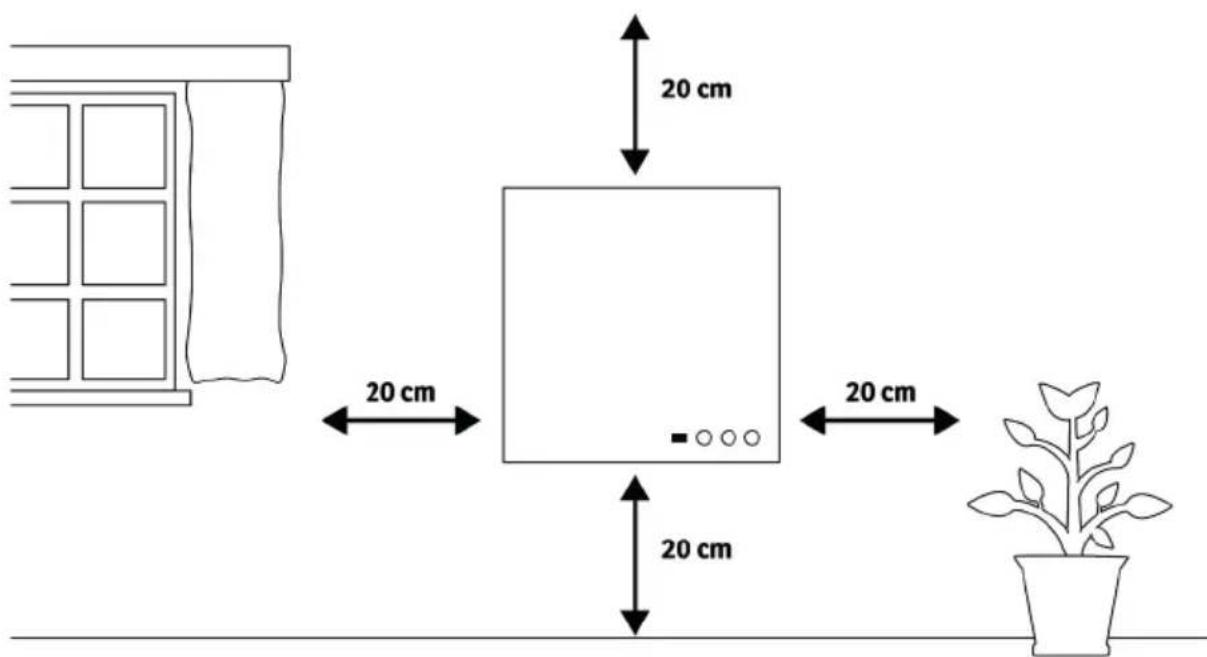
The heater must be at least 20~cm away from all objects, walls, the ceiling and the floor.
3 Installation
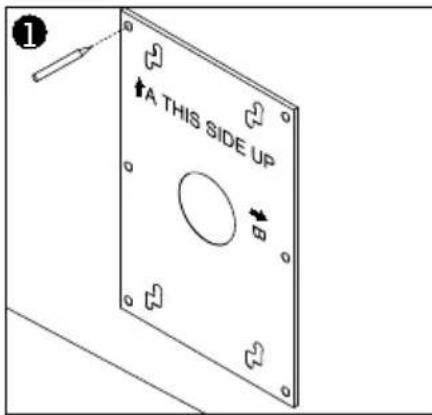
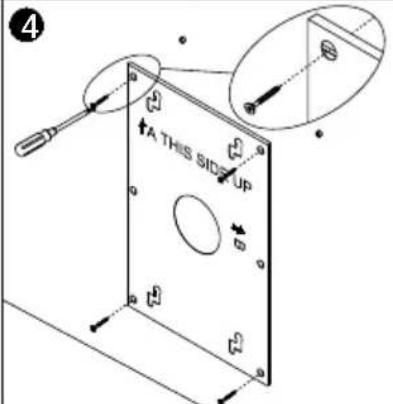
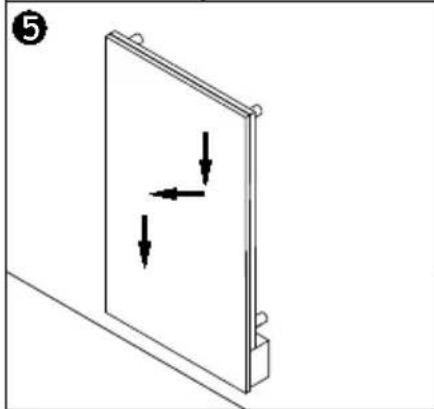
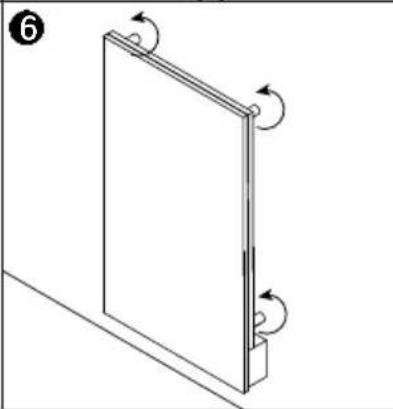
- Use the supplied template to mark the position of the holes on the wall.
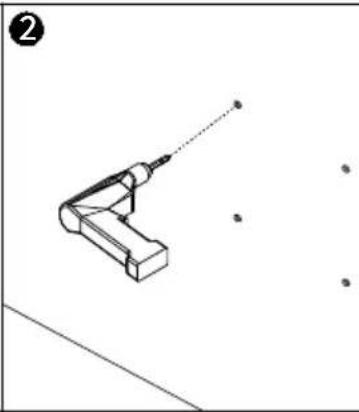
- Drill holes using a 8mm drill.
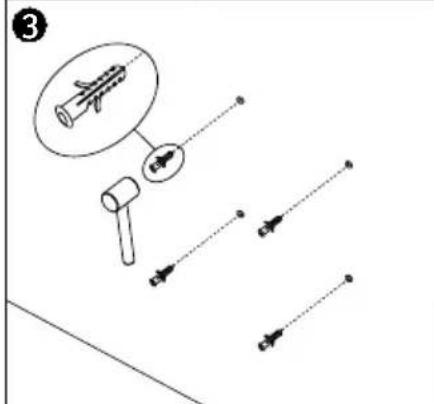
- Insert the dowels into the holes.
- Screw in the supplied screws to the wall.
- Mount the panel on the screws.
- Slide the panel down, left and down again until it is secured.
Note: The kit supplied in the package is designed for mounting vertically on a solid wall. If mounted onto other types of walls, you will need appropriate fixings (not supplied). Please make sure the wall is safe to mount. We highly recommend to have the panel installed by a qualified electrician or installer authorized by SONNENKÖNIG.
EN
4 Controlpanel and Display
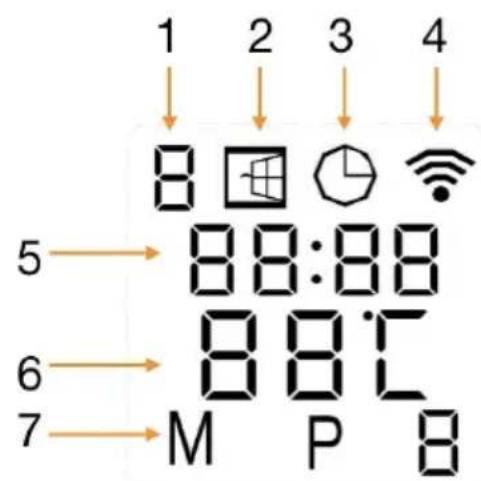
- Weekday
- Open window Sign
- Timer Sign
- WIFI Sign
- Time
- Temperature
- Modes
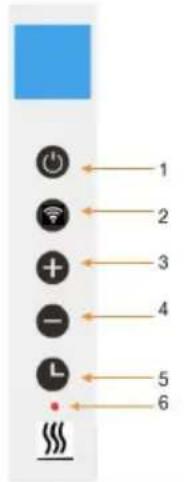
- Power button
- WIFI button
- "+" button
- “-” button
- Timer button
- Heating status indicator
5 Operation
5.1 General introduction of the control system
The product range has an integrated WIFI control box, meaning there is no other additional thermostat needed to control the heater. Once the heater has been connected to the APP, the smartphone will take control and communicate with the control box. If your home internet is not working, it is still possible to operate the heater via the control box manually, once the heater is re- connected to the WIFI, the smart phone will take control again.
- Manual mode: simple temperature control and 24 hours timer function
- Smart mode: 7 days program, 4 time zones per day
- Holiday mode: set up a fixed temperature during your absence and automatically switch back to normal settings after your holiday
- Open window detection function
5.2 Open window detection
This heater is equipped with an open window detection function. If our control system detects that the room temperature has decreased 3 degrees within 15 minutes when the heater is on the heating status, it will recognize that the window is open. The window sign on the screen will start to flash and the heater will power off for 30 minutes and get back to the previous setting automatically after 30 minutes.
You can deactivate and activate this function by long pressing for 5 seconds the "-" button, and the open window sign on the screen will disappear and appear accordingly
5.3 Temperature calibration
Long press "+" button for 5 seconds to enter the temperature calibration, adjust the number by pressing "-" or "+" button, the calibration ranges from -5 to +5 degrees.
5.4 WIFI function on/off
Long press "Timer" button for 10 seconds to disable the WIFI connection and the WIFI sign on the screen will disappear, long press "Timer" button for 10 seconds to turn it on again.
5.5 Manual control
To enter the manual mode, activate the power switch, press power button to power on the heater and the "M" sign will show on the screen. Now the heater operates in the manual mode, adjust your desired temperature by pressing "-" or "+" button, 2 seconds later the screen will retain to the reading of current room temperature.
If you would like to set up the timer, press timer button and "00H" will appear on the screen and you can set the timer by press "-" and "+" button to start the count-down timer.
Please notice that once the timer is set, the heater will automatically work under the manual mode.
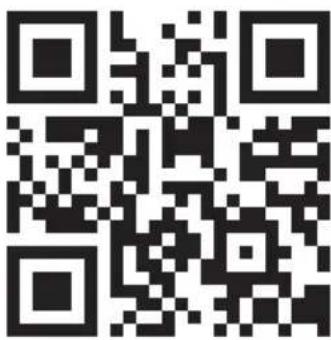
Scan the QR code below to download the "Smart Remote King" APP or search "Smart Remote King" APP on APP store or Google play store to start the procedure to download the APP, open the APP and register with your phone number or Email address.
- After you connect the device to the power supply and press the main switch, the WIFI symbol on the display will start flashing quickly. The WIFI module is now ready for normal connection mode.
1.2.3.
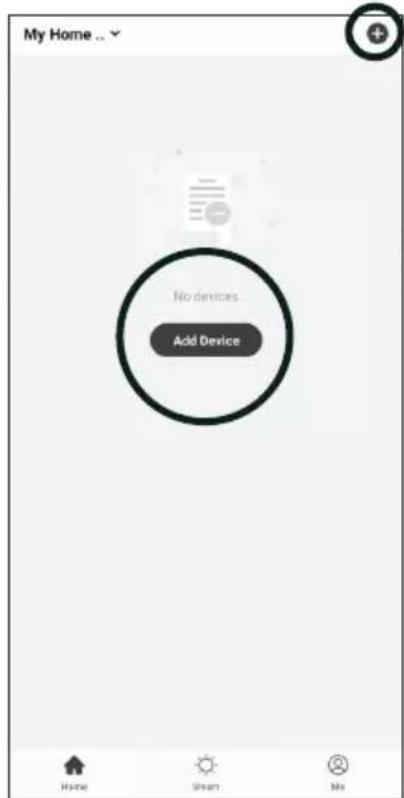
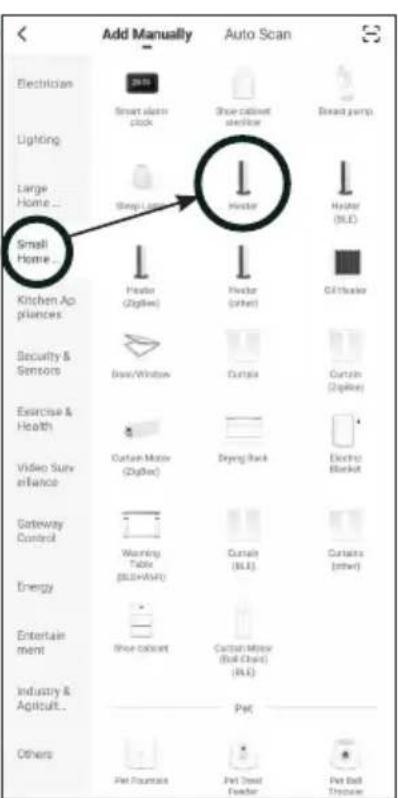
- press the + icon or the "Add Device" button in your app
- Select „Small Home Appliances first and then „Heater".
4.5.6.
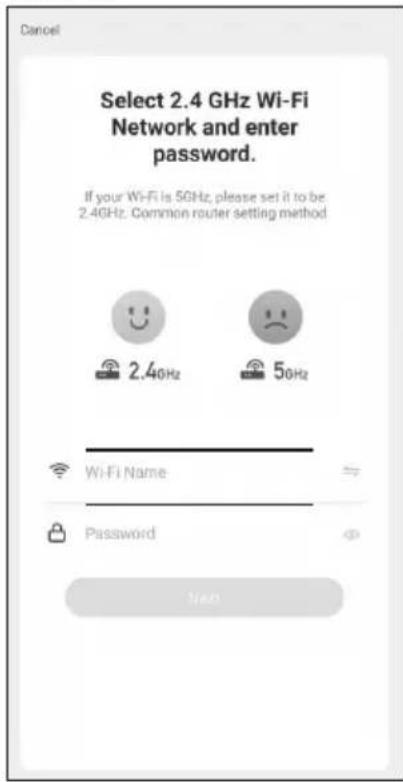
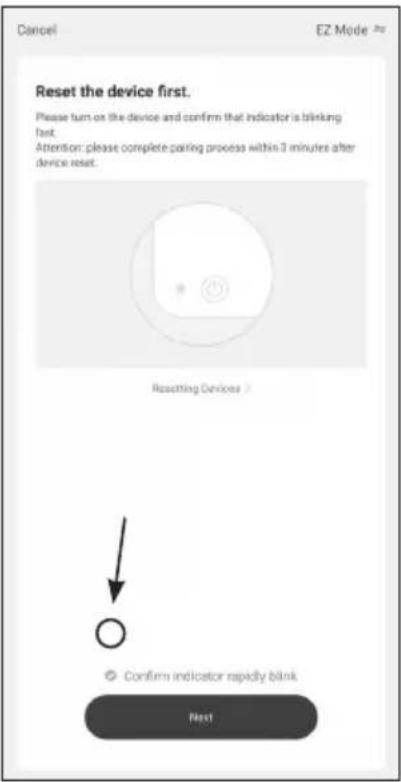
EN
- Make sure that your smartphone is connected to the WLAN and then enter the security phrase or password of your WIFI router
- Check again that the WIFI symbol on the display of the infrared wall heater flashes quickly and check the box before pressing again.
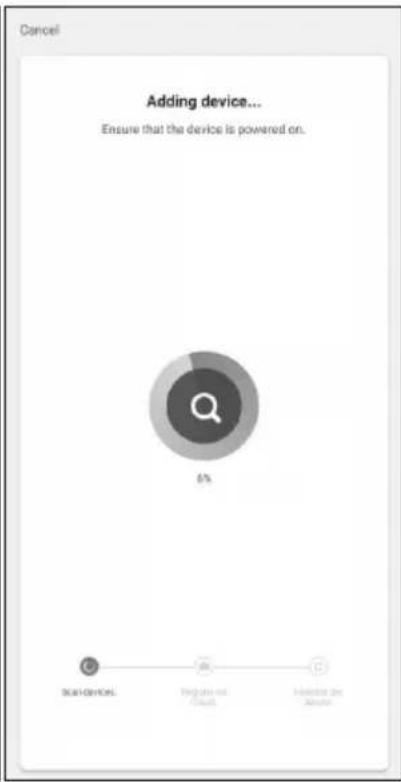
- Wait until the connection status shows 100% . Give the device a name so you can assign it later.
Troubleshooting
If no connection could be established after the time has elapsed, switch off the device, switch it on again after some time, check the points mentioned below and try again.
- Is your device and smartphone near the router?
- Does your WLAN signal have the necessary 2.4 GHz frequency?
- Is your router already overloaded with other WLAN devices?
Reset WIFI settings
To reset the WIFI settings on the device, press and hold the WIFI button until the WIFI symbol flashes slowly. Press the button again until the symbol flashes quickly again. The WIFI module is now back in the factory settings.
6 Dati tecnici
EN
Model Power Size [mm] IP Protection
Class
| ECO 500 500 W 600 x 800 x 70 IP44 | |||
| ECO 700 700 W | 600 x 1150 x 70 | IP44 | |
| ELEGANCE 500 | 500 W 600 x 850 x 70 IP44 | ||
| ELEGANCE 700 | 700 W | 600 x 1200 x 70 | IP44 |
| ELEGANCE SCHIEFER | 600 W 550 x 1100 x 70 | IP44 | |
7 Warranty / Disposal / Technical change
Warranty
The Products are controlled just before delivery. If despite a lack of your product, try trustfully your seller. Please bring your receipt, as this is to be submitted for each warranty. The guarantee period is 24 months from date of purchase.
Disposal
The device must be disposed of properly. The device can be distributed free of charge for disposal at each dealer.
Technical changes
Reserving technical changes in technology and design
Caution
Some parts of this product can become very hot and cause burns. Particular attention has to be given where children and vulnerable people are present.
CE Declaration of Conformity
This device complies with the following standards
EMC EN 55014-1:2017
EN 55014-2:2015
EN 61000-3-2:2019
EN 61000-3-3:2013+A1:2019
LVD EN 60335-2-30:2009/A11:2012
EN 60335-1:2012+A11:2014+A13:2017+A1:2019+A14:2019+A2:2019
EN 62233:2008
EMC 2014/30/EU
LVD 2014/35/EU
RoHS 2015/863/EU
RED 2014/53/EU
DISPOSAL INSTRUCTIONS FOR THE ELECTRICAL PART OF THE PRODUCT
In accordance with Article 26 of the Decree-Law of 14 March 2014 implementing Directive 2012/19/EC and the Law of 4 March 2014 implementing Directive 2011/65/EC on the reduction of the use of hazardous substances in electrical and electronic equipment and on waste management.
The crossed-out dustbin symbol on the machine or packaging indicates that the waste generated at the end of its useful life must be collected separately from other waste. The user must therefore take the device to the appropriate collection points at the end of its service life. Sort electronic and electrical waste or send the purchase of new, equivalent devices back to the dealer in a one-to-one process. L'adeguata separate collection for subsequent commissioning of the equipment to be recycled, treatment and environmentally sound disposal, helps to avoid possible adverse effects on the environment and health and promote the reuse and/or recycling of the materials to which they belong. composed the equipment. Misuse of this product by the user will result in the application of the administrative penalties provided for in the applicable legislation. Batteries contained in the device must be disposed of separately in the appropriate containers for the collection of used batteries.
DISPOSAL OF BATTERIES AND ACCUMULATORS
In accordance with Legislative Decree 188 of 20 November 2008 implementing Directive 2006/66/EC on batteries, accumulators and related waste, the symbol of the crossed-out waste bin on the battery indicates that it is prohibited to dispose of used batteries in household waste.
Batteries and batteries contain substances that are highly polluting for the environment. The user is obliged to dispose of used batteries at collection points in the municipality or in appropriate containers. The service is free. In this way, legal requirements will be respected and the environment will be protected. The symbols identifying hazardous materials that may be present in batteries and accumulators are as follows: Hg = Mercury, Cd = Cadmium, Pb = Lead.
Company
Armin Schmid
Olensbachstrasse 9-15
CH-9631 Ulisbach
Tel. Int. +41 58 611 60 00
Tel.Nat.0848870850
www.sonnenkoenig.ch
Company
Armin Schmid