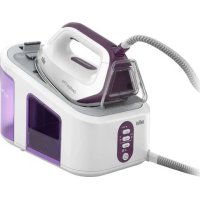
USER MANUAL CareStyle 3 Pro IS 3155 BRAUN
Register your product
www.braunhousehold.com/register
CareStyle 7
CareStyle 7 Pro
Steam generator iron
Deutsch 6
English 11
Français 16
Español 21
Português 26
Italiano 31
Nederlands 36
Dansk 41
Norsk 45
Svenska 49
Finnish 53
Polish 57
Czech 62
Slovak 66
Hungarian 70
Croatian 75
Slovenian 79
Turkish 83
Romanian (MD) 87
Greek 92
Kazakh 97
Russian 102
Ukrainian 107

De'Longhi Braun Household GmbH
German
Before Use
Please read instructions carefully and completely before using the appliance.
Caution

Caution: Hot surfaces!
Electric ironing stations combine high temperatures and hot steam that could lead to burns.
This appliance can be used by children aged from 8 years and above and persons with reduced physical, sensory or mental capabilities or lack of experience and knowledge if they have been given supervision or instruction concerning use of the appliance in a safe way and understand the hazards involved.
Children shall not play with the appliance.
Cleaning and user maintenance shall not be made by children without supervision.
During operation and cool-down the appliance and its mains cord shall be kept out of reach of children under 8 years.
If the supply cord is damaged, it must be replaced by the manufacturer, its service agent or similarly qualified persons in order to avoid a hazard.
Always unplug the station/iron before filling with water.
The appliance must be used and rested on a stable surface.
During ironing pauses, place the iron upright on its heel rest or on the iron rest. Ensure that the heel rest is placed on a stable surface.
The iron must not be left unattended while it is connected to the supply mains.
Do not open the boiler during ironing.
During use, the pressurised apertures must not be opened for filling, descaling, rinsing or inspection.
The appliance must not be used if it has dropped, if there are visible signs of damage or if it is leaking. Regularly check the cords for damages.
This appliance is designed for household use only and for processing normal household quantities.
The cords should never come in contact with hot objects, the soleplate, water and sharp edges.
Before plugging into a socket, check whether your voltage corresponds with the voltage printed on the bottom of the appliance and that you are using an earthed socket.
When using an extension cord watch out that it is in good condition, has a plug with an earth connection and corresponds with the power rating of the appliance (16A).
The soleplate and the iron rest can reach very high temperatures that could lead to burns. Do not touch them.
Description
Steam Generator Iron
1 Display 2 On/Off button 3 Settings (eco, normal, turbo) 4 Calc clean system 5 Iron rest 6 Water tank 7 Power cord 8 Transparent cover 9 Cleaning valve 10 Lock system
Iron
11 Steam button 12 Temperature control LED 13 Precision shot button 14 Double cord 15 Heel rest
(A) Filling the water tank
- Make sure that the appliance is switched off and the system is unplugged.
- Remove the water tank (6).
- Fill the water tank with tap water, taking care not to exceed the “max” level but at least up to the mark “min” otherwise the appliance will not be ready to start steam ironing. If you have extremely hard water, we recommend that you use a mixture of 50% tap water and 50% distilled water.
- Never use distilled water exclusively. Do not add any additives (e.g. starch). Do not use condensation water from a tumble dryer.
- Insert the water tank.
- Place the appliance on a stable, level surface.
Note:
If you use filtering devices, make absolutely sure the water obtained is neutral pH.
Water reserve function
- When the water level is becoming low, the icon ⬆ starts flashing. At this stage it is possible to continue steam ironing for about 10-15 minutes.
- When the icon ⬆ turns permanently on, it becomes necessary to refill the tank. At the same time, the temperature control LED (12) is flashing and the icon related to the selected setting turns off.
- To continue steam ironing, refill the water tank (A).
(B) Start ironing
- Place the iron on the iron rest (5) or on its heel rest (15), plug in the appliance and press the On/Off button (2).
- Select the setting (3) most suitable for the garments to be ironed.
- The iron will start to heat up and the temperature control LED (12) on the iron will flash.
- The related icon for the setting in the display (1) will start to flash. When steam is ready the icon turns permanently on.
- Once the temperature setting is reached, the temperature control LED (12) remains lit continuously.
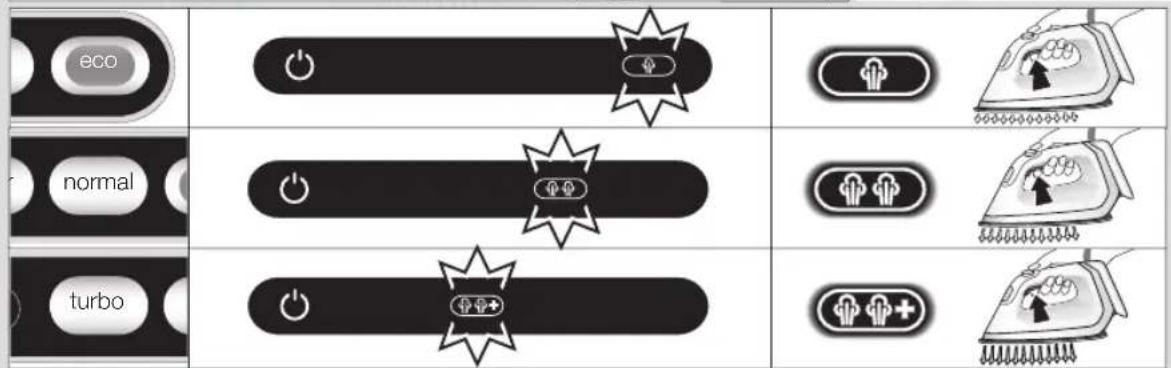
- Settings: The desired setting can be selected by pressing the corresponding button (eco, normal, or turbo). To switch between settings, press the dedicated button (3).
CareStyle 7
eco
Recommended for most delicate garments such as synthetics, silk, and blended fabrics that require less steam. This setting reduces power consumption.
normal
Recommended for garments such as wool, polyester, and cotton/linen.
Note: The normal setting ⏻ is automatically selected when the appliance is first switched on. From the second switch-on onward, it will default to the last setting used.
CareStyle 7 Pro
eco
Recommended for most delicate garments such as synthetics, silk, and blended fabrics. This setting reduces power consumption.
normal
Recommended for garments such as wool, polyester, and cotton.
turbo
Recommended for garments that require more powerful steam, such as thick cotton/linen and jeans.
Note: Due to higher temperature in the turbo mode, do not leave the iron unattended on garments to avoid any damage.
Note: When the appliance is switched on, it will always be set to the normal steam mode, regardless of the last setting chosen.
- For steam ironing, press the steam button (11) below the iron handle. Steam will come out from all the holes in the soleplate.
- Double trigger: Press the steam button (11) or the precision shot button (13) twice in quick succession within 1 second. There will be a continuous steam emission for a few seconds. Press the steam button (11) or the precision shot button (13) once again to stop the function.
- For dry ironing, iron without pressing the steam button (11). Please note that after 10 minutes of dry ironing, the iron switches to the auto-off mode.
- Vertical steam: The iron can also be used for steaming hanging clothes (B).
- 3D soleplate: The unique round shape of the 3D soleplate ensures best gliding results on difficult parts (e.g., buttons, pockets, etc.)
(C) Precision shot
- Press the precision shot button (13) completely down.
- Steam will come out of the tip area of the soleplate only.
- To stop this function, release the button (13).
- If you do not press it down completely, some steam may also come out from the rear steam holes in the soleplate.
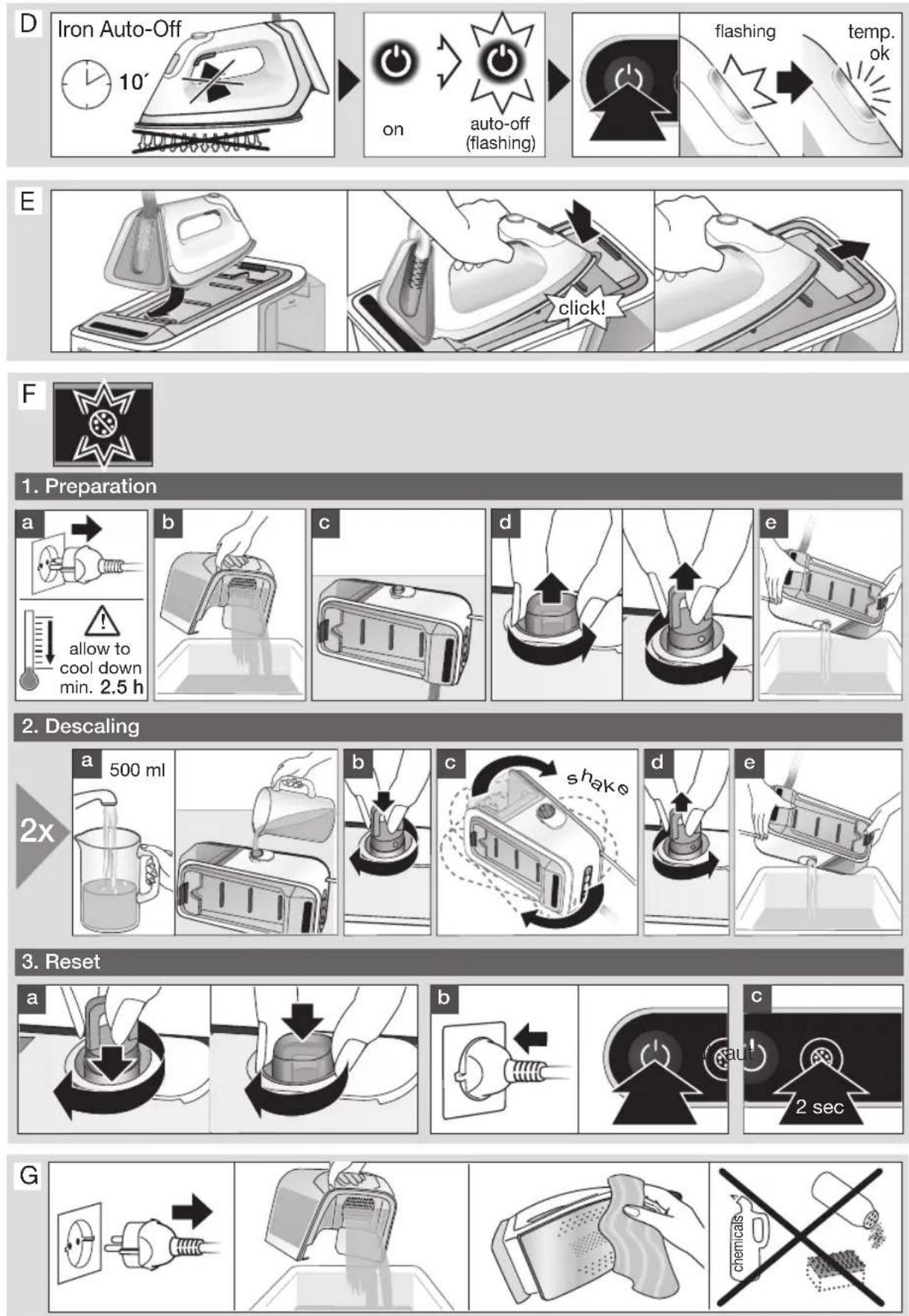
(D) Iron Auto-Off
- When the iron is in the auto-off mode, the icon ⏻ is flashing and the temperature control LED (12) is off. The iron will turn off to reduce power consumption.
- It is activated if after 10 minutes there has been no steam emission.
- To turn the iron on again, the On/Off button (2) has to be pressed. Before starting ironing again, wait until the temperature control LED (12) is continuously on.
After ironing
- Press the On/Off button (2) to turn off the appliance.
- Unplug and let the appliance cool down before storing. Empty the water tank.
- Lock the iron.
(E) Lock system
The lock system can be used for safe and easy storage of the steam station and the iron. Do not lift or carry the appliance by the handle of the locked iron.
- Place the soleplate into the recess on the iron mat.
- Press down the tip of the iron until you hear a "click" and the iron will be locked automatically.
- To unlock the iron, slide the locking system forward. The iron will be released.
(F) Descaling
To maintain optimum performance, the system needs to be decalcified after every 15 litres of water consumption (about 8 complete refills).
The icon Ⓧ is flashing.
- First, switch off and unplug the appliance.
- Unlock the iron and remove it from the iron rest. Wait until the appliance has cooled down (minimum 2.5 hours).
- Remove and empty the water tank.
- Remove the transparent cover (8) and unscrew the cleaning valve (9).
- Empty the boiler.
- Pour in 500 ml tap water. Do not use any chemicals, additives or descaler.
- Screw the cleaning valve (9) to close the boiler.
- Shake the base unit to rinse, then empty the boiler.
- Repeat this procedure one more time.
After having finished the descaling procedure, plug in, switch on (2) and press the calc clean system button (4) for 2 seconds to reset.
If the appliance is switched off without descaling, the icon ⚙ will start to flash again when it is next switched on.
Note: Because of the different water composition by using an installed in-house permanent descaler, it is recommended to descale the system after every 4 complete refills. Please note that in this case the icon for descaling will not automatically start flashing.
(G) Cleaning and maintenance
- Before cleaning, always make sure that the appliance is switched off, unplugged and has cooled down completely.
- Wipe the soleplate clean with a damp or dry cloth.
- Never use scouring pads, vinegar or other chemicals.
- To clean the soft material on the handle use a damp cloth.
For UK Only
Guarantee Information
All Braun Household products carry a minimum guarantee period of two years. The rights and benefits under this guarantee are additional to your statutory rights which are not affected.
Please keep your receipt as this will form the basis of your guarantee.
In the unlikely event of a breakdown you have access to professional help from our team simply by calling:
02392 392333
For service in the Republic of Ireland please call:
012475471
Braun Household undertakes within the specified period to repair or replace any part of the appliance, free of charge (with the exception of any glass or porcelain-ware incorporated in the product) found to be defective provided that;
- We are promptly informed of the defect.
- The product is used and maintained in accordance with the User Instructions.
- The appliance has not been altered in any way or subjected to misuse or repair by a person other than an authorised service agent for Braun Household.
- No rights are given under this guarantee to a person acquiring the appliance second hand or for commercial or communal use.
- Any repaired or replaced appliance will be guaranteed on these terms for the unexpired portion of the guarantee.
- The need for repair has not been caused by insufficient aftercare or cleaning: or damage caused by the chemical or electrochemical effects of water.
Under no circumstances shall the application of this guarantee give rise to the complete replacement of the appliance or entitle the consumer to damages.
Braun Household, New Lane, Havant, Hampshire PO9 2NH
www.braunhousehold.co.uk
Thank you for choosing Braun. We are confident that you will get excellent service from this product.
TO IMPROVE YOUR EXPERIENCE
Register now at www.braunhousehold.co.uk. By registering, we may send you from time to time details on exclusive offers, promotions, recipes, and inside tips.
Troubleshooting guide
| PROBLEM CAUSE REMEDY | |
| The appliance does not switch on. | The appliance is not plugged into a mains socket. | Make sure the appliance is correctly connected and press the On/Off button. |
| Steam comes out under the base unit. | The “max” pressure safety system has opened. | Turn the appliance off immediately and contact an authorised Braun Customer Service. |
| There are some water drops from the holes in the bottom of the soleplate. | Water has condensed inside the tubes because steam is being used for the first time, or has not been used for some time. | Press the steam button several times away from the ironing board. This will eliminate cold water from the steam circuit. |
| Brown coloured fluid leaks from the soleplate. | Chemical water softeners or additives have been poured into the water tank. | Never pour products into the water tank. Clean the soleplate with a damp cloth and rinse the boiler. |
| The first time the appliance is turned on, you notice smoke or smell. | Some parts have been treated with sealer/lubricant which evaporates the first time the iron heats up. | This is normal and will stop when you have used the iron a few times. If the smoke/smell is still present after turning off the appliance, contact an authorised Braun Customer Service. |
| The appliance emits an intermittent noise associated with vibrations. | Water is being pumped into the boiler. | This is normal and no action is needed. |
| The appliance emits a continuous noise associated with vibrations. | System error. Unplug the appliance from the mains and contact an authorised Braun Customer Service. |
| The cleaning valve is difficult to unscrew. | Lime scale has made the cleaning valve difficult to open. | Turn the cap forcefully. To avoid the problem, rinse system frequently. |
| After refilling the water tank, the light does not reset. | The water float does not work appropriately. | Empty the water tank, rinse out and refill. |
| The water tank is not positioned correctly. | Position the water tank correctly. |
| All LEDs are flashing. System error. | Unplug the appliance, plug it in again and press On/Off button. If this problem is still present, turn the appliance off immediately, unplug and contact an authorised Braun Customer Service. |
| Steam icon is permanently on, but there is no steam emission from the soleplate. | Water tank float is locked or the water tank is not correctly inserted. | Turn off and unplug the appliance.Remove and empty the water tank, rinse out and refill.Insert the water tank. Switch on the appliance and wait until the device is ready to use.Press the steam button and wait until steam comes out.Keep the steam button pressed for 10 seconds of steam emission then release the steam button. |
Subject to change without notice.
Please do not dispose of the product in the household waste at the end of its useful life. Disposal can take place at a Braun Service Centre or at appropriate collection points provided in your country.

French
Before use
Caution: hot surfaces!