
DY-WL5E - Projection accessory PANASONIC - Free user manual and instructions
Find the device manual for free DY-WL5E PANASONIC in PDF.
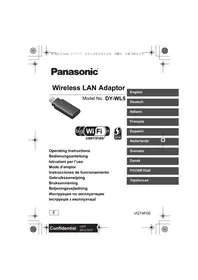


| Product Type | Wireless Local Area Network (LAN) Adapter |
| Brand | Panasonic |
| Model | DY-WL5E |
| Dimensions (W×H×D) | 30 mm × 74 mm × 12 mm |
| Weight | Approx. 18 g |
| Power Supply | DC 5 V (USB powered), 500 mA |
| Power Consumption | Max. 2500 mW |
| Wireless Standards | IEEE 802.11b / 802.11g / 802.11n |
| Frequency Band | 2.4 GHz |
| Security and Encryption | WPA/WPA2 (TKIP/AES, PSK), WEP (64/128 bits) |
| Compatible Devices | Panasonic wireless LAN-compatible recorders and mobile players |
| Supplied Accessories | USB extension cable (ref. K2KYYYY00140) |
| Intended Use | Wireless connection for compatible Panasonic devices |
| Precautions for Use | Do not expose to heat, humidity, or shocks; do not disassemble |
| Operating Environment | Indoor only |
| Regulatory Information | Compliant with Directive 1999/5/EC (R&TTE) |
Frequently Asked Questions - DY-WL5E PANASONIC
User questions about DY-WL5E PANASONIC
0 question about this device. Answer the ones you know or ask your own.
Ask a new question about this device
Download the instructions for your Projection accessory in PDF format for free! Find your manual DY-WL5E - PANASONIC and take your electronic device back in hand. On this page are published all the documents necessary for the use of your device. DY-WL5E by PANASONIC.
USER MANUAL DY-WL5E PANASONIC
Wireless LAN Adaptor
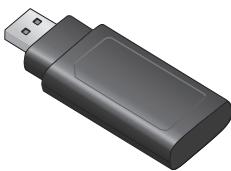
Model No. DY-WL5

Operating Instructions
Operating Instructions
Thank you for purchasing this product.
For optimum performance and safety, please read these instructions carefully. Please keep this manual for future reference.
This Wireless LAN adaptor is specifically designed for use with Panasonic mobile wireless LAN-compatible players, recorders etc. This wireless LAN adaptor does not support PC, Notebook PC or tablet PC operation and will not function when plugged into those devices.
- For how to connect or use this wireless LAN adaptor, please refer to the respective operating instructions.
- For information on devices confirmed for use with this wireless LAN adaptor, please refer to the Panasonic website.
- http://panasonic.jp/support/global/cs/
- (This site is in English only.)
- Precautions
The following limits are in place regarding the usage of this device. You must be aware of these limits before using this device.
The following limits are in place regarding the usage of this device. You must be aware of these limits before using this device.
Panasonic will in no way be responsible for any incidental damage which may arise due to a failure to obey these limits, or to any condition of use or disuse of this device.
- This device is to be used as a wireless LAN device.
- Do not use this device to connect to any wireless network for which you do not have usage rights.
During automatic searches in a wireless network environment, wireless networks (SSID*) for which you do not have usage rights may be displayed; however, using these networks may be regarded as illegal access.
- An SSID (Service Set Identification) is a name used by wireless LAN to identify a particular network. Transmission is possible if the SSID matches for both devices.
Data transmitted and received over radio waves may be intercepted and monitored. - This wireless LAN adaptor contains delicate electronic components.
Please use this adaptor in the manner in which it was intended and follow the following points:
- Do not expose the adaptor to high temperatures or direct sunlight.
- Do not bend, or subject the adaptor to strong impacts.
- Keep the adaptor away from moisture.
- Do not disassemble or alter the adaptor in any way.
- Do not attempt to install the adaptor in any incompatible device.
- Select an 802.11n wireless router (Access point).
This device cannot be connected to 5.0 GHz wireless router (Access point).
Simultaneous use with a microwave, cordless telephone, etc. may result in connection interruptions or other problems. Also, set the encryption type to "AES".
- This unit may receive radio interference caused by mobile telephones during use. If such interference occurs, please increase the separation between this unit and the mobile telephone.
When this unit is not recognized
Messages such as "No Adaptor" are displayed.
- Check if this unit is inserted fully and securely.
- Try removing this unit once, and inserting it again.
If it does not get recognized even after performing the above, consult the dealer where you purchased this unit.
Specifications
| Power supply | DC 5 V (USB powered) 500 mA |
| Power consumption | Max. 2500 mW |
| Dimensions (W×H×D) | 30 mm (W)×74 mm (H)×12 mm (D) |
| Mass | Approx. 18 g |
| Standard Compliance | IEEE802.11b/ IEEE802.11g/ IEEE802.11n |
| Frequency Range | 2.4 GHz band |
| Security* | WPA™/ WPA2™ (Encryption type: TKIP/AES, Authentication type: PSK)WEP (64 bit / 128 bit) |
- This unit supports WPA and WPA2 encryption.
Accessory
(Product numbers correct as of February 2012. These may be subject to change.)
1 USB extension cable (K2KYYYY00140)
- Use according to the connection status of the device to be connected. Please refer to the appropriate instruction manual for details on how to use.
- Do not use any other USB extension cables except the supplied one.
| The Wi-Fi CERTIFIED Logo is a certification mark of the Wi-Fi Alliance. The Wi-Fi Protected Setup Mark is a mark of the Wi-Fi Alliance. |
| "Wi-Fi", "WPA" and "WPA2" are marks or registered marks of the Wi-Fi Alliance. |
| MAC address for this unit is located on the bottom of unit. |
Information on Disposal for Users of Waste Electrical & Electronic Equipment (private households)


This symbol on the products and/or accompanying documents means that used electrical and electronic products should not be mixed with general household waste.
For proper treatment, recovery and recycling, please take these products to designated collection points, where they will be accepted on a free of charge basis. Alternatively, in some countries you may be able to return your products to your local retailer upon the purchase of an equivalent new product.
Disposing of this product correctly will help to save valuable resources and prevent any potential negative effects on human health and the environment which could otherwise arise from inappropriate waste handling. Please contact your local authority for further details of your nearest designated collection point.
Penalties may be applicable for incorrect disposal of this waste, in accordance with national legislation.
For business users in the European Union
If you wish to discard electrical and electronic equipment, please contact your dealer or supplier for further information.
Information on Disposal in other Countries outside the European Union
This symbol is only valid in the European Union.
If you wish to discard this product, please contact your local authorities or dealer and ask for the correct method of disposal.
Declaration of Conformity (DoC)
Hereby, "Panasonic Corporation" declares that this product is in compliance with the essential requirements and other relevant provisions of Directive 1999/5/EC.
Customers can download a copy of the original DoC to our R&TTE products from our DoC server:
http://www.doc.panasonic.de
Contact in the EU: Panasonic Services Europe, a Division of Panasonic Marketing Europe GmbH.
Panasonic Testing Centre, Winsbering 15, 22525 Hamburg, Germany
This product is intended to be used in the following countries.
Austria, Belgium, Bulgaria, Cyprus, Czech Republic, Denmark, Finland, France, Germany,
Greece, Hungary, Ireland, Italy, Iceland, Liechtenstein, Luxembourg, Malta, Netherlands,
Norway, Poland, Portugal, Romania, Slovakia, Slovenia, Spain, Sweden, United Kingdom, Switzerland
This product is intended for general consumer. (Category 3)
The WLAN feature of this product shall exclusively be used inside buildings.
This product on purpose to connect to access point of 2.4 GHz WLAN.
Panasonic Testing Centre, Winsbering 15, 22525 Hamburg, BRD
Panasonic Testing Centre, Winsbering 15, 22525 Hamburg, Germania
"Wi-Fi", "WPA" and "WPA2" are trademarks or registered trademarks of Wi-Fi Alliance.
For Panasonic's website.
http://panasonic.jp/support/global/cs/
This device cannot be connected to a 5.0 GHz wireless router (access point).
When used simultaneously with a microwave oven, cordless telephone, etc.
This device may interfere with other devices. To eliminate interference, increase the distance between the devices.
During operation of this device, it may be damaged by radio interference caused by cordless telephones. To eliminate interference, increase the distance between the device and the cordless telephone.
If the device is not recognized
- Make sure the device is inserted correctly and completely.
- Disconnect the device, then insert it again.
If the device is still not detected after performing the above recommendations, contact the seller of this device.
Specifications
* This device supports WPA and WPA2.
Accessories
(Product numbers are as of January 2012 and may be subject to change.)
1 USB cable (K2KYYYY00140)
Use only the power supply provided with the device when charging. Refer to the user manual for usage information. Do not use additional USB cables other than those included in the package.
| Ilorotin Wi-Fi CERTIFIED — certiФikaций 3нak Wi-Fi Alliance. Wi-Fi Protected Setup ε toproвою маркою компаи Wi-Fi Alliance. |
| "Wi-Fi", "WPA" i "WPA2" ε марками abo заразецьанм марками Wi-Fi Alliance. |
| MAC-a-drepa с耗费 по розашова на hyлого Нухнii ча TinHi. |
- Due to the presence of this sign
Information about countries that are members of the European Union

This device is intended for use in EU countries. If you need to utilize this product, contact your local authorities or the manufacturer for proper disposal.
Wireless LAN module DY-WL5*
Trademark "Panasonic"
| Bídoinobíác BVMORAM Texhynchoro Permañenty 3 énektpromarniHóto ciymicHOCTO mbadhaHnna (3aTeBPdxKemohny noctahOBIO KαβHÉ TY MInCtPrb ÜyKHáB 785 Bd 29 liŋHHN 2009) ta BVMORAM Texhynchoro Permañenty pádioobnadnHnna 1 TEkOeMHyKaHINHO KINHEBO (terpMIHNHóHó) o6bAdnHnna (3aTeBPdxKemohny noctahOBIO KαβHÉ TY MInCtPrb ÜyHαHIn 24 4εbpHnA 2009 p. Ne 679) | |
| Moénly DY-WL5° toprobo marpa Panasonic iBénpoíde BVMORAM hopmatubHnX doKummentb: | JCTY ETS EN 300 328:2008 (ETSI EN 300 328:2006, IDT) JCTY ETS EN 301 489-1:2008 (ETSI EN 301 489-1:2005, IDT) (n.7.1, n. 8.2) JCTY ETS EN 301 489-17:2008 (ETSI EN 301 489-17:2002, IDT) (n.7.1) |
NOTE: Before using this product, please read the instructions carefully and keep them for future reference.
The Declaration of Conformity can be viewed at http://service.panasonic.ua in the "Documents" section.
| Виробник: | Panasonic Corporation | Панасонік Корпорецн |
| 3audenceю: | 1-15 Matsuo-cho, Kadoma-shi, Osaka, 571-8504, Japan | 1-15 Мauуо-чо, Kadoma-shi, Osaka, 571-8504, Рожия |
| Краіна похodжени: | China | Китай |
Service life: 7 years
- The product is warranted for 12 months from the date of purchase. Subject to the conditions of this warranty, Panasonic or its Authorised Service Centre will perform necessary service on the product without charge for parts or labour, if in the opinion of Panasonic, the product is found to be faulty within the warranty period.
- This warranty only applies to Panasonic products purchased in Australia and sold by Panasonic Australia or its Authorised Distributors or Dealers and only where the products are used and serviced within Australia or its territories. Warranty cover only applies to service carried out by a Panasonic Authorised Service Centre and only if valid proof of purchase is presented when warranty service is requested.
- This warranty only applies if the product has been installed and used in accordance with the manufacturer's recommendations (as noted in the operating instructions) under normal use and reasonable care (in the opinion of Panasonic). The warranty covers normal domestic use only and does not cover damage, malfunction or failure resulting from use of incorrect voltages, incorrect installation, accident, misuse, neglect, build-up of dirt or dust, abuse, maladjustment of customer controls, mains supply problems, thunderstorm damage, loss of power or electricity, tampering or repair by unauthorised persons (including unauthorised alterations), introduction of sand, humidity or liquids, commercial use such as hotel, office, restaurant, or other business or rental use of the product, exposure to abnormally corrosive conditions or any foreign object or matter having entered the product.
- This warranty does not cover the following items unless the fault or defect existed at the time of purchase:
(a) Cabinet Part(s) (e) DVD, Blu-ray or Recordable Discs (b) Video or Audio Tapes (f) Video / Audio Heads from wear and tear in normal use (c) SD cards or USB devices (g) Information stored on Hard Disk Drive, USB stick or SD card
(d) User replaceable Batteries (h) DTV reception issues caused by TV Aerial / Cabling / Wall socket(s)
etc.
- Some products may be supplied with Ethernet connection hardware. The warranty is limited on such products and will not cover
(a) Internet and/or DLNA connection / setup related problems (b) Access fees and/or charges incurred for internet connection (c) The use of incompatible software or software not specifically stipulated in the product operations manual; and (d) Any indirect or consequential costs associated with the incorrect use or misuse of the hardware, its connection to the internet or any other device.
- To claim warranty service, when required, you should:
Telephone Panasonic's Customer Care Centre on 132600 or visit our website referred to below and use the Service Centre Locator for the name/address of the nearest Authorised Service Centre. - Send or take the product to a Panasonic Authorised Service Centre together with your proof of purchase and any other relevant information. If that freight and insurance to and/or from your nearest Authorised Service Centre must be arranged by you, Note that home or pick-up/delivery service is available for the following products in the major metropolitan areas of Australia or the normal operating areas of the nearest Authorised Service Centres:
Plasma/LCD televisions / displays (screen size greater than 103 cm)
- The warranties hereby conferred do not extend to, and exclude, any costs associated with the installation, de-installation or re-installation of a product, including costs related to the mounting, de-mounting or remounting of any screen, (and any other ancillary activities), delivery, handling, freight, transportation or insurance of the product or any part thereof or replacement of and do not extend to, and exclude, any damage or loss occurring by reason of, during, associated with, or related to such installation, de-installation, re-installation or transit.
Panasonic Authorised Service Centres are located in major metropolitan areas and most regional centres of Australia, however, coverage will vary dependant on product. For advice on exact Authorised Service Centre locations for your product, please telephone our Customer Care Centre on 132600 or visit our website and use the Service Centre Locator.
In addition to your rights under this warranty, Panasonic products come with consumer guarantees that cannot be excluded under the Australian Consumer Law. If there is a major failure with the product, you can reject the product and elect to have a refund or to have the product replaced, or if you wish, you may elect to keep the goods for future use. This will not be considered a fault, and the replacement of the defect(s) will be required and replaced if the product fails to be of acceptable quality and the failure does not amount to a major failure.
If there is a major failure in regard to the product which cannot be remedied, then you must notify us within a reasonable period by contacting the Panasonic Customer Care Centre. If the failure in the product is not a major failure, then Panasonic may choose to repair or replace the product and will do so in a reasonable period of time from receiving notice from you.
THIS WARRANTY CARD AND THE PURCHASE DOCKET (OR SIMILAR PROOF OF PURCHASE) SHOULD BE RETAINED BY THE CUSTOMER AT ALL TIMES.
If you require assistance regarding warranty conditions or any other enquiries, please visit the Panasonic Australia website www.panasonic.com.au or contact by phone on 132 600. If phoning in, please ensure you have your operating instructions available.
Panasonic Australia Pty. Limited
ACN 001 592 187 ABN 83 001 592 187
1 Innovation Road, Macquarie Park NSW 2113
Panasonic Information Center
For calls from Moscow: +7 (495) 725-05-65
Toll-free call from Russia: 8-800-200-21-00
Panasonic Information Center
For calls from Belarus, please call the toll-free number.
Toll-free call from landline phones in Belarus: 8-820-007-1-21-00
Panasonic Information Center
International calls and calls from Kyiv: +380-44-490-38-98
Free calls from fixed telephones within Ukraine: 0-800-309-880
Panasonic device operator
For Kazakhstan and Central Asia countries.
Calls from Kazakhstan to Central Asia: +7 (7272) 98-09-09
EU
Pursuant to Directive 2004/108/EC, Article 9(2)
Panasonic Testing Centre
Panasonic Marketing Europe GmbH
Winsberging 15, 22525 Hamburg, Germany
- WIRELESS LAN ADAPTOR
- THE FOLLOWING LIMITS ARE IN PLACE REGARDING THE USAGE OF THIS DEVICE. YOU MUST BE AWARE OF THESE LIMITS BEFORE USING THIS DEVICE
- WHEN THIS UNIT IS NOT RECOGNIZED
- ACCESSORY
- USB EXTENSION CABLE (K2KYYYY00140)
- INFORMATION ON DISPOSAL FOR USERS OF WASTE ELECTRICAL & ELECTRONIC EQUIPMENT (PRIVATE HOUSEHOLDS)
- FOR BUSINESS USERS IN THE EUROPEAN UNION
- INFORMATION ON DISPOSAL IN OTHER COUNTRIES OUTSIDE THE EUROPEAN UNION
- DECLARATION OF CONFORMITY (DOC)
- IF THE DEVICE IS NOT RECOGNIZED
- ACCESSORIES
- USB CABLE (K2KYYYY00140)
- DUE TO THE PRESENCE OF THIS SIGN
- INFORMATION ABOUT COUNTRIES THAT ARE MEMBERS OF THE EUROPEAN UNION
- WIRELESS LAN MODULE DY-WL
- TRADEMARK "PANASONIC
- THIS WARRANTY CARD AND THE PURCHASE DOCKET (OR SIMILAR PROOF OF PURCHASE) SHOULD BE RETAINED BY THE CUSTOMER AT ALL TIMES
- PANASONIC AUSTRALIA PTY. LIMITED
Brand : PANASONIC
Model : DY-WL5E
Category : Projection accessory