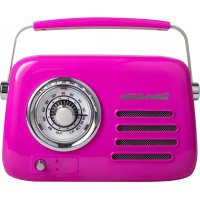
Retro radio - Radio Vintage Cuisine - Free user manual and instructions
Find the device manual for free Retro radio Vintage Cuisine in PDF.


User questions about Retro radio Vintage Cuisine
0 question about this device. Answer the ones you know or ask your own.
Ask a new question about this device
Download the instructions for your Radio in PDF format for free! Find your manual Retro radio - Vintage Cuisine and take your electronic device back in hand. On this page are published all the documents necessary for the use of your device. Retro radio by Vintage Cuisine.
USER MANUAL Retro radio Vintage Cuisine
natural_image
Vintage-style vintage-style radio with a circular dial and antenna, no visible text or symbols on the device itself.
text_image
Circular image displaying seven national flags: UK, Poland, Portugal, France, Germany, Italy, and Spain.Instruction Manual
Retro radio with bluetooth speaker
Appliance components / Budowa / Construção / Construction / Gerätekomponenten / Strut tura / Estructura
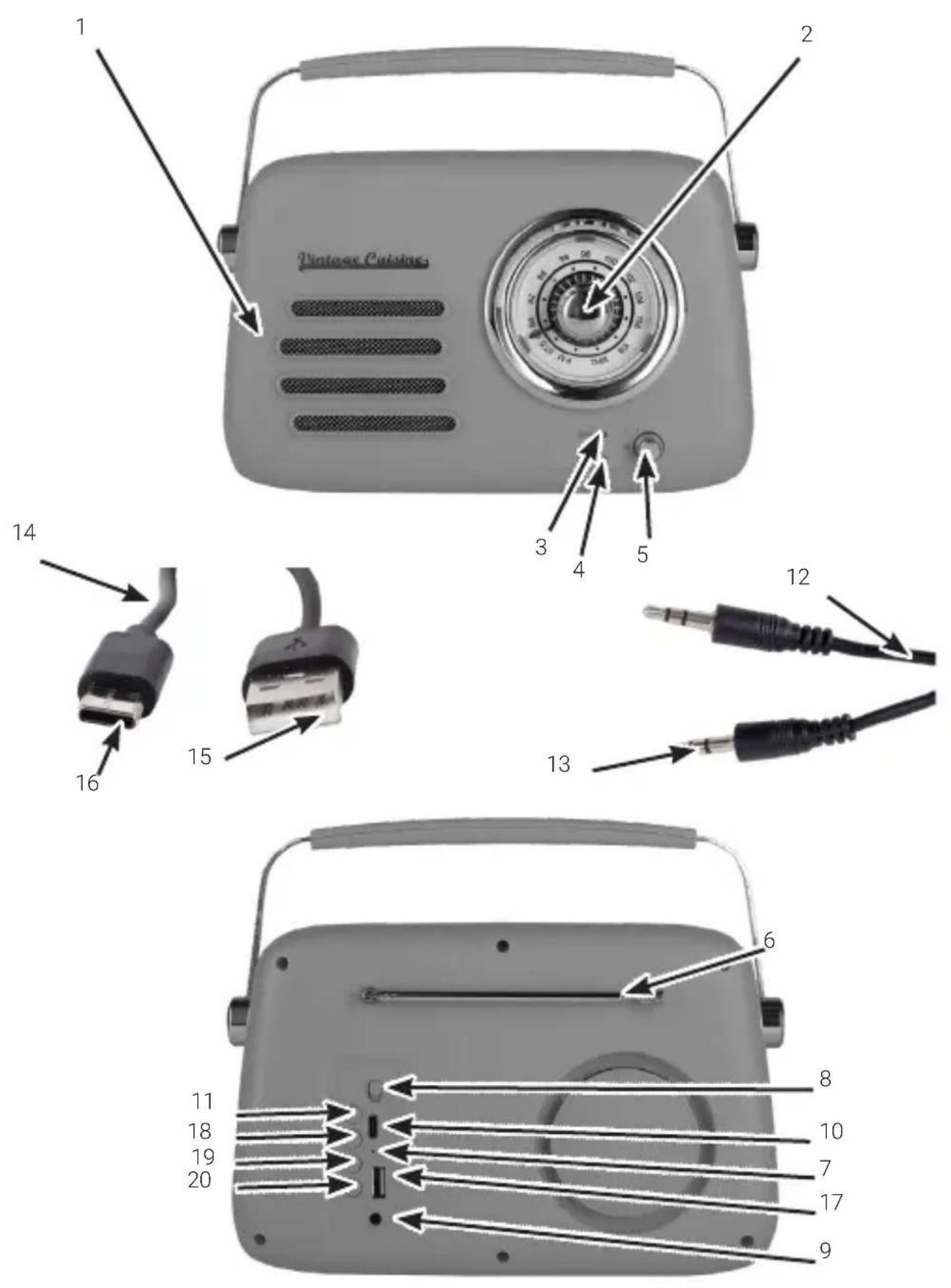
| EN | 1 Loudspeaker |
| 2 FM radio station selection knob | |
| 3 BT (Bluetooth) / AUX operation mode LED- Blue LED – Bluetooth mode- Red LED – AUX mode | |
| 4 FM / USB operation mode LED- Blue LED – USB mode- Red LED – FM (Radio) mode | |
| 5 Volume adjustment knob (VOL) | |
| 6 Telescopic antenna | |
| 7 Charging mode LED | |
| 8 ON/OFF switch | |
| 9 Audio signal socket – jack 3.5 mm (AUX) | |
| 10 USB-C socket for powering/ charging the device | |
| 11 Operation mode change button (Bluetooth/FM/AUX/USB) | |
| 12 Audio signal cable | |
| 13 Audio signal plug – jack 3.5 mm | |
| 14 Device power supply / charging cable | |
| 15 USB-A plug | |
| 16 USB-C plug | |
| 17 USB-A socket | |
| 18 BACK Button | |
| 19 PLAY/PAUSE Button | |
| 20 FORWARD Button |
Welcome to the world full of home warmth and passion for creation! Join people for whom a kitchen means something more. Check what other unique products we have prepared for you at www.vintagecuisine.com
Do you want to see how amazing the mix of tradition and a hint of modernity can look? You'll find amazing interior design inspiration and culinary ideas on our social media channels.

@vintagecuisine_en

com/vintagecuisineEN

(This instruction manual covers various colour versions of the product)
TABLE OF CONTENTS
| 1 | General Information | 7 |
| 2 | Specifications | 7 |
| 3 | Safety instructions | 8 |
| 4 | Meaning of symbols | 9 |
| 5 | Set contents | 9 |
| 6 | Operation | 10 |
| 7 | Cleaning and maintenance | 11 |
| 8 | Repair | 12 |
| 9 | Storage and transportation | 12 |
| 10 | Disposal | 12 |
| 11 | CE declaration | 12 |
| 12 | General complaint conditions | 12 |
1 General Information
The device is intended to receive radio broadcasts in the FM (87.5 MHz - 108 MHz) frequency band, as well as to play audio files transmitted using a cable or the Bluetooth function. The appliance is intended solely for indoor use for private purposes.
This appliance is not intended for use in industrial conditions or for commercial purposes.
Please follow this instruction manual for safe installation and operation of the product.
2 Specifications
| Model VC008BTR24MS, VC008BTR24CS |
| Power supply / Charging 5 V 1 A --- |
| Built-in Li-Ion battery Li-Ion 18650 3.7 V 1500 mAh --- |
| Max. output power - loud- 5 W speaker |
| FM radio frequency band 87.5 MHz - 108 MHz |
| Bluetooth 5.1 version |
| Bluetooth spectrum band 2402 - 2480 MHz |
| Bluetooth effective distance ~8 m |
| Maximum RF output power 4.53 dBm |
| Environmental conditions for the battery |
| Temperature range Operation: 0-25°CStorage and transport: 0-45°C |
| Atmospheric pressure 86-106 kPa |
3 Safety instructions
- Read the whole User's Manual before using the product.
- Do not use the device for any non-intended purposes.
- Be careful when using the device.
- The device is intended for indoor use only.
- The device is not a toy. Children should not play with it.
- Keep the device and its accessories out of the reach of children and animals.
- Do not use the device in highly dusty rooms – risk of damage.
- Do not leave the product in a place exposed to direct sunlight.
- Do not locate the device next to sources of high temperature: gas stoves, electric ovens.
- Protect the device against penetration by water or other liquids.
- Do not use the device if it has fallen into water or has been flooded.
- Throwing the battery into a fire, crushing it, or puncturing it may cause it to explode.
- Leaving the battery in a very high temperature environment may cause it to explode or leak flammable liquid or gas.
- A battery exposed to very low air pressure may explode or leak flammable liquid or gas.
- Information regarding environmental conditions for the battery: see point 2 Specifications in this manual.
- Do not cover the device — risk of overheating and damage.
- Place the device on a stable and flat surface.
- Do not introduce any structural changes to the product, as they may permanently damage the device. Have all repairs performed by a qualified professional.
- Do not operate the device if it has fallen from a great height or shows any sign of damage.
- The device may be powered / charged only using safety extra-low voltage (SELV) sources.
- Keep the instructions and, if possible, the packaging as well.
- If the device is passed on to others, the User's Guide must be attached.
- An electronic version of the user manual is available at https://vintagecuisine.pl/en/pages/instruction-manuals
4 Meaning of symbols
 | Read this instruction manual. |
 | Product compliant with the requirements of the applicable EU directives. |
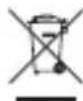 | Disposal of electric and electronic equipment – see the DISPOSAL section of this manual. |
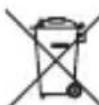 | Instructions for the disposal of batteries – see the DISPOSAL section. |
 | This appliance is designed for indoor use only. |
 | Symbol indicating that the manufacturer has made a financial contribution to the development and operation of a packaging materials recovery and recycling system. |
 | Designation of the packaging material – corrugated fibreboard. |
5 Set contents
| Quantity Component |
| 1 Retro radio with bluetooth speaker |
| 1 Power supply / charging cable with USB-C / USB-A plugs |
| 1 Audio signal cable with two Jack 3.5 mm plugs |
| 1 User's Guide |
Open the packaging and carefully take the appliance out. Make sure that the set is complete and that its components are undamaged. Check that plastic parts are not broken and the cables are not damaged. If you find that any components are missing or damaged, contact the vendor and do not use the appliance. Keep the packaging or dispose of it in accordance with local regulations.

Caution! To keep children safe, do not leave any packaging parts (plastic bags, cardboard boxes, expanded polystyrene elements etc.) freely accessible. Danger of suffocation!
6 Operation
6.1 Device power supply / charging
Charge the device before the first use.
Charge / power the device from a power adapter or a DC voltage source 5 V=1 A, the output cable of which has a USB-C plug; or from a power adapter / power source with a USB socket, using the (included) device power supply / charging cable.
Power supply / charging connection
Prior to connecting the charging / power supply source to the device, make sure the applied DC voltage source parameters are compliant with the ones in the manual and on the rating plate (5 V=1 A). In addition, the power source should be a safety extra-low voltage (SELV) source.
Connect the cable with the USB-C plug to the USB-C socket labelled as DC 5V on the back of the device.
When using the USB-C / USB power supply cable, first connect the USB plug to the USB socket in the DC voltage source 5 V-1A.
Typical DC voltage sources with USB sockets: computers, power banks, car chargers with USB, power adapters with USB-C plugs or USB sockets, etc.
When the device is in charging mode, the charging status LED will turn red. It will turn off when the device is fully charged.
- The device is designed to be used with Li-Ion 18650 3.7 V 1500 mAh batteries.
• The battery is included in the set.

When installing new batteries, observe the polarity markings in the battery compartment.
- Use the same type of batteries recommended for this device: Li-Ion 18650 3.7 V 1500 mAh.
- Do not dispose of used batteries with municipal waste. Put them into special containers for dead batteries.
- Do not recharge batteries not designed for that purpose (non-rechargeable batteries).
- Do not short-circuit the battery terminals.
- Never expose batteries to direct heat sources, such as bright sunlight, heaters or fire.
- Explosion hazard! Batteries must not be dismantled, put into fire or short-circuited.
- Remove spent batteries from the device immediately.
- Electrolyte may leak out of spent batteries, thereby causing damage to the device.
- If any acid from the battery comes into contact with your hands, rinse them under running water. If any acid gets into your eyes, contact a doctor. The acid contained in the battery may cause irritation or burns.
- Swallowing a battery may have fatal consequences! Keep batteries away from children and pet. Seek medical assistance immediately if a battery is swallowed.
6.2 Turning the radio receiver on/off
To turn on the device, slide the ON/OFF switch on the back of the device to ON.
To turn the device off, slide the switch to OFF.
6.3 How to pair the Bluetooth radio receiver with a mobile device via Bluetooth
To pair the radio receiver with your phone or another mobile device, follow the instructions below.
- Set the ON/OFF switch to ON.
- Press the MODE button – the blue LED signaling the BT (Bluetooth) mode will start flashing quickly.
- Enable Bluetooth in your mobile device and select the radio receiver on the list of available devices (VC Radio).
- Connect / pair the devices. The blue BT (Bluetooth) LED will stop flashing quickly. Instead, it will light steadily, if the devices are paired correctly.
6.4 Operation in BT (Bluetooth) mode
If the radio receiver is connected to a mobile device using Bluetooth, the blue BT LED will continuously light blue after turning on. This means you can transmit the sound from your phone or another device with a Bluetooth transmitter to the radio with Bluetooth speaker.
6.5 Operation mode change (Bluetooth/AUX/FM/USB)
To change the operation mode, press the MODE button — select the desired operation mode: Bluetooth/AUX or FM/USB. The current operation mode will be signaled by the respective LED, as labelled on the radio front panel: BT/AUX or FM/USB. If the Bluetooth mode is enabled, the blue signaling LED will start pulsating (approx. every 2 s). The radio is in connect mode and is will be able to pair to a Bluetooth enabled device. After the pairing is complete the blue LED light will be light on continuously. To play the music from an external source using the 3.5 mm audio jack cable, connect on end of the cable to the radio and the other to the external device. The LED light will start to blink red in the BT/AUX setting. The device you intend to play audio from must be equipped with an output audio jack 3.5 mm socket. To listen to the radio, unclip the antenna on the back of the housing and extend/unfold it. Now change the mode to FM/USB and set the required radio frequency using the radio station selection knob. The radio also supports playing music from USB drives. To do this plug in the USB drive and change the mode to FM/USB, the LED will turn to a blue continuous light and the music files on the USB drive will play. You can control the control panel on the back of the radio to pause/play and skip music tracks.
6.6 Volume adjustment
To set the required volume, use the VOL volume adjustment knob (rotate left (-) to reduce the volume, rotate right (+) to increase it).
Caution! If the radio receiver is connected to another audio playing device, you may also adjust the volume on the devices paired via Bluetooth or connected using the audio cable.
7 Cleaning and maintenance
Proper and regular cleaning will ensure safe operation and extend the life span of the appliance. Wipe the housing with a soft, dry cloth.
Caution!
Do not clean the appliance with any strong chemicals, alkali, abrasive or disinfecting agents, as they may damage the surface of the appliance.
Do not use metal, sharp or rough cleaning accessories, as they may damage the surface of the appliance!
Do not immerse the appliance in water or other liquids!
Before you use the appliance again, make sure it is completely dry.
8 Repair
The product does not contain any user-serviceable parts. Do not attempt to make any repairs on your own. Always have a specialist perform repairs.
9 Storage and transportation
Clean the appliance as described.
Always keep the appliance in a dry, well-ventilated location inaccessible to children.
Protect the appliance against vibration and shock during transport.
10 Disposal
The packaging should be disposed of in accordance with local regulations.
Keep the packaging materials out of children's reach, as the materials can pose a hazard.
Correct disposal of the appliance:
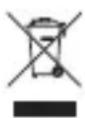
- According to the WEEE Directive 2012/19/EU, the crossed-out wheelie bin symbol is used to label all electric and electronic devices requiring segregation.
-
Do not dispose of the spent product with domestic waste: hand it over to an electric and electronic device collection and recycling center.
-
Hazardous components in electronic and electrical equipment have a negative impact on the environment and human health.
- Plastics contained in the device can be recycled in accordance with the specific marking. By recycling materials and spent equipment you will help to protect the environment.
- Information on electric and electronic devices collection centers is available from local government agencies or from the vendor.
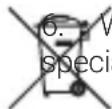
forn out and dead batteries must be discarded in specially marked containers, delivered to total waste collection points or to electronic equipment vendors.
11 CE declaration
Vershold Poland Sp. z o. o. hereby declares that the radio device types: VC008BTR24MS, VC008BTR24CS are in accordance with Directive 2014/53/EU.
This device has been designed, manufactured and marketed in compliance with the requirements of the New Approach Directives; therefore, the product has been marked with the CE mark and a declaration of conformity has been issued for it, which is made available to market regulators.
Full text of the EU declaration of conformity is available at the following internet address
https://vintagecuisine.pl/en/pages/instruction-manuals
12 General complaint conditions
To submit a complaint about the product, please contact the Seller.
All questions and problems related to the functioning of the product, or the submission of a complaint can be directed to us: info@vintagecuisine.com.
Warranty card
- Stamp ....
- Date of sale....
- Signature ....
- Name of the equipment ....
- Equipment model ....
- Serial number or batch number ....
Guarantee
-
This product is covered by the warranty. The warranty period is in accordance with the statutory law of the country in which the point of sale is located. The warranty period is not less than 24 months from the date on which the item was delivered to the buyer.
-
The product will, at the Guarantor's discretion, be subject to:
a) free repair by the Guarantor, with the proviso that the disassembled, damaged, or defective parts of the product become the property of the Guarantor in order to ensure the safety of the Customer,
b) replacement of the product with a new one at the place of purchase of the product, therefore the damaged or defective product becomes the property of the Guarantor,
c) return in exchange for a refund of the price for the purchased product, therefore the damaged or defective product becomes the property of the Guarantor.
-
A defective product is a product that does not fulfill the functions specified in the instruction manual, and the reason for this condition is an internal property of the device.
-
The person entitled to the warranty is obliged to deliver the device to the Customer Service Center in each store for the purpose of submitting a complaint. When exercising the rights under the warranty, a purchase receipt or an invoice should be presented and a detailed description of the product defect should be provided.
-
The warranty does not cover products with mechanical damage which is not the fault of the producer or distributor, due to improper use or resulting from force majeure.
-
The warranty does not apply to products in which the security seal has been removed, unless an authorized service employee has done so.
-
The repair center will use its best endeavors to repair within 21 days. This period may be extended up to 1 month in the event of a need to purchase spare parts that are not currently available to the repair point.
-
It is recommended to advertise complete equipment in order to improve service activities.
-
This warranty does not exclude, limit or suspend the buyer's rights resulting from the statutory rights.
-
The territorial coverage of the warranty covers the territory of the country in which the product was sold.
Manufacturer (Guarantor):
VERSHOLD POLAND Sp. z o.o
VERSHOLD POLAND Sp. z o.o.
VERSHOLD POLAND Sp. z o.o.
natural_image
Product photo of three white kitchen appliances: a 2-toe toaster, a kettle, and a digital TV stand (no visible text or symbols)Vintage Cuisine by CooKing ^® is a collection of kitchen appliances and accessories which combine a retro design and the quality of modern technology. Vintage Cuisine by CooKing ^® products are created to bring joy to your kitchen and meet your cooking expectations, taking your culinary experience to a whole new level.