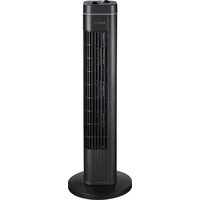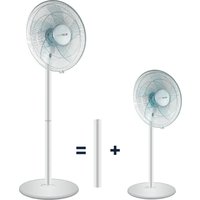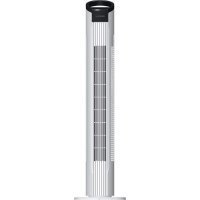
BP78TWF - Fan BLUEPALM - Free user manual and instructions
Find the device manual for free BP78TWF BLUEPALM in PDF.


| Product Type | Tower Fan |
| Brand | BLUEPALM |
| Model | BP78TWF |
| Height | 78 cm |
| Weight | 1.76 kg |
| Rated Voltage | 220 – 240 V |
| Frequency | 50 Hz |
| Rated Power Input | 50 W |
| Power Consumption in Operation | 36.6 W |
| Seasonal Consumption | 11.62 kWh/year |
| Standby Power | 0.15 W |
| Maximum Airflow | 7.38 m³/min |
| Maximum Air Velocity | 0.68 m/s |
| Sound Power Level | 56.1 dB(A) |
| Number of Speeds | 3 (Low – Medium – High) |
| Oscillation | Yes, via the control button |
| Protection Class | II |
| Housing Material | Plastic |
| Warranty | 2 years (valid in Austria) |
| Maintenance and Cleaning | Unplug before cleaning; use a soft cloth and soapy water; do not immerse |
Frequently Asked Questions - BP78TWF BLUEPALM
User questions about BP78TWF BLUEPALM
0 question about this device. Answer the ones you know or ask your own.
Ask a new question about this device
Download the instructions for your Fan in PDF format for free! Find your manual BP78TWF - BLUEPALM and take your electronic device back in hand. On this page are published all the documents necessary for the use of your device. BP78TWF by BLUEPALM.
USER MANUAL BP78TWF BLUEPALM
natural_image
Technical line drawing of a vertical cylindrical device with internal parallel grooves (no text or symbols)HERZLICHEN GLÜCKWUNSCH!
VIELEN DANK, DASS SIE SICH FÜR EIN PRODUKT VON BLUEPALM ENTSCHIEDEN HABEN.


natural_image
Line drawing of a cylindrical battery with a power outlet and cable, no text or symbols presentAbb. 2:
BEDIENUNG
GESCHWINDIGKEIT
natural_image
Technical line drawing of a vertical cylindrical device with internal grating and a top-mounted knob (no text or symbols)FÉLICITATIONS !
MERCI D'AVOIR CHOISI UN PRODUIT BLUEPALM.

VEUILLEZ LIRE ATTENTIVEMENT CE MANUEL D'INSTRUCTIONS AVANT DE COMMENCER L'INSTALLATION, L'UTILISATION OU L'ENTRETIEN. PROTÉGEZ-VOUS ET PROTÉGEZ LES AUTRES EN RESPECTANT LES CONSIGNES DE SÉCURITÉ. LE NON-RESPECT DES INSTRUCTIONS PEUT ENTRAÎNER DES BLESSURES OU DES DOMMAGES AUX PERSONNES ET/OU AUX BIENS ET/OU INVALIDER LA GARANTIE !
INFORMATIONS IMPORTANTES SUR LA SÉCURITÉ, L'EMPLACEMENT ET LA CONNEXION ÉLECTRIQUE.


BLUEPALM
natural_image
Line drawing of a cylindrical electronic device with a power outlet and cable (no text or symbols)Fig. 2:
natural_image
Diagram of a cylindrical device with internal components and labeled Fig. 2 (no text or symbols on the diagram itself)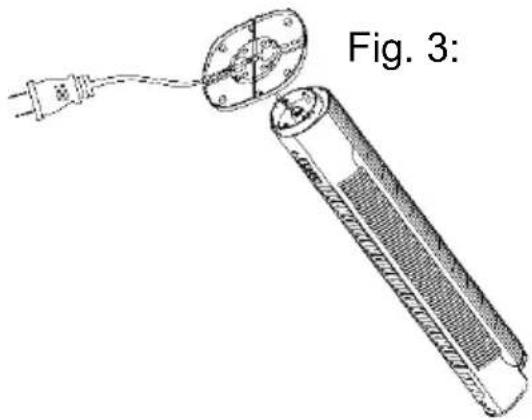
natural_image
Diagram of a battery with an open socket connected to a power outlet, labeled 'Fig. 3:' (no text or symbols on the diagram itself)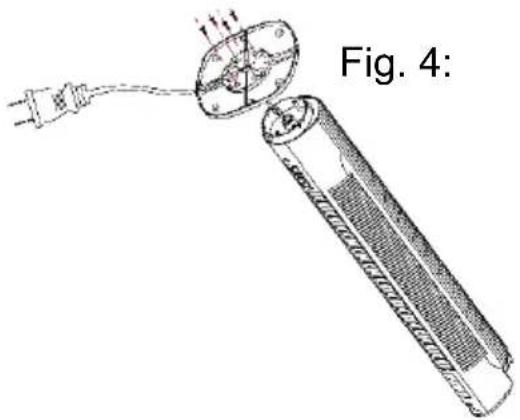
natural_image
Diagram of a battery with a plug inserted, showing internal components and wiring (no text or symbols)MANIPULATION DE L'APPAREIL
VITESSE
natural_image
Technical line drawing of a vertical cylindrical device with internal grating and a top-mounted knob (no text or symbols)CONGRATULAZIONI!
GRAZIE PER AVER SCELTO UN PRODOTTO BLUEPALM.

LEGGERE ATTENTAMENTE IL PRESENTE MANUALE DI ISTRUZIONI PRIMA DI INIZIARE L'INSTALLAZIONE, IL FUNZIONAMENTO O LA MANUTENZIONE. PROTEGGERE SE STESSI E GLI ALTRI SEGUENDO LE ISTRUZIONI DI SICUREZZA. LA MANCATA OSSERVANZA DELLE ISTRUZIONI PUÒ CAUSARE LESIONI O DANNI A PERSONE E/O COSE E/O INVALIDARE LA GARANZIA!
INFORMAZIONI IMPORTANTI SULLA SICUREZZA, L'UBICAZIONE E IL COLLEGAMENTO ELETTRICO.

BLUEPALM
natural_image
Line drawing of a cylindrical electronic device with a power outlet and cable (no text or symbols)Fig. 2:
natural_image
Diagram of a cylindrical device with internal components and labeled Fig. 2 (no text or symbols on the diagram itself)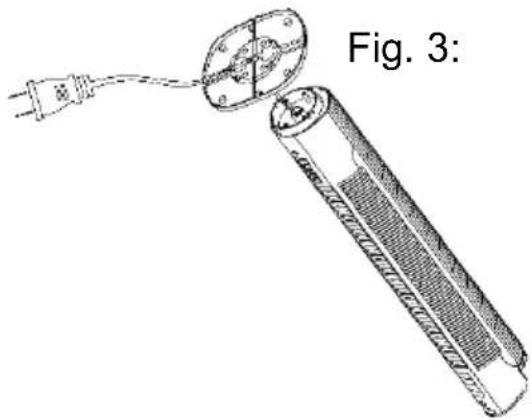
natural_image
Diagram of a battery with an open socket connected to a power outlet, labeled 'Fig. 3:' (no text or symbols on the diagram itself)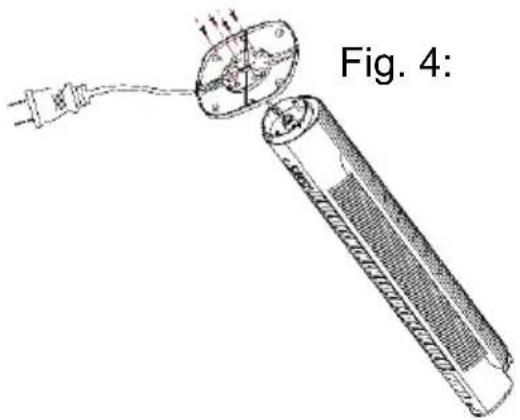
natural_image
Diagram of a battery with a plug inserted, showing internal components and wiring (no text or symbols)MANIPOLAZIONE DELL'APPARECCHIO
VELOCITÀ
natural_image
Technical line drawing of a vertical cylindrical device with internal grating and a top-mounted knob (no text or symbols)GEFELICITEERD!
BEDANKT VOOR HET KIEZEN VAN EEN PRODUCT VAN BLUEPALM.

LEES DEZE GEBRUIKSAANWIJZING ZORGVULDIG DOOR VOORDAT U BEGINT MET DE INSTALLATIE, HET GEBRUIK OF HET ONDERHOUD. BESCHERM UZELF EN ANDEREN DOOR DE VEILIGHEIDSINSTRUCTIES OP TE VOLGEN. HET NIET OPVOLGEN VAN DE INSTRUCTIES KAN LEIDEN TOT LETSEL OF SCHADE AAN PERSONEN EN/OF EIGENDOMMEN EN/OF HET VERVALLEN VAN DE GARANTIE!
BELANGRIJKE INFORMATIE OVER VEILIGHEID, LOCATIE EN ELEKTRISCHE AANSLUITING.

natural_image
Line drawing of a cylindrical electronic device with a power outlet and cable (no text or symbols)Fig. 2:
natural_image
Diagram of a cylindrical device with internal components and labeled Fig. 2 (no text or symbols on the diagram itself)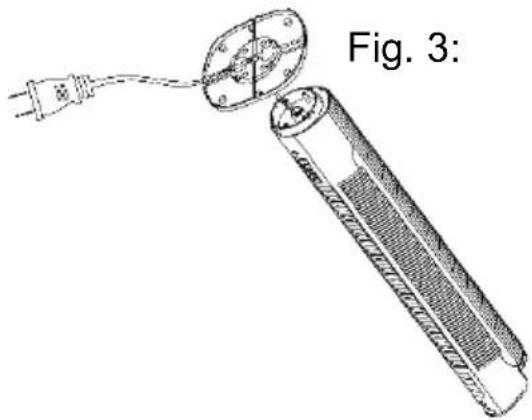
natural_image
Diagram of a battery with an open socket connected to a power outlet, labeled as Fig. 3 (no text or symbols on the diagram itself)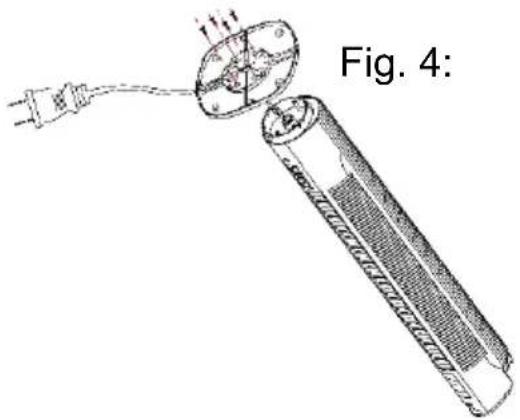
natural_image
Diagram of a cylindrical device with a bulb and cable, labeled 'Fig. 4:' (no text or symbols on the diagram itself)OMGAAN MET HET APPARAAT
SNELHEID
natural_image
Technical line drawing of a vertical cylindrical device with internal parallel grooves (no text or symbols)GRATULERAR!
TACK FÖR ATT DU VALDE EN PRODUKT FRÅN BLUEPALM.

LÄS BRUKSANVISNINGEN NOGGRANT INNAN DU PÅBÖRJAR INSTALLATION, DRIFT ELLER UNDERHÅLL. SKYDDA DIG SJÄLV OCH ANDRA GENOM ATT FÖLJA SÄKERHETSANVISNINGARNA. UNDERLÅTENHET ATT FÖLJA ANVISNINGARNA KAN LEDA TILL PERSONSKADA OCH/ELLER EGENDOMSSKADA OCH/ELLER GÖRA GARANTIN OGILTIG!
VIKTIG INFORMATION OM SÄKERHET, PLACERING OCH ELEKTRISK ANSLUTNING.

natural_image
Line drawing of a cylindrical battery with a terminal plug, showing internal structure and wiring (no text or symbols)Fig. 2:
natural_image
Line drawing of a test tube with plug and outlet, labeled Fig. 2 (no text or symbols on the diagram itself)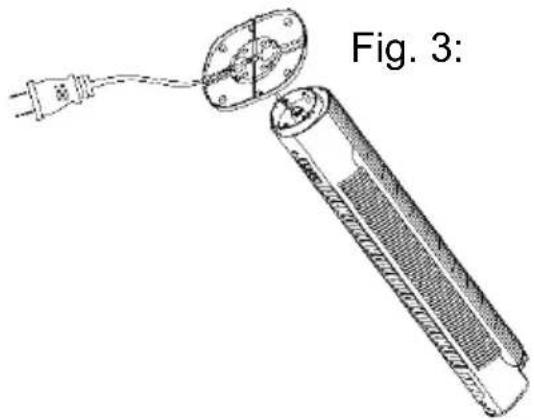
natural_image
Diagram of a handheld device with a power outlet connected to a circular component, labeled 'Fig. 3:' (no text or symbols on the device itself)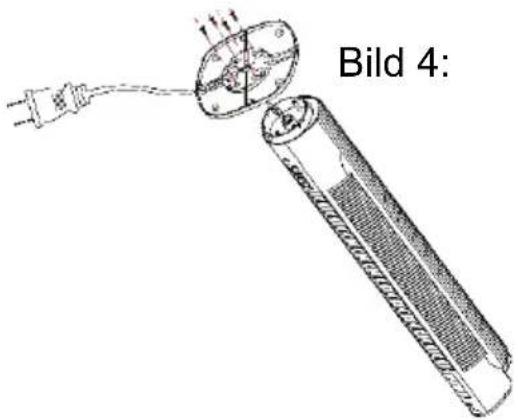
DRIFT
HASTIGHET
natural_image
Technical line drawing of a vertical cylindrical device with internal grating and a top handle (no text or symbols)GRATULUJEME!
DĚKUJEME, ŽE JSTE SI VYBRALI PRODUKT OD SPOLEČNOSTI BLUEPALM.

PŘED ZAHÁJENÍM INSTALACE, PROVOZU NEBO ÚDRŽBY SI POZORNĚ PŘEČTĚTE TENTO NÁVOD K POUŽITÍ. DODRŽOVÁNÍM BEZPEČNOSTNÍCH POKYNŮ CHRAŇTE SEBE I OSTATNÍ. NEDODRŽENÍ POKYNŮ MŮŽE VÉST KE ZRANĚNÍ NEBO POŠKOZENÍ OSOB A/NEBO MAJETKU A/NEBO KE ZTRÁTĚ ZÁRUKY!
DŮLEŽITÉ INFORMACE O BEZPEČNOSTI, UMÍSTĚNÍ A ELEKTRICKÉM PŘIPOJENÍ.

natural_image
Technical line drawing of a vertical cylindrical device with internal grating and a top-mounted knob (no text or symbols)GRATULUJEME!
ĐAKUJEME, ŽE STE SI VYBRALI PRODUKT OD SPOLOČNOSTI BLUEPALM.

PRED ZAČATÍM INŠTALÁCIE, PREVÁDZKY ALEBO ÚDRŽBY SI POZORNE PREČÍTAJTE TENTO NÁVOD NA OBSLUHU. DODRŽIAVANÍM BEZPEČNOSTNÝCH POKYNOV CHRÁŇTE SEBA AJ OSTATNÝCH. NEDODRŽANIE POKYNOV MÔŽE VIESŤ K ZRANENIU ALEBO POŠKODENIU OSÔB A/ALEBO MAJETKU A/ALEBO K STRATE PLATNOSTI ZÁRUKY!
DÔLEŽITÉ INFORMÁCIE O BEZPEČNOSTI, UMIESTNENÍ A ELEKTRICKOM PRIPOJEN


natural_image
Technical line drawing of a vertical cylindrical device with internal grating and a top-mounted knob (no text or symbols)FELICITĂRI!
VĂ MULȚUMIM CĂ AȚI ALES UN PRODUS BLUEPALM.

VĂ RUGĂM SĂ CITIȚI CU ATENȚIE ACEST MANUAL DE INSTRUCTIUNI ÎNAINTE DE A ÎNCEPE INSTALAREA, FUNCTIONAREA SAU ÎNTRETINEREA. PROTEJAȚI-VĂ PE DUMNEAVOASTRĂ ȘI PE CEILALȚI RESPECTÂND INSTRUCTIUNILE DE SIGURANȚĂ. NERESPECTAREA INSTRUCTIUNILOR POATE DUCE LA RĂNIREA SAU LA DETERIORAREA PERSOANELOR ȘI/SAU A BUNURILOR ȘI/SAU LA INVALIDAREA GARANTIEI!
INFORMATII IMPORTANTE PRIVIND SIGURANTA, AMPLASAREA ŞI CONECTAREA ELECTRICĂ.

BLUEPALM
natural_image
Technical line drawing of a vertical cylindrical device with internal grating and a top-mounted knob (no text or symbols)CONGRATULATIONS!
THANK YOU FOR CHOOSING A PRODUCT FROM BLUEPALM.

Current operating instructions and other languages
Download the current operating instructions in different languages using the link www.bluepalm.at/downloads or scan the QR code shown. Follow the instructions on the website.

PLEASE READ THIS INSTRUCTION MANUAL CAREFULLY BEFORE STARTING INSTALLATION, OPERATION OR MAINTENANCE. PROTECT YOURSELF AND OTHERS BY FOLLOWING THE SAFETY INSTRUCTIONS. FAILURE TO FOLLOW THE INSTRUCTIONS MAY LEAD TO INJURY OR DAMAGE TO PERSONS AND/OR PROPERTY AND/OR INVALIDATE THE WARRANTY!
IMPORTANT INFORMATION ON SAFETY, LOCATION AND ELETRICAL CONNECTION.

- Use this device exclusively in accordance with the guidelines in the instruction manual. Any use other
BLUEPALM
than that recommended by the manufacturer, may result in fire, electrical shock or injury to persons.
-
Remove the packaging and ensure the device is not damaged. In case of any doubt do not use the device and contact the service point or your dealer.
-
Keep children away from packaging materials. There is a risk of choking if swallowed!
-
If the power cable is damaged it must be replaced by the manufacturer or an authorised service point, in order to avoid all potential risks.
-
Check whether current type and grid voltage match the specifications on the device's type plate before plugging the device in.
-
The electrical plug socket, into which the device is connected, must not be defective or loose, must be suitable for the required current load and, above all, must be properly earthed.
-
Avoid the use of an extension cable, as this may overheat and cause a fire.
-
It is strictly forbidden to modify the properties of this device in any form or manner and you must only use replacement parts or accessories recommended by the manufacturer (failure to do so will invalidate the warranty and guarantee).
-
If the device has a defect, switch it off and contact your dealer or the customer hotline.
-
For any possible repairs to the device and the mains plug or power cable you must always refer exclusively to the customer service points recommended by the
BLUEPALM
manufacturer. You can view our customer service points online at www.bluepalm.at.
-
Children under the age of 8 and persons with limited physical, psychological, sensory or mental abilities and lack of experience and knowledge may only use this device under appropriate supervision and if comprehensively briefed on the safe use of the device and the associated hazards.
-
Do not use the device without supervision. Always switch the device off when leaving the room.
-
Children must not be allowed to play with the device.
-
Do not twist or kink the power cable.
-
Do not use the device with wet hands.
-
Do not use the device outdoors.
-
Never use the device in rooms in which gas, oil or sulphur are present.
-
Do not use the device in the proximity of water or strong moisture, e.g. in damp cellars, close to pools, bathtubs or showers. Make sure no water can enter the device.
-
Do not place any objects on the device.
-
Place the device on a stable and level subsurface.
-
Never cover the device.
-
Never put fingers, pens or other items into the device and make sure that air in- and outlets are never blocked.
-
Always switch the device off before pulling the power plug.
BLUEPALM
- Do not pull on the power cable to unplug the device. Always pull on the plug to unplug the device.
- Do not touch the plug with wet hands to avoid electrical shocks.
- Pull the plug if you are not using the device, if you want to clean it, if it has to be serviced or if it is moved from one location to another.
- Keep the device in good shape by cleaning and maintaining it. If you have any questions regarding maintenance you can contact the manufacturer's authorised customer hotline / service point.
- Keep and store the device at a safe and dry place out of reach for children when you are not using it.
BLUEPALM
Recycling, disposal, declaration of conformity
 | RECYCLINGThe packaging materials can be recycled. Therefore, it is recommended to dispose of them in sorted waste. |
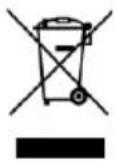 | DISPOSALThe symbol "crossed-out dustbin" requires the separate disposal of waste electrical and electronic equipment (WEEE). Electrical and electronic equipment may contain hazardous and environmentally dangerous substances. Therefore, do not dispose of this in unsorted residual waste, but at a designated collection point for waste electrical and electronic equipment. By doing so, you will contribute to the protection of resources and the environment. For more information, please contact your dealer or local authorities. Directive 2012/19/EU |
 | DECLARATION OF CONFORMITYWe hereby confirm that this article complies with the basic requirements, regulations and directives of the EU. You can view the detailed declaration of conformity at any time under the following link:https://www.schuss-home.at/downloads |
Errors and technical modifications excepted.
BLUEPALM
TECHNICAL DESCRIPTION
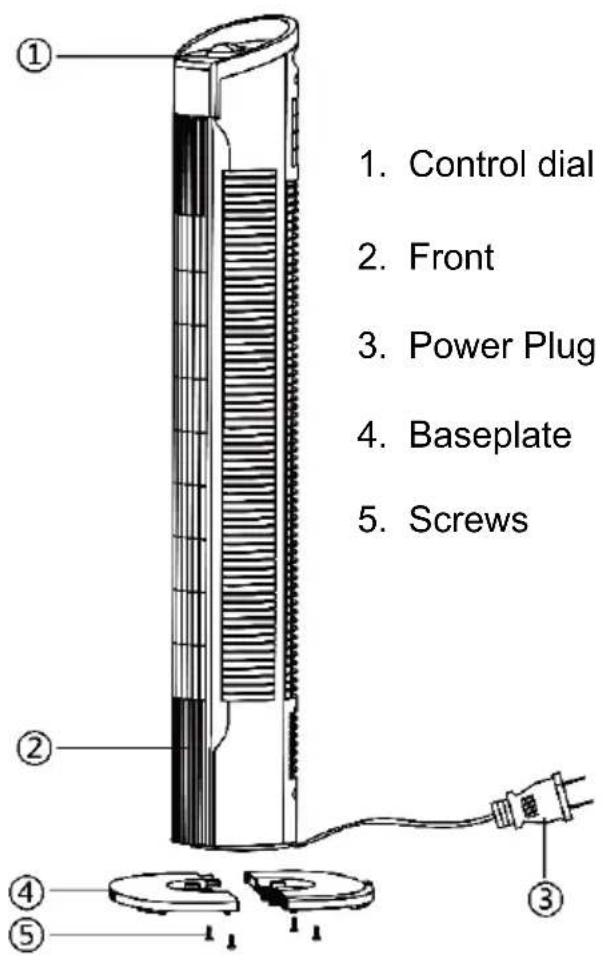
ASSEMBLING THE STAND
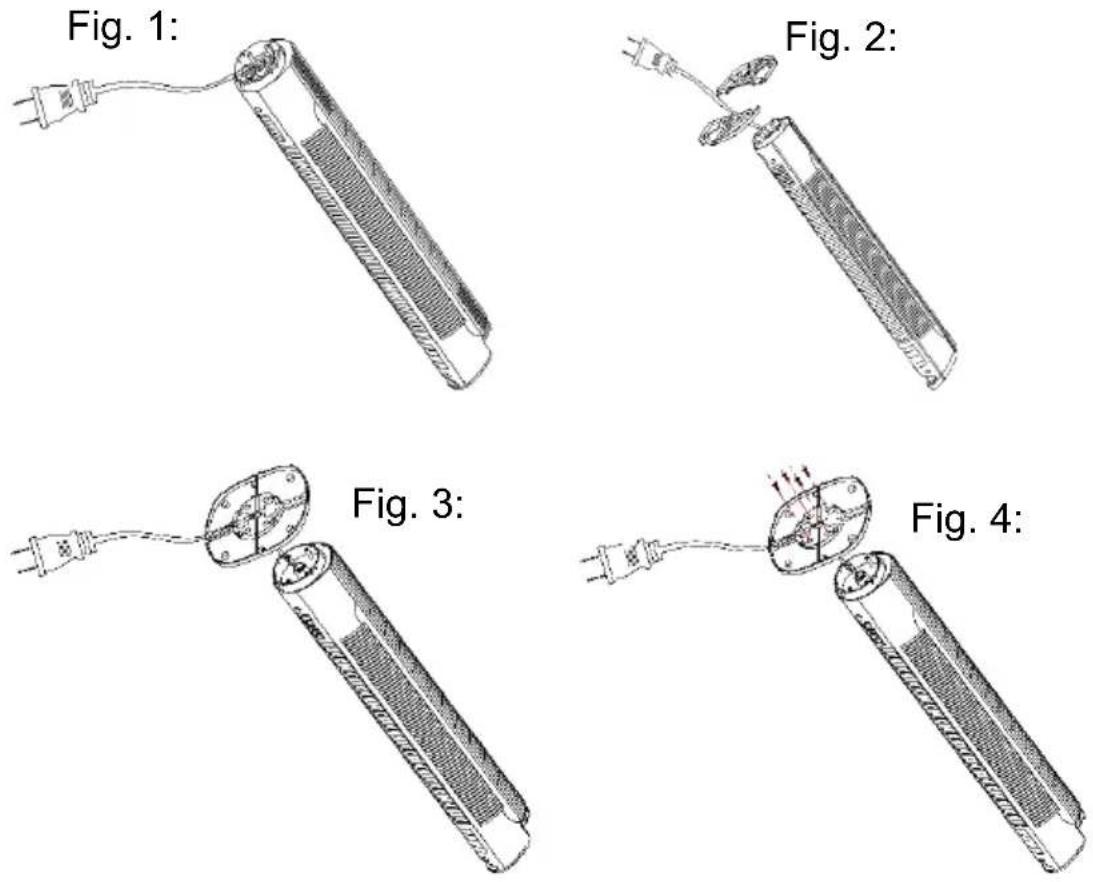
- Take all of the appliance parts out of the packaging and remove all packaging materials and inserts.
- Turn the fan upside down (Fig.1).
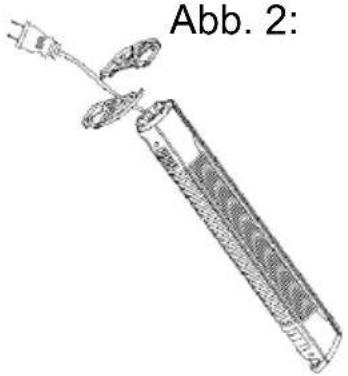
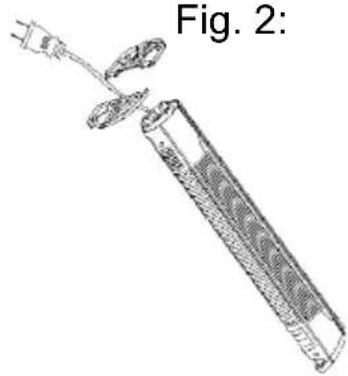
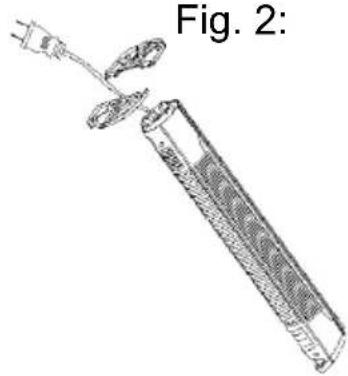
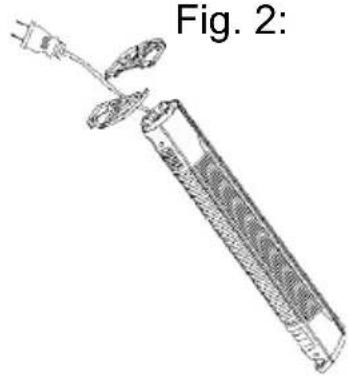
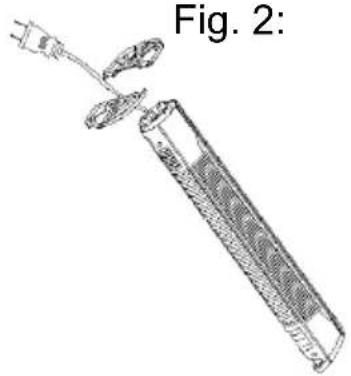
- Take the power cord and put it through the two parts of the baseplate (4) (Fig.2).
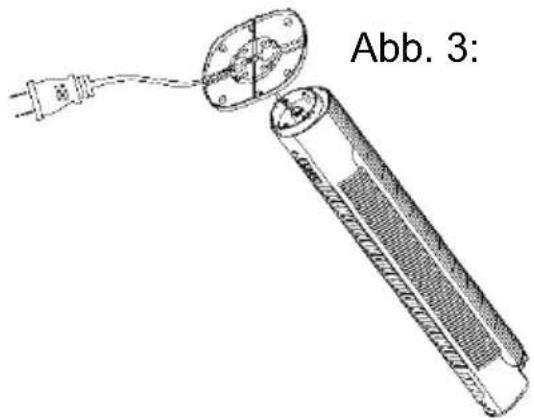
- Fasten the parts (4) and press it into the outlet hole. (Fig.3)
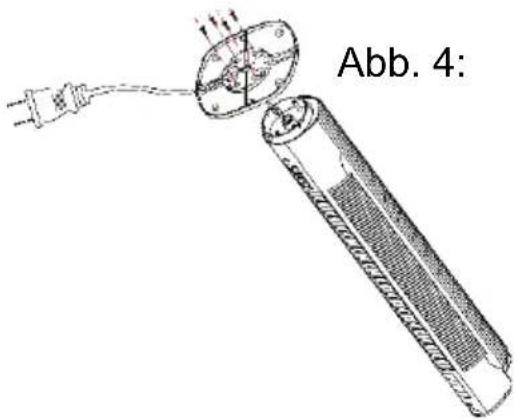
- Use 4 pieces of screw to tight up (Fig.4).
BLUEPALM
HANDLING THE APPLIANCE
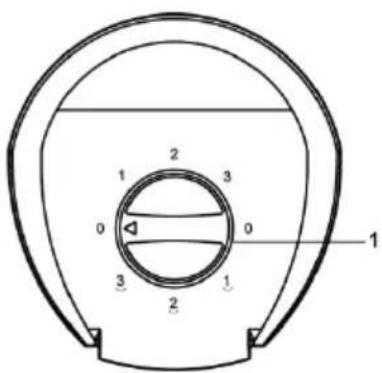
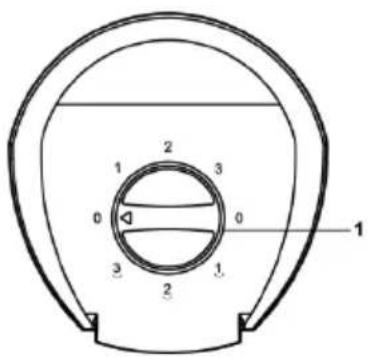
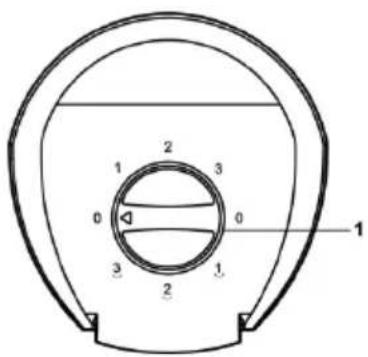
SPEED
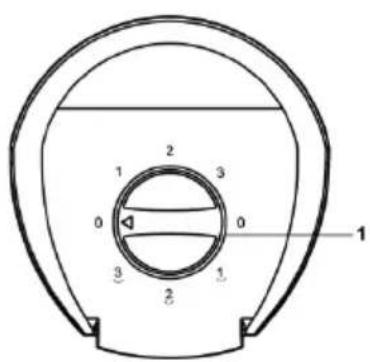
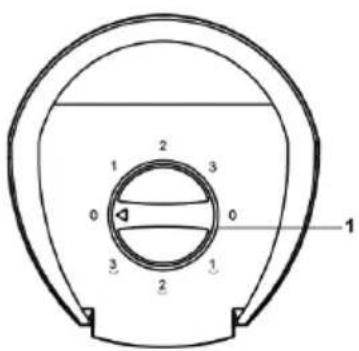
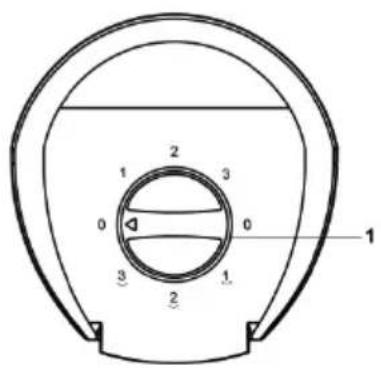
- Turn the button (1), to select the speed with or without oscillation.
• 3 different speed options: (Low - Mid - High)
BLUEPALM
CLEANING INSTRUCTIONS
- Caution! Let the device come to a full stop before cleaning and disconnect it from the outlet.
- Use a soft cloth to clean the device.
- If dirt and contamination should not come off easily, you may use warm soapy water.
- Do not use solvents and scrubbing agents (thinners), metal cutlery or stiff brushes since these may damage the plastic housing.
- Do not immerse the fan in water or other liquids. Water must not drop onto or into the fan's motor housing.
- Dry all components thoroughly before storing them.
- Store the device in a cool, dry and clean environment.
- Store the device out of reach for children and animals.
BLUEPALM
| Technical information | |||
| Rated voltage | 220-240V | ||
| Frequency | 50Hz | ||
| Rated input power | 50 Watt | ||
| Height | 78 cm | ||
| Weight | 1,76kg | ||
| Sound power level | 56.1 dB (A) | ||
| Information requirements of Regulation (EU) No. 206/2012 | |||
| Article | BP78TWF | ||
| Rated | 220 – 240 V | ||
| Protection | II | ||
| Power consumption when switched off (PDFF) | 0 W | ||
| Seasonal power consumption (Q) | 11.62 kWh/a | ||
| Designation | Symbol | Value | Unit |
| Maximum volume flow | F | 7.38 | m3/min |
| Fan power consumption | P | 36.6 | W |
| Service ratio | SV | 0.20 | (m3/min)/W |
| Power consumption in standby mode | PSB | 0.15 | W |
| Fan sound power level | LWA | 56.10 | dB(A) |
| Maximum air velocity | c | 0.68 | m/s |
| Measurement standard for determining the service ratio | ISO 5801:2017 | ||
| Contact address for further information and service line: | Schuss Home Electronic GmbHScheringgasse 3, A-1140 ViennaTel: +43 (1) 97 0 21 – 0www.bluepalm.atCommercial register no.: 236974 t /Commercial register court: Vienna | ||
BLUEPALM
WARRANTY
By purchasing a BLUEPALM quality product you have acquired an innovative, long lasting and reliable item.
For this BLUEPALM device we grant a warranty of 2 years from the date of purchase, valid in Austria only.
In the unlikely event that service work is required on your device in this period we warrant free repair (spare parts and labour) or (subject to Schuss's decision) to replace the product. In the event that neither repair nor exchange make sense from an economical perspective we reserve the right to issue a credit based on current value.
When dealing with air conditioning devices you should always contact the customer hotline first (see label on the device or the title page of the instruction manual), in case of fans contact your dealer or us directly. Please note that repair not performed by the authorised workshop in Austria immediately renders this warranty void.
This warranty does not include:
• Repair of replacement of parts due to normal wear
• Damage due to non-compliance with the instruction manual
• Devices that are used commercially – even in part
• Devices damaged by external forces (falling, impact, cracking, improper use etc.) as well as aesthetic wear
• Devices that have been used improperly
• Devices that were not opened by our authorised workshop.
• Unfulfilled customer expectations.
• Damage caused by force majeure, water, lightning and overvoltage.
• Devices on which type denomination and/or serial number on the device have been erased, rendered illegible or removed.
• Service work not performed by our authorised workshops, transport costs to an authorised workshop or us and back as well as associated risks.
Please note that within the warranty period we charge a flat rate of 60 € (indexed as per consumer price index 2010, June 2015) in case of operating errors or if no fault can be found.
The total warranty period of 2 years is not extended if warranty service is performed (repair or device replacement).
The 2 year warranty is only valid if the original invoice (must contain name and address of the dealer as well as full device name) and the respective warranty certificate are produced, on which the device type and serial number (can be found on the box and the device's rear or bottom) are to be noted! Only the statutory warranty coverage applies if the warranty certificate cannot be produced!
Please note that the statutory warranty coverage is not altered by this warranty and that it applies in full regardless.
Schuss Home Electronic GmbH and its vicarious agents are only liable for damages in case of gross negligence or intent. Liability for loss of profit, expected but not incurred savings, consequential damages and damages from third party claims is excluded in any case. Damages to or for recorded data are always excluded from the liability for damages.
Congratulations on your choice. We hope you will enjoy using your BLUEPALM device!
ADDRESS
Schuss Home Electronic GmbH
A-1140 Vienna, Scheringgasse 3
Tel.: +43 (0)1/ 970 21
Type designation:......
Serial number: ....
Together with the device, this warranty certificate must be handed to the authorised workshop or dealer you bought the device from in the event of a warranty claim!