M2400 - Sewing machine SINGER - Free user manual and instructions
Find the device manual for free M2400 SINGER in PDF.


User questions about M2400 SINGER
0 question about this device. Answer the ones you know or ask your own.
Ask a new question about this device
Download the instructions for your Sewing machine in PDF format for free! Find your manual M2400 - SINGER and take your electronic device back in hand. On this page are published all the documents necessary for the use of your device. M2400 by SINGER.
USER MANUAL M2400 SINGER
natural_image
Line drawing of a vintage sewing machine (no text or symbols present)
SINGER®
Instruction ManualM2400 /
This household sewing machine is designed to comply with IEC/EN 60335-2-28 and UL1594.
IMPORTANT SAFETY INSTRUCTIONS
When using an electrical appliance, basic safety precautions should always be followed, including the following:
Read all instructions before using this household sewing machine. Keep the instructions at a suitable place close to the machine. Make sure to hand them over if the machine is given to a third party.
DANGER - To reduce the risk of electric shock:
- A sewing machine should never be left unattended when plugged in. The electrical socket, to which the machine is plugged in should be easily accessible. Always unplug this sewing machine from the electric outlet immediately after using and before cleaning, removing covers, lubricating or when making any other user servicing adjustments mentioned in the instruction manual.
WARNING - To reduce the risk of burns, fire, electric shock, or injury to person:
- Do not allow to be used as a toy. Close attention is necessary when this sewing machine is used by or near children.
- Use this sewing machine only for its intended use as described in this manual. Use only attachments recommended by the manufacturer as contained in this manual.
- Never operate this sewing machine if it has a damaged cord or plug, if it is not working properly, if it has been dropped or damaged, or dropped into water. Return the sewing machine to the nearest authorized dealer or service center for examination, repair, electrical or mechanical adjustment.
- Never operate the sewing machine with any air openings blocked. Keep ventilation openings of the sewing machine and foot control free from the accumulation of lint, dust, and loose cloth.
- Keep fingers away from all moving parts. Special care is required around the sewing machine needle.
- Always use the proper needle plate. The wrong plate can cause the needle to break.
- Do not use bent needles.
- Do not pull or push fabric while stitching. It may deflect the needle causing it to break.
- Wear safety glasses.
- Switch the sewing machine off ("0") when making any adjustment in the needle area, such as threading needle, changing needle, threading bobbin, or changing presser foot, etc.
- Never drop or insert any object into any opening.
- Do not use outdoors.
- Do not operate where aerosol (spray) products are being used or where oxygen is being administrated.
- To disconnect, turn all controls to the off ("0") position, then remove plug from outlet.
- Do not unplug by pulling on cord. To unplug, grasp the plug, not the cord.
- The foot control is used to operate the machine. Never place other objects on the foot control.
- Do not use the machine if it is wet.
- If the LED lamp is damaged or broken, it must be replaced by the manufacturer or its service agent or a similarly qualified person, in order to avoid a hazard.
- If the cord connected with the foot control is damaged, it must be replaced by the manufacturer or its service agent or a similarly qualified person, in order to avoid a hazard.
- This sewing machine is provided with double insulation. Use only identical replacement parts. See instructions for Servicing of Double-Insulated Appliances.
SAVE THESE INSTRUCTIONS
FOR CENELEC COUNTRIES ONLY:
This appliance can be used by children aged from 8 years and above and persons with reduced physical, sensory or mental capabilities or lack of experience and knowledge if they have been given supervision or instruction concerning use of the appliance in a safe way and understand the hazards involved. Children shall not play with the appliance. Cleaning and user maintenance shall not be made by children without supervision.
The noise level under normal operating conditions is less than 75dB(A).
Only use the sewing machine together with the foot control supplied by the factory.
FOR NON CENELEC COUNTRIES:
This sewing machine is not intended for use by persons (including children) with reduced physical, sensory or mental capabilities, or lack of experience and knowledge, unless they have been given supervision or instruction concerning use of the sewing machine by a person responsible for their safety. Children should be supervised to ensure that they do not play with the sewing machine.
The noise level under normal operating conditions is less than 75dB(A).
Only use the sewing machine together with the foot control supplied by the factory.
SERVICING OF DOUBLE INSULATED PRODUCTS
In a double-insulated product, two systems of insulation are provided instead of grounding. No ground means is provided on a double-insulated product, nor should a means for grounding be added to the product. Servicing of a double-insulated product requires extreme care and knowledge of the system and should be done only by qualified service personnel. Replacement parts for a double-insulated product must be identical to those parts in the product. A double-insulated product is marked with the words 'DOUBLE INSULATION' or 'DOUBLE INSULATED'.
□ List of contents
Machine Basics
Principal Parts of the Machine ....1
Connecting Machine to Power Source....3
Two Step Presser Foot Lifter 4
Adjusting Presser Foot Pressure 4
Accessories....5
Threading the Machine
Winding the Bobbin 6
Inserting the Bobbin 7
Thread Tension....8
Threading the Upper Thread....9
Raising the Bobbin Thread....10
Sewing
How to Choose Your Pattern ....11
Stitch Length Dial 12
Sewing Straight Stitch 13
Reverse Sewing 14
Removing the Work....14
Cutting the Thread....14
Blind Hem 15
Buttonholes 16
Sewing on Buttons 17
Zippers and Piping 18
General Information
Installing the Removable Extension Table 19
Changing the Presser Foot 20
Needle/ Fabric/ Thread Chart 21
Darning Plate....22
Maintenance and Troubleshooting
Inserting the Needle....23
Maintenance....24
Troubleshooting Guide 25
text_image
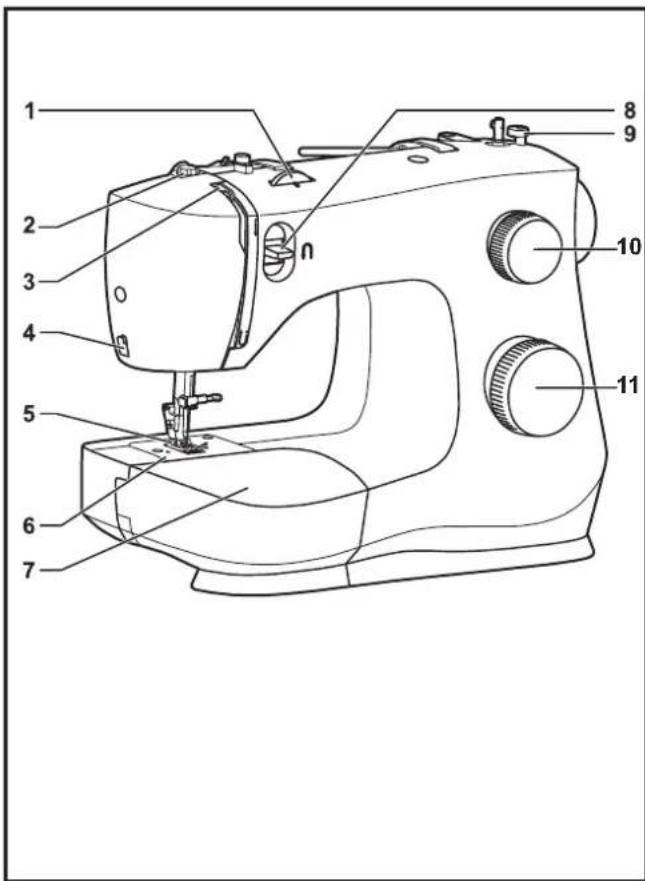
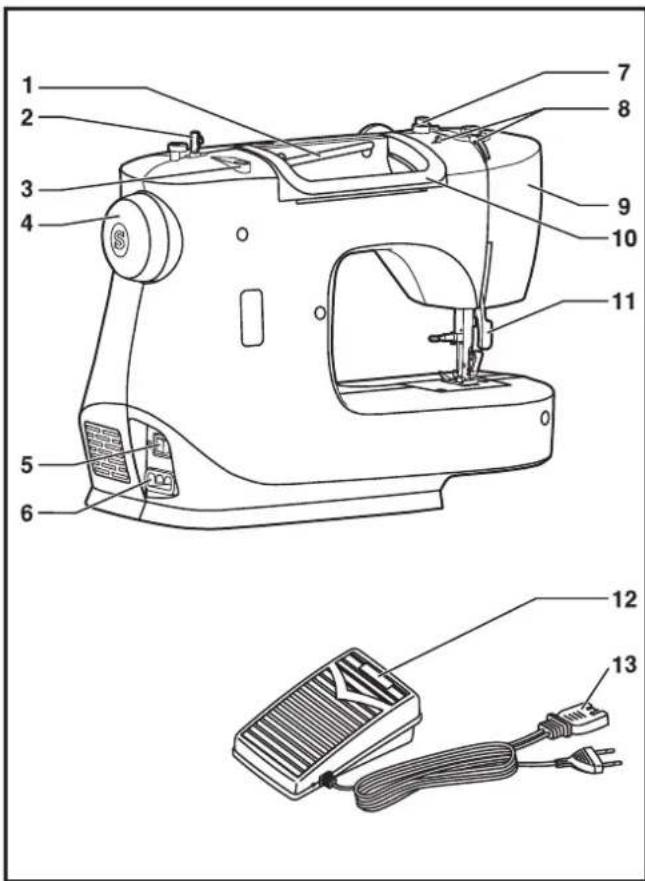
Labeled diagram of a sewing machine with numbered parts for identification□ Principal Parts of the Machine
- Thread tension dial
- Presser foot pressure adjustment
- Thread take-up lever
- Thread cutter
- Presser foot
- Needle plate
- Removable extension table/ accessory storage
- Reverse sewing lever
- Bobbin winding stopper
- Stitch length dial
- Pattern selector dial
Unpacking
- Place the box on a steady, flat surface. Lift your machine out of the box and remove the outer packaging.
- Remove all other packing material and the plastic bag.
text_image
Technical diagram of a sewing machine with numbered parts and a separate circuit breaker labeled 12 and 13.□ Principal Parts of the Machine
- Horizontal spool pin
- Bobbin winder spindle
- Hole for auxiliary spool pin
- Handwheel
- Power and light switch
- Main plug socket
- Bobbin thread guide
- Upper thread guide
- Face plate
- Handle
- Presser foot lifter
- Foot speed control
- Power cord
text_image
Diagram showing connections between a power outlet, plug-in socket, and electrical switch with labeled components A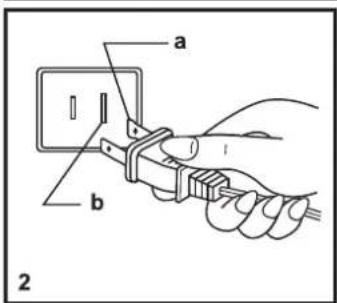
text_image
a b 2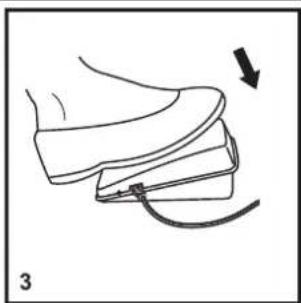
natural_image
Line drawing of a shoe being adjusted with a cable, showing the blade and fold (no text or symbols)□ Connecting Machine to Power Source
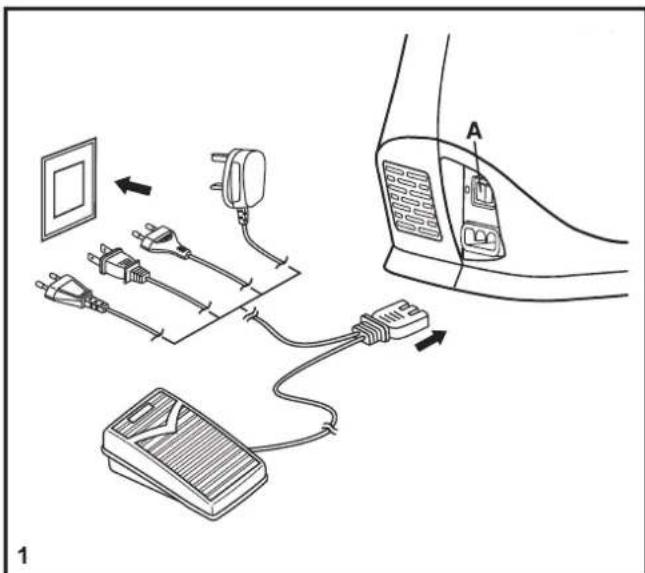
Connect the machine to a power source as illustrated. (1) This appliance is equipped with a polarized plug which must be used with the appropriate polarized outlet. (2)
Attention: Unplug power cord when machine is not in use.
Foot control The foot control pedal regulates the sewing speed. (3)
Attention: Consult a qualified electrician if in doubt of how to connect machine to power source.
Sewing light Press main switch (A) to "I" for power and light.
IMPORTANT NOTICE For appliance with a polarized plug (one blade is wider than the other). To reduce the risk of electric shock, this plug is intended to fit in a polarized outlet only one way. If it does not fit fully in the outlet, reverse the plug. If it still does not fit, contact a qualified electrician to install the proper outlet. Do not modify the plug in any way.
a. Polarized attachment plug
b. Conductor intended to be grounded
natural_image
Line drawing of a sewing machine with a hand operating the blade (no text or symbols)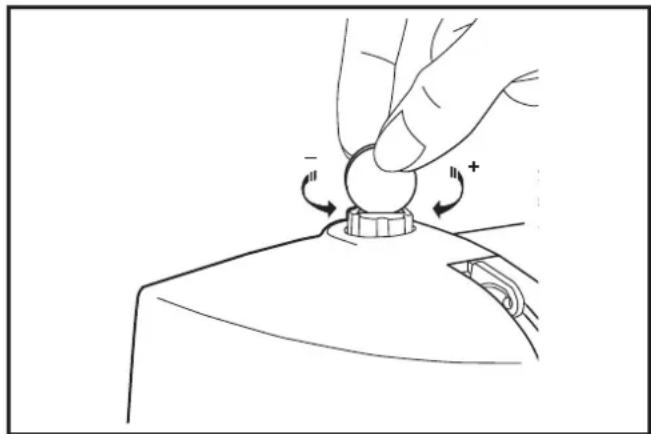
natural_image
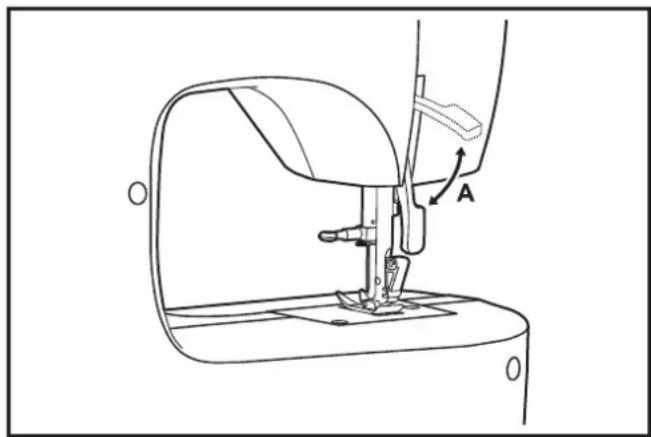
Line drawing of a hand pressing a button on a device (no text or symbols)☐ Two Step Presser Foot Lifter
When sewing several layers or thick fabrics, the presser foot can be raised to a higher position for easy positioning of the work. (A)
Attention:
Your SINGER ^® machine is adjusted to provide the best stitch result at normal room temperature. Extreme hot and cold temperatures can affect the sewn result.
□ Adjusting Presser Foot Pressure
The presser foot pressure of the machine has been pre-set and requires no particular readjustment according to the type of fabric (light-or-heavy weight).
However, if you need to adjust the presser foot pressure, you may turn the presser adjusting screw with a coin.
For sewing very thin fabric, loosen the pressure by turning the screw counter counterclockwise, and for heavy fabric, tighten by turning it clockwise.
abcd



e
f
g
h

i
j
K
|

Accessories
Standard accessories
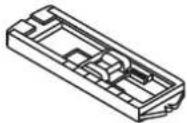
a. All purpose foot
b. Zipper foot
c. Buttonhole foot
d. Button sewing foot
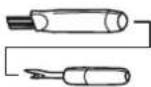
e. L-screwdriver
f. Seam ripper/ brush
g. Pack of needles
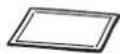
h. SINGER® Class 15 bobbins (4x)
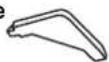
i. Edge/ quilting guide
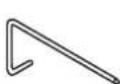
j. Darning plate
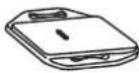
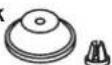
k. Spool holder
1. Soft cover
Optional Accessories:
For information about additional presser feet, attachments and accessories that may be available for your machine, visit www.singer.com
natural_image
Technical line drawing of a cylindrical tank with internal components and flow indicators (no text or labels)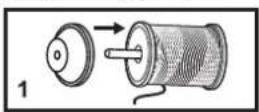
natural_image
Illustration of two hands tying a knot with arrows indicating direction (no text or symbols)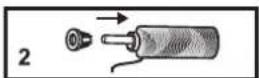
text_image
Diagram showing a hand holding a tool interacting with a mechanical component, with arrows indicating motion and a dashed arrow highlighting a specific movement.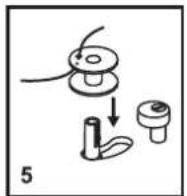
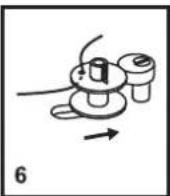

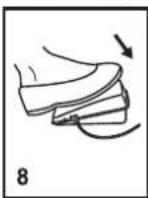
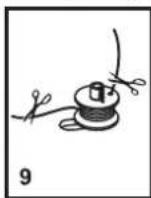
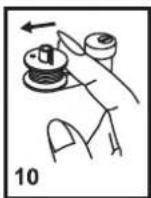
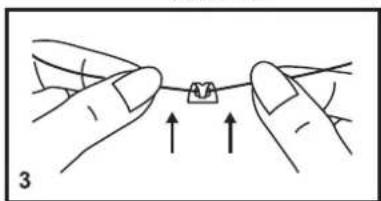
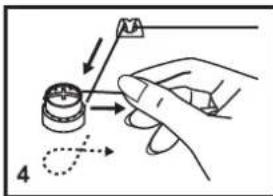
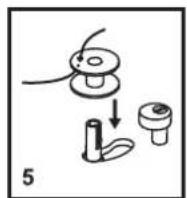
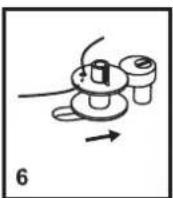
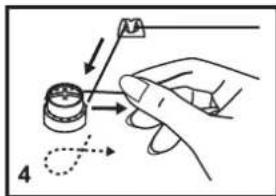
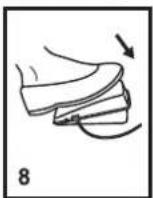
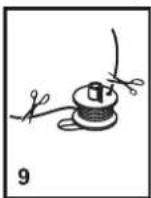
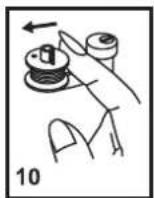
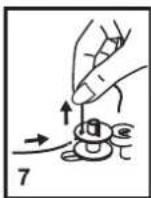
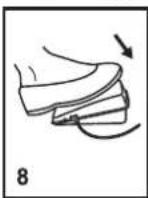
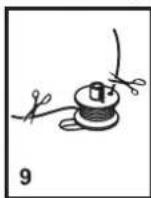
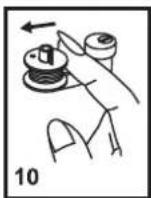
□ Winding the Bobbin
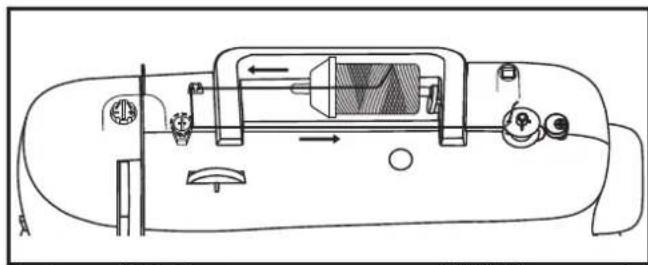
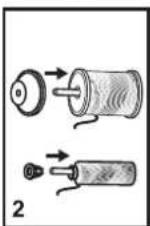
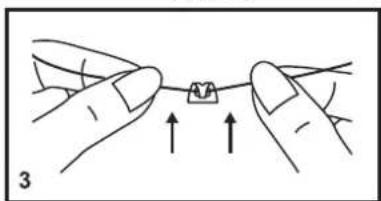
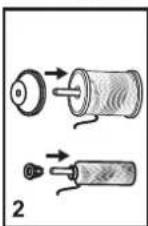
- Place thread and corresponding spool holder on to spool pin. (1/2)
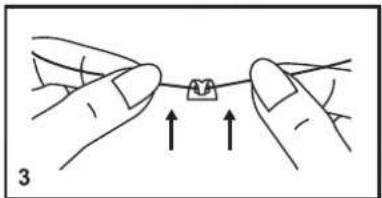
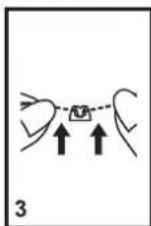
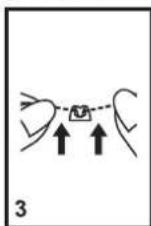
- Snap thread into thread guide. (3)
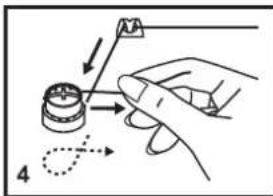
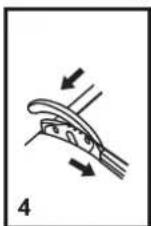
- Wind thread clockwise around bobbin winder tension discs. (4)
- Thread bobbin as illustrated and place on spindle. (5)
- Push bobbin spindle to right. (6)
- Hold thread end. (7)
- Step on foot control pedal. (8)
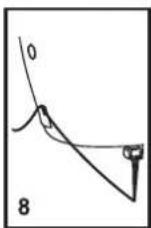
- Release the pedal after a few turns. Release the thread and cut as close as possible to the spool. Press the pedal again. Once the spool is full, it rotates slowly. Release the pedal and cut thread. (9)
- Push bobbin spindle to left (10) and remove.
Please Note:
When the bobbin winder spindle is in "bobbin winding" position, the machine will not sew and the hand wheel will not turn. To start sewing, push the bobbin winder spindle to the left (sewing position).

natural_image
Line drawing of a sewing machine needle with a hand operating it, showing a downward arrow indicating force or direction (no text or symbols present)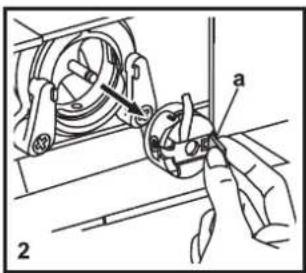
text_image
Technical diagram showing mechanical assembly with labeled parts 'a' and numbered marker '2'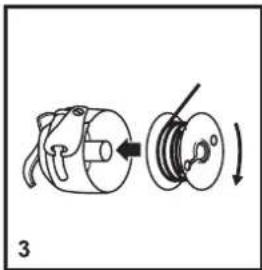
natural_image
Diagram of a mechanical device with a rotating shaft and housing, showing a curved arrow indicating rotation (no text or symbols present)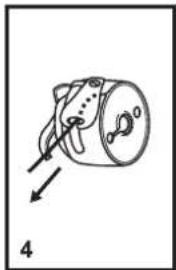
natural_image
Simple line drawing of a mechanical component with an arrow indicating direction (no text or symbols)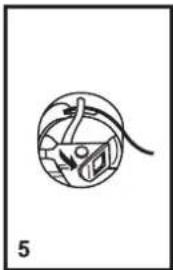
natural_image
Simple line drawing of a globe with arrows indicating direction, no text or symbols present
natural_image
Line drawing of a hand holding a cable inserted into a mechanical device (no text or symbols)☐ Inserting the Bobbin
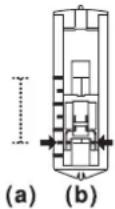
When inserting or removing the bobbin, the needle must be fully raised.
- Open the hinged cover. (1)
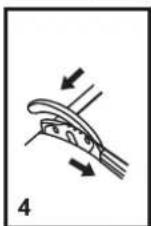
- Pull the bobbin case tab (a) and remove the bobbin case. (2)
- Hold the bobbin case with one hand. Insert the bobbin so that the thread runs in a clockwise direction (arrow). (3)
- Pull the thread through the slit and under the finger. Leave a 6 inch tail of thread. (4)
- Hold the bobbin case by the hinged latch. (5)
- Insert it into the shuttle. (6)
Attention:
Turn power switch to off ("O") before inserting or removing the bobbin.
natural_image
Line drawing of a sewing machine handle and seat assembly (no text or symbols)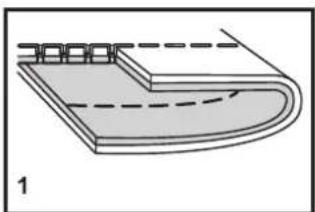
natural_image
Diagram of a curved mechanical component with dashed lines indicating hidden edges (no text or symbols)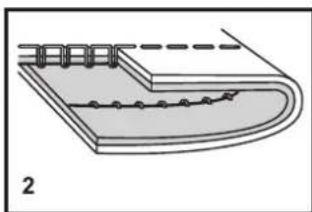
natural_image
Diagram of a layered structure with a dashed line and circular elements, labeled '2' (no text or symbols on the diagram itself)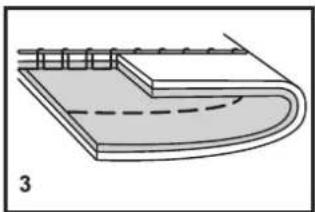
natural_image
Diagram of a layered structure with a dashed line indicating a curved path, labeled '3' (no text or symbols on the diagram itself)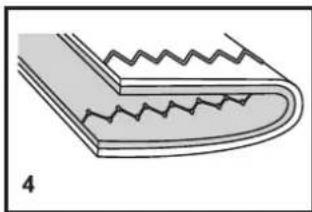
natural_image
Diagram of a corrugated metal strip with zigzag grooves, labeled '4' (no text or symbols on the diagram itself)□ Thread Tension
Upper thread tension
Basic thread tension setting: "4".
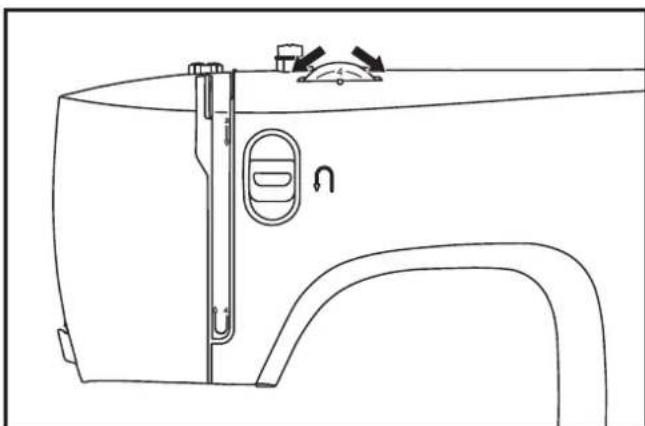
To increase the tension, turn the dial to the next number up.
To reduce the tension, turn the dial to the next number down.
- Normal thread tension for straight stitch sewing.
- Thread tension too loose for straight stitch sewing. Turn dial to higher number.
- Thread tension too tight for straight stitch sewing. Turn dial to lower number.
- Normal thread tension for zigzag and decorative sewing. Correct thread tension is when a small amount of the upper thread appears on the bottom side of fabric.
Lower thread tension
The bobbin tension has been set correctly at the factory, so you do not need to adjust it.
Please note:
- Proper setting of tension is important to good sewing.
- There is no single tension setting appropriate for all stitch functions, thread or fabric.
- A balanced tension (identical stitches both top and bottom) is usually only desirable for straight stitch construction sewing.
- 90% of all sewing will be between "3" and "5".
- For zig zag and decorative sewing stitch functions, thread tension should generally be less than for straight stitch sewing.
- For all decorative sewing you will always obtain a nicer stitch and less fabric puckering when the upper thread appears on the bottom side of your fabric.
text_image
Technical diagram of a sewing machine with numbered parts for identification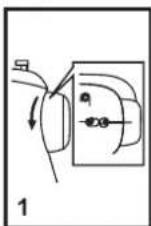
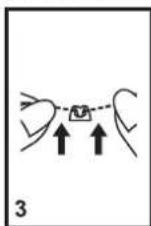
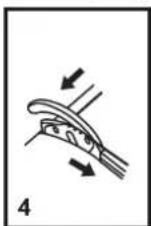
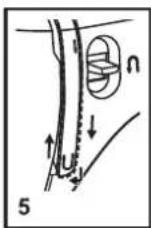
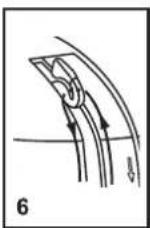

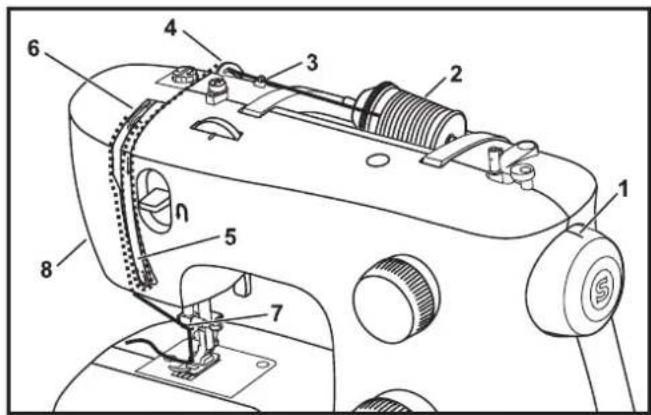
□ Threading the Upper Thread
This is a simple operation but it is important to carry out correctly as by not doing so several sewing problems could result.
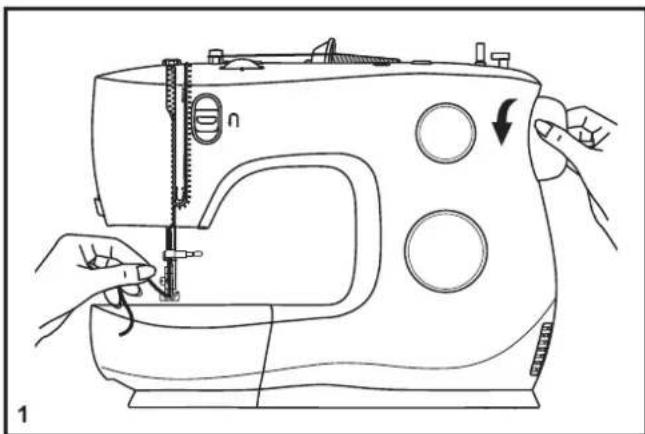
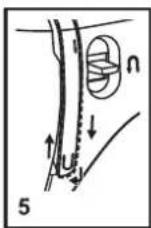
- Raise the needle to its highest position by turning the handwheel towards you (counterclockwise) so that the mark on the handwheel points directly up. Raise the presser foot to release the tension discs. (1)
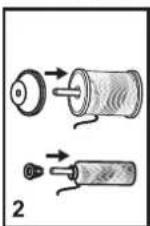
Note: For safety, it is strongly suggested you turn off the power before threading. - Lift up the spool pin. Place the spool of thread on the holder with the thread coming off the spool as shown. For small thread spools, place small side of spool holder next to spool.(2)
- Draw thread from spool through the upper thread guide (3) and pulling thread through pre-tension spring as illustrated. (4)
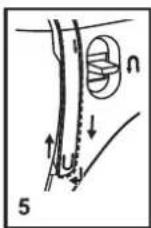
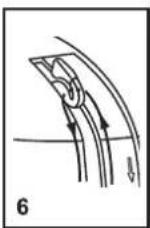
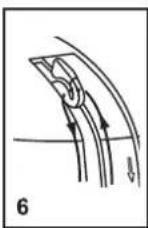
- Thread tension module by leading thread down right channel and up left channel. (5) During this process it is helpful to hold the thread between the spool and thread guide.
- At the top of this movement pass thread from right to left through the slotted eye of the take-up lever and then downwards again. (6)
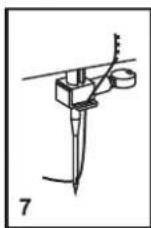
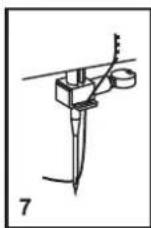
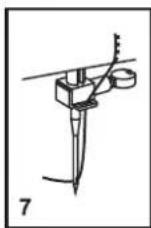
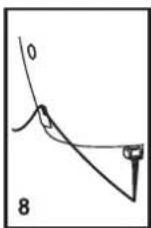
- Now pass thread behind the thin wire needle clamp guide (7) and then down to the needle which should be threaded from front to back.
- Pull about 6-8 inches of thread to the rear beyond the needle eye. Trim thread to length with built in thread cutter. (8)
natural_image
Line drawing of a sewing machine with hands operating the needle and handle (no text or symbols)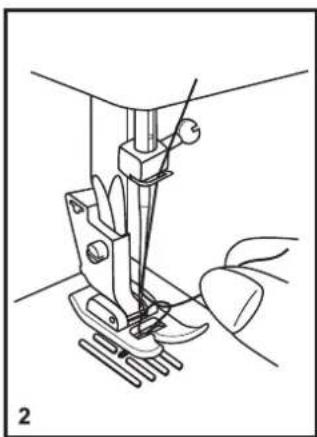
natural_image
Line drawing of a sewing machine needle and foot, showing mechanical components without any text or symbols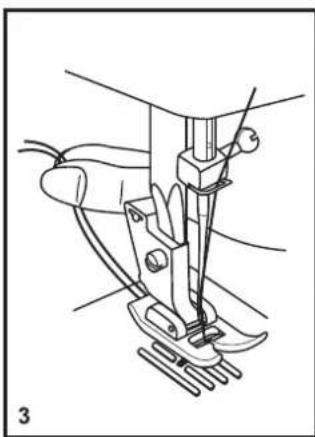
natural_image
Line drawing of a sewing machine needle and foot (no text or symbols)□ Raising the Bobbin Thread
Hold the upper thread with the left hand. (1)
Turn the handwheel towards you (counterclockwise) lowering, then raising needle.
Note:
If it is difficult to raise the bobbin thread, check to make sure the thread is not trapped by the hinged cover or the Removable Extension Table.
Gently pull on the upper thread to bring the bobbin thread up through the needle plate hole. (2)
Lay both threads to the back under the presser foot. (3)
text_image
a b c n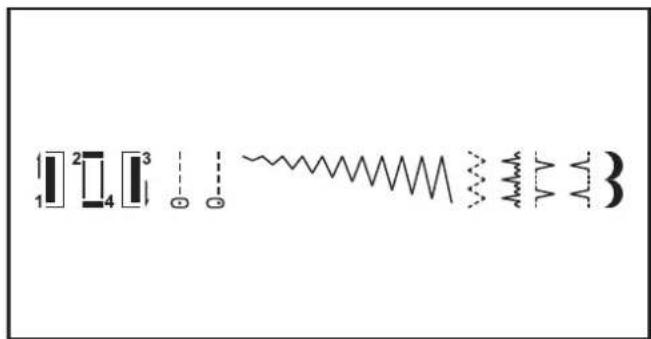
text_image
1 2 3 4 5 6 7 8 9□ How to Choose Your Pattern
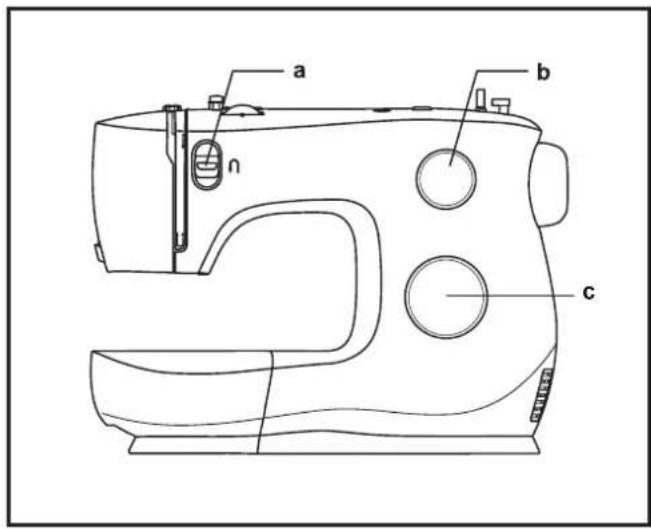
To select a stitch, simply turn the pattern selector dial. The pattern selector dial may be turned in either direction.
For straight stitch, select pattern " " with the pattern selector dial.
For zigzag stitch, select pattern " \~" with the pattern selector dial.
a. Reverse Sewing Lever
b. Stitch Length Dial
c. Pattern Selector Dial
text_image
0.5 1 2 3 4 0 STITCH LENGTH 1 2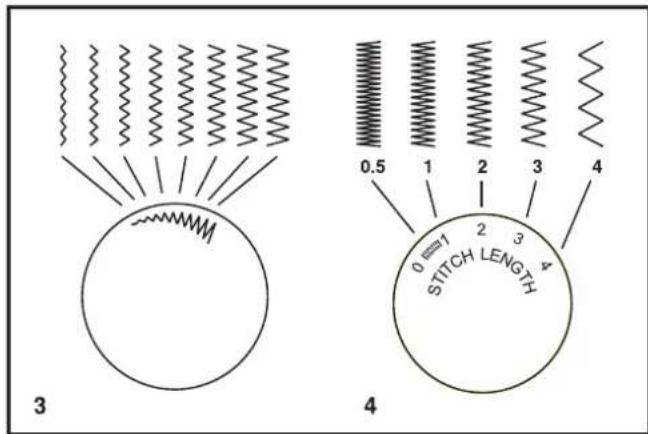
text_image
3 0.5 1 2 3 4 0 STITCH LENGTH 4□ Stitch Length Dial
Function of stitch length dial for when straight stitching
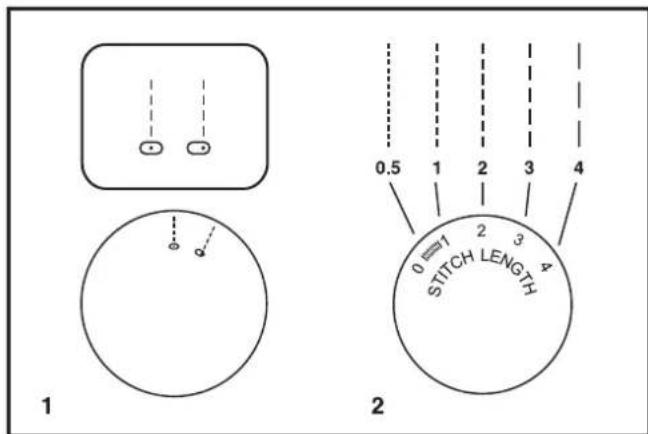
For straight stitch sewing, turn the Pattern Selector Dial to the straight stitch setting. (1)
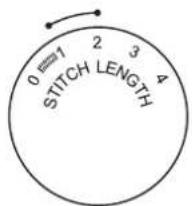
Turn the Stitch Length Dial, and the length of the individual stitches will decrease as the dial approaches "0". The length of the individual stitches will increase as the dial approaches "4". (2)
Generally speaking, use a longer stitch length when sewing heavier weight fabrics or when using a thicker needle or thread. Use a shorter stitch length when sewing lighter weight fabrics or when using a finer needle or thread.
Function of stitch length dial while zig-zag stitching
Turn the Pattern Selector Dial to " \~" . (3)
The density of zig-zag stitches increases as the setting of stitch length dial approaches "0".
Neat zig-zag stitches are usually achieved at "2.5" or below.
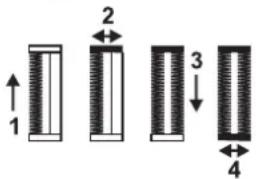
Dense zig-zag stitches are called satin stitches. (4)
natural_image
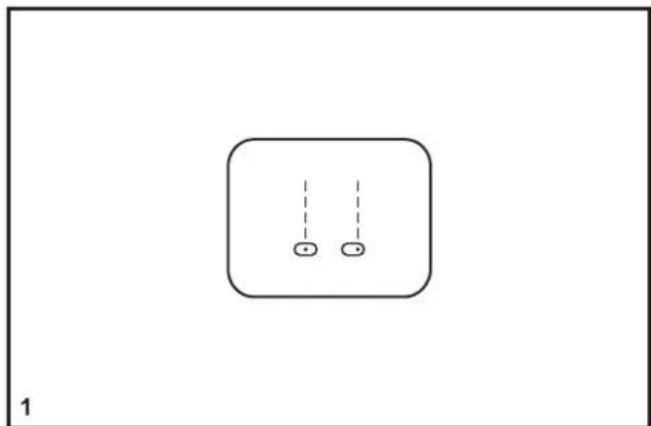
Simple diagram with two circles inside a rounded rectangle, no text or symbols present□ Sewing Straight Stitch
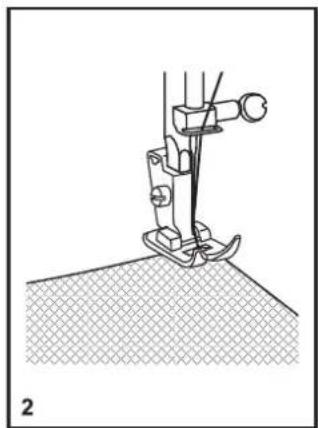
To begin sewing, set the machine for straight stitch. (1)
Place the fabric under the presser foot with the fabric edge lined up with the desired seam guide line on the needle plate. (2)
Lower the presser foot lifter, and then step on the foot control to start sewing. (3)
natural_image
Line drawing of a sewing machine needle stitching fabric (no text or symbols)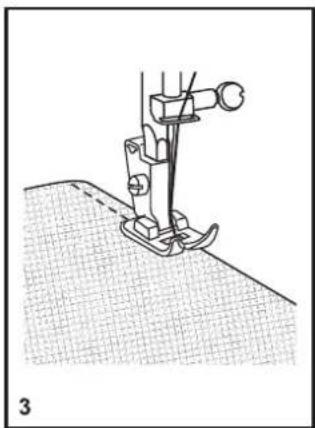
natural_image
Line drawing of a sewing machine needle stitching fabric (no text or symbols)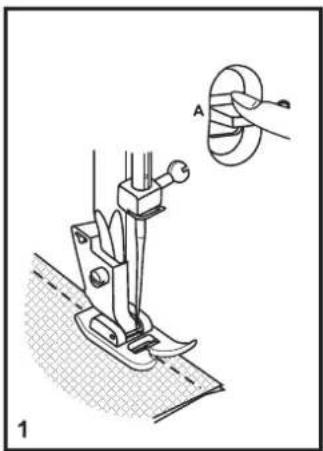
natural_image
Technical illustration of a sewing machine with a close-up inset showing a circular component labeled 'A' (no text or symbols present)
natural_image
Technical line drawing of a sewing machine needle and base mount (no text or symbols)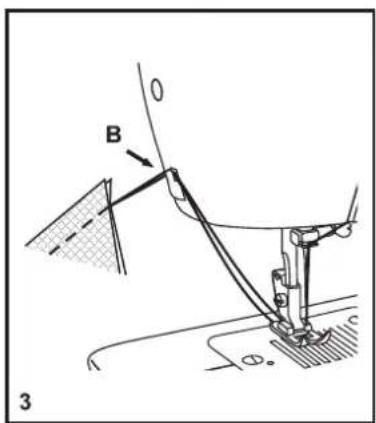
text_image
B 3□ Reverse Sewing
To secure the beginning and the end of a seam, press down the reverse sewing lever (A). Sew a few reverse stitches. Release the lever and the machine will sew forward again. (1)
□ Removing the Work
Turn the handwheel toward you (counterclockwise) to bring the thread take up lever to its highest position and the needle begins to descend, raise the presser foot and remove work behind the needle and presser foot. (2)
□ Cutting the Thread
Pull the threads under and behind the presser foot. Guide the threads to the side of the face plate and into thread cutter (B). Pull threads down to cut. (3)
text_image
0 1 2 3 4 STITCH LENGTH
natural_image
Simple line drawing of a mechanical component or bracket (no text or symbols)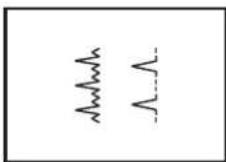
text_image
Technical diagram showing two mechanical assembly steps: top panel with rotation arrow and bottom panel with clamping mechanism.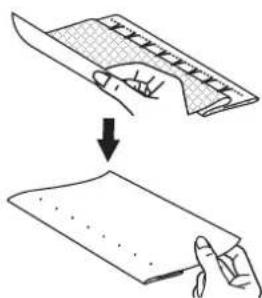
text_image
Diagram showing a hand holding a sheet of paper being folded into a blank sheet, with an arrow indicating the process.□ Blind Hem
For hems on curtains, trousers, skirts, etc.
Blind hem for stretch fabrics.
Blind hem for firm fabrics.
Note:
It takes practice to sew blind hems. Always make a sewing test first.
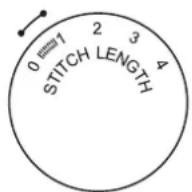
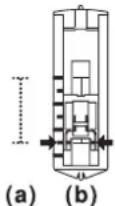
Set the stitch length dial with the range shown on the diagram at the right. Blind hems, however, are normally sewn with a longer stitch length setting.
Generally, a narrower stitch is used for lighter weight fabrics, and a wider stitch is used for heavier weight fabrics. Sew a test first to make sure the machine settings are appropriate for the fabric.
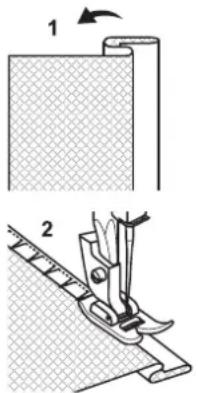
Blind Hem:
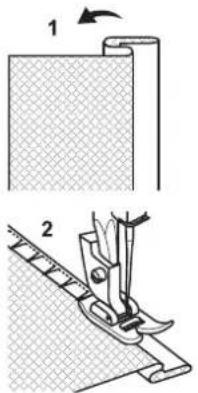
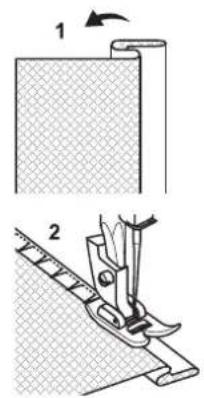
Turn up the hem to the desired width and press. Fold back (as shown in Fig. 1) against the right side of the fabric with the top edge of the hem extending about 7 mm. (1/4") to the right side of the folded fabric.
Start to sew slowly on the fold, making sure the needle touches slightly the folded top to catch one or two fabric threads. (2)
Unfold the fabric when hemming is completed and press.
Note:
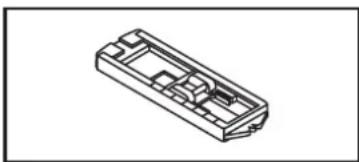
To make blind hem sewing even easier, use a blind hem foot, available from your SINGER ^® retailer.
natural_image
Isometric line drawing of a rectangular electronic component or housing (no text or symbols)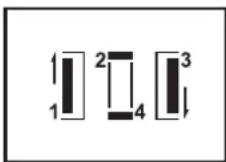
text_image
1 2 3 4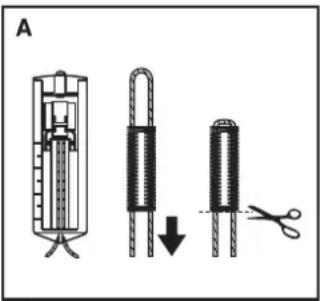
text_image
A□ Buttonholes
Prepare
- Take off the all purpose foot and attach the buttonhole foot.
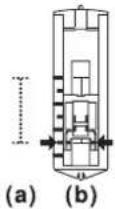
- Measure diameter and thickness of button and add 0.3 cm (1/8") for bar tacks to obtain correct buttonhole length; mark buttonhole length on fabric (a).
- Place fabric under the foot, so that marking on the buttonhole foot aligns with starting marking on fabric. Lower the foot, so that the buttonhole center line marked on the fabric aligns with the center of the buttonhole foot (b).
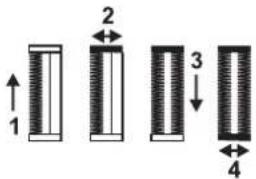
Adjust the stitch length dial in the " 🔊" range to set stitch density.
Note:
Density varies according to the fabric.
Always test sew a buttonhole on the fabric you are using to sew the buttonhole.
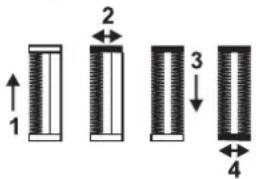
Follow the 4-step sequence changing from one step to another with the Pattern Selector Dial. When moving from step to step through the buttonhole process, be sure that the needle is raised before turning the Pattern Selector Dial to the next step. Take care not to sew too many stitches in steps 2 and 4. Use seam ripper and cut buttonhole open from both ends towards the middle.
Tips:
- Slightly reducing upper thread tension will produce better results.
- Use a stabilizer for fine or stretchy fabrics.
- It is advisable to use heavy thread or cord for stretch or knit fabrics. The zig-zag should sew over the heavy thread or cord. (A)
text_image
STITCH LENGTH 0 1 2 3 4 1 2 3 4□ Sewing on Buttons
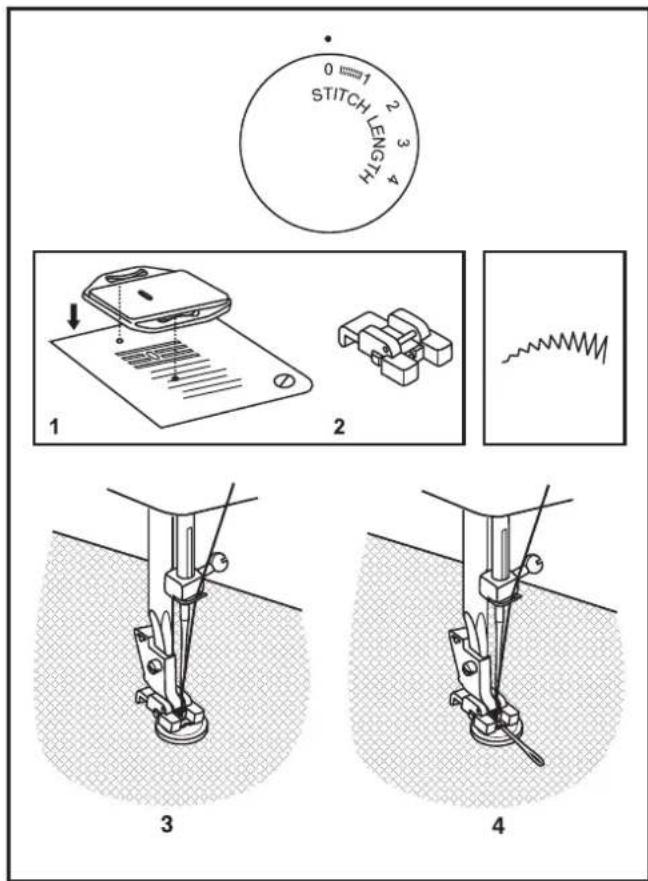
Install the darning plate. (1)
Change the all purpose foot to the button sewing foot. (2)
Set the stitch length to "0".
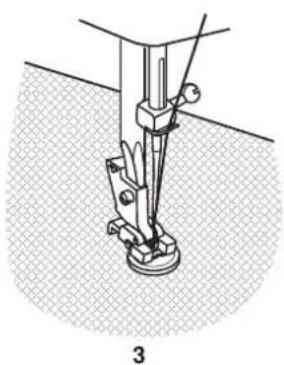
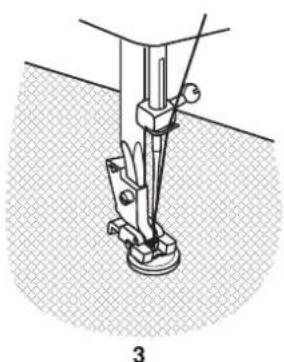
Place the button and fabric under the Button Sewing foot, as illustrated in (3).
Set the machine for zig-zag stitch. Adjust the dial until the needle moves from the left hole into the right hole of the button without interference. Turn the handwheel to check that the needle goes cleanly into the left and right holes of the button. Slowly sew on the button with about 10 stitches.
Raise the needle out of the fabric. Set the machine for straight stitch again, then sew a few securing stitches to finish.
If a shank is required, place a darning needle on top of the button and sew. (4)
For buttons with 4 holes, sew through the front two holes first, push the work forward and then sew through the back two holes.
text_image
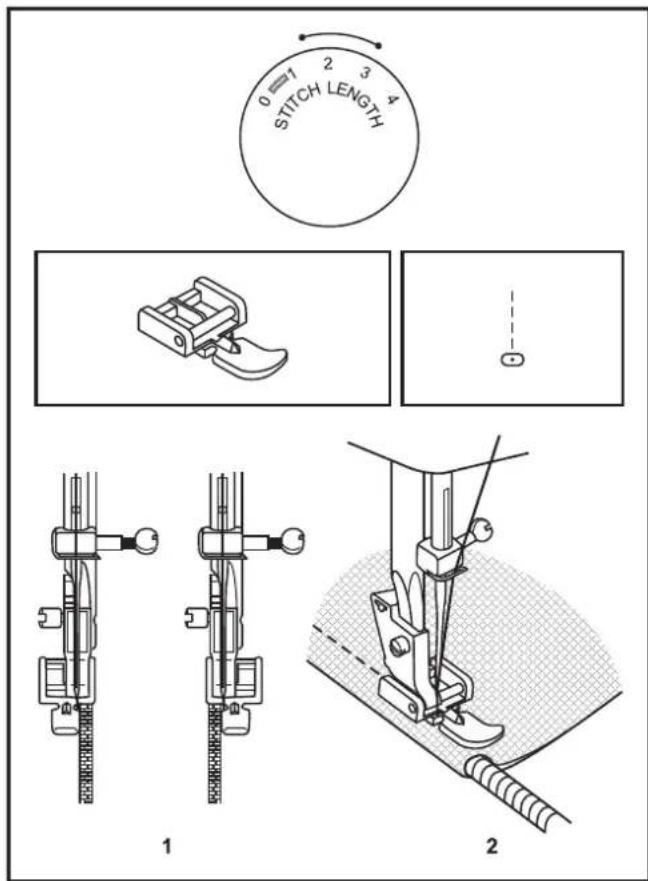
0 7 2 3 4 STITCH LENGTH 1 2□ Zippers and Piping
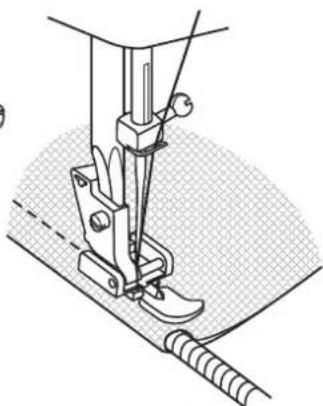
Set the machine as illustrated.
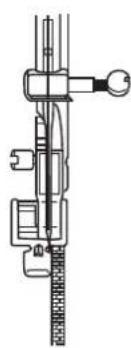
Change to zipper foot.
The zipper foot can be attached right or left, depending on which side of the foot you are going to sew. (1)
To sew past the zipper tab, lower the needle into the fabric, raise the presser foot and push the zipper tab behind the presser foot. Lower the foot and continue to sew.
It is also possible to sew a length of cord into a bias strip to form a "welt" or piping. (2)
natural_image
Line drawing of a sewing machine needle stitching a fabric, with hands operating the component (no text or symbols)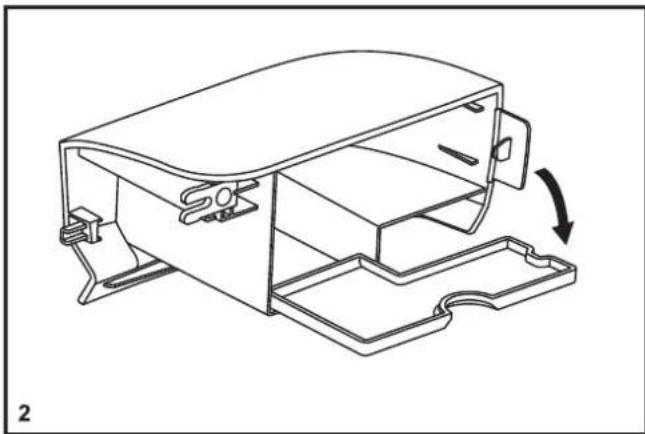
natural_image
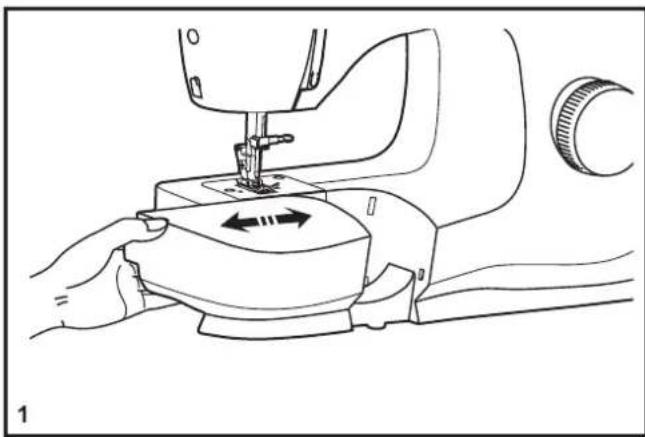
Technical line drawing of a mechanical housing component with an arrow indicating rotation (no text or symbols present)□ Installing the Removable Extension Table
Hold the removable extension table horizontally, and push it in the direction of the arrow. (1)
To remove the extension table, pull it toward the left.
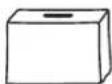
The inside of the removable extension table can be utilized as an accessory box.
To open, flip cover down as shown. (2)
text_image
e c 1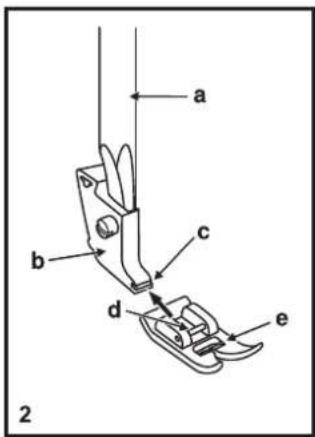
text_image
a b c d e 2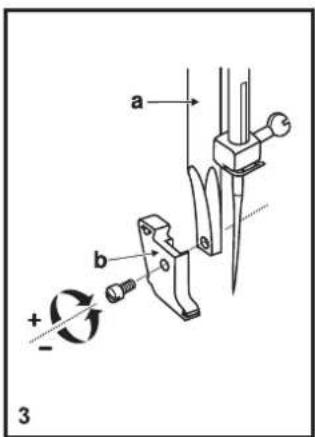
text_image
a b + - 3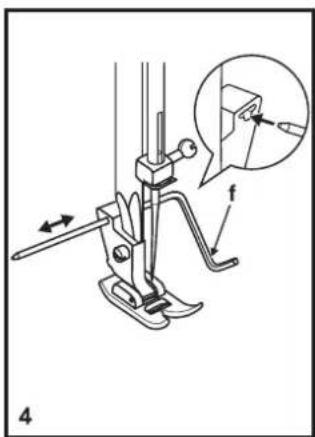
text_image
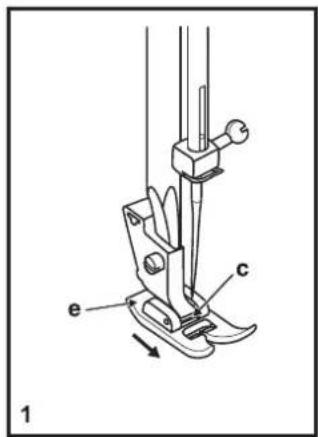
Technical diagram of a sewing machine with labeled parts and an inset showing a close-up view of the tool's tip.□ Changing the Presser Foot
Removing the presser foot
Push the presser foot (e) to disengage from the cut-out (c). (1)
Attaching the presser foot
Install the pin (d) of the presser foot (e) into the cut-out (c) of the presser foot holder. (2)
Removing and attaching the presser foot shank
Raise the presser bar (a) with the presser foot lifter.
Remove and attach the presser foot shank (b) as illustrated. (3)
Attaching the edge/ quilting guide
Attach the edge/quilting guide (f) in the slot as illustrated.
Adjust as needed for hems, pleats, quilting, etc. (4)
Attention:
Turn power switch to off ("O") when carrying out any of the above operations!
□ Needle/ Fabric/ Thread Chart
NEEDLE, FABRIC, THREAD SELECTION GUIDE
| NEEDLE SIZE | FABRICS THREAD | |
| 9-11 (70-80) | Lightweight fabrics-thin cottons, voile, silk, muslin, interlocks, cotton knits, tricots, jerseys, crepes, woven polyester, shirt & blouse fabrics. | Light-duty thread in cotton, nylon, polyester or cotton wrapped polyester. |
| 11-14 (80-90) | Medium weight fabrics-cotton, satin, kettlecloth, sailcloth, double knits, lightweight woolens. | Most threads sold are medium size and suitable for these fabrics and needle sizes.Use polyester threads on synthetic materials and cotton on natural woven fabrics for best results. |
| 14 (90) | Medium weight fabrics-cotton duck, woolen, heavier knits, terrycloth, denims. | |
| 16 (100) | Heavyweight fabrics-canvas, woolens, outdoor tent and quilted fabrics, denims, upholstery material (light to medium). | Always use the same thread on top and bottom. |
| 18 (110) | Heavy woolen, overcoat fabrics, upholstery fabrics, some leathers and vinyls. | Heavy duty thread. |
IMPORTANT: Match needle size to thread size and weight of fabric.
NEEDLE, FABRIC SELECTION
| NEEDLES EXPLANATION TYPE OF FABRIC | ||
| SINGER® 2020 | Standard sharp needles. Sizes range thin to large. 9 (70) to 18 (110). | Natural woven fabrics-wool, cotton, silk, etc.Not recommended for double knits. |
| SINGER® 2045 | Ball point needle, scarfed. 9 (70) to 18 (110). | Natural and synthetic woven fabrics, polyester blends.Knits-polyesters, interlocks, tricot, single and double knits. Also sweater knits, Lycra®, swimsuit fabric, elastic. |
| SINGER® 2032 | leather needles. 12 (80) to 18 (110). | Leather, vinyl, upholstery.(Leaves smaller hole than standard large needle.) |
Note:
- For best sewing results always use genuine SINGER ^® needles.
- Replace needle often (approximately every other garment) and/or at first thread breakage or skipped stitches.
natural_image
Line drawing of a device with a slide and arrow indicating motion (no text or symbols)□ Darning Plate
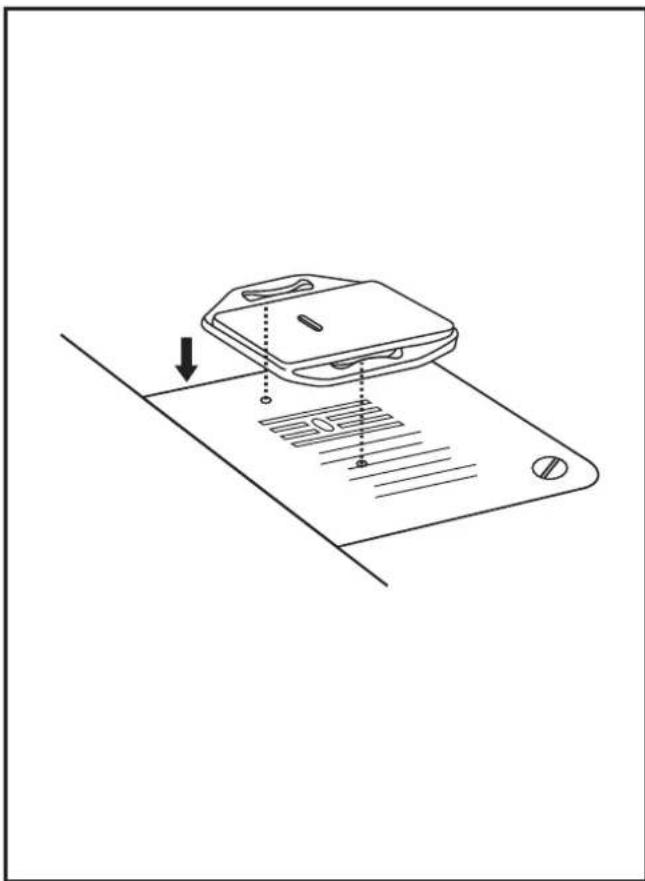
For certain types of work, (e.g. darning or free-hand embroidery), the darning plate must be used.
Install the darning plate as illustrated.
For normal sewing, remove the darning plate.
For free-motion sewing it is recommended to use a darning/embroidery foot, available as an optional accessory from authorized SINGER ^® retailers.
text_image
D A C 1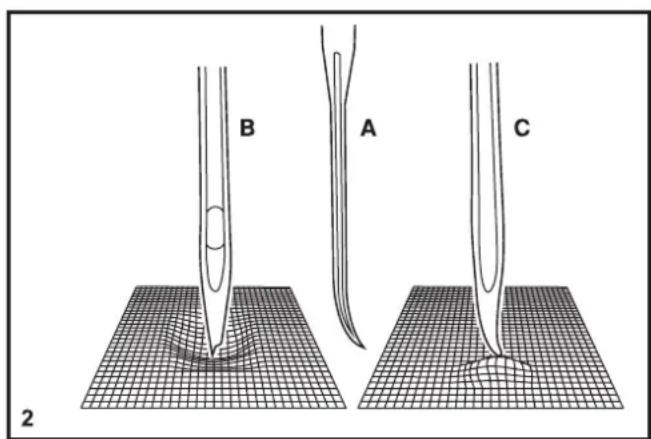
text_image
B A C 2□ Inserting the Needle
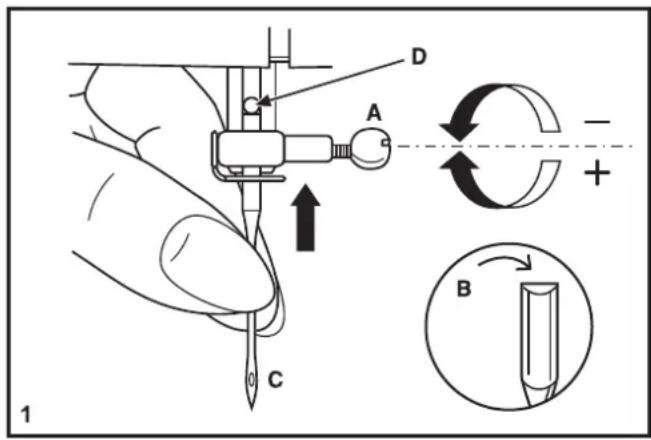
Change the needle regularly, especially if it is showing signs of wear and causing problems. For best sewing results always use SINGER® Brand Needles.
Insert the needle as illustrated as follows:
A. Loosen the needle clamp screw and tighten again after inserting the new needle. (1)
B. The flat side of the shaft should be towards the back.
C/D. Insert the needle as far up as it will go.
Attention:
Turn power switch to off ("O") before inserting or removing the needle.
Needles must be in perfect condition. (2)
Problems can occur with:
A. Bent needles
B. Damaged points
C. Blunt needles
natural_image
Technical line drawing of a sewing machine needle and base (no text or symbols)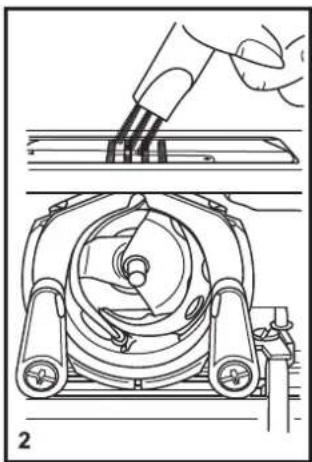
natural_image
Technical line drawing showing a hand using a tool to press or install a mechanical component, with no visible text or symbols.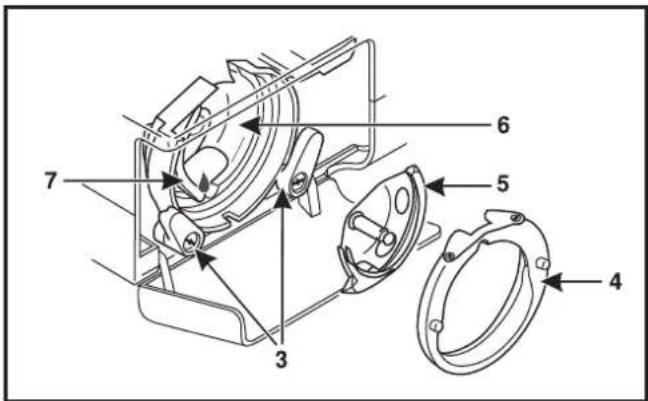
text_image
Technical diagram of a mechanical device with numbered components for identification□ Maintenance
Attention:
Disconnect the machine from the electrical supply by removing the plug from the main socket. When cleaning the machine, it must always be disconnected from the electrical supply.
Remove the needle plate:
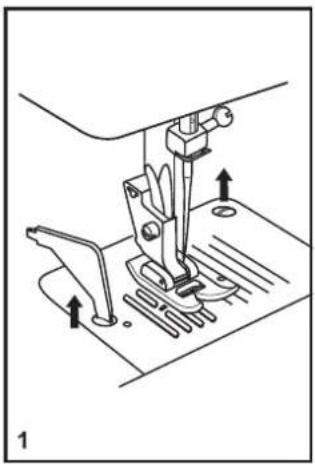
Turn the handwheel until the needle is fully raised. Open the hinged front cover and unscrew the needle plate screws with the screw driver. (1)
Cleaning the feed teeths:
Use the brush supplied to clean the whole area. (2)
Cleaning and lubricating the hook:
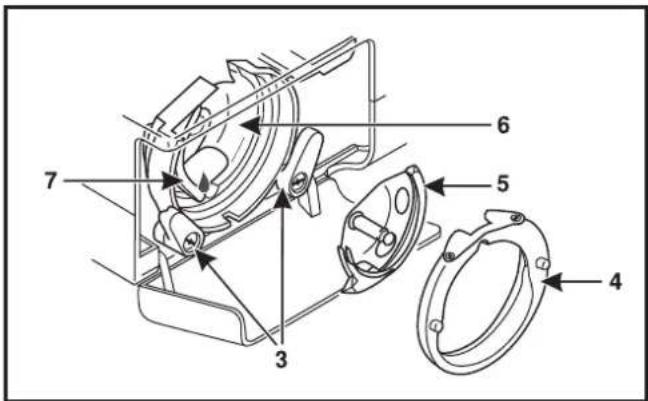
Remove the bobbin case. Snap the two hook retaining arms (3) outwards. Remove the hook race cover (4) and the hook (5) and clean with a soft cloth. Lubricate at the point (6) (1-2 drops) with sewing machine oil. Turn the handwheel until the hook race (7) is in the left position. Replace the hook (5). Replace the hook race cover and snap back the two hook retaining arms. Insert the bobbin case and bobbin and replace the needle plate.
Important:
Fabric lint and threads must be removed regularly. Your machine should be serviced at regular intervals at one of our service centers.
□ Troubleshooting Guide
Problem Cause Correction
| Upper thread breaks | 1. The machine is not threaded correctly. 1. Rethread the machine.2. The thread tension is too tight. 2. Reduce the thread tension. (lower number)3. The thread is too thick for the needle. 3. Select a larger needle.4. The needle is not inserted correctly.5. The thread is wound around the spool holder pin. 5. Remove the reel and wind thread onto reel.6. The needle is damaged. 6. Replace the needle. | |
| Lower thread breaks | 1. The bobbin case is not inserted correctly.2. The bobbin case is threaded wrong. 2. Check both bobbin and bobbin case. | 1. Remove and reinsert the bobbin case and pull on the thread. The thread should pull easily. |
| Skipped stitches | 1. The needle is not inserted correctly.2. The needle is damaged. 2. Insert a new needle.3. The wrong size or type of needle has been used.4. The foot is not attached correctly. | 1. Remove and reinsert needle. (flat side towards the back)3. Choose a needle to suit the thread and fabric.4. Check and attach correctly. |
| Needle breaks | 1. The needle is damaged.2. The needle is not correctly inserted.3. Wrong needle size for the fabric.4. The wrong foot is attached. | 1. Insert a new needle.2. Insert the needle correctly. (flat side towards the back)3. Choose a needle to suit the thread and fabric.4. Select the correct foot. |
| Loose stitches | 1. The machine is not correctly threaded.2. The bobbin case is not correctly threaded.3. Needle/ fabric/ thread combination is wrong.4. Thread tension wrong. | 1. Check the threading.2. Thread the bobbin case as illustrated.3. The needle size must suit the fabric and thread.4. Correct the thread tension. |
| Seams gather or pucker | 1. The needle is too thick for the fabric.2. The stitch length is incorrectly adjusted.3. The thread tension is too tight. 3. Loosen the thread tension. | 1. Select a finer needle.2. Readjust the stitch length. |
| Uneven stitches, uneven feed | 1. Poor quality thread.2. The bobbin case is incorrectly threaded.3. Fabric has been pulled. | 1. Select a better quality thread.2. Remove bobbin case, thread and insert correctly.3. Do not pull on the fabric while sewing, let it be drawn through by the machine. |
| The machine is noisy | 1. Lint or oil have collected on the hook or needlebar.2. The needle is damaged. | 1. Clean the hook and feed teeth as described.2. Replace the needle. |
| The machine jams | Thread is caught in the hook. | Remove the upper thread and bobbin case, turn the handwheel backwards and forwards by hand and remove the thread. |
Please note that on disposal, this product must be safely recycled in accordance with relevant National legislation relating to electrical/electronic products. Do not dispose of electrical appliances as unsorted municipal waste, use separate collection facilities. Contact your local government for information regarding the collection systems available. When replacing old appliances with new ones, the retailer may be legally obligated to take back your old appliance for disposal free of charge.
If electrical appliances are disposed of in landfills or dumps, hazardous substances can leak into the groundwater and get into the food chain, damaging your health and well-being.
We reserve the right to change the machine equipment and the assortment of accessories without prior notice, or make modifications to the performance or design. Such modifications, however, will always be to the benefit of the user and the product.
INTELLECTUAL PROPERTY
Singer, and the Cameo "S" Design are exclusive trademarks of The Singer Company Limited S.à.r.l. or its Affiliates.
471061663 • English ©2019 The Singer Company Limited S.à.r.l. or its Affiliates. All rights reserved.
natural_image
Line drawing of a sewing machine with no text or symbolsM2400 / M2405

SINGER®
دليل الاستعمال
text_image
Technical diagram of a sewing machine with numbered parts for identificationtext_image
Technical diagram of a sewing machine with numbered parts and an exploded view of its internal components.text_image
Diagram showing electrical connections to a device with labeled components and directional arrows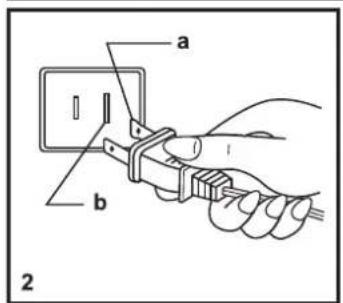
text_image
a b 2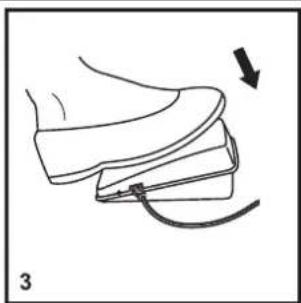
natural_image
Line drawing of a shoe being adjusted with a cable, showing the base and seat (no text or symbols)natural_image
Line drawing of a sewing machine with a clamped arm and handle (no text or symbols)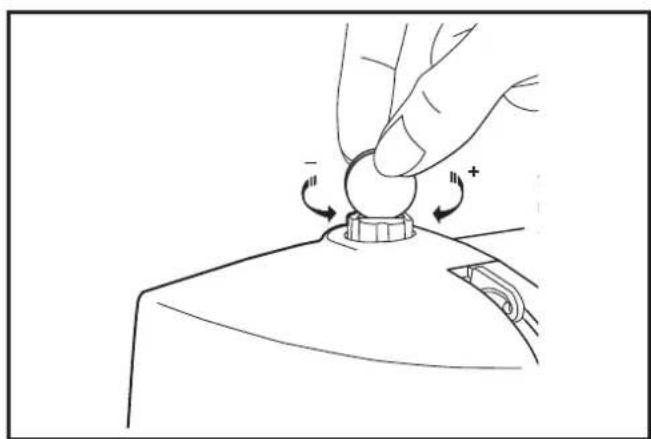
natural_image
Line drawing of a hand pressing a button on a device (no text or symbols)رافعة القدم الضاغطة
natural_image
Technical line drawing of a cylindrical tank with internal components and directional arrows (no text or labels)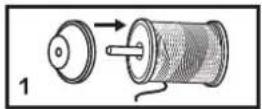
natural_image
Illustration of two hands tying a knot with arrows indicating direction (no text or symbols)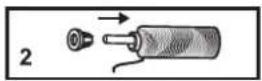
text_image
Diagram showing a hand holding a small object with arrows indicating motion or force, labeled with number 4.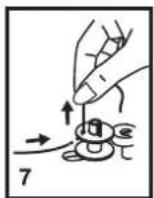
لف المكوك
natural_image
Line drawing of a sewing machine needle being inserted into a slot, with a hand pulling the part (no text or symbols)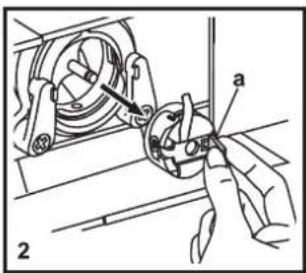
text_image
Technical diagram showing mechanical assembly with labeled parts and directional arrow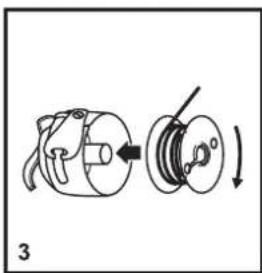
natural_image
Diagram of a mechanical device with a rotating wheel and housing, showing a left-side assembly and a right-side rotation (no text or symbols)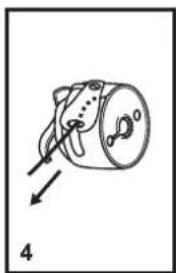
natural_image
Simple line drawing of a mechanical component with an arrow indicating direction (no text or symbols)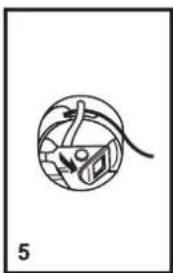
natural_image
Simple line drawing of a mechanical or electrical component with no text or symbols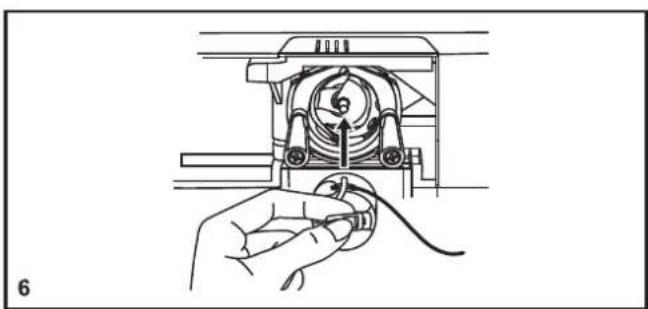
natural_image
Line drawing of a hand holding a cable inside a mechanical device (no text or symbols)natural_image
Line drawing of a garment front panel with handle, gasket, and adjustment knob (no text or symbols)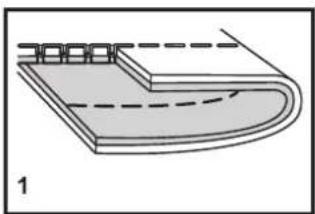
natural_image
Diagram of a layered structure with dashed lines indicating internal layers (no text or symbols)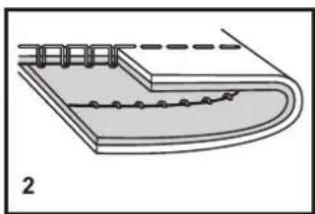
natural_image
Diagram of a layered structure with a curved base and rectangular top, showing internal components and dashed lines indicating hidden edges (no text or symbols)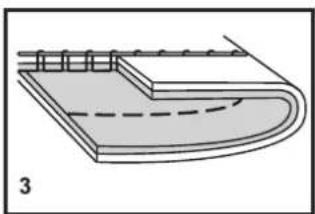
natural_image
Diagram of a layered structure with a dashed line indicating a seam or seam, no text or symbols present.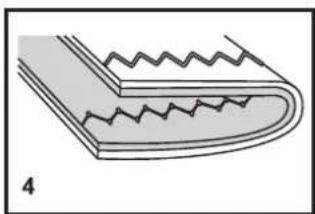
natural_image
Diagram of a layered structure with zigzag edges and a curved base, labeled '4' (no text or symbols on the diagram itself)درجة شد Highway
درجة شد Chipط العوي
text_image
Technical diagram of a sewing machine with numbered parts for identification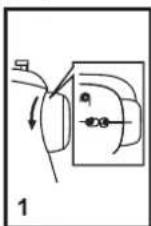
تعبنة高低ط العلوي
natural_image
Line drawing of a sewing machine with hands operating the needle and valve (no text or symbols)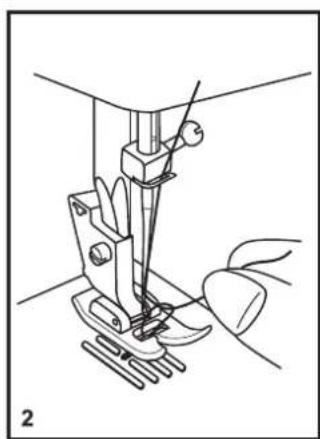
natural_image
Line drawing of a sewing machine needle and foot, showing mechanical components without any text or symbols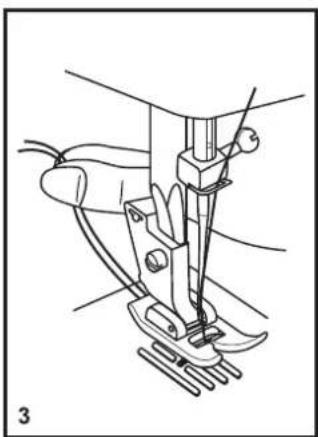
natural_image
Line drawing of a sewing machine needle and foot (no text or symbols)رفع خيط المكوك
natural_image
Simple diagram with two circles inside a rounded rectangle, no text or symbols presentالخياطة المستقيمة
natural_image
Line drawing of a sewing machine needle stitching fabric (no text or symbols)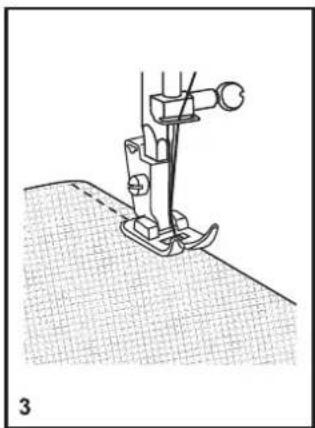
natural_image
Line drawing of a sewing machine needle stitching fabric (no text or symbols)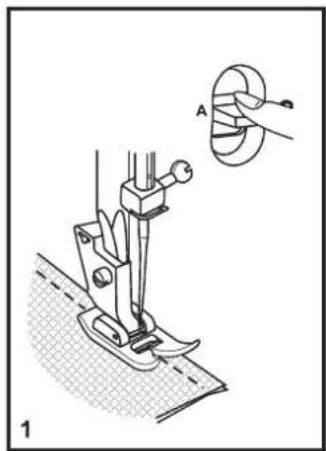
natural_image
Technical illustration of a sewing machine with a close-up inset showing the blade and handle (no text or symbols)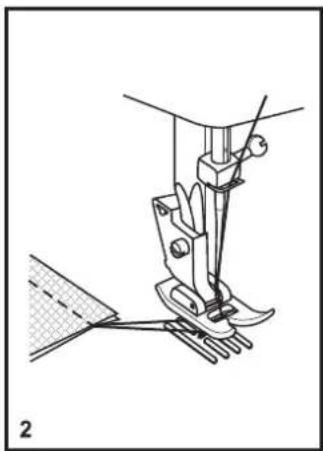
natural_image
Technical line drawing of a sewing machine needle and base mount (no text or symbols)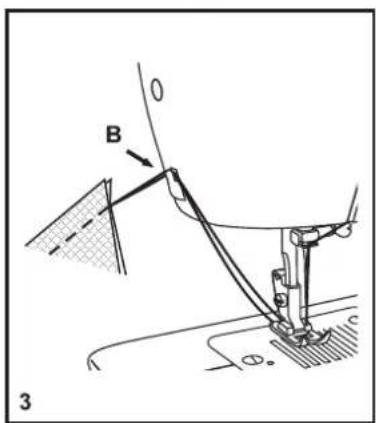
text_image
B 3الخياطة الخلفية
natural_image
Simple line drawing of a mechanical component or bracket (no text or symbols)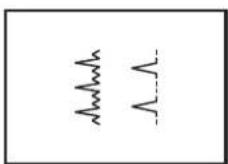
text_image
Technical diagram showing two mechanical assembly steps: top panel with rotation arrow and bottom panel with clamping mechanism.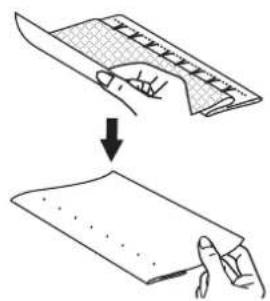
natural_image
Illustration showing a hand holding a folded paper or sheet under a curved cover, with an arrow indicating the process (no text or symbols present)الدرزة المخفية
natural_image
Isometric line drawing of a rectangular electronic component or housing (no text or symbols)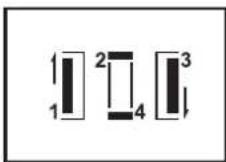
text_image
1 2 3 4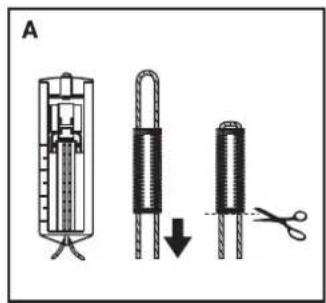
text_image
Aخياطة العروة
تحضير
text_image
Diagram showing a device with labeled parts and a separate mechanical component, likely illustrating a manufacturing or assembly process.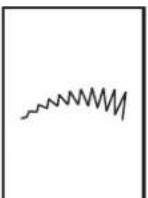
natural_image
Diagram of a sewing machine needle inserted into a base, showing mechanical components and base (no text or symbols)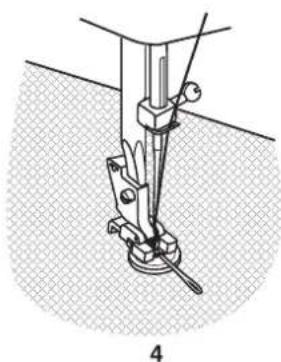
natural_image
Mechanical assembly diagram showing a lever mechanism with weights and a base, no text or symbols presentخياطة الأزرار
natural_image
Technical line drawing of a mechanical clamp or bracket component (no text or symbols)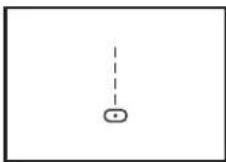
natural_image
Technical line drawing of a mechanical assembly with no visible text or symbols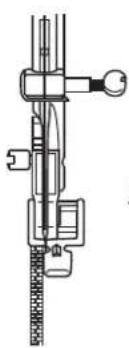
natural_image
Technical line drawing of a mechanical assembly with no visible text or symbols1
natural_image
Technical line drawing of a sewing machine needle and fabric (no text or symbols)2
السحابات وال bórimات
natural_image
Line drawing of a sewing machine needle stitching a fabric, with hands operating the component (no text or symbols)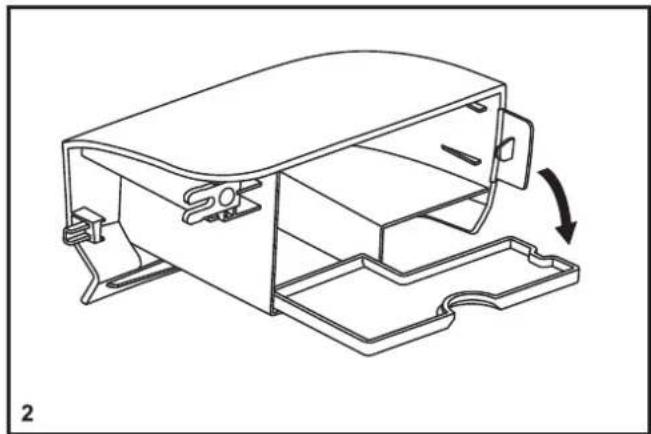
natural_image
Technical line drawing of a mechanical housing component with a curved arrow indicating rotation (no text or symbols)text_image
Technical diagram of a sewing machine with labeled parts and an inset showing a close-up view of the tool's tip.تغير القدم الضغطة
فك القدم الضاغطة
natural_image
Line drawing of a device with a downward arrow and dotted lines indicating movement or alignment (no text or symbols)مرآة الرتي
natural_image
Technical line drawing of a sewing machine needle and base (no text or symbols)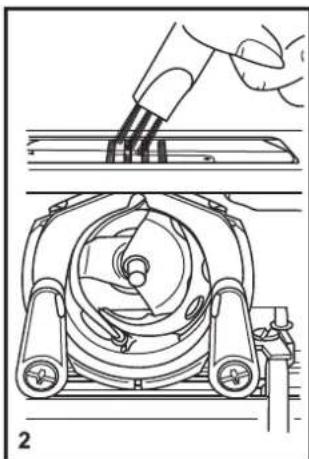
natural_image
Technical line drawing showing a hand using a tool to press or install a mechanical component, with no visible text or symbols.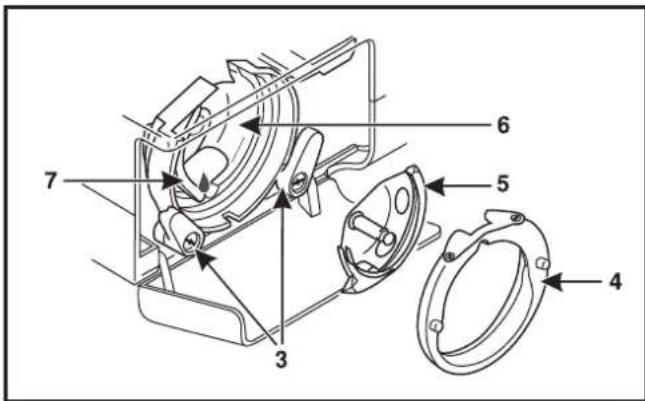
text_image
Technical diagram of a mechanical device with numbered components for identificationالصيانة
natural_image
Line drawing of a vintage sewing machine (no text or symbols present)
SINGER®
Manuel d'InstructionM2400
text_image
Technical diagram of a sewing machine with numbered parts for identificationtext_image
Technical diagram of a sewing machine with numbered parts and a separate circuit breaker labeled 12 and 13.text_image
Diagram showing connections between a power outlet, plug-in socket, and electrical switch with labeled components A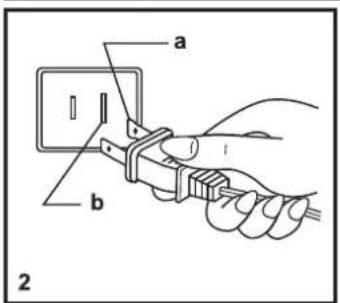
text_image
a b 2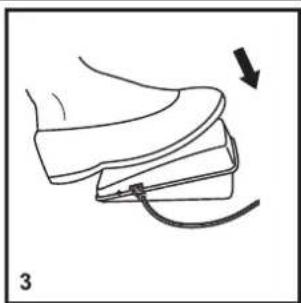
natural_image
Line drawing of a shoe being adjusted with a curved arrow indicating motion (no text or symbols)natural_image
Line drawing of a sewing machine with a clasp and base, showing no text or symbols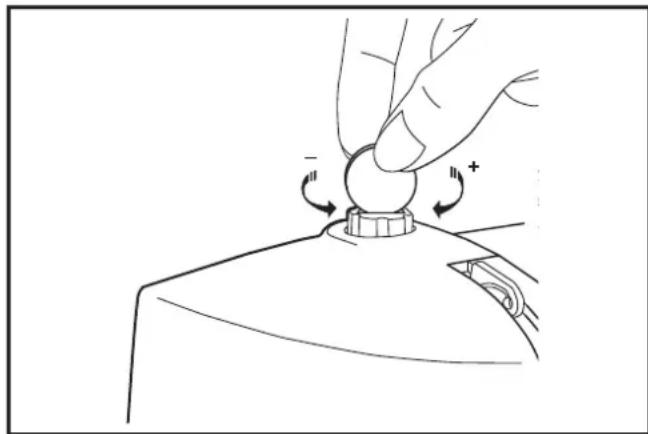
natural_image
Illustration of a hand pressing a button on a device (no text or symbols)Accessoires standards
natural_image
Technical line drawing of a cylindrical tank with internal components and flow indicators (no text or labels)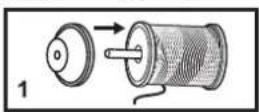
natural_image
Illustration of two hands tying a knot with arrows indicating direction (no text or symbols)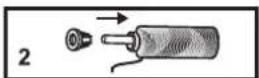
text_image
Diagram showing a hand holding a device with arrows indicating motion or movement, labeled with number 4.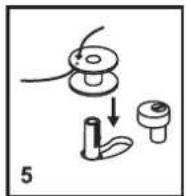

natural_image
Line drawing of a sewing machine needle with a hand operating it, showing a downward arrow indicating force or direction (no text or symbols present)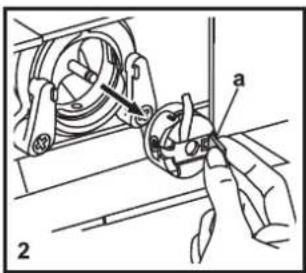
text_image
Technical diagram showing mechanical assembly with labeled parts 'a' and numbered marker '2'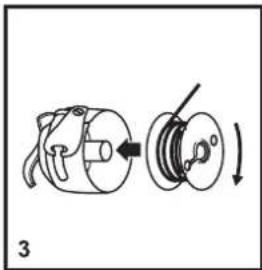
natural_image
Diagram of a mechanical device with a rotating shaft and housing, showing a curved arrow indicating rotation (no text or symbols present)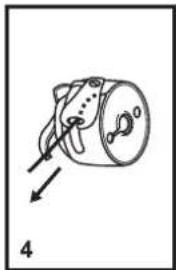
natural_image
Simple line drawing of a mechanical component with an arrow indicating direction (no text or symbols)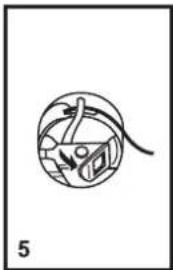
natural_image
Simple line drawing of a globe with arrows indicating direction, no text or symbols present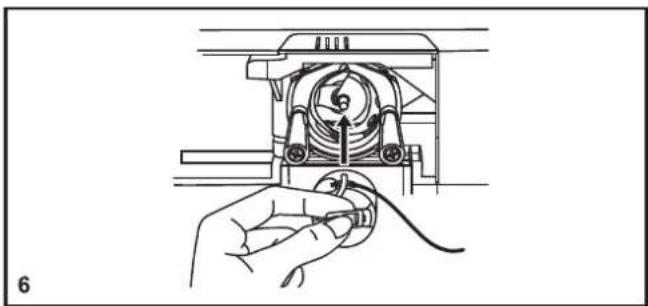
natural_image
Line drawing of a hand holding a cable inserted into a mechanical device (no text or symbols)□ Insertion de la canette
natural_image
Line drawing of a washing machine handle and side panel (no text or symbols)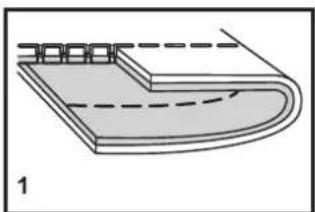
natural_image
Diagram of a curved mechanical component with dashed lines indicating hidden edges (no text or symbols)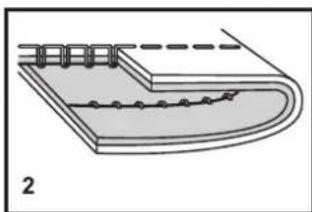
natural_image
Diagram of a layered structure with a dashed line and circular elements, labeled '2' (no text or symbols on the diagram itself)
natural_image
Diagram of a layered structure with a dashed curved line indicating a seam or layer (no text or symbols present)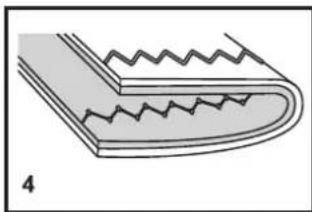
natural_image
Diagram of a corrugated metal strip with zigzag grooves, labeled '4' (no text or symbols on the diagram itself)□ Tension du fil
text_image
Technical diagram of a sewing machine with numbered parts for identification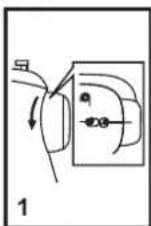
natural_image
Line drawing of a sewing machine with hands operating the needle and handle (no text or symbols)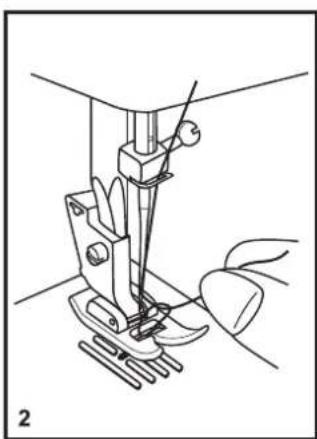
natural_image
Line drawing of a sewing machine needle and foot, showing mechanical components without any text or symbols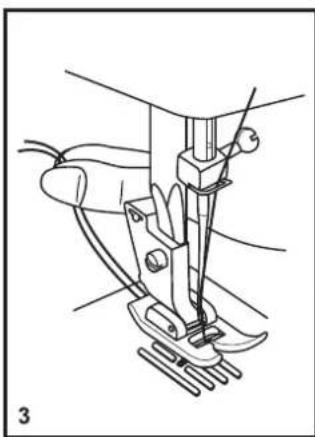
natural_image
Line drawing of a sewing machine needle and foot (no text or symbols)natural_image
Simple diagram with two circles inside a rounded rectangle, no text or symbols presentnatural_image
Line drawing of a sewing machine needle stitching fabric (no text or symbols)
natural_image
Line drawing of a sewing machine needle stitching fabric (no text or symbols)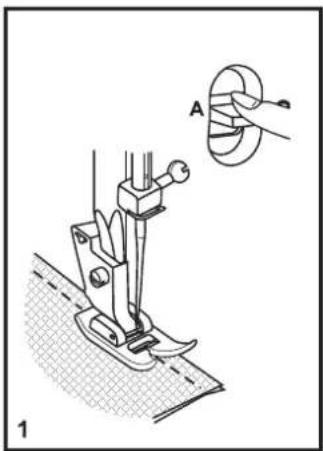
natural_image
Technical illustration of a sewing machine with a close-up inset showing a circular component labeled A (no text or symbols present)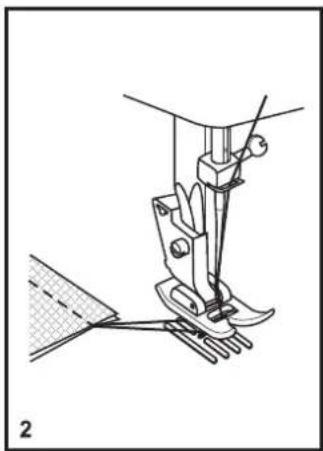
natural_image
Technical line drawing of a sewing machine needle and base mount (no text or symbols)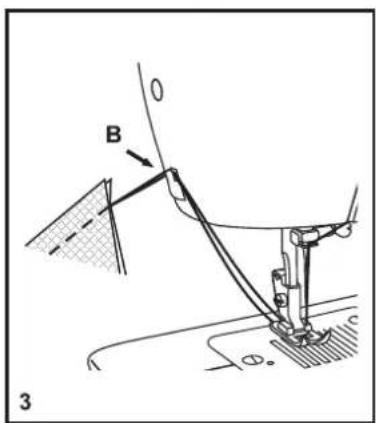
text_image
B 3natural_image
Simple line drawing of a mechanical component or bracket (no text or symbols)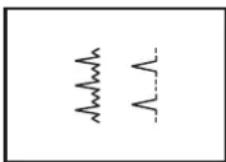
text_image
Technical diagram showing two mechanical assembly steps: top panel with rotation arrow and bottom panel with clamping mechanism.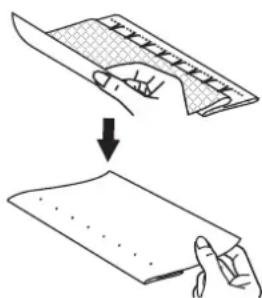
text_image
Diagram showing a hand holding a flat sheet with a ruler, followed by a drop and then a blank sheet with dots.□ Ourlet invisible
natural_image
Isometric line drawing of a rectangular electronic component with internal slots (no text or symbols)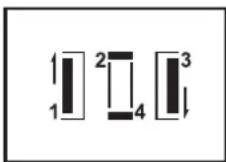
text_image
1 2 3 4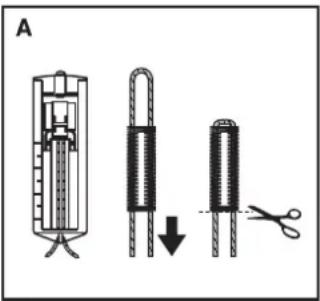
text_image
Atext_image
Diagram showing a device with a document and its corresponding 3D model of a mechanical assembly, labeled with parts 1 and 2.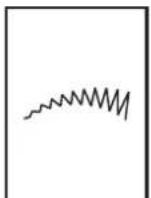
natural_image
Mechanical assembly diagram showing a lever mechanism with a base and pivot point, no text or symbols present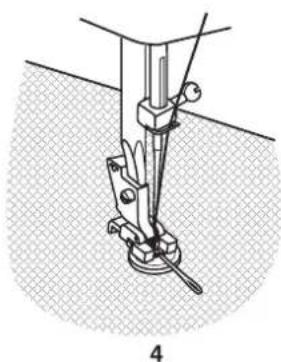
natural_image
Mechanical assembly diagram showing a clamp or bracket inserted into a socket, with no visible text or symbols.□ Couture de boutons
natural_image
Line drawing of a sewing machine needle stitching a fabric, with hands operating the component (no text or symbols)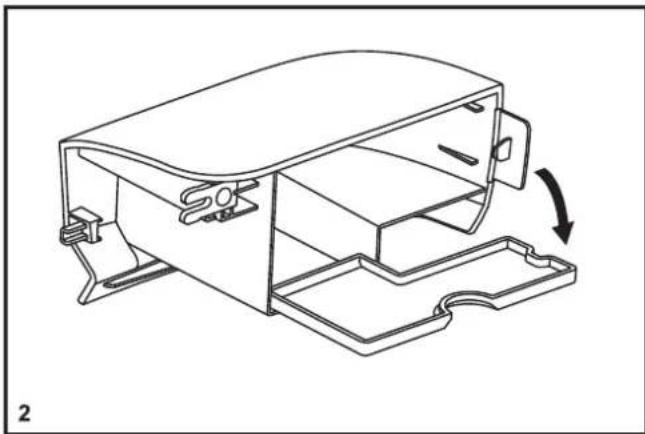
natural_image
Technical line drawing of a mechanical housing component with an arrow indicating rotation (no text or symbols present)□ Installation du bras amovible
text_image
Technical diagram of a sewing machine with labeled parts and an inset showing a close-up view of the tool's tip.natural_image
Line drawing of a device with a slide and arrow indicating motion (no text or symbols)□ Plaque à repriser
natural_image
Technical line drawing of a sewing machine needle and base plate (no text or symbols)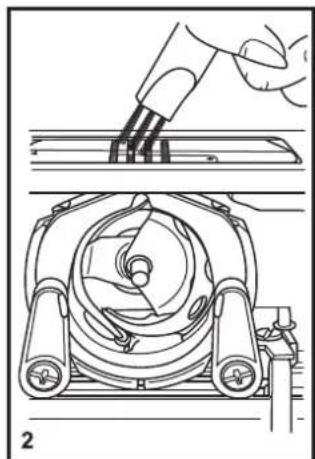
natural_image
Technical line drawing of a mechanical device with a hand holding a tool, showing internal components and assembly (no text or symbols)