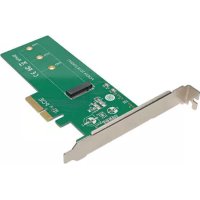
PCE1M2PX4 - PCI card Tripp Lite - Free user manual and instructions
Find the device manual for free PCE1M2PX4 Tripp Lite in PDF.


| Product Type | PCI Express M.2 NGFF PCIe SSD Adapter Card (M-Key) |
| Brand | Tripp Lite |
| Model | PCE1M2PX4 |
| Host Interface | PCI Express x4 (compatible with x4, x8, x16) |
| SSD Interface | M.2 NGFF PCIe (M-key) |
| Supported M.2 Form Factors | 2242, 2260, 2280 |
| PCIe Compatibility | PCIe 3.0, backward compatible with PCIe 2.0 and PCIe 1.0 |
| Power | No external power required |
| Compatible Operating Systems | Windows (XP and later), Mac (OS X 10.0 and later) |
| Operating Temperature | 10 to 50 °C (50 to 122 °F) |
| Operating Humidity | 10 to 80 % RH |
| Package Contents | PCE1M2PX4 card, screws (x2), crimp nut, user manual |
| Warranty | One-year limited warranty |
| Primary Use | Add high-speed internal storage via M.2 PCIe SSD |
| Installation | Requires an available PCIe slot (x4, x8, or x16) |
| SSD Compatibility | M.2 NGFF PCIe SSD with M-key or B+M-key (not compatible with M.2 SATA SSD) |
| Handling Precautions | Use antistatic wrist strap, handle by edges |
| Maintenance | No special maintenance required |
| Repairability | Repair under warranty by Tripp Lite |
Frequently Asked Questions - PCE1M2PX4 Tripp Lite
User questions about PCE1M2PX4 Tripp Lite
0 question about this device. Answer the ones you know or ask your own.
Ask a new question about this device
Download the instructions for your PCI card in PDF format for free! Find your manual PCE1M2PX4 - Tripp Lite and take your electronic device back in hand. On this page are published all the documents necessary for the use of your device. PCE1M2PX4 by Tripp Lite.
USER MANUAL PCE1M2PX4 Tripp Lite
Register your product for quicker service and ultimate peace of mind. You could also win an ISOBAR6ULTRA surge protector—a \$100 value!
www.tripplite.com/warranty


1111 W. 35th Street, Chicago, IL 60609 USA www.tripplite.com/support
Copyright © 2017 Tripp Lite. All rights reserved.
Product Features
- Enhance your PC's speed and increase internal storage by adding an M.2 PCIe SSD (M-Key) adapter
• Supports 2242, 2260 and 2280 M.2 drive types - PCI Express 4-Lane (x4) interface is compatible with (x4), (x8) and (x16) slots
- PCIe M.2 SSD speeds provide ultra-fast data access to your computer
- Install your OS on your M.2 PCIe drive, while using larger platter drives for bulk storage
- Compatible with PCIe 3.0 motherboards; backward compatible with PCIe 2.0 and PCIe 1.0
- Plug-and-play; no software or drivers required
• No external power required
Package Contents
- PCE-1M2-PX4
- Screws (x2)
- SSD standoff nut
- Owner's Manual
System Requirements
- Computer with an available PCI Express (PCIe) expansion slot (x4, x8, x16)
- M.2 NGFF PCIe Drive with an M-Key or B + M-Key connector; not compatible with M.2 NGFF SATA SSDs
- Compatible with Windows® (XP and later), Mac® (OS X® 10.0 and later)
• Supports 2242, 2260 and 2280 M.2 drive types
Installation
Notes:
- PCI Express cards are static sensitive devices that require proper handling. An Anti-Static ESD Wrist Strap (such as Tripp Lite's P999-000) or similar device should always be used when handling.
- Handle the card with care when installing, holding it by the edges and not the PCIe interface connectors.
- When disconnecting the drive, go through the proper disconnection steps of your operating system to safely remove it. Removing the drive prior to proper disconnection can result in losing or corrupting data stored on the drive.
-
If your drive has not been formatted yet, you will first need to format it using your computer's disk management utility in order to copy and access files.
-
Place your SSD next to the M.2 SSD connector on the PCIe adapter, matching up the drive installation holes. Insert the standoff into the hole that matches the size of your drive. Secure the standoff to the board using one of the included screws and nut.
-
Slide the M.2 connector on the SSD drive into the M.2 receptacle on the PCIe adapter.
Note: The connector on the M.2 SSD is keyed so the drive will only fit one way.
-
Hold down the drive toward the mounting standoff, and secure it in place using the second included screw. Your M.2 drive is now installed.
-
Turn off the computer you are installing the PCIe card in. Unplug its power cord and disconnect all peripheral devices (e.g. monitor, keyboard, mouse, printer, etc.) from it.
-
Referring to your computer's technical documentation, remove the cover from your computer.
-
Locate an available PCI Express slot (x4, x8 and x16 slots supported). Remove the metal bracket from the back of the computer to allow for insertion of the card.
Installation
- Gently insert the PCIe interface connector on the adapter into the PCIe slot, making sure it connects securely and evenly.
- Fasten the metal bracket to the back of the computer.
- Place the cover back onto the computer, and re-connect its power cords and peripheral devices. Your adapter is now ready to use.
Specifications
| Drive Connection M.2 NGFF PCIe (M-Key) |
| PCIe Card Connection (x4) PCI Express—Male |
| Supported SSD 2242, 2260, 2280 |
| Operating Temperature 50° to 122°F (10° to 50°C) |
| Operating Humidity 10% to 80% RH |
Warranty and Product Registration
1-Year Limited Warranty
TRIPP LITE warrants its products to be free from defects in materials and workmanship for a period of one (1) year from the date of initial purchase. TRIPP LITE's obligation under this warranty is limited to repairing or replacing (at its sole option) any such defective products. To obtain service under this warranty, you must obtain a Returned Material Authorization (RMA) number from TRIPP LITE or an authorized TRIPP LITE service center. Products must be returned to TRIPP LITE or an authorized TRIPP LITE service center with transportation charges prepaid and must be accompanied by a brief description of the problem encountered and proof of date and place of purchase. This warranty does not apply to equipment, which has been damaged by accident, negligence or misapplication or has been altered or modified in any way.
EXCEPT AS PROVIDED HEREIN, TRIPP LITE MAKES NO WARRANTIES, EXPRESS OR IMPLIED, INCLUDING WARRANTIES OF MERCHANTABILITY AND FITNESS FOR A PARTICULAR PURPOSE. Some states do not permit limitation or exclusion of implied warranties; therefore, the aforesaid limitation(s) or exclusion(s) may not apply to the purchaser.
EXCEPT AS PROVIDED ABOVE, IN NO EVENT WILL TRIPP LITE BE LIABLE FOR DIRECT, INDIRECT, SPECIAL, INCIDENTAL OR CONSEQUENTIAL DAMAGES ARISING OUT OF THE USE OF THIS PRODUCT, EVEN IF ADVISED OF THE POSSIBILITY OF SUCH DAMAGE.
Specifically, TRIPP LITE is not liable for any costs, such as lost profits or revenue, loss of equipment, loss of use of equipment, loss of software, loss of data, costs of substitutes, claims by third parties, or otherwise.
Product Registration
Visit www.triplite.com/warranty today to register your new Tripp Lite product. You'll be automatically entered into a drawing for a chance to win a FREE Tripp Lite product!*
* No purchase necessary. Void where prohibited. Some restrictions apply. See website for details.
FCC Notice, Class B
This device complies with part 15 of the FCC Rules. Operation is subject to the following two conditions: (1) This device may not cause harmful interference, and (2) this device must accept any interference received, including interference that may cause undesired operation.
Note: This equipment has been tested and found to comply with the limits for a Class B digital device, pursuant to part 15 of the FCC Rules. These limits are designed to provide reasonable protection against harmful interference in a residential installation. This equipment generates, uses and can radiate radio frequency energy and, if not installed and used in accordance with the instructions, may cause harmful interference to radio communications.
Warranty and Product Registration
However, there is no guarantee that interference will not occur in a particular installation. If this equipment does cause harmful interference to radio or television reception, which can be determined by turning the equipment off and on, the user is encouraged to try to correct the interference by one or more of the following measures:
- Reorient or relocate the receiving antenna.
- Increase the separation between the equipment and receiver.
- Connect the equipment into an outlet on a circuit different from that to which the receiver is connected.
- Consult the dealer or an experienced radio/TV technician for help.
Any changes or modifications to this equipment not expressly approved by Tripp Lite could void the user's authority to operate this equipment.
WEEE Compliance Information for Tripp Lite Customers and Recyclers (European Union)

Under the Waste Electrical and Electronic Equipment (WEEE) Directive and implementing regulations, when customers buy new electrical and electronic equipment from Tripp Lite they are entitled to:
- Send old equipment for recycling on a one-for-one, like-for-like basis (this varies depending on the country)
- Send the new equipment back for recycling when this ultimately becomes waste
Use of this equipment in life support applications where failure of this equipment can reasonably be expected to cause the failure of the life support equipment or to significantly affect its safety or effectiveness is not recommended.
Tripp Lite has a policy of continuous improvement. Specifications are subject to change without notice.


Manufacturing Excellence.
1111 W. 35th Street, Chicago, IL 60609 USA www.tripplite.com/support
1111 W. 35th Street, Chicago, IL 60609 EE UU www.tripplite.com/support
1111 W. 35th Street, Chicago, IL 60609 EE UU www.tripplite.com/support
1111 W. 35th Street, Chicago, IL 60609 USA www.tripplite.com/support

Manufacturing Excellence.
1111 W. 35th Street, Chicago, IL 60609 USA
www.tripplite.com/support
1111 W. 35th Street, Chicago, IL 60609 USA
www.tripplite.com/support

Manufacturing Excellence.
1111 W. 35th Street, Chicago, IL 60609 USA www.tripplite.com/support
17-02-311 93-36C3_revA