
LC7001 - Speaker On-Q - Free user manual and instructions
Find the device manual for free LC7001 On-Q in PDF.


| Product type | Audio speaker |
| Brand | On-Q |
| Model | LC7001 |
| Catalog number | AUDM |
| Country of origin | China |
| Package contents | Control speaker, satellite speaker, 3.5 mm audio cable, USB/Apple charging cable, instruction manual |
| Power supply | USB 5V, 1.5 A |
| Connectivity | Bluetooth, 3.5 mm audio input |
| Main functions | Wireless playback, charging devices via USB |
| Warranty | 5 years (limited warranty) |
| Care and cleaning | Clean with a dry cloth |
| Safety | Do not expose to water or moisture; do not open; refer all servicing to qualified personnel |
| Intended use | For use only with the Legrand adorne under-cabinet lighting system |
| Certifications | FCC Part 15 compliant, Industry Canada RSS |
| Trademarks | Bluetooth, Apple |
Frequently Asked Questions - LC7001 On-Q
User questions about LC7001 On-Q
0 question about this device. Answer the ones you know or ask your own.
Ask a new question about this device
Download the instructions for your Speaker in PDF format for free! Find your manual LC7001 - On-Q and take your electronic device back in hand. On this page are published all the documents necessary for the use of your device. LC7001 by On-Q.
USER MANUAL LC7001 On-Q
Catalog Number(s): AUDM
Country of Origin: Made in China
Contents Include:
Control Speaker
- Satellite Speaker
3.5 Audio Cable
- USB/Apple® Charging Cable
- Instruction Manual
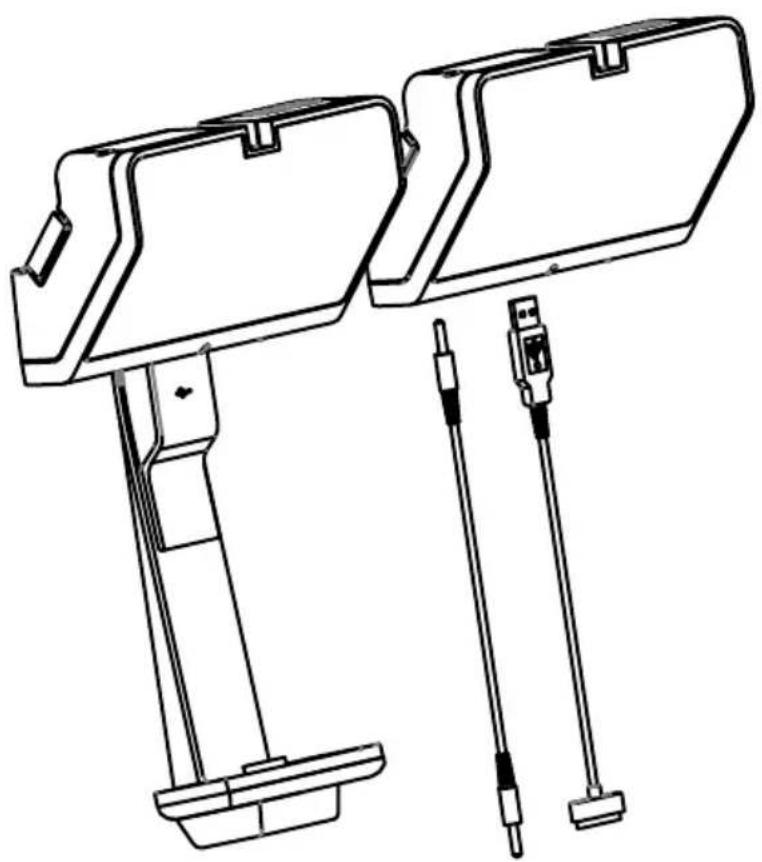
For more information and helpful how-to videos, visit www.adornemyhome.com/install.
Use only with Legrand adorne™ Under-Cabinet Lighting System.
IMPORTANT SAFETY INFORMATION
Read these instructions - All the safety and operating instructions should be read before this product is operated.
Keep these instructions - The safety and operating instructions should be retained for future reference.
Heed all warnings - All warnings on the appliance and in the operating instructions should be adhered to.
Follow all instructions - All operating and use instructions should be followed.
Do not use this apparatus near water - The appliance should not be used near water or moisture - for example, in a wet basement or near a swimming pool. For indoor use only.
The apparatus shall not be exposed to dripping or splashing liquids.
Clean only with dry cloth.
Do not block any ventilation openings. Install in accordance with the manufacture's instructions.
Do not install near heat sources such as radiators, heat registers, stoves, or other apparatus (including amplifiers) that produce heat.
Unplug the apparatus during lightning storms or when unused for long periods of time.
Refer all servicing to qualified personnel. Servicing is required when the apparatus has been damaged in any way, such as power supply cord or plug is damaged, liquid has been spilled or objects have fallen into the apparatus, has been exposed to rain or moisture, does not operate normally, or has been dropped.
CAUTION: These servicing instructions are for use by qualified service personnel only. To reduce the risk of electric shock, do not perform any servicing other than that contained in the operating instructions unless you are qualified to do so.
WARNING: To reduce the risk of fire or electric shock, do not expose this apparatus to rain or moisture.
WARNING: Please refer the information on exterior back enclosure for electrical and safety information before installing or operating the apparatus.
WARNING: To prevent injury, this apparatus must be securely attached to the floor/wall in accordance with the installation instructions.
This lightning flash with arrowhead symbol within an equilateral triangle is intended to alert the user to the presence of non-insulated "dangerous voltage" within the product's enclosure that may be of sufficient magnitude to constitute a risk of electric shock.
WARNING: To reduce the risk of electric shock, do not remove cover (or back) as there are no user-serviceable parts inside. Refer servicing to qualified personnel.
The exclamation point within an equilateral triangle is intended to alert the user to the presence of important operating and maintenance instructions in the literature accompanying the appliance.
WARNING: The direct plug-in plug is used as disconnect device, the disconnect device shall remain readily operable.
Protective grounding terminal. The apparatus should be connected to a mains socket outlet with a protective grounding connection.

COMPLIANCE INFORMATION
FCC Compliance
NOTE: This equipment has been tested and found to comply with the limits for a Class B digital device, pursuant to Part 15 of the FCC Rules. These limits are designed to provide reasonable protection against harmful interference in a residential installation. This equipment generates, uses and can radiate radio frequency energy and, if not installed and used in accordance with the instructions, may cause harmful interference to radio communications.
However, there is no guarantee that interference will not occur in a particular installation. If this equipment does cause harmful interference to radio or television reception, which can be determined by turning the equipment off and on, the user is encouraged to try to correct the interference by one or more of the following measures:
Reorient or relocate the receiving antenna.
Increase the separation between the equipment and receiver.
Connect the equipment into an outlet on a circuit different from that to which the receiver is connected.
Consult the dealer or an experienced radio/TV technician for help.
Warning: Changes or modifications to this unit not expressly approved by the party responsible for compliance could void the user's authority to operate the equipment.
IC Compliance
This device complies with Industry Canada licence-exempt RSS standard(s). Operation is subject to the following two conditions: (1) this device may not cause interference, and (2) this device must accept any interference, including interference that may cause undesired operation of the device.
SpeAKer INSTALLAtloN:

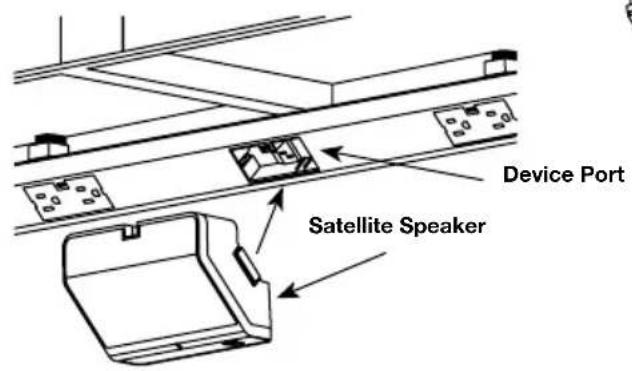
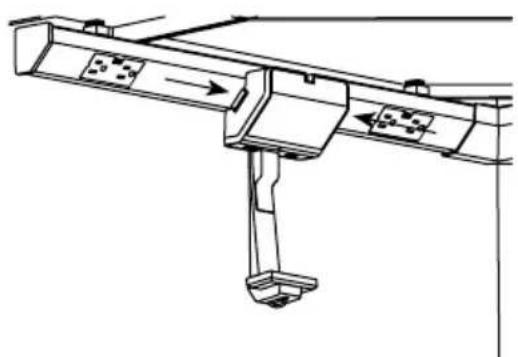
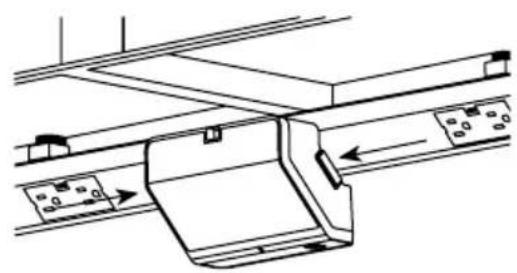
Locate speaker over open device port. Push speakers into openings until secure and flush with Modular Track.
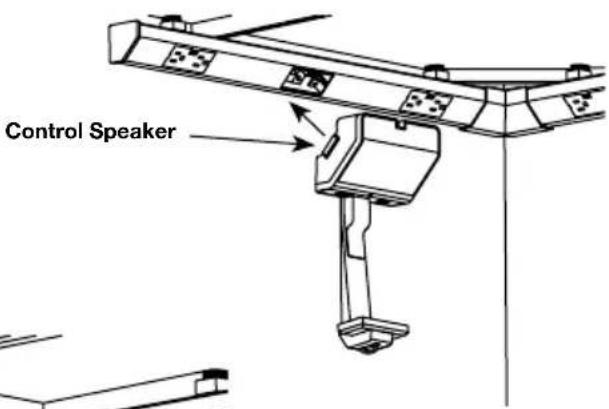
tlpS
Place speakers as far apart as possible for best sound. Place control speaker in an easy to access location.

To remove, depress release buttons and pull speakers straight out.
SpeAKer CoNtroLS:
Control Speaker Satellite Speaker
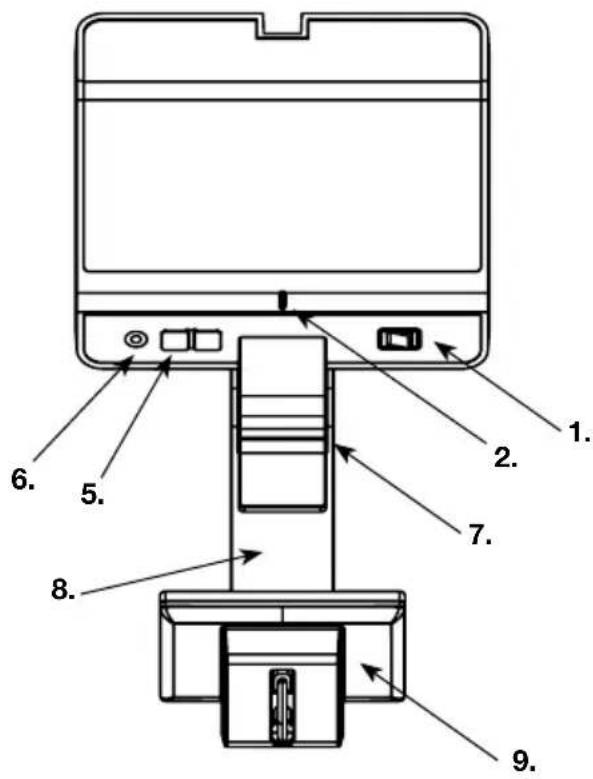
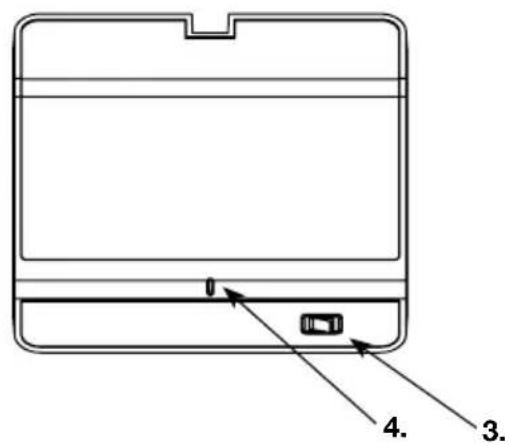
1 Control Speaker ON/OFF Switch
2 Control Speaker Indicator Light
3 Satellite Speaker ON/OFF Switch
4 Satellite Speaker Indicator Light
5 Volume Control
6. 3.5 mm Audio Input Jack
7. USB Cover
8. Cradle Arm
9. Cradle Arm Cover
SPEAKER OPERATION:
Turn on your speaker system Turn ON/OFF Switch on both speakers to "ON" - Indicator light will glow.
Turn up speaker volume Press the "+" button.
Turn down speaker volume Press the “-” button.
Connect a BLUETOOTH device to the speakers
NOTE: Some BLUETOOTH devices require a password to accept. When the 3.5 audio cable is used, BLUETOOTH access is disabled.
Prepare your BLUETOOTH enabled product to search for available devices. Press the "+" and the "-" button on the Control Speaker together and hold for five seconds, until the indicator light on the Control speaker begins to flash. Use your Phone or MP3 player to search for available devices. Speaker is listed as "adorne Modular Music". Select to pair and connect. You are now ready to send music wirelessly to your speakers.
Charge your device via USB connection
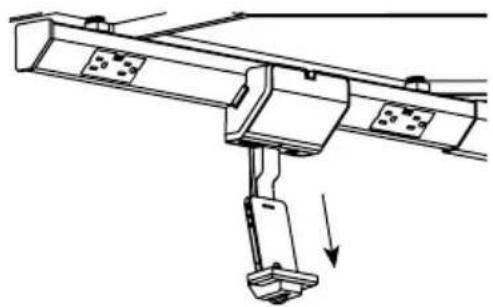
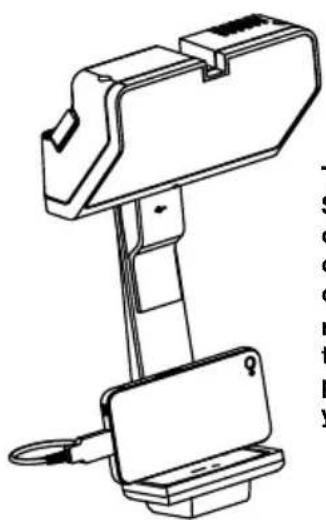
The Control Speaker can charge your device using the USB connection. Place onto cradle. Make sure connector plugs into base of device. If you have an Apple® device, use the provided USB/Apple® cable. If you have a micro USB type device you will need to provide your own cable. View "Configuring the Speaker" section on how to install cables.
The USB charger supplies 5V at 1.5 Amps.
Listen to music with 3.5mm audio cable
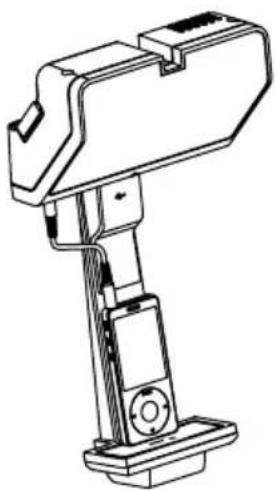
If you do not have a wireless device, you can connect to the speaker using the included 3.5mm audio cable.
SPEAKER CONFIGURATION - Charging Apple® Devices:
1 Remove Cradle Arm Cover. NOTE: Cable is included.
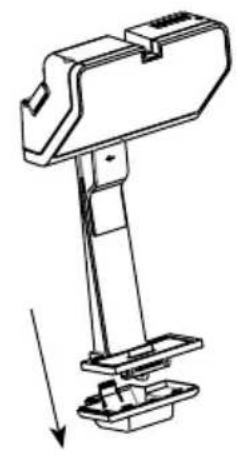
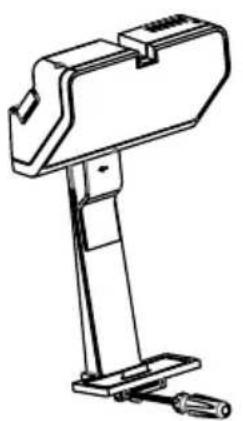
Use a Phillips screwdriver and remove cable clamp. Insert Cable into opening and replace clamp.
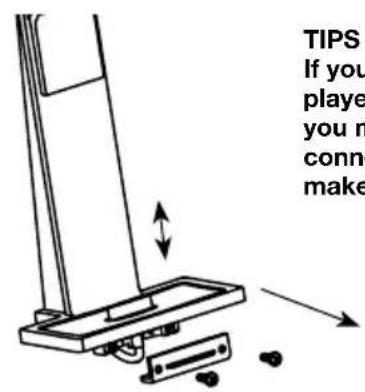
TIPS If your smartphone or MP3 player is protected by a case you may need to adjust the connector higher in order to make proper connection.
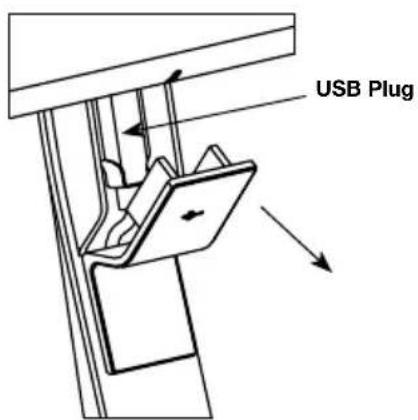
3 Pull open USB cover and plug USB cable into USB port.
SPEAKER CONFIGURATION - Charging USB Devices:
Remove Cradle Arm Cover.
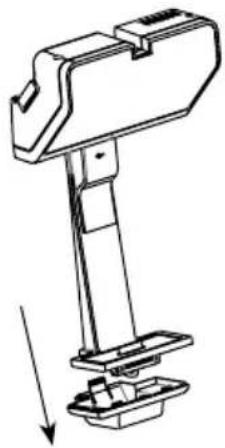
1
NOTE: Cable is not provided. Use the cable supplied with your smartphone or MP3 player.
Use a Phillips screwdriver and remove cable clamp. Insert Cable into opening and replace clamp.
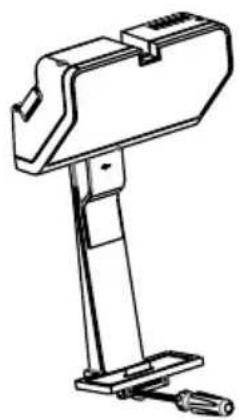
2
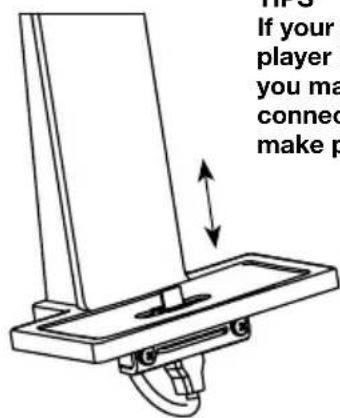
TIPS
If your smartphone or MP3 player is protected by a case you may need to adjust the connector higher in order to make proper connection.
Pull open USB cover and plug USB cable into USB port.
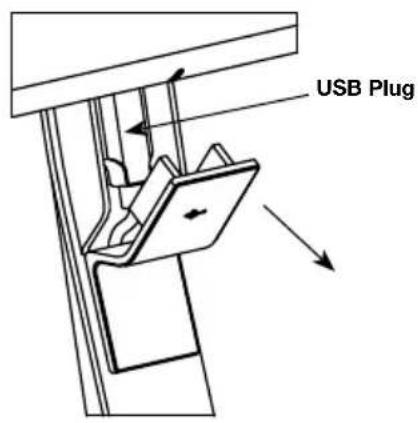
3
TIPS
Some styles of USB cables may not be compatible with the cable clamp. If so, remove the cable from the lower clamp and plug directly into your device.
SpeAKer CoNfIGUrAtloN - Cradle Arm Removal:
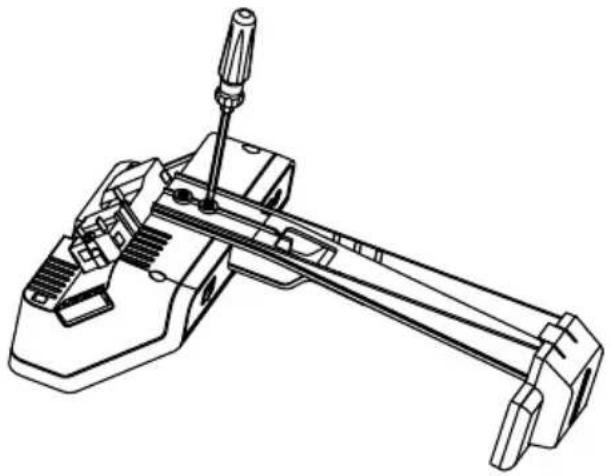
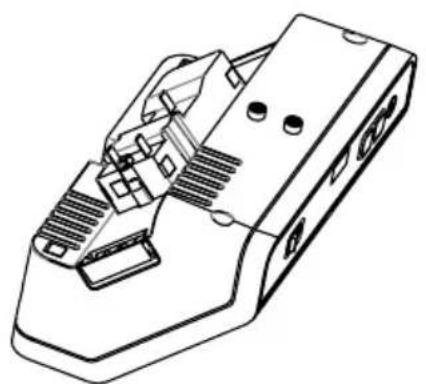
If you do not wish to use the cradle arm it can be removed with a phillips screwdriver.
troUBLeShootING:
Sound only comes from one speaker Turn ON/OFF switch on both Control and Satellite speakers to "ON" position. Make sure both speakers are fully inserted into the Modular Track.
Cannot hear music Press the "+" button. Volume may be made louder by increasing the volume on your smartphone or MP3 player.
Cannot connect to speaker using BLUETOOTH® wireless technology
Disconnect your device from the speaker, reconnect and attempt to pair the speakers. Some BLUETOOTH® enabled devices may take longer to find the speakers, and connect. Some devices may require the user to accept or confirm the connections. If pairing fails several times, please restart phone and speaker system.
Device will not charge The USB charger supplies 5V at 1.5 Amps. Some devices may not charge, or will charge slowly.
Cannot play music through USB cable
The adorne™ Modular Music system can only play music through a wireless BLUETOOTH® connection, or 3.5mm input jack using the supplied cable. Apple® or micro USB cables are for charging only.
BLUtooth is a registered trademark of Bluetooth SIG, Inc.
The Bluetooth word mark and logos are owned by the Bluetooth SIG, Inc. and any use of such marks (licensee name) is under license. Other trademarks and trade names are those of their respective owners.
Apple® is a registered trademark of Apple, Inc.
Limited five year warranty information for adome™ products is available at www.adomemyhome.com/ warranty. Limited warranty information for adome™ products may also be obtained free of charge by sending a written request along with your proof of purchase (including purchase date) to: Legrand, Attn: adome Customer Service/Warranty Department, 50 Boyd Avenue, Syracuse, NY 13209.
Installation Instructions:
10108020512
60 Woodlawn Street
West Hartford, CT 06110
1.877.BY.LEGRAND(295.3472)
www.legrand.us
570 Applewood Crescent
Vaughan, ONT L4K 4B4
905.738.9195
www.legrand.ca
L1 legrand
USO DE LOS ALTAVOCES:
Speaker Configuration - Charging Apple Devices with Lightning Connector
Apple® is a registered trademark of Apple, Inc.
For more information and helpful how-to videos, visit www.adornemyhome.com/install.
Use only with adorne™ Under-Cabinet Lighting System.