Chicago - Headphones Urbanista - Free user manual and instructions
Find the device manual for free Chicago Urbanista in PDF.


| Brand | Urbanista |
| Model | Chicago |
| Product Type | In-ear wireless headphones |
| Playback battery life | 7 hours |
| Standby battery life | 120 hours |
| Full charge time | Approximately 2.5 hours |
| Water resistance rating | IPX5 |
| Bluetooth range | 10 meters (without obstacles) |
| Weight | Approximately 10 g |
| Power source | Rechargeable battery via magnetic charging cable |
| Controls | Multifunction button (on/off, calls, voice control, play/pause), + and - buttons (volume, track change) |
| Included ear tips | GoFit Sport (ambient awareness) and GoFit Boost (isolation) |
| Package contents | Earphones, charging cable, GoFit ear tips, manual |
| Warranty | 1 year limited (manufacturing defects) |
| Care and cleaning | Clean the ear tips with a damp cloth and mild soap; rinse and dry before reassembling |
| Safety | Contains small parts (choking hazard); do not use while driving; set moderate volume to avoid hearing damage |
| Spare parts | GoFit ear tips (spare parts available) |
| General information | Complies with FCC Section 15; Class B; radio frequency exposure respected |
Frequently Asked Questions - Chicago Urbanista
User questions about Chicago Urbanista
0 question about this device. Answer the ones you know or ask your own.
Ask a new question about this device
Download the instructions for your Headphones in PDF format for free! Find your manual Chicago - Urbanista and take your electronic device back in hand. On this page are published all the documents necessary for the use of your device. Chicago by Urbanista.
USER MANUAL Chicago Urbanista
Thank you for purchasing a pair of Urbanista Chicago earphones. Urbanista is inspired by urban environments all around the world. Our products are developed to enhance an active, mobile lifestyle.
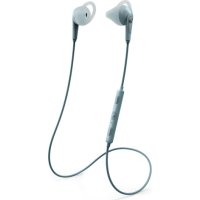
The Chicago is a wireless earphone that embodies the spirit of the athlete, offering intensified sound and matching endurance.
Equipped with specialized GoFit tips, you can switch between heightened sound insulation or letting more ambient sound in to keep track of your surroundings.
With a battery life of 7 hours and an IPX5 water resistance rating, the Chicago rises to any occasion.
BIENVENUE DANS LA COMMUNAUTÉ URBANISTA!
ON - Press and hold the multifunction button for 5 seconds to turn the device on. The LED light will repeatedly flash red then blue to indicate the earphones are waiting to be paired.
OFF- When powered on, press and hold the multifunction button for 5 seconds to turn the device off.
LED STATUS
POWER ON - LED Repeatedly flashes red then blue.
POWER OFF - LED has no light.
PAIRING - LED will repeatedly flash red then blue as the device is waiting to be paired. Once the device is paired, the LED will repeatedly flash blue once every 10 seconds.
MUSIC AND CALLS
Via the multifunction button:
ACTIVATE VOICE ASSISTANT - Tap twice.
ACCEPTCALL-Tap once.
ENDCALL-Tap once.
PLAY/PAUSE - Tap once.
Via the + and - volume buttons:
INCREASE VOLUME - Tap (+).
DECREASE VOLUME - Tap (-).
SKIP TO NEXT TRACK - Hold (+) for 1 second.
SKIP TO PREVIOUS TRACK - Hold (-) for 1 second.
THE CONTROLLER
Multifunction
(+)
ED
(-)

FUNCTIONS
(ENG)
PAIRING
Press and hold the multifunction button for 5 seconds to turn the device on and to simultaneously activate pairing mode. The LED light will repeatedly flash red then blue to indicate the earphones are waiting to be paired.
From the Bluetooth settings menu of the device you want to pair the earphones to, select Urbanista Chicago. If paired successfully, the LED will repeatedly flash blue once every 10 seconds.
The effective connection range of these Bluetooth earphones is 10 meters without any obstacles in between both devices.
ADDING A NEW BLUETOOTH CONNECTION
With the earphones turned off, press and hold the multifunction button for 6-7 seconds. This will cause the earphones to beep three times followed by the LED flashing repeatedly. You can now add a new device to be paired with the earphones.
CHARGING/BATTERY LIFE
To charge the earphones, attach the included cable and connect it to a power outlet or to a power source such as a computer. The LED will turn a solid blue while charging and will turn off when fully charged.
Offering 7 hours of playtime and with a standby time of 120 hours, it will take approximately 2.5 hours to fully charge the device.
CHARGER
CHARGER
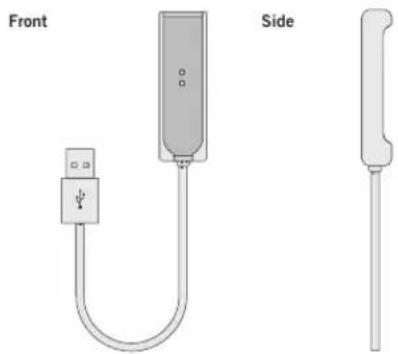
CONNECT TO CHARGER
1) Align the pins on the charging socket with the rear of the remote control (the LED should be facing you) and they will magnetically snap into place.
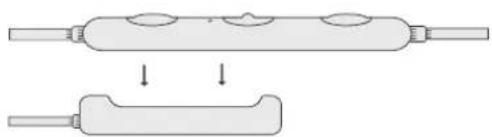
2) Once in place, the LED will turn a solid blue.

GOFIT
(ENG)
GOFIT
CLEANING
Every now and then you will likely need to clean the GoFit tips due to dirt buildup.
To do so, firmly grip the tip with one hand and the earphone with the other then gently peel back the top portion of the tip until it can safely be removed.
Once removed, dampen a cloth with warm water and rub the exterior and interior of the tip using a mild soap. Additionally, you can clean the tips under a running faucet.
After cleaning, be sure to rinse and dry off the tips before placing them back onto the earphones.
ATTACHING GOFIT TIPS
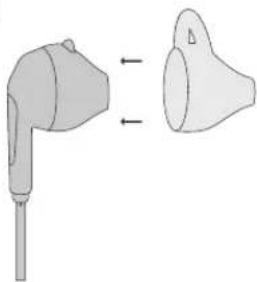
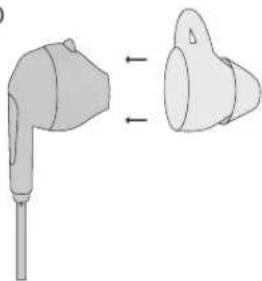
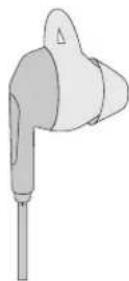
The Chicago comes with two uniquely designed types of GoFitearphone tips, one offering a more insulated sound experience and the other allowing more sound to filter in for better awareness of your surroundings.
To attach the tips:
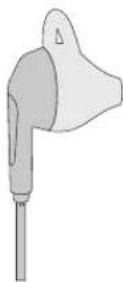
Place them in between your thumb and finger and carefully fit them onto the earphones until they are properly secured in place. Both types of the GoFit tips feature a unique design that hold the tips in place to ensure a snug fit.
GOFIT SPORT
Allows for the perfect balance between amazing sound and staying aware of your surroundings.
1)
2)
GOFIT BOOST
Perfect for when you want to keep noise out and when you want to turn up the beat.
1)
2)
WARRANTY
(ENG)
URBANISTA ONE YEAR LIMITED WARRANTY
All Urbanista earphones are designed and manufactured to meet high expectations and to provide the best customer experience.
We are devoted to producing only high quality items featuring the latest technology. However, in exceptional cases, electronic products may have malfunctions due to manufacturing defects. That is why we offer a full one (1) year warranty from the date of original retail purchase, which covers defects in materials and workmanship.
Urbanista AB hereby warrants that, under normal use, this product will be free from defects in materials and workmanship for a period of one (1) year starting with the original retail purchase date. The replacement warranty is valid only if the original proof of purchase issued to the purchaser, specifying the date of purchase, is presented with the product to be replaced.
How does it work? If you believe this product is defective, carefully repack the unit and return the product to your authorized dealer within the warranty period, with the original proof of purchase. Your authorized dealer will replace the product, provided a defect in materials or workmanship is identified. Should your authorized dealer not have the equivalent product or color in stock, Urbanista AB will promptly provide you with a new product.
This limited replacement warranty does not apply in cases of abuse or misuse of the product, use contrary to the Urbanista AB instructions, ordinary wear and tear, incorrect connection, force majeure or unauthorized repair. Any lawsuit for breach of this limited warranty shall be commenced, if at all, within one (1) year of the date that the claim accrues.
Urbanista AB shall not be liable for special, indirect, incidental or consequential damages resulting from the use or the inability to use this product, regardless of the legal theory on which the claim is based.
This warranty gives you specific legal rights, and you may have other rights, which vary from country to country. This warranty does not restrict the rights of the consumer mandated under applicable laws. This product shall not be treated as household waste. Instead it shall be handed over to the applicable collection point for the recycling of electrical and electronic equipment. This product was produced after April 1st, 2017.
INSTRUCTIONS
IMPORTANT SAFTEY INSTRUCTIONS
Warnings
Not suitable for children under age three: it contains small parts which may be a choking hazard.
- Choose a low volume setting before using the headphones.
- Long-term exposure to loud music or sounds may cause hearing damage. It is best to avoid high volume levels when using these headphones, especially for extended periods.
- Do not use these headphones when operating a motor vehicle, a bicycle, machinery or where your inability to hear outside sounds may present a danger to you or to others.
Cautions
- Using these headphones limits your ability to hear noises around you, regardless of listening volume. Please be cautious when using these headphones.
- Do not drop, sit on, or allow the headphones to be immersed in water.
For any questions or concerns contact: info@urbanista.com
For warranty and safety instructions in other languages:
Caution: The user is cautioned that changes or modifications not expressly approved by the party responsible for compliance could void the user's authority to operate the equipment.
This device complies with Part 15 of the FCC Rules. Operation is subject to the following two conditions: (1) this device may not cause harmful interference, and (2) this device must accept any interference received, including interference that may cause undesired operation.
NOTE: This equipment has been tested and found to comply with the limits for a Class B digital device, pursuant to Part 15 of the FCC Rules. These limits are designed to provide reasonable protection against harmful interference in a residential installation. This equipment generates, uses and can radiate radio frequency energy and, if not installed and used in accordance with the instructions, may cause harmful interference to radio communications. However, there is no guarantee that interference will not occur in a particular installation.
If this equipment does cause harmful interference to radio or television reception, which can be determined by turning the equipment off and on, the user is encouraged to try to correct the interference by one or more of the following measures:
Reorient or relocate the receiving antenna.
- Increase the separation between the equipment and receiver.
- Connect the equipment into an outlet on a circuit different from that to which the receiver is connected.
- Consult the dealer or an experienced radio/TV technician for help.
When test standard is FCC section 15.247 or 15.407 (such Bluetooth, Wifi) Mobile Device
(a device designed to generally be used at a separation distance of at least 20 centimeters is normally maintained between the transmitter's radiating structure(s) and the body of the user)
FCC Radiation Exposure Statement:
This equipment complies with FCC radiation exposure limits set forth for an uncontrolled environment. This equipment should be installed and operated with a minimum distance of 20cm between the radiator and your body. This transmitter must not be co-located or operating in conjunction with any other antenna or transmitter.
Portable Device (a device designed to generally be used at a separation distance of within 20 centimeters is normally maintained between the transmitter's radiating structure(s) and the body of the user).
FCC Radiation Exposure Statement:
This equipment complies with FCC radiation exposure limits set forth for an uncontrolled environment.
This transmitter must not be co-located or operating in conjunction with any other antenna or transmitter.