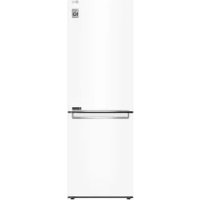
USER MANUAL GBP61SWPFN LG
Read this owner's manual thoroughly before operating the appliance and keep it handy for reference at all times.
EN ENGLISH ES ESPANOL IT ITALIANO PL POLSKI SR SRPSKI
BG BULGARIAN ET ESTONIAN LT LITHUANIAN PT PORTUGUESE SV SWEDISH
CZ CZECH FI FINNISH LV LATVIAN RO ROMANIAN
DA DANISH FR FRENCH MK MACEDONIAN SK SLOVAK
DE GERMAN HR CROATIAN NL DUTCH SL SLOVENIAN
EL GREEK HU HUNGARIAN NO NORWEGIAN SQ ALBANIAN
TABLE OF CONTENTS
This manual may contain images or content different from the model you purchased.
This manual is subject to revision by the manufacturer.
SAFETY INSTRUCTIONS 3
IMPORTANT SAFETY INSTRUCTIONS 3
INSTALLATION 10
Dimensions and Clearances 10
Ambient Temperature 10
OPERATION 11
Notes for Operation 11
Fresh Converter (*) 12
Fresh Vegetable Painter (*) 12
Control Panel 14
SMART FUNCTIONS 16
LG ThinQ Application 16
MAINTENANCE 18
Notes for Cleaning 18
Disposal of Your Old Appliance 18
TROUBLESHOOTING 19
This is a short version of Owner's Manual. For more information, please visit the LG website at http://www.lg.com
Troubleshooting
SAFETY INSTRUCTIONS
EN
The following safety guidelines are intended to prevent unforeseen risks or damage from unsafe or incorrect operation of the appliance.
The guidelines are separated into 'WARNING' and 'CAUTION' as described below.

This symbol is displayed to indicate matters and operations that can cause risk. Read the part with this symbol carefully and follow the instructions in order to avoid risk.

WARNING
This indicates that the failure to follow the instructions can cause serious injury or death.

CAUTION
This indicates that the failure to follow the instructions can cause the minor injury or damage to the product.
IMPORTANT SAFETY INSTRUCTIONS

WARNING
To reduce the risk of explosion, fire, death, electric shock, injury or scalding to persons when using this product, follow basic precautions, including the following:
Children in the Household
- This appliance is not intended for use by persons (including children) with reduced physical, sensory or mental capabilities, or lack of experience and knowledge, unless they have been given supervision or instruction concerning use of the appliance by a person responsible for their safety. Children should be supervised to ensure that they do not play with the appliance.
- If the appliance is equipped with a lock (some models only), keep the key out of reach of children.
For use in Europe:
- This appliance can be used by children aged from 8 years and above and persons with reduced physical, sensory or mental capabilities or lack of experience and knowledge if they have been given supervision or instruction concerning use of the appliance in a safe way and understand the hazards involved. Children shall not play with the appliance. Cleaning and user maintenance shall not be made by children without supervision.
- Children aged from 3 to 8 years are allowed to load and unload refrigerating appliances.
Installation
- This appliance should only be transported by two or more people holding the appliance securely.
- Ensure that the socket outlet is properly grounded, and that the earth pin on the power cord is not damaged or removed from the power plug. For more details on grounding, inquire at an LG Electronics customer information centre.
- This appliance is equipped with a power cord having an equipment-grounding conductor and a grounding power plug. The power plug must be plugged into an appropriate socket outlet that is installed and grounded in accordance with all local codes and ordinances.
- If the power cord is damaged or the hole of the socket outlet is loose, do not use the power cord and contact an authorized service centre.
- Do not plug the appliance into a multi socket adapter which does not have a power cable (mounted).
- Do not modify or extend the power cable.
- The appliance should be connected to a dedicated power line which is separately fused.
- Do not use a multi socket outlet which is not properly grounded (portable). In case of using a properly-grounded multi socket outlet (portable), use the multi socket outlet with the current capacity of the power code rating or higher and use the multi socket outlet only for the appliance.
- Install the appliance in a place where is easy to unplug the power plug of the appliance.
- Be careful not to point the power plug up or let the appliance lean against the power plug. Install the appliance on a firm and level floor.
- Do not install the appliance in a damp and dusty place. Do not install or store the appliance in any outdoor area, or any area that is subject to weathering conditions such as direct sunlight, wind, rain, or temperatures below freezing.
- Do not place the appliance in direct sunlight or expose it to the heat from heating appliances such as stoves or heaters.
- Be careful not to expose the rear of the appliance when installing.
- Be careful not to let the appliance door fall during assembly or disassembly.
- Be careful not to pinch, crush, or damage the power cable during assembly or disassembly of the appliance door.
- Do not connect a plug adapter or other accessories to the power plug.
Operation
- Do not use the appliance for any purpose (storage of medical or experimental materials or shipping) other than any domestic household food storage use.
- Unplug the power plug during a severe thunderstorm or lightening or when not in use for a long period of time.
- Do not touch the power plug or the appliance controls with wet hands.
- Do not bend the power cable excessively or place a heavy object on it.
- If water penetrates electrical parts of the appliance, disconnect power plug and contact an LG Electronics customer information centre.
- Do not place hands or metallic objects inside the area emitting the cold air, cover or heat releasing grille on the back.
- Do not apply excessive force or impact to the back cover of the appliance.
- Do not put animals, such as pets, into the appliance.
- Be careful of nearby children when you open or close the appliance door. The door may bump the child and cause injury.
- Avoid the danger of children getting trapped inside the appliance. A child trapped inside the appliance can cause suffocation.
- Do not place heavy or fragile objects, containers filled with liquid, combustible substances, flammable objects (such as candles, lamps, etc.), or heating devices (such as stoves, heaters, etc.) on the appliance.
- If there is a gas leakage (isobutane, propane, natural gas, etc.), do not touch the appliance or power plug and ventilate the area immediately. This appliance uses a refrigerant gas (isobutane, R600a). Although it uses a small amount of the gas, it is still combustible gas. Gas leakage during appliance transport, installation or operation can cause fire, explosion or injury if sparks are caused.
- Do not use or store flammable or combustible substances (ether, benzene, alcohol, chemical, LPG, combustible spray, insecticide, air freshener, cosmetics, etc.) near the appliance.
- Immediately unplug the power plug and contact an LG Electronics customer information centre if you detect a strange sound, odour, or smoke coming from the appliance.
- Fill with potable water only into icemaker or dispenser water tank.
- Do not damage the refrigerant circuit.
- Do not place any electronic appliance (such as heater and mobile phone) inside the appliance.
Maintenance
- Disconnect the power cord before cleaning the appliance or replacing the inside lamp (where fitted).
- Securely plug the power plug in the socket outlet after completely removing any moisture and dust.
- Never unplug the appliance by pulling on the power cable. Always grip the power plug firmly and pull straight out from the socket outlet.
- Do not spray water or inflammable substances (toothpaste, alcohol, thinner, benzene, flammable liquid, abrasive, etc.) over the interior or exterior of the appliance to clean it.
- Do not clean the appliance with brushes, cloths or sponges with rough surfaces or which are made of metallic material.
- Only qualified service personnel from LG Electronics service centre should disassemble, repair, or modify the appliance. Contact an LG Electronics customer information centre if you move and install the appliance in a different location.
- Do not use a hair drier to dry the inside of the appliance or place a candle inside to remove the odours.
- Do not use mechanical devices or other means to accelerate the defrosting process.
Disposal
- When discarding the appliance, remove the door gasket while leaving the shelves and baskets in place and keep children away from the appliance.
- Dispose of all packaging materials (such as plastic bags and styrofoam) away from children. The packaging materials can cause suffocation.
Technical Safety
- Keep ventilation openings, in the appliance enclosure or in the built-in structure, clear of obstruction.
Do not use electrical appliances inside the refrigerator.
- The refrigerant and insulation blowing gas used in the appliance require special disposal procedures. Consult with service agent or a similarly qualified person before disposing of them.
- Refrigerant leaking out of the pipes could ignite or cause an explosion.
- The amount of refrigerant in your particular appliance is shown on the identification plate inside the appliance.
- Never start up an appliance showing any signs of damage. If in doubt, consult your dealer.
- This appliance is intended to be used in household and similar applications only. It should not be used for commercial, or catering purposes, or in any mobile application such as a caravan or boat.
- Do not store explosive substances such as aerosol cans with a flammable propellant in this appliance.
- This refrigerating appliance is not intended to be used as a built-in appliance.
Risk of Fire and Flammable Materials
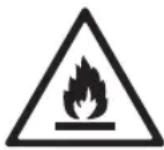
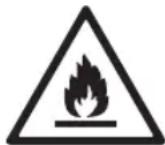
This symbol alerts you to flammable materials that can ignite and cause a fire if you do not take care.
- This appliance contains a small amount of isobutane refrigerant (R600a), but it is also combustible. When transporting and installing the appliance, care should be taken to ensure that no parts of the refrigerating circuit are damaged.
- If a leak is detected, avoid any naked flames or potential sources of ignition and air the room in which the appliance is standing for several minutes. In order to avoid the creation of a flammable gas air mixture if a leak in the refrigerating circuit occurs, the size of the room in which the appliance is used should correspond to the amount of refrigerant used. The room must be 1 m² in size for every 8 g of R600a refrigerant inside the appliance.
- When positioning the appliance, ensure the supply cord is not trapped or damaged.
- Do not locate multiple portable socket-outlets or portable power supplies at the rear of the appliance.
CAUTION
To reduce the risk of minor injury to persons, malfunction, or damage to the product or property when using this product, follow basic precautions, including the following:
Installation
- Do not tilt the appliance to pull or push it when transporting.
- Make sure not to get a body part such as a hand or foot stuck while moving the appliance.
Operation
- Do not touch frozen food or the metal parts in the freezer compartment with wet or damp hands. It may cause frostbite.
- Do not place glass containers, bottles or cans (especially those containing carbonated drinks) in the freezer compartment, shelves or ice bin that will be exposed to temperatures below freezing.
- The tempered glass on the front side of the appliance door or the shelves can be damaged by an impact. If it is broken, do not touch it with hands.
- Do not hang from the appliance doors, storage room, shelf or climb up into it.
- Do not store an excessive amount of water bottles or containers for side dishes on the door baskets.
- Prevent animals from nibbling on the power cable or water hose.
- Do not open or close the appliance door with excessive force.
- If the hinge of the appliance door is damaged or operates improperly, stop using the appliance and contact an authorized service centre.
- Do not clean glass shelves or covers with warm water when they are cold.
- Never eat frozen foods immediately after they have been taken out in the freezer compartment.
- Make sure not to get a hand or foot stuck upon opening or closing the appliance door.
Maintenance
- Do not insert the shelves upside down. The shelves may fall.
- To remove frost from the appliance, contact an LG Electronics customer information centre.
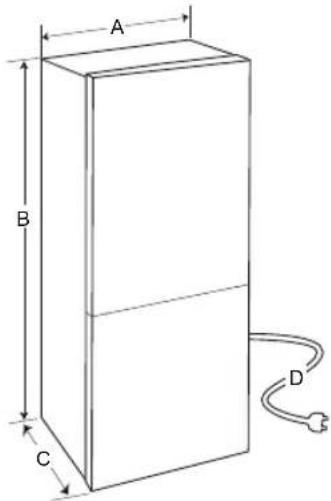
Dimensions and Clearances
Too small a distance from adjacent items may result in the degradation of freezing capability and increased electricity costs. Allow over 50 mm of clearance from each adjacent wall when installing the appliance.
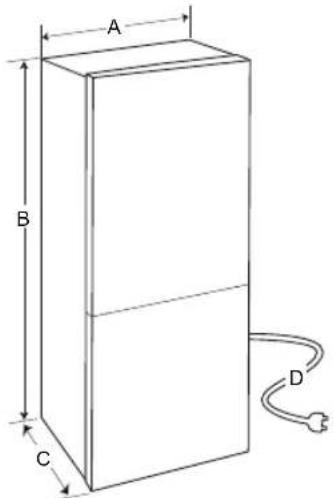
1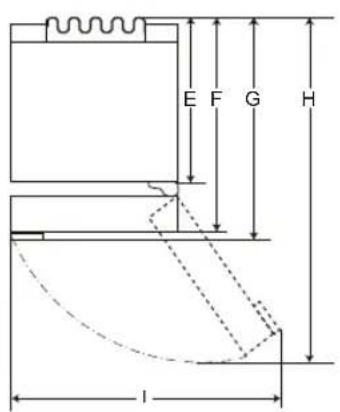
2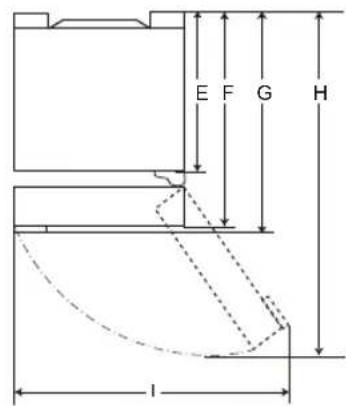
| 1 | 2 |
| Size [mm] |
| Pocket Handle | Bar Handle | Pocket Handle | Bar Handle |
| A | 595 595 595 | | | 595 |
| B | 860 / 2 030 1 860 / 2 030 | 860 / 2 030 1 860 / 2 030 | | |
| C | 682 718 675 712 | | | |
| D | 2 100 | 2 100 | 2 100 | 2 100 |
| 616 | 616 610 610E | | |
| 682 682 | | 675 675F | |
| - | 718 | - 712G | |
| H | 1 230 | 1 237 | 1 225 | 1 232 |
| I | 995 | 995 995 995 | | |
Ambient Temperature
- The appliance is designed to operate within a limited range of ambient temperatures, depending on the climate zone.
- The internal temperature could be affected by the location of the appliance, the ambient temperature, the frequency of door opening and so on.
- The climate class can be found on the rating label.
| Climate Class | Ambient Temperature Range °C |
| SN (Extended Temperate) | +10 - +32 |
| N (Temperate) | +16 - +32 |
| ST (Subtropical) | +16 - +38 |
| T (Tropical) | +16 - +43 / +10 - +43* |
*Australia, India, Kenya
NOTE
- The appliances rated from SN to T are intended to be used at an ambient temperature between 10°C and 43°C.
Notes for Operation
- Users should keep in mind that frost can form if the door is not closed completely, if the humidity is high during the summer, or if the freezer door is opened frequently.
- Ensure there is sufficient space between food stored on the shelf or door basket to allow the door to close completely.
- Opening the door for long periods can cause a significant increase in the temperature of the compartments in the appliance.
- If the refrigerating appliance is left empty for long periods, switch it off, defrost, clean, dry, and leave the door open to prevent mould from developing within the appliance.
Suggestion for Energy Saving
- Ensure there is sufficient space between stored foods. This allows cold air to be circulated evenly and lowers electricity bills.
- Store hot food only after it has cooled in order to prevent dew or frost.
- When storing food in the freezer compartment, set the freezer temperature lower than the temperature indicated on the food.
- Do not put food near the temperature sensor of the fridge compartment. Keep a distance of at least 3 cm from the sensor.
- Note that a temperature rise after defrosting has a permissible range in the appliance specifications. If you wish to minimise the impact this may have on food storage due to a temperature rise, seal or wrap the stored food in several layers.
- The automatic defrosting system in the appliance ensures that the compartment remains free of ice buildup under normal operating conditions.
- For the most efficient use of energy, keep all inner parts (e.g. door bins, drawers and shelves) in their original location.
- Do not set the temperature of the appliance lower than needed.
Storing Foods Effectively
- Store frozen food or refrigerated food inside sealed containers.
- Check the expiration date and label (storage instructions) before storing food in the appliance.
- Do not store food for a long period of time if it spoils easily at a low temperature.
- Avoid refreezing any food which has been completely thawed. Freezing any food which has been completely thawed again will lower its taste and nutrition.
- Do not wrap and store vegetables with newspaper. Printing material of newspaper or other foreign substances may smear and contaminate food.
- Do not overfill the appliance. Cold air can not circulate properly if the appliance is overfilled.
- If you set an excessively low temperature for food, it may become frozen. Do not set a temperature lower than the required temperature for the food to be stored correctly.
- For more space, you can remove bottle rack, egg tray, ice tray and fresh converter drawer.
- Store raw meat and fish in suitable containers in the refrigerator, so that it is not in contact with or drip onto other food.
- Place the refrigerated food or frozen food in each fridge or freezer compartment immediately after purchasing.
- Food may freeze or spoil if stored at the wrong temperature. Set the refrigerator to the correct temperature for the food being stored.
Max Freezing Capacity
- The Express Freeze function will set the freezer to its maximum freezing capacity. This generally takes up to 24 hours and automatically switches off. If the maximum freezing capacity is to be used, Express Freeze must be switched on for 7 hours before fresh produce is placed in the freezer compartment.
Freezing the Maximum Amount of Food
- To get better air circulation, insert all drawers.
- If large quantities of food are to be stored, all the freezer drawers shall be taken out of the appliance and the food shall be stacked directly on the freezer shelf (or shelves) in the freezer compartment.
NOTE
- To remove the drawers, first remove the food from drawers and then pull out the drawers carefully. Not doing so could cause injury or damage to the drawers.
- The shape of each drawer may be different, insert in the right position.
Setting the Temperature
This sets the fridge temperature or freezer temperature
Press the Fridge button or Freezer button to adjust the temperature.
The temperature can be adjusted.
Fridge: from 1°C to 7°C - Freezer: from -15°C to -23°C
The initial temperature is set.
Fridge: 3°C - Freezer: -18°C
The actual inner temperature varies depending on the food status, as the indicated setting temperature is a target temperature, not actual temperature within the appliance.
NOTE
- The default temperature setting may vary depending on the appliance.
- For optimal food preservation, increasing or decreasing 1°C or one level from the default temperature is recommended for each compartment.
- Wait until 2 or 3 hours have passed after connecting the appliance to the outlet before storing food in the appliance.
- For ice making in normal climates, the freezer temperatures should be set to -18°C or colder.
High Temperature Alarm
When the freezer temperature goes too high due to power failure, the freezer temperature LED lamp blinks and an alarm sounds.
- Press the Freezer button to stop. If the temperature is sufficiently cold, the blinking and alarm will automatically stop. This function operates:
- When the refrigerator is turned on.
- When the freezer compartment gets too warm.
- When there is a power outage that lasts for a long period of time.
- When large amounts of warm food are placed in the freezer compartment.
- When the freezer door is open for too long or too frequently.
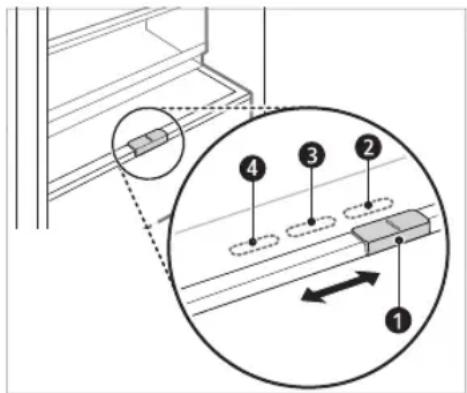
Fresh Converter (*)
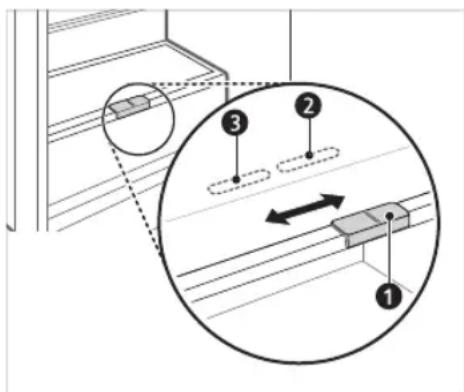
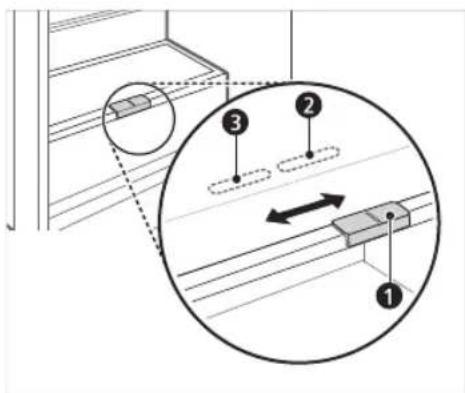
As a chill compartment, the temperature in the Fresh Converter can be controlled by sliding the lever (1), located in front of the compartment, in either direction.
When keeping vegetables after setting up Meat or Fish, cold injury may occur.
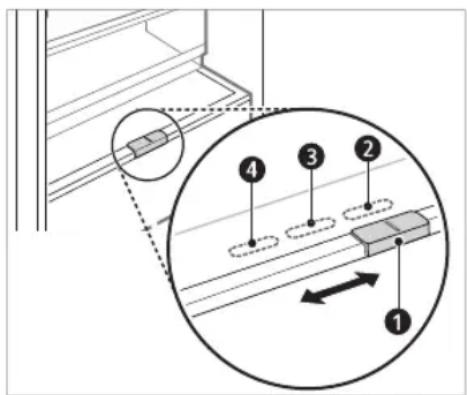
For storing vegetables (Recommended). For storing fish. For storing meat.
NOTE
- (*): This feature varies depending on the model purchased.
Fresh Vegetable Painter (*)
The vegetable compartment's humidity can be adjusted by moving the knob (1).
For storing vegetables (Recommended). For storing fruit.
NOTE
- (*): This feature varies depending on the model purchased.
Food Storage Compartments - Storing Food in the Fridge Compartment
- Fridge Shelf
- This is where refrigerated foods and other items are stored.
- The shelf height can be adjusted by inserting the shelf in another groove of different height.
- Store the foods with higher moisture content at the front of the shelf. The actual number of shelves will differ from model to model.
- Bottle Rack (*)
- This is where drinks tall bottles or containers are stored.
- Folding Shelf (*)
- This is where refrigerated foods and high items are stored.
- Fresh Vegetable Printer
- This is where fruits and vegetables are stored to help maintain freshness by adjusting the humidity controller. The appearance or components of the appliance may differ from model to model.
- Fresh Converter (*)
- As a chill compartment, this is where meat, fish and vegetables are stored. Help maintain freshness by adjusting the humidity controller located in the back of the fridge compartment.
- For more space, you can use the chill area without the chill compartment drawer.
- Movable Egg Tray
- This is where eggs are stored.
- You can move it to a desired position and use it as needed. However, do not use it as an ice bin or place it on the shelf on top of the fridge or the vegetables drawer. Fridge Door Basket
- This is where small packages of refrigerated foods, drinks, and sauce containers are stored.
Water Dispenser Tank (*)
- This is where water to supply the dispenser or the automatic icemaker is stored. It requires manual filling. (Non-plumbed models only)
Storing Food in the Freezer Compartment
Ice Tray
- This is where ice is produced and stored.
- For more space, you can remove the ice tray or ice cubes bucket.
- Freezer Printer
- This is for long-term storage of frozen items.
- To freeze food items quickly, store the food on the left side of the top drawer. Food items will freeze most quickly in the drawer.
NOTE
- (*) : This feature varies depending on the model purchased.
- For more information about other compartments, visit lg.com and download owner's manuals.
Control Panel
The actual control panel may differ from model to model.
Control Panel and Functions
*1 This feature is only available on some models.
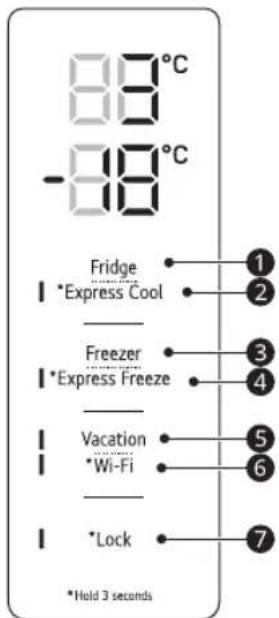
The control panel can be found either on the Fridge Door or inside the Fridge depending on the model.
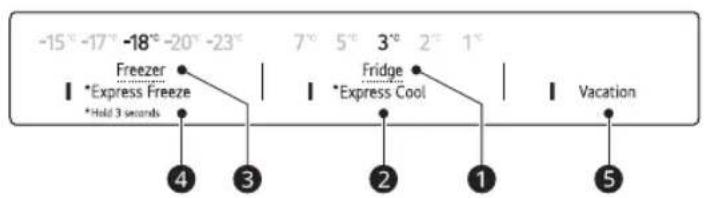
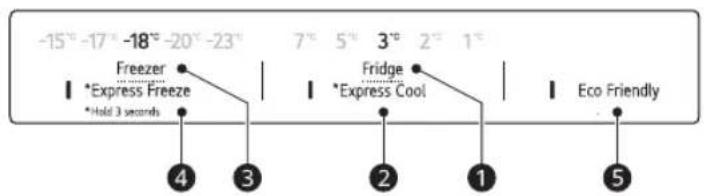
Type A
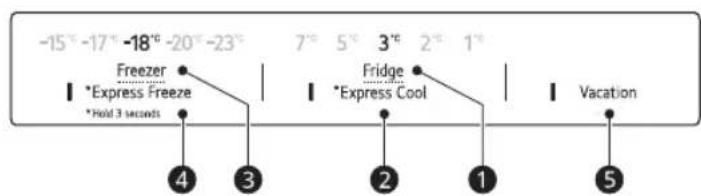
Type B
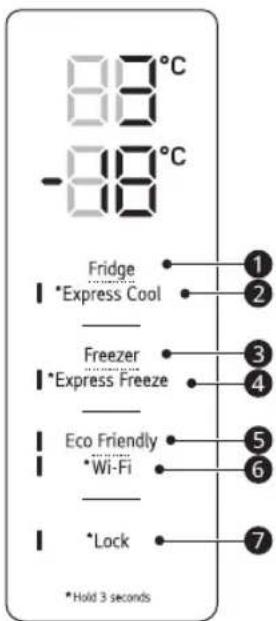
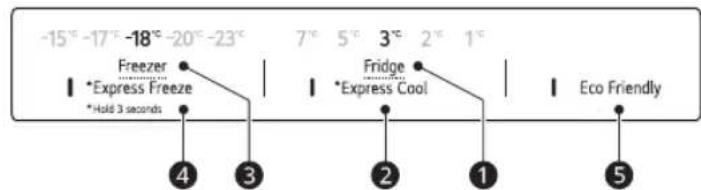
Fridge
Press this button repeatedly to select a desired temperature between 1°C and 7°C.
The default fridge temperature is 3°C.
Express Cool
This function can quickly cool a large amount of foods such as vegetable, fruit and so on.
- This function is enabled and disabled in turn each time you press the button for 3 seconds.
3 Freezer
Press this button repeatedly to select a desired temperature between -15 °C and -23 °C.
- The default freezer temperature is -18 °C.
4 Express Freeze
This function can quickly freeze a large amount of ice or frozen foods.
- Press the Express Freeze button to activate the function for 24 hours. The function automatically shuts off after 24 hours.
- This function is enabled and disabled in turn each time you press the button for 3 seconds.
- When this mode is on, noise may occur and energy consumption may increase.
Vacation
This function is useful when you are away on a holiday. When this function is on, the fridge temperature is 7°C and the freezer temperature is -15°C. When this function is off, the fridge and freezer temperature return to the previous temperature settings.
- This function is enabled and disabled in turn each time you press the button.
- When this mode is on, the other buttons except Lock and Wi-Fi buttons will not operate.
- Eco Friendly has been renamed Vacation.
CAUTION
- When this function is on, be careful about storing foods that require a lower temperature than the default temperature.
- When you return home, remember to turn this function off to unlock the other buttons and return the refrigerator to its previous temperature settings.
6 Wi-Fi*1
This button allows the appliance to connect to a home Wi-Fi network. Refer to SMART FUNCTIONS for information on the initial setup of the LG ThinQ application.
7 Lock
This locks the buttons on the control panel.
- To lock the control panel buttons, press and hold the Lock button for 3 seconds until the function is activated.
- To disable the function, press and hold the Lock button for 3 seconds until the function is deactivated.
NOTE
- For optimal food preservation, increasing or decreasing 1°C or one level from the default temperature is recommended for each compartment.
- The displayed temperature is the target temperature, and not the actual temperature inside the appliance.
- The actual temperature inside the appliance depends on the following factors: room temperature, the amount of food and how often the doors are opened, where the appliance is. Set the temperatures by considering these factors.
- The control panel will turn off automatically for energy saving.
- If there is any finger or skin contacts to the control panel while cleaning it, the button function may operate.
LG ThinQ Application
This feature is only available on models with Wi-Fi.
The LG ThinQ application allows you to communicate with the appliance using a smartphone.
LG ThinQ Application Features
Communicate with the appliance from a smartphone using the convenient smart features.
Smart Diagnosis
- If you experience a problem while using the appliance, this smart diagnosis feature will help you diagnose the problem.
Settings
- Allows you to set various options on the appliance and in the application.
NOTE
- If you change your wireless router, internet service provider, or password, delete the registered appliance from the LG ThinQ application and register it again. The application is subject to change for appliance improvement purposes without notice to users.
- Functions may vary by model.
Before Using LG ThinQ Application
1 Check the distance between the appliance and the wireless router (Wi-Fi network).
- If the distance between the appliance and the wireless router is too far, the signal strength becomes weak. It may take a long time to register or installation may fail.
2 Turn off the Mobile data or Cellular Data on your smartphone.
3 Connect your smartphone to the wireless router.
NOTE
To verify the Wi-Fi connection, check that the icon on the control panel is lit. - The appliance supports 2.4 GHz Wi-Fi networks only. To check your network frequency, contact your Internet service provider or refer to your wireless router manual. LG ThinQ is not responsible for any network connection problems or any faults, malfunctions, or errors caused by network connection. - If the appliance is having trouble connecting to the Wi-Fi network, it may be too far from the router. Purchase a Wi-Fi repeater (range extender) to improve the Wi-Fi signal strength. - The Wi-Fi connection may not connect or may be interrupted because of the home network environment. - The network connection may not work properly depending on the Internet service provider. - The surrounding wireless environment can make the wireless network service run slowly. The appliance cannot be registered due to problems with the wireless signal transmission. Unplug the appliance and wait about a minute before trying again. - If the firewall on your wireless router is enabled, disable the firewall or add an exception to it. - The wireless network name (SSID) should be a combination of English letters and numbers. (Do not use special characters.)
- Smartphone user interface (UI) may vary depending on the mobile operating system (OS) and the manufacturer.
- If the security protocol of the router is set to WEP, you may fail to set up the network. Please change it to other security protocols (WPA2 is recommended) and register the product again.
Installing the LG ThinQ Application
Search for the LG ThinQ application from the Google Play Store or Apple App Store on a smart phone.
- Follow instructions to download and install the application.
Connecting to Wi-Fi
The Wi-Fi button, when used with the LG ThinQ application, allows the appliance to connect to a home Wi-Fi network. The icon shows the status of the appliance's network connection. The icon illuminates when the appliance is connected to the Wi-Fi network.
Initial Appliance Registration
- Run the LG ThinQ application and follow the instructions in the application to register the appliance.
Re-registering the Appliance or Registering Another User
- Press and hold the Wi-Fi button for 3 seconds to temporarily turn it off. Run the LG ThinQ application and follow the instructions in the application to register the appliance.
NOTE
- To disable the Wi-Fi function, press and hold the Wi-Fi button for 3 seconds. On will be turned off.
To obtain the source code under GPL, LGPL, MPL, and other open source licenses that have the obligations to disclose source code, that is contained in this product, and to access all referred license terms, copyright notices and other relevant documents please visit http://opensource.lge.com. LG Electronics will also provide open source code to you on CD-ROM for a charge covering the cost of performing such distribution (such as the cost of media, shipping, and handling) upon email request to opensource@lge.com.
This offer is valid to anyone in receipt of this information for a period of three years after our last shipment of this product.
Notes for Cleaning
- When removing a shelf or drawer from inside the appliance, remove all stored foods from the shelf or drawer to prevent injury or damage to the appliance.
- Otherwise, injury may occur due to the weight of stored foods.
- If cleaning the outside air vents of the appliance by means of vacuuming, then the power cord should be unplugged from the outlet to avoid any static discharge that can damage the electronics or cause an electric shock.
- Detach the shelves and drawers and clean them with water, and then dry them sufficiently, before replacing them.
Regularly wipe the door gaskets with a wet soft towel.
- Door basket spills and stains should be cleaned as they can compromise storage ability of the basket and could even be damaged.
- After cleaning, check if the power cable is damaged, warm or improperly plugged.
- Keep the air vents on the exterior of the appliance clean.
- Blocked air vents can cause fire or appliance damage.
- When cleaning the inside or outside of the appliance pot, wipe it with a rough brush, toothpaste, or flammable materials. Do not use cleaning agents containing flammable substances.
- This may cause discoloration or damage to the appliance.
- Flammable substances: alcohol (ethanol, methanol, isopropyl alcohol, isobutyl alcohol, etc.), thinner, bleach, benzene, flammable liquid, abrasive, etc.
- For the appliance exterior, use a clean sponge or soft cloth and a mild detergent in warm water. Do not use abrasive or harsh cleaners. Dry thoroughly with a soft cloth.
- Never clean the shelves or containers in the dishwasher. The parts may become deformed due to the heat. Regularly clean surfaces that can come in contact with food.
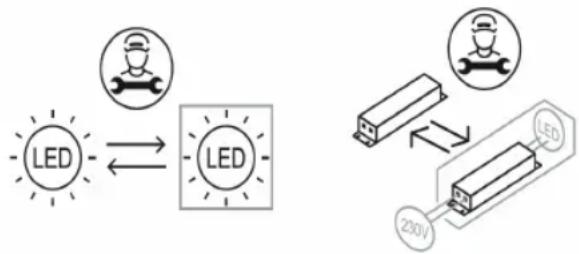
- If the appliance is equipped with an LED lamp, do not remove lamp cover and LED lamp in any attempt to repair or service it. Please, contact an LG Electronics customer information centre.
Disposal of Your Old Appliance
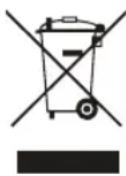
- This crossed-out wheeled bin symbol indicates that waste electrical and electronic products (WEEE) should be disposed of separately from the municipal waste stream.
- Old electrical products can contain hazardous substances so correct disposal of your old appliance will help prevent potential negative consequences for the environment and human health. Your old appliance may contain reusable parts that could be used to repair other products, and other valuable materials that can be recycled to conserve limited resources.
- You can take your appliance either to the shop where you purchased the product, or contact your local government waste office for details of your nearest authorised WEEE collection point. For the most up to date information for your country please see www/lg.com/global/recycling.
Before Calling for Service
Customer Care and Service
Contact an LG Electronics customer information centre.
To find information on LG authorized service centre, visit our website at www/lg.com. - Only qualified service personnel from LG authorized service centre should disassemble, repair, or modify the appliance. - The minimum warranty period of this refrigerating appliance is 24 months. - To purchase spare parts, contact an LG Electronics customer information centre or our website at www/lg.com. - Spare parts referenced in Regulation EU 2019/2019 are available for 7 years (only door gaskets are available for 10 years).
NOTE
- For more information about the energy efficiency of the appliance, visit https://ec.europa.eu and search using the model name (valid from 1st March 2021).
- Regulation EU 2019/2019, valid from 1st March 2021, is related to the Energy Efficiency classes by Regulation EU 2019/2016.
- Scan the QR code on the energy label supplied with the appliance, which provides a web link to the information related to the performance of the appliance in the EU EPREL database. Keep the energy label for reference and all other documents supplied with the appliance (valid from 1st March 2021).
- The model name can be found on the rating label of the appliance.
- This product contains a light source of energy efficiency class G.
OPERATING INSTRUCTIONS
REFRIGERATOR-FREEZER
Read the operating instructions carefully before using the appliance and keep them in a convenient place for reference at all times.
www.lg.com
SAFETY INSTRUCTIONS 3
Important safety instructions 3
INSTALLATION 10
Dimensions and clearances 10
Ambient temperature 10
TABLE OF CONTENTS 11
Safety Instructions 11
Converter for Fresh Products (*) 12
Fresh Vegetable Compartment ( *) 13
Control Panel 15
SMART FUNCTIONS 17
Using LG ThinQ 17
MAINTENANCE 19
Cleaning the Appliance 19
Replacing the Old Appliance 19
TROUBLESHOOTING 20
Additional Information Regarding the User Manual
This is a brief version of the user manual for
operation. For more detailed information,
please visit the LG website at http://www.lg.com
Troubleshooting
Safety Instructions
BG
The safety instructions in this manual are intended to prevent unforeseen risks and damage or danger due to incorrect use of the product. The instructions are divided into the sections "WARNING" and "CAUTION", as described in detail.

This symbol is used to draw attention to factors and uses that may pose a risk. Read the section marked with this symbol carefully and follow the instructions to avoid risks.

WARNING
This indicates that failure to follow the instructions may cause serious injury or death.

CAUTION
This indicates that failure to follow the instructions may cause minor injury or damage to the product.
Important safety instructions

WARNING
To reduce the risk of fire, electric shock, or injury to persons when using the product, the following basic precautions should be followed, including:
Children in the household
This appliance is not intended for use by persons (including children) with reduced physical, sensory, or mental capabilities, or lack of experience and knowledge, unless they have been given supervision or instruction concerning use of the appliance by a person responsible for their safety. Children should be supervised to ensure that they do not play with the appliance.
- If the appliance has a plug and cord (only for certain models), keep the cord out of reach of children.
Use in Europe:
This appliance can be used by children aged from 8 years and above and persons with reduced physical, sensory or mental capabilities or lack of experience and knowledge if they have been given supervision or instruction concerning use of the appliance in a safe way and understand the hazards involved. Children shall not play with the appliance. Cleaning and user maintenance shall not be made by children without supervision.
- Children aged from 3 to 8 years are allowed to load and unload refrigerating appliances.
Installation
This appliance must be transported only by adults or supervised persons, holding the appliance properly. - Make sure the plug is correctly earthed and that the earth wire is not damaged or disconnected. For more information about earthing, consult the information site for LG Electronics customers.
The appliance is equipped with a power cord with an earthing wire and an earthing plug. The plug must be inserted into a suitable socket that is installed and earthed in accordance with all local codes and ordinances.
- If the power cord is damaged, do not use the cord and contact an authorized service center. Do not plug the appliance into a multi-outlet adapter that has a power cord (extension). Do not modify or damage the electrical cord.
- The appliance must be connected to a separate electrical circuit with its own fuse.
- Do not use a multi-outlet socket that is not properly earthed (grounded). In case of using a properly earthed multi-outlet socket (grounded), use a multi-outlet socket with a ground fault circuit interrupter for the power cord or use only for the appliance. - Place the appliance in a location where the plug can be easily disconnected from the socket.
Be careful not to damage the power cord and do not place the appliance on top of it. - Place the appliance on a stable, level surface. - Do not install the appliance in a damp or dusty place. - Do not install the appliance outdoors or in a place exposed to atmospheric conditions such as direct sunlight, wind, rain, or temperatures below freezing. Do not place the appliance near heat sources such as heaters or radiators. Be careful not to expose the rear part of the appliance during installation. Be careful that the door of the appliance does not fall during opening or closing. Be careful not to bend, crush, or damage the cord when opening or closing the door of the appliance. - Do not connect adapters or extension cords to the socket.
Explosion
- Do not use the appliance for any purpose other than its intended use (storage and medical or experimental materials or for transport), different from the purposes of storage of food and household items. - The appliance will beep when the door is opened, when the light is on, or when the appliance is not in use for a long time. - Do not touch the appliance or the control devices with wet hands. - Do not interrupt the power supply and do not place heavy objects on the power cord. - If water penetrates into the electrical parts of the appliance, unplug it and contact the LG Electronics customer information service. Do not place containers with water or metal objects on the appliance, on the top of the cabinet, or on the grill, which could cause a fire in the rear part. - Do not apply excessive force to the door of the appliance. Do not place live animals in the appliance. The animal may suffocate.
Be careful if there are children when you open or close the appliance door. The door may be heavy and cause injury. Do not allow anyone to climb on or sit on the door, as this may cause the appliance to tip over and result in serious injury. - Be careful of the risk of children being trapped in the appliance. A child trapped inside the appliance may suffocate. Do not place heavy or sharp objects, containers with liquids, flammable substances, easily flammable items (e.g., candles, lamps, etc.), or heating appliances (e.g., stoves, radiators, etc.) on top of the appliance. - If there is a gas leak (butane, propane, natural gas, etc.), do not touch the appliance, do not unplug the power cord, and immediately ventilate the area. This appliance uses a flammable refrigerant (isobutane, R600a). Although it uses a small amount of gas, it is still flammable. A gas leak during transport, installation, or operation may cause a fire, explosion, or injury if sparks occur. Do not use or store flammable substances (ether, benzene, alcohol, chemicals, liquefied petroleum gas, flammable sprays, insecticides, air fresheners, cosmetics, etc.) near the appliance. Immediately remove the appliance from the area and contact the LG Electronics customer information service if you notice an unusual smell, noise, or smoke coming from the appliance. - Fill the water tank only with drinking water. Do not damage the refrigerant pipes. Do not place other electrical appliances (such as heaters or mobile phones) in the appliance.
Maintenance
Unplug the power cord before cleaning the appliance or replacing the interior light bulb (if applicable). Insert the plug correctly into the socket, after removing any moisture and dust. - Never unplug the appliance by pulling the power cord. Always grip the plug firmly and pull it straight out of the socket.
- Do not store flammable substances (such as toothpaste, alcohol, solvents, benzene, flammable liquids, abrasives, etc.) inside or near the appliance. Do not use the appliance with brushes, scrapers, or tools with rough surfaces, or with metal materials.
- Only qualified service personnel from an LG Electronics service center should disassemble, repair, or modify the appliance. Contact the LG Electronics customer service center if you are installing or relocating the appliance to another location. Do not use a hairdryer to dry the inside of the appliance, and do not place candles inside to remove odors.
- Do not use mechanical devices or other means to accelerate the defrosting process.
Disposal
When disposing of the appliance, remove the door gasket, leave the shelves and baskets in place, and do not allow children to play near the appliance. Dispose of the packaging material (such as plastic bags and Styrofoam) away from children. Packaging materials can cause suffocation.
Technical Safety
Do not place obstacles in front of the ventilation openings or in the walls of the appliance or in the built-in enclosure. Do not use electrical appliances inside the refrigerator. Special disposal procedures are required for the refrigerant and for the insulating gas used in the appliance. Consult a technician or similarly qualified person before disposing of them. The refrigerant that escapes from the pipes could ignite or cause an explosion. The amount of refrigerant for your specific appliance is indicated on the identification label on the appliance. Never operate an appliance that shows signs of damage. If you have any doubts, consult your dealer.
This appliance is intended for household use only and similar non-commercial applications. It should not be used for commercial purposes, catering, or mobile applications such as in caravans or mobile homes. Do not store explosive substances such as aerosol cans with flammable gas in the appliance. This refrigerator is not intended for use as a built-in appliance.
Risk of fire and flammable materials
This symbol warns of flammable materials that can ignite and cause a fire if you are not careful.
Contains a small amount of flammable refrigerant (R600a), but it is not flammable. When transporting and installing the appliance, be careful not to damage any part of the cooling circuit. - If a leak is detected, avoid open flames or potential ignition sources and ventilate the room where the appliance is located for a few minutes. To avoid the formation of a flammable gas-air mixture, if a leak in the cooling circuit occurs, the size of the room in which the appliance is used must correspond to the amount of refrigerant used. The room must be at least 1 m² for every 8 g of refrigerant R600a in the appliance. When positioning the appliance, make sure that the power cord is not pinched or damaged. Do not place multiple portable sockets or portable power supplies in the rear area of the appliance.

WARNING
To reduce the risk of minor injury, malfunction, or damage to the product or property, follow the basic precautions, including:
Installation
- Do not place the appliance to hold or dispose of it during transport.
- Be careful not to press on parts of the appliance (e.g., legs or pipes) while moving it.
Operation
- Do not touch frozen food or metal parts in the freezer compartment with wet or damp hands. This may cause frostbite. Do not place glass containers, bottles, or cans (especially those with carbonated drinks) in the freezer compartment, on shelves, or in the ice container, where they will be exposed to temperatures below freezing. - Frozen glass in the front part of the appliance door or on the shelves may be damaged upon impact. Do not handle it with wet hands if it is frozen. Do not lean on the appliance door, the storage compartment, or the freezer drawer. - Do not store an excessively large amount of water bottles or glass containers for food in the door compartments. - Do not allow pets to chew on the power cord or the water hose. - Do not open or close the appliance door with excessive force. If the appliance door hinge is damaged or does not work properly, stop using the appliance and contact an authorized service center.
Do not wash the glass shelves or containers with hot water when they are cold.
- Never eat frozen food immediately after removing it from the freezer. Be careful not to press on the handle or leg when opening or closing the appliance door.
Maintenance
Do not place the shelves upside down. They may fall. - To remove the frost from the appliance, contact the LG Electronics customer information center.
Dimensions and clearances
The distance to surrounding objects may increase the energy consumption and reduce the cooling capacity. Keep a distance of more than 50 mm from the surrounding walls when installing the device.
1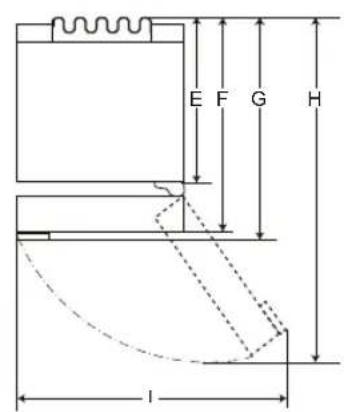
2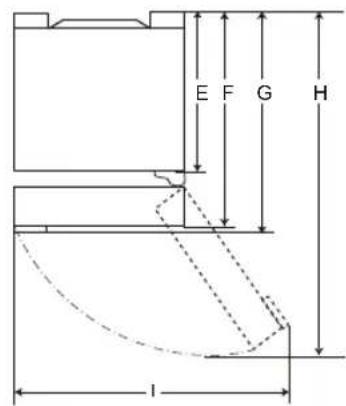
| 1 | 2 |
| Размер [MM] |
| Джобна дрьжka | Лостова дрьжka | Джобна дрьжka | Лostова дрьжka |
| A | 595 595 595 | | | 595 |
| B | 1860 / 2030 | 1860 / 2030 | 1860 / 2030 | 1860 / 2030 |
| C | 682 718 675 | 712 | | |
| D | 2100 | 2100 | 2100 | 2100 |
| 616 | 616 610 | 610 | |
| F | 682 682 | | 675 | 675 |
| G | - | 718 | - | 712 |
| H | 1230 | 1237 | 1225 | 1232 |
| I | 995 | 995 995 | 995 | |
Ambient temperature
- The device is intended for operation in a limited temperature range depending on the climate zone. The temperature of the device must be within the range specified by the ambient temperature, the frequency of door openings, etc. The climate class can be indicated with data.
| КлIMаТичЕн Клас | Диапазон Ha okолины Temпература в °C |
| SN (РаЗширен умерен) +10 - +32 | |
| N (Умерен) +16 - +32 | |
| ST (Субтошичен) +16 - +38 | |
| T (Трочen) +16 - +43 / +10 - +43* | |
*Australia, India, Kenya
WARNING
The device with category from SN to T is intended for use at ambient temperatures from 10°C to 43°C
Operating instructions
- Consumers must be aware that frost can form if the door is not closed properly, if the humidity is high during the summer, or if the freezer door is opened frequently.
- Make sure there is enough space between the stored items on the top shelf and the door liner, so that the door can close completely.
- Leaving the door open for a long time can lead to a significant increase in the temperature of the device. - If the cooling device is left open for a long time, you must turn it off, defrost it, clean it, dry it, and leave the door open to prevent the formation of mold in the device.
Energy saving tips
- Make sure there is enough space between the stored food items. This allows for even circulation of cold air and reduces electricity bills.
- Store hot food only after it has cooled down, to avoid the formation of condensation or frost. When storing food in the freezer, set the freezer temperature to a lower value than the temperature indicated on the food. Do not place food close to the temperature sensor of the refrigerator. Leave a distance of at least 3 cm from the sensor. - Keep in mind that raising the temperature after defrosting is within the permissible range in the device's specifications. If you want to reduce the impact that this temperature increase may have on food storage, close the hermetic packaging of the stored food in several.
- The appliance is designed for the storage of food and guarantees normal operation under normal conditions. For the most efficient use of energy, keep all internal parts (e.g., door shelves, drawers, and shelves) in their original position.
Do not set the temperature of the appliance lower than necessary.
Efficient storage of food
Store fresh and frozen food in the sealed containers. -Check the expiration date (storage instructions) before placing food in the appliance. Do not store food for a long time if it spoils easily at low temperatures. -Place cooled or deep-frozen food in the refrigerator or freezer as soon as possible after purchase. Store raw meat only in the refrigerator's coldest containers, so that it does not come into contact with other food or drip onto it. -Avoid refreezing food that has been completely thawed. Refreezing thawed food will impair its taste and nutritional qualities. -Do not wrap and store vegetables in newspaper. The printing ink or other chemicals may contaminate or block the food. Do not overload the appliance. The cold air cannot circulate properly if the appliance is overloaded. -If you set a low temperature, food may freeze. Do not set the temperature lower than necessary for proper food storage. For more space, you can remove the bottle rack, the can rack, the egg tray, and the drawer for fresh products. Food may freeze or spoil if stored at the wrong temperature. Set the refrigerator to the correct temperature for the food being stored.
Max. freezing capacity
-The Express Freeze function sets the freezer to maximum freezing capacity. This continues for up to 24 hours and then switches off automatically. If you need to use the maximum freezing capacity, Express Freeze must be switched on for seven hours before placing fresh products in the freezer compartment.
Freezing the maximum amount of food
For better air circulation, remove all drawers. If large quantities of food need to be stored, all drawers of the freezer must be removed and the food placed directly on the freezer shelves (or racks) in the freezer compartment.
REMOVAL
To remove the drawers, first remove the food from the drawers and then pull them out. Failure to follow this instruction may result in damage to the drawers. -The shape of each drawer may be different, place them in the correct position.
Setting the temperature
This sets the temperature of the refrigerator or freezer.
- Press the Fridge button or the Freezer button to adjust the temperature.
- The temperature can be adjusted. -Refrigerator: from 1 °C to 7 °C -Freezer: from -15 °C to -23 °C -The initial temperature is set. -Refrigerator: 3°C -Freezer: -18°C
The set temperature can be adjusted depending on the state of the food, but the set temperature is a reference, not the actual temperature in the environment.
NOTE
The set temperature may vary depending on the environment. For optimal food storage, it is recommended to increase or decrease by 1°C and check the temperature after each adjustment. - Remove food 2-3 hours before
connecting the appliance to the power supply,
before storing food in it.
For normal operation, the freezer temperatures must be set to -18°C or colder.
High Temperature Alarm
When the freezer temperature becomes too high due to a power failure, the LED temperature alarm lights up and sounds an alarm.
- Press the Freezer button to turn it off. If the temperature has reached a sufficiently cold level, the alarm and the alarm will automatically turn off.
-The function works:
-When the refrigerator is turned on. -When the freezer compartment becomes too warm. -When there is a prolonged power outage. -When large quantities of warm food are placed in the freezer compartment. -When the freezer door is left open for too long or too often.
Converter for fresh products (*)
As the cooling compartment, the temperature in the converter for fresh products can be controlled by adjusting the lever, located in the front part of the compartment in any direction.
When storing vegetables, meat, or fish, you can adjust the temperature accordingly.
For storing vegetables (recommended) for storing fruit. For storing meat.
NOTE
(*): This feature may vary depending on the purchased model.
Keep vegetables fresh (*)
The humidity in the vegetable drawer can be adjusted by turning the knob 1.
To keep vegetables fresh, it is recommended to store them in the drawer.
DELAY
(*):Ta3nφyHKua BapupaB 3abucmocT O3akynenMoJen.
Temperature setting
Press the Fridge or Freezer button to adjust the temperature.
- The temperature can be adjusted. Refrigerator: from 1°C to 7°C
- Freezer: from -15 °C to -23 °C The initial temperature is set. Refrigerator: 3°C Freezer: -18 °C
Installation of LG ThinQ application
Search for the LG ThinQ app from the Google Play Store or Apple's App Store on a smartphone.
Important safety instructions 3
INSTALLATION 10
IMPORTANT SAFETY INSTRUCTIONS

DANGER
Mobile egg tray
LG ThinQ Application
IMPORTANT SAFETY INSTRUCTIONS 3
INSTALLATION 10
Dimensions and free space 10
Ambient temperature 10
OPERATION 11
Notes for operation 11
IMPORTANT SAFETY INSTRUCTIONS

WARNING
To reduce the risk of explosion, fire, death, electric shock, injury, or burns to persons when using this product, follow basic precautions, including the following:
Children in the household
- This appliance should not be used by persons (including children) with reduced physical, sensory, or mental capabilities, or lack of experience and knowledge, unless they are supervised or given instructions concerning the use of the appliance by a person responsible for their safety. Children should be supervised to ensure that they do not play with the appliance.
- If the appliance is equipped with a lock (only on some models), keep the key out of reach of children.
For use in Europe:
Copyright © 2019-2023 LG Electronics Inc. All Rights Reserved
Frozen and chilled food
Store frozen or chilled food in closed containers. - Observe the expiration date and storage instructions on the label. Place the food in the appliance. - Do not store food for longer than the recommended period (usually no more than 4 weeks) if it spoils easily at low temperatures. Place chilled or frozen food in the refrigerator or freezer compartment as soon as possible after purchase. Avoid refreezing food that has been completely thawed. Refreezing any food that has been completely thawed will affect its nutritional value. - Keep fresh meat and fish in the appropriate compartment in the refrigerator to prevent them from coming into contact with or dripping onto other food. Do not store vegetables in plastic bags. Packaging materials such as plastic bags or other synthetic materials can contaminate and spoil food. Do not overload the appliance. Cold air cannot circulate properly if the freezer is overfilled. - If you set a very low temperature, food may freeze. Do not set the temperature lower than necessary for proper food storage.
For more space, you can remove the shelves for bottles, jars, and the drawer for fresh food.
Food may freeze or spoil if stored at the wrong temperature. Set the temperature in the refrigerator to the correct level for the food stored in it.
Maximum freezing capacity
- The Express Freeze function enables maximum freezing capacity. - The function is automatically activated for 24 hours, then it switches off automatically. - If you want to use the maximum freezing capacity, the Express Freeze function must be activated 7 hours in advance, and then fresh produce can be placed in the freezer compartment.
Freezing maximum quantity of food
To improve air circulation, insert the drawers. - If large quantities of food need to be stored, the drawers in the freezer should be removed and the food placed directly on the shelves (or in the drawers) in the freezer compartment.
NOTE
To remove the drawers, first remove the food from them, then pull them out carefully. If you do not do this, you may damage or break the drawers. - The shape of each drawer may be different, so insert them into the corresponding slots.
Setting the temperature
The temperature is adjusted using the thermostat knob.
Set the Fridge or Freezer to the desired temperature. The temperature may vary. Fridge: from 1°C to 7°C. Freezer: from -15°C to -23°C. The recommended temperature is set. Fridge: 3°C. Freezer: -18°C.
The actual internal temperature varies depending on the status of the food. The recommended temperature setting is the target temperature, not the actual temperature inside the appliance.
WARNING
- The factory recommended temperature settings may differ from the actual ones. For optimal food preservation, it is recommended to adjust the standard temperature up or down for each compartment by 1°C or one level.
- Wait 2 to 3 hours after connecting the appliance to the power supply before placing food in it. To make ice in normal climate, the freezer temperature should be set to -18°C or lower.
High Temperature Alarm
When the freezer temperature is too high due to a defect, the freezer LED light will blink and the alarm will sound.
- Press the Freezer button to turn it off. Set the temperature sufficiently low, the blinking and alarm will turn off automatically.
- The function is activated in the following cases:
The fridge is turned on.
When the temperature in the freezer compartment rises significantly. In case of prolonged power outage. In case of placing a large amount of warm food in the freezer. In case the freezer door is left open for a long time or opened very frequently.
Compartment for fresh products (*)
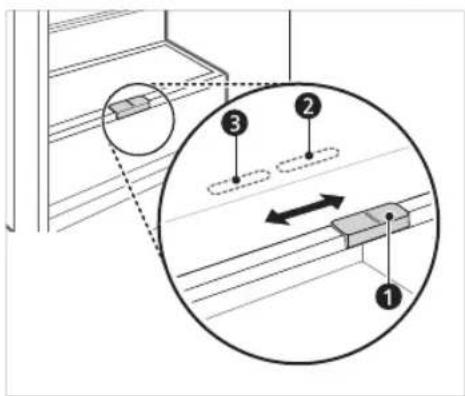
In the food compartment, the temperature in the fresh products compartment can be controlled with the help of the handle (1) located at the front of the compartment, by placing it in two directions.
When storing vegetables with meat or fish settings, it may lead to freezing.
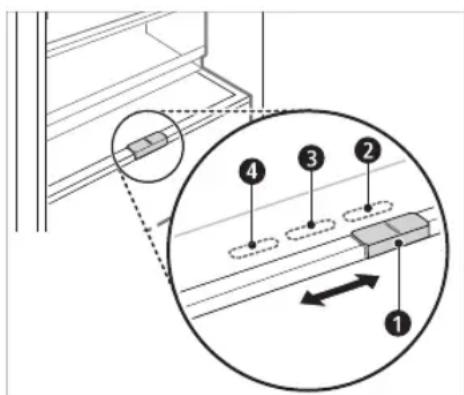
Drawer for vegetables. (Recommended) For the refrigerator. 4 For the refrigerator.
NOTE
(*) The characteristic varies depending on the purchased model.
Crisper drawer ( *)
At the end of the drawer, adjust the humidity in the crisper drawer 1.
Vegetable drawer. (Recommended) Drawer for vegetables.
NOTE
(水 ) :The characteristic varies depending on the purchased model.
Storing food in the refrigerator compartment
-Shelves in the refrigerator -Place food in the refrigerator compartment. -The height of the shelf can be adjusted by placing the shelf in another slot with a different height. -Food that is stored more humid should be placed in the front, not at the back. -The number of shelves varies by model. -Door shelves (*) -On the door shelves you can store all types of bottles and jars. -Folding shelf ( ) -Here you can store already prepared food and tall items. -Crisper drawer ( ) -Use the humidity controller in the drawer to keep the vegetables and fruits fresh longer. -The accessories of the appliance may vary from model to model. -Fresh food compartment (*) -In the fresh food compartment you can store meat, fish, vegetables. Use the humidity controller located at the back of the refrigerator to keep the products fresh longer. -For more space, you can use the fresh food compartment without the drawer for vegetables. -Raised shelf -Here you store eggs. -You can move it and place it in a suitable position. However, do not use it as a tray for ice or place it at the top of the refrigerator or in the vegetable drawer.
- Door of the refrigerator -Here you store small packages of food, jars, bottles with sauces.
- Water dispenser reservoir (*) -The reservoir holds water for the dispenser or for the automatic ice maker. The reservoir is filled manually. (Only for models that are not connected to the water supply in the home)
Storing food in the freezer compartment
-The tray is used for making and storing ice. -For additional space, you can remove the tray or the ice cube container.
-To quickly freeze fresh food, place it in the top drawer. In this drawer, fresh products freeze the fastest.
NOTE
* :This characteristic varies depending on the purchased model. For more information about other functions, visit lg.com and read the instructions for use.
Control panel
The control panel may differ from model to model.
Control panel functions
*1 This function is available only for some models.
The control panel can be found on the door of the refrigerator or inside the refrigerator, depending on the model.
Type A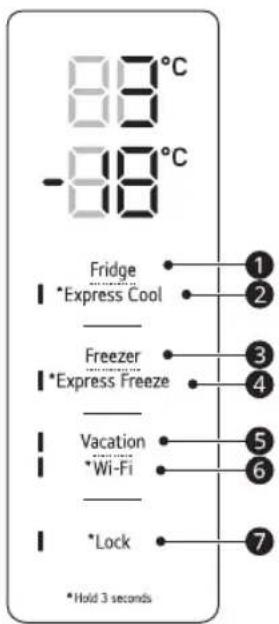
Type B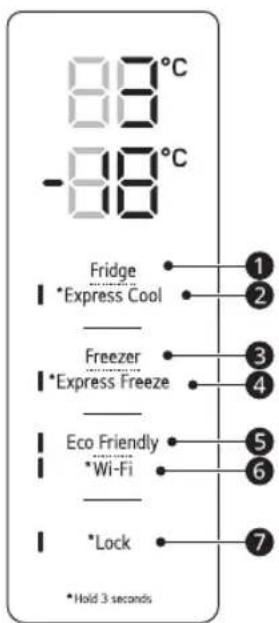
1 Fridge
Set this knob constantly to select a temperature between 1°C and 7°C
- The standard temperature of the refrigerator is ° C
Express Cool
Both functions switch on and off every time the door is opened.
- Both functions switch on and off every time the door is opened.
3 Freezer
Press this button repeatedly to select a temperature between -15 °C and -23 °C.
- The standard freezing temperature is -18 °C.
4 Express Freeze
With this function, you can quickly freeze large quantities of fresh or frozen food.
- Press the Express Freeze button to activate the function for a period of 24 hours. The function automatically switches off after 24 hours.
- This function switches on and off every time you press the button. When this mode is on, you can reduce energy consumption.
5 Vacation
This function is useful when you are on vacation. When the function is on, the temperature in the refrigerator is 7 °C, and in the freezer -15 °C. When the function is off, the temperatures in the refrigerator and freezer return to the previous settings.
- This function switches on and off every time you press the button. When this mode is on, the other buttons do not work except Lock Wi-Fi.
- Eco Friendly is included in Vacation.
WARNING
When the function is on, pay attention to the food that requires a lower temperature than the standard one. When you return home, remember to switch off the function to activate the other buttons and return the temperature to the previous settings.
6 Wi-Fi
This function allows you to control the appliance remotely via a home Wi-Fi network. Follow the SMART FUNCTIONS instructions for information on the initial setup of the LG ThinQ application.
7 Lock*1
This function locks the control panel.
To lock the control panel, press and hold the Lock button for 3 seconds until the function is activated. To deactivate the function, press and hold the Lock button for 3 seconds until the function is deactivated.
NOTE
- For optimal food preservation, it is recommended to adjust the standard temperature for each compartment by 1°C or one level.
- The displayed temperature is the set temperature, not the actual temperature inside the appliance.
- The actual temperature inside the appliance depends on several factors: room temperature, the amount of food, and how often the doors are opened, as well as the location of the appliance. Set the temperature considering these factors.
- The control panel will turn off automatically to save energy. If contact occurs between the panel and the control panel, or if you touch it, the function of the corresponding button may be activated.
LG ThinQ Application
This function is available only on models with Wi-Fi.
The LG ThinQ application allows you to communicate with the appliance using your smartphone.
Features of the LG ThinQ Application
Communicate with the appliance from your smartphone using the practical functions.
If you encounter a problem with the appliance, use the diagnostic function to help you diagnose the problem.
Troubleshooting
Wi-Fi connection
Energy saving recommendations
- Foldable shelf (*)
TROUBLESHOOTING. 19
Copyright © 2019-2023 LG Electronics Inc. All Rights Reserved
SAFETY INSTRUCTIONS 3
Copyright © 2019-2023 LG Electronics Inc. All Rights Reserved
CONTENTS
IMPORTANT SAFETY INSTRUCTIONS

WARNING
TABLE OF CONTENTS
for more information.
Troubleshooting
SAFETY INSTRUCTIONS
EN
Set the temperature
Use this button to set the refrigerator or freezer temperature.
Press the Fridge button or the
Freezer button to adjust the temperature.
- The temperature can be adjusted.
Refrigerator: from 1°C to 7°C - Freezer: from -15 °C to -23 °C
- The initial temperature is set.
Refrigerator: 3°C - Freezer: -18 °C
- (*): This feature varies depending on the model purchased.
Warning for flammable material
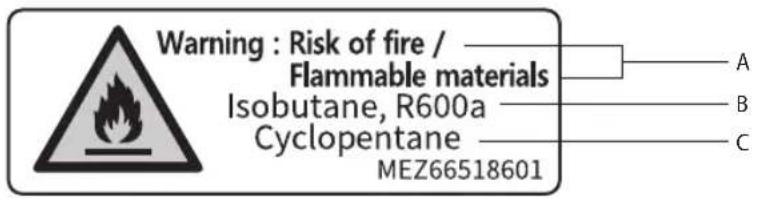
A (EN) Warning: Risk of fire / Flammable materials / (BG) Предупреждение: Риск от пожар / Запалими материали / (CZ) Varování: Nebezpečí vzniku požáru / Hořlavé materiály / (DA) Advarsel: brandrisiko / brandbare materialer / (DE) Warnung: Brandgefahr / Brennbare Materialien / (ES) Advertencia: Riesgo de incendio / Materiales inflamables / (ET) Hoiatus: tuleoht / Tuleohtlikud materjalid / (FI) Varoitus: Tulipalovaara / sytyviä materiaaleja / (FR) Avertissement: Risque d'incendie / Matériaux inflammables / (GR) Προειδοποίηση: Κίνδυνος φωτιάς / Εύφλεκτα υλικά / (HR) Upozorenje: Opasnost od požara / Zapaljivi materijali / (HU) Figyelmeztetés: Tűzveszély / Gyúlékony anyagok / (IT) Attenzione: rischio d'incendio / Materiale infiammabile / (LT) Įspėjimas: gaisro rizika / Degiosios medžiagos / (LV) Brīdinājums: Ugunsgrēka risks / Viegli uzliesmojoši materiāli / (MK) Предупредување: Опасност од пожар / Запалливи материјали / (NL) Waarschuwing: Brandgevaar / Brandbare materialen / (NO) Advarsel: Brannfare / Brennbare materialer / (PL) Ostrzeżenie: Ryzyko pożaru / Materiały łatwopalne / (PT) Aviso: Risco de incêndio / Materiais inflamáveis / (RO) Avertisment: Risc de incendiu / Materiale inflamabile / (SK) Varovanie: Nebezpečenstvo požiaru / Horľavé materiály / (SL) Opozorilo: nevarnost požara / Vnetljivi materiali / (SQ) Paralajmërim: Rrezik zjarri / Materiale të ndezshme / (SR) Upozorenje: Opasnost od požara / Zapaljivi materijali / (SV) Varning: Brandrisk / Brandfarligt material B (BN) Isobutane, R600a / (BG) Изобутан, R600a / (CZ) Izobutan, R600a / (DA) Isobutan, R600a / (DE) Isobutan, R600a / (ES) Isobutano, R600a / (ET) Isobutaan, R600a / (FI) Isobutaani, R600a / (FR) Isobutane, R600a / (GR) Ισοβουτάνιο, R600a / (HR) Izobutan, R600a / (HU) Izobutan, R600a / (IT) Isobutano, R600a / (LT) Izobutanas, R600a / (LV) Izobutāns, R600a / (MK) Изобутан, R600a / (NL) Isobutaan, R600a / (NO) Isobutan, R600a / (PL) Izobutan, R600a / (PT) Isobutano, R600a / (RO) Izobutan, R600a / (SK) Izobutan, R600a / (SL) Izobutan, R600a / (SQ) Izobutan, R600a / (SR) Izobutan, R600a / (SV) Isobutan, R600a C (EN) Cyclopentane / (BG) Циклопентан / (CZ) Cyklopentan / (DA) Cyklopentan / (DE) Zyklo-Pentan / (ES) Ciclopentano / (ET) Tsüklopentaan / (FI) syklopentaani / (FR) Cyclopentane / (GR) Κυκλοπεντάνιο / (HR) Ciklopentan / (HU) Ciklopentán / (IT) Ciclopentano / (LT) Ciklopentanas / (LV) Ciklopentāns / (MK) Циклопентан / (NL) Cyclopentaan / (NO) Syklopentan / (PL) Cyklopentan / (PT) Ciclopentano / (RO) Ciclopentan / (SK) Cyklopentan / (SL) Ciklopentan / (SQ) Ciklopentan / (SR) Ciklopentan / (SV) Cyklopentan
Rating label
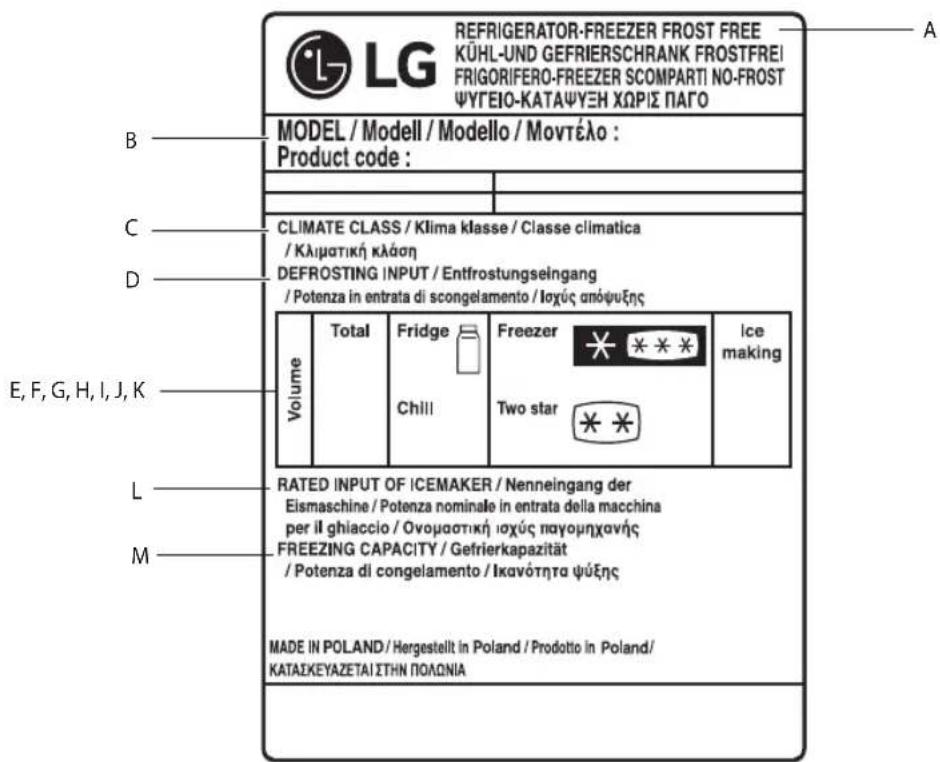
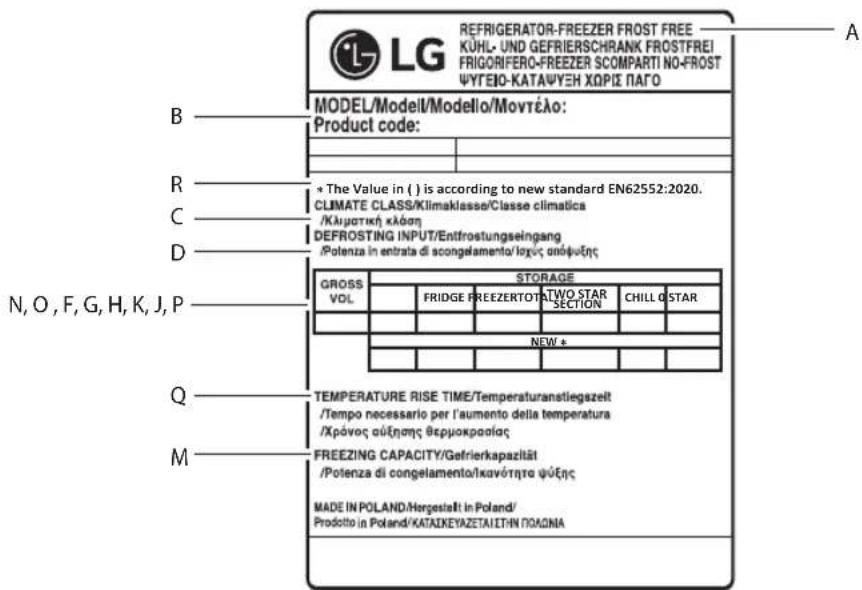
A (EN) Refrigerator-freezer Frost free / (BG) Xlaɪnɪnɪk-фρɪəр Без крөг / (CZ) Chladnička s mrazničkòu, Beznamrozová / (DA) No frost-køleskab/fryser / (ES) Refrigerador-congelador Libre de eschara / (ET) Külmik-sugavkulmik Külmumiskindel / (FI) Jäkaappi-pakastin, automaattisulatteinen / (FR) Refrigerateur-congeléatelurs Sans givre / (HR) Hladnjak-zamrzivač Bez nakupljanja leda / (HU) Hutöszekrény-fagyasztó Jegesedesmentes / (LT) Saldytuvas-saldiklis Be serksno / (LV) Ledusskapissaldetava Bezarsarmas nodalijums / (MK) Φрикдер-Замрнувач Бе мраз / (NL) Koel-vriescombinatie No-frost / (NO) Frostfri koleskap med fryser / (PL) Chlodziarko-zamražarka System bezszronowy / (PT) Frigorifco-congelador Sem gelо / (RO) Frigider-congelator Fāra gheata / (SK) Chladnička s mrazničkòu Beznamrozový systém / (SL) Hladilnik-zamrozvalnik Brez ledu / (SQ) Frigorifer-ngrirës pa ngrice / (SR) Frizider-zamrizaçbez zamrzavanja / (SV) Frostfritt Kyl-och frysskap B (EN) Model / (BG) Moden / (CZ) Model / (DA) Model / (ES) Model / (ET) Model / (FI) Malli / (FR) Modèle / (HR) Model / (HU) Model / (LT) Modelis / (LV) Modelis / (MK) Moden / (NL) Model / (NO) Modell / (PL) Model / (PT) Modelo / (RO) Model / (SK) Model / (SL) Model / (SQ) Model / (SR) Model / (SV) Modell C (EN) Climate class / (BG) KlimaHTueh knac / (CZ) Klimaticka trida / (DA) Klimaklasse / (ES) Clase climatica / (ET) Klimaklass / (FI)llmastoluokka / (FR) Classe climatique / (HR) Klimatski razred / (HU) Klima osztaly / (LT)Klimato klase / (LV) Klimata klase / (MK)KlmaTcKa knaca / (NL) Klimaatklasse / (NO) Klimaklasse / (PL) Klasa klimatyczna / (PT)Classe climatica / (RO)Clasa de climatizare / (SK) Klimaticka trieda / (SL) Klimatski razred / (SQ) Kategoria e klimes / (SR) Klimatska klasa / (SV) Miljoklass D (EN) Defrosting input / (BG) IopTe6BaHa MoUHcT 3a pa3Ma3BaHe / (CZ) Prikon pri Rozmrazovani/ (DA) Optoningsindgang ES) Entrada de desescarche / (ET) Sulatamise sisend / (FI) Sulatuksen tulo / (FR) Entree de décongélation / (HR) Ulaz odmrzavanja / (HU) Leolvasztási bemet / (LT) Energijos poreikis atsildymui / (LV) Atsaldeşanas ievade / (MK) OdmP3NvBauKn Bne3 / (NL) Ingang ontdooien / (NO) Nominel avtining / (PL) Pobó mocy przy Rozmražaniu / (PT) Entrada para descogelação / (RO) Puteredezghetare / (SK) Prikon Rozmrazovania / (SL) Odjemna moč za odleditev / (SQ) Hyrja e shkrirjes (/SR) Ulazna snaga za odmrzavanje (SV) Avfrostningse'ekt E (EN)Volume / (BG)O6em / (CZ) Objem / (DA)Volumen / (DE) Volumen / (EL) OyKoc / (ES) Volumen / (ET) Maht / (FI) Määrä / (FR) Volume / (HR) Zapremina / (HU) Terfogat / (IT) Volume / (LT) Talpa / (LV) Skalums / (MK) Kolunna / (NL) Volume / (NO) Volum / (PL) Objetosc / (PT) Volume / (RO) Volum / (SK) Objem / (SL) Prostornina / (SQ) Vellim / (SR) Zapremina / (SV) Volym F (EN) Total / (BG)O6uio / (CZ) Celkem / (DA)Total / (DE)Gesamt / (EL) Suvoio / (ES) Total / (ET) Kokku / (FI) Yhteensa / (FR) Total / (HR) Ukupno / (HU) Osszen / (IT) Totale / (LT) Is viso/ (LV) Kopa/ (MK) Bkyno/ (NL) Totaal / (NO) Total / (PL) Lacznie / (PT) Total / (RO) Total / (SK) Celkovo / (SL) Skupaj / (SQ) Totali / (SR) Ukupno / (SV) Total G (EN)Fridge / (BG)XlaHnHnK / (CZ)Chladnicka / (DE)Kuhlschrank / (DA)Koleskab / (EL)KaTauKtnc / (ES)Frigorifico / (ET)Kulmik/ (FI)Jäkaappi / (FR)Refrigerateur / (HR)Hladnjak / (HU)Hutszekrény / (IT)Frigorifero / (LT)Saldytuvas / (LV)Ledusskapis / (MK)Φpnnqndep / (NL)Koelkast / (NO)Kjoleskap / (PL)Lodowka / (PT)Rgtrifico / Frigider / (SK)Chladnicka / (SL)Hladilnik / (SQ)Frigoriferi / (SR)FriZider / (SV)Kylskap H (EN) Freezer / (BG) Φριδερ / (CZ) Mraznicka / (DA) Fryser / (DE) Gefrierschrank / (ES) Congelador / (ET) Sugavülmik / (FI) Pakastin / (FR) Congélateur / (GR) Kαταψικτης / (HR) Zamrživač / (HU) Fagasyztó / (IT) Freezer / (LT) Saldiklis / (LV) Saldetava / (MK) 3amρηнвач / (NL) Vriescombinatie / (NO) Fryser / (PL) Zamražalnik / (PT) Congelador / (RO) Congelator / (SK) Mraznicka / (SL) Zamrzovalnik/ (SQ)Ngrires / (SR) Zamrživač (SV) Frysskap | (EN) Ice making / (BG) Leandropehataop / (CZ) Vyroba ledu / (DA) Isterningmaskine / (DE) Eisherstellung / (EL) Napiaywnnyayou / (ES) Fabricacion de hielo / (ET) Jaa valmistamine / (FI) Jaapaloen valmistus / (FR) Fabricacion de glace / (HR) Pravljenke leda / (HU) Jegkesztes / (IT) Produzione ghiaccio / (LT) Ledo gaminimas / (LV) Ledus gatavošana / (MK) Правене мраз / (NL) Jss maken / (NO) Ismaskin / (PL) Wytwarzanie lodu / (PT) Produção de gelo / (RO) Utilizarea dozatorului de gheata / (SK) Vyrobnik'ladu / (SL) Izdelava ledu / (SQ) Prodhibi i akullit / (SR) Ledomat / (SV) Istillverknings J (EN) Chill / (BG) CTydeHnHa / (CZ) chlad / (DA) Kold / (DEKuhle / (ES) frio / (EL) ψuxpα / (ET) kulmus / (FI) Jaahdytys / (FR) Fraicheu / (HR) hladnoca / (HU) huteso/ (IT) Freddo / (LT) saltumas / (LV)Aukstums / (MK) CTydeHnO / (NL) koude / (NO) avkjole / (PL) Komora schladzania / (PT) frio/ (RO)Racire / (SK) chlad / (SL) hladnost / (SQ) ftohtesi / (SR) Hladnoca / (SV) kyla K (EN) Two star / (BG) 2 vēzǎn / (CZ) Dve hvezdicky / (DA) To stjerner / (DE) Zwei Sterne / (EL) 2 αοτέρων / (ES) 2 estrellas / (ET) Kahetärniline / (FI) Kaksi tāhtea / (FR) Deux étoiles / (HR) Dvijé zvijezde / (HU) Két csillag / (IT) 2 stelle / (LT) Dvi Žvaigždutës / (LV) Divas zvaigñes / (MK) 2 sBezni / (NL) Twee sterren / (NO) To stjerner / (PL) Dwie gwiazdki / (PT) Duas estrelas / (RO) Doua stele / (SK) Dve hvezdicky / (SL) Dve zvezdici / (SQ) Me dy yje / (SR) Dve zvezdice / (SV) Tvà stjärnor
L (EN) Rated input of icemaker / (BG) Номинална мощност на ледогенератора / (CZ) Jmenovitý vstup výrobníku ledu / (DA) Vurderet input af isterningsmaskine / (DE) Nennlast von Eisbereiter / (EL) Ονομαστική είσοδος παραγωγού πάγου / (ES) Entrada nominal del fabricador de hielo / (ET) Hinnanguline jäätise masina sisend / (FI) Jääpalakoneen nimellissyöttöteho / (FR) Puissance nominale machine à glace / (HR) Nazivna ulazna snaga ledomata / (HU) A jégkészítő névleges bemenete / (IT) Potenza nominale di ingresso della macchina per il ghiaccio / (LT) Ledo gaminimo aparato vardinė įėjimo galia / (LV) Ledus ražotāja nominālā ieeja / (MK) Номинална моќност на апарат за мраз / (NL) Nominale ingang van de ijsmachine / (NO) Rangert inngang av ismaskin / (PL) Znamionowa moc wejściowa kostkarki do lodu / (PT) Potência de entrada nominal da máquina de gelo / (RO) Putere consumată dozatorului de gheață / (SK) Menovitý príkon výrobníka ľadu / (SL) Nazivni vhod aparata za led / (SQ) Inputi vlerësuar i makinerisë së akullit / (SR) Nazivni ulaz ledomata / (SV) Märkeffekt för ismaskin / M (EN) Freezing Capacity / (BG) Капацитет на замразяване / (CZ) Mrazicí výkon / (DA) Nedfrysningskapacitet / (ES) Capacidad de congelación / (ET) Külmutusvõimsus / (FI) Pakastuskapasiteetti / (FR) Capacité de congélation / (HR) Kapacitet zamrzavanja / (HU) Fagyasztási kapacitás / (LT) Šaldymo geba / (LV) Saldēšanas jauda / (MK) Капацитет за замрзнување / (NL) Vriesvermogen / (NO) Frysekapasitet / (PL) Wydajność zamrażania / (PT) Capacidade de congelamento / (RO) Capacitatea frigiderului / (SK) Kapacita mrazenia / (SL) Zamrzovalna zmogljivost / (SQ) Kapaciteti ngrirës / (SR) Kapacitet zamrzavanja / (SV) Fryskapacitet / N (EN) Gross Volume / (BG) Бруто обем / (CZ) Hrubý objem úložného prostoru / (DA) Bruttokapacitet / (DE) Bruttovolumen / (EL) Συνολικός όγκος / (ES) Volumen bruto / (ET) Kogumaht / (FI) Bruttotilavuus / (FR) Volume brut / (HR) Bruto obujam / (HU) Brutto térfogat / (IT) Volume lordo / (LT) Bendroji talpa / (LV) Bruto tilpums / (MK) Бруто волумен / (NL) Brutovolume / (NO) Bruttovolum / (PL) Pojemność brutto / (PT) Volume bruto / (RO) Volum brut / (SK) Hrubý objem / (SL) Bruto prostornina / (SQ) Volumi bruto / (SR) Bruto zapremina / (SV) Bruttovolym / O (EN) Storage Volume / (BG) Полезен обем / (CZ) Úložný prostor / (DA) Opbevaringskapacitet / (DE) Speichervolumen / (EL) Αποθηκευτικός όγκος / (ES) Volumen de almacenaje / (ET) Hoiustamise kogumaht / (FI) Säilytystilavuus / (FR) Volume de stockage / (HR) Obujam skladištenja / (HU) Tároló térfogat / (IT) Volume di conservazione / (LT) Sandėliavimo talpa / (LV) Uzglabāšanas tilpums / (MK) Волумен за складирање / (NL) Opslagvolume / (NO) Lagringsvolum / (PL) Pojemność przechowywania / (PT) Volume de armazenamento / (RO) Volum de depozitare / (SK) Objem úložného priestoru / (SL) Prostornina shranjevalnega prostora / (SQ) Volumi i ruajtjes / (SR) Skladišna zapremina / (SV) Lagringsvolym / P (EN) 0 star / (BG) 0 звезди / (CZ) 0 hvězdiček / (DA) 0-stjernet / (DE) 0 Sterne / (EL) 0 αστέρων / (ES) 0 estrella / (ET) 0-tärniline / (FI) 0 tähteä / (FR) 0 étoile / (HR) 0 zvjezdica / (HU) 0 csillagos / (IT) 0 stelle / (LT) 0 žvaigždučių / (LV) 0 zvaigžņu / (MK) 0 ѕвезди / (NL) 0-ster / (NO) 0-stjerners / (PL) 0 gwiazdek / (PT) 0 estrelas / (RO) 0 stele / (SK) 0 hviezdičkový / (SL) Oddelek z 0 / (SQ) 0 yje / (SR) 0 zvezdica / (SV) 0-stjärnig / Q (EN) Temperature rise time / (BG) Време за повишаване на температурата / (CZ) Bezpečná doba uchování bez napájení / (DA) Temperaturstigningstid / (ES) Tiempo de incremento de temperatura / (ET) Temperatuuri tõusmise aeg / (FI) Lämpötilan nousuaika / (FR) Durée de l'augmentation de température / (HR) Vrijeme porasta temperature / (HU) Visszamelegedési idő / (LT) Temperatūros nuostolio pasiekimo trukmė / (LV) Temperatūras paaugstināšanās laiks / (MK) Време на зголемување на температура / (NL) Tijd temperatuurstijging / (NO) Temperaturstigningstid / (PL) Czas wzrostu temperatury / (PT) Tempo de subida da temperatura / (RO) Timp de creștere a temperaturii / (SK) Doba bezpečného uchovania pri vypnutom napájaní / (SL) Čas dviga temperature / (SQ) Koha e ngritjes së temperaturës / (SR) Vreme rasta temperature / (SV) Temperaturökningstid / R (EN) The value in () is according to new standard EN62552:2020. / (BG) Стойността в () е съгласно новия стандарт EN62552:2020. / (CZ) Hodnota v () je podle nové normy EN62552:2020. / (DA) Værdien i () er ifølge ny standard EN62552:2020. / (DE) Der Wert in () entspricht der neuen Norm EN62552:2020. / (ES) El valor de () es conforme al nuevo estándar EN62552:2020. / (EL) Η τιμή στο () είναι σύμφωνη με το νέο πρότυπο EN62552:2020. / (ET) Sulgudes toodud väärtus () vastab uuele standardile EN62552:2020. / (FI) Arvo kohdassa () on uuden standardin EN62552:2020 mukainen. / (FR) La valeur dans () correspond à la nouvelle norme EN62552:2020. / (HR) Vrijednost u () u skladu je s novim standardom EN62552:2020. / (HU) A zárójelben () az új, EN62552:2020 szabvány szerinti érték látható. / (IT) Il valore in () è secondo la nuova norma EN62552:2020. / (LT) Reikšmė () pateikta pagal naująjį standartą EN62552:2020. / (LV) Vērtība () ir saskaņā ar jauno standartu EN62552:2020. / (MK) Вредноста во () е во согласност со новиот стандард EN62552:2020. / (NO) Verdien i () er i henhold til ny standard EN62552:2020. / (NL) De waarde in () is volgens de nieuwe norm EN62552:2020. / (PL) Wartość podana w () jest zgodna z nową normą EN62552:2020. / (PT) O valor de () está de acordo com a nova norma EN62552:2020. / (RO) Valoarea din () este conformă noului standard EN62552:2020. / (SK) Hodnota v () je podľa novej normy EN62552:2020. / (SL) Vrednost v () je v skladu z novim standardom EN62552:2020. / (SQ) Vlera në () është vendosur sipas standardit të ri EN62552:2020. / (SR) Vrednost u () je po novom standardu EN62552:2020. / (SV) Värdet i () är enligt nya standarden EN62552:2020.

Life's Good