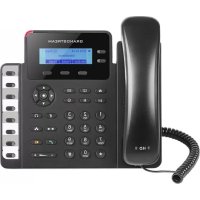
GXP1628 - Desk Phone GRANDSTREAM - Free user manual and instructions
Find the device manual for free GXP1628 GRANDSTREAM in PDF.

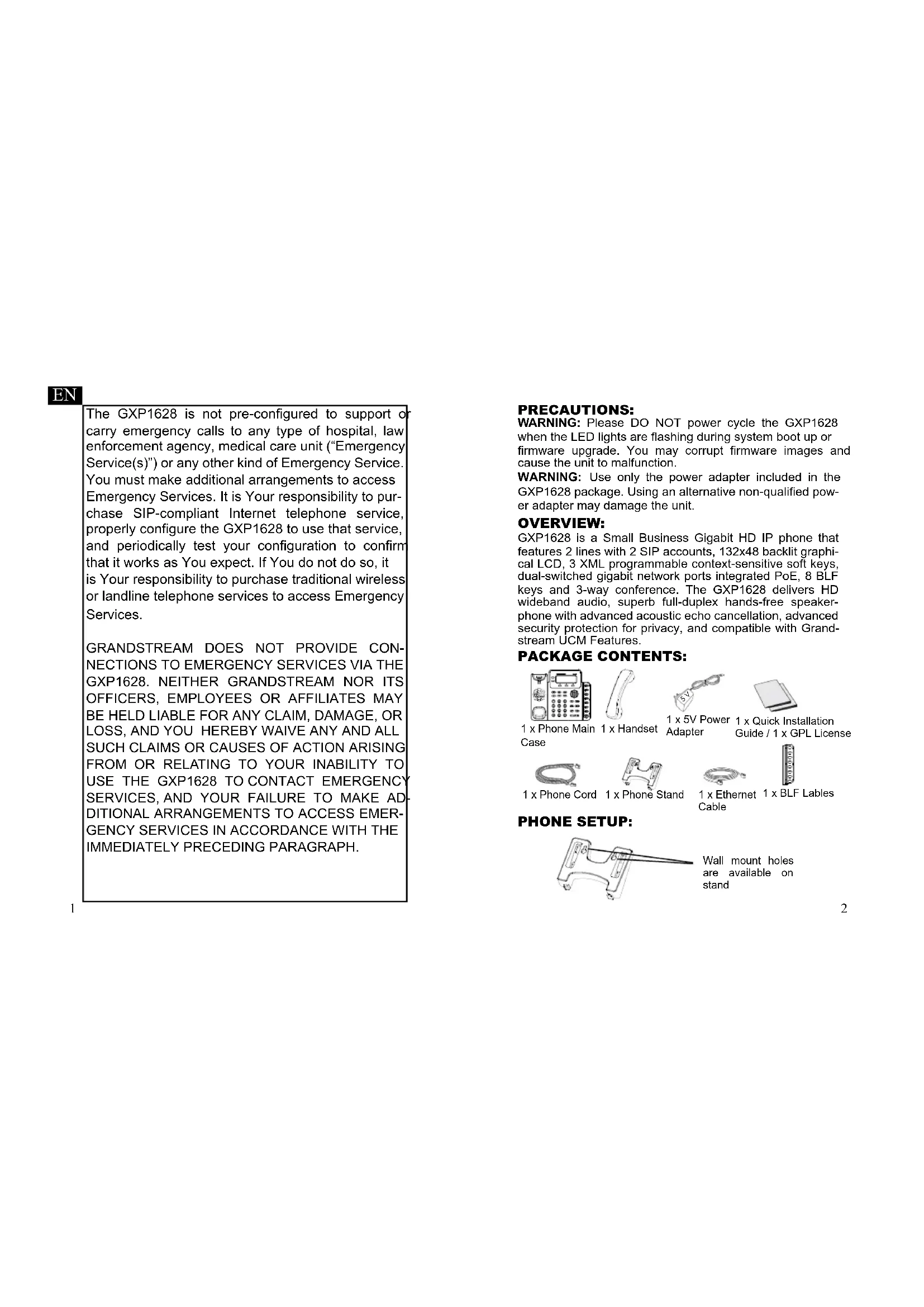


| Brand | Grandstream |
| Model | GXP1628 |
| Product Type | IP Desktop Phone |
| Dimensions (approx.) | 20 x 18 x 8 cm |
| Weight (approx.) | 0.8 kg |
| Power Supply | 5V DC power adapter included, PoE (Power over Ethernet) support |
| Number of Lines | 2 lines, 2 SIP accounts |
| Display | Backlit graphical LCD display 13x4X |
| Programmable Keys | 3 XML context-sensitive keys, 8 BLF keys |
| Network | Dual switched Gigabit ports (LAN and PC) with PoE |
| Audio | Wideband HD audio, full-duplex speakerphone with echo cancellation |
| Conference | 3-way conference |
| Security | Advanced privacy protection, SIP encryption |
| Compatibility | Compatible with Grandstream UCM and SIP standards |
| Wall Mount | Yes, wall mount bracket included |
| Package Contents | Main unit, handset, 5V adapter, telephone cable, installation guide, GPL license |
| Care and Cleaning | Clean with a soft dry cloth. Do not use abrasive products. |
| Repairability | Spare parts available from manufacturer. Repair by qualified technician recommended. |
Frequently Asked Questions - GXP1628 GRANDSTREAM
User questions about GXP1628 GRANDSTREAM
0 question about this device. Answer the ones you know or ask your own.
Ask a new question about this device
Download the instructions for your Desk Phone in PDF format for free! Find your manual GXP1628 - GRANDSTREAM and take your electronic device back in hand. On this page are published all the documents necessary for the use of your device. GXP1628 by GRANDSTREAM.
USER MANUAL GXP1628 GRANDSTREAM
Grandstream Networks, Inc.
126 Brookline Ave, 3rd Floor
Boston, MA 02215 USA
Tel: +1 (617) 566-9300
For Warranty and RMA information, please visit
www.grandstream.com
EU Agent:
Picus Advisors Ltd
Taivalmaki 9F1-02200 Espoo, FINLAND https://www.picus.fi
Note: For European Union only


GXP1628
Small Business Gigabit HD IP Phone
Quick Installation Guide
Content
English. 1
简体中文 6
Espanol. 11
Francais. 16
Deutsch. 21
Italiano 26
Polski. 31
Portugues. 46
Pycckn. 41
EN
The GXP1628 is not pre-configured to support or carry emergency calls to any type of hospital, law enforcement agency, medical care unit ("Emergency Service(s)") or any other kind of Emergency Service. You must make additional arrangements to access Emergency Services. It is Your responsibility to purchase SIP-compliant Internet telephone service, properly configure the GXP1628 to use that service, and periodically test your configuration to confirm that it works as You expect. If You do not do so, it is Your responsibility to purchase traditional wireless or landline telephone services to access Emergency Services.
GRANDSTREAM DOES NOT PROVIDE CONNECTIONS TO EMERGENCY SERVICES VIA THE GXP1628. NEITHER GRANDSTREAM NOR ITS OFFICERS, EMPLOYEES OR AFFILIATES MAY BE HELD LIABLE FOR ANY CLAIM, DAMAGE, OR LOSS, AND YOU HEREBY WAIVE ANY AND ALL SUCH CLAIMS OR CAUSES OF ACTION ARISING FROM OR RELATING TO YOUR INABILITY TO USE THE GXP1628 TO CONTACT EMERGENCY SERVICES, AND YOUR FAILURE TO MAKE ADDITIONAL ARRANGEMENTS TO ACCESS EMERGENCY SERVICES IN ACCORDANCE WITH THE IMMEDIATELY PRECEDED PARAGRAPH.
PRECAUTIONS:
WARNING: Please DO NOT power cycle the GXP1628 when the LED lights are flashing during system boot up or firmware upgrade. You may corrupt firmware images and cause the unit to malfunction.
WARNING: Use only the power adapter included in the GXP1628 package. Using an alternative non-qualified power adapter may damage the unit.
OVERVIEW:
GXP1628 is a Small Business Gigabit HD IP phone that features 2 lines with 2 SIP accounts, 132x48 backlit graphical LCD, 3 XML programmable context-sensitive soft keys, dual-switched gigabit network ports integrated PoE, 8 BLF keys and 3-way conference. The GXP1628 delivers HD wideband audio, superb full-duplex hands-free speakerphone with advanced acoustic echo cancellation, advanced security protection for privacy, and compatible with Grandstream UCM Features.
PACKAGE CONTENTS:
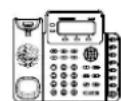



1 x Phone Main Case
1 x Handset
1 x 5V Power Adapter
1 x Quick InstallationGuide / 1 x GPL License


1 x Phone Cord
1 x Phone Stand
1 x Ethernet 1 x BLF Lables Cable
PHONE SETUP:

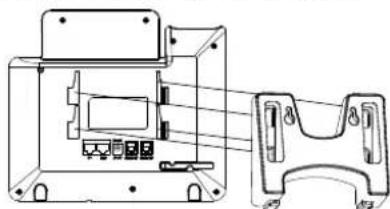
Wall mount holes are available on stand
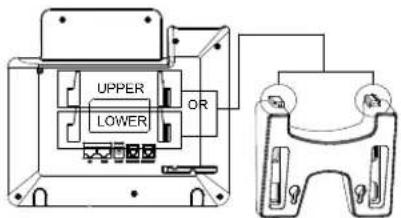
Installing the Phone (Phone Stand):
- Insert the hooks on top of the stand into a slots, you have options to use either upper OR lower slots.
- Firmly slide the stand upward to lock it in place.
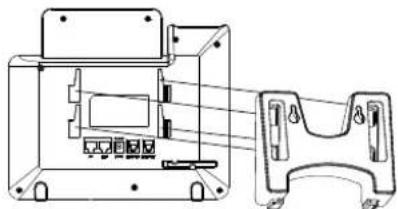
Installing the Phone (Wall Mount):
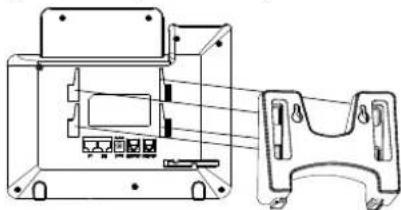
- Insert all 4 hooks located in the front of wall mount into the slots.
- Firmly slide the wall mount upward to lock it in place.
- Pull out and rotate the tab from handset rest to hold the handset while the phone is mounted on the wall.
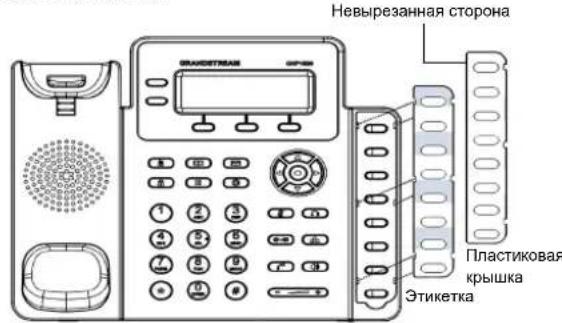
Installing BLF Paper Label:
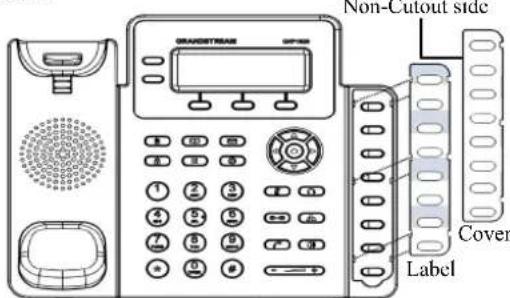
- Install the paper label by aligning the cutouts on paper label with the plastic notches on the phone and gently lay the paper down on the phone surface.
- Install the plastic cover over the paper label by inserting the non-cutout side of the plastic cover under the notches on the left side of the panel, adjust the plastic cover in up/ down direction to make 3 cutouts on the right side align with the plastic notches.
- Slightly pull the plastic cover upward to complete the installation.
CONNECTING THE PHONE:
To setup the GXP1628, follow the steps below:
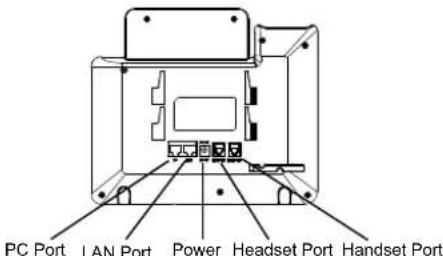
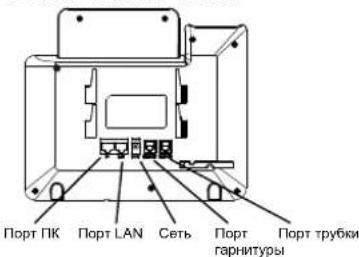
- Connect the handset and main phone case with the phone cord.
- Connect the LAN port of the phone to the RJ-45 socket of a hub/switch or a router (LAN side of the router) using the Ethernet cable.
- Connect the 5V DC output plug to the power jack on the phone; plug the power adapter into an electrical outlet.
- The LCD will display provisioning or firmware upgrade information. Before continuing, please wait for the date/time display to show up.
- Using the phone embedded web server or keypad configuration menu, you can further configure the phone using either a static IP or DHCP.
Tips For Using the Keypad:
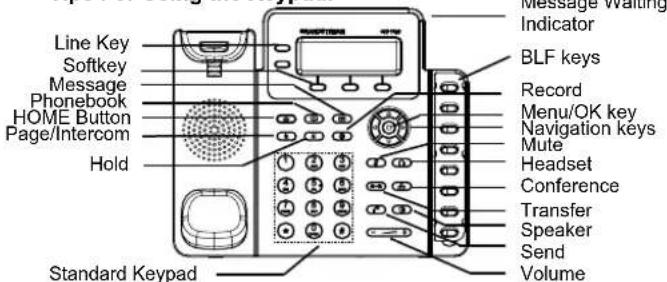
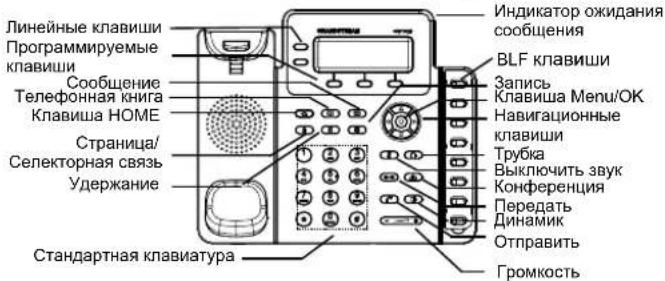
- To access the MENU, press the round MENU button.
- Navigate the menu by using the UP/DOWN and LEFT/RIGHT buttons.
-
Press the round MENU button to confirm a menu selection.
-
The phone automatically exits MENU mode when there is an incoming call, the phone goes off-hook, or when the MENU mode is left idle for 60 seconds.
PHONE CONFIGURATION:
Configure the GXP1628 Using a Web Browser:
- Ensure your phone is powered up and connected to the Internet.
- Press MENU button to go into menu of the phone.
- Select "Status," then "Network Status," to check the IP address(es).
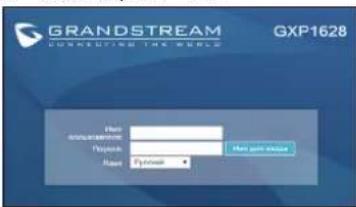
- Type the phone's IP address in your PC browser. (See figure below).
- The default administrator username and password are "admin"; the default end-user username is "user" and the password is "123".
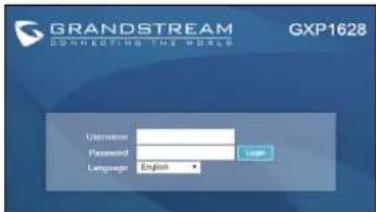
Configure the GXP1628 using the Keypad:
- Make sure the phone is idle.
- Press the MENU button to access the keypad MENU to configure the phone.
- Select MENU->Config, to configure settings for SIP Proxy Outbound Proxy, SIP User ID, SIP Auth ID and SIP Password.
- Follow MENU options to configure the basic features of the phone. For example: the IP address if using a static IP. For details, please check GXP1628 User Manuals.
- Please contact your ITSP (Internet Telephony Service Provider) for additional settings that may be necessary to configure the phone.
Note: For the detailed user manual, please download from: http://www.grandsstream.com/support
This product is covered by one or more of the U.S. patents (and any foreign patent counterparts thereto) identified at www.cmspatents.com.
ZH

1xSupport du telephone

1 x Cable Ethernet

1 x Iables BLF
INSTALLATION DU TÉLÉPHONE:
Installation du Telephone (Support Mural):
http://www.grandstream.com/support
MEpbI PPEIOCTOPOXHOCTN:
BHIMAHNE: IoxanyIcTA HE BbIKIOUATE nITaHne GXP1628 KOrdaLED CBeTOnIObI MIRaHT BnpoceCE 3arpy3Kn TeneP0Ha nIN O6HOBNeHnI pOprpAMMHorO oEcbneHn. 3TO MOxET npINBcTn K NOBpeXeHHIO pOprpAMMHorO oEcbneHn I cTaTb npuHHo HEMCnpabHOCTN.
BHMHAHNE: NcnoJb3yIe ToJbKO cTOUHHK NTaHnA, KOTOpB bKNIOHEn B NoCTaBky C GXP1628. NcnoJb3oBaHne CTOPOHHX NcTOUHHKOB NTaHnA MOKeT Bb3BaTb NONOMKY yCTPOCTBA.
0630P:
GXP1628 npedctabnret co60 nra6bntbI IP-TeneoH dnma Manoro 6bn3e, noepexmbaoum 2 IHHN, 2 SIP akkayHTA, ochaunHbI rpaueckm KKK-dncnneM 132x4, 3 XMLnporpammmpyemblIM KOHEKTCHO-3ABNCMBIMKnabuWAMn, DBymu rna6bntbIMn ceTeBbIMn nopTaMn CpE, 8 KnabuWAMn BLF nnopekkoek PekmHa KOHPepHcIM Do 3-x yacthNKOB. GXP1628 coetaet B c6e bPONOPONOCb ayDNO-3Bk YBC kUcOK oTtKocTN, MKNPOO hPNEBOXODHO KAeCTBa rPOMKOROBOPITENm DnOHOBPEMeHHo DByXCTOpOHHe CB3n C pOBDHYTo fYHKJNeEH 3XONQDABNEHIN naP3AOBOPa NO DByM INHHM, paCUnpeHbIE fYHKJIm 3aunbTI KOnfDuEHNaIbHOCTn N COBMcTMMOCbUCM KOMNAH Grandstream.
KOMJIeKT NOCTABKN:

1xGXP1628

1xTepeHnHa Tpyka

1XCTOHTNHKNTAHNN5V

1xKpatKne pykoBQcTBaNo yctahOBke / 1x GPLJIIMH3N


1x Ethernet - ka6ebn
1xTenepe
HHbIuHyp 1xNoD HAD NO TENE


1xBLF 3TKeKtKu
YCTAHOBKA TEJIENEOHA:

Ha noctabke
mEOTcR HesDa dnn
KpEnHnTne TenePoha
ha cTeHy.
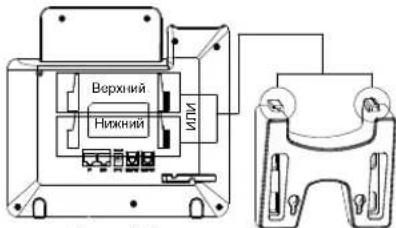
YcTaHOBKa TeNeΦoHa (NoCTaBka) :
1.BctabTe KpOuKn B BepxHe Nactn NoCTaBKn B na3bl, nCNoJIb3yIe BepXHMe INn HNkHMe Na3bl, NO JeHaHIO.
2.CdBnHbTe NOCTABKy BBepx, TTO6bl 3aФNKCupOBaTb eHa MeCTe.
YcTaHOBKa TeNeepoHa (KpenneHHe Ha cTeHy):
1.BctaBte Bce 4 KpOka,paonnoKeHHbIX Ha nepedHn qactn HacteHHoro KpePHeHn B na3bl.
2.CBnHe HaCTeHHoe KpeHHe BBePx, YTO6bI 3aФmKcnpoBaTe erHa MeCTe.
3. BbTaunite n nobepnnte KOHTA NIOCTABKN DnT py6kn DnN Pkcaun Tpy6kn npn HAcTeHHOM MOHTaxe TeleepoHa.
YcTaHObKa 6yMaXHoN 3TnKeTKn BLF
1.YCTaHOBNTe 6yMaJHyIO 3TKeKTeKY,pacNOJIOXBbIpe3bHa 6ymaxHOH Metke B COOTBeTcBN C BnAINHmHa TNeIePoHe n 6e3 yCNHnIOJIOXe 3TKeKTeHY NOBepxHOCTb TeNEpOHa
2.YCTAHOBNTe NnactIKOBYIO KpbIuKy NOBepx 6ymaxHoi 3TnkeTkn, NOMCTMB HEBbIpe3aHHYIO CTPOHY KpbIuKIN NOI NpACTIKOBIIe na3bl Ha neBOI CTopoHE, BbIPoBHNIte NnactIKOByIO KpbIuKy, nepeDnBraIa eBBepx/BHn3,HTo6bI COBMeCTNtB 3 BBpe3a Ha npabOBI CTopoHe c Na3aAM.
3.CnErkA NOrHHTe PnactIKOByIO KpbIuKy BBepX, YTO6bl 3aBepuMbYcTaHOBky.
NODKNIUOYEHNTENEFOHA:
IoiroTOBkA TeJefoHa K BKNIOeHnIO:
1.ПОДКИОЧТЕ TЕLEФОHHYIO TPy6ky K TENEФOHy C NOMOUIO TENEФOHORO WHypa.
2.NoKIOHHTe TeneoH K BaueH IP cetn, dna 3TOrO coeHHTE Ethernet - Ka6eHem pa3bEm RJ-45 TeneoHa c kOMMyTaTopoM/ CBHNEM.
3.ПОДКПIOЧИТЕ раБЕМ ИСТОУнКИ ПИТАНУ 5V K TENEФОHY, a 3aTeM CAM ITOUCHNK ПИТАНУ ПОДКПIOCHΥTE K 3JIЕКТРМСECHKО P03EТKE.
4.Ha dncnnee oTo6pa3ntcnpoucc 3arpy3kn HnHnHpOpMaunna 06 obNoBHeN nporpaMMHO oBeCneYehn.DoXnTeCb nKa Ha dncnnee He OTo6pa3ntcDaTApBemn TOnbKO nOTOM HauHaHnTa Te pOueCC HAcTOPOKn.
5.NcnoIb3yBCTpoehHbB6cebpENMHeHO TeneoHa Bbo Moketo Hactpntb CtaTneckn IP Nyn yka3aTb Noluyehne ABOTMATueckn IP aepocpe3DHCP.
Cobetbno nncnol3oBaHIO KlaBnAtypbl:
1.ДЯdoctynaКMeHIO HAXMITE KpyrIyIO KnAbuWу MeHIO.
2.ДЯ Bыбopa nyHkTOB MeHIO nCNoIb3yIte KJIaBnIu CO CTpeNkAMM.
3.ДЯ BXODA B NOdMeHIO NcNoJIb3yIte KJIaBmUy MeHIO.
4.Tenefoh ABOTMATUeCKn BuiDTe N3 MeHIO ecnn NoCTyNTBxOaIIN 3BOHOK,6yDcT NOHra Tpyka INn npOncteHmIO 60ceKHyN pOCTor.
KOHΦHγPALNRA TEJIΕΦOHA:
HactpoKa TenePOna Upe3 Be6-6poy3ep:
1.Поберп Te noKIOUeH nB Baw TelefoH K nHTAHnIO N IP cTeN.
2.HaKaTb KhoNky MENU DnBxOda B MeHIO TeNefoHa.
3.Bb6epuTe "Ctatyc", 3aTeM "Ctatyc cetn" nI npOBepKn IP- aDpeca(-OB).
4.B aDpechoH CTPOKe Be6-6poy3epa npoHnWte IP aDpec TelefoHa.(CM. pnc. Hnke)
5.Имя adminnctpatorpo no ymoIaHnHO - "admin"; Имя KOHeuHoro
Nonb3OBaTeN - "user", napoiB - "123".
HactpoKa TelefoHa GXP1628 c HcnoIb3ObaHHeM MeHIO:
1.Y6eHNTecb YTO TenefoH HAXoMTcB B 6e3dEChTByIOeM COCTOHH.
2.Haxmte KnabuWy“MENU"DnA DOctyna K MeHIO.
3.Bb6patb MENU->Config nIy Bb6opa Hactpoek dIpy SIP-npokcn, nCXoJaIero npOKC-cepBepa, nEHTnHnKaunu SIP-nOlb3oBaTeTn, nEHTnHnKaunu ABTOPIAUNu SIP, napOnl SIP.
4.Takke B MeHIO TeneoHa MOxHO HAcTPOITb Dpyrue 6a30BbIe HAcTPOIKI TeneoHa. HanPIMep, CstINHeCKn JIn6O dHAMHcEckn IP apec.Dna 6ooee noPp6oHoi HOpMaun OpaTntEc b K pyKOBdCTBy nONs30BaTeTae.
5.06paTntecb K BaWemy npoBaIepy ycnyr Internet-TepeHnIN 117TOO,HTO6blNpOvUHbNpOONHmTeHbHe HACTPOKn
IPMMEUAHHE:PyKOBOCTBO NOIb3OBaTeJIaMOXHO CKaayatb no 3TOI Ccblke:
http://www.grandstream.com/support

- CONTENT
- EN
- PRECAUTIONS
- OVERVIEW
- PACKAGE CONTENTS
- PHONE SETUP
- INSTALLING THE PHONE (PHONE STAND)
- INSTALLING THE PHONE (WALL MOUNT)
- INSTALLING BLF PAPER LABEL
- TIPS FOR USING THE KEYPAD
- PHONE CONFIGURATION
- CONFIGURE THE GXP1628 USING THE KEYPAD
- ZH
- INSTALLATION DU TÉLÉPHONE
- MEPBI PPEIOCTOPOXHOCTN
- 0630P
- KOMJIEKT NOCTABKN
- YCTAHOBKA TEJIENEOHA
- YCTAHOBKA TENEΦOHA (NOCTABKA)
- YCTAHOBKA 6YMAXHON 3TNKETKN BLF
- KOHΦHΓPALNRA TEJIΕΦOHA
- HACTPOKA TELEFOHA GXP1628 C HCNOIB3OBAHHEM MEHIO
Brand : GRANDSTREAM
Model : GXP1628
Category : Desk Phone