ManualGo.com
14148906L - Lamp Livarno Lux - Free user manual and instructions
Find the device manual for free 14148906L Livarno Lux in PDF.



Download the instructions for your Lamp in PDF format for free! Find your manual 14148906L - Livarno Lux and take your electronic device back in hand. On this page are published all the documents necessary for the use of your device. 14148906L by Livarno Lux.
USER MANUAL 14148906L Livarno Lux
Operation and safety notes
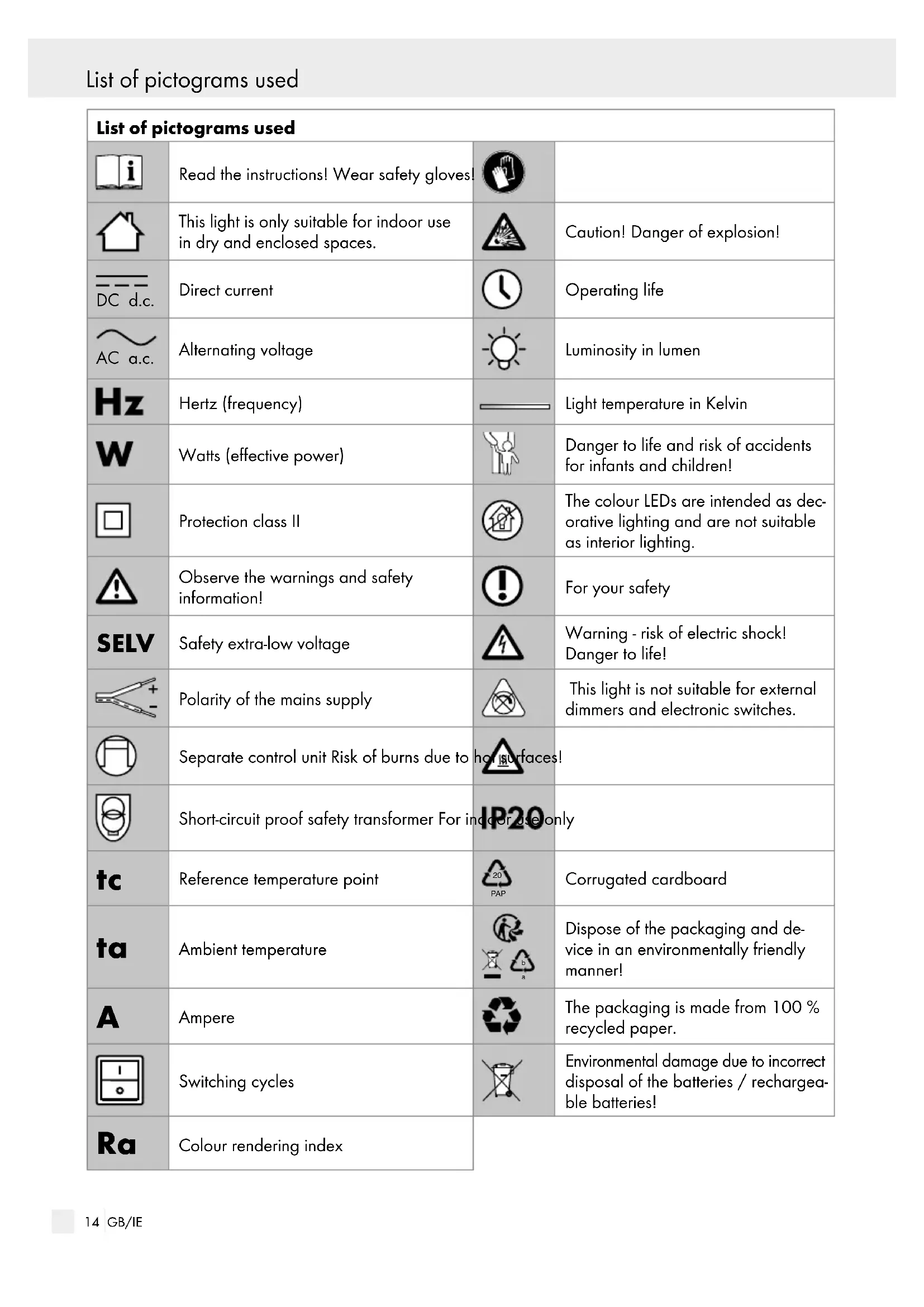
PAP Corrugated cardboard
Dispose of the packaging and de- vice in an environmentally friendly manner!
Ampere The packaging is made from 100 % recycled paper. Switching cycles
nvironmental damage due to incorre
Colour rendering index Introduction15 GB/IE List of pictograms used Introduction Smart LED mood light Introduction Congratulations on the purchase of your new device. You have selected a high quality product. Please be sure to carefully read all the instructions for use. These instructions are part of the product and contain important informa- tion on setup and operation. Always observe all safety information. Before using this product for the first time, verify that the correct voltage is available and that all parts are properly assembled. If you have any questions or are unsure about using this device, please contact your retailer or the service centre. Please keep these instructions in a safe place and include them when passing this product on to others. Intended use This light is only suitable for indoor use in dry and enclosed spaces. This light is only intended for private residential use, not for commercial use. Any use other than that de- scribed above is prohibited and will result in product damage. This is further associated with dangers, e.g. short-circuit, fire, electric shock, etc. This product is intended for normal operation. The colour LEDs are intended as decora- tive lighting and are not suitable as inte- rior lighting. Scope of delivery Check that all the parts are present and that the device is in perfect condition immediately after unpacking. 1 LED mood light, model 14148906L 1 Set of instructions for use Parts description
Mains cable (removable)
50 / 60 Hz Output power: 5 V ,1500 mA, 7.5 W16 GB/IE Safety Safety Safety notes Damage due to failure to comply with these operat- ing instructions will void the warranty! We assume no liability for consequential damages! We assume no liability for property damage or personal injury caused by improper handling or failure to observe the safety notes! DANGER TO
LIFE AND RISK OF ACCIDENTS
FOR INFANTS AND CHILDREN! Never leave children unsupervised with the packaging material. The packaging material poses a suffocation hazard. Children frequently underestimate the dangers. Do not leave the light or packaging material lying unattended. Plastic films / bags, plastic pa rts, etc. are dangerous for children to play with. This device may be used by children aged 8 years and up, as well as by persons with reduced physical, sensory or mental capacities, or lack- ing experience and / or knowledge, so long as they are supervised or instructed in the safe use of the device and understand the associated risks. Do not allow children to play with the product. Cleaning and user maintenance must not be performed by children without supervision. Avoid the risk of fatal injury from electric shock Check the light for possible damage before every use. Never use the light if it shows any signs of damage. A damaged light means there is a danger of death from electric shock. In the event of dam- age, repairs or other problems with the light, please contact the service centre or an electrician. Before use, verify that the available mains voltage corresponds to the required operating voltage of the light (see “Technical data“). Never allow the light to come into contact with water or other liquids. Always unplug the mains adapter from the plug socket prior to assembly, disassembly, cleaning, or if the light will not be used for extended periods. Never open any of the electrical equipment or insert any objects into this equipment. Such in- terferences pose a risk of fatal injury from elec- tric shock. The light‘s illuminant is not replaceable. The en- tire light needs to be replaced if the illuminant reaches the end of its service life. This light is not suitable for external dimmers or electronic switches. The colour LEDs are decorative lighting. Not suitable as interior lighting. Prevent fire and injury hazards Do not look into the illuminant from a close distance during operation. Do not look at the LED with an optical instrument (e.g. magnifier). Exposure to certain strobe lights or lighting effects can cause epileptic seizures or uncon- sciousness in some people. If you experience symptoms of an epileptic seizure, seek immedi- ate medical attention. Do not cover the light or the mains adapter with objects. Excessive heat build-up can result in fire. Do not operate the product inside the packag- ing. Otherwise there is the risk of overheating! Do not leave the light unattended when in use. For your safety Install the light in a location where it is protected from moisture and dirt. Always be alert! Always pay attention to what you are doing and always use common sense. Never mount or use the light if you are having difficulty concentrating or do not feel well. In order to disconnect the light completely from the power supply, the mains adapter must be unplugged from the socket. Safety / Preparation / Initial use17 GB/IE Safety Safety / Preparation / Initial use Safety instructions for batteries / rechargeable batteries DANGER TO LIFE! Keep batteries / rechargeable batteries out of reach of children. If accidentally swallowed seek immediate medical attention. DANGER OF EXPLOSION!
Never recharge non-rechargeable batteries. Do not short-circuit batteries / rechargeable batteries and / or open them. Overheating, fire or bursting can be the result. Never throw batteries / rechargeable batteries into fire or water. Do not exert mechanical loads to batteries / rechargeable batteries. Risk of leakage of batteries / rechargeable batteries Avoid extreme environmental conditions and temperatures, which could affect batteries / rechargeable batteries, e.g. radiators / direct sunlight. If batteries / rechargeable batteries have leaked, avoid contact with skin, eyes and mucous mem- branes with the chemicals! Flush immediately the affected areas with fresh water and seek medical attention! WEAR PROTECTIVE GLOVES!
Leaked or damaged batteries / rechargeable batteries can cause burns on contact with the skin. Wear suitable protective gloves at all times if such an event occurs. This product has a built-in rechargeable battery which cannot be replaced by the user. The re- moval or replacement of the rechargeable bat- tery may only be carried out by the manufacturer or his customer service or by a similarly quali- fied person in order to avoid hazards. When disposing of the product, it should be noted that this product contains a rechargeable battery. Preparation To pair the light with the smartphone you will need a Gateway and the “Lidl Home“ app. Install the Gateway per the manufacturer instructions. Download the “Lidl Home“ app from the App Store. Initial use Note: Before first use, remove all packaging mate- rials and remove the protective films from the light‘s cover. Note: You can choose to power the light either via the mains connection or using the integrated rechargeable battery. Initial use with mains adapter: Set up the light in the desired location. Connect the plug-in connector
into a mains socket that has been professionally installed. Switch the light on or off using the ON / OFF button
Initial use without the mains adapter (battery power): Note: To operate the light without the mains adapter
, the integrated battery must be charged. Remove the plug-in connector
in order to use the light without a mains connection. Set up the light in the desired location. Switch the light on or off using the ON / OFF button
Charging the rechargeable battery Connect the plug-in connector
into a mains socket that has been professionally installed.18 GB/IE Initial use / Resetting the light / Pairing the LED mood light... / App functions Note: The battery will also be charged when the light is in operation. Resetting the light The light must be in learning mode to pair the light with the app. This is indicated by the light flashing regularly. If the light does not automatically start flashing, re- turn the light to learning mode. To activate learning mode, switch the light on and off as follows: ‒ switch on ‒ 1 sec. off – 1 sec. on ‒ 1 sec. off – 1 sec. on ‒ 1 sec. off – 1 sec. on The light should now be flashing regularly in learning mode. Note: This procedure only resets the product to offline mode and starts the learning mode. If you want to remove all product and cloud data, please refer to the section Disconnecting the remote control and smart phone. Follow the instructions and select “Disconnect and delete data” under “Remove device”. Pairing the LED mood light with the smartphone Please consult the “Lidl Home” app for DETAILS of our privacy policy.
Select “+“ (add device).
3. Choose the category “Lighting” and the de-
sired lighting type.
4. Select the gateway (only available when using
6. Go to “Confirm“ whilst the LED mood light is
7. Connect to the device.
of the light. The selected room will now be greyed out.
11. Click “Finish“ to confirm.
12. The learning process is complete.
to return to the home screen. Disconnecting the smartphone
3. Choose one of the categories:
5. Go to “Remove device“.
6. Click “Confirm“ to proceed. To remove all
product data from the cloud, select “Disconnect and delete data”. App functions Note: Make sure that you are always operating the current version of the app on your smartphone. Update the app if necessary. Note: To use voice control, the light must be con- nected online with the “Lidl Home“ app and the “Google Home“ app. The following modes are available via app control Switching on and off – Remaining time: set timer
: switch on and off – Programme: create schedules to auto- matically switch the lights on and off at certain times App functions / Maintenance and cleaning / Disposal19 GB/IE Initial use / Resetting the light / Pairing the LED mood light... / App functions App functions / Maintenance and cleaning / Disposal White – Touch arc: adjust light colour from 2,000 K to 6,500 K – Touch panel: adjust light intensity from 1 % to 100 % Scene – Night: warm, soft light – Reading: neutral light – Working: cold white light – Leisure: bright, warm light – Add a scene: to save custom-designed lighting setups Maintenance and cleaning
from the mains socket.
SHOCK! For electrical safety reasons, never clean the light with water or other fluids nor immerse it in water.
CAUTION! RISK OF BURNS DUE TO
HOT SURFACES! First allow the light to cool down completely. Do not use solvents, petrol, etc. These would damage the light. Only clean with a dry, lint-free cloth. Plug the mains adapter
back into the mains socket. Disposal The packaging is made entirely of recyclable mate- rials, which you may dispose of at local recycling facilities.