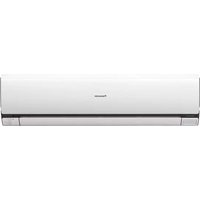
S45MA1E5 - Air-conditioner PANASONIC - Free user manual and instructions
Find the device manual for free S45MA1E5 PANASONIC in PDF.


User questions about S45MA1E5 PANASONIC
0 question about this device. Answer the ones you know or ask your own.
Ask a new question about this device
Download the instructions for your Air-conditioner in PDF format for free! Find your manual S45MA1E5 - PANASONIC and take your electronic device back in hand. On this page are published all the documents necessary for the use of your device. S45MA1E5 by PANASONIC.
USER MANUAL S45MA1E5 PANASONIC
Operating Instructions FS Multi Air Conditioner
Model No.
Indoor Unit Outdoor Unit
S-45MA1E5 U-4LA1E5
S-56MA1E5 U-5LA1E5
S-63MA1E5 U-6LA1E5
S-71MA1E5 U-4LA1E5-1
S-90MA1E5 U-5LA1E5-1
- S-100MA1E5 U-6LA1E5-1
-
S-125MA1E5 * U-8EA1E8
-
U-10EA1E8


ENGLISH
2~13
Before operating the unit, read these operating instructions thoroughly and keep them for future reference.
- Available to selected country
FRANCAIS
14~25
© Panasonic Manufacturing Xiamen Co.,Ltd. 2010. Unauthorized copying and distribution is a violation of law.
P07-T10850-01
Thank you for purchasing Panasonic Air Conditioner
TABLE OF CONTENTS
SAFETY PRECAUTIONS
2~3
INFORMATION
4
MULTI AIR CONDITIONER FUNCTION
5
PRODUCT OVERVIEW & OPERATIONS (WIRELESS REMOTE CONTROL)
6~7
PRODUCT OVERVIEW & OPERATIONS (WIRED REMOTE CONTROL)
8~10
CARE & CLEANING
11
TROUBLESHOOTING
12~13
QUICK GUIDE
BACK COVER
NOTE
The illustrations in this manual are for explanation purposes only and may differ from the actual unit. It is subjected to change without notice for future improvement.
SAFETY PRECAUTIONS

To prevent personal injury, injury to others, or property damage, please comply with the following. Incorrect operation due to failure to follow instructions below may cause harm or damage, the seriousness of which is classified as below:

WARNING
This sign warns of death or serious injury.

CAUTION
This sign warns of injury or damage to property.
The instructions to be followed are classified by the following symbols:

This symbol denotes an action that is PROHIBITED.


This symbol denotes an action that is COMPULSORY.

WARNING
INDOOR UNIT AND OUTDOOR UNIT

This appliance is not intended for use by persons (including children) with reduced physical, sensory or mental capabilities, or lack of experience and knowledge, unless they have been given supervision or instruction concerning use of the appliance by a person responsible for their safety. Children should be supervised to ensure that they do not play with the appliance.

Please consult authorized dealer or specialist to repair, install, remove and reinstall the unit. Improper installation and handling will cause leakage, electric shock or fire.
Do not install the unit in a potentially explosive or flammable atmosphere. Failure to do so could result in fire.
Do not insert your fingers or other objects into the air conditioner indoor or outdoor unit, rotating parts may cause injury.

Do not touch the outdoor unit during lightning, it may cause electric shock.
REMOTE CONTROL

Do not allow infants and small children to play with the remote control to prevent them from accidentally swallowing the batteries.


| WARNING | |
| POWER SUPPLY | |
| Do not use modifi ed cord, joint cord, extension cord or unspecifi ed cord to prevent overheating and fi re. | |
| Do not share the same power outlet with other equipment to prevent overheating and fi re. | |
| Do not operate with wet hands to prevent electric shock. | |
| If the supply cord is damage, it must be replaced by the manufacturer, its service agent or similarly qualifi ed persons in order to avoid a hazard. | |
| It is strongly recommended to be installed with Earth Leakage Circuit Breaker (ELCB) or Residual Current Device (RCD) to prevent electric shock or fi re. | |
| This equipment must be earthed to prevent electrical shock or fi re. | |
| Prevent electric shock by switching off the power supply when: - Before cleaning or servicing. - Extended non-use. - Abnormally strong lightning activity. | |
| Stop using the product when any abnormality/failure occurs and disconnect the power plug or turn off the power switch and breaker. (Risk of smoke/ā re/electric shock) | |
| Examples of abnormality/failure | ·The ELCB trips frequently. ·Burning smell is observed. ·Abnormal noise or vibration of the unit is observed. ·Water leaks from the indoor unit. ·Power cord or plug becomes abnormally hot. ·Fan speed cannot be controlled. ·The unit stops running immediately even if it is switched on for operation. ·The fan does not stop even if the operation is stopped. |
| Contact immediately your local dealer for maintenance/repair. | |
| CAUTION | |
| INDOOR UNIT AND OUTDOOR UNIT | |
| Do not wash the indoor unit with water, benzene, thinner or scouring powder. | |
| Do not use for other purpose such as preservation of food. | |
| Do not use any combustible equipment in front of the airflow outlet to avoid fire propagation. | |
| Do not expose yourself directly to cold air for a long period. | |
| Do not sit or step on the unit, you may fall down accidentally. | |
| Do not touch the sharp aluminium fi n, sharp parts may cause injury. | |
| Do not switch ON the indoor unit when waxing the fi oor. After waxing, aerate the room properly before operating the unit. | |
| Do not install the unit in oily and smoky areas. | |
| Ensure drainage pipe is connected properly. Otherwise, leakage may occur. | |
| Aerate the room regularly. | |
| After long period of use, make sure the installation rack is not deteriorate to prevent the unit from falling down. | |
| REMOTE CONTROL | |
| Do not use rechargeable (Ni-Cd) batteries. It may damage the remote control. | |
| Remove the batteries if the unit is not going to be used for a long period of time. | |
| New batteries of the same type must be inserted following the polarity stated to prevent malfunction of the remote control. |
INFORMATION INFORMATION
OPERATION CONDITION
Use this air conditioner under the following temperature range
| Temperature (°C) Indoor Outdoor | |||
| COOLING | Maximum 32 43 | ||
| Minimum 21 -5 | |||
| HEATING | Maximum 27 24 | ||
| Minimum 16 -15 | |||
NOTICE: This unit is still able to operate as a cooler with outdoor temperature as low as -5^ in a non-living room, such as a computer room, with a room temperature of 21^ or above, and room humidity up to 80% .
Information for Users on Collection and Disposal of Old Equipment and used Batteries
These symbols on the products, packaging, and/or accompanying documents mean that used electrical and electronic products and batteries should not be mixed with general household waste.
For proper treatment, recovery and recycling of old products and used batteries, please take them to applicable collection points, in accordance with your national legislation and the Directives 2002/96/EC and 2006/66/EC.
By disposing of these products and batteries correctly, you will help to save valuable resources and prevent any potential negative effects on human health and the environment which could otherwise arise from inappropriate waste handling.
For more information about collection and recycling of old products and batteries, please contact your local municipality, your waste disposal service or the point of sale where you purchased the items.
Penalties may be applicable for incorrect disposal of this waste, in accordance with national legislation.
For business users in the European Union
If you wish to discard electrical and electronic equipment, please contact your dealer or supplier for further information.

[Information on Disposal in other Countries outside the European Union]
These symbols are only valid in the European Union. If you wish to discard these items, please contact your local authorities or dealer and ask for the correct method of disposal.
Note for the battery symbol (bottom two symbol examples):
This symbol might be used in combination with a chemical symbol. In this case it complies with the requirement set by the Directive for the chemical involved.
MULTI AIR CONDITIONER FUNCTION MULTI AI
DEFINITION
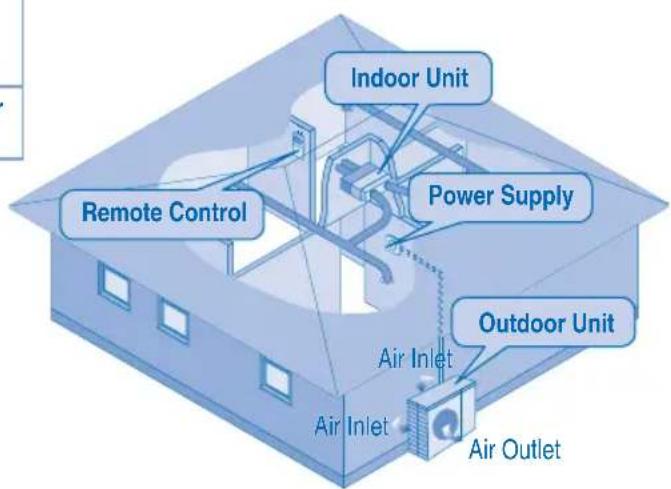
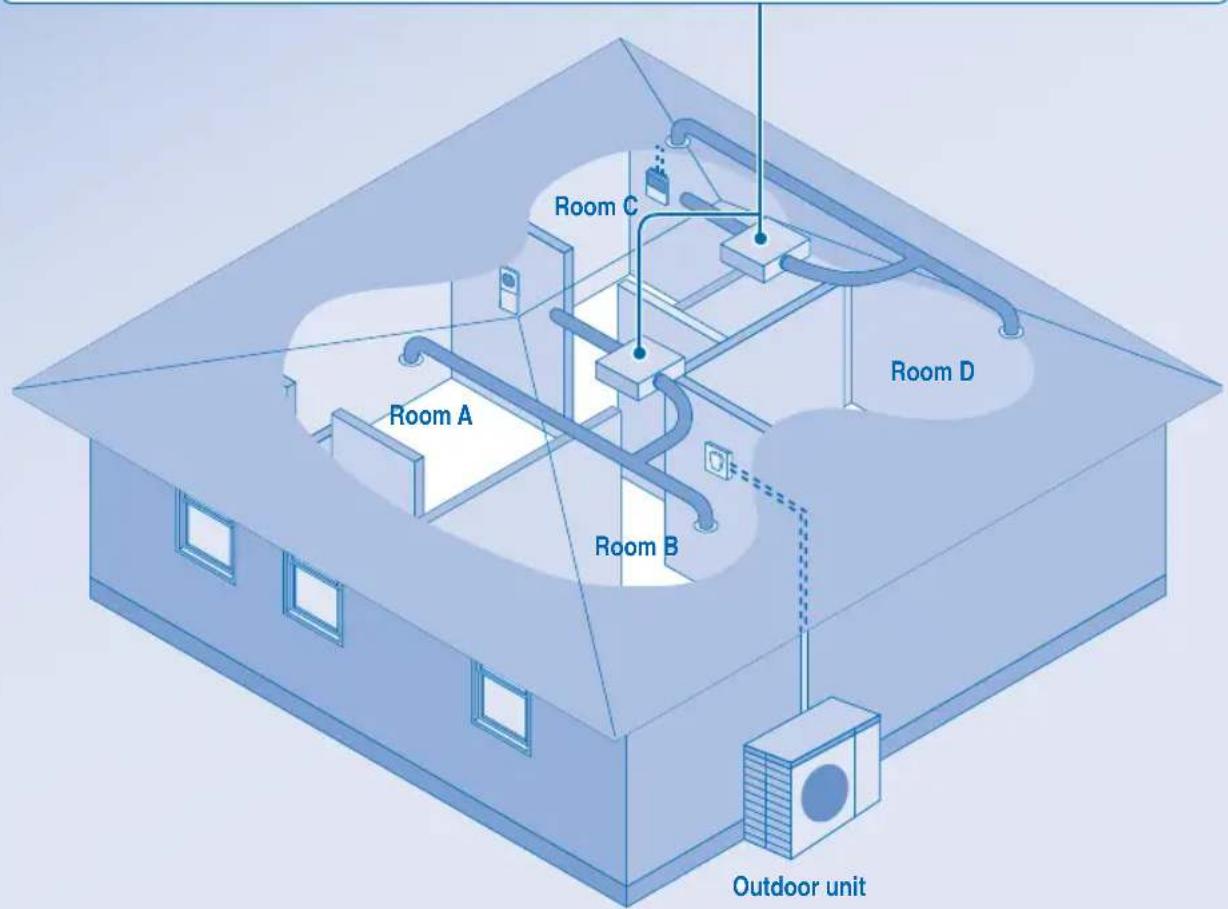
Multi air conditioner system has one outdoor unit connected to multiple indoor units.
INDOOR UNIT
- It is possible to operate the indoor units individually or simultaneously.
- The operation mode priority is given to the first unit that turned on.
- During operation, heating and cooling mode could not be activated at the same time for different indoor unit.
- The power indicator blinks to indicate the indoor unit is standing by for different operation mode.
PRODUCT OVERVIEW & OPERATIONS (WIRELESS REMOTE CONTROL)
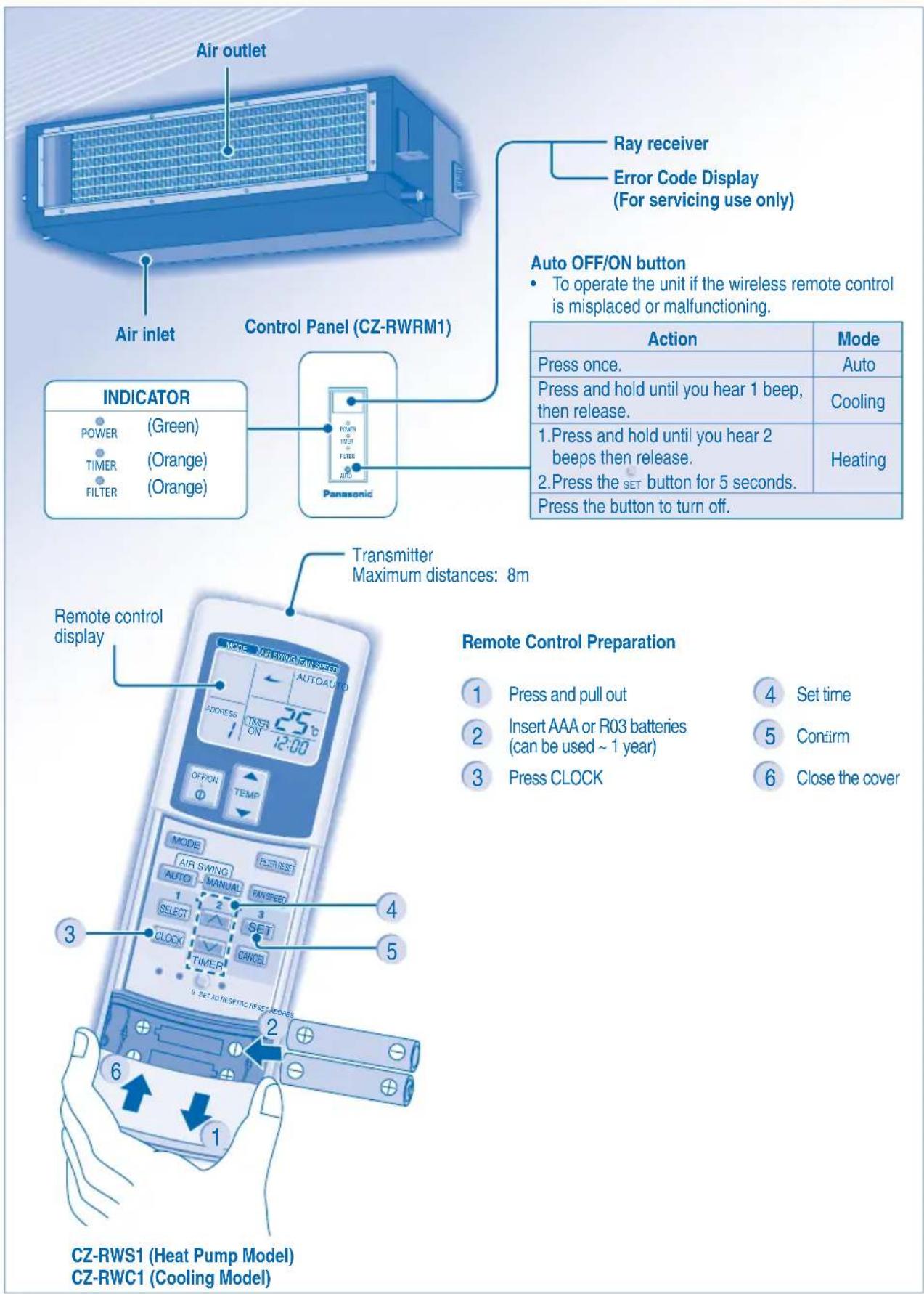

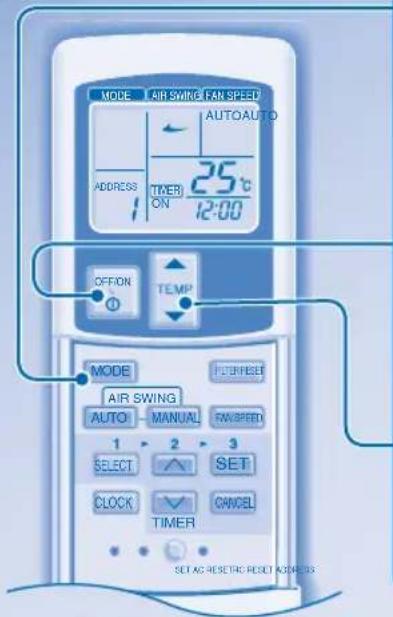
TO TURN ON OR OFF THE UNIT

TO SET TEMPERATURE
Selection range: 16^ 31^ .

- Unit selects operation mode according to temperature setting, outdoor and room temperature.
HEAT mode - To enjoy warm air
Unit takes a while to warm up.
FAN mode - To enables air circulation in the room
COOL mode - To enjoy cool air
DRY mode - To dehumidify the environment
- Unit operates at low fan speed to give a gentle cooling operation.
- During soft dry operation, the indoor fan operates at a low fan speed.

TO SELECT FAN SPEED (3 OPTIONS)
For AUTO, the indoor fan speed is automatically adjusted according to the operation mode.
- If the operation mode is set to Fan, the fan speed will be fixed at MEDIUM regardless of the temperature setting.
TO SET DAILY TIMER
- To turn ON or OFF the unit at a preset time.

Select ON or OFF timer.

the time. Confrm.


To cancel ON or OFF timer, press CANCE.
- When ON timer is set, the unit may start early before the actual set time in order to achieve the desired temperature on time.
- Timer operation is based on the clock set in the remote control and repeats daily once set. For clock setting, please refer to Remote Control preparation.
The timer closest to the current time will be activated first.
If timer is cancelled manually, you can restore the previous setting by pressing SET.
If the main power is switched off for an hour or more, the clock and timer will need to be set again.
OPTIONAL SETTINGS

- To avoid unintentional operation, you can assign a different address to each indoor unit.
- Press repeatedly to select your desired address setting.
RCRESET

- By default, ADDRESS 1 is selected. You do not need to change this setting for normal operation.
If the address is set to GROUP, more than one indoor unit can be operated at the same time.

Press to restore the remote control's default setting.

Not used in normal operations.
HINT
- Use curtains to screen off sunlight and outdoor heat to reduce power consumption during cool mode.
PRODUCT OVERVIEW & OPERATIONS (WIRED REMOTE CONTROL)
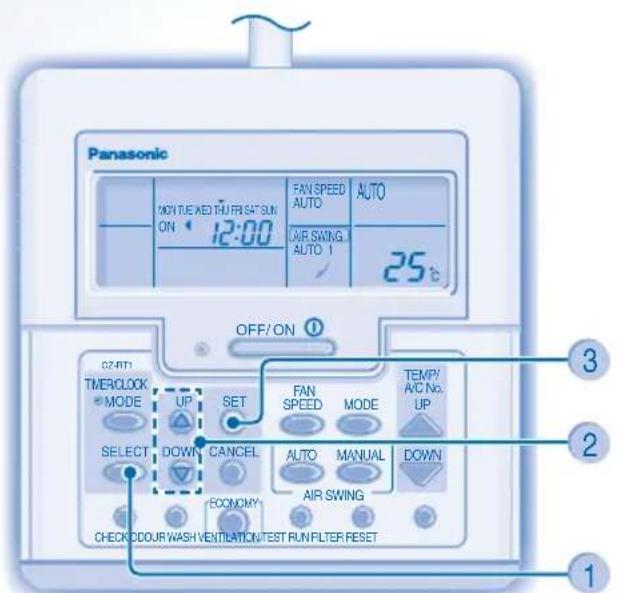
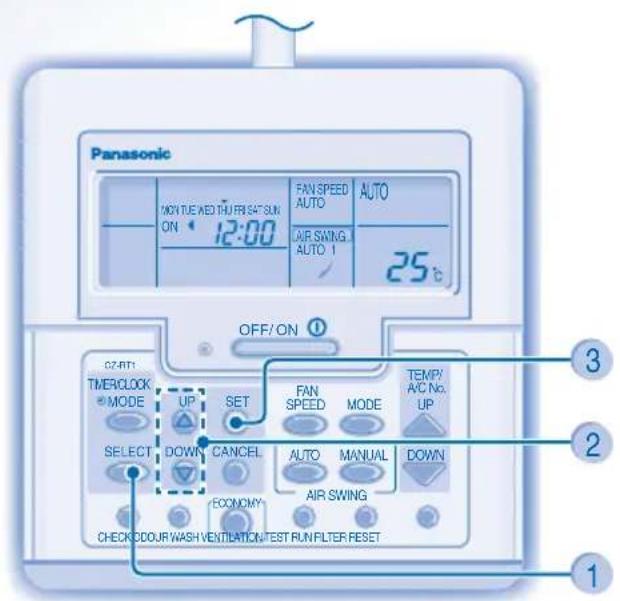
CZ-RT1
ECONOMY For normal operation, the COOURWASH, VENTILATION and TEST RUN buttons are not in use.
Remote Control Preparation
1 Press SELECT
2 Press to set day
3 Conf. m
Repeat steps 2 and 3 to set the current time.

TO TURN ON OR OFF THE UNIT

TO SET TEMPERATURE
Selection range: 16^ 31^ .

- Unit selects operation mode according to temperature setting, outdoor and room temperature.
HEAT mode - To enjoy warm air
Unit takes a while to warm up.
FAN mode - To enables air circulation in the room
COOL mode - To enjoy cool air
DRY mode - To dehumidify the environment
- Unit operates at low fan speed to give a gentle cooling operation.
- During soft dry operation, the indoor fan operates at a low fan speed.

TO SELECT FAN SPEED (3 OPTIONS)
- For AUTO, the indoor fan speed is automatically adjusted according to the operation mode.
- If the operation mode is set to Fan, the fan speed will be fixed at MED regardless of the temperature setting.
TO SET DAILY TIMER
- To turn ON or OFF the unit at a preset time.


Enter daily timer mode. Select ON or OFF timer.

4

Set the time. Confrm.
- To cancel ON or OFF timer, press

- When ON timer is set, the unit may start early before the actual set time in order to achieve the desired temperature on time.
- Timer operation is based on the clock set in the remote control and repeats daily once set. For clock setting, please refer to Remote Control preparation.
- The timer closest to the current time will be activated first.
If timer is cancelled manually, you can restore the previous setting by pressing SET - If the main power is switched off for an hour or more, the clock and timer will need to be set again.
HINT
- Use curtains to screen off sunlight and outdoor heat to reduce power consumption during cool mode.
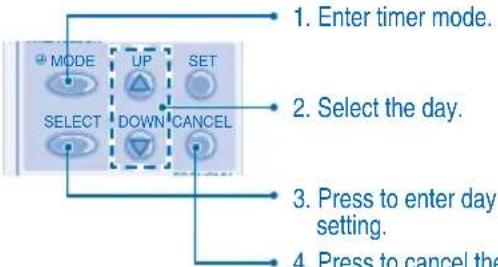
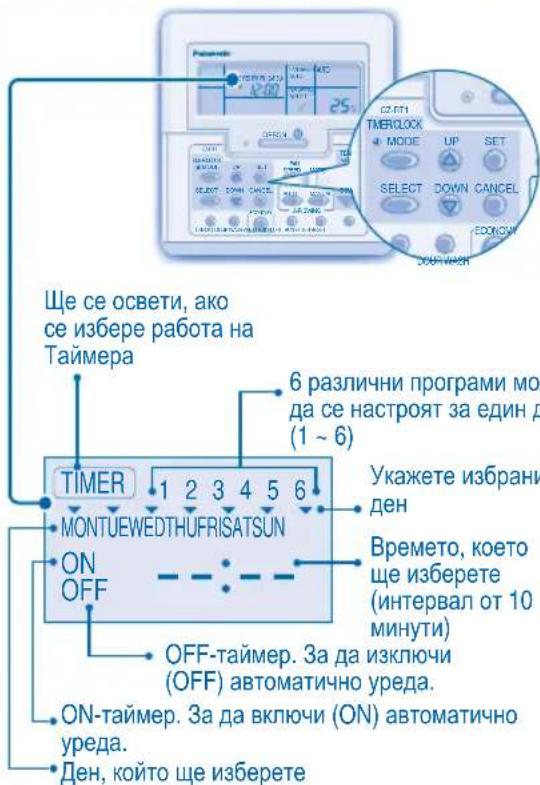
TO SET WEEKLY TIMER
Change Display
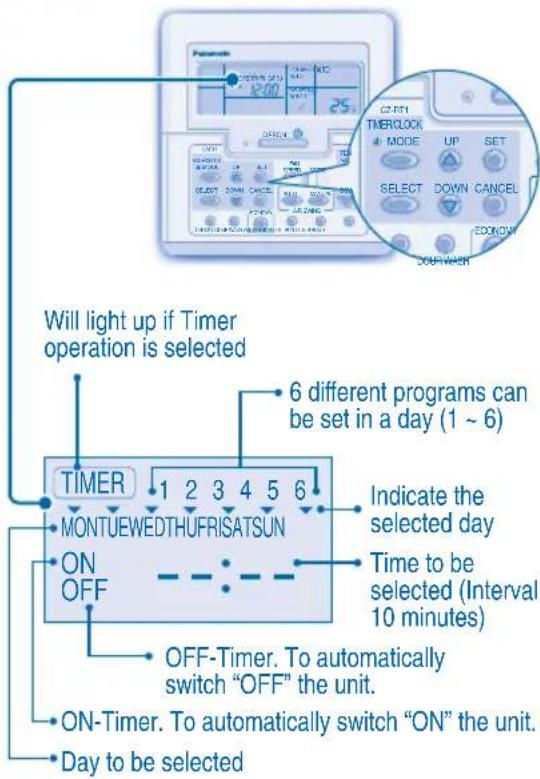
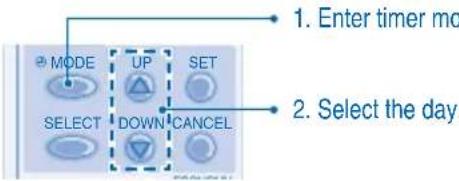
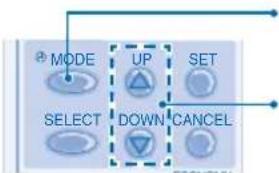
- Press MODE for 3 seconds to change the display to weekly timer.
Select days to run timer
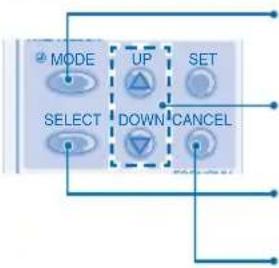
- Press SELECT to enter day setting.
- Press to select your desired day. The selected day will be highlighted with Press to deselect or select mark. Repeat this step includes other day.
Select ON/OFF Timer
- Press SELECT to enter Timer 1.
- Press to choose ON or OFF.
- Press SET to confirm the selection.
Select Timer
- Press to select your desired time. If you want to set together with your desired temperature, press DOWN to select the temperature.
-
Press to confirm the setting.
-
Repeat steps 5 to 8 to set Timer 2 to 6, or press to cancel the related timers.
OPERATION DETAILS
Weekly timer is only applicable for wired remote control, press MODE for 3 seconds to select daily timer or weekly timer.
- Daily timer and weekly timer could not be set at the same time.
Promotes energy saving by allowing you to set up to 6 timers in any given day.
- Same timer program cannot be set on the same day.
Check Timer
- The display will show the program for each of the selected day.
Modify Or Add Timer
Perform check timer operation to select the day. Repeat steps 4 to 8 to modify existing timer program, or add any new timer program.
Cancel Timer
- Perform the step below to cancel the timer program for a particular day.
Disable Weekly Timer
To disable weekly timer setting, press MODE, then press CANCEL
Enable Weekly Timer
To enable previous weekly timer setting, press set then press
CARE & CLEANING CARE & CLEANING

- Switch off the power supply before cleaning.
- Do not touch the aluminium fin, sharp parts may cause injury.
CLEANING INSTRUCTIONS
- Do not use benzene, thinner or scouring powder.
- Use only soap ( pH7) or neutral household detergent.
- Do not use water hotter than 40^ .
HINTS
Clean the filter regularly for best performance and to reduce power consumption.
- Please consult your nearest dealer for seasonal inspection.
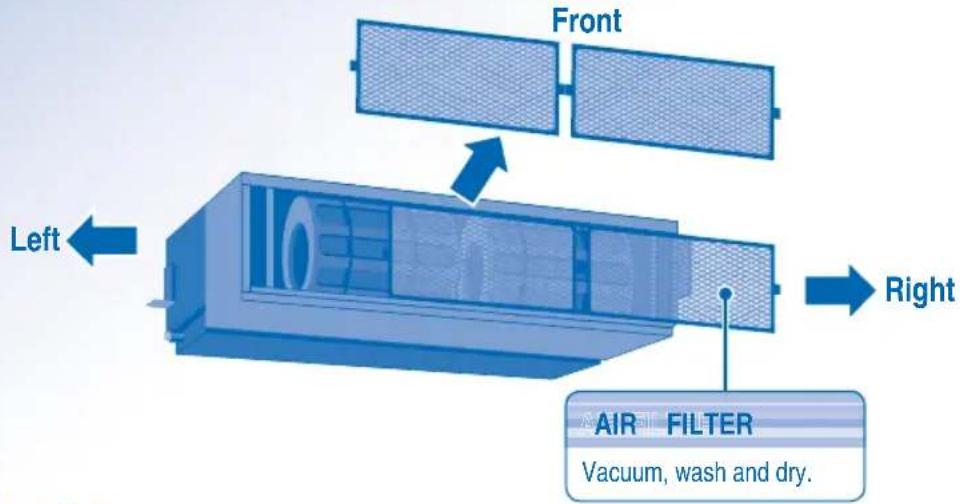
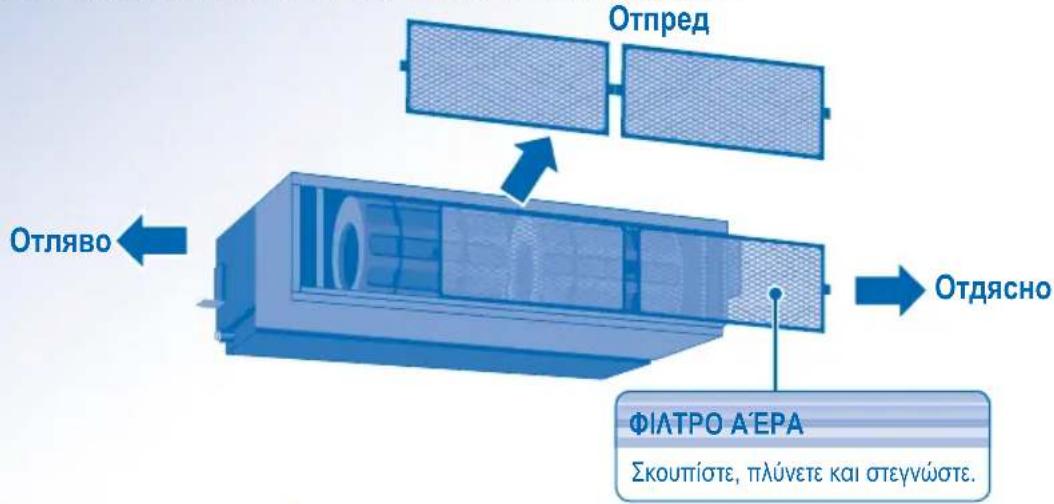
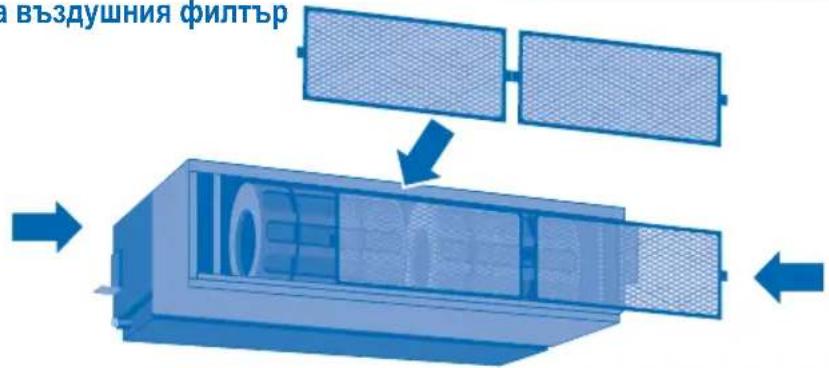
Remove Air Filter
3-Way Removable Air Filter
The air filter can be removed in three directions for easier maintenance.
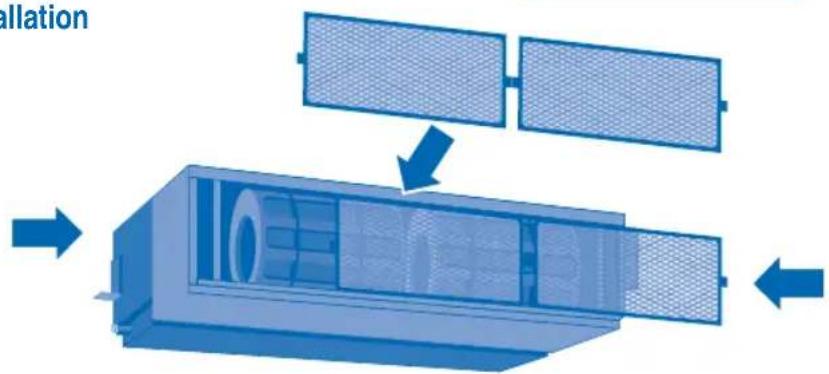
Air Filter Installation
Air Filter Maintenance
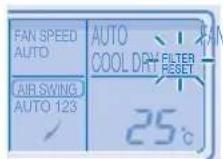
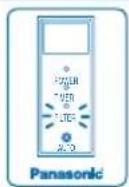
Cleaning is needed when:
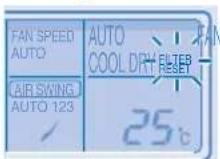
"FILTER RESET" appears on the remote control display. (For wired remote control)
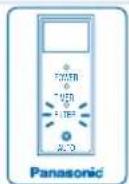
"FILTER" lights up on the indicator display. (For wireless remote control)
It is recommended to clean the air filter every 6 weeks.
After the air filter is cleaned, press / to reset.
- Do not operate without an air filter.
- Wash/rinse the air filter gently with water to avoid damage to the air filter surface.
- Do not dry the part with a hair dryer or a stove.
- Replace any damaged air filter.
TROUBLESHOOTING TROUBLESHOOTING
The following symptoms do not indicate malfunction.
| Symptom | Cause |
| Mist emerges from indoor unit. • Condensation effect due to cooling process. | |
| Water flowing sound during operation. | • Refrigerant flow inside the unit. |
| The room has a peculiar odour. • This may be due to damp smell emitted by the wall, carpet, furniture or clothing. | |
| Indoor fan stops occasionally during automatic fan speed setting. | • This helps to remove the surrounding odours. |
| Operation is delayed a few minutes after restart. | • The delay is a protection to the unit's compressor. |
| Outdoor unit emits water/steam. • Condensation or evaporation occurs on pipes. | |
| Timer indicator is always on. • The timer setting repeats daily once set. | |
| Indoor fan stops occasionally during heating operation. | • To avoid unintended cooling effect. |
| Cracking sound can be heard during operation. | • Changes of temperature cause the expansion/contraction of the unit. |
| Unit switch to FAN operation and air become humid. | • This happens when the room temperature reaches the set temperature, operation switches to FAN mode and the humidity increase. |
| Outdoor unit emits noise during heating operation. | • This is due to changes inflow of refrigerant gas when operation stops and starts. |
| Operation does not stop immediately after pressed the OFF/ON button. | • Discharging heat is in process. Operation will stops automatically after approximately 60 seconds. |
| Operation stops occasionally. ("DEFROST" appears on the remote control display) | • The unit is in defrosting mode, and the melted frost is drained from the outdoor unit. |
| Airflow does not start immediately after operation is started. ("PRE HEAT" appears on the remote control display) | • The unit is warming up to provide warm air. |
| Operation starts after power resumes. • Auto restart is in function and operates under previous setting. | |
| During dry mode, cold air blow out. | • The unit is running cooling operation with low fan speed to dehumidify the room. |
| Fan speed change occasionally during heating mode. | • The room temperature has reached the remote control setting. When the room temperature drops again, the fan speed will resume to the remote control settings. |
| Outdoor unit emits steam during heating mode. | • This is due to defrost operation happens at the heat exchanger. |
Check the following before calling for servicing.
| Symptom | Check |
| Heating/Cooling operation is not working eficiently. | ·Set the temperature correctly. ·Close all doors and windows. ·Clean or replace the filters. ·Clear any obstruction at the air inlet and air outlet vents. |
| Heating mode cannot be operated. • The unit is forced to operate at cooling mode only in a non-living room, such as a computer room. | |
| Noisy during operation. • Check if the unit has been installed at an incline or the intake grille is not closed properly. | |
| Remote control does not work. (Wireless remote control display is dim or transmission signal is weak.) | ·Insert the batteries correctly. ·Replace weak batteries. |
| The unit does not work. • Check if the circuit breaker is tripped. ·Check if timers have been set. | |
| The unit does not receive the signal from the remote control. | ·Make sure the receiver not obstructed. ·Make sure the address is set correctly. ·Make sure the remote control signal transmission is within the range. ·Certain fluorescent lights may interfere with signal transmitter. Please consult your nearest dealer. |
| The unit stopped and TIMER indicator blinks. • Turn OFF the power supply to reset the unit (TIMER indicator stop blinking). ·Turn ON the power supply and restart the unit ·If TIMER indicator blinks again, please consult your nearest dealer. | |
FOR SEASONAL INSPECTION AFTER EXTENDED NON-USE
- Checking of remote control batteries (wireless remote control).
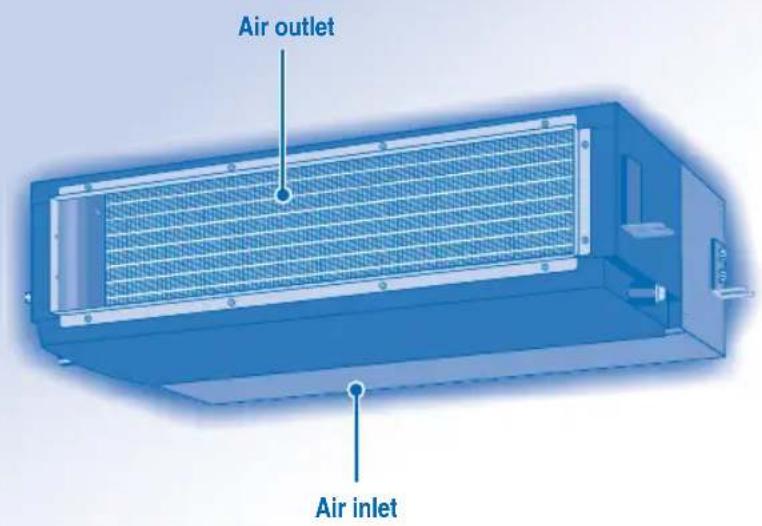
- No obstruction at air inlet and air outlet vents.
- Use Auto OFF/ON button to select Cooling/Heating operation, after 15 minutes of operation, it is normal to have the following temperature difference between air inlet and air outlet vents:
Cooling: ≥ 8^ Heating: ≥ 14^
FOR EXTENDED NON-USE
- Activate Heat Mode for 2~3 hours to remove moisture left in the internal parts thoroughly to prevent mould growth.
- Turn off the power supply.
- Remove the remote control batteries (wireless remote control).
NON SERVICEABLE CRITERIAS
TURN OFF POWER SUPPLY then CALL Authorized Distributor under the following conditions:
Abnormal noise during operation.
Water/foreign particles have entered the remote control.
Water leaks from Indoor unit.
- Circuit breaker switches off frequently.
Power cord becomes unnaturally warm.
- Switches or buttons are not functioning properly.
INFORMATIONS INFORMATIONS
CONDITION D'UTILISATION
Address 1 Address 2Group-Address 3
RCRESET

ADDRESS
Address 1 Address 2 Group Address 3
UNITÀ INTERNA E UNITÀ ESTERNAR

INFORMATIE INFORMATIE
GEBRUIKSOMSTANDIGHEDEN
MEER INFORMATIE OVER DE WERKING
Address 1 Address 2Group-Address 3
TIA NA ENEPTOIOIHSETE (ON)
TH NA ANIENEPTOIOIHSETE
(OFF) TH ΣYΣKEYH

TIA NA PYOMIETE TH OEPMOKPAEAIA
Eupoc 211oyns: 16^ 31^.

TIA THN EIIIOH TOY TPOIOY AEITOYPFIAZ
AYTOMATH KATAEIAH AEITOYPTIAE -Ig eyauteep ukoia
Hovada etiyei ia letoupyia ovaloya me tn puoi tnc 0epokpaia, nyn eWtepikn 0epokpacia kai tn 0epokpacia domegaiou.
KATAZTAH AEITOYPTIAE OEPMANSE -Tgva aTROaouavETe ZeTOAepa
Hovada xpeiaicai lyo xpovo ia va zetatae.
AEITOYPTIA FAN -Tia Tn DIEukokluvon Kukloopopias Tou aepa sto domegaatio
KATAZTAH AEITOYPTIAE YEH -Tva aTolaoaavetkpuo aepa
KATAZAHIEYOYPIAA YTPANHE-1a TnV aqypavon ToupeBaalovtoxpwou
Hovadaaieioupyei xayanh taxumta aevpiotnpawte va dwoe iiaatn aeitoupyia wnc.
Kata n aeitoupyia nias apuypavons, o eowteipkos aeviortpaac aeitoupyei oe xaunn taxutnta.

TIA NA ENIAEETETAXYHTA ANEMIETHPA (3 ENIANOES)
TTOV AYOMATO pToIo aeIOupyiac, n ToxUTnTa Tou EoeTEPIKOU aveiOtnpa puOgiEeai autOpata Ouupwua Me TOV pToTIO aeIOupyiac.
Eav n kataoan aeitoupyiac exputhetai oe Fan, n taxutn taou aveiopnpa oipotei otaepa otny etiaoyn MEDIUM avexapnta atto npuohion eepokpaaic.
TIA NA PYOMIZETENHMEPHZIO XPONODAIKOITH
Tia va evepytoioe (ON) n va atvepytoioe (OFF) touakeun eva Tpoppuoiapevo xpovo.

ETIAECTO XPOVODIAKOTTN ONnOFF.

Qiote ToV xpóvo.


ETIβεβαiωτε.
Ia va akupwote Tnv evpyoioinon (ON) n aTVEpyoioinon (OFF) tou xpvodiaakottn, tataote CANCEL
OTAV exEVEpyoToinOeI (ON) Oxpvovdiakottn, n mova dba Evexetai va ekivvwpitepa anTo nV wpa Tou exE oipTei payatika, ia v eTITEuxei n EITIOUunTH 0epukpia kata nTv kaOpioEvn wpa.
H eitoupyia tou xpoovdiakottn Baizetai ot np uoio Tou pooyiou oTo nExeiptipnoi kai otav puoiotei, tavaaauabavetai kaonepiva. Tn pOoiou Tou pooyiou, avatpeTe OTN Ppoeuaia tnexpiopiou.
H wpa oTO xPOVoiDiakOttn TIO Bpioketai TIO KovTa OTNv Tpexouo aPwAeEvpyoToinTei PwTn.
Eav n aeitoupyia tou xpvodiaokotn akupwtheta xepokivnta, mtopeite va emavapepeTe nTv Tponyouevn puOmuon natowvtao koumt SET.
Eav n kevtpiik npaox npeuatoa tvepyoiointheta iya ia wpa n tepiaootepo, to poloi kai o xpvodiaokottns ptei va puoiotouv gava.
PYOMIIZEIGKAT'ENIAOH
Tia va attofouyete aokotn xpnon, mTOpeite va avtioToiXoTe pia diaopopetikn dieuuvon e kaTe eoTEPIKn oVda.
Pnntote ETTaveianmueva, yia va ETIaEeTe Tnv EITHoumtn puOuion dieuovons.

Ano TPOeTIAOyn, Exei EITIAVEyei n puOuian ADDRESS 1. DEv XpeiaZetai va aAALLaTe auty n puOuian yia Tnv kavovikn Aetoupyia.
Eav n dieuovon exi opioei ot npuoun GROUP, mtopeite va xeiipoteite Tepiaotepc ato ia eowtepiKc movaec tautoxpova.

Planote yia va avakntaete tn npoppuoueyn pUOUIOTnIEXEPIOTnpiou.

xnpoiopoieitai kata nV kavovikn AC RESET Aetoupyia.
ΣYMBOYAH
Xpnoiopoioiote Koupivec yia va Tapemuoiodee To naiko qwoc kai tnv eWtepiK thepoTnta va meiwouv tn katavawon 1oxuoc kata tov tpotto aeitoupyiac u
ENIISKONHESH NPOIONTO& AEITOYPRIEZ (ENZYPMATO THAEXEIPIZTHPIO)
CZ-RT1
EOKOMY 1, VENTATION KAI TEST RUN DEV XPOIOTIOUVTAI.
Ppoetoiia TnExeiipntpiou
1 Pntne T
2 PntnoTe yia va puthetae Tnv napea.
3 ETTBcBAIOWTE
4 EtnavaaIabeTe TaBnuaTa 2 Kai 3 Vla paUbmuTe Tnv Tpexouoawpa.

TIA NA ENEPTONIOIHZETE (ON) H NA ANIENEPTONIOIHZETE (OFF) TH ΣYΣKEYH

TIA NA PYOMIETE TH OEPMOKPAZIA
Eupoc 16°C ~ 31°C.

TIA THN ENIIOH TOY TPOIOY AEITOYPIA
AYTOMATH KATAZTAH AEITOYPIA2 - TiapeyauTeepu Ekoia
Hovada etiyei ia aeitoupyia avaloya me tn puoi nTnGepokpaia, Tny Ewotepikn 0epokpaoia kai TnOepokpaoia omuiaou.
KATAZTAZH AEITOYPIIAE OEPMANNE -Tgva aTolaaBavet ZeToaepa
Hovada xpeiazaiyo xpovo ia va zetataei.
AEITOYPII A FAN -Tn 01kovon kkoopipas Tou aepa oTo dWmuTio
KATAZTAH AEITOYPTIAE YEH -Tia va aTolalaverte Kpuo aepa
KATAZTAH AEITOYPRIAA OAYFPANHE -Tia TnV apuypavon Tou περβαλλοντο χωρου
Hovadaaieitoupyei xaaunan taxutnata aevmuotnpawot va dwoeia aattan aeitoupyia wu
Kata n aeitoupyia htnias auypavans, o eowteipokc aveiortnpac aeitoupyei oe xunn tanytnta.

TIA NA ENIANEETAXYHTA ANEMIHTHPA (3ENIAOFE)
TATOV AY TOMATO TpOToA aeIoupyiac, n taxutnta tou eotepikoavemuioppa pubuicetai autopata oupuwva Teov TpOToA aeIoupyiac.
Eav n kataaotaan aeitoupyiaegexputhetaei oe Fan, n taxutnta tou aveioptnpa oipotei otaepa otv etioymed aeeapnta atno pueoian eepokpiaic.
TIA NA PYGMIEETON HMEPHIOX PONODIAKOINTH
Tia va evepyoioiOe (ON) n va atvepyoioiOe (OFF) tn ouakeun o eva npoppuoiqevxpovo.
1
MODE

KataxwpnoTe Tn dpyia tou nepnoiou xpvodiaokottn.
3

DOWN

PuθμioTeTov xpovo.
2
SELECT

ETIAECTO XPOVODIAKOTTN ONnOFF.
4
SET
EmbetaiaWOT
Tia va akupwaeTe Tnv evepytooinon (ON) n aeevepytoinon (OFF) tou xpvodiaakottn, TatnoTE CANCEL
OTAV exEVEpyoToineI (ON) oXpvovdiakottnc, n mova edexetai va ekivva wipitepa ato Tnv wpa tou exE opiatei payatika, ia va etteuxei n ettihujntn thepuokpacia kata nTv kaopioevn wpa.
H Aitoupyia Tou xpoovdiakottn Baoiizetai otn puboian Tou poLoyiou oTo nExeiptipntpio kai otav puboipte, tavaaumavai ta Kthneepiva. Tn puboian Tou poLoyiou, avatpeTe OTN Ptoiaia tnExeiptipntpiou.
H wpa oTO xpoVoiakOITn TIO Bpioketai TIO KovTa OTNV tpexoua wpa 0eEvpyoToinBei TTPOTN.
Eav n aeitoupyia tou xpvobdiakokntn akupwtheta xepokivnta, pTIOpeite va eTavaapepe TIV Tponyouevn puOPIan Tatovtac to koupti
Eav n kevpiik npaox peuatoa evepyoiothe i yia wpa n tepiaooTepo, to poloi kai o xpvodiaokottni npetie va puoiotouv gava.
ΣYMBOYΛH
Xpnaiotoiinote kouptivec yia va TnapemuobioeTe to naiako cai tnv EwtepiK hepoTnta va meiowov TN katavawan 1oxuoc kata tov tpTOAeIToupyiac u
FIA TH PYOMIEH TOY EBOMAIAIOY XPONOIAKONTTH
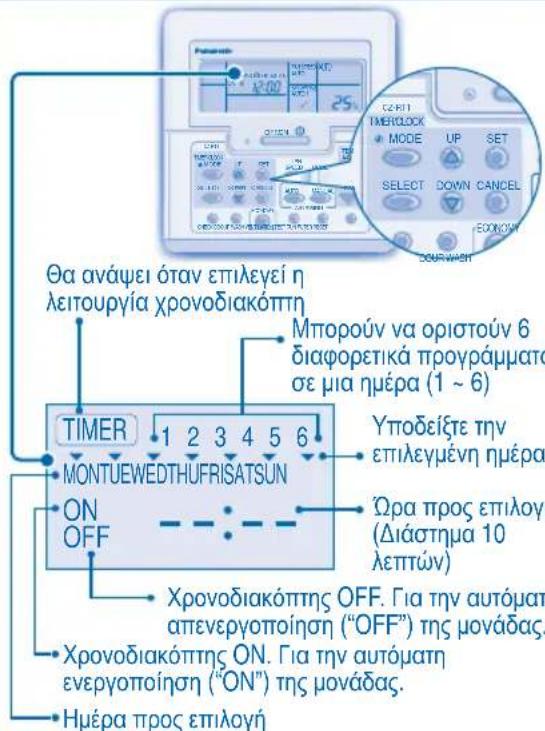
Aaayn oovns
- PntoTE To koumuIYi3 3eutepeaTeia yia va aalaoTe Tny oovn eBdoaiaoxpvoviaokTtn.
Etlioyn nepwv, otic otoies 0a letoupye i xpoovdiakottns
- NaHOTe TO KOUUMI SELECT, YIA VA KAATAxWpHnOe Tn PueHmION napea.
- Pnntote To koumti , ia va etiieetene tny eitihuntn nepa. H eitoumnpn nepa 0a etionmuavtheta ne tv evdoen . Pnntote To koumti SET ia va katapynoe tny eiloyn yia va etiieeTe Tnv Evdoien . Etavaabete auto to bna yia aann npepa
Emloyn evpyooinons (ON)/antevpyooinons (OFF) xpoovdiakottn
- Platnote to koupti yia va kataywpnoTe To TPOpypaqa xpvobiaokottn 1 (Timer 1).
- Pntnote To koumt yia va eTIAEETEN ON n OFF.
- Pntnote To koumtf SET, ia va etiBepaioeTe tvv etiAoyn.
Etiyipoypaatocxpvobiaokotn
- Patnote To koumti , ia va etiieetene tnv etiueunnt npa. Eav thee va pubioete nTv etiueuntn thepokpaia tautoxpova, TATnote To koumti DOWN , ia va etiieetene thepoekpaia.
- Manote to koumi SET, ia va etiipebaiwotn pOthion.
Erravaaabe Ta 9muata 5 e8 yia va puuioe Ta npoypaupa XPOVIOAKOTI (Timer) 2 e6 6 n tntote to koupi CANCE, ia va aKUPoTe TA OYETKA TPOypaMaTa.
AEITOMEPEIEA EAITOYPFIA
3A DA IN3BEPETE PEXKIM HA PABOTA
ABTOMATUHEH PEXKIM HA PABOTA - 3a Bawae ydo6ctbo
- YpeBt n3bupa pexkma Ha pa6oTa B 3aBNCMOCT OT 3aadaHata TemnepaTypata, BbHnHaTn CTaHata TemnepaTypa.
PEXKIM HA OTONJIEHNE - 3a da ce hacnaJdaBaTe Ha TOnbJI Bb3dyx
- Huyxho e Bpeme 3a 3arpBaHe Ha ypeda.
PEKIM HA BEHTINATOP -No3BOLBA cnpkynaetaHa Bb3dyxa BCTaTa
PEXIM HA OXIAKDAHE - 3a da ce hacnaKaBaTe Ha CTyden Bb3dyx
PEKIM HA MEKO N3CYUABAHE - 3a da ce HacnaIte Ha Tnxa cpeda
- YpeBbT pa60Tu Ha HnCKa ckopocT, 3a Da rapaHTnpa yMepeHo OxnaXdaHe Ha Bb3dyxa.
- No Bpeme Ha pexima Ha Meko 13cyuwaBaHe BbTpewHnT BeHTnAToP pa6OTn HA HnCKa CKopoCt.

3A HACTPOBAAE CKOPOCTTA HA BEHTINATOPA (3 Bb3MOXHOCTN)

- PnppeKIM AUTO CKOpocTtHa BbTppeHnBBeHTnIaTOp Ce HAcTpoBa ABTOMaTHUHO CnopeDpeKIma Ha pa6ota.
Ako pekmbt ha pa60ta e 3aaden Ha BeHTnlaTOp, ckopocTt ha BHTnlaTopa ue 6bJe qNKcnpHa Ha MEDIUM (cpeHa) He3aBNCmO ot 3aadenHaTa TemnepaTypa.
3A DA CE HACTPON BCEKNIDHEBHNA TAIMEP
3a da BKJIIOUHTE nI IN 3KJIIOUHTE KINMaTnKa B npedBaupTeHNO 3aJaDeHo BpeMe.

I36epete ONnn OFF TaMep.


3aJaTe JKeJHaHOTo BpeMe.


NotbpeTe Nahtpokkata.
3a da OTMeHnTe ON nIe OFF TaMep, HATncHeTe

Ako TaImepbTe HacTpoEH BpeKIM ON, ypeBt MoKe Da 3aONue He da pa6OTn IO-paHO OT DeNCTBNTeJIHO 3aJaDeHTo Bpeme, 3a Da IOCTnHE HabPeme Do XeJHaHata ot Bac TemnepaTypa.
TaimepbTe ce 6a3npa Ha HAcTpOKnTe Ha yaca OT DnCTaHcNHOHTO ynpaBHeHne I Ce NOBTapr EKeJeHBeHNO, CNeI KaTo BeHbX e HAcTpoEH. 3a HAcTpOKnTe Ha YacOBHnKa, MoJI BnKTe POnOrTBHe Ha DnCTaHcNHOHTO ynpaBHeHne.
Hai-Hanpei ce 3aedcTba Hai-6nKnTdo TEkyoTO BpeMe TaImeP.
Ako TaHMepeTe OTMHeH PbUHO,MOKe Da Bb3CTaHOBnTE IpeDnHnHaTa HAcTPOKa,KaTO HaTNCHEte 6yToHa SET.
AkoOCHOBHOT3axpaHbAeE N3KNOUeHO 3a Yac INN NOBuey, YACOBHNkBT N TaIMepbT TpRA6Ba OTHOBO da 6bDat HAcTPOeHN.
DONJIHINH HACTPOIKN

3a da n36eHHe TbeBONHO BKIOUbaHe Ha ypeHa, Bne moXe Da npNCBOunte pa3nueH aDPEC Ha BCaKO BbTpEwHO TnO.
HaTnCHTe HeKoNkoKpaTHO,3a da n36epTe XeIaHata OBa HacToKa Ha aDpec.


- По поразьбирахе се мзьра ADDRESS 1. He e hyжно да поменят ta3n hactrpoиka 3a HopmaHna pa60ta.
Ako apebTe hactpoeh Ha GROUP, NOBuee OT eHNO BbTpEHHO TnIO MoKe da pa6aTN No eHNo CbIoo Bpeme.
HaTNCHETe,3a Da Bb3CTaHOBnTe 0abpnuHnTe HAcTpOKn Ha DnCTaHcIOHHOTo ynpabJIeHHe.

RCRESET
AC RESET He ce n3no3Ba npn HopMaJIH nopeaun.
CbET
3a da Hama nte pa3xoda Ha eJeKtpoeHepnra, KOrato ypeBt E B peXm HA OXJaXdaHe, DpbNHeTe nepDeTata, 3a Da npEoTbpaTne npOHnKBaHe Ha CbHcBa CBETnHa NTOnHa OTbH.
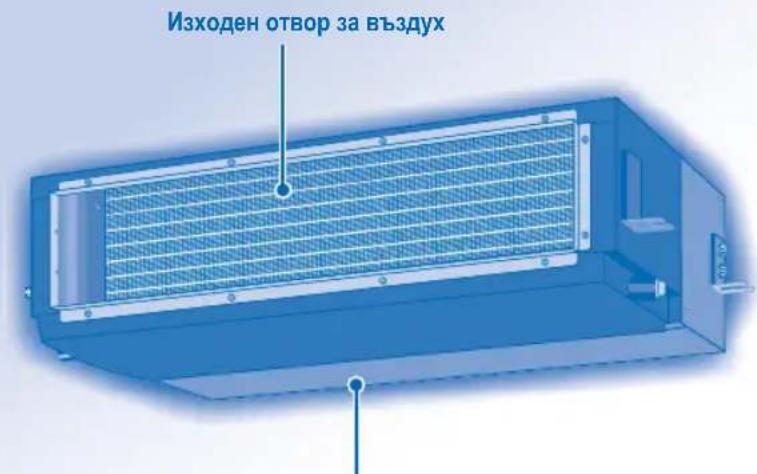
BxoJeh OTbOp 3a Bb3dyx
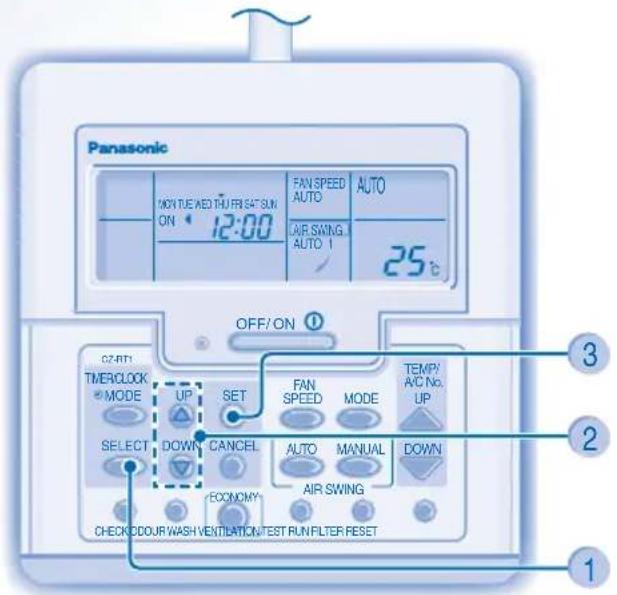
CZ-RT1
Ipn HopMaJEn pexmHa pa6ota 6yToHnTe ECOOURWASH, VENTILATION N TESTRUN He Ce n3n013BaT.
IoproTBHe Ha nctaHnOHHOYnpabHe
1 Hattnchete SELECT
2 HATNCHETe,3a da HAcTpoTe DeHr
3 IotBbpeTe
4 TIOBTOpeTe CTbKn 2 n 3, 3a da HacTpOte TEkyuHnAac.
3A DA BKNIOHTE NINN3KJIOHTE YPEDbT

3AДA HACTPONTE TEMNEPATYPATA
- Tempepatypn danaa3ohn: 16^ 31^

3AДАИЗБЕPETEPEKIMHA PABOTA
ABTOMATUHEPPEKIM HA PABOTA-3aBaue ydo6ctbo
- YpeBt n3bupa pexkma Ha pa6oTa B 3aBNCMOCT OT 3aJaDeHata TemnepaTypa, BbHsHaTn CTaHaTAtemnepaTypa.
PEKIM HA OTONJIEHNE - 3a da ce hacnaJaBaTe Ha TOnbI Bb3dyx
- HxH0 e BpeMe 3a 3arpaBaHe Ha ypeHa. PEXHM HA BEHTNIATOP - No3BOJRAuNpKyaunrTa Ha Bb3dyxa B CTAraTAPEXHM HA OXIAkDAHE - 3a da ce HacnaKaDaBteHa CTyDen Bb3dyx
PEXIM HA MEKO I3CYUABAHE - 3a da ce HacnaIte Ha Tnxa cpea
- YpeBt paBOTn Ha HnCKa CkOpocT, 3a Da rapaHTnpa yMepeHo OxnaJaHe Ha Bb3dyxa.
- No Bpeme Ha pexima Ha Meko n3cyuwaBaHe BbTpueHHaT BeHTnAToP pa60Tu HA HnCKa ckopoCT.

3A HACTPOBAAE CKOPOCTTA HA BEHTNATOPA (3 Bb3MOXHOCTN)
IpipeKIM AUTO CKOPoCTTHa BbTppeHnBeHTNlAToP ce HactpoBa aBTOMaTHHO CnopeDpeKIma Ha pa6ota.
- Ako peximbT ha pa60Ta e 3aadenHa BeHTnIaTOp, ckopocTtHa HBeHTnIaTOp a 6bJe 6KcnpaHa Ha MED (cpeHa) He3aBncMo OT 3aadenHata TemnepaTypa.
3A DA CE HACTPON BCEKNHEBHNA TAIMEP
3a da BKNIOHTE nIN N3KNIOHTE KINMaTHKa BnpedBaPntENHO 3aadaeHo BpeMe.
1
MODE

Bne3Te B pexm Ha DHeBeH TaMep.
3

DOWN

3aatae xenaHOTo BpeMe.
2
SELECT

I36peTe ON nnn OFF TaHmep.
4

TbpeTa
3a da OTMeHnTe ON nIN OFF TaIMep, HATNCHeTc CANCEL
Ako TaImepbTe HAcTpoEH BpeXM ON, ypeBt MoKe Da 3aONHe da paBOTn NO-paHO OT DeNCTBNTeH0 3aDaHEHO Bpeme, 3a Da DOCTNR He HABpeMe Do Xenahata ot Bac TemnepaTypa.
TaimepbCTe6a3npaHaHacptpoknteHa yaca OT DnctaHcnoHHoTO ynpabHeHneIe NOBtapr EKeJeHBeHNO, CNEI KATO BeHbXe HAcTpoEH.3a HAcTPOKNTe Ha YacOBHnKa, MoJI BnKTe IOnIroTBHe HA DnCTaHcNoHHOTo ynpabHeHne.
- Hai-Hanpei 1e ce 3aedCTBa Hai-6n3KnT DO TEkyuOTo BpeMe TaMep.
Ako TaMepbTe OTMHeH pBHyO,MOKe Da Bb3ctaHOBNTe npeduHaTa HAcTPOKa,KaTO HaTNCHe6byToHa SET
Ako OCHOBHOTO 3axpaHbAe e n3KJIOUeHO 3a Yacnnn NOBuey, YACOBHNkBT TaMepbT Tp6Ba OTHOB Da 6bDaT HAcTPOeH.
CbBET
3a da HamaNTe pa3XoHa eNeKtpoeHepnra, KOraTo ypeBt E B peXMM Ha OxnaJdaHe, DpBnHeTe nepDeTa, 3a da PpeObPaTne IpoHKBaHe Ha CbHcBeBA CBETInHa N TOINHa OTbH.
3A DA HACTPONTE CEDMNUHNA TAMMEP
PpomraHa Ha dncnne
- HatncheTe 3a 3 cekyHn, 3a da npomeHnte Dcnnpe Ha ceDMueH TaMep.
H36epete dHnTe 3a pa6ota Ha TaMepa
- HATNCHETe 3a Da Bne3eTe B HactpoiKaTa 3a DeHr.
- HatncheTe 3a da n36peTe XeNaHnO T Bac
H36paHnT DeH ue 6bDe COCBteH 3HaK
HaTnCHTe SET,3a da pa3MapKnpate nn n36epeTe 3Haka
NobTopeTe Ta3n CTbPKa, KaTO BKNIOUHTe DpyI DeH.
№36peTe ON/OFF TaMep
- HatncheTe ,3a da Bne3eTe TaMep 1.
- HatncheTe 3a da n36peTe ON uIN OFF.
- HatncheTe 3a da notbpynte n36opa cn.
U36peTe TaHMeP
- HatncheTe 3a da n36epete xenahoto ot Bac BpeMe.AKO uCKate Da Hactponte 3aeHNO c xenahata
OT Bac TemnepaTypa,HaTNCHeTe DOWN 3a Da H36epete TemnpaTypa.
- HATNCHETe 3a da notBbPdnte HAcTPOKaTa.
IIOBTOpeTe CbIKn 5do8,3a da HAcTPOnte TaIMep 2do6,NHnHaTNCHeTe CANCEL ,3a da OTMeHInTe cbOTBeTHInTe TaIMepn.
IPODPOBHOCTN 3A PABOTATA HA TAYMEPNTE
CeMnHnT TaIepe npnIOXM CAmO 3a KNUHO DnCTaHNoHHo ynpabJeHne, HATNCHeTe MODE 3a 3ceyni, 3a da n36epete dHebeH nn CeMnueh TaIepe.
- DHeBHNr TaIeMep IN CeIMNHyHrT TaIeMep He 6NuXa MOJIN Da CE HAcTPOr IIO EJHO N CbU O BpeMe.
Hacbpqaba eheproceTbaHeto, kato Bn daBa Bb3MOXHOCT Da HAcTpoBATE Do 6 TaMepa BBB BCEKN EINH DeH.
EHa nCbua nporpama Ha TaMepa He MoKe da 6bHe HacTpoeHa Ha CbUy DeH.
PpOBepTe TaMepa
- Bne3Te B peXIM Ha TaImeP.
2.ИЗберетe DeHЯ.
3.Диспгггт�е noka3Ba nporpaMaTa 3a BCEKn OT n36paHHTe DnH.
MoDnOuPauTe uJIn doabete TaMep
-3nblhHeTe onepaunra 3a npOBepKa Ha TaMepa, 3a Da n36epe DeHr. NobTOpTe CTbKn 4 Do 8, 3a Da MoDnΦuPate CbIeCTbByBaata npOrpMa Ha TaMepa IIN da DoabNTe HkaKbHOBa npOrpMa Ha TaMepa.
OTmeHete TaMepa
- 3nBnHeTe CTbNkata No-DoNY, 3a Da OTMeHInTe nporpaMATA Ha TaMepa 3a OnpeDeIeH DeH.
- Bne3Te B peXIM Ha TaHMeP.
2.ИЗберетe Деня. - HatncheTe, 3a da Bne3eTe B HactpoKaTa 3a DeH.
- HatncheTe, 3a Da OTMeHnTe 3aJaDeHnTaMep.
3a6paHTe CeDMnUHn TaHmep
3a da 3abpaHnte HactpOkaTHa CeMmUHn TaIMeP, HATNCHE MODE CNEKoETo HAHTNCHE T CANCEL
Pa3peweTe ceDMnHnTaMep
3a da pa3peuTe npednHa HacTroKa Ha ceDMHnra TaMep,HaTNCHeTe MODE ,CneKoETo HA TNCHeTe
ГРNXN & NOUNCBAHE

BHIMAHNE
- N3KJIouye Te 3axpaHbHaTeTo npedn nouchBaHe.
He dokocbaTe anyMHHneBOTo pe6po, ocTpaTa yact MoKe da npuHn HapaHaBaHe.
NHCTPYKUN 3A N3MBAHE
He n3no3BaIte 6eH3nH, pa3peiTe Inn a6pa3nBn npaxOBe.
- 3nON3BaIe cAmO canyHn (pH7) JIN HeYtpaJIHN DOMAKINHCN INPaxOBe.
He n3noJIbAaTe BOda, no-ropeuca ot 40^
C'bbETN
- POnCTBaIteФHITbpa peIOBHO 3a OcHrypRAHe Ha ONTMAJHa IPOUN3BOIDTEJIHOCT N3a HAMAJBAHe Ha pa3XoJa Ha eHepn.
MOna, KOHCyTTnpaIte Ce c HAMpaUmaCe Ha-6n3Ko Do BAc DnBp 3a ce3OHeH nprrne.
CbaeneBb3duhna qnIITbp
- 3-ntbTeH CBaJIeM Bb3dUweH qnTTbp
Bb3dyuHnIaT fumItbp moKe da ce cBaJIa B TpN nOcOKn 3a no-JneCHO noDlbpxaHe.
IocTabaHHe Ha Bb3dUshnna fHNTbP
PpKaHa Bb3dywnn qntlbp
Ima hyjda ot nouchtahe, koraTo:
Ha dncnne Ha nctaHcnoHto ynpabnene ce noBn cb6eHnTo "FILTER RESET". (3a xuH NoCTaHcnoHoo ynpabnene)
Ha HnDikatopHnI DnCnIeBcETBa Cbo6ueHMeTo "FILTER".(3a 6e3KmHo DnCTAHnOHOynpaBHeHne)
- PpenopbUba Ce Bb3dyuHnT fnnIbP da ce noNCTBa Ha BCEK 6 ceMnU.
Cne KaTO B3dUHnTФnTbp e NoCTeH, HATNCHE T/ITERPSET, 3a Da BbPHTe B HaayanHO CbCTOHRHe.
He n3non3BaTe ypea 6e3 Bb3dyuen p.
BHHMaTeJIHO NOUcHbAaTe/IN3MnBaIte Bb3DyHnIa HHTbp, 3a Da He HapaHnte NOBbpxHOCTTa My.
He n3cyuabaTe yacTc bC cewoap nn neka.
CmeHnTe BceKn NobpeDen Bb3DyWeH hntbp.
OTCTPAHRAHE HA NPOBEMN
CneHnTe cHmntomn npn pa6oTaTa Ha ypea He 03NaUaBt Henn3npaBHOcT.
| СИМПТOM | Прочини |
| ОТ ВБТРЕШАТа чAST ИЗЛЗАЗмБгелENВБДух. | ·Кондэнзurance поади п ropеса на охлajжданe. |
| Звук OT Teчаша вODA NO ВРЕме на равота. | ·Охлajждаша Точност ВБтpe B урeded. |
| Стаята Има STРANHа МИРИЗм. | ·Тoba може дa e мИрИЗмatura на Влиага, OTдемяна OT StEVHTe,КИПIMa, MeбELITE Или Дрекпe. |
| ВБТРЕSHИТВЕNTIATOPспра OTВРЕм На ВРЕм РИ NASTPОДУАЗа 3a ABTOMATUHOPereLITAPAne Ha SCOKOCTTA. | ·Тoba сponмara 3a OTSTРANYBAнe Ha OKOLNITe MIPIN3Mn. |
| РавOTATA ce 3a6abra C HAKOLKO MINUTI спedпостартура. | ·ЗakьсеньеToСпУЖи 3a 3aцИТа Ha KOMPecOpa Ha урeded. |
| ВБнIHATaЧAST OTDELA BODA/napa. | ·По TrьБИte ce ПОЛУСABA кONDEN3AZUЯ Или ИЗПAPYBAнe. |
| ИнDIКATOPBT Na Taimepa e NOCTOЯнHOВКLOЧEN. | ·HACTPОДКATA Ha TAIMERa CE NOBТAPRЯ EXJEДNEВNO, cIeD KaT O BeHNbX e 3aДаден. |
| ВБТРЕSHИТВЕNTIATOPспра OTВРЕм Ha ВРЕм РИ OTOПЯВа. | ·С цen Da ce ИЗБERTHE HexeJAN HoxlaKDAU eФeKT. |
| ЧУВа ce 3bYk OT ИЗЛКВАнe NO ВРЕм Ha paboTa. | ·Temпературнite пориму MONAT ДдовEDAT Do pa3ширяВанe Или CBVAne Ha UрEDA. |
| Урдьт e INPEВКПUCHЯн PEXIM Ha BEHTIATOPи ВБДухьт CTaba BnALChEN. | ·Тoba счунBa, korATO StAIHATA TEMPURAtpa DOCTURHHe 3aDAJIHATA TEmPURAtpa -ОпeрAUЯТa ce INPEBКПUCHBy Ha PEXIM Ha BEHTIATOPи BnALXHOCCTTA ce YBeJIuCua. |
| ВБнIHATaЧAST ИЗДABA SHUM NO ВРЕм Ha PexIM Ha OTOПЯВа. | ·Тoba e B peZIPTa Ha IprOmeHi B pInTOka Ha OXIIAKDaUЯ ra3, koratoОпeрAUЯТa CTIPAru HA CTAPTura. |
| ОпeрAZIЯТа He Cпра ВEDнARA спeД нATSCaHETO Ha 6bTuHa OFF/ON. | ·ИЗБьшBa ce ИЗПСКАнe Ha TOnПиHA.ОпeрAZIЯТa УSe cspre ABTOMATUHObNo cIeD prNБПИЗТENHO 60 cekyHd. |
| ОпeрAZIЯТа Cпра OT ВРЕм Ha PEXIM. ("DEFROST" ce NOYIBa Ha DlcNPIEЯ Ha ДИSTAHIOHOTU ynpaBleHne) | ·Урдьт e B peXIM Ha p3Mpa3YBaHBe N CTОнEHrT OXlaIITe Ce OTTHa PrE 3 BbHsHATA Chact. |
| ВБЗДУSHИТNotOK He 3aOчуBa BEdHara спeД СТAPTIRaHETO Ha OPEPazrJa. ("PRE HEAT" CE NOYIBa Ha DlcNPIEЯ Ha DlcSTAHIOHOTO ynpaBleHne) | ·UpeДыт ce 3aRpyBa, 3a DA DoCTABN TOnbI Bb3dYx. |
| ОпeрAZIЯТa ZanOvBa спeД b3cStahOBYBaHae Ha 3aXpranBaHETo. | ·АВТOMATUHOTOp pectarTpIaHae E B DeiCTBVE n pa6OTn no ppeDIISHA HAcTPOIKA. |
| ПО ВРЕм Ha PEXIM Ha ИЗСушаванe duxa STyden Bb3dYx. | ·UpeДыт e B onePazrIa Ha OXIIAKDAHe C HsCKa CskoPocT Ha BEHTIaTopa, 3a DA OTSTPANH BnARaTa OT NOMEseHMeTo. |
| СКорOCТТа Ha BEHTIATOPa ce IprOmeЯ OT ВРЕм Ha PEXIM, KORATO ypeДы T e B pEXIM Ha OTOПЯВaHes. | ·Стайна ТЕмпeратура e ДОctИналa HacTpoKATA Na ДИSTAHIOHOTO ynpaBleHne. Korato StaiHATA TemPepaTpy cnaIHe OTHBO, CskoPocTTa Ha BEHTIaTopa ce Bpyca Ha HAcTpoKIne Ta ДИSTAHIOHOTO ynpaBleHne. |
| ВБнIHATaЧAST ИЗПУСKa спeД NOВЕм Ha PexIM Ha OTOПЯВaHes. | ·Тoba e NOРADI ONePazrIaTaN Ha pa3Mpa3YBaHBe, ИЗБырБИа Ze B TOnlloO6MeHnIka. |
PpOBepeTe cIeHNHTe Heuca, npei Da ce o6aHte Ha otOpn3npaH cepBn3.
| СимпTom | Проберka |
| Урелов.T He paBOTи eФИКасно в рекIM Ha OTОПЕнUE/OxлaxДаHE. | • 3адаITE npabUNHо TempepatypaTe. • 3ATBOPeTe BCnUKN BpATиnpOZOpu. • ПочистЕ пИСmehe ФиNTPHTe. • ПочистЕ ВXODNTEи n3XODN H BENTINaCUnOHn OTBOPi. |
| РекIMь.T Ha OTОПЯВане He ФунKцIOHIPA. | • Урелов.T e NOCTABeH INPRIHydITeNHO DA paBOTи сamo B pekIM Ha OXIIaXDAH E HEObITaBAHa CTaY, KATO HApRIMeK COMIQUTOH NOMeUHe. |
| ШуМ по ВсмЕ Ha paBOTa. | • ПrobEpTe daniу урелов.T He e bIN INHCTaIINAPAN NOJ HAKNOH пIN peшETKaTа 3a BxODNIA Bb3dUx He e 3aTbOpeH npravINHO. |
| ДиSTAnZCuIHOTo uPraVbIeHne He paBOTи. (ДиSTПЯТ Ha 6eZKUHOTo DnCTaIcHOnH OyPraBbIeHne e I3rAChaII пePdABaTeJIHnT CnHaN e cIa6.) | • ПочистЕ пЯВИHNo 6aTePryHte. • Сmenete n3Xa6eHnTe 6aTePryHn. |
| Урелов.T He paBOTи. | • ПrobEpTe daniY ATOMaTNUHnT npeKbCBaY e n3KlIQuHe. • ПrobEpTe dani T aMepbT e NaCTPOeH. |
| Урелов.T He poluchBa CnHaNt OTe ДиSTAnZCuIHOTo yPraBbIeHne. | • UBepeTe ce, Ye HЯMa nperpaDi. • UBepeTe ce, Ye aDpeCbT e 3aJaDeH npravINHO. • UBepeTe ce, Ye n3JIbUBAHeto Ha CNHAla Ha DnCTaHcZIOHHTO yPraBbIeHne e B oxbaTa. • HЯkon φfIyopeCsEHTHn CBetЛиHn MOrat Da IOBEdaT Do CMUSeHn piN ppeDaBANeTo Ha CNHAla. Моя, кONcUttpaiTe ce c Hain-6blzKnД do BAC dinIbP. |
| Урелов.T e cIpyIи ИndikatopbT Ha TAIIMEPA MIGA. | • ИЗкLIOчete 3axpaBbAHeto (OFF), 3a DA bByhete уpeDa B hauJIHNo cIctOHne (ИндikatopbT Ha TAIIMEPA cIpya Da MIGa). • BkLIOчete 3axpaBbAHeto (ON) i pectaTpiraTe уpeDa. • Ако ИndikatopbT Ha TAIMEPA zanOHe DA MIGa OTHOB, мОЯ кONcUttpaiTe ce c Hain-6blzKnД do BAC dinIbP. |
PNI CE3OHEH PPERLEC JIENIPOJbIXKHTELHO HEN3IOJ3BAHE
-ПоберкаHaбatepnteHaДNTaHNoHHOTOуnpabJIeHne (6e3KNUHOДNTaHNoHHOуnpaBJIeHne).
HnkaBn nperepaHn HbXoHNte n3xoDnBeHTnlaOHHN OTBOpN.
- 3n0n3baTe 6yToHa 3a ABTomTuHb BKJ./N3KJI. (Auto OFF/ON), 3a da n36pepepepeqmHa oxnaJaHe/ oToPenne. HopMaHNo e, cne15 MmHyTu pa6Ota, da mATE cneHata TemnepaTyPha pa3nka Mejdy OTBOpTe 3a BXoDnI u N3XoDnI Bb3dYx:
OxnaXdane: ≥ 8^
OTonPbBaHe: ≥ 14^
PPIIPOIDbIXKNTEJIHO HEN3I0J3BAHE
- AktiBupaTe pexkMa ha OTonneHne 3a 2~3 yaca, 3a da OTCTpaHHe HnblHo BlaRaTa, OCTaHaJa BbB BbTpEHNHTe eIeMeHTu C cen Da Ce IpeDoTbPaTu pa3BHTNeTo Ha PJIeCEH.
- ɪnəkʌnəyete 3axpaɪhbaɪheɪtɔ.
- 3BaTe 6aTePnIte Ha nctaHOnHOTo ynpabNeHne (6e3KNUHO nCTaHOnHOynpabNeHne).
KPNTEPIN 3A IOBPEDA
N3KJIIOUETE 3AXPAHBAHETO, cne Kceto CE OBADETE Ha oTopnIupan dncptn6byTop B cneHNITE cnuyan:
HeobuaeH 3Byk no BpeMe ha pa60Ta.
Boda/yykni yactnca nnonaHaHn B dNCTaHNOHOTO npabHeHne.
- ɪn'tɪya Bɔːda O T Bbɪtpeɪnɪya ypeɪd.
- PpeKbcBaYbT Ha eJ. BepurA Ce N3KJIIOUyBa YecTo.
3axpaHbAaIyT Ka6e cIe 3aepBa HeoBuayHO.
KoHcyTeTAtu nn 6yToHmTe He yHKUOnHpaT npabunHO.



MEMO MEMO





MEMO MEMO


QUICKGUIDEGUIDERAPIDE/GUIARAPIDA/KURZANLEITUNG/GUIDARAPIDASNELLE GIDS/GUIARAPIDO/ΣYNTOMO ΣOHFO ΣБbP3 CNPABOHHK
WIRELESS REMOTE CONTROL • TELÉCOMMANDE À INFRAROUGE • MANDO A DISTANCIA INALÁMBRICO • KABELLOSE FERNBEDIENUNG • TELECOMANDOSENZA FILI • DRAADLOZE AFSTANDSBEDIENING • CONTROLRO REMOTO SEM FIOS • AYZPMATO THAEXEIPITPHIO • B3XNUHO INCCTAUHNO YYPABLIEHNE
1

Select the desired mode • Sélectionnez le mode de fonctionnement souhaite • SeLECTIONe el mode deseado • Wahlen Sie die gewünschte Betriebsart aus • SeLECTIONare la modalità desiderata • Selecteer de gewenste stand • SeLECTIONe o modo de lavoroamento pretendedo -Eekivno/otoumntoe m aeioupyia Bknoubahe/cnnpa

2

Start/stop the operation - Mettez l'appareil sous/hors tension - Inicie/detenga el fonctionamento - Schalten Sie das Gerä ein bzw. aus - Avviare/arrestare l'apparechio - Start/stop het apparaat - Ligue/Desligue a unidade - Ekvivnt/otauantote m Aitoupyia Bknohae/cnupahe
3
Select the desired temperature -Selectionnez la
température souhaitée -Selecione la temperature
deseada-Stellen Sie die gewünschte Temperatur ein
Selezionare la temperatura desiderata.
Stel de gewenste temperatur in-Programe a temperatura
desejada-ETIAETE mV ETTBunrT BepokpTaHacrpoka Ha keJahata Temnepatypa

Wired REMOTE CONTROLTELECOMMANDE CABLEE MANDO A DISTANCIALAMBRICO KABELFERNBEDIENUNG TELECOMANDO CON FILO BEDRADE AFSTANDBEDIENING CONTROLRO REMOTO COM FIOS ENZYPMATO THALEXIPITPHIO XMHNO DUCTAHMOHOYIPABINEHIE
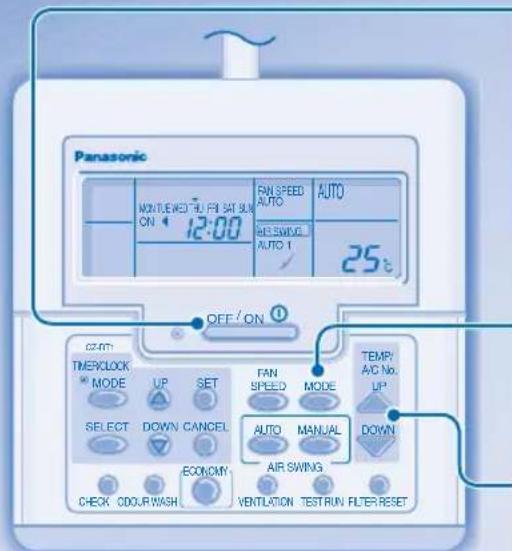
1
Start/stop the operation Mettez l'appareil sous/hors tension Inicie/detenga el fonctionamento Schalten Sie das Gerat ein bzw. aus Aviare/arrestare l'appareccchio Start/stop het apparata Ligue/Desligue a unidade EKIVNOTe/OTQATNTGE Tn AIEIOUpyia BKnIOVAhe/cnnpaHe
2

Select the desired mode • Sélectionnez le mode de fonctionnement souhaite • SeLECTIONE el moyen désaed • Wahlen Sie die gewünschte Betriebsart aus • SeLECTIONARE la modalità desiderata • Selecteer de gewenste stand • SeLECTIONO o modo de lavoramento pretendido • Eπλείτε ηγκατοστην λειουρίας τοῦ επθυμείτε Μιδόρ ἀνελημήρ eρχμΜ ὁropaθα

3

Select the desired temperature
Selectionnez la température souhaïée
• SeLECTIONA la température désada
• Stellen Sie die gewünschte Temperatur ein
• SeLECTIONAre la temperature desiderata
• Stel de gewenste temperatur in • Programe a temperature desejada • EtTLeGTe TnV
• EtTouuTn TcEpuKpOia • Hactpoika ha
XeenaHATA TEMpepaTypa
Pursuant to the directives 2004/108/EC, article 9(2) and 2006/42/EC, Annex I article 1.7.3
Panasonic Testing Centre
Panasonic Marketing Europe GmbH
Winsberging 15, 22525 Hamburg, Germany
Printed in China OYYF1006-00
Panasonic Corporation Website: http://panasonic.net
P07-T10850-01