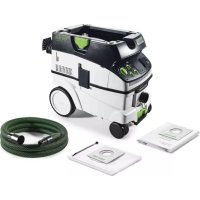
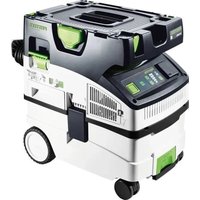
Cleantec CTM 26 AC - Vacuum Cleaner FESTOOL - Free user manual and instructions
Find the device manual for free Cleantec CTM 26 AC FESTOOL in PDF.



| Product Type | Mobile Vacuum Cleaner |
| Brand | Festool |
| Model | Cleantec CTM 26 AC |
| Tank Volume | 26 litres |
| Dimensions (L x W x H) | 587 x 372 x 539 mm |
| Weight | 14.6 kg |
| Power Consumption | 350 - 1200 W |
| Max. Connection Value (Tool Socket) | 2400 W (EU) |
| Max. Airflow Rate | 130 m³/h (vacuum) / 234 m³/h (central) |
| Max. Vacuum Pressure | 240 hPa |
| Mains Cable Length | 7.5 m |
| Sound Pressure Level | 71 dB(A) |
| Dust Class | M (up to 0.1 mg/m³) |
| Special Features | AUTO-CLEAN (automatic main filter cleaning), Bluetooth wireless connection, CT-F I remote control, airflow rate monitoring |
| Tool Socket | Yes (max. 2400 W) |
| System Compatibility | Festool Systainer (SYS-Dock) |
| Parking Brake | Yes, with release button |
| Protection Rating | IP X4 |
| Main Filter | Replaceable, available as spare part |
| Filter Bag / Disposal Bag | Yes, models SC FIS-CT 26/36/48 and ENS-CT26/36/48 |
| Care and Maintenance | Regular filter cleaning, emptying the tank, annual professional inspection |
| Spare Parts and Repairability | SD I and DL I modules available, repairs by Festool Service |
| General Information | Intended use: suction of dust and liquids, industrial use |
Frequently Asked Questions - Cleantec CTM 26 AC FESTOOL
User questions about Cleantec CTM 26 AC FESTOOL
0 question about this device. Answer the ones you know or ask your own.
Ask a new question about this device
Download the instructions for your Vacuum Cleaner in PDF format for free! Find your manual Cleantec CTM 26 AC - FESTOOL and take your electronic device back in hand. On this page are published all the documents necessary for the use of your device. Cleantec CTM 26 AC by FESTOOL.
USER MANUAL Cleantec CTM 26 AC FESTOOL
en: EU Declaration of Conformity. We declare under sole responsibility that this product complies with all the relevant requirements in the following EU Directives, and following standards or normative documents were applied:
S.I. 2008/1597 Supply of Machinery [Safety] Regulations 2008
S.I. 2017/1206 Radio Equipment Regulations 2017
S.I. 2016/1091 Electromagnetic Compatibility Regulations 2016
S.I. 2021/422 Restriction of the Use of Certain Hazardous Substances in Electrical and Electronic Equipment Regulations 2012
BS EN 60335-1:2012 + AC:2014 + A11:2014 + A13:2017 + A15:2021,
BS EN 60335-2-69:2012
BS EN 300 328 V2.2.2.
BS EN 301 489-1 V.1.9.2
BS EN 301 489-17 V3.2.4,
BS EN 303 446-1 V1.2.1,
BS EN 55032:2015 + A11:2020,
BS EN 55014-1:2017 + A11:2020,
BS EN 55014-2:1997 + A1:2001 + A2:2008 + AC:1997,
BS EN 61000-3-2:2014
BS EN 61000-3-3:2013
BS EN 62233:2008 + AC:2008
BS EN 62311:2008,
BS EN IEC 63000:2018
1 Safety warnings. 19
2 Symbols. 20
3 Parts of the machine. 20
4 Technical data. 21
5 Intended use. 22
6 Commissioning. 22
7 Connecting a device 22
8 Settings. 23
9 Working. 24
10 Service and maintenance. 26
11 Accessories 27
12 Environment. 27
13 General information. 27
1 Safety warnings



WARNING! Read all safety warnings and instructions. Failure to follow the safety warnings and instructions may result in electric shock, fire and/or serious injury.
Save all safety warnings and instructions for future reference.
- This machine is not intended for use by persons (including children) with reduced physical, sensory or mental capabilities, or lack of experience and knowledge. Children should be supervised to ensure that they do not play with the appliance.
- This machine must not be used by people who might have a particularly adverse reaction to an electric shock (e.g. people with cardiac pacemakers), because the possibility of the machine building up a static charge cannot be excluded.
- Ensure you are on a firm base. The effects of a shock moment, e.g. due to antistatic discharge, may lead to accidents.
- This machine must only be operated under constant supervision. To prevent potential hazards, never let it run unsupervised.
- WARNING Operators shall be adequately instructed on the use of these machines.

- WARNING The machine may contain hazardous dust. Only have the machine maintained and emptied, and only have the filter replaced by an authorised specialist using suitable protective equipment.
- Always operate with the filter system installed!
- Always use suitable protective equipment!
- If intact following a visual inspection, work in a dry environment according to instructions!
-
Risk of explosion and fire! Do not extract:
-
Sparks, glowing particles or hot dust;
- combustible or explosive materials (e.g. magnesium, aluminium, petrol, diluting agents);
- aggressive materials (e.g. acid, alkaline solutions, solvents);
English
-
chemically reactive materials which lead to the generation of heat, acids/bases, gases, etc. (e.g. reactive two-component materials, aluminium and water).
-
Observe all national safety regulations as well as the material manufacturer's specifications!
- WARNING Only use the socket outlet on the machine for purposes specified in the instructions.
- Check the plug, the electrical outlet module, the cable and the filter regularly in order to prevent a hazard. Damaged electrical components must be replaced by an authorised service workshop only.
- The mains plug must always be disconnected from the socket before performing cleaning or maintenance tasks, when replacing consumables or when converting the machine.
- CAUTION Clean the water level limiting device regularly and examine it for signs of damage.
- WARNING If foam or liquid escapes from the machine, switch off immediately.
- Use only the original Festool suction hose.
- Pay attention to the work environment and watch out for your own safety and the safety of others when transporting or working with the machine.
In this way, you can for example prevent tripping hazards caused by the suction hose or mains cable.
- Only carry the machine using the handle provided.
- Do not lift or transport using a crane hook or lifting gear.
- Keep packaging film away from children.
There is a risk of suffocation.
2 Symbols

Warning of general danger

Warning of electric shock

Read the operating manual and safety warnings.

Wear a dust mask.

Tip or advice

Handling instruction

WARNING! The machine may contain hazardous dust!
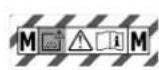
Suitable for separation of dust with an exposure limit value greater than 0.1mg / m^3

Do not dispose of it with domestic waste.

CE conformity marking

UKCA marking: Confirms the conformity of the product with UK regulations.

Tool contains a chip which stores data. See section 13.3
3 Parts of the machine
[1-1]
Plug
[1-2]
Intake opening
[1-3]
Electrical outlet module
[1-4] Hose holder
[1-5] Handle
[1-6] SYS dock
[1-7] Connection display
[1-8] Connection button
[1-9] AC indicator (variants with AUTOCLEAN only)
[1-10] AC button (variants with AUTOCLEAN only)
[1-11] Status indicator (suction power adjustment/hose diameter setting)
[1-12] Buttons for suction power adjustment/hose diameter setting
[1-13] MAN button
[1-14] Switch
[1-15] Locking clip
[1-16] Dirt trap
[1-17] Release button (brake)
[1-18] Brake
Accessories shown or described are not always included in the scope of delivery.
4 Technical data
| Mobile dust extractors CT 26-48 EI CT 26-48 EI AC | ||
| Power consumption 350-1200 W | ||
| Max. electrical outlet module connected load EU | CH, DK GB 230 V/110 V | 2400 W 1100 W 1800 W/230 W |
| Max. volume flow (air), extractor/turbine 130 m³/h / 234 m³/h | ||
| Max. vacuum, turbine 240 hPa | ||
| Suction hose (depending on mobile dust extractor version) D27/32x3.5m-AS/CTR D36x3.5-AS/KS/B/LHS 225 D36/32x3.5m-AS/R | ||
| Mains power cable length 7.5 m | ||
| Sound pressure level as per EN 60335-2-69/uncertainty K 71 dB(A)/3 dB | ||
| Hand-arm vibrations in accordance with EN 60335-2-69 < 2.5 m/s² | ||
| Protection class IP X4 | ||
| Frequency 2402-2480 Mhz | ||
| Effective isotropic radiated power (EIRP) < 10 dBm | ||
| Container capacity CT 26 26 l | ||
| CT 36 36 l | ||
| CT 48 48 l | ||
| Dimensions L x W x H CT 26 | 587 x 372 x 539 mm | |
| CT 36 | 587 x 372 x 606 mm | |
| CT 48 | 593 x 405 x 687 mm | |
| Weight | CT 26 | 14.6 kg |
| CT 36 | 15.1 kg | |
| CT 48 | 17.0 kg | |
5 Intended use
Mobile dust extractor suitable for
- Extracting dust up to 0.1mg / m^3 according to dust class 'M', including wood and paint dust,
- Extracting water,
- Increased loads during commercial use, according to IEC/EN 60335-2-69.

The user is liable for improper or non-intended use.
6 Commissioning

WARNING
Unauthorised voltage or frequency!
Risk of accidents
Observe the specifications on the machine's name plate.
Observe country-specific regulations.
6.1 Initial commissioning
- Open the locking clips [2-2] and remove the top section of the machine [2-1].
- Remove the accessories from the dirt trap [2-3] and the packaging.
- Place a filter bag or disposal bag in the dirt trap (see sections 10.1 and 10.2).
Replace the top section [2-1] and close the locking clips [2-2]. - Attach the cord holder to the reverse of the mobile dust extractor (see figure [3]).
Connect the suction hose to the machine and note the hose diameter adjustment (see section 8.1).
6.2 Connecting a mobile dust extractor

WARNING
Risk of injury from tools starting up unexpectedly
Before switching on, ensure that the connected tool is switched off.

WARNING
Risk of injury from electric current
Insert the mains plug into an earthed socket.
- Do not reach into the electrical outlet module on the mobile dust extractor.
i While the mobile dust extractor is connected to the mains socket, an electric current is running through the electrical outlet module on the mobile dust extractor at all times.
Connecting the mobile dust extractor to a mains socket
The mobile dust extractor is switched off.
- Connect the power cable to a mains socket. The electrical outlet module [1-3] is live.
Switching the mobile dust extractor to standby mode
Press the on/off switch [1-14].
The electrical outlet module [1-3] is live.
The green LED [1-11] indicates standby mode.
Starting the mobile dust extractor automatically
The mobile dust extractor is in standby mode.
To start the mobile dust extractor automatically: Switch on the connected tool.
Starting the mobile dust extractor manually
The mobile dust extractor is in standby mode.
Press the MAN button [1-13].

Pull the mains plug from the socket when you are not using the mobile dust extractor and before performing any long and maintenance work.
7 Connecting a device

WARNING
Risk of injury from the mobile dust extractor starting up unexpectedly
Before performing any work with the mobile dust extractor, check which remote control and which power tool are connected to the mobile dust extractor.
The remote control must only be attached to the suction hose.
A battery-powered power tool must always be connected to the mobile dust extractor via the suction hose. After finishing work, the connection to the mobile dust extractor must be disconnected.
7.1 Connecting a power tool

WARNING
Risk of injury
Observe the maximum electrical outlet module connected load (see "Technical data" section).
- Switch off the power tool.
Connecting a mains-powered power tool to the mobile dust extractor
Connect the power tool to the electrical outlet module [1-3].
The power tool is connected to the mobile dust extractor via the power cable.
Connecting a battery-powered power tool to the mobile dust extractor
In standby mode, press the connection button [1-8].
The connection display [1-7] flashes slowly. For a period of 60 seconds, the mobile dust extractor is ready for connection.
Turn on the battery-powered power tool.
The mobile dust extractor starts up and the battery-powered power tool is connected until the mobile dust extractor is manually switched off or the mains plug is disconnected. The cordless tool must then be connected again.
Connecting a new battery-powered power tool overwrites the previous connection.
7.2 Connecting the CT-F I remote control
Connecting the remote control and the mobile dust extractor
To be able to connect a remote control to a mobile dust extractor, the remote control must be reset (see "Resetting the remote control"). A remote control that has not been connected previously can be connected directly.
A connection that has been established between the remote control and the mobile dust extractor will persist even after the mobile dust extractor has been manually switched off or the mains plug has been disconnected.
- Hold down the connection button [1-8] on the mobile dust extractor for three seconds in standby mode.
The connection display [1-7] flashes rapidly.
For a period of 60 seconds, the mobile dust extractor is ready for connection.
Press the MAN button on the remote control.
The remote control is permanently stored in the mobile dust extractor.
Switching on/off
Once the remote control is connected to the mobile dust extractor, the mobile dust extractor can be switched on and off with the remote control.
Press the MAN button on the remote control to switch the device on and off.
Resetting on the remote control
Resetting deletes the connection between a remote control and the mobile dust extractor.
- Hold down the connection button and the MAN button for ten seconds.
The LED indicator lights up purple if the reset has taken place.
7.3 Festool App*
The mobile dust extractor can be configured with the Festool App.
- Hold down the connection button [1-8] on the mobile dust extractor for three seconds in standby mode.
The connection display [1-7] flashes rapidly.
For a period of 60 seconds, the mobile dust extractor is ready for connection.
-
Follow the instructions provided in the Festool App.
-
Not available in all countries.
8 Settings
8.1 Adjusting the hose diameter
Adjustment of the hose diameter is only possible in standby mode.
- Use the buttons of the hose diameter adjuster [1-12] to adjust the inner diameter of the connected suction hose.
The adjustment is stored in the mobile dust extractor.
This ensures that the air speed in the extractor hose is measured correctly (see section 8.6).
8.2 Adjusting the suction power
Press the plus or minus button [1-12] while extracting.
8.3 Connecting sleeve
The bypass function of the connecting sleeve prevents strong suction from sanding
English
machines and floor nozzles on smooth surfaces.
Open
- Turn the adjusting ring to the "OPEN" position.
Close
- Turn the adjusting ring to the "CLOSE" position.
8.4 Applying the brake
Folding out the black brake lever [1-18] prevents the mobile dust extractor from rolling. To achieve this, lift the front end of the mobile dust extractor slightly and push the black brake lever downwards until it latches into place. Press the release button [1-17] to release it.
8.5 Temperature cut-out
A temperature cut-out switches the mobile dust extractor off when it reaches a critical temperature to prevent overheating. The bottom LED [1-11] indicates a fault.
LED lights up red Excessive temperature
- Switch off the mobile dust extractor, let it cool down.
- Switch on the mobile dust extractor again after approx. five minutes.
8.6 Volumetric flow monitoring
For safety reasons, an acoustic warning signal sounds if the air speed in the suction hose falls below 20m / s (dust class M only). For the volumetric flow monitoring to function correctly, this requires the use of Festool suction hoses with an inner diameter of 21mm to max. 42mm
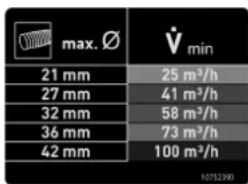
The table* on the mobile dust extractor explains this connection for the minimum required extraction volume of the respective hose diameter. If the rate is below the
respective extraction volume, a warning signal is emitted.
- only with EU versions of CT AC
Possible causes Solution
Value set on the suction power adjustment [1-11] is too low.
Set the suction power adjustment to a higher value (see section 8.2).
Mobile dust extractor not set to the correct hose diameter.
Set the correct hose diameter (see section 8.1).
Suction hose is blocked or kinked.
Eliminate the cause of the clogging or straighten the hose.
Filter bag full. Insert a new filter bag (see section 10.1).
Dirty main filter. Change the main filter (see section 10.3).
AUTOCLEAN ONLY: Clean the main filter (see section 9.2).
Electronic monitoring malfunction.
Have the fault rectified by a Festool service workshop.
Wet extraction. Function not impaired, no measures required.
ONLY CTM 36 E AC-LHS with PLANEX LHS 2 225:
Activate the bypass function on the special extraction sleeve [1A].
In tasks that require a low extraction setting (e.g. on soft surfaces).
9 Working
9.1 Handling
Hose holder: After finishing work, you can feed the suction hose through the opening [8-2] and place it in the hose holder.
SYS-Dock Systainer storage area: A Systainer can be fastened to the storage area with the four slides or the T-Loc lock [8-1].
9.2 AUTOCLEAN - cleaning the main filter (variants with AUTOCLEAN only)

Only in conjunction with a disposal bag (to comply with dust class M). Not for use during wet extraction.
Switching automatic deducting on and off
In standby mode, press the AC button [1-10] to switch AUTOCLEAN on or off.
i The AC function can be configured with the Festool App*.
Manual cleaning
Press the AC button [1-10] while extracting.
Full manual deducting
- While extracting, cover the end of the nozzle or suction hose with your hand or CT-VS closing slide for three seconds.
Press and hold the AC button [1-10] for at least three seconds.
Do not clean the main filter too often within a short period of time.
Within 1 minute maximum:
1x full manual deducting
3x manual deducting
- Not available in all countries.
9.3 Special features of the CTM 36 E AC-LHS
To use the mobile dust extractor in combination with the PLANEX:
- Use kink-resistant suction hose D 36 mm x 3.5 m-AS.
Use a special suction sleeve for connecting the PLANEX. - Use closing slide CT-VS between the intake opening [1-2] and suction hose.
- Attach the tool holder.
Always use with a disposal bag!
Bypass function
In tasks that require a low extraction setting (e.g. on soft surfaces).
Activate bypass function on special extraction sleeve.
9.4 Extracting dry materials


CAUTION
Hazardous dust
Damage to the respiratory passage
- When extracting substances that are hazardous to health, use a filter bag or disposal bag.
- Do not use the machine if the volumetric flow monitoring function is inactive.
Observe the following when extracting dust generated by operating power tools:
If the exhaust air is discharged back into the room, the air renewal rate L within the room must be sufficient. The volume of air discharged back into the room must not exceed 50% of the fresh air volume flow (room volume
VR x air renewal rate LW) . Also observe the national regulations.
Observe the following: A moist main filter clogs more quickly when extracting dry materials. Therefore, dry the main filter before extracting dust or replace the damp filter with a dry one.
9.5 Extracting wet materials/liquids

Remove the filter/disposal bag. Use a special wet filter (NF-CT).
The dust extraction stops automatically when the maximum fill level is reached.
The bottom LED [1-11] flashes red.
It must be ensured that the machine (main filter, suction hose, container, etc.) is sufficiently dried after extracting wet materials.

CAUTION
Hazardous dust
Damage to the respiratory passage
After extracting wet materials, remove the wet filter and replace it with the main filter for dry materials.

CAUTION
Escaping foam and liquids
- Switch off and empty the machine immediately.
9.6 After finishing work
- Variants with AUTOCLEAN only: Clean the main filter automatically or manually (see section 9.2).
- Switch off the mobile dust extractor and pull out the mains plug.
Wind up the mains power cable.
Empty the dirt trap. - Close the extractor connector [1-2] using the plug [1-1].

WARNING
Hazardous dust
Damage to the respiratory passage
Before removing the mobile dust extractor from the contaminated area, clean it and all accessories by thoroughly vacuuming and washing them down (interior and exterior).
Parts that cannot be thoroughly cleaned must be sealed in an airtight plastic bag during transportation.
Wear a dust mask.

Only store this machine indoors.
- Place the mobile dust extractor in a dry room inaccessible to unauthorised users.
10 Service and maintenance

WARNING
Risk of injury, electric shock
Always pull the mains plug from the socket before performing any servicing and maintenance work.
- All maintenance and repair work which requires the housing to be opened should always be carried out by an authorised service workshop.
Customer service and repairs must only be carried out by the manufacturer or service workshops. You must only use original Festool spare parts.
Further information: www.festool.co.uk/service
Damaged safety devices and components must be properly repaired or replaced in a recognised specialist workshop, unless otherwise indicated in the operating manual.
Observe the following information:
- Dust-related inspection (e.g. for filter damage, tightness of the machine and function of the control devices) by the manufacturer or an instructed person at least once a year.
- Dispose of components that cannot be cleaned. Use impermeable bags to do so. Observe the applicable disposal provisions.
- Provided that maintenance personnel or other persons in the vicinity are not endangered, the user must dismantle and clean the machine prior to performing maintenance work. Appropriate precautionary
measures include decontaminating the machine prior to disassembly, making provisions for locally filtered forced ventilation at the location of machine disassembly, cleaning the maintenance area and appropriate personal protective equipment.
10.1 Changing the filter bag (SC FIS-CT 26/36/48)
Removing the filter bag [4]
- Open the locking clips [2-2] and remove the top section of the machine[2-1].
- Remove the filter bag.
- Dispose of the used filter bag in accordance with statutory regulations.
Clean the dust container [2-3].
Inserting the filter bag [5]
Insert a new filter bag (SC FIS-CT 26/36/48) in the inlet port of the dust container and interlock it. Important: be aware that the locking engages.
Replace the top section [2-1] and close the locking clips [2-2].
Make sure that the filter bag is not pinched between the top and bottom sections.
10.2 Changing the disposable bag (variants with AutoClean only)
Removing the disposal bag [6]
- Close off the extractor opening [1-2] using the sealing plug [1-1].
- Open the locking clips [2-2] and remove the top section of the machine [2-1].
- Close the disposal bag.
Remove the disposal bag. - Dispose of the used disposal bag in accordance with statutory regulations.
Clean the dust container [2-3].
Inserting the disposal bag [7]
- Insert a new disposal bag (ENS-CT26/36/48) into the inlet nozzle on the container and lock it in place.
- Important: The side openings in the disposal bag must be inside the dirt trap. Make sure that the catch clicks into place.
- Place the disposal bag over the edge of the container.
![FESTOOL Cleantec CTM 26 AC - Inserting the disposal bag [7] - 1](/content/2026/03/555277/images/7199e07dccb29d80d179458a0318b8e115f29c0a1654072f701ec440ea1be4ee.jpg)
Make sure that the contacts [10-2] are exposed.
Replace the top section [2-1] and close the locking clips [2-2].
10.3 Changing the main filter
NOTICE
Damage to the motor
- Never extract material without a main filter, as this can damage the motor.
- Open the locking clips [2-2] and remove the top section of the machine [2-1].
- Rotate the top section of the machine so that the main filter is facing upwards (figure [9]).
- Fold over the lever [9-3] and remove the retainer [9-2].
- Remove the used main filter [9-1] and replace with a new one.
- Clear the sealing surfaces and area behind them of dirt.
- Dispose of the used main filter in accordance with statutory regulations.
- Insert the retainer [9-2] and fold over the lever [9-3] until it engages.
Replace the top section [2-1] and close the locking clips [2-2].
10.4 Emptying the dust container
The dust container [2-3] can be emptied once the top section has been removed.
After extracting fluids, clean the fill level sensors [10-1] regularly with a soft cloth and inspect for damage.
11 Accessories
Refer to the Festool catalogue for the order numbers of accessories and filters or find them online at "www.festool.com".
11.1 Modules
The following modules for extending the mobile dust extractor are available in the range of accessories, and can be connected to the electrical outlet module [1-3]:
- SD I-CT26-48 (socket module)
- DL I-CT26-48 (compressed-air module)
For more information about the modules, visit "www.festool.com".
12 Environment

Do not dispose of the device in the household waste! Recycle devices, accessories and packaging. Observe appli
cable national regulations.
In accordance with the European Directive on waste electrical and electronic equipment and
implementation in national law, used electrical devices must be collected separately and handled in for environmentally friendly recycling. Information on the collection points can be viewed at www.festool.com/environment.
Information on critical materials:
www.festool.co.uk/reach
13 General information
Imported into the UK by
Festool UK Ltd
1 Anglo Saxon Way
Bury St Edmunds
IP30 9XH
Great Britain
13.1 Bluetooth®
The Bluetooth® word mark and the logos are registered trademarks of Bluetooth SIG, Inc.; they are used by TTS Tooltechnic Systems AG & Co. KG, and therefore by Festool, under licence.
13.2 License information
License information on any open source licenses used in the product can be found in the Festool app* at Information > Power tool open source licenses.
- Not available in all countries.
13.3 Information on data privacy
The power tool contains a chip which automatically stores machine and operating data. The data saved cannot be traced back directly to an individual.
The data can be read in a contactless manner using special devices and shall only be used by Festool for fault diagnosis, repair and warranty processing and for quality improvement or enhancement of the power tool. The data shall not be used in any other way without the express consent of the customer.
Sommaire
Causes possibles Solution
m = 311
< 0, < 0, > 0
A DEPOSER IN EMEAECAS
N MAGSIN
112
A DEPOSER ENDECOETERIE
EN DECHETERIE
19/19
oo
13/14
DEPOSER VECTETURE
DECHETERIE
。
杰
Varning for allman risk

Varning for elstotar

8.1 Stalla in slangens diameter
Slangdiametern kan bara stallas in i standby-.
lage.
[1-6] Forberedt for Systainer
[1-7] Forbindelsessindikator
Sette inn filterpose [5]
- Sett i en ny filterpose (SC FIS-CT 26/36/48) (bilde [4]). Viktg: Trykk filterposemuffen kraftig på apningen.
- Sett på overdelen [2-1] og lukk laseklemmene [2-2].
9.3 Specifica CTM 36 E AC-LHS
9.3 Cechy szczecholne CTM 36 E AC-LHS

- Safety warnings
- Save all safety warnings and instructions for future reference.
- English
- Symbols
- Parts of the machine
- Intended use
- Commissioning
- WARNING
- Unauthorised voltage or frequency!
- Risk of accidents
- Initial commissioning
- Connecting a mobile dust extractor
- Risk of injury from tools starting up unexpectedly
- Risk of injury from electric current
- Connecting the mobile dust extractor to a mains socket
- Switching the mobile dust extractor to standby mode
- Starting the mobile dust extractor automatically
- Starting the mobile dust extractor manually
- Connecting a device
- Risk of injury from the mobile dust extractor starting up unexpectedly
- Connecting a power tool
- Risk of injury
- Connecting a mains-powered power tool to the mobile dust extractor
- Connecting a battery-powered power tool to the mobile dust extractor
- Connecting the CT-F I remote control
- Connecting the remote control and the mobile dust extractor
- Switching on/off
- Resetting on the remote control
- Festool App*
- Settings
- Adjusting the hose diameter
- Adjusting the suction power
- Connecting sleeve
- Open
- Close
- Applying the brake
- Temperature cut-out
- Volumetric flow monitoring
- Possible causes Solution
- ONLY CTM 36 E AC-LHS with PLANEX LHS 2 225:
- Working
- Handling
- AUTOCLEAN - cleaning the main filter (variants with AUTOCLEAN only)
- Switching automatic deducting on and off
- Manual cleaning
- Full manual deducting
- Within 1 minute maximum:
- Special features of the CTM 36 E AC-LHS
- Bypass function
- Extracting dry materials
- CAUTION
- Hazardous dust
- Damage to the respiratory passage
- Extracting wet materials/liquids
- Escaping foam and liquids
- After finishing work
- Service and maintenance
- Risk of injury, electric shock
- Customer service and repairs must only be carried out by the manufacturer or service workshops. You must only use original Festool spare parts.
- Observe the following information:
- Changing the filter bag (SC FIS-CT 26/36/48)
- Removing the filter bag [4]
- Inserting the filter bag [5]
- Changing the disposable bag (variants with AutoClean only)
- Removing the disposal bag [6]
- Inserting the disposal bag [7]
- Changing the main filter
- NOTICE
- Damage to the motor
- Emptying the dust container
- Accessories
- Modules
- Environment
- Information on critical materials:
- General information
- Imported into the UK by
- Bluetooth®
- License information
- Information on data privacy
- Sommaire
- Causes possibles Solution
- Stalla in slangens diameter
- Sette inn filterpose [5]
- Specifica CTM 36 E AC-LHS
- Cechy szczecholne CTM 36 E AC-LHS
Brand : FESTOOL
Model : Cleantec CTM 26 AC
Category : Vacuum Cleaner