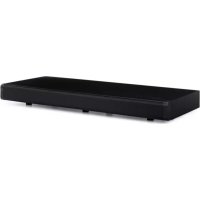
Stealth Bar 60 - Soundbar Auna - Free user manual and instructions
Find the device manual for free Stealth Bar 60 Auna in PDF.


| Product Type | Soundbar |
| Brand | Auna |
| Model | Stealth Bar 60 |
| Article Number | 10031847 |
| Power Supply | 110-220 V ~ 50/60 Hz via mains adapter |
| Impedance | 8 Ohm |
| RMS Power | 2 x 20 W + 40 W |
| Dimensions (W x H x D) | 68 x 27 x 6 cm |
| Weight | Not specified (estimated 2-3 kg) |
| Connectivity | Bluetooth, USB (up to 32 GB), HDMI (ARC), optical, AUX, LINE IN |
| Supported Audio Formats | MP3 (via USB) |
| Main Functions | BT, USB, HDMI, OPTIC, LINE IN, AUX modes; panel controls and remote control; mute function; state memory |
| Maintenance and Cleaning | Use a dry cloth; do not use volatile liquids |
| Safety | Not for use by children; avoid exposure to rain/humidity; max altitude 2000 m; tropical climates |
| Spare Parts and Repairability | Not specified (contact the manufacturer) |
| General Information | Domestic use; compliant with European directives 2011/65/EU, 2014/53/EU, 2014/35/EU |
Frequently Asked Questions - Stealth Bar 60 Auna
User questions about Stealth Bar 60 Auna
0 question about this device. Answer the ones you know or ask your own.
Ask a new question about this device
Download the instructions for your Soundbar in PDF format for free! Find your manual Stealth Bar 60 - Auna and take your electronic device back in hand. On this page are published all the documents necessary for the use of your device. Stealth Bar 60 by Auna.
USER MANUAL Stealth Bar 60 Auna
Congratulations on purchasing this equipment. Please read this manual carefully and take care of the following hints on installation and use to avoid technical damages. Any failure caused by ignoring the items and cautions mentioned in the operation and installation instructions are not covered by our warranty and any liability.
TECHNICAL DATA
| Item number 10031847 | |
| Power supply adaptor 110-220 V ~ | 50/60 Hz |
| Impedance 8 ohms | |
| RMS 2 x 20 W + 40 W | |
| Dimensions 68 x 27 x 6 cm |
SAFETY INSTRUCTIONS
FAILURE TO CAREFULLY FOLLOW THESE INSTRUCTIONS MAY LEAD TO SERIOUS PERSONAL INJURY AND DAMAGE TO YOUR PRODUCT.
General Instructions
• DANGER. NOT FOR USE BY CHILDREN.
- For home and personal use only.
- For indoor use only. Outside usage shall be construed as a misuse as set forth herein.
- Read, keep and follow the instructions carefully.
- Heed all warnings.
- Electrical equipment should never be kept or stored in rain or damp environments. Storage of the Product under the aforementioned conditions shall be construed as neglect as set forth herein
- Unplug the product during lightning storms or when unused for long period of time.
- Do not expose to direct sunlight and do not install near any heat sources such as radiators, heat registers, stoves, or other apparatus that produces heat.
- DO NOT PLUG IN THE PRODUCT UNLESS IT IS TURNED OFF COMPLETEY.
- Do NOT expose to dripping or splashing water. Do NOT place objects on top of the product.
Special safety instructions
- This product is suitable for at an altitude of 2000 meters or below, the non-tropical climate condition.
Small objects / packaging parts (plastic bags, cardboard, etc.)
Keep small objects (for example, screws and other assembly materials, memory cards) and packaging parts out of reach of children so that they cannot be swallowed. Do not let small children play with plastic bags. Risk of suffocation.
Transporting the device
Please keep the original packaging. To ensure adequate protection when transporting the device, pack the device tin its original packaging.
Cleaning the outer surfaces
Do not use volatile fluids, such as insect sprays. The surface can be damaged by excessive pressure during wiping. Rubber or plastic parts should not be left in contact with the device for an extended period of time. Use a dry cloth.
GETTING STARTED
- Please connect the machine with AC power socket.
- Press the button(/MODE) for one second to enter into work status, then the status light will be on cables
-
Connect all input, the HDMI, OPTICAL port is on the of the machine, and then press MODE to select the input source.
-
BT-Kopplung
-
Turn on the search function on the Bluetooth device from which you want to play music.
- Press the BT/PAIR button.
- Activate the Bluetooth function of the media player.
-
On your Bluetooth device, select "Stealth Bar 60" and make the connection. If a password is required, enter "0000".
-
USB connection: If you insert a USB stick with MP3 documents, then the device will play the Mp3 files automatically, the red light flash when playing.
-
LINE IN connection: use the audio output to connect multimedia. LINE IN jack (as Multimedia 2.1 active speaker use), the red light will be on.
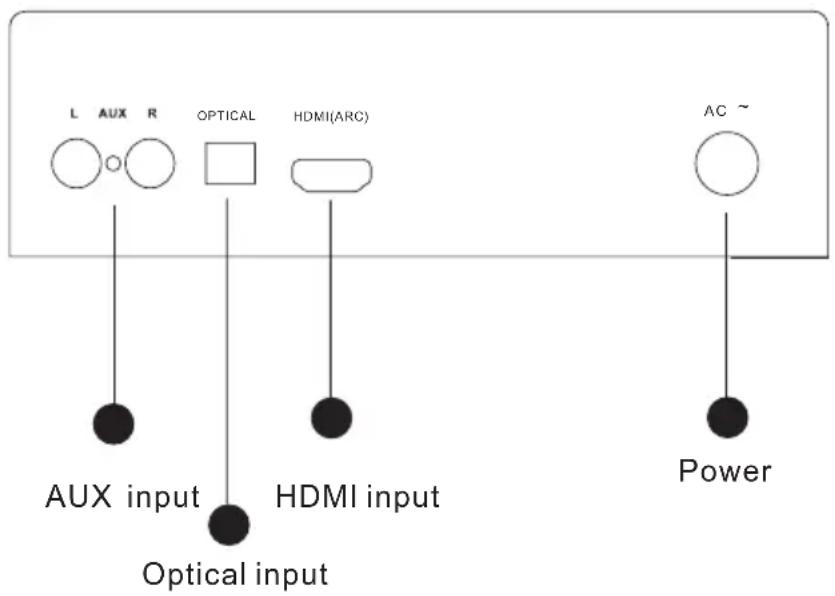
Connections
OPERATION
Control panel

flowchart
graph LR
    A["USB input"] --> B["USB"]
    C["LINE input"] --> D["LINE IN"]
    E["φ/MODE"] --> F["STANDBY/ MODE"]
    G["PAIR/▶"] --> H["Pair/Play"]
    I["VOL+▶"] --> J["Vol up/ Next section"]
    K["VOL-▶"] --> L["Vol down/ Prev section"]
Panel functions
| /MODE | Press for seconds to trun on/off. This machine has a status memory function status. |
| USB/ BT/ HDMI/ OPTIC/ LINE/ AUX mode. | |
| VOL+ / ▶ | Next section of USB or Bluetooth playing. |
| Long press for main volume up. | |
| VOL- / ◀ | Prev section of USB o next section of Bluetooth playing |
| Long press for main volume down. | |
| PAIR/ ▶ | Press this button to play / pause during USB/ bluetooth playing. |
| Press for mute during other mode.. | |
| USB function for reading MP3/WMA format audio documents, max USD memory is 32GB. | |
| LINE and AUX port to receive audio source from other audio machine. (port located at the side panel) | |

Remote control
Remote control functions
| After connecting AC Power, Press this button to trun on/off | |
| Press to switch between mute/unmute | |
| MODE Press to | switch among Bluetooth/ USB/ LINE/AUX mode |
| Press for prev section | |
| Press for next section | |
| Press this button to play / pause during USB/Bluetooth playing. | |
| Note! Press for mute during other mode.. | |
| + | Press for Volume up |
| - | Press for Volume down |
DISPOSAL CONSIDERATIONS

According to the European waste regulation 2012/19/EU this symbol on the product or on its packaging indicates that this product may not be treated as household waste. Instead it should be taken to the appropriate collection point for the recycling of electrical and electronic equipment. By ensuring this product is disposed of correctly, you will help prevent potential negative consequences for the environment and human health, which could otherwise be caused by inappropriate waste handling of this product. For more detailed information about recycling of this product, please contact your local council or your household waste disposal service.
Your product contains batteries covered by the European Directive. 2006/66/EC, which cannot be disposed of with normal household waste. Please check local rules on separate collection of batteries. The correct disposal of batteries helps prevent potentially negative consequences on the environment and human health.
Declaration of Conformity
Producer: Chal-Tec GmbH, Wallstraße 16, 10179 Berlin. Germany
This product is conform to the following European Directives:
2011/65/EU (RoHS)
2014/53/EU (RED)
2014/35/EU (LVD)
Chère cliente, cher client,
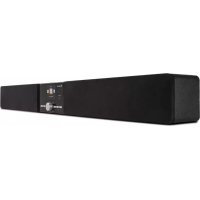
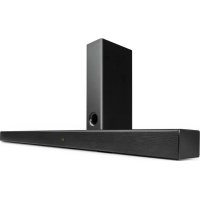
Brand : Auna
Model : Stealth Bar 60
Category : Soundbar