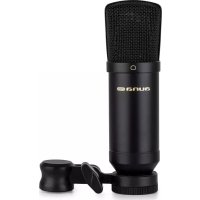
MIC600 - Microphone Auna - Free user manual and instructions
Find the device manual for free MIC600 Auna in PDF.


| Brand | Auna |
| Model | MIC600 |
| Product Type | USB Condenser Microphone |
| Capsule | Electret 25 mm (back) |
| Directivity | Cardioid |
| Frequency Response | 20 Hz - 20 kHz |
| Sensitivity | -35 dB ± 2 dB |
| Equivalent Noise Level | ≤ 22 dB |
| Maximum Sound Pressure Level | 130 dB |
| Signal-to-Noise Ratio (S/N) | 68 dB |
| Sampling Rate | 16 bits, 48 kHz |
| Power Supply | USB |
| Connector | Standard USB (plug & play) |
| Compatibility | Windows, macOS |
| Article Number | 10035300 |
| Manufacturer | Chal-Tec GmbH, Berlin, Germany |
| Standards | RoHS (2011/65/EU), RED (2014/53/EU) |
| Maintenance | Wipe with a dry cloth; avoid direct sunlight, heat sources, shocks, and disassembly |
| Recycling | Compliant with European Directive 2012/19/EU (WEEE) |
Frequently Asked Questions - MIC600 Auna
User questions about MIC600 Auna
0 question about this device. Answer the ones you know or ask your own.
Ask a new question about this device
Download the instructions for your Microphone in PDF format for free! Find your manual MIC600 - Auna and take your electronic device back in hand. On this page are published all the documents necessary for the use of your device. MIC600 by Auna.
USER MANUAL MIC600 Auna
Congratulations on purchasing this equipment. Please read this manual carefully and take care of the following hints on installation and use to avoid technical damages. Any failure caused by ignoring the items and cautions mentioned in the operation and installation instructions are not covered by our warranty and any liability. Scan the QR code to get access to the latest user manual and other information about the product.

SPECIFICATIONS
| Item number 10035300 | |
| Microphone type USB electret microphone | |
| Capsule 25mm back electret capsule | |
| Polar pattern Cardioid | |
| Frequency response 20 Hz - 20 kHz | |
| Sensitivity -35 dB ± 2 dB | |
| Equivalent noise level ≤ 22 dB | |
| Max. SPL 130 dB | |
| S/N ratio 68 dB | |
| Sampling rate 16 bit, 48 kHz | |
| Power USB power | |
Product features
Mic 600 USB condenser microphone has a cardioid pick-up pattern, standard and general-used USB port. It can be used without installing any device software when operating in the WINDOWS and MAC systems. Moreover, in can identify the recording equipment MAC automatically. It is a plug-and-play USB condenser microphone, which opens up possibilities for anyone who records audio from podcasters, journalists, students and multimedia presentations. Mic 600 adopts a 25mm back electret capsule. It ensures Mic 600 vivid sound quality.
SAFETY INSTRUCTIONS
- Do not store the microphone under direct sunlight, near heating devices or in a hot, humid or dusty place. Do not allow the microphone to get wet.
- Do not install near any heat sources such as radiators, heat registers, stoves, or other apparatus (including amplifiers) that produce heat.
- Do not subject the microphone to strong impact.
- Do not disassemble, modify or attempt to repair the microphone.
- Clean only with dry cloth.
- When this product is used for a long time, the microphone may become discolored due to ultraviolet light (especially direct sunlight) or wear.
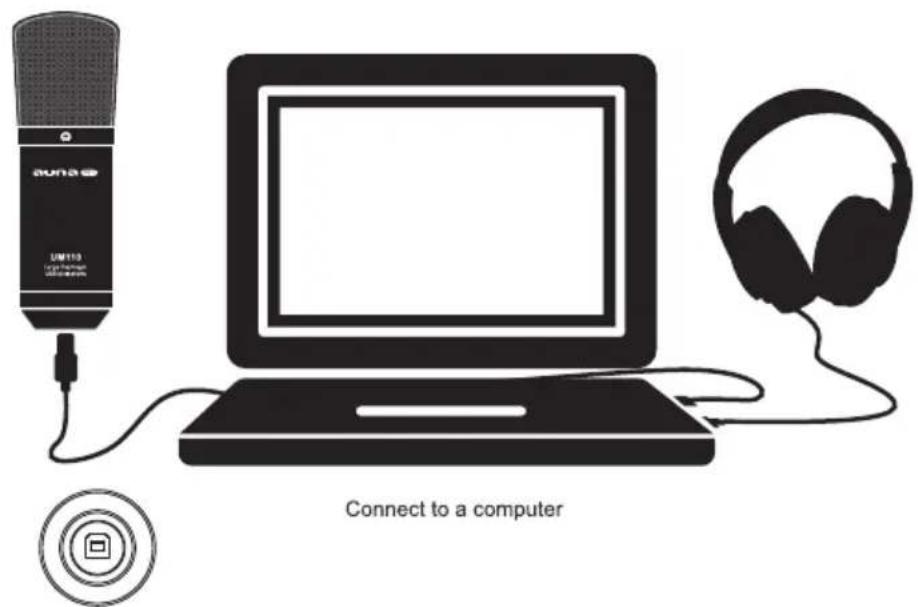
USB Connector
SETUP
Windows
- Use USB cable to connect microphone and computer.
Your computer will automatically recognise the USB device and install a driver. - Select control panel>hardware and sound>manage audio devices to view your sound setting window.
- In the recording tab, select "Mic 600" from the list and click the set default button.
MAC
- Use USB cable to connect microphone and computer.
- Select system preferences>sound to view your sound settings window.
- In the input tab, select "Mic 600" from the list.
DISPOSAL CONSIDERATIONS

According to the European waste regulation 2012/19/EU this symbol on the product or on its packaging indicates that this product may not be treated as household waste. Instead it should be taken to the appropriate collection point for the recycling of electrical and electronic equipment. By ensuring this product is disposed of correctly, you will help prevent potential negative consequences for the environment and human health, which could otherwise be caused by inappropriate waste handling of this product. For more detailed information about recycling of this product, please contact your local council or your household waste disposal service.
DECLARATION OF CONFORMITY
Producer:
Chal-Tec GmbH, Wallstraße 16, 10179 Berlin, Germany.

This product is conform to the following European Directives:
2011/65/EU (RoHS)
2014/53/EU (RED)
The complete declaration of conformity of the manufacturer can be found at the following link:
https://use.berlin/10035300
Chere cliente, cher client,

Brand : Auna
Model : MIC600
Category : Microphone