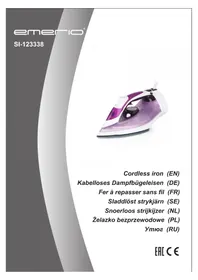
SI123338 - Iron Emerio - Free user manual and instructions
Find the device manual for free SI123338 Emerio in PDF.



| Product type | Cordless iron |
| Brand | Emerio |
| Model | SI123338 |
| Supply voltage | 220-240 V |
| Frequency | 50/60 Hz |
| Nominal power | 2000-2400 W |
| Ironing modes | Dry, steam, steam shot, spray |
| Anti-drip function | Yes, prevents water leaks at low temperature |
| Self-cleaning function | Yes, with dedicated button to remove scale |
| Automatic safety shut-off | Yes, after 30 s horizontally or 8 s vertically |
| Cordless mode autonomy | Approximately 25 seconds |
| Recharging time | Approximately 10-15 seconds |
| Recommended water type | Distilled or tap water |
| Soleplate care | Clean with diluted vinegar, avoid abrasive products |
| Safety | Automatic shut-off, base lock, hot surface indication |
| Base lock | Button to lock iron in corded mode or storage |
| Integrated iron rest | Yes, the heating base serves as stand |
| Usage | Household only |
| Included accessories | Heating base/stand, filling cup |
| Warranty | 2 years |
| After-sales service | Emerio Holland B.V., info.nl@emerio.eu |
Frequently Asked Questions - SI123338 Emerio
User questions about SI123338 Emerio
0 question about this device. Answer the ones you know or ask your own.
Ask a new question about this device
Download the instructions for your Iron in PDF format for free! Find your manual SI123338 - Emerio and take your electronic device back in hand. On this page are published all the documents necessary for the use of your device. SI123338 by Emerio.
USER MANUAL SI123338 Emerio
natural_image
Close-up of a purple and white steam iron with a black base (no visible text or symbols)Cordless iron (EN)
Instruction manual – English ...... - 2 -
Before use make sure to read all of the below instructions in order to avoid injury or damage, and to get the best results from the appliance. Make sure to keep this manual in a safe place. If you give or transfer this appliance to someone else make sure to also include this manual.
In case of damage caused by user failing to follow the instructions in this manual the warranty will be void. The manufacturer/importer accepts no liability for damages caused by failure to follow the manual, a negligent use or use not in accordance with the requirements of this manual.
-
This appliance can be used by children aged from 8 years and above and persons with reduced physical, sensory or mental capabilities or lack of experience and knowledge if they have been given supervision or instruction concerning use of the appliance in a safe way and understand the hazards involved.
-
Children shall not play with the appliance.
-
Cleaning and user maintenance shall not be made by children without supervision.
-
If the supply cord is damaged, it must be replaced by the manufacturer, its service agent or similarly qualified persons in order to avoid a hazard.
-
The iron must not be left unattended while it is connected to the supply mains.
-
Keep the iron and its cord out of reach of children less than 8 years of age when it is energized or cooling down.
-
The iron must be used and rested on a flat, stable surface.
-
The iron must only be used with the stand provided.
-
When placing the iron on its stand, ensure that the surface on which the stand is placed is stable.
-
The filling aperture must not be opened during use.
-
The iron is not to be used if it has been dropped, if there are visible signs of damage or if it is leaking.
-
The plug must be removed from the socket-outlet before the water reservoir is filled with water.
-
Before inserting the plug into the mains socket, please check that the voltage and frequency comply with the specifications on the rating label.
-
Always plug the appliance into an earthed plug socket.
-
If an extension cord is used it must be suited to the power consumption of the appliance, otherwise overheating of the extension cord and/or plug may occur. There is a potential risk of injuries from tripping over the extension cord. Be careful to avoid dangerous situations.
-
Disconnect the mains plug from the socket when the appliance is not in use and before cleaning.
-
Ensure that the mains cable is not hung over sharp edges and keep it away from hot objects and open flames.
-
Do not immerse the appliance or the mains plug in water or other liquids. There is danger to life due to electric shock!
-
To remove the plug from the plug socket, pull the plug. Do not pull the power cord.
-
Do not touch the appliance if it falls into water. Remove the plug from its socket, turn off the appliance and send it to an authorized service center for repair.
-
Do not plug or unplug the appliance from the electrical outlet with a wet hand.
-
Never attempt to open the housing of the appliance, or to repair the appliance yourself. This could cause electric shock.
-
Never leave the appliance unattended during use.
-
This appliance is not designed for commercial use. It is for household use only.
-
Do not use the appliance for other than intended use.
-
Do not wind the cord around the appliance and do not bend it.
-
The iron should always be off before plugging or unplugging from the wall socket.
-
Never use the appliance if damaged in anyway.
-
When leaving, even when only for a short while, always unplug the iron.
-
Burns can occur from touching hot metal parts, hot water or steam.
-
Use caution when you turn a steam iron upside down-there may be hot water in the reservoir.
-
Always place the iron standing on a firm flat surface when interrupting ironing and after use.
-
Keep the soleplate smooth. Avoid hard contact with a metal object.
-
The cord should not be allowed to touch the soleplate when it is hot.
-
Prevent water overflow. Do not over max level.
-
When using the iron for the first time use it on an old piece of fabric to check if the soleplate and water from the water tank are completely clean.
-
Remove the plug from the socket before filling or emptying water reservoir.
-
The iron shall be used on a stable ironing board.
-
Regarding the instructions for cleaning and maintenance, please refer to the below paragraphs.
-
WARNING!!

Please do not touch surface while in use. The temperature of accessible surfaces may be high when the appliance is operating.
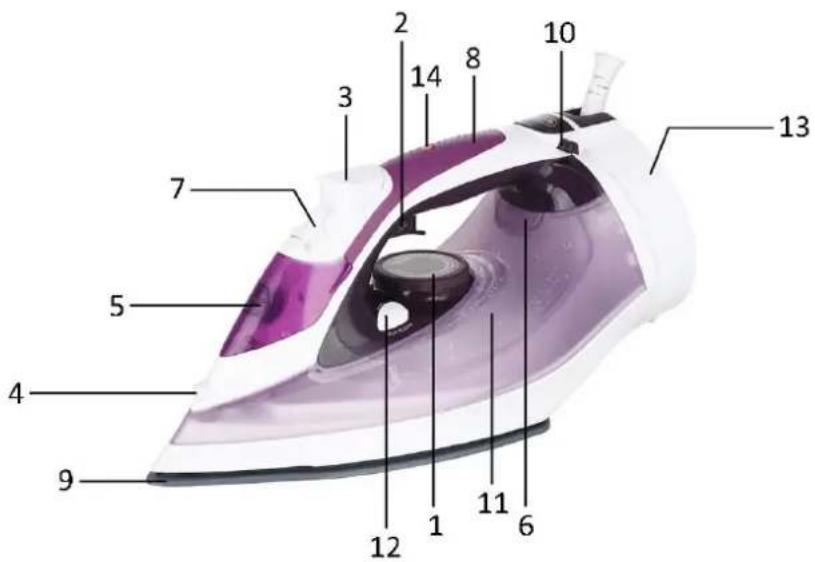
PARTS IDENTIFICATION
- Temperature regulator
- Burst of steam button
- Spray button
- Spray nozzle
- Water inlet cover
- Indicator light
- Steam control knob
- Handle
- Soleplate
- Lock button
- Water tank
- Self-clean button
-
Power stand
-
Power lamp / Auto-shut off lamp
BEFORE INITIAL USAGE
Remove all packaging material. Make sure the appliance is unplugged and the temperature regulator is set at position "MIN".
Open the water inlet cover and fill water into the opening up to the max level marked on the water tank. For this, use the measuring cup. Use the distilled or tap water only. Do not fill in with any other liquid except water. With first use, there can be slight odour or smoke, but this is harmless and only of short duration. Make sure there is adequate ventilation.
OPERATION
Before selecting the temperature, read the instruction manual for the iron or the care advice on the tag of the clothing.
Note: If there is no care advice on the piece of clothing, then you should begin ironing with the lowest temperature. With lower temperature, there will be less steam.
| MIN | |
| ● | Nylon |
| ●● | Silk, wool |
| ●●●, MAX | Linen, cotton, highest temperature |
Lock button
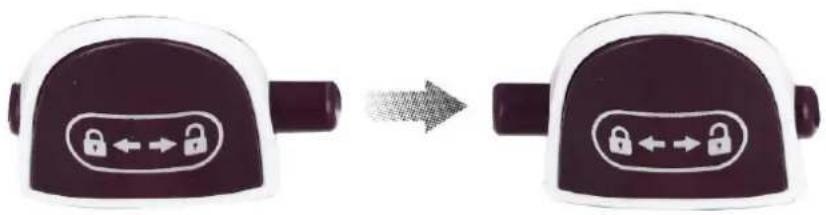
Cordless mode: Press the lock button (A) from the left to the right position (see lock/unlock printing below) to unlock the iron. The iron can be rotated 360 degree on the power stand. Then lift it from the power stand. The iron can be used in cordless mode.
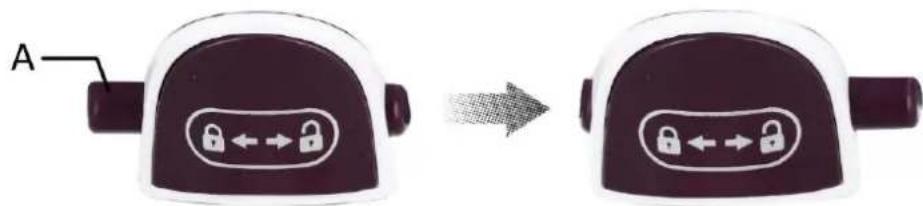
Corded mode and storage position: Place the iron on the power stand. Press the lock button from the right to the left position (see lock/unlock printing below). Rotate the iron until it is locked to the power stand.
natural_image
Two identical padlock-shaped devices with bidirectional arrows, connected by an arrow (no text or symbols)Power lamp / auto-shut off lamp
This appliance is equipped with a power lamp / auto-shut off lamp on the handle.
- When the iron is placed on the power stand, the power lamp is on. When lifted, the power lamp is off.
- When the iron is in corded mode and placed horizontally for approx. 30 seconds or vertically for approx. 8 minutes without any operations, an internal safety feature will switch the iron off and the auto-shut off lamp will blink. Beep sounds will be heard. Operate the appliance to switch it on again.
Note: In cordless mode the iron can be used for about 25 seconds. After this recharge the iron by placing it for about 10-15 seconds on the power stand (13).
DRY IRONING
- Connect the appliance to a suitable mains supply outlet.
- Ensure that the steam setting is in the position “※”.
- Select the setting on the temperature regulator.
- When the indicator light goes off, the required temperature is reached. The iron is ready for use.
- To turn off the iron, turn the temperature regulator counter-clockwise to position "MIN", set the iron upright, and pull out the power plug.
STEAM IRONING
Fill the water tank, as described before initial usage.
Steam ironing can be used in the temperature ranges ●, ●●, ●●●, MAX. For the reliable functioning of the steam ironing, the water tank must be at least 1/4 filled.
Spraying function: Press the spray button to moisten a spot to be ironed. Water will come out of the spray nozzle.
Steam function:
1) Turn the steam control knob to the minimum position. Set the temperature regulator to position "MAX".
2) When the indicator light goes off, turn the steam control knob to the suitable position. The steam will come out from the holes in the soleplate. You can start ironing.
Burst of steam: Turn the temperature regulator to the position "MAX". The indicator light will go off when the required temperature is reached. Then press the burst of steam button. The soleplate will spray out the bursting steam.
"Burst of steam" can also be applied when holding the iron in vertical position, which is useful for removing creases from hanging clothes, curtains, etc.
The iron surface must always be kept in an upright position.
To turn off, turn the temperature regulator counter-clockwise to "MIN" and pull out the power plug.
Turn the appliance upside down and carefully pour the remaining water out of the water tank. Carefully shake the appliance.
Press the spray button to allow possible remaining water to come out more easily.
ANTI-DRIP FUNCTION
This appliance is equipped with a drip stop function. It automatically stops steaming when the temperature is too low to prevent water from dripping out of the soleplate.
SELF-CLEAN FUNCTION
You can use the self-clean function to remove scale and impurities.
Use the self-clean function every two weeks.
• Make sure the appliance is unplugged.
- Fill the water tank to maximum level.
- Put the plug in the wall socket.
- Set the temperature regulator to the highest position. Wait for approx. 3 minutes.
- Hold the iron over the sink, press and hold the self-clean button for approx. 1 minute and gently shake the iron to and fro. (Steam and boiling water will come out of the soleplate. Impurities and flakes (if any) will be flushed out).
Repeat the self-clean process if the iron still contains a lot of impurities.
CLEANING AND MAINTENANCE
- Before cleaning the iron ensure it is disconnected from the power supply and has completely cooled down.
- Deposits on the soleplate may be removed with a rough cloth soaked in a vinegar water solution.
• The housing may be wiped with a damp cloth and then polished with a dry one. - Do not use abrasives on the soleplate.
- Keep the soleplate smooth. Avoid hard contact with metal objects.
TIPS
Which type of water to use?
Your appliance is designed to function with the distilled or tap water only.
In order to increase the service life of the appliance please use the distilled water which contains less impurities and minerals.
Which type of water not to use?
The types of water listed below contain organic waste or mineral elements that can cause spitting, brown staining, or leakage: water from clothes dryers, scented or softened water, and water from air conditioners.
If problems occur?
| Brown streaks come through the holes in the soleplate and stain the linen. | You are using chemical descaling agents. | Do not add any descaling agents to the water. |
| Fabric fibers have accumulated in the holes of the soleplate and are burning. | Let the iron cool down and clean the soleplate with a sponge. Vacuum the holes of the soleplate from time to time. | |
| Your linen has not been rinsed sufficiently or you have ironed a new garment before washing it. | Make sure that your laundry is rinsed sufficiently so as to remove any deposits of soap or chemical products on new clothes. | |
| The soleplate is dirty or brown and can stain the linen. | You are ironing with a too high temperature. | Let the iron cool down and clean the soleplate with a sponge. Select the appropriate temperature. |
| The soleplate is scratched. | You have placed your iron flat on a metal rest-plate or ironed over a zip. | Always set your iron on its heel in an upright position.Do not iron over zips. |
TECHNICAL DATA
Operating voltage: 220-240V \~ 50/60Hz
Power consumption: 2000-2400W
GUARANTEE AND CUSTOMER SERVICE
Before delivery our devices are subjected to rigorous quality control. If, despite all care, damage has occurred during production or transportation, please return the device to your dealer. In addition to statutory legal rights, the purchaser has an option to claim under the terms of the following guarantee:
For the purchased device we provide 2 years guarantee, commencing from the day of sale. If you have a defective product, you can directly go back to the point of purchase.
Defects which arise due to improper handling of the device and malfunctions due to interventions and repairs by third parties or the fitting of non-original parts are not covered by this guarantee. Always keep your receipt, without the receipt you can't claim any form of warranty. Damage caused by not following the instruction manual, will lead to a void of warranty, if this results in consequential damages then we will not be liable. Neither can we hold responsible for material damage or personal injury caused by improper use if the instruction manual is not properly executed. Damage to accessories does not mean free replacement of the whole appliance. In such case please contact our service department. Broken glass or breakage of plastic parts is always subject to a charge. Defects to consumables or parts subjected to wearing, as well as cleaning, maintenance or the replacement of said parts are not covered by the warranty and are to be paid.
ENVIRONMENT FRIENDLY DISPOSAL
Recycling – European Directive 2012/19/EU
This marking indicates that this product should not be disposed with other household wastes. To prevent possible harm to the environment or human health from uncontrolled waste disposal, recycle it responsibly to promote the sustainable reuse of material resources. To return your used
device, please use the return and collection systems or contact the retailer where the product was purchased. They can take this product for environmental safe recycling.
Emerio Holland B.V.
Zomervaart 1A
2033 DA Haarlem
The Netherlands
Customer service:
T: +31(0)23 3034369
E: info.nl@emerio.eu
SICHERHEITSHINWEISE
VOR ERSTBENUTZUNG
natural_image
Two identical padlock-shaped devices with left-pointing arrows, connected by an arrow (no text or symbols)TROPFSCHUTZ-FUNKTION
natural_image
Two identical padlock-shaped devices with left-pointing arrows, connected by an arrow (no text or symbols)FÖ RE FÖ RSTA ANVÄNDNING
natural_image
Two identical padlock-shaped devices with bidirectional arrows, shown in a transformation from left to right (no text or symbols)VÓ Ó R INGEBRUIKNAME
natural_image
Two identical padlock-shaped objects with left-pointing arrows, connected by an arrow (no text or symbols)PRZED PIERWSZYM UŻYCIEM
natural_image
Two identical padlock-shaped devices with left-pointing arrows, connected by an arrow (no text or symbols)natural_image
Two identical padlock-shaped devices with left-pointing and right-shifted keys, connected by an arrow (no text or symbols)

- PARTS IDENTIFICATION
- BEFORE INITIAL USAGE
- OPERATION
- Lock button
- Power lamp / auto-shut off lamp
- DRY IRONING
- STEAM IRONING
- Steam function:
- ANTI-DRIP FUNCTION
- SELF-CLEAN FUNCTION
- CLEANING AND MAINTENANCE
- TIPS
- Which type of water to use?
- Which type of water not to use?
- TECHNICAL DATA
- GUARANTEE AND CUSTOMER SERVICE
- ENVIRONMENT FRIENDLY DISPOSAL
- Customer service:
- SICHERHEITSHINWEISE
- VOR ERSTBENUTZUNG
- TROPFSCHUTZ-FUNKTION
- FÖ RE FÖ RSTA ANVÄNDNING
- VÓ Ó R INGEBRUIKNAME
- PRZED PIERWSZYM UŻYCIEM
Brand : Emerio
Model : SI123338
Category : Iron