TF108449 - Fan Emerio - Free user manual and instructions
Find the device manual for free TF108449 Emerio in PDF.



| Brand | Emerio |
| Model | TF108449 |
| Product type | Pedestal fan |
| Power supply | 220-240 V ~ 50 Hz |
| Power consumption | 90 W |
| Standby power | 0 W |
| Maximum air flow | 24.75 m³/min |
| Noise level | 59.49 dB(A) |
| Maximum air speed | 3.71 m/s |
| Service value | 0.32 (m³/min)/W |
| Number of speeds | 3 (low, medium, high) |
| Operating modes | Normal, Breeze, Sleep |
| Oscillation function | Yes |
| Timer | Yes, up to 7.5 hours in 0.5-hour increments |
| Remote control | Yes, with CR2032 battery included |
| Aroma pads | Yes, 3 pads included |
| Control panel | Touch, with LED display |
| Maintenance | Clean with a dry, clean cloth; do not use liquid cleaners |
| Safety | Do not immerse; do not insert objects into the grilles; keep out of reach of children under 8 years |
| Remote control battery | CR2032, 3 V |
Frequently Asked Questions - TF108449 Emerio
User questions about TF108449 Emerio
0 question about this device. Answer the ones you know or ask your own.
Ask a new question about this device
Download the instructions for your Fan in PDF format for free! Find your manual TF108449 - Emerio and take your electronic device back in hand. On this page are published all the documents necessary for the use of your device. TF108449 by Emerio.
USER MANUAL TF108449 Emerio
natural_image
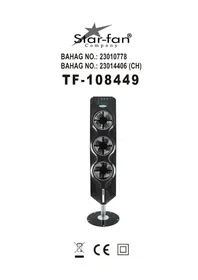
Black vertical tower with three circular fan blades and a metallic base (no visible text or symbols)
CE

Inhalt – Съдържание – Sadržaj – Obsah – Indhold – Contenido – Sisukord – Sisältö – Contenu – Content – Sadržaj – Tartalom – Innihald – Contenuto – Turinys – Saturs – Inhoud – Innhold – Содержание – Sadržaj – Obsah – Vsebina – Innehåll – İçerik
Inhalt – German ...... - 2 -
Ръководство с инструкции – Bulgarian ...... - 7 -
Uputstvo – Bosnian ...... - 12 -
Návod k použití – Czech ...... - 17 -
Brugsanvisning – Danish...... - 22 -
Manual de Instrucciones – Spanish ...... - 27 -
Kasutusjuhend – Estonian ...... - 32 -
Käyttöopas – Finnish ...... - 37 -
Mode d'emploi – French ...... - 42 -
Instruction manual – English ...... - 47 -
Upute za rad – Croatian ...... - 52 -
Használati útmutató – Hungarian ...... - 57 -
Leiðbeiningarhandbók – Icelandic...... - 62 -
Manuale d'istruzioni – Italian.... - 67 -
Instrukciju vadovas – Lithuanian ...... - 72 -
Instrukciju rokasgrāmata – Latvian ...... - 77 -
Gebruiksaanwijzing – Dutch .... - 82 -
Brukermanual – Norwegian ...... - 87 -
Инструкция по эксплуатации – Russian ...... - 92 -
Uputstvo – Serbian-Latin.... - 97 -
Návod na obsluhu – Slovakian.... - 102 -
Priročnik za uporabo – Slovenian ...... - 107 -
Bruksanvisning – Swedish ...... - 112 -
Kullanım talimatı – Turkish...... - 117 -
BATTERIEN EINLEGEN
natural_image
Pure electrical circuit lines without any symbolsANZEIGEFELD
flowchart
graph TD
    A["OFF"] --> B["ON/SPEED"]
    B --> C["MODE FAN1"]
    C --> D["SWING FAN2"]
    D --> E["TIMER FAN3"]
    E --> F["SHIFT"]
    G["1"] --> H["3"]
    I["2"] --> J["5"]
    K["3"] --> L["4"]
    M["4"] --> N["5"]
    O["5"] --> P["6"]
    Q["6"] --> R["7"]
    S["7"] --> T["8"]
    U["8"] --> V["9"]
    W["9"] --> X["10"]
    Y["10"] --> Z["11"]
    AA["11"] --> AB["12"]
    AC["12"] --> AD["13"]
natural_image
Line drawing of a speaker with two circular buttons and an arrow pointing to the right (no text or symbols)ПОСТАВЯНЕ НА БАТЕРИЯТА
natural_image
Simple line drawing of a rectangular object with an arrow pointing to its top edge (no text or symbols)ПАНЕЛ НА ДИСПЛЕЯ
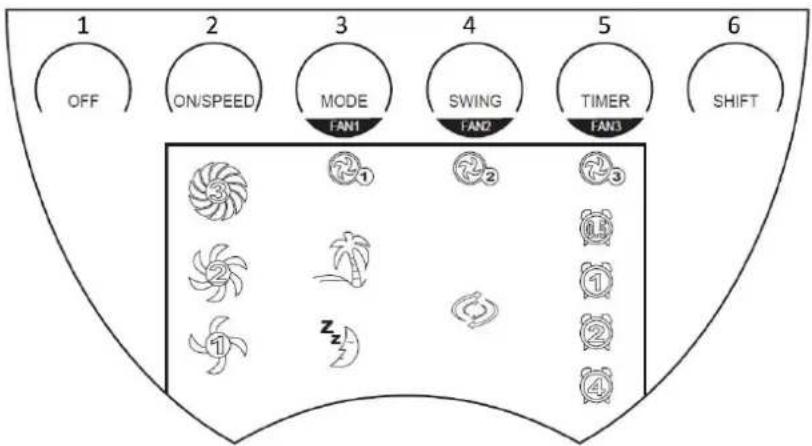
flowchart
graph TD
    A["OFF"] --> B["ON/SPEED"]
    B --> C["MODE FAN1"]
    C --> D["SWING FAN2"]
    D --> E["TIMER FAN3"]
    E --> F["SHIFT"]
    G["1"] --> H["2"]
    H --> I["3"]
    I --> J["4"]
    J --> K["5"]
    K --> L["6"]
    M["1"] --> N["2"]
    N --> O["3"]
    P["2"] --> Q["4"]
    R["1"] --> S["5"]
    T["2"] --> U["6"]
    V["3"] --> W["7"]
    X["4"] --> Y["8"]
natural_image
Line drawing of a speaker with two circular buttons and an arrow pointing to the speaker (no text or symbols)POSTAVLJANJE BATERIJE
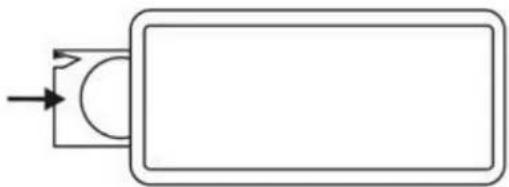
Molimo vas da za ovaj daljinski upravljač koristite samo pljosnate baterije tipa CR2032 od 3V. Bateriju čvrsto postavite u daljinski upravljač i obratite pažnju na polove. Ako se daljinski upravljač ne koristi duže vrijeme izvadite bateriju iz njega.
natural_image
Simple line drawing of a rectangular object with an arrow pointing to its top section (no text or symbols)DISPLEJ
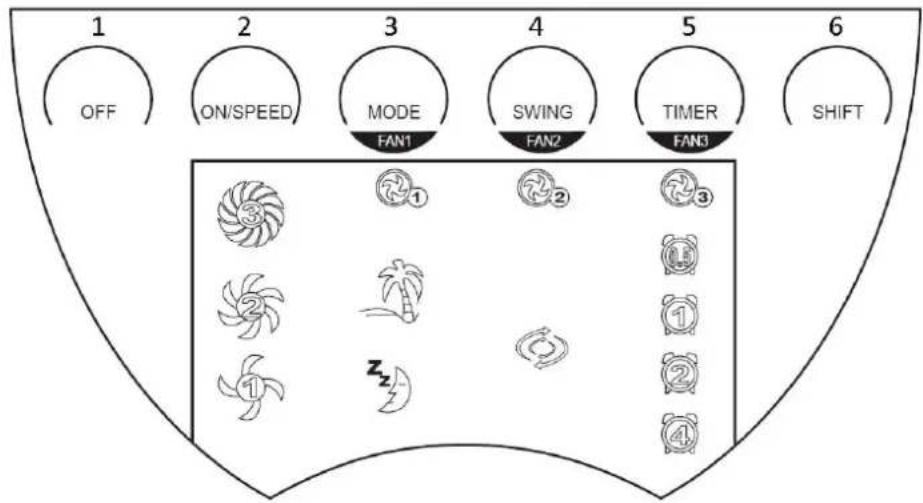
flowchart
graph TD
    A["OFF"] --> B["ON/SPEED"]
    B --> C["MODE FAN1"]
    C --> D["SWING FAN2"]
    D --> E["TIMER FAN3"]
    E --> F["SHIFT"]
    G["3"] --> H["1"]
    I["2"] --> J["2"]
    K["1"] --> L["3"]
    M["2"] --> N["4"]
    O["3"] --> P["5"]
    Q["4"] --> R["6"]
natural_image
Line drawing of a speaker with two circular buttons and an arrow pointing to the right (no text or symbols)ČIŠĆENJE I ODRŽAVANJE
- Prije nego počnete čistiti ventilator isključite dovod napajanja i iskopčajte utikač iz utičnice.
• Nosač očistite suhom krpom. - Nemojte čistiti ventilator hemikalijama. Potrudite se da u unutrašnjost uređaja ne dospije voda. To može dovesti do kratkog spoja i tako uništiti uređaj.
- Ako se ventilator ne koristi duže vrijeme, zapakujte ga u kutiju i odložite na suho i čisto mjesto.
- U slučaju da se propeleri više ne okreću ili da ispuštaju karakterističan neugodan miris, iskopčajte uređaj iz utičnice i potražite pomoć ovlaštenog tehničara.
TEHNIČKI PODACI
Radni napon: 220-240V \~ 50Hz
Potrošnja snage: 90W
| Zahtjevi za ekološki dizajn | |
| Zahtjevi za informacije o proizvodu | |
| Maksimalna brzina okretanja propelera (F) | 24.75 m^3/min |
| Ulazna snaga ventilatora (P) | 76.2 W |
| Vrijednost opsluživanja (SV) | 0.32( m^3/min )/W |
| Mjerni standard za vrijednost opsluživanja | IEC 60879: 1986 (ispravljeno.1992) |
| Potrošnja snage pri mirovanju (PSB) | 0 W |
| Nivo jačine zvuka propelera (LWA) | 59.49 dB(A) |
| Maksimalna brzina zraka (c) | 3.71 metara/sekundi |
| Kontakt podaci za više informacija | BAHAG AGGutenbergstr. 2168167 MannheimGermany |

Recikliranje
Ova oznaka pokazuje da ovaj proizvod ne treba odlagati s ostalim otpadom iz domaćinstva, koliko je obuhvaćeno propisom 2012/19-EU. Kako bi se spriječila moguća šteta po okolinu i čovjekovo zdravlje usljed nekontrolisanog odlaganja otpada, molimo vas da odgovorno vršite recikliranje kako bi se promovisala održiva ponovna upotreba resursa i materijala. Za povrat iskorištenog uređaja koristite sisteme za povrat i prikupljanje ili se obratite prodavcu kod koga ste kupili ovaj proizvod. Oni mogu preuzeti ovaj proizvod za recikliranje bez opasnosti po okolinu.
BEZPEČNOSTNÍ INFORMACE
INSTALACE BATERIÍ
natural_image
Simple line drawing of a rectangular object with an arrow pointing to its side (no text or symbols)ZOBRAZOVACÍ PANEL
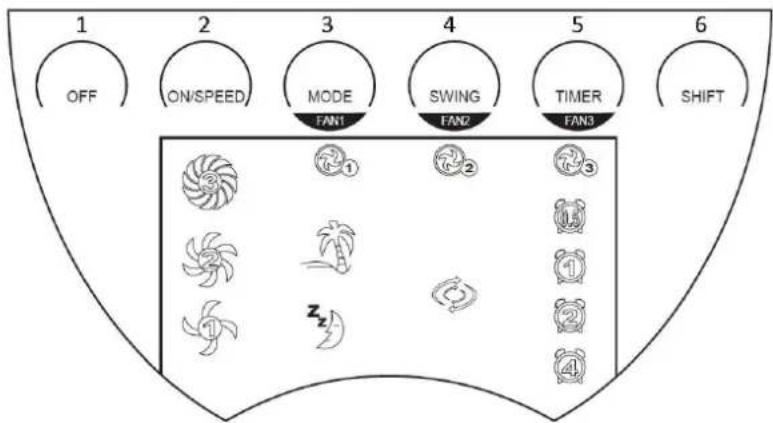
- Off (Vyp)
- On/speed (Zapnuto/rychlost)
- Mode (Fan 1) [Režim - Ventilátor 1]
- Swing (Fan 2) [Oscilace - Ventilátor 2]
- Timer (Fan 3) [Časovač - Ventilátor 3]
- Shift [Střídání]
OPERATION (provoz)
natural_image
Line drawing of a speaker with two circular ventricles and an arrow pointing to the speaker (no text or symbols)ČIŠTĚNÍ A ÚDRŽBA
ISÆ TNING AF BATTERI
natural_image
Simple line drawing of a rectangular object with an arrow pointing to its side (no text or symbols)DISPLAY-PANEL
- Slukket
- ON/SPEED
(=TÆ NDT/HASTIGHED)
- Modus (ventilator 1)
- Sving (ventilator 2)
- Timer (ventilator 3)
- Skift
BETJENING
natural_image
Simple line drawing of a speaker or audio device with two circular cutouts and an arrow pointing to the speaker (no text or symbols)RENG∅ RING OG VEDLIGEHOLDELSE:
natural_image
Simple line drawing of a rectangular object with an arrow pointing to its side (no text or symbols)PANEL DE PANTALLA
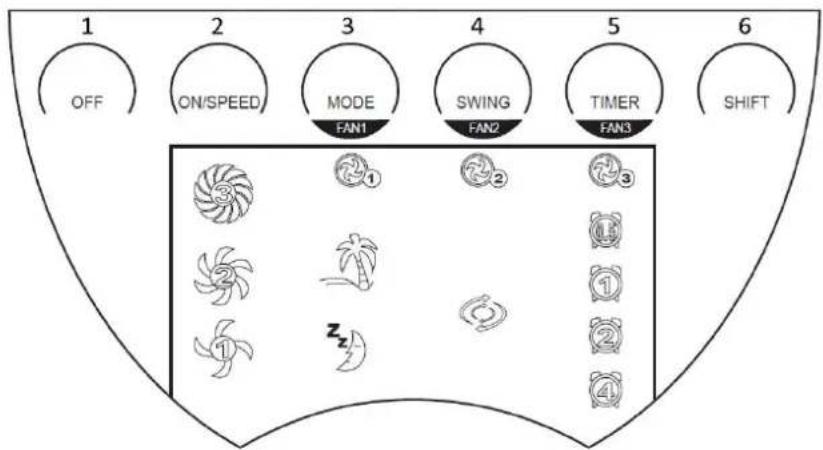
natural_image
Line drawing of a device casing with circular cutouts and an arrow pointing to a small electronic component (no text or symbols)LIMPIEZA Y MANTENIMIENTO
PATAREI PAIGALDAMINE
natural_image
Simple line drawing of a rectangular object with an arrow pointing to its side (no text or symbols)NÄIDIKUPANEEL
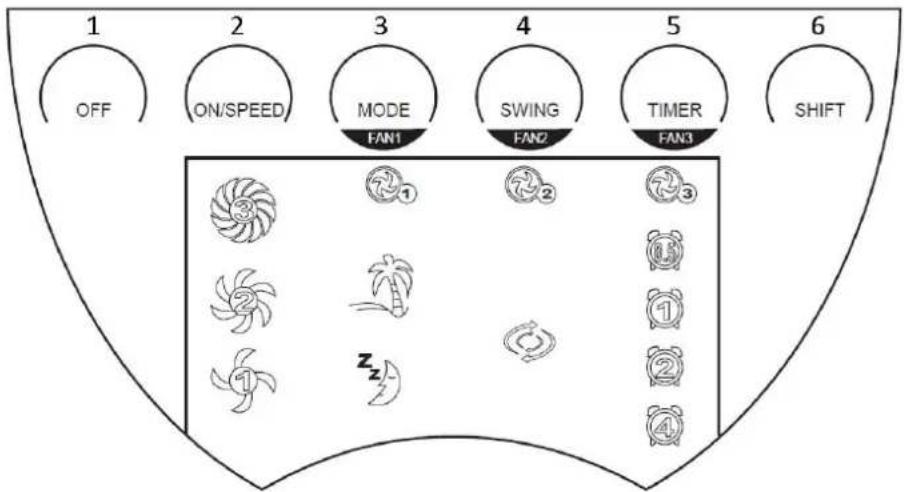
flowchart
graph TD
    A["1 OFF"] --> B["2 ON/SPEED"]
    B --> C["3 MODE FAN1"]
    C --> D["4 SWING FAN2"]
    D --> E["5 TIMER FAN3"]
    E --> F["6 SHIFT"]
natural_image
Line drawing of a two-door refrigerator with circular vent slots and an arrow pointing to the front panel (no text or symbols)PARISTON ASENTAMINEN
natural_image
Simple line drawing of a rectangular object with an arrow pointing to its side (no text or symbols)NÄYTTÖ PANEELI
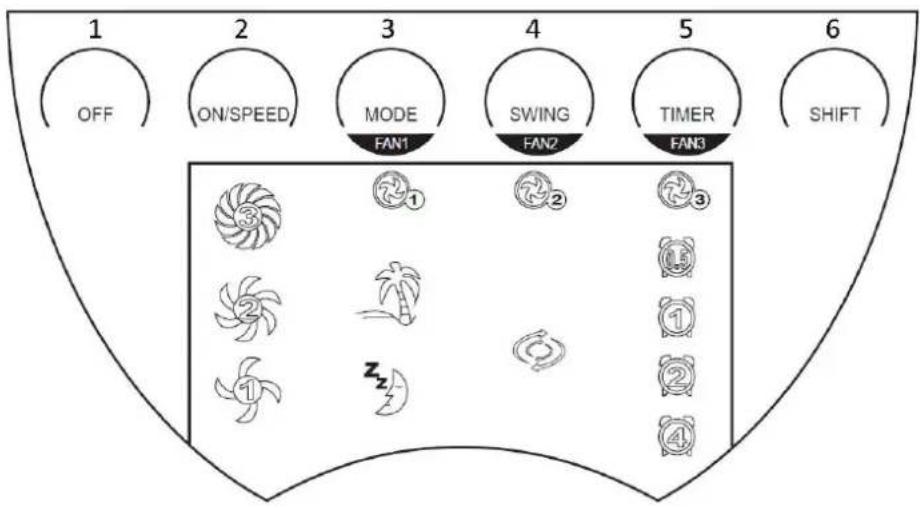
- Off
- On/speed
- Mode (Fan 1)
- Swing (Fan 2)
- Timer (Fan 3)
- Shift
KÄYTTÖ
natural_image
Line drawing of a speaker with two circular buttons and an arrow pointing to the right side (no text or symbols)PUHDISTUS JA HUOLTO
MISE EN PLACE DE LA PILE
natural_image
Simple line drawing of a rectangular object with an arrow pointing to its top edge (no text or symbols)PANNEAU D'AFFICHAGE
natural_image
Line drawing of a speaker with two circular buttons and an arrow pointing to the right (no text or symbols)NETTOYAGE ET ENTRETIEN
- This appliance can be used by children aged from 8 years and above and persons with reduced physical, sensory or mental capabilities or lack of experience and knowledge if they have been given supervision or instruction concerning use of the appliance in a safe way and understand the hazards involved.
- Children shall not play with the appliance.
- Cleaning and user maintenance shall not be made by children without supervision.
- If the supply cord is damaged, it must be replaced by the manufacturer, its service agent or similarly qualified persons in order to avoid a hazard.
- This appliance is intended to be used in household and similar applications such as: staff kitchen areas in shops, offices and other working environments; farm houses; by clients in hotels, motels and other residential type environment; bed and breakfast type environments.
- Incorrect operation and improper handling can lead to faults on the device and injuries to the user.
- In the event of improper use or incorrect handling, no liability can be accepted for any damage that may occur.
- Before you put the plug into the socket, please check that the type of current and mains voltage correspond to the instructions on the nameplate on the underside of the appliance.
- Do not immerse the unit or mains plug in water or other liquids. There is danger to life due to electric shock! However, if this should occur, remove the mains plug immediately and then have the unit checked by an expert before using it again.
- Do not operate the device if the mains cable or the mains plug show signs of damage, if the device has fallen on the floor or has been otherwise damaged. In such cases take
the device to a specialist for checking and repair, if necessary.
- Never remove the mains plug from the socket by pulling on the mains cable, or with wet hands.
- Ensure that the mains cable does not hang over sharp edges or allow it to become trapped.
- Keep the appliance away from damp, and protect from splashes.
- Keep the appliance away from hot objects (e.g. hotplates) and open flames.
- Keep the appliance and its cord out of reach of children less than 8 years.
- The machine should not be operated by means of an external timer-switch or by means of a separate system with remote control.
- Use the appliance on a flat, dry and heat resistance surface.
- Never leave the device in unattended during use.
- Do not store or operate the appliance in the open air.
- Keep the appliance in a dry place, inaccessible to children (in its packaging).
- Never put fingers or any other objects through the fan guards when the fan is running.
- Never operate the product without the fan guards in place, as serious personal injury may result.
- The appliance must be assembled completely before use.
- Watch out for long hair! It can be caught in the fan owing to the air turbulence.
- Do not point the air flow to the people for a long time.
PARTS DESCRIPTION
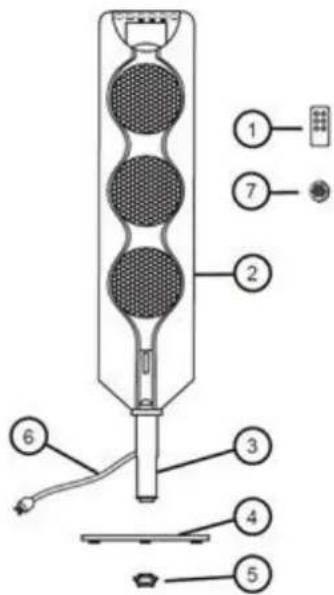
-
Remote control
-
Main body
-
Stand
-
Base
-
Locking nut
-
Power cord & plug
-
(Aromatic cake) Aroma pad (X3)
ASSEMBLY
- Please unpack the fan and check if all parts are available.
- Turn the fan upside down.
- Assemble the base onto the stand and lock into position with the locking nut.
IMPORTANT: Ensure the locking nut is tight in order to avoid that the fan shaking.
BATTERY INSTALLATION
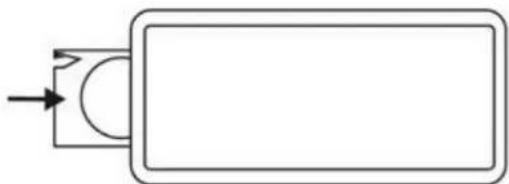
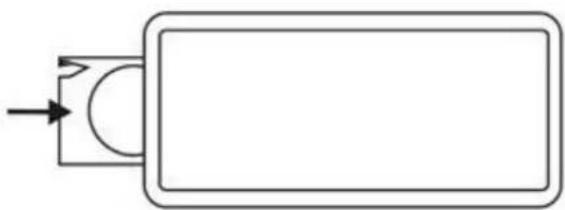
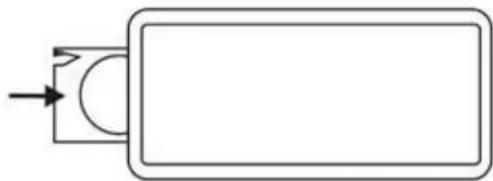
Please use only the button battery type CR2032 3V for this remote control. Please insert the battery to the remote control tightly, based on the direction of the polarity. If it is not in use for a longer time, please take the battery out of the remote control.
natural_image
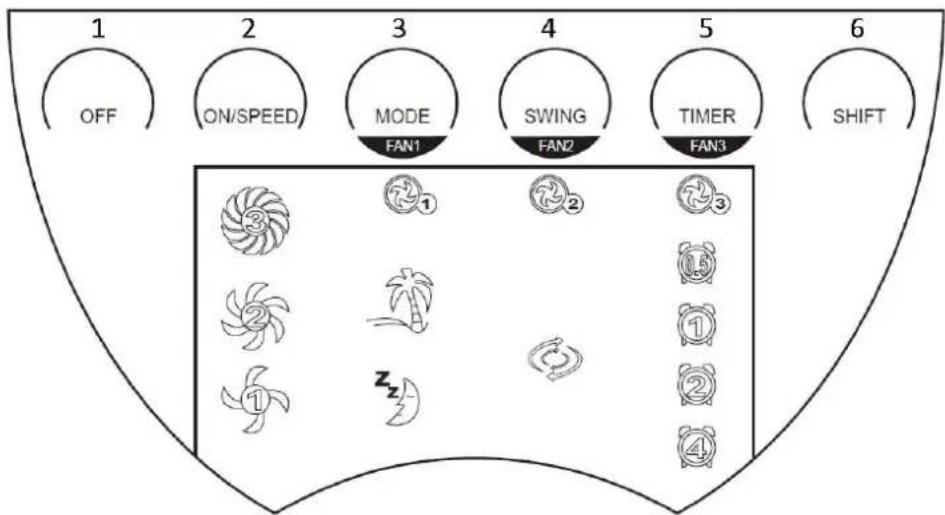
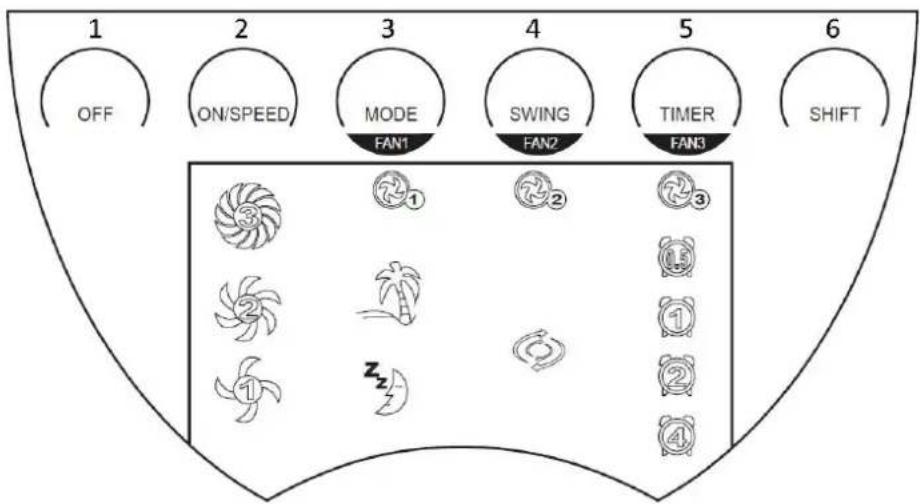
Simple line drawing of a rectangular object with an arrow pointing to its side (no text or symbols)DISPLAY PANEL
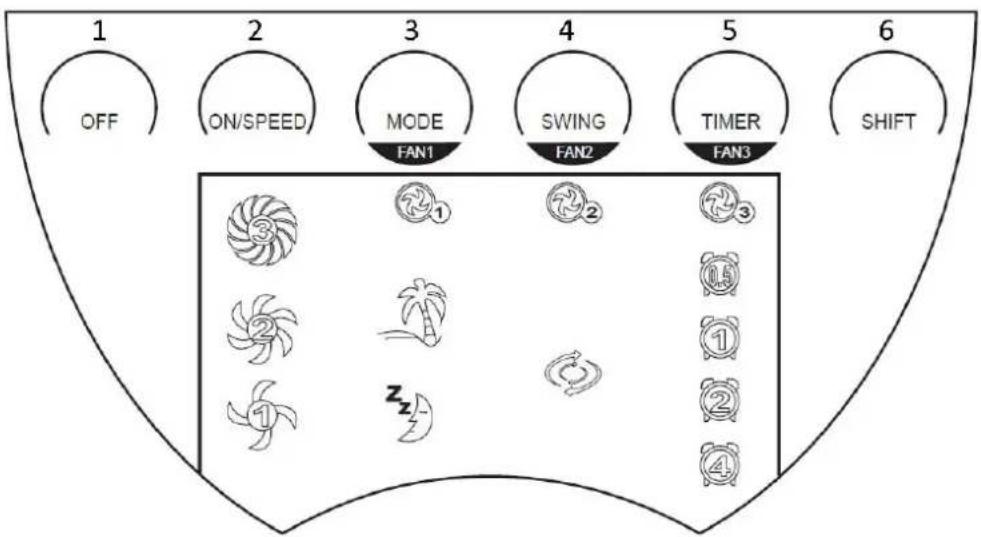
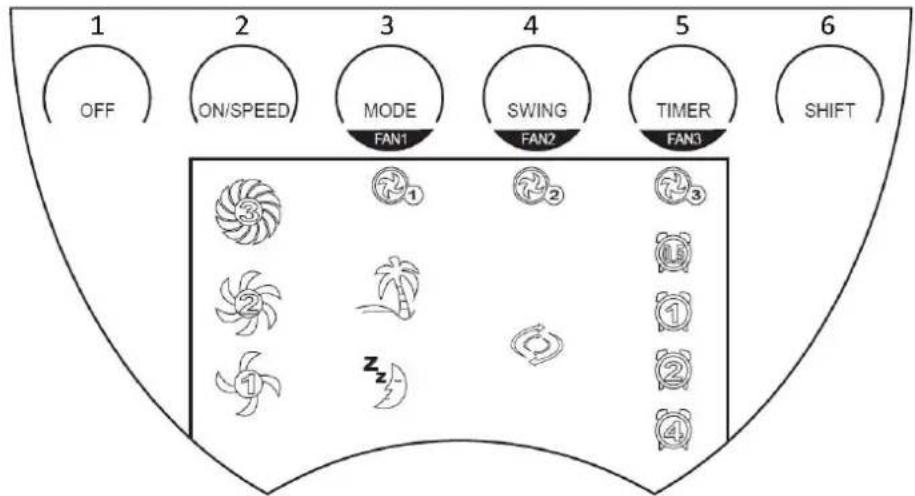
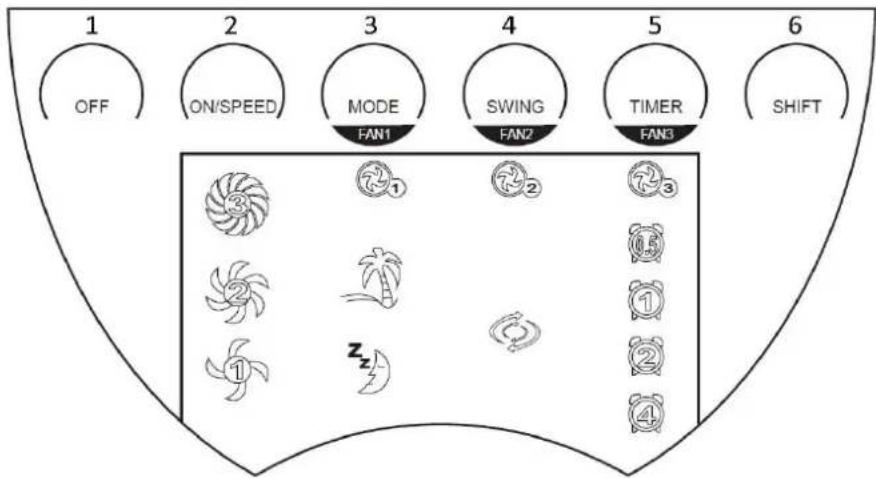
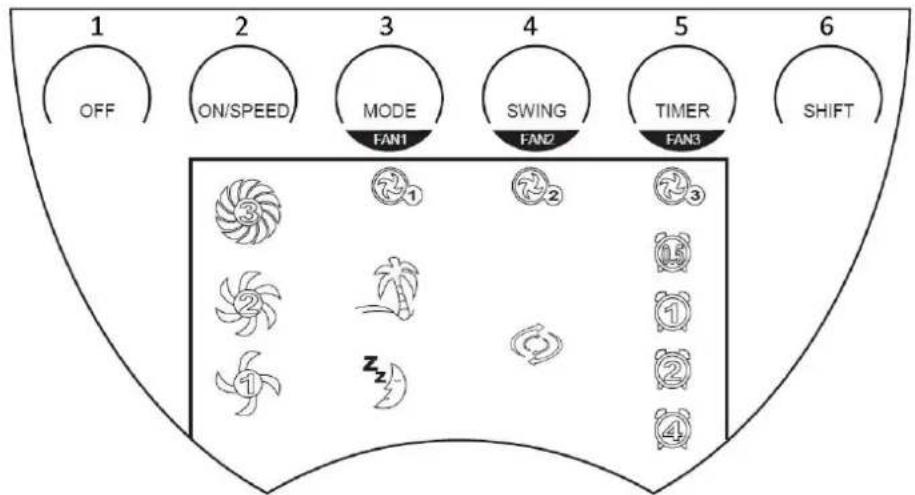
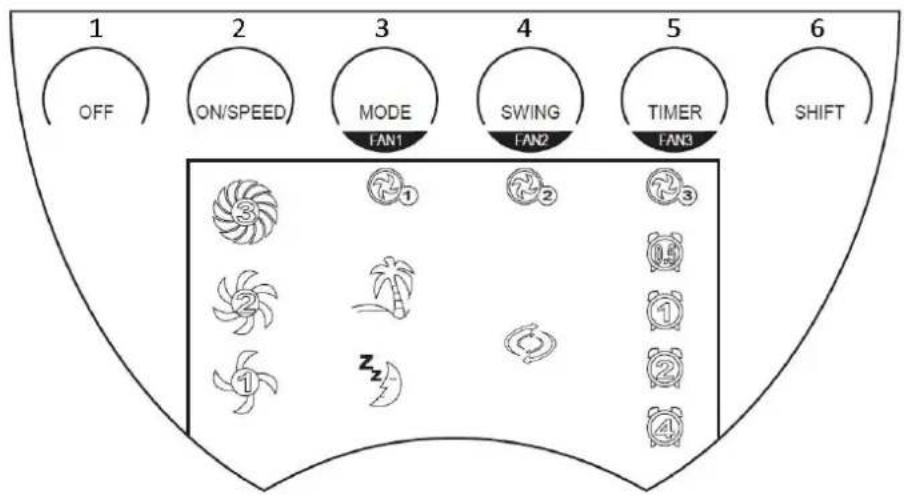
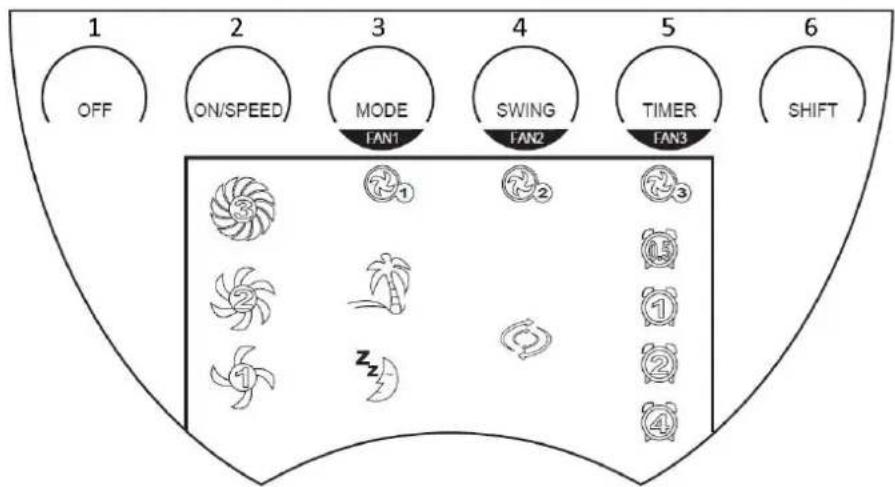
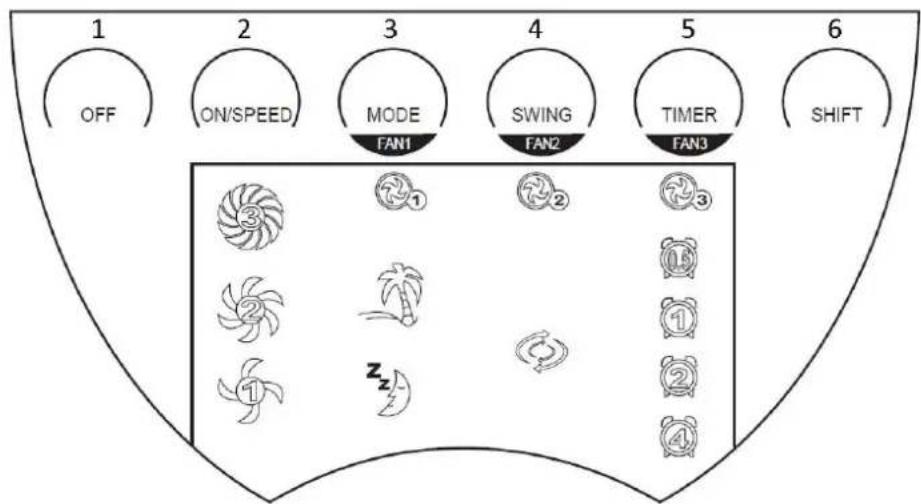
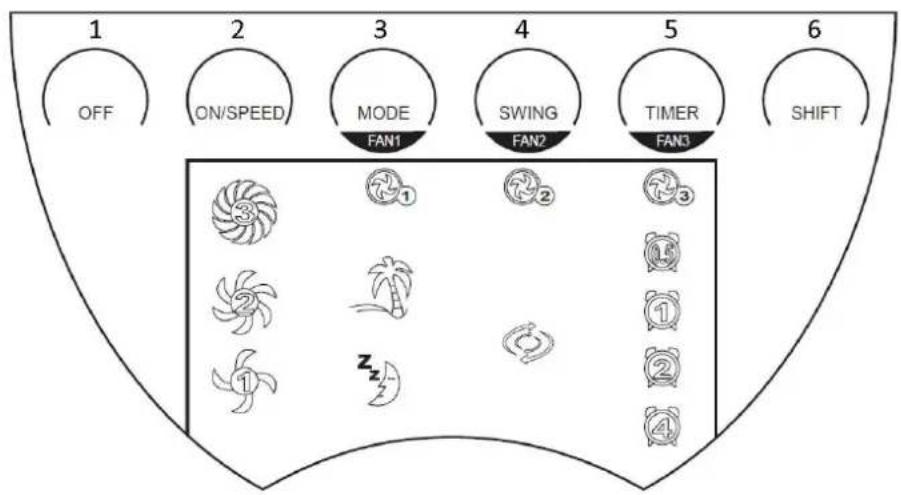
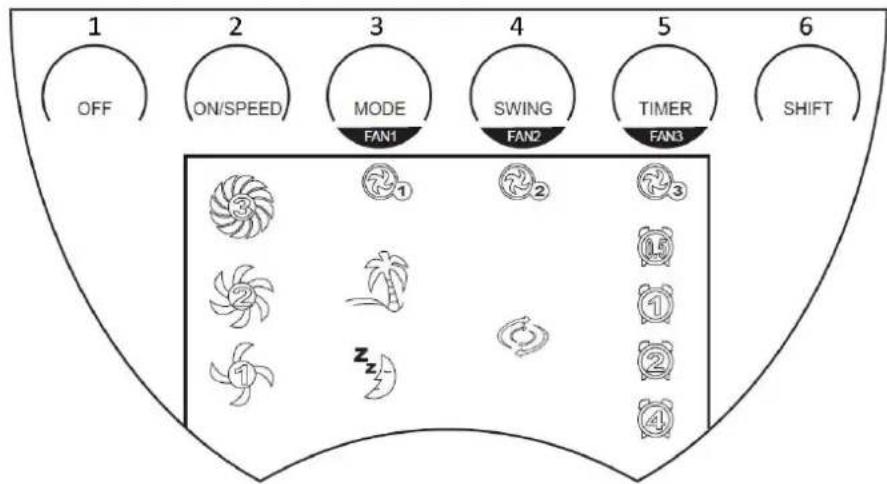
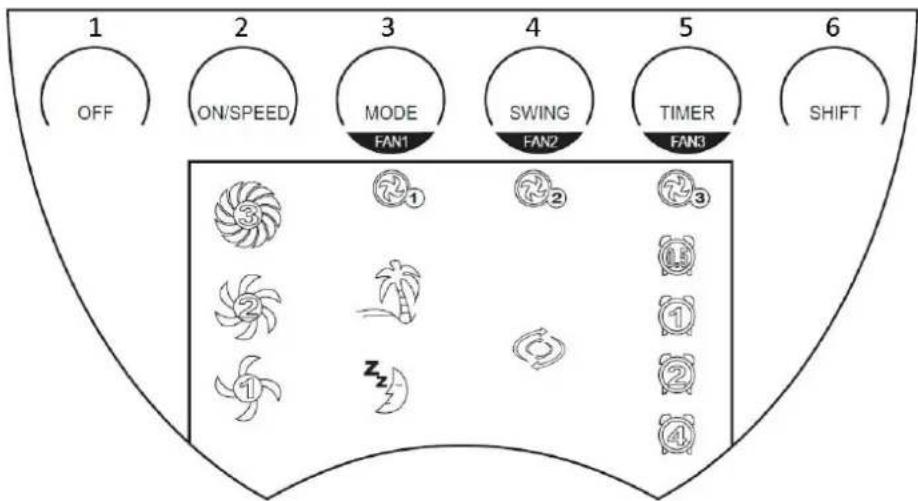
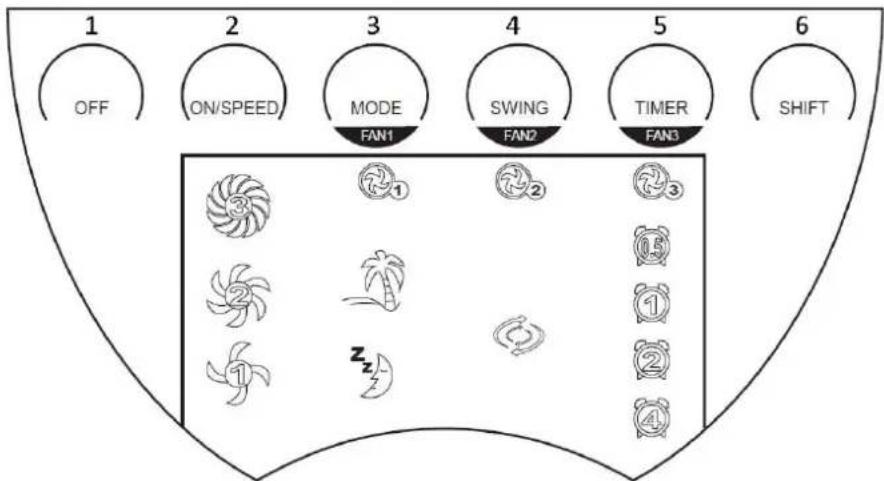
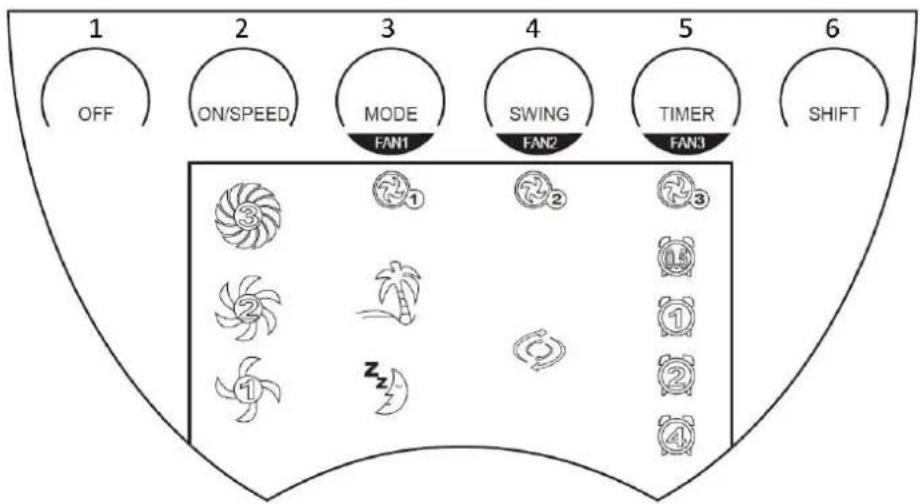
- Off
- On/speed
- Mode (Fan 1)
- Swing (Fan 2)
- Timer (Fan 3)
- Shift
OPERATION
Please touch the display panel to choose your desired functions. Press gently.
- ON/SPEED: Connect the unit to a suitable power source. Then press the on/speed button to turn the unit on and the display panel will now be illuminated.
1) If the unit is turned on at the first time, it will work with the following presetting:
Speed: low / Mode: normal / Swing: off / Timer: off / Three fan blades: working together
2) If the unit has already been used, press the on/speed button to resume to work and the settings will be the same as the last time; except for the function of timer and sleeping mode.
3) If the unit is working, press on/speed button to adjust the speed. It will work as below:
4) After the unit is turned on, the blue LED light on the lower part of the main body will illuminate. If the unit is turned off, the LED light will go out.
$$ \text { Low } \rightarrow \text { Mid } \rightarrow \text { High } \rightarrow \text { Low } \dots (\text { repeating }). $$
- MODE: Press the button to choose the mode functions from normal →Breeze → Sleeping → Normal ... (repeating).
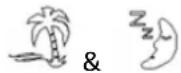
1) Normal: under this mode, the motors work with the preset speed and the display of are off.
2) Breeze: under this mode, the display of 🎨 is on and 📋 is off. The fan will work from high to low and repeat automatically. You can press “ON/SPEED” button to choose speed 1 / 2 / 3.
3) Sleeping: under this mode, the display of 📄 is off and 🌐 is on. The speed level (Speed 1 / 2 / 3) will be automatically changed from high to low and keep working as speed 1 until you manually change the speed.
(For example: If you choose speed 3, the motor will work as speed 3. After 30 minutes, it will automatically change to speed 2. After 30 minutes again the motor will change to speed 1 and keep working as speed 1 unless you manually change the speed.)

- SWING: Press this button to control the oscillation function on and off. The display of ____ will be on and off accordingly.
- TIMER: Press this button to set your desired working time from 0.5h → 1h → 1.5h → 2h → ... → 7.5h → off → 0.5h ... (repeating). After the timer is set, the unit will count down with LED display showing the remaining time (For example, if the timer is set with 2h, after 30 minutes the LED display will show 1.5h.). After the set time, all timer functions are disabled, the display will be off and the unit will not be working anymore. The fan is under standby condition now.
- SHIFT: Press this button to choose any fan blade to work.
1) You set the fan on working status once you press the button the first time. Display of Fan 1, Fan 2 and Fan 3 will flash 5 seconds in order to select the different fan blades.
2) During the setting status (display of fan blades is flashing), press the button MODE / SWING / TIMER to choose Fan 1, Fan 2 or Fan 3 to work. When you turn off all the three fans, the unit will also be turned off and at standby condition.
3) During the setting status (display of fan blades is flashing), press SHIFT button, ON/SPEED button or do not operate for 5 seconds, the setting status will be closed. The LED display will stop flashing.
- OFF: Press this button and all functions and the display will be off. The unit will be at standby condition.
AROMA PAD FUNCTION
After inserting the aroma pad into the front fan guard, a flood of fragrance will be spread out in the whole room once the fan is turned on. Please insert the aroma pad with the pillars buckled into the fan guard.
REMOTE CONTROL
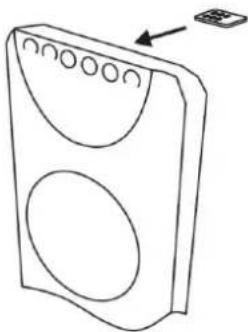
This unit has a remote control. One piece of CR2032 battery will be provided with the unit. The functions of the remote control buttons are the same as of the buttons on the control panel. You can store the remote control in the recess provided on the rear panel.
Remote Control Storage
natural_image
Line drawing of a speaker with two circular buttons and an arrow pointing to the right (no text or symbols)CLEANING AND MAINTENANCE
• Before you clean the fan, please disconnect the main power and pull out the plug from the socket.
- Please clean the stand pole with a clean dry cloth.
- Please do not clean the fan with wet chemicals. Please avoid that water can enter into the unit. This can lead to a short circuit and destroy the unit.
- If the fan is not in use for a longer time, please pack the fan in the gift box and store it on dry and clean place.
- In case the fan blades do not turn any longer or have any peculiar smell, please disconnect from the power socket and seek for assistance of an authorized technician.
TECHNICAL DATA
Operating voltage: 220-240V \~ 50Hz
Power consumption: 90W
| Eco design requirements | |
| Product information requirements | |
| Maximum fan flow rate (F) | 24.75 m^3/min |
| Fan power input (P) | 76.2 W |
| Service value (SV) | 0.32( m^3/min )/W |
| Measurement standard for service value | IEC 60879: 1986 (corr.1992) |
| Standby power consumption (PSB) | 0 W |
| Fan sound power level (LWA) | 59.49 dB(A) |
| Maximum air velocity (c) | 3.71 meters/sec |
| Contact details for obtaining more information | BAHAG AGGutenbergstr. 2168167 MannheimGermany |

Recycling
This marking indicates that this product should not be disposed with other household wastes throughout the 2012/19-EU. To prevent possible harm to the environment or human health from uncontrolled waste disposal, recycle it responsibly to promote the sustainable reuse of material resources. To return your used device, please use the return and collection systems or contact the
retailer where the product was purchased. They can take this product for environmental safe recycling.
SIGURNOSNE INFORMACIJE
UGRADNJA BATERIJE
Molimo da koristite samo bateriju tipa CR2032 3V za ovaj daljinski upravljač. Umetnite baterije u daljinski upravljač, prema polaritetu na baterijama. Ako daljinski upravljač ne koristite na dulje vrijeme, izvadite baterije.
natural_image
Simple line drawing of a rectangular object with an arrow pointing to its side (no text or symbols)PLOČA ZASLONA
flowchart
graph TD
    A["OFF"] --> B["ON/SPEED"]
    B --> C["MODE FAN1"]
    C --> D["SWING FAN2"]
    D --> E["TIMER FAN3"]
    E --> F["SHIFT"]
    G["1"] --> H["3"]
    I["2"] --> J["7"]
    K["3"] --> L["2"]
    M["4"] --> N["15"]
    O["5"] --> P["1"]
    Q["6"] --> R["2"]
    S["1"] --> T["1"]
    U["2"] --> V["2"]
    W["3"] --> X["4"]
- Isključeno
- On/speed (Uklj./Brzina)
- Način rada (Ventilator 1)
- Swing (Ventilator 2)
- Tajmer (Ventilator 3)
- Shift
RAD
Dotaknite ploču zaslona za odabir željenih funkcija. Pritisnite lagano.
natural_image
Line drawing of a speaker with two circular vent holes and an arrow pointing to the speaker (no text or symbols)ČIŠĆENJE I ODRŽAVANJE:
- Prije čišćenja ventilatora, molimo odspojite napajanje i izvucite utikač iz utičnice.
- Očistite postolje sa suhom čistom krpom.
- Nemojte čistiti ventilator s mokrim kemikalijama. Izbjegavajte da voda dođe u jedinicu. Ovo može dovesti do kratkog spoja i uništiti jedinicu.
- Ako se ventilator ne koristi za dulje vrijeme, zapakirajte ventilator u kutiju i pohranite na suho i čisto mjesto.
- U slučaju da se lopatice ventilatora više ne okreću ili imaju poseban miris, odspojite napajanje i potražite pomoć ovlaštenog tehničara.
TEHNICKI PODACI
Radni napon: 220-240V \~ 50Hz
Potrosnja energije : 90W
| Zahtjevi u eko-dizajnu | |
| Zahtjevi informacija o uređaju | |
| Maksimalna brzina ventilatora (F) | 24.75 m^3/min |
| Ulazna snaga ventilatora (P) | 76.2 W |
| Servisna vrijednost (SV) | 0.32( m^3/min )/W |
| Standardne mjere za servisnu vrijednost | IEC 60879: 1986 (corr.1992) |
| Potrošnja energije u stanju čekanja (PSB) | 0 W |
| Razina zvučne snage ventilatora (LWA) | 59.49 dB(A) |
| Maksimalna brzina zraka (c) | 3.71 meter/sek |
| Detalji za kontakt radi dobivanja više informacija | BAHAG AGGutenbergstr. 2168167 MannheimGermany |

Recikliranje
Ova oznaka naznačuje da se ovaj proizvod ne smije odlagati s ostalim kućanskim otpadom u cijeloj 2012/19-EU. Kako biste spriječili moguće štete za prirodno okruženje ili ljudsko zdravlje od nekontroliranog zbrinjavanja otpada, odgovorno ga reciklirajte kako biste promicali održivu ponovnu upotrebu materijalnih resursa. Za vraćanje vašeg korištenog uređaja molimo vas da koristite
postojeće sustave za vraćanje i prikupljanje ili kontaktirajte vašeg prodavača gdje je uređaj kupljen. Oni mogu uzeti ovaj uređaj za ekološki sigurno recikliranje.
BIZTONSÁGI ELŐÍRÁSOK
AZ ELEMEK BEHELYEZÉSE
natural_image
Simple line drawing of a rectangular object with an arrow pointing to its top section (no text or symbols)KIJELZÓPANEL
natural_image
Line drawing of a speaker with two circular buttons and an arrow pointing to a small electronic device (no text or symbols present)RAFHLADA
natural_image
Simple line drawing of a rectangular object with an arrow pointing to its top edge (no text or symbols)STJÓ RNBORD
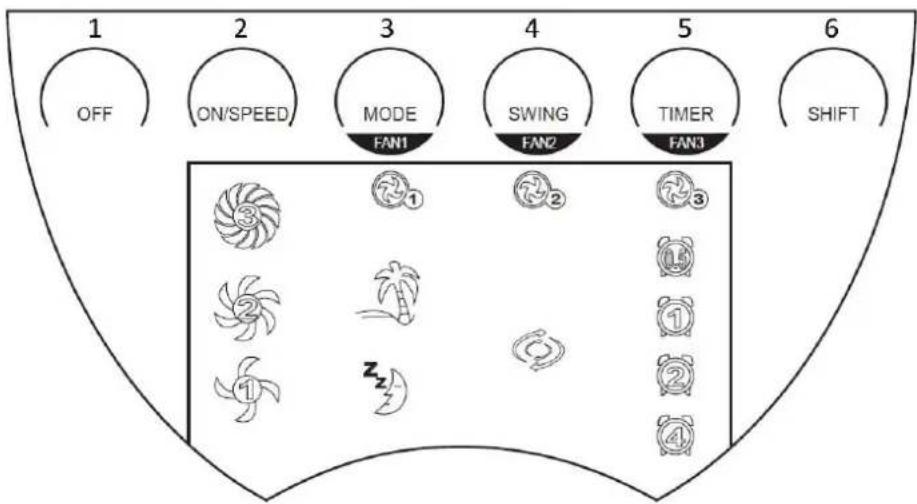
- Off
- On/hraði
- Stilling (Vifta 1)
- Snúningur (Vifta 2)
- Tímastillir (Vifta 3)
- Skipta
NOTKUN
natural_image
Line drawing of a device casing with circular cutouts and an arrow pointing to a small electronic component (no text or symbols)PRIF OG VIDHALD
natural_image
Pure schematic diagram of a rectangular component with an arrow pointing to its top edge (no text or symbols)PANNELLO DISPLAY
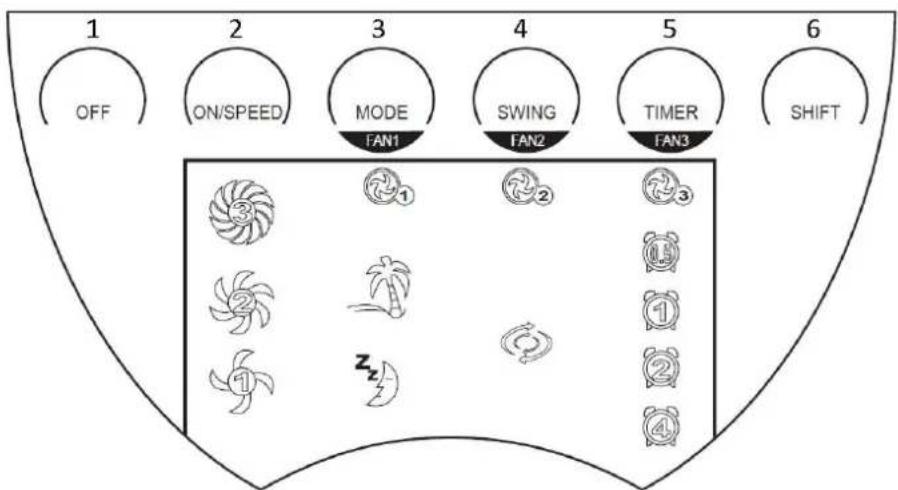
flowchart
graph TD
    A["OFF"] --> B["ON/SPEED"]
    B --> C["MODE FAN1"]
    C --> D["SWING FAN2"]
    D --> E["TIMER FAN3"]
    E --> F["SHIFT"]
    G["3"] --> H["7 1"]
    I["2"] --> J["7 2"]
    K["1"] --> L["10"]
    M["2"] --> N["11"]
    O["4"] --> P["12"]
    Q["Zz"] --> R["13"]
natural_image
Line drawing of a speaker with two circular vent holes and an arrow pointing to the speaker (no text or symbols)BATERIJOS JDĖJIMAS
natural_image
Simple line drawing of a rectangular object with an arrow pointing to its top face (no text or symbols)RODINIŲ EKRANĖLIS
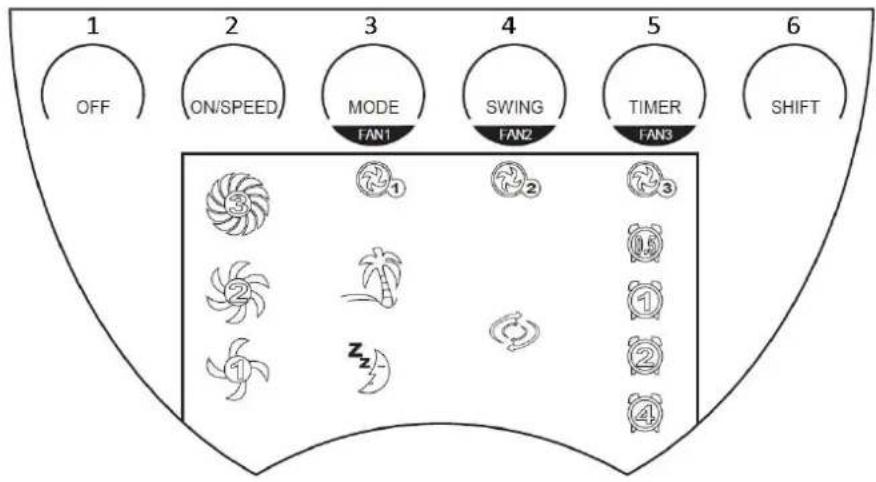
- lšj
- Jj./greitis
- Režimas (1 ventiliatorius)
- Svyravimas (2 ventiliatorius)
- Laikmatis (3 ventiliatorius)
- Perjungimas
VALDYMAS
natural_image
Line drawing of a two-door electronic device with circular vent slots and an arrow pointing to the top-right corner (no text or symbols)VALYMAS IR PRIEŽIŪRA
AKUMULATORA UZSTĀDĪŠANA
natural_image
Simple line drawing of a rectangular object with an arrow pointing to its top edge (no text or symbols)DISPLEJA PANELIS
natural_image
Line drawing of a speaker with two circular buttons and an arrow pointing to a small electronic device (no text or symbols present)TİRİŞANA UN APKOPE
natural_image
Pure diagram of a rectangular block with an arrow pointing to its left side, no text or symbols present.WEERGAVEPANEEL
- Uit
- Aan/snelheid
- Modus (ventilator 1)
- Zwenken (ventilator 2)
- Timer (ventilator 3)
- Shift
WERKING
natural_image
Line drawing of a speaker with two circular buttons and an arrow pointing to the right side (no text or symbols)REINIGEN EN ONDERHOUD
MONTERING AV BATTERI
natural_image
Simple line drawing of a rectangular object with an arrow pointing to its top section (no text or symbols)DISPLAYPANELET
- Av
- På/hastighet
- Modus (vifte 1)
- Sving (vifte 2)
- Timer (vifte 3)
- Shift
BRUK
natural_image
Line drawing of a two-tiered electronic device with circular cutouts and an arrow pointing to a small component (no text or symbols)RENGJ∅ RING OG VEDLIKEHOLD
УСТАНОВКА БАТАРЕЕК
natural_image
Simple line drawing of a rectangular object with an arrow pointing to its side (no text or symbols)ИНДИКАТОРНАЯ ПАНЕЛЬ
flowchart
graph TD
    A["1 OFF"] --> B["2 ON/SPEED"]
    B --> C["3 MODE FAN1"]
    C --> D["4 SWING FAN2"]
    D --> E["5 TIMER FAN3"]
    E --> F["6 SHIFT"]
    subgraph Zone 1
        G["3 fan icon"] --> H["1 fan icon"]
        I["2 fan icon"] --> J["2 fan icon"]
        K["3 fan icon"] --> L["3 fan icon"]
        M["4 fan icon"] --> N["4 fan icon"]
    end
    subgraph Zone 2
        O["1 fan icon"] --> P["1 fan icon"]
        Q["2 fan icon"] --> R["2 fan icon"]
        S["3 fan icon"] --> T["3 fan icon"]
    end
    subgraph Zone 3
        U["1 fan icon"] --> V["1 fan icon"]
        W["2 fan icon"] --> X["2 fan icon"]
        Y["3 fan icon"] --> Z["3 fan icon"]
    end
natural_image
Line drawing of a speaker with two circular buttons and an arrow pointing to the speaker (no text or symbols)POSTAVLJANJE BATERIJE
Molimo vas da za ovaj daljinski upravljač koristite samo pljosnate baterije tipa CR2032 od 3V. Bateriju čvrsto postavite u daljinski upravljač i obratite pažnju na polove. Ako se daljinski upravljač ne koristi duže vreme izvadite bateriju iz njega.
natural_image
Simple line drawing of a rectangular object with an arrow pointing to it, no text or symbols present.DISPLEJ
flowchart
graph TD
    A["OFF"] --> B["ON/SPEED"]
    B --> C["MODE FAN1"]
    C --> D["SWING FAN2"]
    D --> E["TIMER FAN3"]
    E --> F["SHIFT"]
    G["1"] --> H["3"]
    I["2"] --> J["5"]
    K["3"] --> L["5"]
    M["4"] --> N["5"]
    O["5"] --> P["5"]
    Q["6"] --> R["6"]
- Isključivanje
- Uključivanje/brzina
- Režim rada (Vent. 1)
- Osciliranje (Vent. 2)
- Merač vremena (Vent.3)
- Promena
RAD
Željene funkcije birate dodirom displeja. Pritiskajte pažljivo.
- UKLIJUČIVANJE/BRZINA: Priključite uređaj na odgovarajući izvor napajanja. Zatim pritisnite ovo dugme („ON/SPEED“) kako biste uključili uređaj, a displej će se tada osvetliti.
natural_image
Line drawing of a speaker with two circular vent holes and an external control panel (no text or symbols)ČIŠĆENJE I ODRŽAVANJE
• Pre nego što počnete da čistite ventilator isključite dovod napajanja i iskopčajte utikač iz utičnice.
• Nosač očistite suvom krpom.
- Nemojte čistiti ventilator hemikalijama. Potrudite se da u unutrašnjost uređaja ne dospe voda. To može da dovede do kratkog spoja i tako da uništi uređaj.
- Ako se ventilator ne koristi duže vreme, zapakujte ga u kutiju i odložite na suvo i čisto mesto.
- U slučaju da se propeleri više ne okreću ili da ispuštaju karakterističan neugodan miris, iskopčajte uređaj iz utičnice i potražite pomoć ovlašćenog tehničara.
TEHNICKI PODACI
Radni napon: 220-240V \~ 50Hz
Potrosnja struje: 90W
| Zahtevi za ekološki dizajn | |
| Zahtevi za informacije o proizvodu | |
| Maksimalna brzina okretanja propelera (F) | 24.75 m^3/min |
| Ulazna snaga ventilatora (P) | 76.2 W |
| Vrednost opsluživanja (SV) | 0.32( m^3/min )/W |
| Merni standard za vrednost opsluživanja | IEC 60879: 1986 (ispravljeno 1992) |
| Potrošnja snage pri mirovanju (PSB) | 0 W |
| Nivo jačine zvuka propelera (LWA) | 59.49 dB(A) |
| Maksimalna brzina vazduha (c) | 3.71 metara/sekundi |
| Kontakt podaci za više informacija | BAHAG AGGutenbergstr. 2168167 MannheimGermany |

Reciklaža
natural_image
Simple line drawing of a rectangular object with an arrow pointing to its top face (no text or symbols)PANEL DISPLEJA
flowchart
graph TD
    A["OFF"] --> B["ON/SPEED"]
    B --> C["MODE FAN1"]
    C --> D["SWING FAN2"]
    D --> E["TIMER FAN3"]
    E --> F["SHIFT"]
    G["1"] --> H["3"]
    I["2"] --> J["5"]
    K["3"] --> L["7"]
    M["4"] --> N["7"]
    O["5"] --> P["7"]
    Q["6"] --> R["7"]
    S["1"] --> T["0"]
    U["2"] --> V["1"]
    W["3"] --> X["2"]
    Y["4"] --> Z["4"]
- Vyp.
- Zap./rýchlost
- Režim (ventilátor 1)
- Vychyľovanie (ventilátor 2)
- Časovač (ventilátor 3)
- Posun
OBSLUHA
Dotykom na panel displeja vyberte požadované funkcie. Jemne stlačte.
- ZAP./RÝCHLOŠŤ: Pripojte zariadenie ku vhodnému napájaciemu zdroju. Potom tlačidlom zap./rýchlost' zapnite zariadenie a rozsvieti sa panel displeja.
natural_image
Line drawing of a speaker with two circular vent holes and an arrow pointing to the speaker (no text or symbols)ČISTENIE A ÚDRŽBA
VSTAVITEV BATERIJE
natural_image
Simple line drawing of a rectangular object with an arrow pointing to it, no text or symbols present.ZASLON

flowchart
graph TD
    A["1 OFF"] --> B["2 ON/SPEED"]
    B --> C["3 MODE FAN1"]
    C --> D["4 SWING FAN2"]
    D --> E["5 TIMER FAN3"]
    E --> F["6 SHIFT"]
- Izklop
- Vklop/hitrost
- Način (ventilator 1)
- Obračanje (ventilator 2)
- Časovnik (ventilator 3)
- Preklop
DELOVANJE
natural_image
Line drawing of a speaker with two circular ventricles and an arrow pointing to the right side (no text or symbols)ČIŠČENJE IN VZDRŽEVANJE
INSTALLATION AV BATTERI
natural_image
Simple line drawing of a rectangular object with an arrow pointing to its side (no text or symbols)DISPLAYPANEL
natural_image
Line drawing of a speaker with two circular ventricles and an arrow pointing to the right side (no text or symbols)RENGÖ RING OCH UNDERHÅLL
PİLLERİN TAKILMASI
natural_image
Simple line drawing of a rectangular object with an arrow pointing to its side (no text or symbols)EKRAN PANELİ
natural_image
Line drawing of a speaker with two circular ventricles and an arrow pointing to the right side (no text or symbols)TEMİZLEME VE BAKIM

- BATTERIEN EINLEGEN
- ANZEIGEFELD
- ПОСТАВЯНЕ НА БАТЕРИЯТА
- ПАНЕЛ НА ДИСПЛЕЯ
- POSTAVLJANJE BATERIJE
- DISPLEJ
- ČIŠĆENJE I ODRŽAVANJE
- TEHNIČKI PODACI
- Recikliranje
- BEZPEČNOSTNÍ INFORMACE
- INSTALACE BATERIÍ
- ZOBRAZOVACÍ PANEL
- OPERATION (provoz)
- ČIŠTĚNÍ A ÚDRŽBA
- ISÆ TNING AF BATTERI
- DISPLAY-PANEL
- BETJENING
- RENG∅ RING OG VEDLIGEHOLDELSE:
- PANEL DE PANTALLA
- LIMPIEZA Y MANTENIMIENTO
- PATAREI PAIGALDAMINE
- NÄIDIKUPANEEL
- PARISTON ASENTAMINEN
- NÄYTTÖ PANEELI
- KÄYTTÖ
- PUHDISTUS JA HUOLTO
- MISE EN PLACE DE LA PILE
- PANNEAU D'AFFICHAGE
- NETTOYAGE ET ENTRETIEN
- PARTS DESCRIPTION
- ASSEMBLY
- BATTERY INSTALLATION
- DISPLAY PANEL
- OPERATION
- AROMA PAD FUNCTION
- REMOTE CONTROL
- Remote Control Storage
- CLEANING AND MAINTENANCE
- TECHNICAL DATA
- Recycling
- SIGURNOSNE INFORMACIJE
- UGRADNJA BATERIJE
- PLOČA ZASLONA
- RAD
- ČIŠĆENJE I ODRŽAVANJE:
- TEHNICKI PODACI
- BIZTONSÁGI ELŐÍRÁSOK
- AZ ELEMEK BEHELYEZÉSE
- KIJELZÓPANEL
- RAFHLADA
- STJÓ RNBORD
- NOTKUN
- PRIF OG VIDHALD
- PANNELLO DISPLAY
- BATERIJOS JDĖJIMAS
- RODINIŲ EKRANĖLIS
- VALDYMAS
- VALYMAS IR PRIEŽIŪRA
- AKUMULATORA UZSTĀDĪŠANA
- DISPLEJA PANELIS
- TİRİŞANA UN APKOPE
- WEERGAVEPANEEL
- WERKING
- REINIGEN EN ONDERHOUD
- MONTERING AV BATTERI
- DISPLAYPANELET
- BRUK
- RENGJ∅ RING OG VEDLIKEHOLD
- УСТАНОВКА БАТАРЕЕК
- ИНДИКАТОРНАЯ ПАНЕЛЬ
- Reciklaža
- OBSLUHA
- ČISTENIE A ÚDRŽBA
- VSTAVITEV BATERIJE
- ZASLON
- DELOVANJE
- ČIŠČENJE IN VZDRŽEVANJE
- INSTALLATION AV BATTERI
- DISPLAYPANEL
- RENGÖ RING OCH UNDERHÅLL
- PİLLERİN TAKILMASI
- EKRAN PANELİ
- TEMİZLEME VE BAKIM
Brand : Emerio
Model : TF108449
Category : Fan