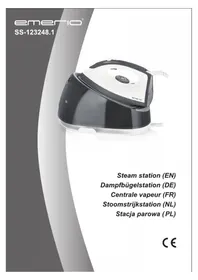
SS123248 - Steam cleaner Emerio - Free user manual and instructions
Find the device manual for free SS123248 Emerio in PDF.


| Brand | Emerio |
| Model | SS123248 |
| Product type | Steam cleaner / Steam iron |
| Power supply | 220-240 V ~ 50/60 Hz |
| Power | 2000-2400 W |
| Water tank capacity | 2.0 L |
| Temperature range | 70 - 225 °C |
| Temperature settings | 4 positions (•, ••, •••, MAX) |
| Steam flow rates | MAX and ECO |
| Functions | Dry ironing, steam ironing, steam jet, water spray, self-cleaning |
| Included accessories | Thermal insulation support, base unit, steam supply hose |
| Maintenance and cleaning | Clean the soleplate with a damp cloth; self-cleaning via the cleaning button; empty the tank if not used for a long time |
| Safety | Temperature indicator; unplug before filling; do not touch hot soleplate; do not direct steam at people |
| Warranty | 2 years |
| General information | Household use only; do not use additives in water; unplug after use |
Frequently Asked Questions - SS123248 Emerio
User questions about SS123248 Emerio
0 question about this device. Answer the ones you know or ask your own.
Ask a new question about this device
Download the instructions for your Steam cleaner in PDF format for free! Find your manual SS123248 - Emerio and take your electronic device back in hand. On this page are published all the documents necessary for the use of your device. SS123248 by Emerio.
USER MANUAL SS123248 Emerio
Before use make sure to read all of the below instructions in order to avoid injury or damage, and to get the best results from the appliance. Make sure to keep this manual in a safe place. If you give or transfer this appliance to someone else make sure to also include this manual.
In case of damage caused by user failing to follow the instructions in this manual the warranty will be void. The manufacturer/importer accepts no liability for damages caused by failure to follow the manual, a negligent use or use not in accordance with the requirements of this manual.
- This appliance can be used by children aged from 8 years and above and persons with reduced physical, sensory or mental capabilities or lack of experience and knowledge if they have been given supervision or instruction concerning use of the appliance in a safe way and understand the hazards involved.
- Children shall not play with the appliance.
- Cleaning and user maintenance shall not be made by children without supervision.
- If the supply cord is damaged, it must be replaced by the manufacturer, its service agent or similarly qualified persons in order to avoid a hazard.
- The iron must not be left unattended while it is connected to the supply mains.
- Keep the iron and its cord out of reach of children less than 8 years of age when it is energized or cooling down.
- The iron must be used and rested on a flat, stable surface.
-
When placing the iron on its stand, ensure that the surface on which the stand is placed is stable.
-
The filling aperture must not be opened during use.
- The iron is not to be used if it has been dropped, if there are visible signs of damage or if it is leaking.
- The plug must be removed from the socket-outlet before the water reservoir is filled with water.
- Before inserting the plug into the mains socket, please check that the voltage and frequency comply with the specifications on the rating label.
- If an extension cord is used it must be suited to the power consumption of the appliance, otherwise overheating of the extension cord and/or plug may occur. There is a potential risk of injuries from tripping over the extension cord. Be careful to avoid dangerous situations.
- Disconnect the mains plug from the socket when the appliance is not in use and before cleaning.
- Ensure that the mains cable is not hung over sharp edges and keep it away from hot objects and open flames.
- Do not immerse the appliance or the mains plug in water or other liquids. There is danger to life due to electric shock!
- To remove the plug from the plug socket, pull the plug. Do not pull the power cord.
- Do not touch the appliance if it falls into water. Remove the plug from its socket, turn off the appliance and send it to an authorized service center for repair.
- Do not plug or unplug the appliance from the electrical outlet with a wet hand.
- Never attempt to open the housing of the appliance, or to repair the appliance yourself. This could cause electric shock.
- Never leave the appliance unattended during use.
- This appliance is not designed for commercial use.
-
Do not use the appliance for other than intended use.
-
The iron should always be off before plugging or unplugging from the wall socket.
- Never use the appliance if damaged in anyway.
- When leaving, even when only for a short while, always unplug the iron.
- Burns can occur from touching hot metal parts, hot water or steam.
- The cord should not be allowed to touch the soleplate when it is hot.
- The iron shall be used on a stable ironing board.
- Always plug the appliance into an earthed plug socket.
- This appliance is for household use only. Do not use outdoors.
- Unplug from outlet when not in use, before filling water or cleaning.
- The use of accessory not recommended by manufacturer may cause injury to persons or damage to the appliance.
- Never fill the water tank with hot water, vinegar, starch, descaler, fabric softener or other chemical reagent.
- Never touch the hot soleplate unless the iron is cooled down completely and unplugged.
- Always place or use the appliance on a stable, level and horizontal surface.
- WARNING!!

Please do not touch surface while in use. The temperature of accessible surfaces may be high when the appliance is operating.
- Regarding the instructions for cleaning and maintenance, please refer to the below paragraphs.
PARTS DESCRIPTION
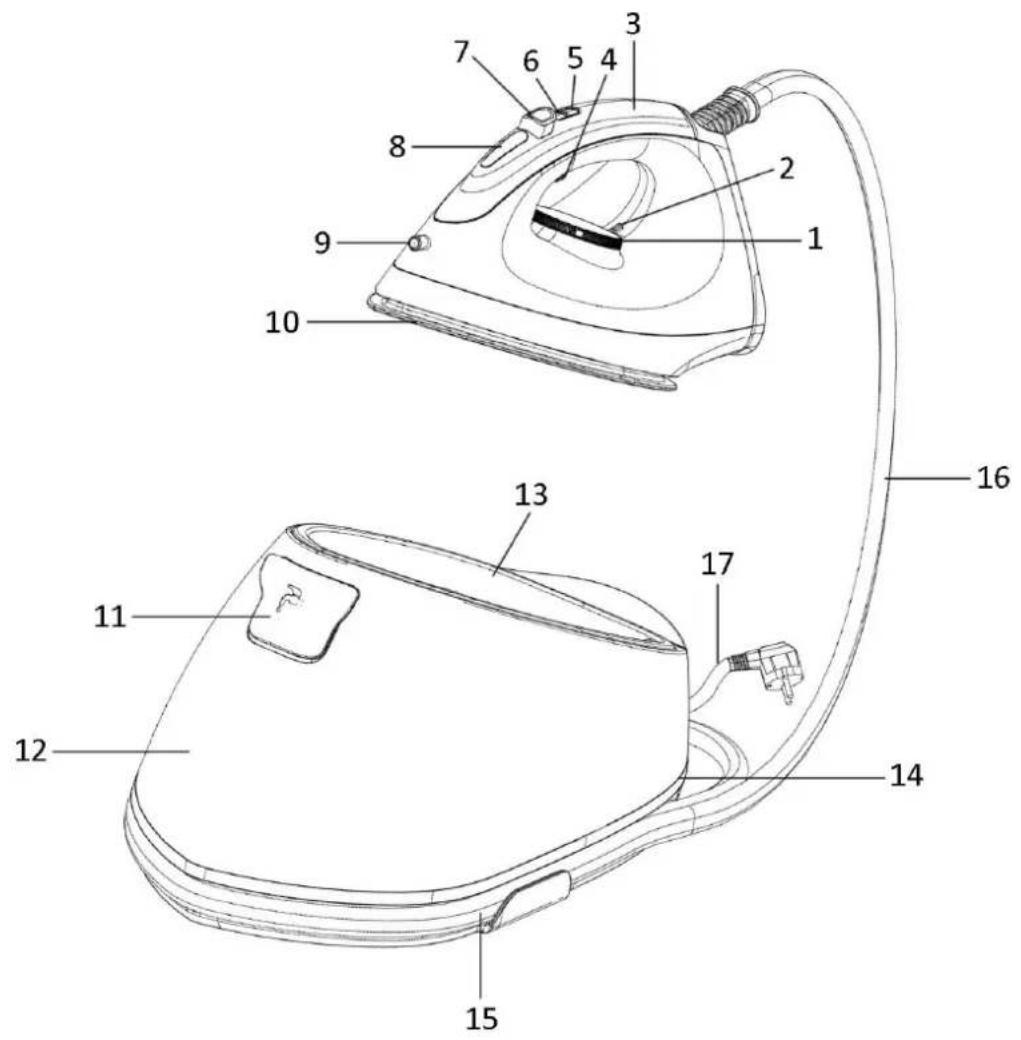
- Temperature dial
- Temperature indicator
- Handle
- Steam trigger
- Steam toggle button
- Clean button
- Water spray button
- Function indicator
- Spray nozzle
- Soleplate
- Water inlet cover
- Water tank
- Thermal insulation stand
- Unit base
- Cord winding groove
- Steam supply hose
- Power cord and plug
TEMPERATURE DIAL
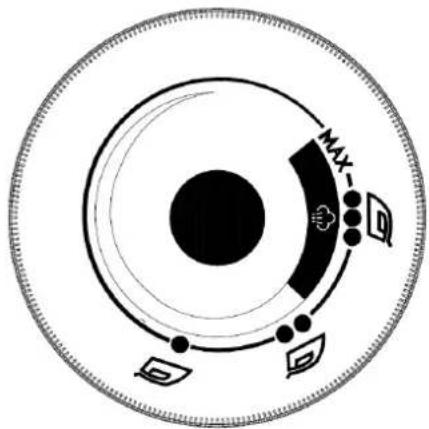
| ● | The first setting (70 ~ 120°C) |
| ●● | The second setting (100 ~ 160°C) |
| ●●● | The third setting (140 ~ 210°C) |
| MAX | Maximum setting (170 ~ 225°C) |
INTRODUCTION FOR FUNCTION INDICATORS AND BUTTONS
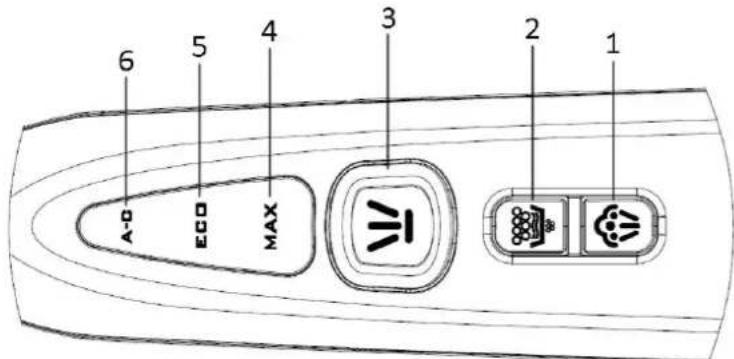
- Steam toggle button
- Clean button
- Water spray button
- Indicator of MAX steam rate
- Indicator of ECO steam rate
- Clean indicator
Steam toggle button (Indicators of MAX and ECO steam rate)
The appliance can switch between MAX and ECO steam rates by the steam toggle button. The default setting is the MAX steam rate when the appliance is turned on. Press the steam toggle button to select your desired steam rate. ECO steam rate is less than the MAX steam rate.
Temperature dial
Turn the temperature dial to set the ironing temperature based on the garment needs to be ironed. If need to activate the steam function, try to select the temperature range that the steam can be produced (see section "TEMPERATURE DAIL"), otherwise slight water spray will occur.
Temperature indicator
When the iron is heating up, the temperature indicator will illuminate. Once the iron has reached the selected temperature, it will extinguish. The temperature indicator will be cycled on and off as the iron maintains the selected temperature during ironing.
Steam trigger
When the appliance is heated to the selected temperature, press and hold the steam trigger with a little force, the steam will be sprayed from the soleplate continuously. When loosen the steam trigger, the appliance can only be used for dry ironing without steam.
Shot of steam
This function can only be activated when the appliance is operated under MAX steam rate, the indicator of MAX steam rate illuminates solidly and the temperature dial is set above the third setting.
Quickly press the steam trigger twice to produce the shot of steam, and the indicator of MAX steam rate will blink. After the blink is finished, wait for approx. 10 seconds to proceed the second shot of steam. ECO steam rate has no such function.
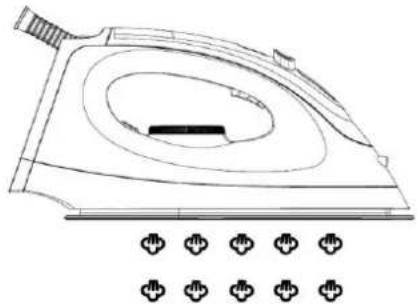
Water spray button
When you need to activate the water spray function, press and hold the water spray button with a little force, the spray nozzle will spray water and wet the clothes that need to be ironed, and then release the water spray button to stop.
Clean indicator
The appliance needs to be cleaned when the clean indicator illuminates solidly. And the clean indicator will blink when the appliance is being cleaned.
Clean button
-
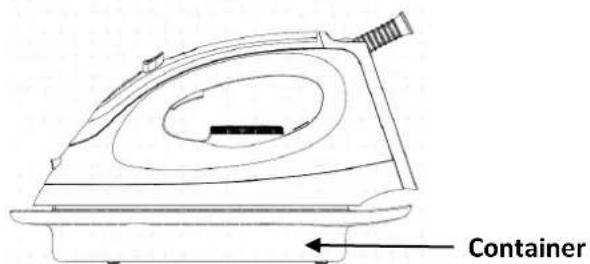
The appliance must be cleaned when the clean indicator illuminates solidly. Before perform cleaning, prepare a container with a capacity of more than 300ml for collecting the waste water, then put the appliance on the container and place the container steadily. Press and hold the clean button for approx. 2 seconds. When the buzzer sounds, the operator should remove from the appliance to avoid being burnt by high-temperature steam during the cleaning process. The appliance enters into the cleaning mode and the clean indicator blinks. After about 2 minutes, the cleaning is completed and the appliance returns to the working condition.
-
When the clean indicator does not illuminate and the user needs to perform cleaning, press and hold the clean button for approx. 5 seconds. When the buzzer sounds, the operator should remove from the appliance to avoid being burnt by high-temperature steam during the cleaning process. The appliance enters into the cleaning mode and the clean indicator blinks. After about 2 minutes, the cleaning is completed and the appliance returns to the working condition.
NOTES:
For better cleaning, please ensure that the temperature dial is turned to "MAX" setting before activate the clean function. The cleaning may be not so good or cannot be performed if the temperature dial is turned to other temperature settings except "MAX" setting.
Cord winding groove
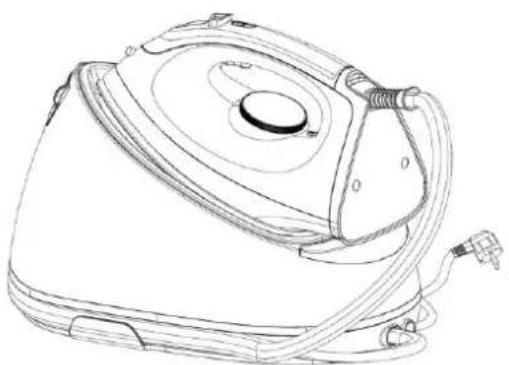
When not in use, the steam supply hose and power cord can be winded along the cord winding groove for storage.
BEFORE FIRST USE
-
Remove any sticker or protective foil from the soleplate.
-
Fill the water tank with water and heat up the iron, and then iron over a piece of damp cloth for several minutes for the purpose of removing any residue on the soleplate according to the section of "Steam ironing".
1) It is normal that strange odor comes out from the unit for the first use. This will cease after a short while.
2) Some particles may come out of the soleplate when you use the iron for the first time. This is normal: the particles are harmless and stop coming out of the iron after a short while.
3) When you activate the steam function, the appliance may produce a pumping sound. This is normal; the sound tells you that water is pumped into the appliance.
4) During the heating process of the soleplate, there will be little steam coming out from the soleplate automatically and this phenomenon will continue for about 3 seconds. This is normal.
5) There will be little condensation water in the steam supply hose after first use. But in the second use, the condensation water will be sprayed out together with the steam at the beginning of releasing steam. This phenomenon will continue for several seconds. This is normal.
- If all the indicators keep blinking after being powered on, it means that the appliance has malfunctioned. Please stop using the appliance and contact the after-sales service department.
USING YOUR APPLIANCE
The appliance has two ironing functions. You can use dry ironing or steam ironing; the details refer to the following:
Dry ironing
- Put the iron on the thermal insulation stand of the unit base.
- Connect the plug to the wall outlet.
- Turn the temperature dial to select your desired temperature setting, which is depended on the fabric of garment. The iron starts heating. Refer to "Ironing tips" and "Additional table" as below when select the temperature.
- When the selected temperature is reached, the temperature indicator turns off. You can start ironing now.
Warning: Never touch the hot soleplate at any time before cooling down!
Steam ironing
- Put the unit base on a stable and level surface.
- Open the water inlet cover, and then fill the water tank with water through the filling aperture. You had better use purified water with less calcium particles. The max capacity of water tank is 2.0L, the water level shall not exceed the "MAX" mark on the water tank.
- Put the iron on the thermal insulation stand of the unit base.
- Connect the plug to the wall outlet. Turn the temperature dial to select your desired temperature setting (at least higher than the second setting so that steam can be triggered). The iron starts heating and the temperature indicator illuminates. Refer to "Ironing tips" and "Additional table" as below when select the temperature.
- The defaulted MAX steam rate indicator will illuminate solidly once the corresponding steam temperature is reached.
Note: There are two modes available: MAX and ECO steam rates. You can select the desired steam rate for each garment according to your requirement. Make sure that there is enough water in the tank. - After a few minutes, the temperature indicator will extinguish, it indicates the soleplate temperature has reached the selected temperature. The iron is ready for ironing garment with steam.
- Press and hold the steam trigger with a little force, the steam will be sprayed from the soleplate continuously, and then you can iron the garment with steam.
Note: There may be dripping water during spraying steam when the temperature is at and lower than the second setting. This is normal.
Cautions:
1) Do not touch the hot soleplate at any time before cooling down!
2) Never direct the steam at people!
3) Do not activate the steam button when the iron is placed on the unit base to avoid being scalded by steam.
4) After ironing, remove the plug from the wall socket. The appliance will be turned off and all the indicators will extinguish. But the soleplate is still hot. Never touch it with hand and place it on the thermal insulation stand until it cools down completely.
CLEANING AND MAINTENANACE
Before cleaning, firstly disconnect the power outlet and let the appliance cool down.
- Wipe the residues and any other deposits on the soleplate with a damp cloth or a non-abrasive (liquid) cleaner.
Note: Do not use chemical, steel, wooden or abrasive cleaners to scrape the soleplate.
- Clean the upper part of the iron with a soft damp cloth. Wipe the water drop on the base and the thermal insulating stand with a dry cloth.
- Perform auto-cleaning by following the operation described in "Clean button" when the clean indicator illuminates.
- When do not use the appliance for a long time, pour out the water in the tank, and store the iron on the thermal insulating stand.
- When not in use, the steam supply hose and power cord can be folded well for storage. See figure in "Cord winding groove".
IRONING TIPS
- The iron heats up quicker than cooling down. Therefore, you should start ironing the articles requiring the lower temperature such as those made of the synthetic fiber.
- If the fabric consists of various kinds of fibers, you must always select the lowest ironing temperature to iron the composition of those fibers.
-
Synthetic fiber and silk fabrics should be ironed on their inner side to avoid being shone.
-
Velvet and other textures that rapidly become shiny should be ironed in one direction with light pressure applied. Always keep the iron moving at any moment.
Pure wool fabrics (100% wool) may be ironed with the steam ironing. Use a dry cloth as a mat and then select the corresponding fabric setting for ironing. - Never iron over zip, rivet in the cloth. This will damage the soleplate. Iron around any such object.
Before activate the clean function, make sure that the water in the tank is sufficient, and prepare a high temperature-resistant container to be placed under soleplate for holding the dirty water sprayed from the steam hole of soleplate during cleaning.
NOTE: When ironing woolen fabrics, shining of the fabric may occur. So it is suggested that you should turn the article inside out and iron the reverse side.
ADDITIONAL TABLE
| Setting | Temperature (℃) | Fabric |
| ● | 70 ~ 120 | Acetate, elastane, polyamide, polypropylene |
| ●● | 100 ~ 160 | Cupro, polyester, silk |
| ●●● | 140 ~ 210 | Triacetate, viscose, wool |
| MAX | 170 ~ 225 | Cotton, flax |
TECHNICAL DATA
Operating voltage: 220-240V ~ 50-60Hz
Power: 2000-2400W
GUARANTEE AND CUSTOMER SERVICE
Before delivery our devices are subjected to rigorous quality control. If, despite all care, damage has occurred during production or transportation, please return the device to your dealer. In addition to statutory legal rights, the purchaser has an option to claim under the terms of the following guarantee: For the purchased device we provide 2 years guarantee, commencing from the day of sale. If you have a defective product, you can directly go back to the point of purchase.
Defects which arise due to improper handling of the device and malfunctions due to interventions and repairs by third parties or the fitting of non-original parts are not covered by this guarantee. Always keep your receipt, without the receipt you can't claim any form of warranty. Damage caused by not following the instruction manual, will lead to a void of warranty, if this results in consequential damages then we will not be liable. Neither can we hold responsible for material damage or personal injury caused by improper use if the instruction manual are not properly executed. Damage to accessories does not mean free replacement of the whole appliance. In such case please contact our service department. Broken glass or breakage of plastic parts is always subject to a charge. Defects to consumables or parts subjected to wearing, as well as cleaning, maintenance or the replacement of said parts are not covered by the warranty and are to be paid.
ENVIRONMENT FRIENDLY DISPOSAL
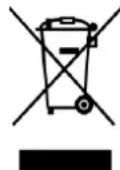
Recycling - European Directive 2012/19/EU
This marking indicates that this product should not be disposed with other household wastes.
To prevent possible harm to the environment or human health from uncontrolled waste disposal, recycle it responsibly to promote the sustainable reuse of material resources. To return
your used device, please use the return and collection systems or contact the retailer where the product was purchased. They can take this product for environmental safe recycling.
Manufactured by: Emerio Deutschland GmbH
Höffer Weg 14, 51519 Odenthal Germany