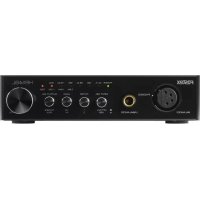
HPA4BL - Receiver FOSTEX - Free user manual and instructions
Find the device manual for free HPA4BL FOSTEX in PDF.

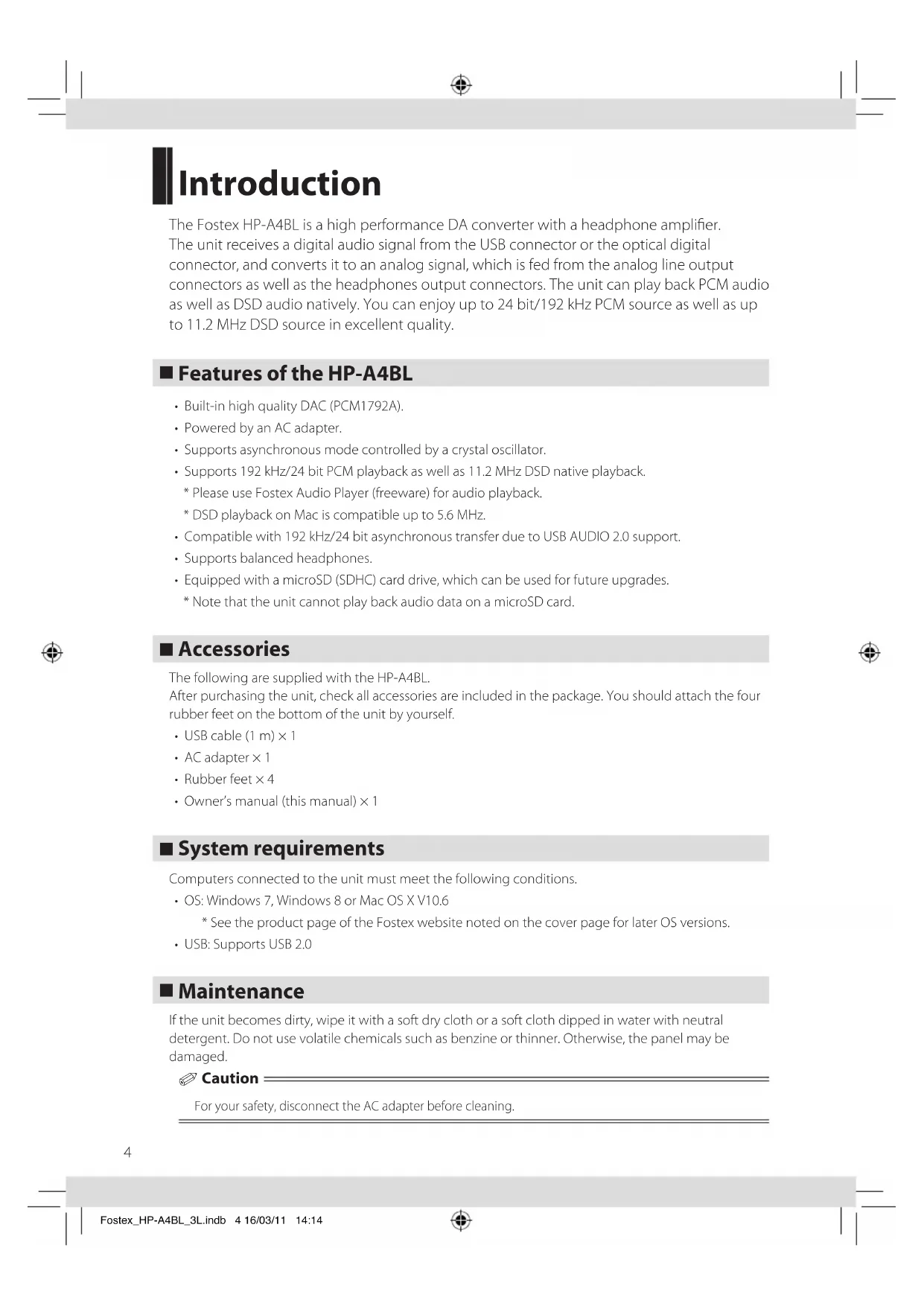


| Product type | D/A converter and headphone amplifier |
| Brand | Fostex |
| Model | HPA4BL |
| Dimensions (W × H × D) | 150 mm × 34 mm × 157 mm |
| Weight | Approx. 630 g |
| Power supply | DC 12 V via included AC adapter |
| Power consumption | 4.2 W |
| Digital audio inputs | USB 2.0 (Type B), optical TOSLINK |
| Audio outputs | Balanced headphone XLR 4-pin, unbalanced headphone 6.35 mm jack, RCA line, digital optical |
| Supported PCM formats | Up to 192 kHz / 24-bit |
| Supported DSD formats | Native DSD up to 11.2 MHz (5.6 MHz on Mac) |
| DAC | PCM1792A |
| USB transfer mode | Asynchronous with crystal oscillator |
| Digital filter | Selectable: slow roll-off or fast roll-off (PCM), high cutoff frequency or low cutoff frequency (DSD) |
| Headphone gain | Selectable: HI (+10 dB) or LO |
| Auto standby function | Yes, after approx. 20 minutes without signal |
| Maintenance and cleaning | Wipe with a soft cloth; disconnect the adapter before cleaning; do not use benzene or thinner |
| Safety | Do not expose to rain or moisture; unplug during thunderstorms; do not open the casing |
| Spare parts and repairability | No user-serviceable parts; refer all servicing to qualified personnel |
| Included accessories | USB cable (1 m), AC adapter, 4 rubber feet, instruction manual |
Frequently Asked Questions - HPA4BL FOSTEX
User questions about HPA4BL FOSTEX
0 question about this device. Answer the ones you know or ask your own.
Ask a new question about this device
Download the instructions for your Receiver in PDF format for free! Find your manual HPA4BL - FOSTEX and take your electronic device back in hand. On this page are published all the documents necessary for the use of your device. HPA4BL by FOSTEX.
USER MANUAL HPA4BL FOSTEX
D/A converter & headphone amplifier
HP-A4BL
Thank you very much for purchasing a Fostex product. This manual provides instructions for basic use of the unit. Read this before using the unit for the first time.
Notes:
If you connect the HP-A4BL to a Windows computer via USB, you must install the dedicated USB Audio Class 2.0 driver which can be downloaded from the Fostex website as follows. If you use a Mac computer, you do not need to install a driver. Please use Fostex Audio Player (freeware) for audio playback, which can be found at the URL below. http://www.fostexinternational.com/
© FOSTEX COMPANY All Rights Reserved.

■ WARNINGS and PRECAUTIONS
-
CAUTION: The symbol To prevent electric shock hazard, do not connect to mains power supply while grille is removed.
-
WARNING: An apparatus with CLASS I construction shall be connected to a MAINS socket outlet with a protective earthing connection.
- CAUTION: TO PREVENT ELECTRIC SHOCK, MATCH WIDE BLADE OF PLUG TO WIDE SLOT, FULLY INSERT.
-
WARNING: To reduce the risk of fire or electric shock, do not expose this apparatus to rain or moisture.
-
CAUTION: Use of any controls or adjustments or performance of procedures other than those herein specified may result in hazardous radiation exposure.
-
WARNING: Changes or modifications to this unit not expressly approved by the party responsible for compliance could void the user's authority to operate the equipment.
-
WARNING: Do not place the unit on top of any soft, porous, or sensitive surfaces to avoid damaging the surface. Use a protective barrier between the unit and surface to protect the surface.
- WARNING: Use of this unit near fluorescent lighting may cause interference regarding use of the remote. If the unit is displaying erratic behavior move away from any fluorescent lighting, as it may be the cause.
-
CAUTION: Danger of explosion if battery is incorrectly replaced. Replace only with the same or equivalent type.
-
WARNING: Do not install this equipment in a confined space such as a book case or similar unit.
-
WARNING: Mains plug is used as disconnect device and it should remain readily operable during intended use. In order to disconnect the apparatus from the mains completely, the mains plug should be disconnected from the mains socket outlet completely.
- Do not mix old and new batteries. Do not mix alkaline, standard (carbonzinc), or rechargeable (ni-cad, ni-mh, etc) batteries.
WARNING: TO REDUCE THE RISK OF FIRE OR ELECTRIC SHOCK, DO NOT EXPOSE THIS APPLIANCE TO RAIN OR MOISTURE.
CAUTION
RISK OF ELECTRIC SHOCK DO NOT OPEN
WARNING: TO REDUCE THE RISK OF ELECTRIC
SHOCK,DO NOT REMOVE COVER (OR BACK).
NO USERSERVICEABLE PARTS INSIDE.REFER

The lightning flash with arrowhead symbol, within an equilateral triangle, is intended to alert the user to the presence of uninsulated "dangerous voltage" within the product's enclosure that may be of sufficient magnitude to constitute a risk of electric shock to persons.

The exclamation point within an equilateral triangle is intended to alert the user to the presence of important operating and maintenance (servicing) instructions in the literature accompanying the appliance.
IMPORTANT SAFETY INSTRUCTIONS
1) Read these instructions.
2) Keep these instructions.
3) Heed all warnings.
4) Follow all instructions.
5) Do not use this apparatus near water.
6) Clean only with dry cloth.
7) Do not block any ventilation openings. Install in accordance with the manufacturer's instructions.
8) Do not install near any heat sources such as radiators, heat registers, stoves, or other apparatus (including amplifiers) that produce heat.
9) Do not defeat the safety purpose of the polarized or grounding-type plug. A polarized plug has two blades with one wider than the other. A grounding type plug has two blades and a third grounding prong. The wide blade or the third prong are provided for your safety. If the provided plug does not fit into your outlet, consult an electrician for replacement of the obsolete outlet.
10) Protect the power cord from being walked on or pinched particularly at plugs, convenience receptacles, and the point where they exit from the apparatus.
11) Only use the power cable/AC adapter/attachments/accessories specified by the manufacturer.

12) Use only with the cart, stand, tripod, bracket, or table specified by the manufacturer, or sold with the apparatus. When a cart is used, use caution when moving the cart/apparatus combination to avoid injury from tipover.
13) Unplug this apparatus during lightning storms or when unused for long periods of time.
14) Refer all servicing to qualified service personnel. Servicing is required when the apparatus has been damaged in any way, such as power supply cord or plug is damaged, liquid has been spilled or objects have fallen into the apparatus, the apparatus has been exposed to rain or moisture, does not operate normally, or has been dropped.
15) The apparatus shall be used in an open area.
16) Apparatus shall not be exposed to dripping or splashing and that no
objects filled with liquids, such as vases, shall be placed on apparatus.
17) Mains plug is used as disconnect device. It shall remain readily operable and should not be obstructed during intended use. To completely disconnect the apparatus from supply mains, the main plug of the apparatus shall be disconnected from the mains socket outlet completely.
18) Excessive sound pressure from earphones and headphones can cause hearing loss.
FCC (U.S.A.) & ICES-003 (Canada) INFORMATION
1.IMPORTANT NOTICE
This product, when installed as indicated in the instructions contained in this manual, meets FCC and ICEs-003 requirements. Changes or modifications not expressly approved by Fostex Company for compliance could void the user's authority to operate the equipment. DO NOT MODIFY THIS PRODUCT.
2.IMPORTANT
In order to comply with FCC and ICES-003 requirements, use high quality shielded cables for connection to accessories and / or another products. If any cables are supplied with this product, they MUST be used. Follow all installation instructions. Failure to do so could void your FCC/ICES-003 authorization to use this product in the USA/Canada.
3. NOTE
This equipment has been tested and found to comply with the limits for a Class B digital device, pursuant to Part 15 of the FCC Rules. These limits are designed to provide reasonable protection against harmful interference in a residential installation. This equipment generates, uses and can radiate radio frequency energy and, if not installed and used in accordance with instructions, may cause harmful interference to radio communications. However, there is no guarantee that interference will not occur in a particular installation. If this equipment does cause harmful interference to radio or television reception, which can be determined by turning the equipment off and on, the user is encouraged to correct the interference by one or more of
the following measures:
Reorient or relocate the receiving antenna.
- Increase the separation between the equipment and receiver.
-
Connect the equipment into an outlet on a circuit different from that to which the receiver is connected.
-
Consult the dealer or an experienced radio/TV technician for help. 4. Compliance with Part 15 of FCC Rules and Canadian ICES-003.
This device complies with Part 15 of the FCC Rules. Operation is subject to the following two conditions: (1) This device may not cause harmful interference, and (2) this device must accept any interference received, including interference that many cause undesired operation.
WARNINGs and PRECAUTIONS 2
IMPORTANT SAFETY INSTRUCTIONS 2
FCC (U.S.A.) & ICES-003 (Canada) INFORMATION 2
Contents. 3
Introduction 4
Features of the HP-A4BL 4
Accessories 4
System requirements 4
Maintenance 4
Parts names and functions 5
Setting up and connecting a computer 7
Installing the USB driver (Windows only) 7
DSD audio playback software application 7
Connecting the computer 7
Computer settings 8
Windows 8/Windows 7 8
Mac OS 9
Unit settings 10
[INPUT SEL] switch setting 10
[FILTER] switch setting 10
[GAIN] switch setting 10
[OUTPUT SEL] switch setting 10
Volume level setting 10
Specifications 11
Introduction
The Fostex HP-A4BL is a high performance DA converter with a headphone amplifier. The unit receives a digital audio signal from the USB connector or the optical digital connector, and converts it to an analog signal, which is fed from the analog line output connectors as well as the headphones output connectors. The unit can play back PCM audio as well as DSD audio natively. You can enjoy up to 24 bit/192 kHz PCM source as well as up to 11.2 MHz DSD source in excellent quality.
Features of the HP-A4BL
Built-in high quality DAC (PCM1792A).
- Powered by an AC adapter.
Supports asynchronous mode controlled by a crystal oscillator.
Supports 192 kHz/24 bit PCM playback as well as 11.2 MHz DSD native playback.
- Please use Fostex Audio Player (freeware) for audio playback.
- DSD playback on Mac is compatible up to 5.6 MHz.
- Compatible with 192kHz / 24 bit asynchronous transfer due to USB AUDIO 2.0 support.
Supports balanced headphones. - Equipped with a microSD (SDHC) card drive, which can be used for future upgrades.
- Note that the unit cannot play back audio data on a microSD card.
■ Accessories
The following are supplied with the HP-A4BL.
After purchasing the unit, check all accessories are included in the package. You should attach the four rubber feet on the bottom of the unit by yourself.
- USB cable (1 m) × 1
- AC adapter × 1
Rubber feet × 4 - Owner's manual (this manual) × 1
System requirements
Computers connected to the unit must meet the following conditions.
- OS: Windows 7, Windows 8 or Mac OS X V10.6
- See the product page of the Fostex website noted on the cover page for later OS versions.
- USB: Supports USB 2.0
■ Maintenance
If the unit becomes dirty, wipe it with a soft dry cloth or a soft cloth dipped in water with neutral detergent. Do not use volatile chemicals such as benzine or thinner. Otherwise, the panel may be damaged.
Caution
For your safety, disconnect the AC adapter before cleaning.
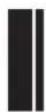
Parts names and functions
Front panel
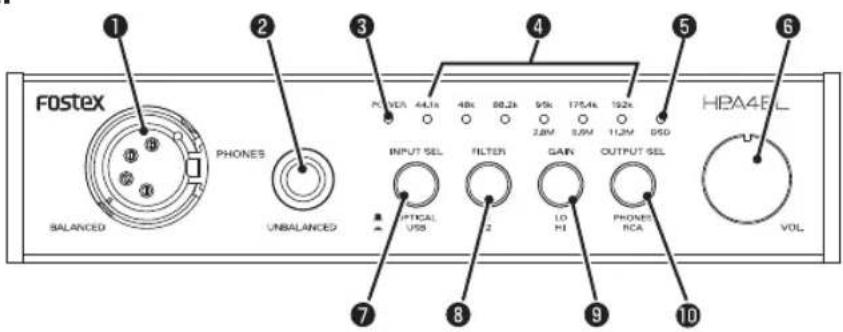
1 [PHONES BALANCED] terminal (XLR-4pin)
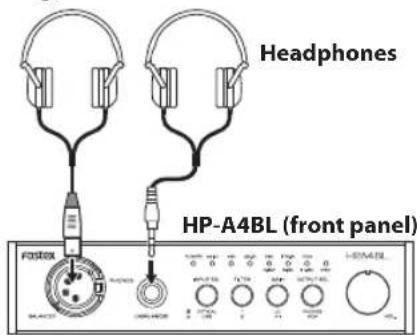
Connect balanced stereo headphones. The signal outputs are as below.
![FOSTEX HPA4BL - [PHONES BALANCED] terminal (XLR-4pin) - 1](/content/2026/03/553367/images/05657ac107738f6327d36a459bc21f1212bcafdae07b55ece87f4bd325aa82af.jpg)
2 [PHONES UNBALANCED] terminal (normal stereo jack)
Connect stereo headphones. Set the [OUTPUT SEL] switch on the front panel to the unpressed ([PHONES] position) to activate. The [PHONES] terminal will prioritize [UNBALANCED].
3 [POWER]indicator
Lit in green when the power is supplied. Lit in red in standby mode.
4 Input indicators (44.1 k, 48 k, 88.2 k, 96 k/2.8 M, 176.4 k/5.6 M, 192 k/11.2 M)
Lit in red according to the input audio source. When no signal is input or when a signal with an unsupported audio format is input, the 44.1 kHz indicator blinks (unlocked).

Notes
Immediately after the power is supplied to the unit, no input indicator is illuminated.
[DSD] indicator
Lit in red when the unit plays back DSD audio.
[POWER] switch/volume knob
Adjusts the analog output level ([PHONES] terminal and [OUTPUT] terminal). Supply power by turning the knob to the right until it makes a clicking sound.
7 [INPUT SEL] switch
Selects the digital input source between the [USB] terminal and [DIGITAL IN] terminal.
3 [FILTER] switch
Selects the digital filter characteristics of the DAC.
[GAIN] switch
Selects the gain of the headphone output amplifier.
![FOSTEX HPA4BL - [GAIN] switch - 1](/content/2026/03/553367/images/9a5fec10da5547a8dbd20d1524a5ce0fe4944db2bd0ec56d7e7a892ba1123896.jpg)
Caution
Turn the volume knob all the way to the left before you operate the switch.
10 [OUTPUT SEL] switch
Selects the analog output destination between the [PHONES] terminal and [OUTPUT] terminal.
- See page 10 for setting 6 - 10.
![FOSTEX HPA4BL - [OUTPUT SEL] switch - 1](/content/2026/03/553367/images/f3afa3f1b4ce898b461a021362b18a0b9ba9064bf68e6088bcc7a00cf0b6d4af.jpg)
Back panel
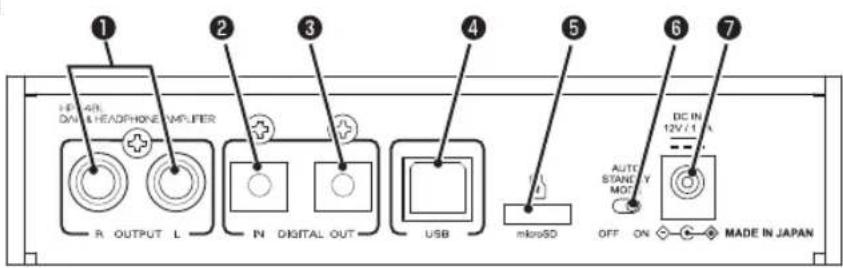
OUTPUT] (L, R) terminals (RCA pin jack)
Connect to an amplifier, etc.
Outputs an analog audio signal after the DA converter.
Set the [OUTPUT SEL] switch on the front panel to the pressed ([RCA] position) to activate.
[DIGITAL IN] terminal (optical)
Connect to digital audio source devices such as a CD player.
Inputs PCM digital audio.
![FOSTEX HPA4BL - [DIGITAL IN] terminal (optical) - 1](/content/2026/03/553367/images/742febbf5c841224992458cabbb35febd8153be9ddfd03766770b3461c0b518a.jpg)
Notes
DSD signals cannot be input.
[DIGITAL OUT] terminal (optical)
Connect digital audio devices.
Outputs PCM digital audio received from the [USB] terminal or [DIGITAL IN] terminal in S/PDIF format.
No signal is output when the unit receives DSD audio.
4 [USB] terminal
Connect to a computer using the supplied USB cable for USB audio source input.
![FOSTEX HPA4BL - [USB] terminal - 1](/content/2026/03/553367/images/9fe9bd27442e8f0f1e52dc00b592e4d0327223f053c0a9ab9d91a871fc07362d.jpg)
Notes
- Set the audio output appropriately to input USB audio.
- Please download and use Fostex Audio Player (freeware) for audio playback, which can be found at the URL noted on the cover page.
[microSD] slot
Set the microSD card for updating the software version of the unit. Compatible microSD cards are SDHC with a volume of 32 GB or less.
![FOSTEX HPA4BL - [microSD] slot - 1](/content/2026/03/553367/images/e4a0b7a87a4aa1c93be590dad8c4372d221dec0dca331d61dc85ed473fd31738.jpg)
Notes
- The software upgrade file is available from the web site noted on the cover page. Download and read the Update Notes and Manual Supplement.
Audio data on a microSD is not playable.
[AUTO STANDBY MODE] switch
If AUTO STANDBY MODE is on, the auto standby function is activated when the 44.1 kHz indicator blinks (unlocked) for about 20 minutes, and power consumption is reduced to below 0.5 W.
If AUTO STANDBY MODE is off, auto standby mode is not activated.
![FOSTEX HPA4BL - [AUTO STANDBY MODE] switch - 1](/content/2026/03/553367/images/d08ec94b1a8c081af817172edab83414e0851012c89d15f122eeadf919c9009d.jpg)
Caution
To power on from standby mode, power on again using the [POWER] switch/volume knob on the front panel. Conditions for unlocking may differ depending on the computer.
[DC IN] terminal
Connect to an outlet using the supplied AC adapter.
![FOSTEX HPA4BL - [DC IN] terminal - 1](/content/2026/03/553367/images/957c6394c853b5eb8825a3bdaff3ec6b495ca757e63c3a0095a83d915da0e05a.jpg)
Caution
Do not use any AC adapter other than that supplied with the product.
Setting up and connecting a computer
When using the unit to output the computer sound, set up the computer as below.
■ Installing the USB driver (Windows only)
Before you connect the unit via USB to a Windows computer, the dedicated USB Audio Class 2.0 driver must be installed to the computer.
You can download the driver software from the Fostex website noted on the cover page.
- When you connect the unit via USB to a Mac OS computer, you do not need to install a driver.
DSD audio playback software application
To play back DSD audio, an appropriate DSD audio playback software application must be installed on your computer. Please download and use Fostex Audio Player (freeware) for DSD audio playback, which can be found at the URL noted on the cover page. The unit supports both ASIO and DoP.
Notes
- If an audio playback software application sends illegal data to the unit, audio may not be played back.
- With some audio playback software applications, the beginning of a song may be muted when you switch between DSD and PCM.
- Before you operate an audio playback software application, it is recommended to turn down the HP-A4BL audio output volume.
- It is recommended that tracks in the playlist of an audio playback software application have the same sampling rate.
Connecting the computer
While connecting to an outlet using the supplied AC adapter, turn the [POWER] switch to the right until it makes a clicking sound. Power is supplied and the [POWER] indicator lights in green.
When connecting to the computer using the supplied USB cable, the computer recognizes the unit.

Notes
The unit works in asynchronous mode and processes audio data using the high performance crystal clock.
(Connecting)
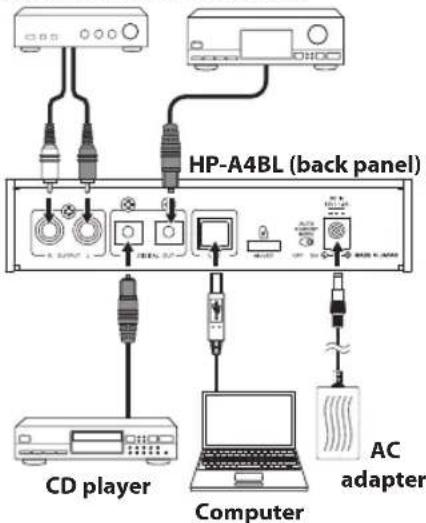
Audio amplifier AV amplifier
Computer settings
Set the sound output destination of the computer to HP-A4BL to listen to the sound of the computer. Adjusting sound output settings of the computer may improve the sound. See the manual of the computer or the online help for more information.

Notes
- When you reboot your computer or reconnect the unit, check that the sound output destination is correctly set.
- Adjust the sound output level of the computer according to your usage environment.
Windows 8/Windows 7
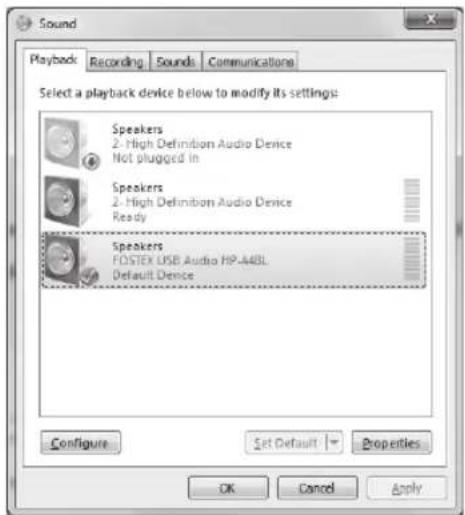
Sound output destination setting
1) Select "Hardware and Sound" from the Control Panel.
2) Select "Sound" to open the "Sound" window.
3) Select the "Playback" tab.
4) Select "FOSTEX USB Audio HP-A4BL" and click the "Set Default" button, followed by the "OK" button.
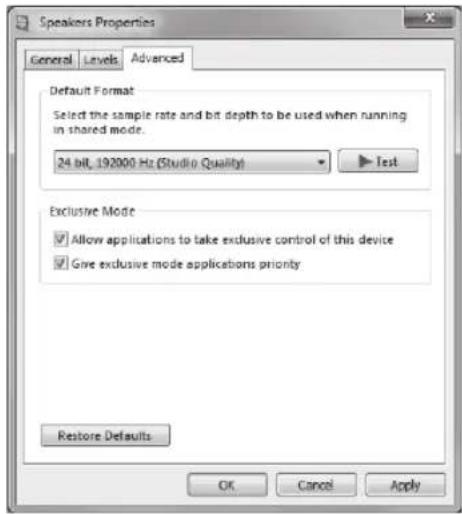
Advanced settings
Clicking the "Property" button on the "Sound" window opens the window where you can select the sampling rate, etc.
Mac OS
Sound output destination setting
1) Select "System preferences" from the Apple drop-down menu.
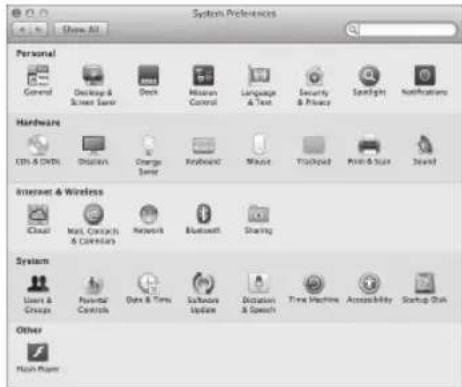
2) Select "Sound" to open the "Sound" window and select the "Output" tab at the top of the window.
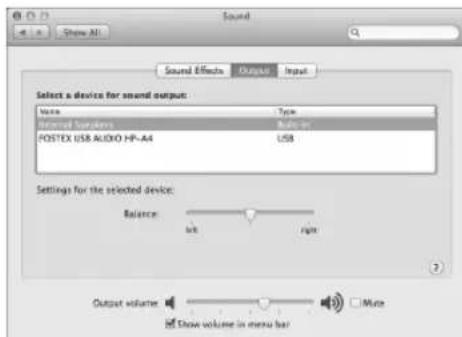
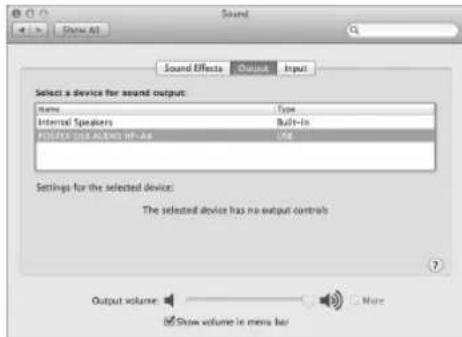
3) Select "FOSTEX USB AUDIO HP-A4" in the list box.
Advanced settings
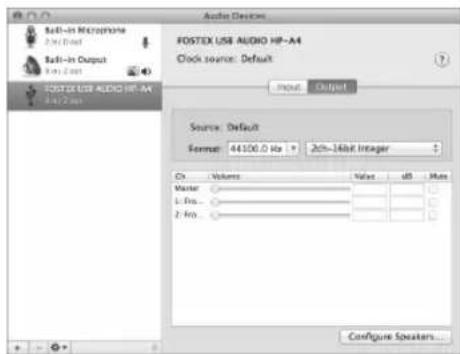
The "Audio MIDI setting" utility in the "Utility" folder in the "Application" folder allows you to select the sampling rate and bit rate.
Unit settings
■ [INPUT SEL] switch setting
This switch selects the audio input source. At the pressed ([USB] position), the unit plays back a USB audio signal from a USB-connected computer. At the unpressed ([OPTICAL] position), the unit plays back a signal from the [DIGITAL IN] terminal.
Notes
The unit cannot input signals from the [USB] and [DIGITAL IN] terminals simultaneously.
■ [FILTER] switch setting
This switch selects the digital filter characteristics of the DAC.
- With a PCM audio source
At the [1] position, a slow roll-off digital filter is applied.
At the [2] position, a sharp roll-off digital filter is applied.
- With a DSD audio source
At the [1] position, a digital filter with high cutoff frequency is applied. At the [2] position, a digital filter with low cut-off frequency is applied.
[GAIN] switch setting
This switch selects the gain of the headphone output amplifier. At the [HI] position, the gain is 10 dB higher than the gain at the [LO] position.
![FOSTEX HPA4BL - [GAIN] switch setting - 1](/content/2026/03/553367/images/ded322e2652adaebb7d4124473534f8c24dc635438c89f0a004c70db4e9ce856.jpg)
Caution
Turn the volume control knob all the way to the left before you operate the switch.
[OUTPUT SEL] switch setting
This switch selects the analog output destination between the [PHONES] and [OUTPUT] terminals.
- To monitor audio from headphones connected to the [PHONES] terminal, set it to the [PHONES] position.
- To monitor audio from an amplifier/speaker system connected to the [OUTPUT] terminals, set it to [RCA] position.
![FOSTEX HPA4BL - [OUTPUT SEL] switch setting - 1](/content/2026/03/553367/images/4031e2630c8e0df104e6741bc42021ef3c144f3cf47a65caf84c87bad6a2b24e.jpg)
Notes
You cannot output the signal from both the [PHONES] and [OUTPUT] terminals simultaneously.
Volume level setting
You can adjust the analog output level of the [PHONES] and [OUTPUT] terminals using the volume control knob.

Notes
- Adjust the sound output level on the computer according to your usage environment.
The volume control knob does not affect the output level of the [DIGITAL OUT] terminal.
Specifications
Input
| [USB] terminal | ||
| Interface USB 2.0 high speed | ||
| Supported sampling frequency | PCM: 44.1 kHz, 48 kHz, 88.2 kHz, 96 kHz, 176.4 kHz, 192 kHz DSD: 2.8 MHz, 5.6 MHz, 11.2 MHz (* Up to 5.6 MHz on Mac) | |
| Supported quantization bit width | 16 bit, 24 bit | |
| [DIGITAL IN] terminal | ||
| Connector type TOSLINK optical | ||
| Format S/PDIF | ||
| Supported sampling frequency | 44.1 kHz, 48 kHz, 88.2 kHz, 96 kHz, 176.4 kHz, 192 kHz | |
| Supported quantization bit width | 16 bit, 24 bit | |
Output
| [PHONES BALANCED] terminal | ||
| Connector type XLR 4-pin | ||
| Maximum output 300 mW or more (32 ohms load) | ||
| Applicable load impedance 16 ohms to 600 ohms | ||
| THD 0.04% or less (at 1 kHz, 32 ohm load, 100 mW output) | ||
| Frequency response 20 Hz to 80 kHz, +/- 3 dB (32 ohm load, 100 mW output) | ||
| [PHONES UNBALANCED] terminal | ||
| Connector type Φ6.3 mm stereo jack | ||
| Maximum output 150 mW or more (32 ohms load) | ||
| Applicable load impedance 16 ohms to 600 ohms | ||
| THD 0.04% or less (at 1 kHz, 32 ohm load, 100 mW output) | ||
| Frequency response 20 Hz to 80 kHz, +/- 3 dB (32 ohm load, 1o0 mW output) | ||
| [OUTPUT](L,R) terminals (analog output terminal) | ||
| Connector type RCA pin jack | ||
| Nominal output level 2 Vrms (0 dBFS) | ||
| Applicable load impedance 10 k ohms or more | ||
| THD 0.01% or less (at 1 kHz) | ||
| Frequency response 20 Hz to 80 kHz, +/- 3 dB (at nominal level) | ||
| [DIGITAL OUT] terminal | ||
| Connector type TOSLINK optical | ||
| Format S/PDIF | ||
| Supported sampling frequency | 44.1 kHz, 48 kHz, 88.2 kHz, 96 kHz, 176.4 kHz, 192 kHz | |
| Supported quantization bit width | 16 bit, 24 bit | |
General
| [microSD] card slot | ||
| Format FAT32 | ||
| Usable card microSD card (SDHC), 32 GB maximum | ||
| Supplied accessories | USB cable (1 m) × 1, AC adapter × 1, rubber feet × 4, Owner's manual (this manual) × 1 | |
| Power requirements DC 12 V (supplied from the AC adapter) | ||
| Power consumption 4.2 W | ||
| External dimensions | 150 mm (W) × 34 mm (H, excluding rubber feet) × 157 mm (D, including protrusions) | |
| Weight Approx. 630 g | ||
- Specifications and appearance are subject to change without notice for product improvement.
- Windows is a registered trademark of Microsoft Corporation in the United States and other countries.
- Mac is a trademark of Apple Inc., registered in the U.S. and other countries.
- DSD is a trademark.
- All other trademarks are the property of their respective owners.
Declaration of EC Directive
This equipment is compatible with the EMC Directive (2004/108/EC) - Directive on approximation of member nation's ordination concerning the electromagnetic compatibility and with the Low Voltage Directive (2006/95/EC) - Directive on approximation of member nation's ordination concerning electric equipment designed to be used within the specified voltage range. This equipment is also compatible with the Ecodesign Directive (2009/125/EC) - Directive on approximation of member nation's ordination concerning the ecodesign requirement for energy-using products and with EU RoHS 2 Directive (2011/65/EU) - Directive on approximation of member nation's ordination concerning the restriction of the use of certain hazardous substances in electric equipment.
The Affect of Immunity on This Equipment
The afect of the European Specification EN61000-6-1 (coexistence of electromagnetic waves - common immunity specification) on this equipment are as shown below.
In the electrical fast transient/burst requirements, surge, conducted disturbances by radio-frequency fields, power frequency magnetic field, radiate electromagnetic field requirements and static electricity discharging environment, this could be affected by generation of noise in some cases.
FOSTEX DISTRIBUTORS LIST IN EUROPE
- Including non-EU countries (as of Jan. 2016)
Albania, Bosnia and Hezegovina, Croatia, Kosovo, Macedonia, Montenegro, Serbia & Slovenia
NAME: Player Plus d.o.o.
ADD: St. Sestano Strain 1/13, 11080 Belgrade, Serbia
TEL: (+381) 11 377 4968, FAX: (+381) 11 377 4969
Email: info@player.ps
Web Site: http://www-player.ps
Austria, Germany & Hungary
NAME: Mega Audio GmbH
ADD: Feldborn 3, in 55444 Waldaubersheim.
Germany
TEL:(+49)6721-94330.FAX:(+49)6721-32046
Email:info@megaaudio.de
Web Site http://www.megaaudio.de
Belgium
NAME: XLR spol/bvba
ADD: Pierre Strauwenstraat 24, 1020 Brussels,
Belgium
TEL:+32)25200827,FAX:+32)25211977
Email:info@xpro.be
Web Site: http://www.xrpro.be
Czecho
NAME: Praba Music Center spot spon
ADD: Ocelarska 937/39, Praha 9, 19000, Czecho
TEL(420)226-011-111
FAX:(+4201226-011-112
Email:info@pmc.cz
Web Site: http://www.pmc.zc
Denmark
NAME:SCSound A/S
ADD:Dalgas Alle 15, DK-6600 Vejen,Denmark
T[1:45)43998877,FAX:(+45)43998077
Estonia, Latvia & Lithuania
NAME: Mafico BY
NAME: Hammysound (Consumer and Hi-Fi Systems)
ADD: 28 Rue Edith Caveli, 92400 Courvevoie, France
TEL: (+33) 1 4788 4702, FAX: (+33) 1 4789 4872
Email: sawamhamsound.com
Web Site: http://www.hamysound.com
France
NAME: Selectronic (Speaker Components)
ADD:Zac de I'Oree du Golf,16 rue Jules Verme,59790 Ronchin, France
TEL: (+33) 328550328, FAX: (+33) 328550329
[mail] contact@selectronic.fr
France
NAME: Sennheiser France (Pro-Audio)
ADD: 128 bis, avenue Jean Jaures, 94851 Ivry sur Seine Cedex, France
TEL:(+33)149870300,FAX:(+33)149870324 Web Site:http://www.sennheiser.fr
Greece
NAME:BonStudioS.A.
ADD:6ZairmiSorex,Exarchia106.83 Athens
Greece
TEL:(30)2103809605.606,507.608
FAX:1-302210-3845-755.210-3827-868
Email:bon@bonstudio.gr
Web Site: http://www.bonstudio.gr
Italy
NAME: Art of Music Sas (Consumer/Hi-Ti Systems)
Speaker Components
ADD: Via Dal Line 23/2, 40134 Bologna, Italy
TEL:(+391)3472532215
Email:artofmusic@libero.it
Web Site: http://www.artofmusic.it
Italy
NAME:Backline S. u.l. (Pro-Audic)
ADD: Via dell' Aprica, 16-20158 Milano, Italy
TEL:+3910269015709.FAX:+3910259015645
Email:info@backline.it
Web Site: http://www.bacdine.it
The Netherlands
NAME: Jermke Roos Audio B.V.
ADD: Kuiperbergweg 20, 1101 AG Amsterdam, The Netherlands
TEL:(+31)206972121,FAX:(+31)20-6974201
Email: sales@iemkeroosn.com
Web Site: http://www.jemkeroos.nl
Norway
NAME: Siv. Ing. Benum AS
ADD:Ostre Aker ve 68,0581 OSLO
TEL:(+47)22139900,FAX:(+47)22148259
Email: Norway@benum.com
Web Site: http://www.benum.no
Poland
NAME: Mega Music Spolka z.o.o.
ADD:U.L. Lesna 15,81-876 Sopot, Poland
TEL(148)58-551-18-82
TAX: (+48) 58-551-18-72
Email:pro@meqamusic.pl
Web Site: http://pro.mcgamusic.com
Portugal & Spain
NAME:ATCONSUMER (Consumer/Hi-Fi Systems)
Speaker Components
ADD:POBOX15,08340Wilassar de Mar,Barcelona
Spain
TE:(-34,609288310
Email:info@atconsumer.es
Web Site: http://www.atConsumeres.com
Portugal & Spain
NAME:LETUSA.S.A.(Pro-Audior)
ADD: C/Laguna No.10, Poligono Industrial Urtinsa,
28923 Alcorcon, Madrid, Spain
TEL:(+34)91-862800,FAX:(+34)91-6414597
Email: info@letusa.es
Web Site: http://www.lehusa.es
Russia
NAME: Audio Mania LLC (Speaker Components)
ADD: 107023 Barabanny Lane 4/4, Moscow Russia
TEL:+74932680468
Email: info@audiomania.ru
Web Site: http://www.audomania.ru
Russia
NAME: BLADE Group of Companies (Consumer)
ADD: Elizavetinskiy per, 12 Moscow 105005, Russia
TEL:+74952762076.FAX:+74952762076
[mail:info@blade.ru]
Web Site: http://www.blade.net/
Russia
NAME:MS-MAX (Pro-Audio)
ADD: Entrance 12B. Kutuzovsky prosoekl. 30/32.
121165, Moscow, Russia
TEL:(+7)495-234-0006.FAX:(-7)495-249-8034
Email: office@ms-max.ru
Web Site: http://www.ms-max.ru
Russia
NAME: Qwinta Company LLC (Hi-T Systems)
ADD: Building 2, Street 26A, Dmitriy Ulyanova,
Moscow 117036 Russia
T174957877767
Slovakia
NAME:Rockcentrum
ADD: Ambra Pietra 40,036 01 Martin, Slovakia
TEL:(+421)434136336,FAX:(+421)434136337
Email: rock-centrum@rock-centrum.sk
Web Site: http://rock-centrum.sk
Sweden
NAME: Bencum Nordic AS
ADD: Vastberga Alle 26, 126 30 Hagersten, Sweden
TEL:41461820770
Email: sweden@benum.com
Web Site: http://www.benum.se
Switzerland
NAME: Audio Bauer Pro AG
ADD.Bernerstrasse-Nord 182,CH-8064 Zurich
Switzerland
TEL:+41)44432320.FAX:+41)444326558
Email: info@audio-bauerpro.ch
Web Site: http://www.audio-bauerpro.ch
Turkey
NAME: Extreme Audio (Consumer/Hi-Fi Systems)
ADD:Sheraton Istanbul Maslak Kat B2 Buykdere Cad.
Nr.233 Ucyol Mevkii 34398 Maslak Istanbul Turkey
TEL+904443760.FAX+902122850073
Email: bahadir@extreme.audio.com
Web Site: http://www.extreme-audio.com
Turkey
NAME: Radikal Elektronik Ltd. Srl. (Pro-Audio)
ADD Inlamur Yildiz Cad, Kessaf Sok. 4/12 Besiktas,
Istanbul 34353, Turkey
TT+90)(212)2597971
FAX: (+90) (212) 259.7993
Email: radikale@radikahr.com
Web Site: http://www.radikatr.com
UK
NAME:Pro-Hifi (Consumer/Hi-Fi Systems)
ADD:Unit C1 Belcon Industrial Estate, Geddings
Road, Hodcescon, Hertfordshire, EK11 0NT, UK
TEL+4403301222500
FAX:(+44)(01)992 44 9171
Email info@pro-hif.co.uk
Web Site: http://www.pro-hift.co.uk
UK
NAME: SCV Distribution (Pro Audio/Speaker)
[Components]
ADD. Unit C1 Belcon Industrial Estate, Geddings
Road, Hodesdon, Hertfordshire, EN11 0NT, UK
TE+441013301222500
43.0199249171
Email: fostex@scydistribution.co.uk
Web Site: http://www.scydistribution.co.uk
Ukraine
NAME: A & T Trade Petroshop
ADD.29,Obolonskaya Str.,Kiev, Ukraine 04071
TEL+38044-537-3356
FAX:(+380)44-462-5092
Email: attrade@attract.kjey.ua
Web Site: http://www.attra.de
FOSTEX
FOSTEX CO.
1-1-109, Tsutsujigaoka, Akishima City, Tokyo, 196-8550, Japan
© Printed in Japan Mar. 2016 8288993102 609947
Fostex
8288993102 (609947)
Mode d'emploi
Prises [OUTPUT] (L, R) (prise Cinch RCA)
Albania, Bosnia and Hezegovina, Croatia
Kosovo, Macedonia, Montenegro, Serbia
& Slovenia
NAME: Player Plus.d.o.a.
ADD: St. Sestara Strain 1/13, 11080 Belgrade, Serbia
TEL: (+381) 11 377 4968, FAX: (+381) 11 377 4969
Email: info@player.ps
Web Site: http://www-player.ps
Austria, Germany & Hungary
NAME: Mega Audio GmbH
ADD:feldborn 3, in 5544 Wadlaubersheim, Germany
TEL: (+49) 6721 94330, FAX: (+49) 6721-3
Email: info@megaaudio.de
Web Site: http://www.megaaudio.de
Belgium
NAME: XLR spil/hyba
ADD: Pierre Schrauwenstraat 24, 1020 Brussels, Belgium
TEL: (+32) 2520827, FAX: (+32) 2521977
Email: info@xinpro.be
Web Site: http://www.xipro.be
Czecho
NAME: Praha Music Center spol s.r.o.
ADD: Ocelarska 937/39, Praha 9, 190 00, Czechos
TEL: (+420) 226-011-111
FAX: (+420) 226-011-112
Email: info@gpmc.cz
Web Site: http://www.pmc.z
Denmark
NAME:SCSoundA/S
AOD: Dalgas Alle 15, DK-6600 Vejen, Denmark
TEL: (+45) 4399 887/FAX: (+45) 4399 807/
Email: mail@scsound.dk
Web Site: http://www.scsound.dk
Estonia, Latvia & Lithuania
NAME: Mafico BV
ADD: Weg en Sus 2 2661 DH Bergschenhoek
Niederland
TEL: (+31) (0)10-4148426
FAX: (+31) (0)10-4048863
Email: info@mafico.com
Web Site: http://www.mafico.com
Finland
NAME: Noreton Cy Audio
ADD: Mankkaantie 32, FIN-02180 ESPCO, Finland
TEL: (+358) 10-525-8000
FAX: (+358) 10-525-8010
Web Site: http://www.noreton.fi
#
NAME: Hamy Sound (Consumer and Hi-Fi Systems)
ADD: 28 Rue Edith Caveli, 92400 Courvevoic, France
TEL: (+33) 1 4788 4702, FAX: (+33) 1 4789 4872
Email: Saw@hamysound.com
Web Site: http://www.hamysound.com
France
NAME: Selectronic (Speaker Components)
ADD: Zac de I'Oré du Golf, 16 rue Jules Veme, 593 Ronchin, France
TEL: (+33) 328 550 328, FAX: (+33) 328 550 329
Email: contact@selectronic.fr
France
NAME: Senntheiser France (Pro-Audio)
ADD: 128 hrs, avenue Jean-laures, 94851 Iyry-sur-Scine Cedex, France
TEL: (+33) 1 4987 0300, FAX: (+33) 1 4987 0324
Web Site: http://www.senntheiser.fr
Greece
NAME: Bon Studio S.A
ADD: 6 Zalmi Street, Exarchia, 106.83 Athens, Greece
TEL: (+30) 210-3809-605, 606, 507, 608
FAX: (-30) 210-3845-755, 210-3877-868
Email: bon@bonstudio.gr
Web Site: http://www.bonstudio.gr
Italy
NAME: Art of Musicas (Consumer/II-Fl Systems/ Speaker Components)
ADD: Via Dali Ino 237, 40134 Bologna, Italy
TEL: (+39) 347 2532215
Email: artofmusic@bbero.it
Web Site: http://www.artofmusic.it
Italy
NAME:Backline S.r.l. (Pro-Audice)
ADD: Via dell'Arpica, 16-20158 Milano, Italy
TEL: (+39) 02 6901 5709, FAX: (+39) 02 6901 5645
Email:info@backline.it
Web Site: http://www-backline.it
The Netherlands
NAME: Jemke Roos Audio B.V.
ADD: Kuperbergweg 20, 1101 AG Amsterdam, The Netherlands
TEL: (+31) 20-697-2121, FAX: (+31) 20-697-4201
Email: sales@jemkercos.nl
Web Site: http://www.jemkercos.nl
Norway
NAME:Stic,Ing,Benum AS
ADD:Ostre Akerve68,0581OSLO
TEL:+47)22139900,FAX:+47)22148259
Email:Norway@bumen.com
Web Site:http://www.benum.no
Poland
NAME: Mega Music Spolka z.o.o
ADD: UJ Lesna 15, 81-876 Sopot, Poland
TEL: (+48) 58-551-18-82
FAX: (+48) 58-551-18-72
Email: prog@megamusic.pl
Web Site: http://pro.megamusic.nl
Portugal & Spain NAME: ATCONSUMER (Consumer/HI-FI Systems/ Speaker Components)
ADD:POBOX15,08340Vilassar de Mar,Barcelona Spain
TEL: ((+34)609288310
Email:info@atconsumer.es
Web Site:http://www.atconsumer.es
Portugal & Spain
NAME:LETUSA S.A.(Pro-Audio)
ADD:C/Laguna No.10, Polgono Industria Urtinsa, 28923 Akcorcon, Madrid, Spain
TEL:(+34)91-4862800,FAX:(+34)91-6414597
Email:info@letusa.es
Web Site:http://www.letusa.es
Russia
NAME: Audio Mania 1C (Speaker Components)
ADD: 107023 Barabenny Lane 4/4, Moscow Russia
TEL: 174952680468
Email: info@audomania.ru
Web Site: http://www.audomania.ru
Russia
NAME: BIADE Group of Companies (Consumer)
ADD: Elizabethinsky pers, 12 Moscow 105005, Russia
TfI: +7 495 276 2076, FAX: +7 495 276 2076
Email: info@blade.ru
Web Site: http://www.blade.ru/
Russia
NAME: MS-MAX (Pro-Audio)
ADD: Entrance 12B, Kutuzovsky prospects, 30732, 121165, Moscow, Russia
TEL: (+7) 495-234-0006, FAX: (+7) 495-249-8034
Email: office@ms-max.ru
Web Site: http://www.ms-maxru.com
Russia
NAME: Qinvin Company LLC (Hi-Fi Systems)
ADD: Building 2, Street 26A, Dmitriy Ulyanova, Moscow 117036 Russia
TEL: +7 495 787 7767
Slovakia
NAME: Rockcentrum
ADD: Ambra Pietra 40, 036 01 Martin, Slovakia
TEL: (+421) 43 41 36336, FAX: (+421) 43 41 36337
Email: rock-centrum@rock-centrum.sk
Web Sice: http://rock-centrum.sk
Sweden
NAME: Benum Nordic AS
ADD: Vasberga Aïle 76, 126 30 Hagerstrøn, Sweden
TEL: (+46) 8 207710
Email: swedengabernum.com
Web Site: http://www.benum.se
Switzerland
NAME: Audio Bauer Pro AG
ADD: Bemnerstrasse-Nord 182, CH-8064 Zurich, Switzerland
TEL: (+41) 4432320, FAX: (+41) 44326558
Email: info@audio-bauerpro.ch
Web Site: http://www.audio-bauerpro.ch
Turkey
NAME: Extreme Audio (Consumer)/(I-Fi Systems)
ADD: Sheraton Istanbul Maslak Kat, B2 Buykondere Cad.
Nr-233 Uyuz Mewkli 34398 Maslak Istanbul Turan
TEL: 190444 3760, FAX: 190212 285 0073
Email: bahadir@extreme-audio.com
Web Site: http://www-extreme-audio.com
Turkey
NAME: Radialk Elektronik Ltd. Sti (Pro-Audio)
ADD: Inamur-Yildiz Kad, Kessal' Sak. 4/12 Besikas, Istanbul 34353, Turkey
TEL: (+90) (212) 259-7971
FAX: (+90) (212) 259-7993
Email: radikal@radikalr.com
Web Site: http://www.radikalr.com
UK
NAME: Pro-Hil (Consumer/HI-Fl Systems)
ADD: Unit: C1 Belcon Industrial Estate, Ceddings Road, Hoddesdon, Hertfordshire, FA1 1N7, UK
TEL: (+44) (0)3301 22 2500
FAX: (+44) (0)1992 44 9171
Email: info@pro-hil.co.uk
Web Site: http://www.pro-hil.co.uk
UK
NAME: SCV Distribution (Pro Audio/Speaker Components)
ADD: Unit C1 Belcon Industrial Estate, Geddings Road, Hodesdon, Hertfordshire, EN11 0NT, UK
TEL: (+44) (0)3301 22 2500
FAX: (+44) (0)1992 44 9171
Email: fostrex@swcdivstitution.co.uk Web Site: http://www.swcdivstitution.co.uk
Ukraine
NAME:A&I Trade Petroshoo
ADD:29,Cholonskaya Str.,Kiev, Ukraine O4071
TEL:(1380)44-537-3356
FAX:(+380)44-462-5092
Email:attrade@attrade.kiev.ua
Web Site:http://kiev.atrada.ru
Fostex
FOSTEX CO.
1-1-109, Tsutsujigaoka, Akishima City, Tokyo, 196-8550, Japan
Albania, Bosnia and Herzegovina, Croatia
Kosovo, Macedonia, Montenegro, Serbia
& Slovenia
NAME:Player Plus d.c.o.
ADD:St. Sestara Strain 1713, T1080 Belgrade, Serbia
TEL:+381)113774968,FAX:(+381)113774969
Email:info@payer.com
Web Site: http://www-player.s
Austria, Germany & Hungary
NAME: Mega Audio GmbH
ADDelfbom 3.in 5544 Wdaubershem.
Germany
EL1491672194330.FAX:(+4916721-32046
Email: info@meecaudio.de
Web Site: http://www.megaaudin.de
Belgium
NAME: XUBspn/bvha
ADD: Pierre Strauwenstraat 24, 1020 Brussels
Belgium
TEL(+32)25200827,FAX:(+32)25211977
Email:info@xpro.be
Web Site: http://www.xinpro.be
Czecho
NAME: Praha Music Center spol s.r.o.
ADD: Ocelarska 937/39, Praha 9, 19000, Czecho
TEL(+420)226-011-11
[68:(+120)226-011-112
Email:info@pmc.cz
Web Site: http://www.pmc.cz
Denmark
NAME:SCSoundA/S
ADD: Dallas Alle 15, DK-6600 Veien, Denmark
TEL(+45)43998877,FAX:(+45)43998077
Email: mail@sc-sound.dk
Web Site: http://www.sc-sound.dk
Estonia, Latvia & Lithuania
NAME: Mafic BV
ADD: Weg en Bos 2 2661 DH Bergschenhoek
Niederland
TEL:+31)010-4148426
FAX: +3110010-4048863
Emailinfo@mafco.com
Web Site: http://www.mafico.com
Finland
NAME: Noreton Cy Audio
ADD: Mankxante 32, FIN-02180 ESPCO, Finland
NAME: Hamy Sound (Consumer and Hi-Fi Systems)
ADD:28 Rue Edith Cavel,92400 Courvevoic,France
TEL:+33147884702.FAX:+33147894872
Email: say@hamysound.com
Web Site: http://www.hamysound.com
France
NAME: Selectronic (Speaker Components)
NAME: Sennheiser France (Pro-Audior)
ADD:128 bis avenue lean-laures.94851 lvy-sur
ScineFedexFrance
TT:+33149876300.FAX:+33149870324
Web Site: http://www.sennheiser.fi
Greece
NAME:Bon Studio S.A.
ADD: 6 Zaimi Street, Exarchia, 106.83 Athens,
G
TEL:(+301210-3809-605,606,607,608
FAX: (-30); 210-3845-755, 210-3827-868
Email:bon@bonstudio.gr
Web Site: http://www.bonstudio.gr
Italy
NAME: Art of Music Sas (Consumer/Hi-Fi Systems/
Speaker Components
ADD: Via Dali nio 23/2,40134 Bologna Italy
TEL:(+39)3472532215
Email: arctmusicalbeno.it
Web Site: http://www.artofmusic.it
Italy
NAME:Backline S.u.r.l. (Pro-Audior)
ADD:Ul. Icesna 15,81-876 Sopot, Poland
TEL:(+48)58-551-18-82
FAX:148158-551-1872
Email: pro@mecamusic.pl
Web Site: http://pro.megamusic.com
Portugal & Spain
NAME:ATCONSUMER (Consumer/Hi-Fi Systems/
Speaker Componentis
ADD:POBOX15.08340Vilassar de Mar,Barcelona
Span
TEL:(34)609288310
Email:info@atconsumers.es
Web Site: http://www.atconsumer.es
Portugal & Spain
28923 Akcorcon, Madrid, Spain
TEL:(+34)91-4862800,FAX:(+34)91-6414597
Email: info@letusa.es
Web Site: http://www.leusaes.com
Russia
NAME: AudioMania (C) (Speaker Components)
ADD:107023 Barabanny Lane 4/4, Moscow Russia
TEL:174952680468
Email:info@audiomaria.ru
Web Site: http://www.audomania.ru
Russia
NAME: BI ADE Group of Companies (Consumer)
AD0:Elizavetinskiy per,12 Moscow 105005, Russia
T:+74952762076.FAX:+74952762076
Email: info@blade.ru
Web Site: http://www.blade.ru/
Russia
NAME:MS-MAX (Pro-Audio)
ADD: Entrance 12B.Kutuzovsky prosoekt.30/32
121165, Moscow, Russia
NAME: Qvinta Company LLC (Hi-Fi Systems)
ADD: Building 2, Street 26A, Dmitriy Ulyanova,
Moscow 117036 Russia
TEL:+74957877767
Slovakia
NAME: Rockcentrum
ADD: Ambra Pietra 40, 036 01 Martin, Slovakia
TEL:(+421)434136336,TAX:(+421)434136337
Email: rock-centrum@rock-centrum.sk
Web Site: http://rock-centrum.sk
Sweden
NAME: Benum Nordic AS
ADD.VastbemaAlle26,12630Hagersten.Sweden
TEL:+4618207710
Email: sweeden@berum.com
Web Site: http://www.benjum.se
Switzerland
NAME: Audio Bauer Pro AG
ADD: Bernerstrasse-Nord 182, CH-8064 Zurich
Switzerland
TEL+414432320.FAX:(+41)44432658
Email: info@audio-baucrope.ch
Web Site: http://www.audio-bauerproch.com
Turkey
NAME: Extreme Audio (Consumer/Hi-Fi Systems)
ADD Sheraton Istanbul Naslak Kat B2 Buyklerc Cad.
No.233 Uyoil Mewkii 34398 Maslak (stanbuul Turkey)
TEL:904443760.FAX:902122850073
Email: bohadin@extreme-audio.com
Web Site: http://www.extreme-audio.com
Turkey
NAME: Radikal Elektronik Ltd. Sti. (Pro-Audio)
ADD: Ihamur-Yildiz Cad, Kessar Sok. 4/12 Besiktas,
Istanbul 34353, Turkey
TEL(+90)2122597971
FAX:(190121)2597993
Email: radiclal@radiclal.com
Web Site: http://www.radisalt.com
HK
NAME:Pro-Hifi (Consumer/Hi-Fi Systems)
ADD: Unit C1 Belcon Industrial Estate, Geddings
Road, Hoddesdon, Hertfordshire, EN11 0NT, UK
TEL:(+44)0330122500
FAX:(441001992449171
Email: info@pro-hit.co.uk
Web Site: http://www.prog-hit.co.uk
UK
NAME: SCV Distribution (Pro Audio/Speaker)
[components]
ADD: Unit C1 Belcon Industrial Estate, Geddings
Boad, Hodesdon, Hertfordshire, EN11 0AT, UK
H=441013301227500
FAX:(+44)011992449171
Email: fostexesccdistribution.co.uk
Web Site: http://www.scvdistribution.co.uk
Ukraine
NAME:A&ITTrade Petroshop
ADD:29,Obolonskava Str.,Kiev,Ukraine 04071
TEL:(1380)44-537-3356
FAX: (+380) 44-462-5092
Email:attrade@attrade.kiev.ua
Web Site: http://kEy.attrade.ru
Fostex
FOSTEX CO.
1-1-109, Tsutsujigaoka, Akishima City, Tokyo, 196-8550, Japan


- D/A converter & headphone amplifier
- HP-A4BL
- Notes:
- ■ WARNINGS and PRECAUTIONS
- CAUTION
- IMPORTANT SAFETY INSTRUCTIONS
- FCC (U.S.A.) & ICES-003 (Canada) INFORMATION
- 1.IMPORTANT NOTICE
- 2.IMPORTANT
- NOTE
- Introduction
- Features of the HP-A4BL
- ■ Accessories
- System requirements
- ■ Maintenance
- Parts names and functions
- Front panel
- [PHONES BALANCED] terminal (XLR-4pin)
- [PHONES UNBALANCED] terminal (normal stereo jack)
- [POWER]indicator
- Input indicators (44.1 k, 48 k, 88.2 k, 96 k/2.8 M, 176.4 k/5.6 M, 192 k/11.2 M)
- Notes
- [DSD] indicator
- [POWER] switch/volume knob
- [INPUT SEL] switch
- [FILTER] switch
- [GAIN] switch
- [OUTPUT SEL] switch
- Back panel
- OUTPUT] (L, R) terminals (RCA pin jack)
- [DIGITAL IN] terminal (optical)
- [DIGITAL OUT] terminal (optical)
- [USB] terminal
- [microSD] slot
- [AUTO STANDBY MODE] switch
- [DC IN] terminal
- Setting up and connecting a computer
- ■ Installing the USB driver (Windows only)
- DSD audio playback software application
- Connecting the computer
- Computer settings
- Windows 8/Windows 7
- Sound output destination setting
- Advanced settings
- Mac OS
- Unit settings
- ■ [INPUT SEL] switch setting
- ■ [FILTER] switch setting
- - With a PCM audio source
- - With a DSD audio source
- [GAIN] switch setting
- [OUTPUT SEL] switch setting
- Volume level setting
- Specifications
- Declaration of EC Directive
- The Affect of Immunity on This Equipment
- FOSTEX DISTRIBUTORS LIST IN EUROPE
- Albania, Bosnia and Hezegovina, Croatia, Kosovo, Macedonia, Montenegro, Serbia & Slovenia
- Austria, Germany & Hungary
- Belgium
- Czecho
- Denmark
- Estonia, Latvia & Lithuania
- France
- Greece
- Italy
- The Netherlands
- Norway
- Poland
- Portugal & Spain
- Russia
- Slovakia
- Sweden
- Switzerland
- Turkey
- UK
- Ukraine
- Fostex
- Prises [OUTPUT] (L, R) (prise Cinch RCA)
- Albania, Bosnia and Hezegovina, Croatia
- Kosovo, Macedonia, Montenegro, Serbia
- & Slovenia
- Finland
- #
- Web Site: http://pro.megamusic.nl
- Web Site: http://www.ms-maxru.com
- Albania, Bosnia and Herzegovina, Croatia
- HK
Brand : FOSTEX
Model : HPA4BL
Category : Receiver