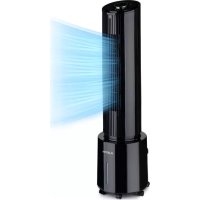
Waterfall - Air Conditioning Klarstein - Free user manual and instructions
Find the device manual for free Waterfall Klarstein in PDF.


| Brand | Klarstein |
| Model | Waterfall |
| Product type | Air cooler / Evaporative air conditioner |
| Power supply | 220-240 V~, 50 Hz |
| Power consumption | 45 W |
| Noise level (max) | ≤ 65 dB |
| Dimensions (L × H) | 260 mm × 959 mm |
| Weight | Not specified |
| Water tank capacity | Not specified |
| Fan speeds | 3 levels (low, medium, high) |
| Operating modes | Normal, Natural wind, Night |
| Oscillation | Yes, switchable |
| Cooling / humidification function | Yes, with water tank and wet towel |
| Timer | Yes, up to 9 hours |
| Remote control | Yes, with CR2032 button cell battery |
| Control type | Touch panel + remote control |
| LED display | Yes, with water level indicator |
| Dry run protection | Yes, automatic pump shut-off |
| Grille disconnector | Yes, cuts power if grille is removed |
| Air filter | Removable, cleanable grille |
| Castors | Yes, for moving |
| Main material | Not specified (probably plastic) |
| Package contents | Unit, remote control, cooling pack, wet towel |
| Item numbers | 10035833, 10035834 |
Frequently Asked Questions - Waterfall Klarstein
User questions about Waterfall Klarstein
0 question about this device. Answer the ones you know or ask your own.
Ask a new question about this device
Download the instructions for your Air Conditioning in PDF format for free! Find your manual Waterfall - Klarstein and take your electronic device back in hand. On this page are published all the documents necessary for the use of your device. Waterfall by Klarstein.
USER MANUAL Waterfall Klarstein
ONNNNNNNNNNNNNNNNNNNNNNNNNNNNNNNNNNNNNNNNNNNNNNNNNNNNNNNNNNNNNNNNNNNNNNNNNNNNNNNNNNNNNNNNNNNNNNNNNNNNNNNNNNNNNNNNNNNNNNNN
KLARSTEIN
www.klarstein.com

Berlin Brands Group UK Limited
PO Box 42
272 Kensington High Street
London, W8 6ND
United Kingdom
Dear Customer,
Congratulations on purchasing this equipment. Please read this manual carefully and take care of the following hints to avoid damages. Any failure caused by ignoring the items and cautions mentioned in the instruction manual are not covered by our warranty and any liability. Scan the QR code to get access to the latest user manual and other information about the product.
CONTENTS
Technical Data 17
Safety Instructions 18
Product Description 20
Product Installation and Usage 22
Cleaning and Storage 26
Disposal Considerations 28
Manufacturer & Importer (UK) 28
TECHNICAL DATA
| Item number 10035833, 10035834 | |
| Power supply 220-240 V~ AC | 50 Hz |
| Power rating 45 W | |
| Noise (strong mode) ≤65 dB | |
| Dimensions 260 mm × 959 mm | |
SAFETY INSTRUCTIONS
- The appliance is only for household and indoor use.
- Check the voltage indicated on the rating plate.
- This appliance is not intended for use by persons (including children) with reduced physical, sensory or mental capabilities, or lack of experience and knowledge, unless they have been given supervision or instruction concerning use of the appliance by a person responsible for their safety. Children should be supervised to ensure that they do not play with the appliance.
- This appliance can be used by children aged from 8 years and above and persons with reduced physical, sensory or mental capabilities or lack of experience and knowledge if they have been given supervision or instruction concerning use of the appliance in a safe way and understand the hazards involved. Children shall not play with the appliance. Cleaning and user maintenance shall not be made by children without supervision.
- If the supply cord is damaged, it must be replaced by the manufacturer, its service agent or similarly qualified persons in order to avoid a hazard.
- Unplug the power plug before cleaning or repairing the product.
- Do not touch the power cord with wet hands to avoid the risk of electric shock.
- Do not pull the cord when unplug the power plug.
- Do not bend the power cord or place heavy objects on it.
- Never insert wood sticks, metal sticks and other objects into the air inlet and outlet, it may lead to current leakage, short circuit and product damage.
- Do not spray insecticides or flammable sprays around the product, it may cause damage to the product.
- Avoid direct blowing to children for long time, it may lead to child sickness or affect the health.
- Make sure that no foreign matter is adhered to the power plug and insert the plug completely.
- Exception handling: If there is any peculiar smell or abnormal sound when using the product, stop it immediately and disconnect the power.
- Do not tilt or impact the device when placing or moving it after filling water, in order to prevent water spilling. If the product has ever inclined and there is water inside, immediately pull out the plug, and dry 24 hours before starting again.
- The water level of the tank must not exceed the maximum level. When the cooling or humidification function is turned on, the water level shouldn't be lower than the minimum level.
- When the tank is filled with water, do not lift the product by holding the handle, or else the water in the tank will overflow. Please push the handle. If there is no water or little water in the tank, you can hold the handle to lift the device.
- During humidification, do not remove the air filter and wet curtain bracket. It may cause water droplets ejection from air outlet.
-
Do not turn the blades with hands, or else it will damage the synchronous motor.
-
If you go out or the device will not be used for a long time, turn it off and unplug the power cord from the outlet.
- In case of fault, please deliver it to the maintenance station or notify after-sales service centre. Don't dismantle or replace parts arbitrarily, as it may cause safety problems.
- Do not ingest battery, Chemical Burn Hazard.
- This product contains a coin / button cell battery. If the coin / button cell battery is swallowed, it can cause severe internal burns in just 2 hours and can lead to death.
- Keep new and used batteries away from children.
- If the battery compartment does not close securely, stop using the product and keep it away from children.
- If you think batteries might have been swallowed or placed inside any part of the body, seek immediate medical attention.
- The batteries contain materials, which are hazardous to the environment. they must be removed from the appliance before it is scrapped and that they are disposed of safely.
- Be aware that high humidity levels may encourage the growth of biological organisms in the environment.
- Do not permit the area around the humidifier to become damp or wet. If dampness occurs, turn the output of the humidifier down. If the humidifier output volume cannot be turned down, use the humidifier intermittently. Do not allow absorbent materials, such as carpeting, curtains, drapes, or tablecloths, to become damp.
- Never leave water in the reservoir when the appliance is not in use.
- Empty and clean the humidifier before storage. Clean the humidifier before next use.
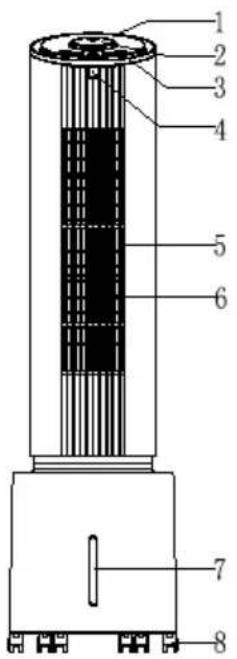
1 Function display window
2 High/medium/low knob
3 Keypad
4 Remote control receiver window
5 Wind outlet
6 Guide vanes
7 Water level display window
8 Caster
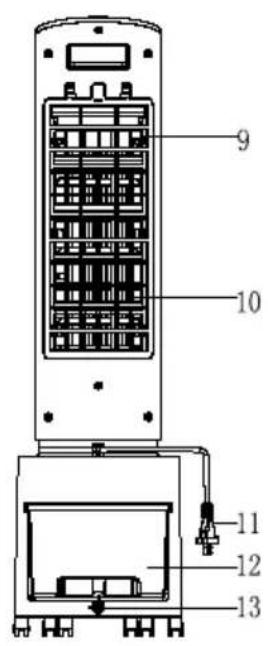
9 Air filter mesh
10 Wet curtain bracket
11 Power cord
12 Water tank
13 Tank lock
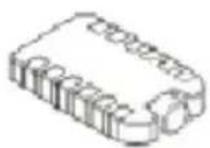
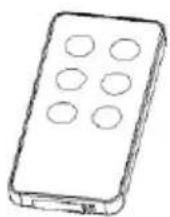
Ice box Remote control
Keypad
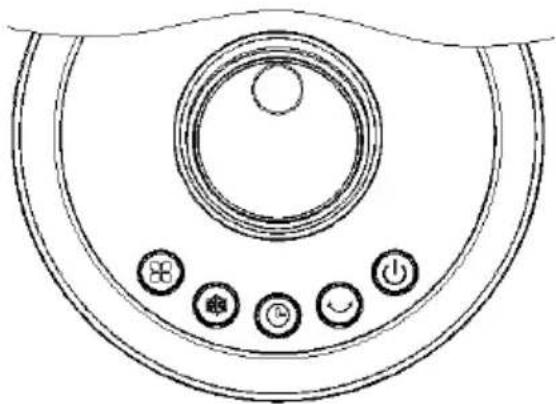
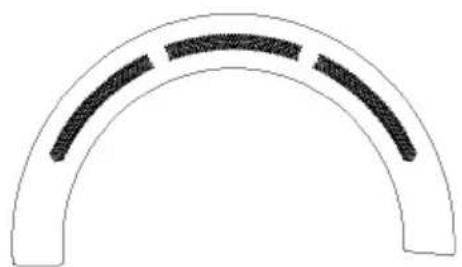
Display panel
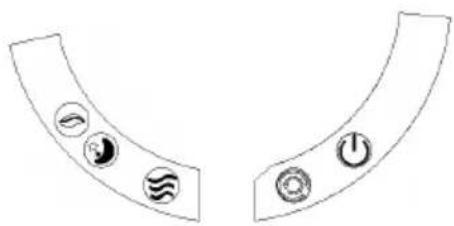
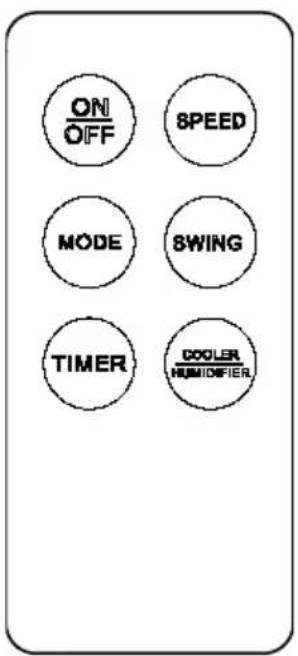
Remote control
PRODUCT INSTALLATION AND USAGE
Installation method
The product can be used directly after removing the package (without installation)
Usage of various function buttons
The buttons are touch buttons. You can tap the buttons on the operation panel to trigger the corresponding functions.
- When the power is turned on for the first time, the buzzer beeps twice and enters standby mode; except the ON/OFF button, other buttons are invalid.
- ON/OFF button: in power-on state, press this button to turn on/off the device.
After turning on, the system is in standby mode without any output.
When the device is turned on, the wind speed is at level 2 by default. After turning off the device, its current state will be saved. But the timer setting will not be saved. Same in case of sleep wind mode, it will switched to normal mode for next time.
In power-on state, if there is no button or (remote control) operation for next one minute, the brightness of all LEDs will be reduced by half. Press the ON/OFF button again, the brightness will resume and you can perform further actions.
- Speed button: in power on state, rotate this button clockwise to increase the wind speed from level 1 to level 3; rotate this button counterclockwise to reduce the wind speed from level 3 to level 1. LED indicator shows the appropriate speed state.
- Mode button: the device first enters normal wind mode; press this button to enter the natural wind mode, press it again to enter sleep wind mode, and press it again to enter normal wind mode. In natural wind and sleep wind mode. LED turns on according to setting. In normal wind mode, no LED is lit.
Press the Mode button to switch the wind modes, which run as follows:
Normal wind: high speed, medium speed, low speed
Natural wind: The main motor of the fan performs irregular operation according to pre-programmed computer program. Combined with the wind speed button, the natural wind can be set to high, medium and low level to simulate the effect of nature wind, and make the wind more soft and comfortable. The wind speed LED displays the corresponding speed, and the natural wind mode indicator turns on.
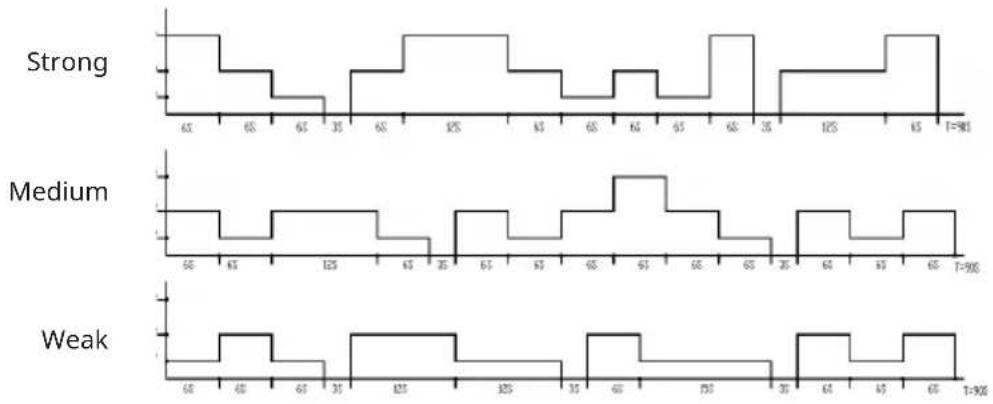
| High speed: 30 min | utes high speed natural wind -30 minutes medium speed natural wind - low speed natural wind (hold) |
| Medium speed Medium speed: 30 minutes natural wind - low speed natural wind (hold) | |
| Low speed Low speed natural wind | |
- Direction button: in power on state, press this button to turn on/off swing function, and the corresponding indicator displays its function; press this button to turn on swing function and the swing indicator turns on; press it again to turn off swing function;
- Cool/Humidify button: in power on state, press this button to turn on/off cooling/humidification, and the corresponding indicator displays its function;
- Timer button: after connecting the power, the timer function is turned off in initial state, and the digitron displays 0; after turning on, press this button to switch among OFF, 1, 2, 3....9, and the digitron of corresponding level also changes accordingly: "0" on "1" on "2" on "3" on ......."9" on "0" on. No memory is saved after restart, and changes back to "0";
- Water shortage protection: If the software detects water protection switch off (lacking water) for 5 seconds continuously when the water pump has been working for 50 seconds, the water pump stops working; and the buzzer beeps 10 seconds.
- Rear net protection switch: If the rear net is opened when the device is working, the power supply will be disconnected.
If the rear net is not installed, the switch is in off state, the power input is cut off, and the device enters standby state;
Filling water
If the refrigeration or humidification function is needed, please add water into the water tank. Before adding water, please open the water tank lock, take the water tank out and add water in it slowly (Figure 1, 2, 3 and 4): put the water tank to the original location after adding water and lock the water tank lock.

Fig.1 Water tank locked
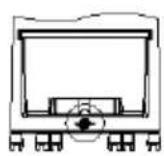

Fig.2 Water tank unlocked
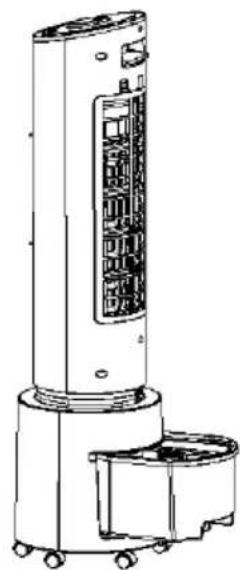
Fig 3 Water tank pulled out
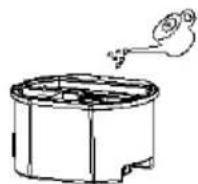
Fig 4 Filling water
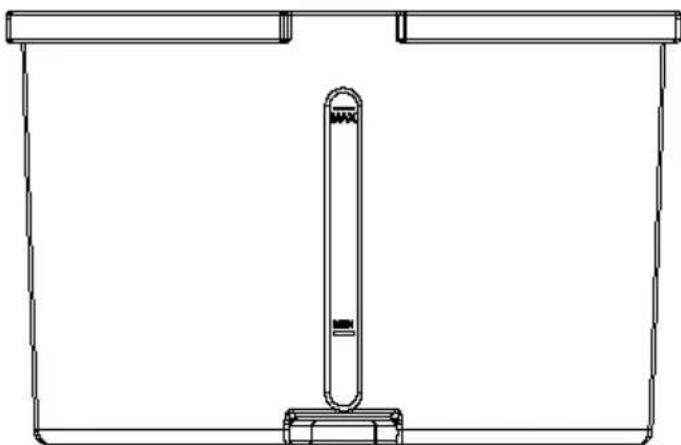
Fig 5
- For manual water filling, please note the level indicator in the front of the air cooler (Fig. 5).
- Do not fill the water exceeding the maximum water level (Fig. 5).
- Be sure to use clean tap water.
Tip: It is normal, non-toxic, and will not affect your health if the device has slight odor or the water in the tank has a slight discoloration when it is used for the first time.
Using the remote control
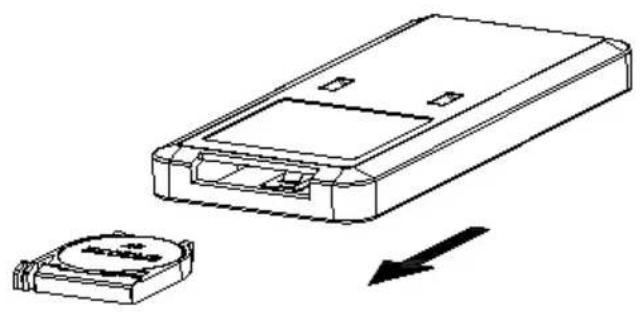
- Battery replacement: Open the battery cover as shown in the figure and replace with new battery (CR2032). Please note the positive pole and the negative pole of the battery; then, put on the battery cover.
- Use: Please point to the receiver when using the remote control.
CLEANING AND STORAGE
Air filter net and wet curtain assembly cleaning
If there are too many dust on the air filter net, the wind effect will be impacted, therefore, it should be cleaned at least once a month.
- Take the air filter net out firstly, then the wet curtain assembly can also be taken out (operation is as below).
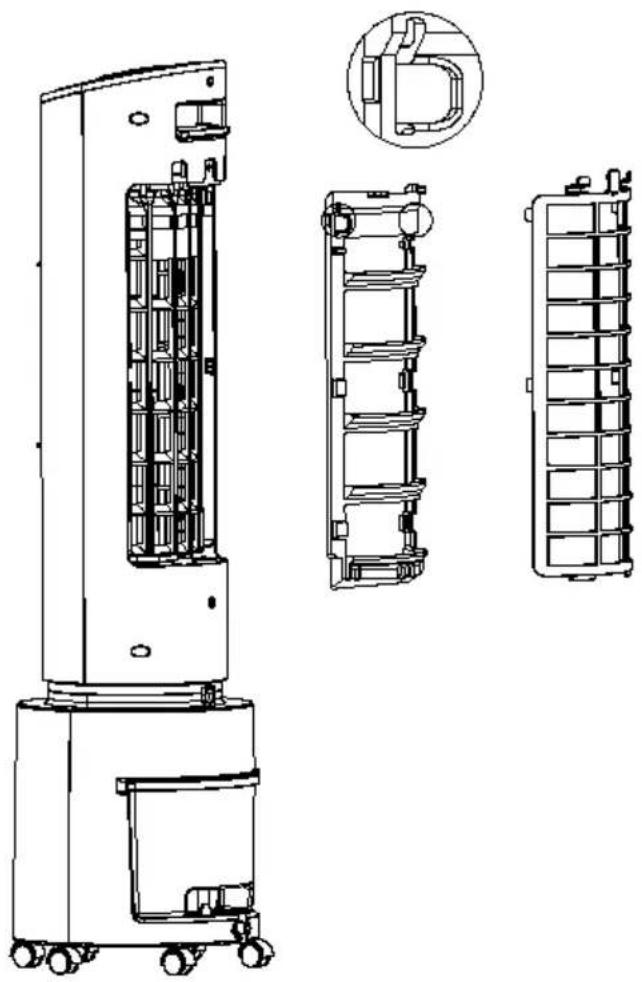
- Use cleanser and banister brush to clean the air filter net.
- Dip the wet curtain assembly into cleanser for several minutes, then clean and dry it.
Water tank cleaning
- Cut off the power and rotate the water tank lock to horizontal direction, then take the water tank out.
- Use the towel to clean the incrustation of the water tank by cleanser, and then use water to wash and pour the dirty water out.
Machine body cleaning
- Use wet towel to clean the machine body, washing by water directly is forbidden.
- Do not wash by corrosive cleanser or solvent.
- The power should be off and power cable should be pulled out when cleaning the machine body, or there is electric shock risk.
Installation after cleaning
- Install the air filter net, wet curtain assembly and water tank orderly and ensure the installation is correct.
- Link the power and confirm the machine runs smoothly.
Maintenance
- If the machine has not been used for a long time, the power cable should be pulled out and the machine should be packed to prevent dust.
- Please ensure the wet curtain and air filter net is dry and there is no water in the tank before packing.
DISPOSAL CONSIDERATIONS
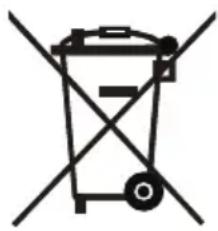

If there is a legal regulation for the disposal of electrical and electronic devices in your country, this symbol on the product or on the packaging indicates that this product must not be disposed of with household waste. Instead, it must be taken to a collection point for the recycling of electrical and electronic equipment. By disposing of it in accordance with the rules, you are protecting the environment and the health of your fellow human beings from negative consequences. For information about the recycling and disposal of this product, please contact your local authority or your household waste disposal service.
This product contains batteries. If there is a legal regulation for the disposal of batteries in your country, the batteries must not be disposed of with household waste. Find out about local regulations for disposing of batteries. By disposing of them in accordance with the rules, you are protecting the environment and the health of your fellow human beings from negative consequences.
MANUFACTURER & IMPORTER (UK)
Manufacturer:
Chal-Tec GmbH, Wallstrasse 16, 10179 Berlin, Germany.
Importer for Great Britain:
Berlin Brands Group UK Limited
PO Box 42
272 Kensington High Street
London, W8 6ND
United Kingdom
Chere cliente, cher client,
Berlin Brands Group UK Limited
PO Box 42
272 Kensington High Street
London, W8 6ND
United Kingdom
Estimado cliente,
Berlin Brands Group UK Limited
PO Box 42
272 Kensington High Street
London, W8 6ND
United Kingdom
Gentile clientele,
PRODUTTORE IMPORTATORE (UK)
Produttore:
Chal-Tec GmbH, Wallstraße 16, 10179 Berlin, Germania.
Berlin Brands Group UK Limited
PO Box 42
272 Kensington High Street
London, W8 6ND
United Kingdom


KLARSTEIN

- CONTENTS
- TECHNICAL DATA
- SAFETY INSTRUCTIONS
- PRODUCT INSTALLATION AND USAGE
- Installation method
- Usage of various function buttons
- Normal wind: high speed, medium speed, low speed
- Filling water
- Using the remote control
- CLEANING AND STORAGE
- Air filter net and wet curtain assembly cleaning
- Water tank cleaning
- Machine body cleaning
- Installation after cleaning
- Maintenance
- DISPOSAL CONSIDERATIONS
- MANUFACTURER & IMPORTER (UK)
- Estimado cliente,
- PRODUTTORE IMPORTATORE (UK)
- Produttore:
Brand : Klarstein
Model : Waterfall
Category : Air Conditioning