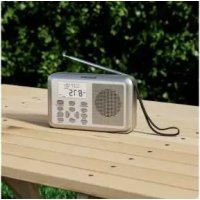
SWDR 500 C1 - Radio SILVERCREST - Free user manual and instructions
Find the device manual for free SWDR 500 C1 SILVERCREST in PDF.



| Product type | Multi-band radio (FM/AM/SW/LW) with clock and alarm |
| Brand | SilverCrest |
| Model | SWDR 500 C1 |
| Dimensions | Approx. 17.7 x 4.1 x 11 cm (L x D x H) |
| Weight | Approx. 285 g (without batteries) |
| Power supply | Mains adapter 5.9 V / 600 mA (supplied) or 4 AA (LR6) 1.5 V batteries (not supplied) |
| Power consumption | Radio mode: approx. 0.7 W; Standby mode: < 0.2 W |
| Frequency bands | FM 87.5-108 MHz, AM 522-1620 kHz, SW (9 sub-bands from 4.75 to 21.85 MHz), LW 153-279 kHz |
| Presets | 400 stations (100 per band) |
| Audio output power | 500 mW |
| Display | Backlit LCD with icons (time, frequency, alarm, etc.) |
| Main features | Dual alarm (AL1/AL2) with beep or radio, SDA (special date alarm), nap timer, stopwatch, auto standby (10-90 min), bass boost (BASS), button lock, world clock, RDS time sync |
| Headphone jack | 3.5 mm jack |
| Antenna | Telescopic antenna |
| Operating temperature | 5 °C to 35 °C |
| Operating humidity | 85% max. relative humidity |
| Maintenance and cleaning | Use a clean, dry cloth. Do not use corrosive liquids. Do not open the housing. |
| Safety | Do not expose to water, flames, or excessive heat. Disconnect during storms. Use only the supplied adapter. |
| Spare parts and repairability | Repairs must be carried out by a qualified technician. Spare parts available during the warranty period. |
| Warranty | 3 years. Contact TARGA GmbH customer service (targa@lidl.fr) |
Frequently Asked Questions - SWDR 500 C1 SILVERCREST
User questions about SWDR 500 C1 SILVERCREST
0 question about this device. Answer the ones you know or ask your own.
Ask a new question about this device
Download the instructions for your Radio in PDF format for free! Find your manual SWDR 500 C1 - SILVERCREST and take your electronic device back in hand. On this page are published all the documents necessary for the use of your device. SWDR 500 C1 by SILVERCREST.
USER MANUAL SWDR 500 C1 SILVERCREST
GB IE Operating instructions and safety instructions
 | Fehler im ersten Absatz von Kapitel 9.4.2:Bitte drücken Sie anstelle „VOL-“ (12) und „VOL+“ (4) die Tasten „TUNE-“(13) und „TUNE+“(11). |
 | Error in the first paragraph of Chapter 9.4.2:Please press the keys "TUNE-"(13) and "TUNE+"(11) instead of "VOL-" (12) and "VOL+" (4). |
 | Erreur dans le premier paragraphe du chapitre 9.4.2 :Veuillez appuyer sur les touches "TUNE"(13) et "TUNE+"(11) au lieu de "VOL-" (12) et "VOL+" (4). |
 | Fout in de eerste alinea van hoofdstuk 9.4.2:Druk op de toetsen "TUNE-" (13) en "TUNE+" (11) in plaats van "VOL-" (12) en "VOL+" (4). |
 | Błąd w pierwszym akapicie rozdziału 9.4.2:Proszę nacisnąć klawisze "TUNE-"(13) i "TUNE+"(11) zamiast "VOL-" (12) i "VOL+" (4). |
 | Chyby v prvním odstavci kapitoly 9.4.2:Stiskněte namísto „VOL-“ (12) a „VOL +“ (4) tlačitka „TUNE -“ (13) a „TUNE +“ (11). |
 | Chyby v prvom odseku kapitoly 9.4.2:Stlačte namíesto tlačidiel „VOL-“ (12) a „VOL +“ (4) tlačidlá „TUNE -“ (13) a „TUNE +“ (11). |
 | Fel i första stycket i kapitel 9.4.2:Tryck på "TUNE -" (13) och "TUNE +" (11) i stället för "VOL-" (12) och "VOL+" (4). |
 | A 9.4.2. Fejezet első bekezdésében szereplő hibák:Kérjük, nyomja meg a "TUNE -" (13) és a "TUNE +" (11) gombot a "VOL-" (12) és a "VOL +" (4) helyett. |
 | Napake v prvem odstavku poglavja 9.4.2:Pritisnite gumb "TUNE -" (13) in "TUNE +" (11) namesto "VOL-" (12) in "VOL+" (4). |
[PT | Erro no primeiro parágrafo do Capítulo 9.4.2:Por favor pressione as teclas "TUNE-"(13) e "TUNE+"(11) em vez de "VOL-" (12) e "VOL+" (4). |
| Pogreške u prvom stavku poglavlja 9.4.2:Pritisnite tipke "TUNE -" (13) i "TUNE +" (11) umjesto "VOL-" (12) i "VOL +" (4). | |
 | Σφάλματα στην πρώτη παράγραφο του κεφαλαιου 9.4.2:Πιέστε τα πλήκτρα "TUNE -" (13) και "TUNE +" (11) αντί για "VOL-" (12) και "VOL +" (4). |
 | Greške u prvom odeljku poglavlja 9.4.2:Pritisnite tastere „TUNE -" (13) i „TUNE +" (11) umesto „VOL-“ (12) i „VOL +" (4). |
Deutsch......2
English 45
Français....85
Nederlands 132
Polski 173
Čeština 216
Slovenčina....255
Inhalt
natural_image
Illustration of a power adapter connected to a cable and an open book, labeled B and C (no text or symbols on the diagram itself)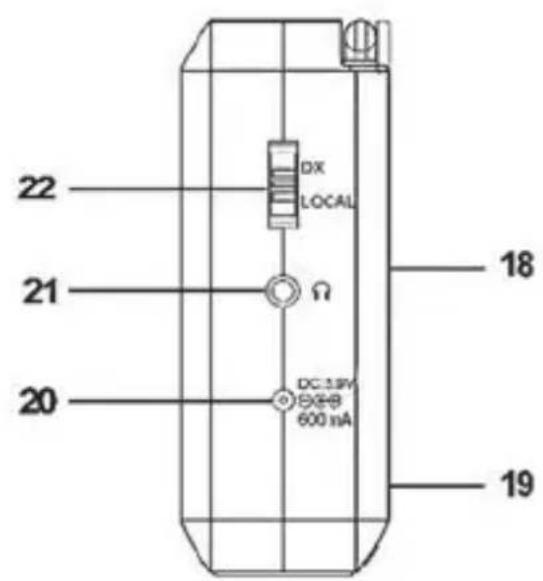
natural_image
Interior view of a device showing two battery cells with AA1.5V labels, mounted on a tray (no text or symbols beyond component labels)* UTC: Universal Time Coordinated
| Kürzel | Differenz zur UTC* | Sommer-zeit | Stadt / Land |
| HNL | -10:00h nein | Honolulu / USA | |
| ANC | -9:00h ja Anchorage / USA | ||
| YVR | -8:00h ja Vancouver / Kanada | ||
| LAX | -8:00h ja Los Angeles / USA | ||
| DEN | -7:00h ja Denver / USA | ||
| CHI | -6:00h ja Chicago / USA | ||
| MEX | -6:00h ja Mexico City / Mexico | ||
| NYC | -5:00h ja NewYork / USA | ||
| YYZ | -5:00h ja Toronto / Kanada | ||
| YUL | -5:00h ja Montreal / Kanada | ||
| CCS | -4:30h nein Caracas / Venezuela | ||
| RIO | -3:00h ja Rio | de Janeiro / Brasilien | |
| BUE | -3:00h nein B | Buenos Aires / Argentinien | |
| UTC* | 0:00h nein U | universal Time Coordinated | |
| LON | 0:00h ja London | don / Großbritannien | |
| BER | +1:00h | ja | Berlin / Deutschland |
| PAR | +1:00h ja Paris / Frankreich | ||
| ROM | +1:00h ja Rom / Italien | ||
| CAI | +2:00h ja Kairo / Ägypten | ||
| IST | +2:00h ja Istanbul / Türkei | ||
| MOW | +3:00h ja Moskau / Russland | ||
| KWI | +3:00h nein | Kuwait City / Kuwait | |
| DXB | +4:00h nein | Dubai / Saudi Arabien | |
| KHI | +5:00h nein | Karachi / Pakistan | |
| DAC | +6:00h ja Dacca / Bangladesh | ||
| BKK | +7:00h nein | Bangkok / Thailand | |
| SIN | +8:00h nein | Singapur | |
| HKG | +8:00h | nein | Hong Kong |
| PEK | +8:00h nein | Peking / China | |
| SHA | +8:00h nein | Shanghai / China | |
| TYO | +9:00h nein | Tokyo / Japan | |
| SYD | +10:00h ja Sydney / Australien | ||
| NOU | +11:00h nein | Noumea / Neukaledonien | |
| AKL | +12:00h | ja Auckland / Neuseeland |
https://www.targa.gmbh/downloads/conformity/330977_1907.pdf
- Intended use...... 47
- Package contents ...... 48
- Technical specifications 49
- Safety instructions 50
- Copyright 56
- Operating environment 56
- Overview of controls and button functions 57
7.1 Display icons....59
7.2 Stand....60
- Before you start.... 61
8.1 External power / battery power operation 61
8.2 Inserting the batteries....61
8.3 Connecting the power adapter ....62
- Getting started 62
9.1 Display illumination....62
9.2 Switching the device on/off....62
9.3 Setting the time zone 63
9.4 Setting the date and time 65
9.4.1 Automatic synchronisation via RDS....65
9.4.2 Manual setting 65
9.5 Displaying the world clock....67
9.6 The "MODE" button functions....68
9.7 SDA (Special Date Alarm) 68
9.8 NAP timer 69
9.9 Stop watch ....70
9.10 Setting the AM reception spacing....71
9.11 Adjusting the volume....71
9.12 Setting the sensitivity....71
9.13 Enabling bass amplification....71
9.14 Selecting a station 72
9.15 Automatic station search and automatic store 72
9.16 Manual station search ....73
9.17 Manually tuning a station....73
9.18 Fine tuning....73
9.19 Saving a station manually ....74
9.20 Recalling a saved station....75
9.21 Stereo output 75
9.22 SLEEP timer....75
9.23 Setting the alarm 76
9.24 Enabling the alarm 77
9.25 Enabling/disabling the button lock....79
9.26 Connecting earphones....79
9.27 Storage when not using the product....80
- Troubleshooting.... 80
- Environmental regulations and disposal information ..... 81
- Conformity notes 83
- Warranty and Service Information 83
Congratulations!
By purchasing the SilverCrest SWDR 500 C1 multi-band radio, hereinafter referred to as multi-band radio, you have opted for a high-quality product.
Familiarise yourself with the multi-band radio before using it for the first time and read these operating instructions carefully. Observe the safety instructions and only use the multi-band radio in the manner described in these operating instructions and for the indicated fields of application.
Keep these operating instructions in a safe place. Hand over all documents in the event that you pass on the multi-band radio to a third party.
1. Intended use
This device is a consumer electronics device. It has been designed to re and play back radio stations. The device can also be used as a clock and as an alarm clock. It is suitable only for private use, not for industrial or commercial purposes. The device may also not be used in tropical climates. The manufacturer is not liable for any damage or problems caused by unauthorised modifications. Only use accessories recommended by the manufacturer. Observe the regulations and laws in the country of use.
Please note that country-specific regulations may exist with respect to the frequency bands that can be received. Any information received from frequency bands outside those that are explicitly free for public use may not be used, nor may its contents be forwarded to any third parties.
2. Package contents
Remove the device and all the accessories from the packaging. Remove the packaging material and check whether all the parts are complete and undamaged. If you find anything missing or damaged, please contact the manufacturer.
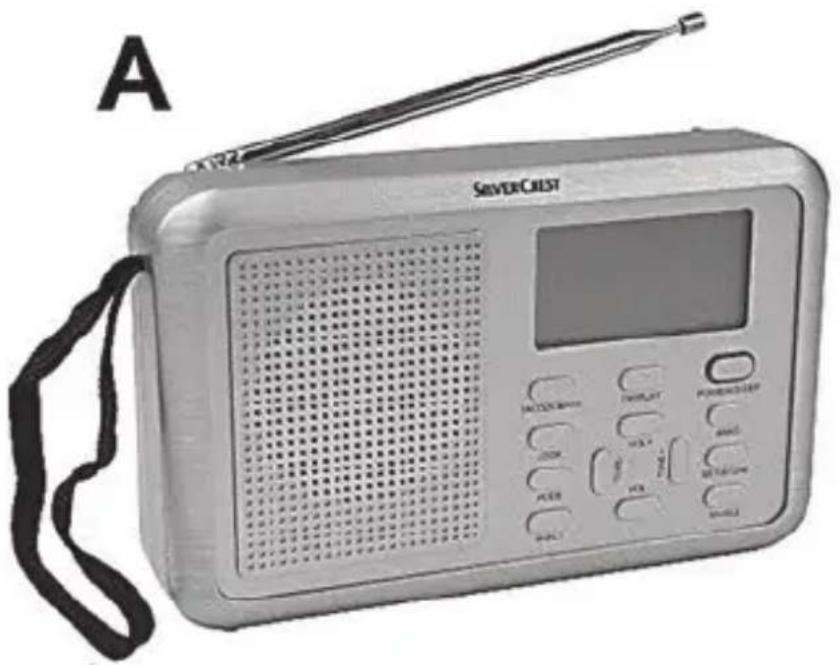
natural_image
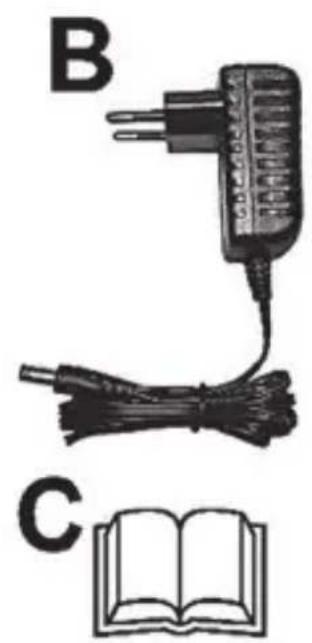
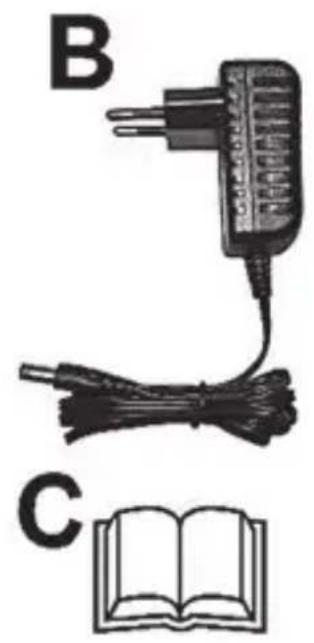
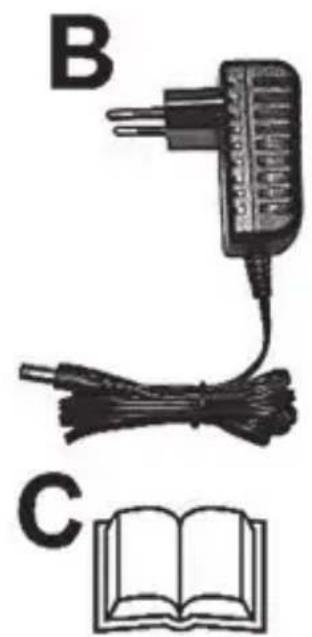
Illustration of an electric plug connected to a cable and an open book, labeled B and C (no text or symbols on components)A Multi-band tuner SilverCrest SWDR 500 C1
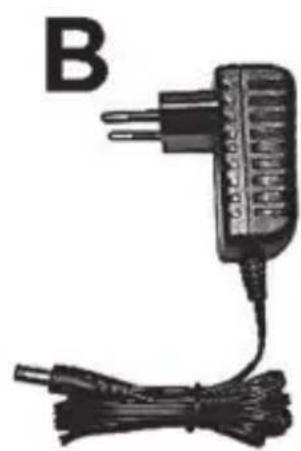
B Wall plug power adapter
C These operating instructions (linear illustration)
3. Technical specifications

This information describes the technical characteristics of your device. Different national regulations may apply in different countries with respect to the frequency bands that are free for public use. Please note that receiving any information from bands outside these frequency bands will be illegal and may be punishable by law.
Multi-band tuner
| Power supply | • supplied power adapter• optional 4x AA 1.5 V (LR6) batteries |
| Input voltage/input current 5,9 V / 600 mA | |
| Power consumption in radio mode: approx. 0.7 Win Standby mode: < 0.2 W | |
| Audio output power 500 mW | |
| Frequency bands | FM 87.5 - 108 MHzAM 522 - 1620 KHz |
| Please note that the given tuning bands may slightly vary upwards or downwards because of product tolerances. | SW1 4.75 - 5.94 MHzSW2 5.95 - 7.09 MHzSW3 7.10 - 9.49 MHzSW4 9.50 - 11.64 MHzSW5 11.65 - 13.59 MHzSW6 13.60 - 15.09 MHzSW7 15.10 - 17.49 MHzSW8 17.50 - 21.44 MHzSW9 21.45 - 21.85 MHzLW 153 - 279 KHz |
| Station presets 400 (100 per band) | |
| Dimensions approx. 17.7 x 4.1 x 11 cm (W x D x H) | |
| Weight approx. 285 g (without batteries) | |
| Max. output voltage on earphones jack | approx. 120 mV |
| Battery life approx. 28 hours | |
| Operating temperature 5 °C to 35 °C | |
| Storage conditions -10 °C to 50 °C | Note: Do not store the device at hot places (e.g. inside a car in summer) |
| Operating humidity max. 85% | rel. humidity |
Power adapter
| Manufacturer DONGGUANG | OBELIEVE ELECTRONIC CO.,LTD |
| Type | OBL-0590600E |
| Input voltage, frequency / input current | 100-240 V, 50/60 Hz / 0,3 A MAX |
| Output voltage / output current | 5,9 V 7/600 mA, -@+ |
The technical data and design may be changed without prior notice.
4. Safety instructions
Before you use this device for the first time, please read the following notes in this manual and heed all warnings, even if you are familiar electronic devices. Keep this manual in a safe place for future reference. If you sell the device or pass it on, it is essential that you also hand over this manual. The User Manual is part of the product.
Explanation of used symbols

DANGER! This signal word indicates danger involving a high level of risk, which if not avoided, may result in severe injury or even death.

WARNING! This signal word indicates danger involving a medium level of risk, which if not avoided, may result in severe injury or even death.

CAUTION! This signal word indicates danger involving a low level of risk, which if not avoided, may result in minor or moderate injury.

CAUTION! This signal word indicates important information for protection against damage to property.
This symbol denotes possible danger due to electric shock.
This icon on the multi-band radio indicates that the operating instructions must be observed.

This symbol denotes further information on the topic.
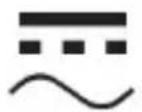
DC voltage
AC voltage
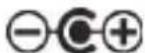
Polarity of the power supply unit

The mains adapter is only suitable for use in indoor rooms.

Protection class II

WARNING! Please make sure that:
- you always ensure sufficient ventilation (do not put the device on shelves, a carpet, a bed or places where the ventilation slots are covered and leave at least a 10 cm gap on all sides)
- contact with splashing and dripping water and aggressive liquids is avoided, and that the device is not operated in the vicinity of water. In particular, the device should never be immersed, nor should any objects filled with liquid, for example vases or drinks, be placed on or near the device.

CAUTION! Please make sure that:
- no open flames (for example, burning candles) are placed on or near the device.
■ no foreign bodies penetrate into the device
■ the device is not exposed to excessive temperature fluctuations, as otherwise condensation can occur and lead to electrical short circuits. If, however, the device has been exposed to significant temperature fluctuations, wait approximately two hours until the device has reached ambient temperature before starting it up.
■ the device and the plug are not used during thunder and lightning storms. Remove the plug from the socket in the event of thunder and lightning storms. - when a plug is being used, the socket it is connected to is always easily accessible. Always lay the cable in such a way that nobody can trip over it.

Caution! Please make sure that:
■ the device is not exposed to direct sources of heat (for example, heaters)
■ the device is not exposed to direct sunlight or strong artificial light
■ the device is not placed close to magnetic fields (for example, loudspeakers)
■ the device is not exposed to excessive shocks and vibrations.

DANGER! Batteries
Insert the batteries with the correct polarity. Refer to the diagram inside the battery compartment. Do not attempt to recharge the batteries and do not dispose of the batteries in a fire. Do not mix battery types (old and new or carbon and alkaline, etc.). Remove the batteries when the device is not to be used for an extended period. Improper use could cause explosions or leaks. Batteries must never be opened or deformed, as this could result in chemical leaking out which could cause injuries. If the battery fluid comes into contact with the skin or eyes, rinse immediately with plenty of water and seek medical aid.
Do not allow children to play with the batteries as they represent potential choking hazards. Keep batteries out of reach of children. If a battery is swallowed, seek medical help immediately.

DANGER! Personal safety
This device can be used by children aged eight and over, as well as by people with reduced physical sensory or mental abilities or who lack experience and knowledge, providing they are supervised or have been instructed in the safe use of the device and understand the resulting dangers. Children must not play with the device. Small parts can be lethal if swallowed. If small parts are swallowed, you must seek medical attention immediately. Cleaning and user maintenance must not be carried out by children unless they are supervised.
Keep the packaging film away from children.

Danger of suffocation!

DANGER! Wall plug power adapter
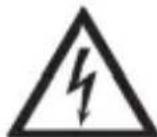
Only plug the wall plug power adapter into a suitable and easily accessible power socket. Do not touch the power adapter with wet hands as this could cause an electric shock. Unplug the wall plug power adapter from the mains in the following circumstances:
• in any dangerous situation
- if the wall plug power adapter makes an unusual noise or gives off smoke
• before a storm and/or thunderstorm
- if the wall plug power adapter is damaged
- if the wall plug power adapter has been exposed to rain, liquids or high levels of humidity
- when you wish to clean it
- The wall plug power adapter consumes electricity even in Standby mode. In order to completely disconnect the device from the mains, the wall plug power adapter must be pulled out from the power socket.
Please follow these instructions to avoid risk of potential fatal injury or fire! Never cover the wall plug power adapter, otherwise there is a risk of fire. Never open the housing of the plug. This could result in potentially fatal electrocution.

WARNING! Cables
Unplug all cables by holding the plugs and never pull on the cables themselves. The plug must not be touched with wet hands. Never place pieces of furniture or other heavy objects on the cables and take care that they do not become damaged, especially at the plugs and sockets. Never install the cables around hot or sharp objects to avoid damaging them. Never tie knots in cables and do not tie them to other cables. All cables should be positioned so that nobody can trip over them or be obstructed by them.

WARNING! Display
Do not apply any pressure to the screen and keep sharp objects away from the screen. A broken screen represents a risk of injury. Wear gloves when collecting the broken parts and contact the manufacturer if necessary. In the case of scratches or other damage to the display, take extreme care to ensure that no fluid escapes from the display.
If fluid does escape, proceed as follows:
- If the fluid comes into contact with the skin, wipe off with a clean cloth and rinse with plenty of water. Contact a doctor if necessary.
- If the fluid comes into contact with the eyes, rinse them under running water for at least 15 minutes and contact a doctor immediately.
- If the fluid is swallowed, first rinse the mouth out with water and then drink plenty of water. Contact a doctor immediately!

WARNING! Repairs
Repairs are required when this device has been damaged in any way, for example, when the power adapter or device housing is damaged, when liquids or objects have entered the device or when the product has been exposed to rain or moisture. Repairs are also necessary if the product is not working properly or has been dropped. If you notice any smoke, unusual noise or strange smells, switch off the device immediately, disconnect the wall plug power adapter from the power supply and remove any inserted batteries. If this occurs, do not continue to use the device and have it checked out by an expert. All repairs must be carried out by qualified service personnel. Never open the housing of the device or the wall plug power adapter.

WARNING! Cleaning
Disconnect the device from the mains. Only use a clean, dry cloth for cleaning the multi-band tuner. Never use any corrosive liquids. Never open the housing of the device, this will void your warranty.
If the batteries leak, contact a technician for a professional cleaning.
5. Copyright
All the contents of this user manual are protected by copyright and provided to the reader for information only.
Copying data and information without the prior explicit written consent of the author is strictly forbidden. This also applies to any commercial use of the contents and information.
All texts and diagrams are up-to-date as of the date of printing.
6. Operating environment
The device is not designed for use in environments with high temperatures or humidity (e.g. bathrooms) or those with above-average levels of dust. Operating temperature and operating humidity: 5°C to 35°C, max. 85% rel. humidity.
7. Overview of controls and button functions
These operating instructions have a fold-out cover. Fold-out the cover so you can refer to the relevant controls at any time.
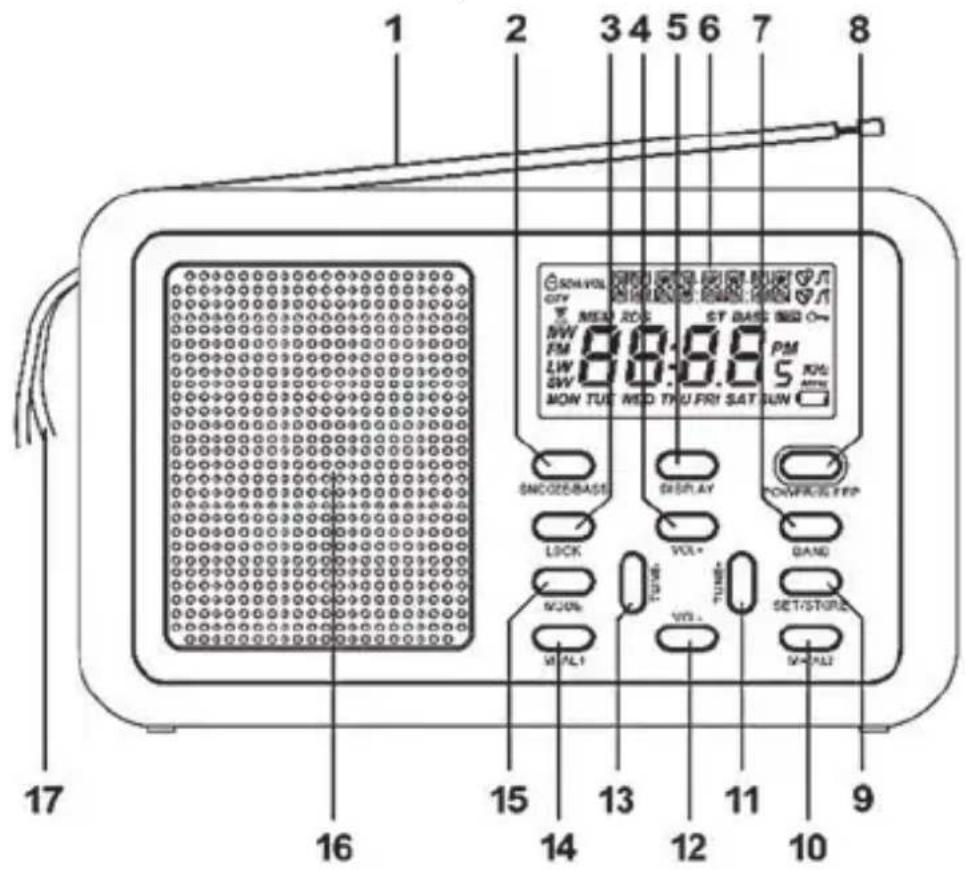
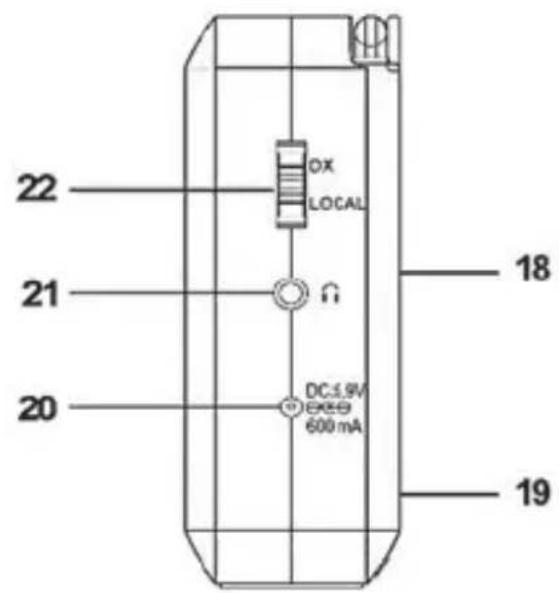
1 Telescopic antenna
2 SNOOZE/BASS button (delay the alarm for 5 to 120 minutes/amplify low-frequency sound)
3 LOCK button (button lock)
4 VOL + button (increase the sound volume)
5 DISPLAY button (show the time zone)
6 Display
7 BAND button (select the frequency band)
8 POWER/SLEEP button (switch on/off; set the sleep timer)
9 SET/STORE button (set time, store a station)
10 M+/AL2 button (tune in the next station preset, Alarm 2)
11 TUNE+ button (station scan to increasing frequencies)
12 VOL - button (reduce the sound volume)
13 TUNE-button (station scan to decreasing frequencies)
14 M-/AL1 button (tune in the previous station preset, Alarm 1)
15 MODE button
16 Speaker
17 Strap
18 Stand (on the back)
19 Battery compartment (on the back)
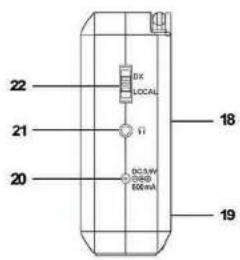
20 ⊖ ⊕ ⊕ (receptacle for optional wall plug power adapter)
21 (earphones receptacle)
22 DX/LOCAL button (set the reception sensitivity)
7.1 Display icons
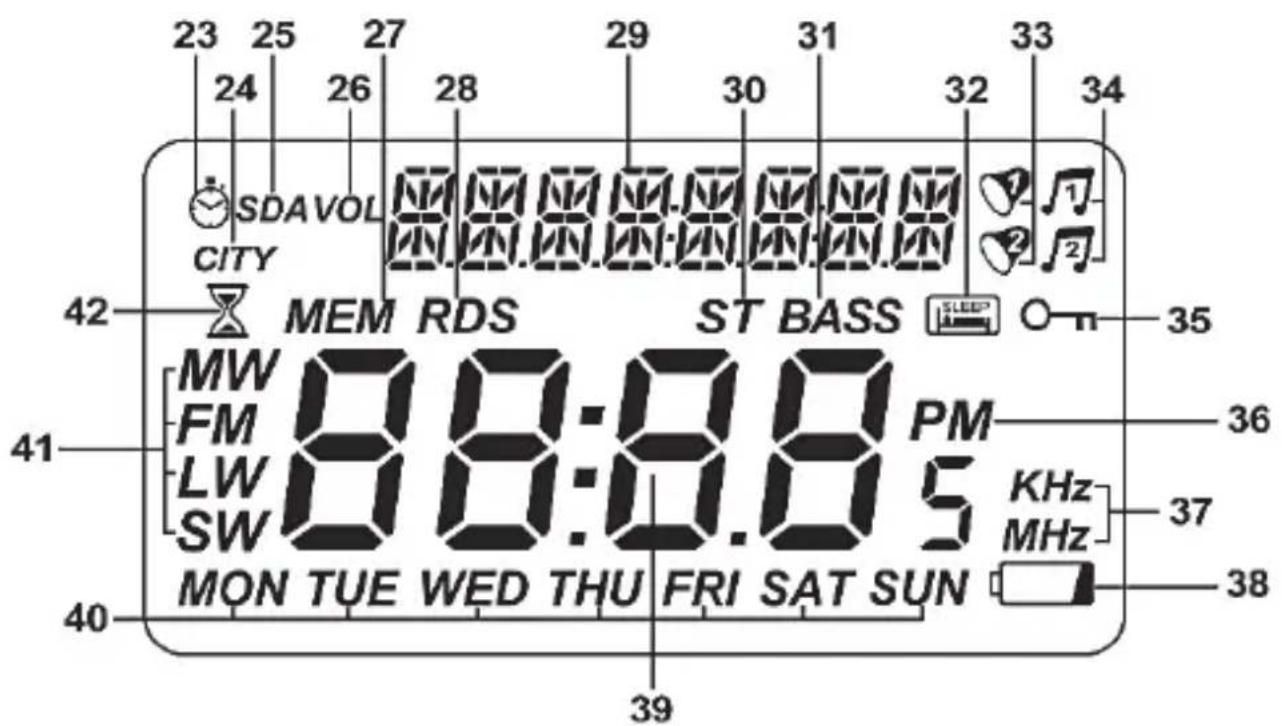
23 Stop watch
24 CITY
25 SDA (Special Date Alarm)
26 VOL (sound volume)
27 MEM (station preset)
28 RDS (Radio Data System)
29 Different indicators: station name, date, station preset
30 ST (STEREO - only for earphones mode)
31 BASS (bass amplification enabled)
32 SLEEP (sleep timer)
33 Alarm 1/2 enabled (buzzer)
34 Alarm 1/2 enabled (radio)
35 LOCK (button lock)
36 Afternoon indicator (PM)
37 Frequency unit
38 Low battery indicator
39 Clock/frequency display
40 Day of the week indication
41 Frequency band
42 NAP timer
7.2 Stand
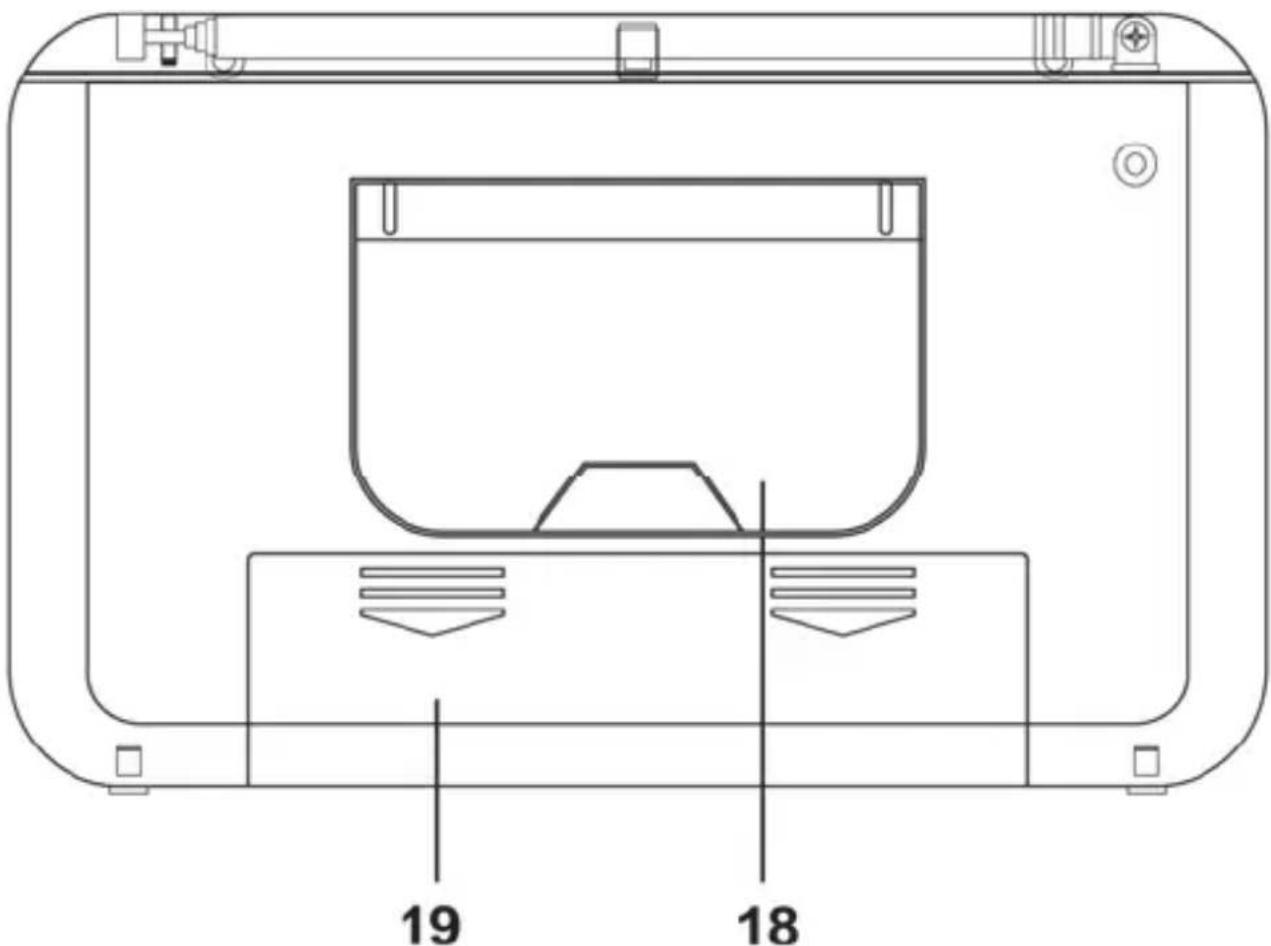
On the back panel of the device you'll find a stand (18) that allows to install the multi-band tuner in an inclined position. To do this, fold-out the retractile stand (18).
8. Before you start
You can power the device on either by using the supplied power adapter (B) or by using 4 optional AA-sized (LR6) batteries. The batteries are not included in the package.
8.1 External power / battery power operation
When disconnecting the multi-band tuner (A) from the power supply, different settings (time and alarm time) are lost. To avoid this, insert batteries before disconnecting the device from the mains. This guarantees that the mentioned settings are preserved.
Any stored stations are preserved even if there are no batteries inserted when disconnecting the device from the mains.
8.2 Inserting the batteries
Open the battery compartment cover (19) on the back panel of the device by sliding it towards the bottom and remove it. Insert the batteries with the correct polarity (+ and -), as shown in the following figure. The correct polarity is labelled on the batteries and inside the battery compartment. Re-insert the cover of the battery compartment (19) and slide it upwards until it locks in place.
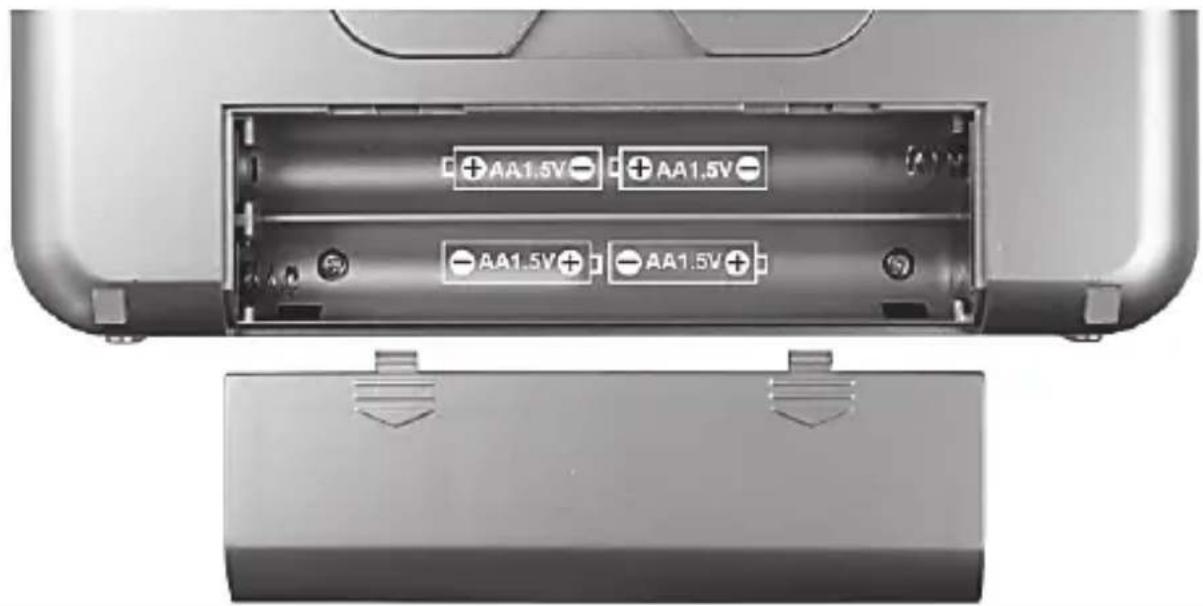
If the display (6) indicates a low battery level (38), the batteries are almost empty. When this happens, replace the batteries with new batteries of the same type.

WARNING! Remove the batteries when the device is not to be used for an extended period. The batteries could leak and cause damage to the device.
8.3 Connecting the power adapter
Plug the wall plug power adapter plug (B) into the receptacle (20) of the multi-band tuner (A). Plug the wall plug power adapter (B) into an easily accessible power socket.
While the wall plug power adapter (B) is connected, the device is powered from the mains and not from any inserted batteries. When powering the device via the wall plug power adapter (B) for a long time, you should remove the batteries to avoid any leakage.
9. Getting started
9.1 Display illumination
Press any button to switch the display illumination on for approx. 10 seconds. It automatically switches back off after this time.
9.2 Switching the device on/off
To power the device on, press the "POWER/SLEEP" button (8) once. When powered on, the currently tuned in frequency, the frequency band and the day of the week are shown on the display (6):
| FM | VHF FM band |
| MW | Medium wave band |
| SW | Short wave band |
| LW | Long wave band |
For the "FM" band, the name of the station is also shown, if broadcast. When the station transmits no name or when the signal is too weak, the current date is shown instead.
For the "MW", "SW", and "LW" bands, the current date is shown there.
To power the device off, press the POWER/SLEEP button (8) again. When powered off, the current date and time, and the day of the week are shown on the display (6).

It is recommended to start configuring the multi-band tuner with setting the time zone. To do so, see the "Setting the time zone" section below.
9.3 Setting the time zone
The following table contains an overview of the abbreviated city names for the different time zones. The table also lets you check the time offset and, if applicable, a daylight saving.
* UTC: Universal Time Coordinated
| Abbreviation | UTC offset* | Daylight saving | City / country |
| HNL | -10:00h no | Honolulu / USA | |
| ANC | -9:00h yes | Anchorage / | USA |
| YVR | -8:00h yes | Vancouver / | Canada |
| LAX | -8:00h yes | Los Angeles / | USA |
| DEN | -7:00h yes | Denver / USA | |
| CHI | -6:00h yes | Chicago / USA | |
| MEX | -6:00h yes | Mexico City / | Mexico |
| NYC | -5:00h yes | New York / | USA |
| YYZ | -5:00h yes | Toronto / Canada | |
| YUL | -5:00h yes | Montreal / Canada | |
| CCS | -4:30h no | Caracas / Venezuela | |
| RIO | -3:00h yes | Rio de Janeiro / | Brazil |
| BUE | -3:00h no | Buenos Aires / | Argentina |
| UTC* | 0:00h | no | Universal Time Coordinated |
| LON | 0:00h yes | London / United Kingdom | |
| BER | +1:00h yes | Berlin / Germany | |
| PAR | +1:00h yes | Paris / France | |
| ROM | +1:00h | yes | Rome / Italy |
| CAI | +2:00h yes | Cairo / Egypt | |
| IST | +2:00h yes | Istanbul / Turkey | |
| MOW | +3:00h yes | Moscow / Russia | |
| KWI | +3:00h no | Kuwait City / Kuwait | |
| DXB | +4:00h no | Dubai / Saudi Arabia | |
| KHI | +5:00h no | Karachi / Pakistan | |
| DAC | +6:00h yes | Dacca / Bangladesh | |
| BKK | +7:00h no | Bangkok / Thailand | |
| SIN | +8:00h no | Singapore | |
| HKG | +8:00h | no | Hong Kong |
| PEK | +8:00h no | Beijing / China | |
| SHA | +8:00h no | Shanghai / China | |
| TYO | +9:00h no | Tokyo / Japan | |
| SYD | +10:00h yes | Sydney / Australia | |
| NOU | +11:00h no | Noumea / New Caledonia | |
| AKL | +12:00h yes | Auckland / New Zealand | |
UTC is the abbreviation for "Universal Time Coordinated", formerly also called GMT (Greenwich Mean Time). UTC is the base for time zone calculation. The corresponding offset is shown in the 2nd column of the table.
To set the time zone, proceed as follows:
- While powered off, press and hold the "SET/STORE" button (9) until the display (6) reads "US" or "EU". Then press the "SET/STORE" button (9) briefly to go to the time zone setting. The currently set city abbreviation and the corresponding local time are shown in the upper part to the display (6). The default setting is "UTC".
- Press the "VOL-" (12) or "VOL+" (4) button to set the city abbreviation for your current time zone, e.g. BER for Berlin. You can find the city abbreviation in the table above. With each city abbreviation, the displayed time is changed.
When finished, set the correct time as described in the following section.
9.4 Setting the date and time
9.4.1 Automatic synchronisation via RDS
Upon factory delivery time synchronisation via RDS is enabled. If the device receives an RDS signal after powering on, the date and time are synchronised and shown correctly after a few moments.

The multi-band radio is only set automatically if the selected station transmits an RDS signal and the reception quality is strong enough to receive the RDS signal. If an RDS signal is received, the RDS indicator (28) appears on the display.
Time synchronisation and the correct time setting also depend on the set time zone. Therefore it is mandatory to set the correct time zone first. To do so, see the "Setting the time zone" section above.
9.4.2 Manual setting
First disable automatic time synchronisation via RDS. To do so, while powered off, press the "MODE" button (15) four times until "TS ON" (Time Synchronisation ON) appears in the upper part of the display (6). Press the
"VOL-" (12) or "VOL+" (4) button to set it to "TS OFF" (Time Synchronisation OFF).
Now set the correct time zone.
The time can only be set while the device is powered off. If it is powered on, press the POWER/SLEEP button (8) to power the device off.
If no button is pressed for approx. 7 seconds while changing the setting, the settings are applied and the unit exits the setting mode. You can keep the buttons "VOL-" (12) or "VOL+" (4) pressed to accelerate the digits count.
■ While powered off, press and hold the "SET/STORE" button (9) until the display (6) reads "US" or "EU". Now press the "VOL-" (12) or "VOL+" (4) button to select your preferred date format.
Example:
| EU | DD.MM.YYYY |
| US | MM.DD.YYYY |
Press the "SET/STORE" button (9) to confirm your selection.
Please remember that the tuning spacing for the AM band is also changed with this setting.
- Now set the correct time zone as described in the previous chapter and press the "SET/STORE" button (9) to confirm the setting. The set time format flashes.
- Now you can press the "VOL-" (12) or "VOL+" (4) buttons to set the desired time format. Upon factory delivery the time format is set to 24 hours. You have the choice between 12H and 24H. Press the "SET/STORE" button (9) to confirm the setting. The hour digit flashes.
-
Press the "VOL-" (12) and "VOL +" (4) buttons to set the hour. Press the "SET/STORE" button (9) to confirm the setting. The minutes digit flashes.
-
Press the "VOL-" (12) and "VOL +" (4) buttons to set the minute. Press the "SET/STORE" button (9) to confirm the setting. The year digit flashes.
- Press the "VOL-" (12) or "VOL+" (4) buttons to set the correct year. Press the "SET/STORE" button (9) to confirm the setting. The month digit flashes.
- Press the "VOL-" (12) and "VOL +" (4) buttons to set the month. Press the "SET/STORE" button (9) to confirm the setting. The day digit flashes.
- Press the "VOL-" (12) and "VOL +" (4) buttons to set the day. Press the "SET/STORE" button (9) to confirm the setting.
The day of the week (40) is calculated automatically and shown on the display (6).
| Display Day of the week | |
| MON | Monday |
| TUE | Tuesday |
| WED | Wednesday |
| THU | Thursday |
| FRI | Friday |
| SAT | Saturday |
| SUN | Sunday |
■ You have finished the setting.
- If you have selected the 12-hour clock format, the "PM" icon (36) appears on the display (6) for post meridian clock hours.

Please note that you should adjust the clock when you move into a different time zone.
9.5 Displaying the world clock
Press the "DISPLAY" button (5). The time is shown in large digits on the display (6). Additionally, you can show the time for a specific time zone in the upper part of the display. Use the "TUNE-" (13) or "TUNE+" (11) button to select the
time zone for which you want to know the current time. After this, with each press of the "DISPLAY" button (5) the selected time zone and the corresponding time are displayed.
Please remember that the time zone is being displayed only. To set the time zone, proceed as described in the "Setting the time zone" chapter.
9.6 The "MODE" button functions
While the device is powered off the "MODE" button (15) lets you access the setting mode for different functions.
| Press once SDA (Special Date Alarm) | |
| Press twice NAP timer | |
| Press 3 times Stop watch | |
| Press 4 times RDS time synchronisation ON/OFF | |
In radio mode the "MODE" button (15) has the following functions:
| Press once To show and change the tuning mode | |
| Press twice | FM: To show and change the "MONO" and "AUTO-ST" settingsSW: Quick selection of the different short wave bands |
9.7 SDA (Special Date Alarm)
This function lets you program up to 10 yearly-recurring date alarms. The procedure is as follows:
■ While the device is powered off, press the "MODE" button (15) once. The display (6) reads "SDA". 01 (for the first SDA) and the associated date in month.day format flash. If the alarm is disabled, the "SDA" icon (25) will also flash. While an SDA is enabled, the "SDA" icon (25) illuminates. In this case, the "SDA" icon (25) is also shown in clock mode.
- Press the "VOL-" (12) or "VOL+" (4) buttons to set the desired date. You can keep the buttons pressed to accelerate the digits count.
- Press the "SET/STORE" button (9) briefly to enable or disable the set SDA. You can enable or disable each SDA independently from the others. The setting will be saved automatically.
- Press the "TUNE-" (13) or " TUNE+" (11) button to program more SDAs in the same way.
The enabled SDAs will sound every year. If the current date matches the set SDA alarm date, the buzzer will sound for approx. 10 minutes hourly between 08:00 h and 23:00 h. The current radio mode is not interrupted by the SDA. The alarm will sound only after the user has stopped radio mode and the minutes digit has increased by "1".
Press any button to disable the alarm sound.
9.8 NAP timer
You can set a nap timer (with alarm buzzer only) for a one-time power on event. There are 6 preset times, use the "TUNE-" (13) or "TUNE+" (11) button to select one. The default settings of the 6 timers are different and are 10, 15, 20, 25, 30 and 35 minutes.
■ While the device is powered off, press the "MODE" button (15) twice. The NAP timer icon (42), the timer number and the preset power-on time in minutes appear on the display (6).
- Press the "TUNE-" (13) or " TUNE+" (11) button multiple times to toggle between the preset times.
- Press the "VOL-" (12) and "VOL +" (4) buttons to set these times from 1 to 39 minutes as required.
- Press the "SET/STORE" button (9) briefly to launch the timer.
- The countdown appears on the display (6). After the timer is finished, an alarm will sound until you disable it.
Press any button to disable the nap timer alarm buzzer.
- Press the "SET/STORE" button (9) briefly to cancel the enabled NAP timer before the countdown ends. The remaining time of the previously set timer is shown on the display. Press the "SET/STORE" button (9) briefly again to relaunch the timer with the remaining time.
■ While the timer is running, you can change its value by pressing the "VOL-" (12) or "VOL+" (4) buttons.

Please note: When the NAP-timer is activated do not press any buttons apart from "SET/STORE" (9), "VOL-" (12) or "VOL+" (4). Otherwise the NAP-timer will be finished.
9.9 Stop watch
To use the stop watch, proceed as follows:
■ While the device is powered off, press the "MODE" button (15) three times. The display (6) shows the stop watch icon (23) and "STOP" 00:00 (minutes:seconds) and in the upper right corner the seconds/100 are shown.
- Press the "VOL+" button (4) briefly to start the stop watch.
- Press the "VOL+" button (4) briefly again to stop or pause the stopwatch.
- Press the "VOL+" button (4) again to resume the stopwatch from the currently displayed time count.
- Press the "VOL-" button (12) briefly to stop reset stop watch to 00:00.

While the stop watch is running, the running time is shown on the display (6). After resetting the stop watch to 00:00, the display toggles to the normal clock time after approx. 8 seconds.
9.10 Setting the AM reception spacing
Due to different radio broadcasting band allocation in different countries it is necessary to adjust the tuning spacing:
| Region | Frequency | band | Tuning |
| Europe 522 kHz - 16 | 20 kHz 9 kHz | ||
| America 530 kHz - 1 | 720 kHz 10 kHz |
The procedure is as follows:
■ While powered off, press and hold the "SET/STORE" button (9) until the display (6) reads "US" or "EU". Now press the "VOL-" (12) or "VOL+" (4) button to select your tuning region. Please remember that the date format is also changed with this setting.
9.11 Adjusting the volume
Press the "VOL-" (12) and "VOL+" (4) buttons to adjust the volume to the desired level. You can set it from level "00" (minimum volume) to level "16" (maximum level). The device will always power on with the volume level that was set when it was powered off.
9.12 Setting the sensitivity
This feature is only relevant for the FM and SW bands. Slide the "DX/LOCAL" switch (22) to the "DX" position to use the device in normal mode.
Slide the "DX/LOCAL" switch (22) to the "LOCAL" position to receive strong broadcasting station signals only. This is recommended whenever a weaker local station is receiving interference from a non-local station.
9.13 Enabling bass amplification
You can choose to have the bass sounds amplified.
■ While the device is powered on, press the "SNOOZE/BASS" button (2). BASS (31) is shown on the display (6).
- Press the "SNOOZE/BASS" button (2) again to disable bass amplification. The "BASS" indicator (31) goes out.
9.14 Selecting a station
For an optimum reception, please fully extend the telescopic antenna (1) before tuning a station. The telescopic antenna (1) can be rotated. This lets you optimise the signal quality.
9.15 Automatic station search and automatic store
The most convenient way to search for and store radio stations is the automatic scan with auto-store.
■ Power the device on.
- Press the "BAND" button (7) to select the desired frequency band.
- Keep the "SET/STORE" button (9) pressed for approx. 1 second to launch the automatic station search. The automatic station search always starts at the lowest frequency.
- The multi-band tuner (A) will scan the entire frequency band for strong radio stations.
■ The 100 first found stations are directly saved on the presets P001 to P100.
After all 100 presets have been filled, the station search continues to the end of the frequency band but no more stations will be saved. . . finished, the station of preset P001 will be tuned-in.

Please note that any station presets already used will be overwritten.
9.16 Manual station search
■ Power the device on.
- Press the "BAND" button (7) to select the desired frequency band.

The short wave band "SW" is divided into 9 different frequency sub-bands "SW1" to "SW9" (see the "Technical specifications" chapter). To select the different short wave bands, start pressing the "MODE" button (15) twice. The upper part of display reads "SW << >>". Press the "TUNE-" (13) or "TUNE+" (11) button to select the desired SW band. Press the "MODE" button (15) again to start searching for any stations.
- Keep the "TUNE-" (13) or "TUNE+" (11) button pressed for approx. one second to launch the station search down or upwards. The search will stop when the next station has been found and its frequency is shown on the display (6).
9.17 Manually tuning a station
Besides the automatic station search, you can also tune in a station manually. This allows you to also tune-in any weaker stations. Proceed as follows:
Briefly press the "TUNE-" (13) or "TUNE+" (11) button to increase or reduce the frequency stepwise. These steps depends on the selected frequency band and tuning spacing. Please also read the following chapter for different tuning spacings.
9.18 Fine tuning
If you don't succeed to find a specific station, you can adjust the tuning spacing to a finer setting (see the following table).
The procedure is as follows:
- In radio mode, press the "Mode" button (15) once.
- The display (6) shows the current frequency and above it the "STEP" indication as well as the current tuning spacing.
- Press the "TUNE-" (13) or "TUNE+" (11) button to toggle between the normal or fine tuning spacing. The setting will be saved automatically.
| Frequency range Normal / fine tuning spacing | |
| FM | 100kHz/50 |
| AM EU* 9 kHz/1 kHz | |
| AM US* 10 kHz/1 kHz | |
| SW 5 kHz/1 kHz | |
| LW 9 kHz/1 kHz | |
*For medium wave (AM), the tuning spacing depends on the date format setting (EU or US), as set in chapter "Setting the date and time".
9.19 Saving a station manually
You can save up to 100 stations or frequencies for each frequency band. Proceed as follows:
■ Tune in the station that you want to store.
- Press the "SET/STORE" button (9) briefly.
■ The last selected preset flashes in the upper part of the display (6).
- Press "M-/AL1" (14) or "M+/AL2" (10) to select the desired preset where you want to store the station.
- Press the "SET/STORE" button (9) to finish saving.

Please note that any station presets already used will be overwritten.
9.20 Recalling a saved station
- To tune in a previously stored station, press "M-/AL1" (14) or "M+/AL2" (10) to select the preset where the desired station has been saved.
Please note:

On delivery, the presets are empty. When selecting an empty preset, the lowest frequency of the selected band is tuned in.
Once a station has been saved on a preset, its frequency is stored until it is overwritten by a new frequency.

When no power is supplied to the multi-band tuner, the clock is erased but the stored stations are preserved.
9.21 Stereo output
A stereo sound output is only possible while the earphones are connected. In this case, the display (6) will show the "ST" (30) icon.
However, the stereo signal may be weak or noisy in some cases. In "AUTO-ST" mode the multi-band tuner will toggle between "MONO" and "STEREO" depending on the signal quality.
However, you can always use the "MONO" setting if you want. To do so, in radio mode, press the "MODE" button (15) twice and then use the "TUNE-(13) or "TUNE+" (11) button to select between the "MONO" and "AUTO-ST" settings. The setting made here will prevail until you change it again.
9.22 SLEEP timer
The SLEEP timer function lets you set a countdown time between 10 and 90 minutes. After this time, the multi-band tuner (A) switches off automatically. This setting can be adjusted in 10-minutes steps. The procedure is as follows:
- Press the "POWER/SLEEP" button (8) to power the device off.
- Hold down the 'POWER/SLEEP' button (8) for approx. one second. The multi-band radio (A) now switches on and the number 90 (for 90 minutes) and the 'SLEEP' symbol (32) flash on the display (6).
- Press the "POWER/SLEEP" button (8) as many times as necessary to display the desired time in minutes (e.g. 40). Each press of the "POWER/SLEEP" button (8) reduces the number of minutes before power off by 10 minutes.
- The multi-band radio (A) automatically switches off after the selected number of minutes (e.g. 40) has elapsed.
■ While the sleep timer is enabled, the "SLEEP" icon (32) is shown on the display (6).
■ While the sleep timer is enabled, it is still possible to select a different frequency band, to start a station search, to recall a stored station and to set the volume. - You can cancel the enabled sleep timer by switching the device off.
9.23 Setting the alarm
You can set up to two alarm times (AL1 and AL2). Verify that the clock displays the correct time. The alarm time can only be set while the device is powered off. If it is powered on, press the "POWER/SLEEP" button (8) to power the device off.
In the following we describe the setting for AL1. You can program AL2 in the same way. If during the setting procedure no button is pressed for approx. 8 seconds, the settings are applied and the setting mode is quit.
- Press the "M-/AL1" button (14) for approx. 1 second. The hours flash on the display (6).
-
Press the "VOL-" (12) or "VOL+" (4) buttons to set the desired hour of the alarm time. You can keep the buttons pressed to accelerate the digits count. Press the "M-/AL1" button (14) briefly to apply the setting. The minutes flash on the display (6).
-
Press the "VOL-" (12) or "VOL+" (4) buttons to set the desired minutes of the alarm time. You can keep the buttons pressed to accelerate the digits count. Press the "M-/AL1" button (14) briefly to apply the setting.
- Now you can press the "VOL-" (12) or "VOL+" (4) button to select if you want to wake-up with the buzzer ("bUZZ") or the radio ("rdA"). Press the "M-/AL1" button (14) to confirm your selection.
- Now you can press the "VOL-" (12) or "VOL+" (4) buttons to set the desired alarm volume. Press the "M-/AL1" button (14) briefly to apply the setting.
- Finally you can select the days of the week for which you want enable the set alarm. Press the "VOL-" (12) and "VOL +" (4) buttons to toggle between the following options:
| Individual days of the week |
| Days of the week from Monday to Friday |
| Weekend Saturday and Sunday |
| All days of the week |
Press the "M-/AL1" button (14) briefly to apply the setting.
You have finished setting the alarm time.
9.24 Enabling the alarm
In the following we describe the setting for AL1. You can program AL2 in the same way.
After you have set the alarm time you want, you can enable the alarm as follows:
■ While the device is powered off, press the "M-/AL1" button (14) briefly to show the set alarm time on the display (6).
- Press the "M-/AL1" button (14) briefly once again to enable the alarm with the buzzer. The corresponding icon (33) will appear on the display (6).
- Press the "M-/AL1" button (14) briefly once again to enable the alarm with the radio. The corresponding icon (34) will appear on the display (6).

Please note that no earphones must be connected when waking up with the radio. If the earphones are connected, the alarm sound (buzzer or radio) is output over the earphones only.
- The device will power on at the set alarm time and will receive the last tuned-in frequency and frequency band. However, if you have chosen the buzzer during alarm setting you will wake-up with the buzzer.

The alarm tone starts quietly and gradually becomes louder until it reaches the selected alarm volume.
- Press any button to cancel the alarm sound or press the "SNOOZE/BASS" button (2) briefly to delay the alarm for approx. 5 minutes. The alarm indicator (33, 34) flashes. After the 5 minutes snooze period, the alarm starts again. If you press any button within the 5 minutes of snooze time, the "SNOOZE" function is disabled but the alarm remains enabled.

Upon factory delivery the snooze delay is set to 5 minutes. If required, you can customise it to up to 120 minutes. To do so, while the device is powered off, keep the "SNOOZE/BASS" button (2) pressed for approx. one second. The set snooze time is shown on the display (6). Press the "VOL-" (12) or "VOL+" (4) buttons to change the snooze time. You can keep the buttons pressed to accelerate the digits count. Press the "SNOOZE/BASS" button (2) briefly to apply the setting.
- To disable the alarm, press the "M-/AL1" button (14) as many times as necessary until no alarm icon (33, 34) is shown on the display (6).

Even when the alarm function is enabled, you can use the device as usual. Please note:
• Waking up with the radio:
The alarm always powers on with the last tuned-in frequency and frequency band.
• Waking up with the buzzer:
The alarm starts very low and gets louder until the set volume is reached.
9.25 Enabling/disabling the button lock
Press and hold the "LOCK" button (3) for approx. one second to activate the button lock. The "LOCK" icon (35) flashes on the display (6).
In order to operate the device, you first have to disable the button lock. To do this, press and hold the "LOCK" button (3) again for approx. one second. The "LOCK" icon (35) no longer flashes on the display (6).
Please note that the alarm sound cannot be stopped or delayed while the button lock is enabled.
9.26 Connecting earphones
Caution when using earphones. Listening at a high volume can damage your hearing.
You may connect earphones with a 3.5 mm phone jack via the earphones jack (21). While the earphones are plugged in, the speaker (16) is muted automatically.
9.27 Storage when not using the product

If you will not be using the device for a long period of time, remove any inserted batteries.
Store the device in a dry, cool place.
10. Troubleshooting
The device does not switch on.
- Check whether the wall plug power adapter is plugged in.
- The inserted batteries may be empty, fit new batteries.
- Test that the batteries are fitted with the correct polarity. Please note the diagram in the battery compartment and on the batteries. See also the chapter "Inserting the batteries".
- Please check if the button lock feature is enabled. If necessary, press and hold the "LOCK" button (3) for approx. one second to disable the button lock.
No radio reception, poor radio reception
- Pull the telescopic antenna (1) all the way out and make sure it is orientated correctly.
- Tune in the station correctly. If necessary, start a new station search.
- Check whether the "DX/LOCAL" switch (22) is in the correct position. Please also read the chapter "Setting the sensitivity".
The station name is not shown.
- This feature is only supported in FM mode.
- The tuned-in station does not broadcast any RDS signal or the signal is too weak. Re-orientate the antenna to optimise reception.
Device switched on but no sound
- Check the volume setting.
- While the headphones are plugged in, the built-in speaker (16) is muted automatically.
No alarm sound or alarm sound too low
- Check the alarm sound volume in the alarm settings and, if necessary, set a higher volume.
Unable to operate the device
- Please check if the button lock feature is enabled.
11. Environmental regulations and disposal information
natural_image
Symbol of a trash bin crossed with no text or labels, accompanied by a black rectangular block below (no readable text or symbols)A symbol depicting a crossed-out rubbish bin on a product means it is subject to European Directive 2012/19/EU. All electrical and electronic devices must be disposed of separately from household waste at official disposal centres. Remove the batteries before disposal of the device. With the proper disposal of old or defective devices you avoid damage to the environment and your personal health. For further information about proper disposal, contact your local government, disposal bodies or the shop where you bought the device.
Disposal of packaging

Dispose of all packaging in an environmentally friendly manner. Cardboard packaging can be taken to paper recycling centres or public collection points for recycling. Any film or plastic contained in the packaging should be taken to your public collection points for disposal.


Please pay attention to the labels on packaging materials when you separate waste; these are marked with abbreviations (a) and numbers (b) that mean the following:

1-7: Plastics/20-22: Paper and cardboard/80-98: Composite materials.
Disposing of batteries
Think about environmental protection. Used batteries do not belong in normal domestic waste. Defective or used be recycled in accordance with Directive 2006/66/EG and its amendments. You must dispose of them at a collection point for old batteries. Please note that you should only dispose of batteries in collection containers for old batteries when they are fully discharged. When disposing of batteries that are not fully discharged, tape over the ends as a precaution against short circuits.
Incorrect disposal of batteries can harm the environment.
Batteries may not be disposed of with your household waste. They can contain toxic heavy metals and must be disposed of as hazardous waste. The chemical symbols of heavy metals are as follows: Cd = cadmium, Hg = mercury, Pb = lead. Therefore, please dispose of used batteries at your local collection centre.
12. Conformity notes

This device conforms to the fundamental requirements and other relevant regulations of the RE Directive 2014/53/EU, the ERP Directive 2009/125/EC, and the RoHS Directive 2011/65/EU.
This product fulfils the requirements specified in the applicable national policies for the Republic of Serbia.
You can download the full EU declaration of conformity at the following link:
https://www.targa.gmbh/downloads/conformity/330977_1907.pdf
13. Warranty and Service Information
Warranty of TARGA GmbH
This device is sold with three years warranty from the date of purchase. Please keep the original receipt in a safe place as proof of purchase. Before using your product for the first time, please read the enclosed documentation. Should any problems arise which cannot be solved in this way, please call our hotline. Please have the article number and, if available, the serial number to hand for all enquiries. If it is not possible to solve the problem on the phone, our hotline support staff will initiate further servicing procedures depending on the fault. Within the warranty period the product will be repaired or replaced free of charge as we deem appropriate. No new warranty period commences if the product is repaired or replaced. Consumables such as batteries, rechargeable batteries and lamps are not covered by the warranty.
Your statutory rights towards the seller are not affected or restricted by this warranty.
Service
Phone: 0800 404 7657
E-Mail: targa@lidl.co.uk

Phone: 1890 930 034
E-Mail: targa@lidl.ie

Phone: 800 62230
E-Mail: targa@lidl.com.mt

Phone: 8009 4409
E-Mail: targa@lidl.com.cy
IAN: 330977_1907

Manufacturer
TARGA
GmbH
Coesterweg 45
59494 Soest
GERMANY
Table des matières
natural_image
Illustration of a plug connected to a cable and an open book, labeled B and C (no text or symbols on the diagram itself)A Radio multibande SilverCrest SWDR 500 C1
natural_image
Interior view of a car battery pack showing two internal compartments with battery labels (AA1.5V) and no visible text or symbols on the main body.natural_image
Symbol of a trash bin crossed with a diagonal line and a horizontal bar below (no text or numbers present)https://www.targa.gmbh/downloads/conformity/330977_1907.pdf
WAARSCHUWING! Kabels
WAARSCHUWING! Display
WAARSCHUWING! Reparaties
WAARSCHUWING! Reinigen
natural_image
Interior view of a device showing two battery cells with AA1.5V labels, placed on a tray (no text or symbols beyond component labels)| FM | VHF FM-band |
| MW | Middengolfband |
| SW | Kortegolfband |
| LB | Langegolfband |
* UTC: Universal Time Coordinated
natural_image
Symbol of a trash bin with crossed lines indicating no waste, and a solid black rectangle below (no text or labels)https://www.targa.gmbh/downloads/conformity/330977_1907.pdf
natural_image
Interior view of a car showing battery pack with two 1.5V power supply labels (AA1.5V), no text or symbols present.natural_image
Interior view of a car battery pack showing two internal compartments with battery labels (AA1.5V) and power supply indicators, no text or symbols present.natural_image
Symbol of a trash bin with crossed lines indicating no waste or discharge, and a solid black rectangle below (no text or labels)natural_image
Symbolic illustration of a person disposing of trash into a bin and a circular arrow (no text or symbols)Likvidace obalu
https://www.targa.gmbh/downloads/conformity/330977_1907.pdf
natural_image
Electric heating element with two leads and coiled cable (no text or symbols visible)
natural_image
Interior view of a battery pack with two 1.5V AA1.5V batteries, showing casing and battery casing (no text or symbols beyond basic labels)Ak sa na displeji (6)! indikuje nízky stav nabitia batérií (38), sú batérie takmer vybité. Vymeňte batérie za nové rovnakého typu.

* UTC: Universal Time Coordinated

- Inhalt
- Congratulations!
- Intended use
- Package contents
- Technical specifications
- Safety instructions
- Explanation of used symbols
- WARNING! Please make sure that:
- CAUTION! Please make sure that:
- DANGER! Batteries
- DANGER! Personal safety
- Keep the packaging film away from children.
- Danger of suffocation!
- DANGER! Wall plug power adapter
- WARNING! Cables
- WARNING! Display
- WARNING! Repairs
- WARNING! Cleaning
- Copyright
- Operating environment
- Overview of controls and button functions
- Display icons
- Stand
- Before you start
- External power / battery power operation
- Inserting the batteries
- Connecting the power adapter
- Getting started
- Display illumination
- Switching the device on/off
- Setting the time zone
- Setting the date and time
- Automatic synchronisation via RDS
- Manual setting
- Displaying the world clock
- The "MODE" button functions
- SDA (Special Date Alarm)
- NAP timer
- Stop watch
- Setting the AM reception spacing
- Adjusting the volume
- Setting the sensitivity
- Enabling bass amplification
- Selecting a station
- Automatic station search and automatic store
- Manual station search
- Manually tuning a station
- Fine tuning
- Saving a station manually
- Recalling a saved station
- Stereo output
- SLEEP timer
- Setting the alarm
- Enabling the alarm
- Enabling/disabling the button lock
- Connecting earphones
- Storage when not using the product
- Troubleshooting
- The device does not switch on.
- No radio reception, poor radio reception
- The station name is not shown.
- Device switched on but no sound
- No alarm sound or alarm sound too low
- Unable to operate the device
- Environmental regulations and disposal information
- Disposal of packaging
- Disposing of batteries
- Incorrect disposal of batteries can harm the environment.
- Conformity notes
- Warranty and Service Information
- Warranty of TARGA GmbH
- Service
- Manufacturer
- Table des matières
- WAARSCHUWING! Kabels
- WAARSCHUWING! Display
- WAARSCHUWING! Reparaties
- WAARSCHUWING! Reinigen
- Likvidace obalu
Brand : SILVERCREST
Model : SWDR 500 C1
Category : Radio