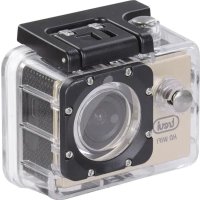
GO 2200 WIFI - Action camera Trevi - Free user manual and instructions
Find the device manual for free GO 2200 WIFI Trevi in PDF.



| Product type | Sportscam (action camera) |
| Brand | Trevi |
| Model | GO 2200 WIFI |
| Screen | 2-inch LTPS |
| Lens | 120° wide angle |
| Sensor | 5 MP CMOS |
| Maximum video resolution | 1080FHD (1920x1080) interpolated, 30 fps |
| Maximum photo resolution | 12 megapixels (interpolated) |
| Video format | AVI |
| Storage | Micro SDHC class 10, 16 to 32 GB |
| Connectivity | Wi-Fi 2.4 GHz (range approx. 10 m), USB 2.0 |
| Battery | Rechargeable lithium-ion 3.7 V, 900 mAh |
| Recording battery life | Approximately 100 minutes (1080P) |
| Charging time | Approximately 2 hours |
| Water resistance | Up to 30 meters (with waterproof case) |
| Power supply | 5 V, 1 A (via USB) |
| Compatible operating systems | Windows XP/7/8/Vista, Mac OS 10.5+; iOS 6.1+, Android 4.0+ |
| Maintenance and cleaning | Soft slightly damp cloth; avoid solvents and abrasives |
| Safety | Do not expose to shocks, magnetic fields, or liquids (except waterproof case) |
| Spare parts and repairability | Contact an authorized TREVI service center |
Frequently Asked Questions - GO 2200 WIFI Trevi
User questions about GO 2200 WIFI Trevi
0 question about this device. Answer the ones you know or ask your own.
Ask a new question about this device
Download the instructions for your Action camera in PDF format for free! Find your manual GO 2200 WIFI - Trevi and take your electronic device back in hand. On this page are published all the documents necessary for the use of your device. GO 2200 WIFI by Trevi.
USER MANUAL GO 2200 WIFI Trevi
Scheda TF (Micro SD Card):
Thank you for purchasing this Wi-Fi camera. Thanks to the high-performance components, the device is capable of recording videos with excellent image quality. The camera has a unique and ultra-portable design that can be used in different situations, making your daily life comfortable, safe and full of color. Read this manual carefully and keep it for future reference. The screenshots and illustrations in this manual are intended to provide you with more detailed and straightforward information about your digital camera. There may be differences between the screenshots, illustrations contained in this manual and the current state of the digital camera, due to technological improvements and differences between production batches. In such a case, the actual functions of the camera should be considered as a priority.
SAFETY MEASURES
Waterproof casing:
The permissible diving depth is 30 meters.
- Keep the rubber seal of the camera housing clean when sealing the waterproof case. A single hair or grain of sand can cause infiltration. You can test by closing the case without inserting the camera. Completely immerse the case in water for approximately one minute. Remove the case from the water, dry the outside with a towel, and then open it. If the interior is dry, the case is safe for use underwater.
- After use in salt water it is necessary to rinse and dry the exposed parts of the case with fresh water. This will prevent corrosion of the hinge pin, which can cause breakage.
To clean the gasket, rinse in fresh water and air dry (if wiped with a cloth, lint may compromise the seal). Reinstall the gasket in the grooves in the rear housing door.
TF Card:
- The camera supports high-speed (at least class 10) TF (Micro SD) cards with high capacity up to 32GB.
- Please format the card before using it for the first time or after using it on another device.
- Be sure to turn off the device before inserting or removing the card from the camera.
- During a long period of use, the card may overheat and its memory capacity may decrease over time.
- Remember that the card is a sensitive electronic device: protect it from humidity, twisting, falling, crushing and strong electromagnetic fields.
- It is possible to lose the data stored on the card if the device loses power during recording.
WARNING AND NOTES FOR USE
- When using the camera as a unit recorder, always follow the applicable local regulations. illegal use of the product will lead to legal consequences. In some countries, the use of recording units (or, in particular, posting recordings on the internet) may be illegal. We suggest that you familiarize yourself with the current regulations in force.
- The product must be used with an appropriate lighting level. Do not aim the camera directly at the sun or other strong light sources, as this could damage the optical system of the device.
- This product is a precision electronic device that cannot be exposed to strong vibrations and shocks. Cannot be used near strong magnetic or electric fields.
- The appliance must not be exposed to dripping or splashing water. No objects filled with liquid, such as vases, must be placed on the appliance.
- If liquids penetrate inside the device, disconnect the battery immediately and take the device to the nearest authorized TREVI service center.
- No naked flame sources, such as lighted candles, must be placed on the appliance.
- Instruct children and people with little knowledge of the product to use it correctly.
- Keep the following user manual.
CARE AND MAINTENANCE
For cleaning, we recommend using a soft, slightly damp cloth. Avoid solvents or abrasive substances.
IMPORTANT
The good construction of this device guarantees its perfect functioning for a long time. However, should any problems arise, it will be advisable to consult the nearest TREVI Authorized Service Center.
TREVI pursues a policy of continuous research and development. Therefore the products may have characteristics different from those described.
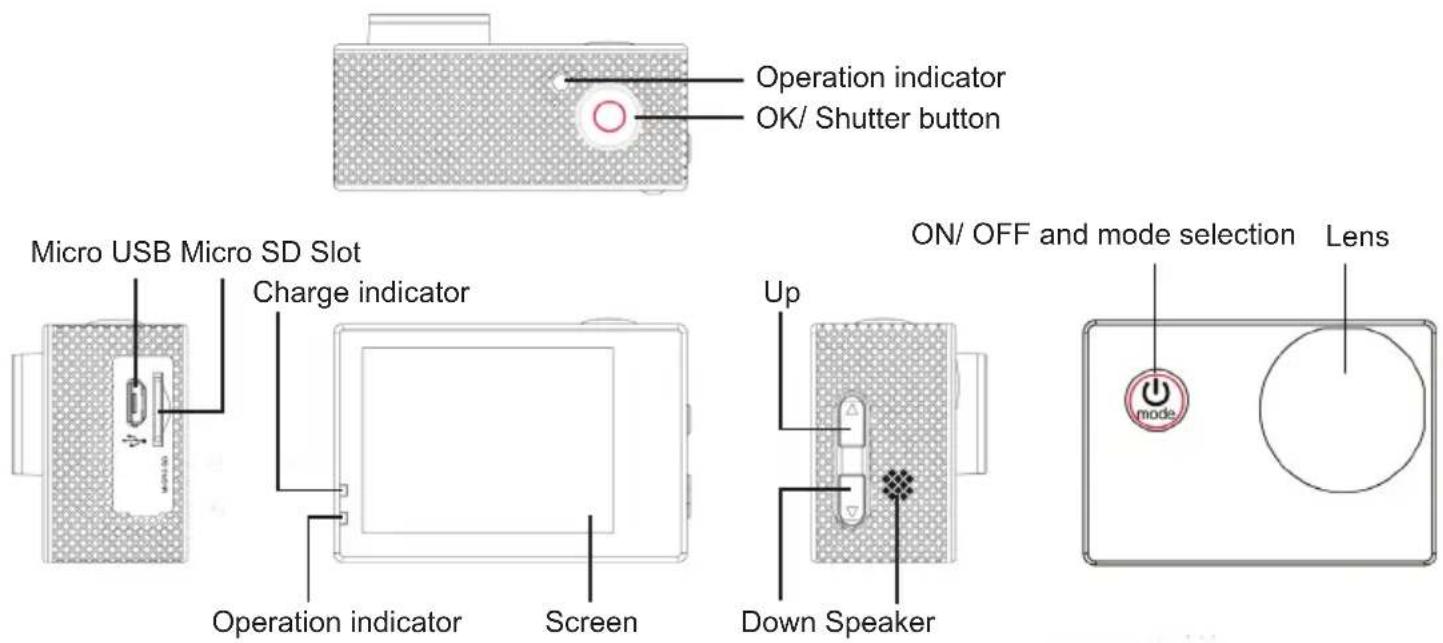
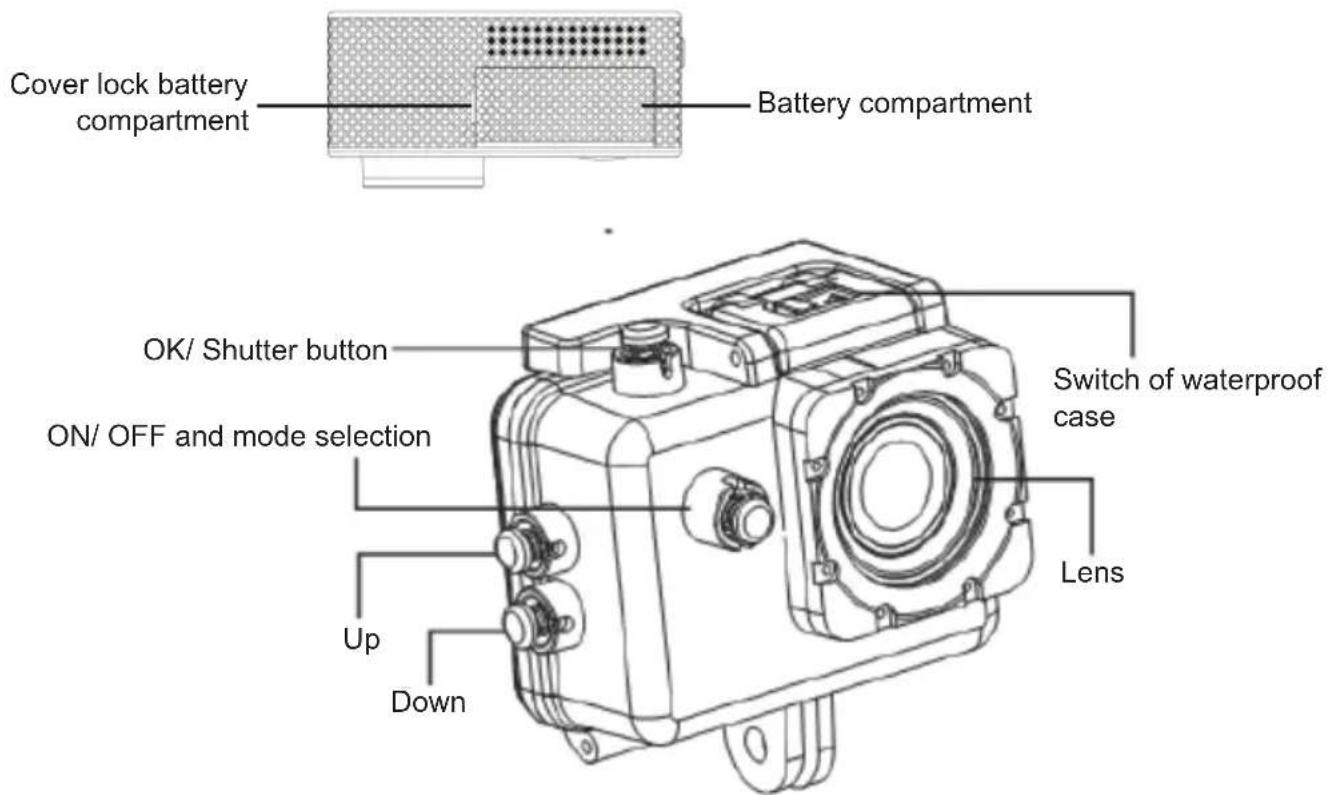
COMMANDS DESCRIPTION
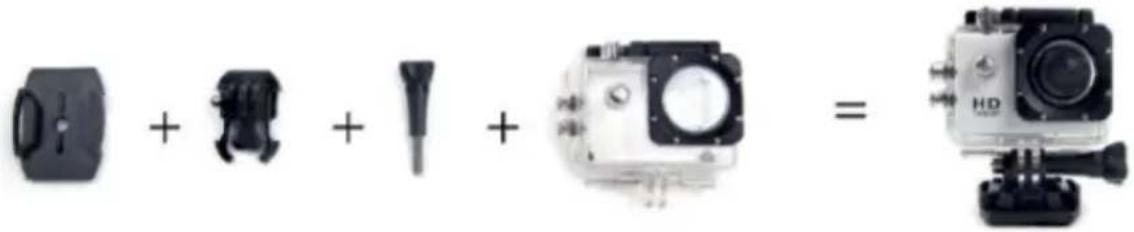
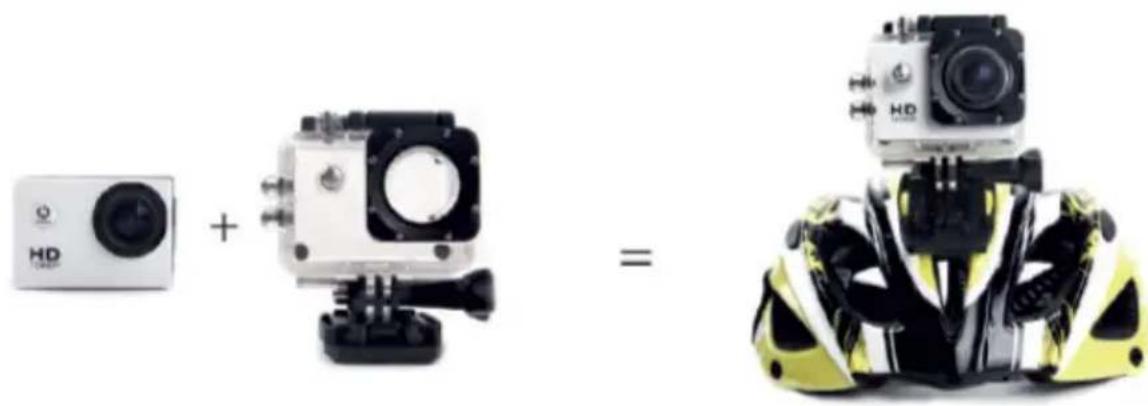
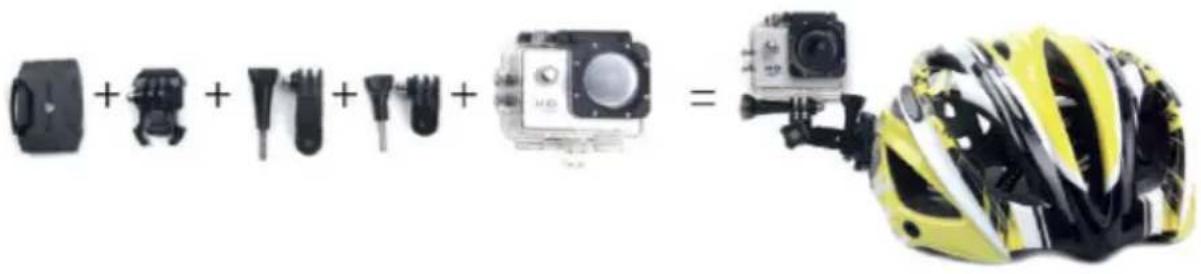
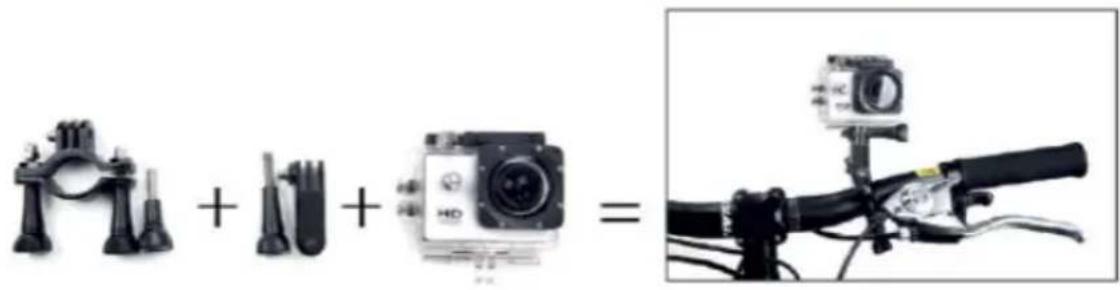
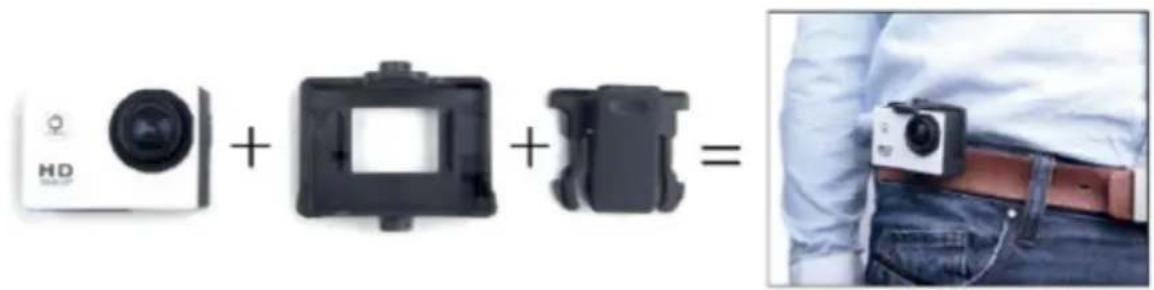
SUGGESTED USES OF MOUNTS
Attach the camera to helmets, parts and equipment using the appropriate accessories.
INSTRUCTIONS FOR USE
1. Insert micro SD card into the port:
Make sure to insert the card with the top side facing the screen. The bottom of the card with the connectors should be directed towards the front of the camera.
Note: Please choose branded Micro SD card and format it on your computer before use. Neutral cards are not guaranteed to work normally.
2. Installing and removing batteries
- Unlock the cover lock and open the battery compartment.
- Insert the battery in the correct position so that the battery +/- terminals fit the connectors on the camera. After inserting the battery, close the cover.
- The battery indicator on the screen shows the battery charge level.
- To replace the battery, open the battery compartment and remove the battery by pulling its strap. Insert a new battery and close the cover.
3. Charging
- The battery of the GO 2200 WIFI can be charged by connecting the device to any USB port on the computer via a USB cable.
- The camera can also be charged in the car using a Micro USB 5V charger (not supplied).
- The camera can be used for recording even while charging.
4. Turn ON/OFF
- Press and hold the On/ Off button for 3/5 seconds to turn the camera ON or OFF.
- The screen will turn off automatically, according to the MENU settings. To turn the screen back on, press the OK button.
5. Switching modes
It is possible to switch from one mode to another: Video/ Photo/ Playback/ MENU by pressing the On/ Off button.
The active mode is displayed by the icons in the upper left corner of the screen.
In Playback mode, use "UP" and "DOWN" keys to select the file to be viewed and press "OK" key to start or stop playback.
6. Material registration
1. Video capturing
Select the Video mode. To start recording, press the "OK" button. The yellow dot on the display will start flashing and the time indication will turn red, press the "OK" button again to stop recording completely.
Recorded Video Resolution: 1080FHD/ 1080P/ 720P/WVGA/QVGA.
Note: The default recording mode is loop. If there is insufficient storage space for recording, the new files will be overwritten on the old ones. Please choose and adjust your favorite modes within the Menu.
2. Taking pictures
Select Photo mode. Press the "OK" button to take a photo. In the camera menu mode, you can set the shooting mode: single shot / self-timer (3S/ 5S/ 10S/ 20S) / continuous shooting with various shutter speeds.
3. Archiving and playing a file
After recording is complete, use a USB cable to export the videos to a computer and play them back. Or take out the Micro SD card and access the image data via a card reader.
7. MENU navigation
- Enter the MENU mode by pressing the On/ Off key several times;
- Use the "UP" and "DOWN" keys to move between the various items;
- Press the "OK" button to enter an item and confirm the setting.
8. Wi-Fi connection
The camera can connect via Wi-Fi to an iOS or Android tablet or smartphone.
To establish a connection, proceed as follows:
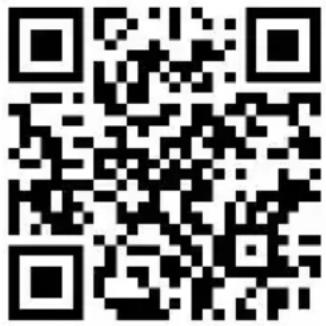
- Install the "GoPlus Cam" application on your smartphone or tablet. It is possible to find it on the Google Play store (for devices using Android) or on the APP Store (for iOS devices), or use the following QR Code:
- Turn on the camera and press the "UP" key to start the Wi-Fi function;
- Select and start the "GoPlus Cam" application on your smartphone or tablet, then touch the phone icon that will appear;
- Activate the Wi-Fi network on your smartphone or tablet. Search for the network generated by the camera and connect to it. Enter the login password (default password 12345678);
- Once the connection is established, the appropriate information will be displayed on the screen. Recordings and direct shooting cannot be viewed on the camera screen during a Wi-Fi connection;
- After establishing a Wi-Fi connection between the camera and a smartphone/ tablet using the "GoPlus Cam" app, you can change the camera settings and have a live preview of the recorded image. It is also possible to download the video camera files to your smartphone/ tablet.
To deactivate the Wi-Fi network, press the "UP" key again
Wi-Fi password and Wi-Fi network name setting:
From the Camera Menu, you can set/ change the Wi-Fi password and change the Wi-Fi network name.
WARNING FOR A CORRECT USE OF RECHARGEABLE BATTERY
- Recharge the battery at a temperature between 5^ and 35^ .
- When charging is completed, the charge indicator LED will turn off.
- Do not extend the recharge beyond the indicated times to avoid the risk of overheating and bursting.
- Charging the battery beyond the indicated times or a prolonged period of inactivity can reduce its duration.
- The rechargeable battery is subject to wear and its capacity gradually decreases.
- To extend the life of the battery, use it when it is fully charged until it is completely discharged, then fully charge it again before using it again. Charging a battery that is not completely depleted will shorten its life. In this case, repeat the complete upload/ download cycle several times.
- Avoid keeping the battery charging all night.
INFORMATION NOTE ON THE REMOVAL AND DISPOSAL OF BATTERIES
Whatever the type of exhausted battery, it must not be thrown away in household waste, in fire or water. Each type of exhausted battery must be recycled or disposed of at the appropriate dedicated collection centers.
How to remove the battery:
- Unlock the lid lock and open the battery compartment;
- Remove the battery by pulling its clamp;
- Insert a new battery and close the cover.
TECHNICAL SPECIFICATIONS
Display: 2" LTPS
Lens:
Sensor: CMOS 5Mpxl
Resolution Video recorder:
120^ + Wide angle lens
30FPS 1080FHD (1920x 1080) interpolated
30FPS 1080p (1440x 1080) interpolated
30FPS 720p (1280x 720)
30FPS WVGA (848x 480)
30FPS VGA (640x 480)
30FPS QVGA (320x 240)
Video format: AVI
Picture resolution:
Storage:
Shooting mode:
Wi-Fi Frequency:
Wi-Fi Power:
Wi-Fi support system:
Wi-Fi function:
and sharing albums
Frequency of Optical Source:
Connections:
Power source Interface:
Battery Capacity:
Recording Time:
Charging Time:
Operating System(OS):
Dimensions:
Weight:
12M/10M/8M/5M/3M
Micro SDHC class 10 16GB - 32GB
Single Shot/ Self timer/ Continuous Shooting
2,4GHz
1.5mW
iOS 6.1 and above, Android 4.0 and above
Image transmission, remote control, setting, sync
50Hz/60Hz
USB 2.0
5V, 1A
3,7V,900mAh
1080P/ about 100 minutes
About 2 hours
Windows XP/7/8SP3A/Vistaand Mac10.5 or above
59x41x29,8mm
58 gr with battery
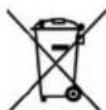

Precautions for correct disposal of the product.
The symbol shown on the equipment indicates that waste must be disposed of in "separate collection" and so the product must not be disposed of together with urban waste.
The user must take the product to special "separate waste collection centres" provided by local government, or deliver it to the retailer against the purchase of a new product.
Separate collection of waste and subsequent treatment, recycling and disposal operations promotes the production of equipment with recycled materials and limits negative effects on the environment and on health caused by improper handling of waste.
Illegal disposal of the product leads to the enforcement of administrative penalties.
Dimensions: 59x41x29,8mm
Poids: 58 gr with battery
SIMPLIFIED EU DECLARATION OF CONFORMITY
Hereby TREVI Spa declares that the radio equipment type GO 2200 WIFI is in compliance with directive 2014/53/EU.
The full text of the EU declaration of conformity is available at the following internet address https://www.trevi.it/dms/zidi/TREVI/DOCGO2200WIFI.pdf

Strada Consolare Rimini-San Marino, 62, 47924 Rimini (RN) Italy Tel. 0541/756420 - Fax 0541/756430 - www.trevi.it - e-mail: info@trevi.it

Made in CHINA
- Scheda TF (Micro SD Card):
- SAFETY MEASURES
- Waterproof casing:
- TF Card:
- WARNING AND NOTES FOR USE
- CARE AND MAINTENANCE
- IMPORTANT
- COMMANDS DESCRIPTION
- SUGGESTED USES OF MOUNTS
- INSTRUCTIONS FOR USE
- Insert micro SD card into the port:
- Installing and removing batteries
- Charging
- Turn ON/OFF
- Switching modes
- Material registration
- Video capturing
- Taking pictures
- Archiving and playing a file
- MENU navigation
- Wi-Fi connection
- Wi-Fi password and Wi-Fi network name setting:
- WARNING FOR A CORRECT USE OF RECHARGEABLE BATTERY
- INFORMATION NOTE ON THE REMOVAL AND DISPOSAL OF BATTERIES
- TECHNICAL SPECIFICATIONS
- Precautions for correct disposal of the product.
- SIMPLIFIED EU DECLARATION OF CONFORMITY
Brand : Trevi
Model : GO 2200 WIFI
Category : Action camera