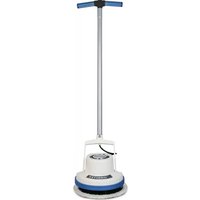
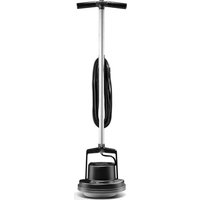
SurfaceScrub FK40100PC - Floor cleaner Oreck - Free user manual and instructions
Find the device manual for free SurfaceScrub FK40100PC Oreck in PDF.



User questions about SurfaceScrub FK40100PC Oreck
0 question about this device. Answer the ones you know or ask your own.
Ask a new question about this device
Download the instructions for your Floor cleaner in PDF format for free! Find your manual SurfaceScrub FK40100PC - Oreck and take your electronic device back in hand. On this page are published all the documents necessary for the use of your device. SurfaceScrub FK40100PC by Oreck.
USER MANUAL SurfaceScrub FK40100PC Oreck
Important: Read carefully before assembly and use.
FK40100 Series #961151928 ID112043
THANK YOU
for purchasing an Oreck® product
please register your product:
online at oreck.com or call 1.800.989.3535(U.S)
or 1.888.676.7325 (Canada) to register by phone
TABLE OF CONTENTS
1 1 important safety instructions 4
2 FEATURES 8
3 OPERATION 10
Getting Started. 10
Before you Begin Cleaning 11
Filling the Clean Water Tank 12
Emptying the Recovery Tank. 13
Using your Machine 14
4 CLEANING 18
Cleaning the Filter 18
Cleaning the Nozzle and Spinbrush. 19
5 TROUBLESHOOTING GUIDE 20
6 WARRANTY 22
7 SPANISH 23
8 FRENCH 45
IMPORTANT SAFTEY INSTRUCTIONS
SAVE THESE INSTRUCTIONS
When using an electrical appliance, basic precautions should always be followed, including the following: READ ALL INSTRUCTIONS BEFORE USING THIS APPLIANCE.
WARNING: TO REDUCE THE RISK OF FIRE, ELECTRIC SHOCK OR INJURY:
This hard floor cleaner is intended for household use only and NOT for commercial or industrial use.
Fully assemble before operating.
- Operate cleaner only at voltage specified on data plate on lower handle of cleaner.
- Do not leave appliance when plugged in. Unplug from outlet when not in use and before cleaning or servicing.
- Do not use outdoors or on wet surfaces.
Do not allow to be used as a toy. Not intended for use by children age 12 and under. Close supervision is necessary when used near children. To avoid injury or damage, keep children away from product, and do not allow children to place fingers or other objects into any openings.
- Use only as described in this manual. Use only manufacturer's recommended attachments and products.
Do not use with damaged cord or plug. If appliance is not working as it should, has been dropped, left outdoors, or dropped into water, take it to a service center prior to continuing use.
Do not pull or carry by cord, use cord as handle, close a door on the cord, or pull around sharp edges or corners. Do not place product on cord Do not run appliance over cord. Keep cord away from heated surfaces.
- Do not unplug by pulling on cord. To unplug, grasp the plug, not the cord.
- Do not handle plug or appliance with wet hands.
- Do not put any object into openings. Do not use with any opening blocked; keep free from dust, lint, hair, and anything that may reduce air flow.
- Keep hair, loose clothing, fingers, and all parts of body away from openings and moving parts.
- Turn off all controls before unplugging.
- Use extra care when cleaning on stairs. To avoid personal injury or damage, and to prevent the cleaner from falling, always place cleaner at bottom of stairs or on floor. Do not place cleaner on stairs or furniture, as it may result in injury or damage.
- Do not use to pick up flammable or combustible liquids, such as gasoline, or fine wood sandings, or use in areas where they may be present.
- Connect to a properly grounded outlet only. See Grounding Instructions.
- Not intended for use on carpets.
- Do not pick up anything that is burning or smoking, such as cigarettes, matches, or hot ashes.
- Do not use without filters or tanks in place.
- Do not clean over floor electrical outlets.
WARNING: To reduce risk of fire and electric shock, use only Oreck cleaning products intended for use with this machine.
WARNING: This product contains chemicals known to the State of California to cause cancer, birth defects or reproductive harm. WASH HANDS AFTER HANDLING.
CAUTION: To reduce the risk of damage:
- Avoid picking up hard, sharp objects with this product, as they may cause damage.
- Store appropriately indoors in a dry place. Do not expose machine to freezing temperatures.
- Do not use sharp objects to clean out hose as they can cause damage.
- To assist in reducing drying time, be certain the area is well ventilated when using detergents and other cleaners with this machine.
- Do not store extractor with solution in tanks.
- With brushes on, do not allow cleaner to sit in one location for an extended period of time, as damage to floor can result.
- Water will drip from the brushes and underside of the product after use and may puddle. To avoid damage to wood and laminate flooring and to avoid potential slip hazard, after use (a) do not leave the product on wood and laminate surfaces and move to a hard surface and (b) place unit on absorbent material (such as a towel) to soak up drips.
PLEASE KEEP INSTRUCTIONS FOR FURTHER USE.
IMPORTANT SAFETY INSTRUCTIONS
WARNING: Improper connection of the equipment-grounding conductor can result in the risk of electric shock. Check with a qualified electrician or service person if you are in doubt as to whether the outlet is properly grounded. Do not modify the plug provided with the appliance - if it will not fit the outlet, have a proper outlet installed by a qualified electrician. This appliance is for use on a nominal 120-volt circuit and has a grounding plug that looks like the plug (A) illustrated in Fig. 1. A temporary adapter (D) may be used to connect this plug to a 2-pole receptacle (E) if a properly grounded outlet is not available (Fig. 2). The temporary adapter should be used only until a properly grounded outlet (B) can be installed by a qualified electrician (Fig. 1). The green colored rigid ear, lug, or the like (F) extending from the adapter must be connected to a permanent ground (G) such as a properly grounded outlet box cover (Fig. 2). Whenever the adapter is used, it must be held in place by a metal screw. NOTE: In Canada, the use of a temporary adapter is not permitted by the Canadian Electrical Code.
GROUNDING INSTRUCTIONS: This appliance must be grounded. If it should malfunction or breakdown, grounding provides a path of least resistance for electric current to reduce the risk of electric shock. This appliance is equipped with a cord having an equipment-grounding conductor (C) and grounding plug (A). The plug must be inserted into an appropriate outlet (B) that is properly installed and grounded in accordance with all local codes and ordinances.
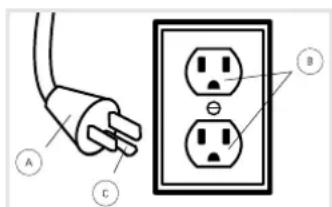
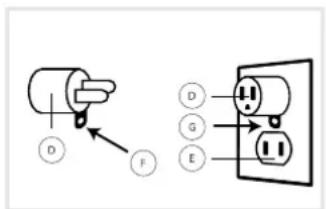
Fig.1 Fig.2
CLEANING SOLUTION GUIDE
| Product Name | Solution Name | Available Sizes |
| Oreck® SurfaceScrub™ | Oreck® Elite Hard Floor Cleaning Solution | 32 oz./64 oz. |
For optimal performance use Oreck brand solutions found on oreck.com and Oreck stores nationwide.
!WARNING!!
TO REDUCE THE RISK OF FIRE AND ELECTRIC SHOCK DUE TO INTERNAL COMPONENT DAMAGE, USE ONLY ORECK CLEANING PRODUCTS INTENDED FOR USE WITH THE APPLIANCE AS NOTED ABOVE.
2 FEATURES
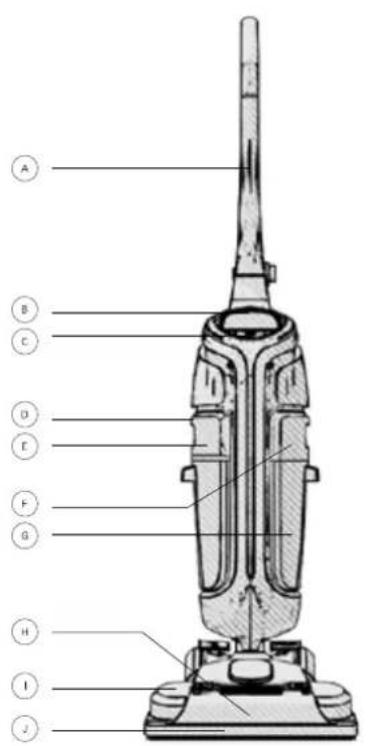
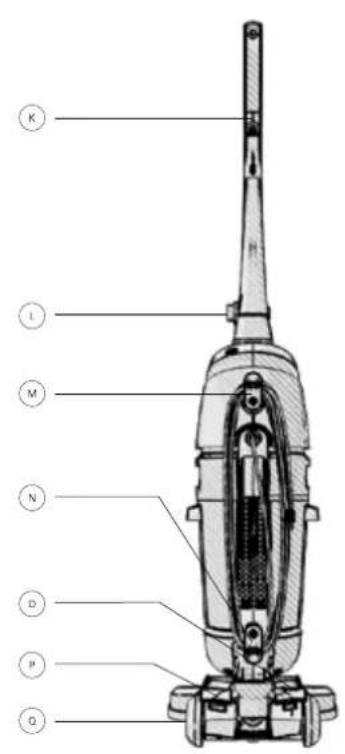
CARTON CONTENTS

Handle

Clean Water/ Solution Tank

Quick Release Cord Hook

Carry Handle

Nozzle

Lower Cord Hook

On/Off Switch

Nozzle Release Clips

Wash/Dry Selector Pedal

Recovery Tank Release Button

Squeegee

Handle Release Pedal

Recovery Tank

Solution/Water Trigger

Soft-Tread Wheels

Clean Water Tank Release Button

Tool-Free Handle Lock
TECHNICAL SPECIFICATIONS | FK40100
| Name | Wattage | Cord Length | Weight |
| SurfaceScrub™ | 750W | 30 ft. | 13 lbs. |
Subject to technical change without notice.
ALSO INCLUDES
16oz Oreck Elite Hard Floor Cleaning Solution
SpinBrush 360^T
3. OPERATION
GETTING STARTED
Please read important safety instructions before use (pg. 4)
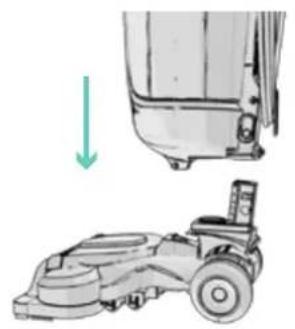
Place base of machine on the floor and insert machine body into place. It will click when locked.
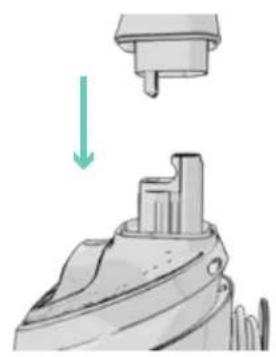
Lock handle into place. Turn handle release dial counter-clockwise
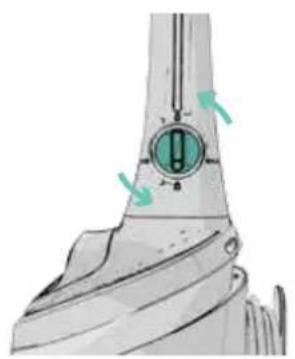
into 'locked' position.
WARNING! TO REDUCE THE RISK OF PERSONAL INJURY-UNPLG BEFORE CLEANING OR SERVICING.
Please remove any large objects and debris off your floor. It is advisable to then vacuum your floor prior to using your SurfaceScrub™
Important: Only use Oreck Elite Hard Floor Cleaning Solution. Using other solutions may cause excess foaming. Excessive foam will prevent the machine from working effectively. Using other detergents will invalidate the warranty.
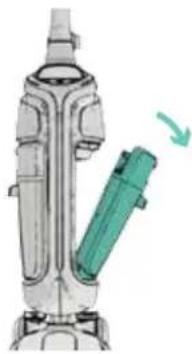
To remove the clean water tank, squeeze release button and pull to remove.
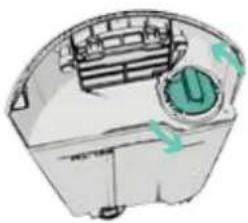
Twist tank cap counter clockwise and lift to remove.
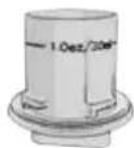
Using the water tank cap as a measuring cup, pour in the required amount of solution (approx. 1 oz. per quart of water).
!CAUTION!!
TO PREVENT DAMAGE TO WOOD FLOORS, FOLLOW MANUFACTURER'S CLEANING RECOMMENDATIONS. IF USING CLEANER ON SEALED WOOD FLOORS, INSPECT FLOOR SURFACE FOR WORN FINISH, BARE WOOD OR SEPARATED JOINTS. DO NOT USE DRECK ELITE HARD FLOOR CLEANING SOLUTION TO CLEAN SEALED WOOD FLOORS IF ANY OF THESE CONDITIONS EXIST.
3. OPERATION
FILLING THE CLEAN WATER TANK
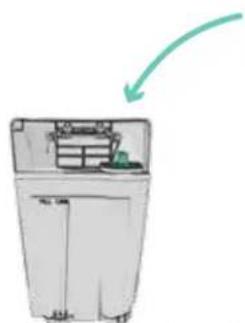
Pour cleaning solution into tank. Top up tank to fill line with warm water (Max 100^ ).
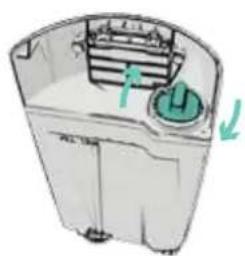
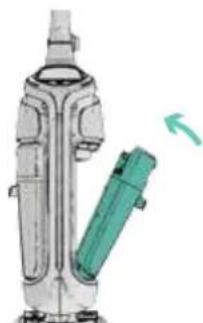
Twist the tank cap into place to secure. Place the bottom of the Clean water tank onto the machine first and click the top into place.
!
!
TO REDUCE THE RISK OF FIRE AND ELECTRIC SHOCK DUE TO INTERNAL COMPONENT DAMAGE, USE ONLY ORECK HARD FLOOR CLEANING SOLUTION FOR USE WITH THIS APPLIANCE.
!WARNINGWARNING!CAUTION!
TO REDUCE THE RISK OF PERSONAL INJURY-UNPLG BEFORE CLEANING OR SERVICING. DO NOT USE CLEANER WITHOUT TANK IN PLACE.
WATER WILL DRIP FROM THE BRUSHES AND UNDERSIDE OF THE PRODUCT AFTER USE AND MAY PUDDLE. TO AVOID DAMAGE TO WOOD AND LAMINATE FLOORING AND TO AVOID POTENTIAL SLIP HAZARD, AFTER USE (A) DO NOT LEAVE THE PRODUCT ON WOOD AND LAMINATE SURFACES AND MOVE TO A HARD SURFACE AND (B) PLACE UNIT ON ABSORBANT MATERIAL (SUCH AS A TOWEL) TO SOAK UP DRIPS.
EMPTYING THE RECOVERY TANK
Note: The recovery tank has an automatic shut off to prevent the tank from overflowing. If this is activated, the machine will not pick up and the sound of the motor will change. The recovery tank will need to be emptied.
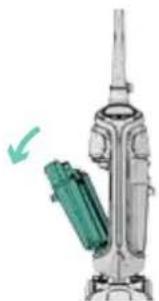
To remove recovery tank, press down on release button and pull.
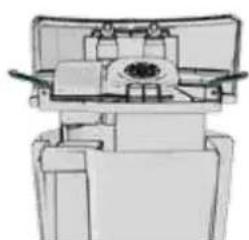
Unclip latches on recovery tank lid, remove lid to empty.
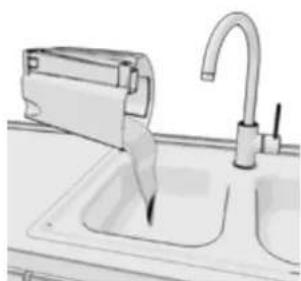
Pour dirty water into sink. Reattach lid to tank.
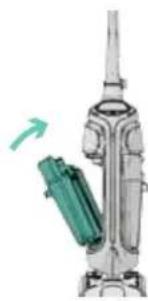
Place the bottom of the recovery tank onto the machine first and click the top into place.
WARNING! TO REDUCE THE RISK OF PERSONAL INJURY-UNPLUG BEFORE CLEANING OR SERVICING. DO NOT USE CLEANER WITHOUT TANK IN PLACE.
3. OPERATION
USING YOUR MACHINE
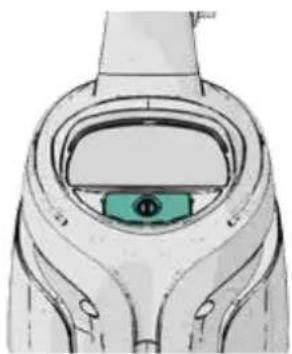
Push ON/OFF switch to turn machine on, push switch again to turn machine off.

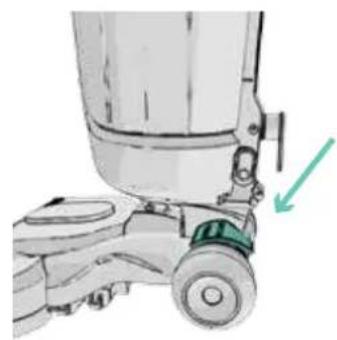
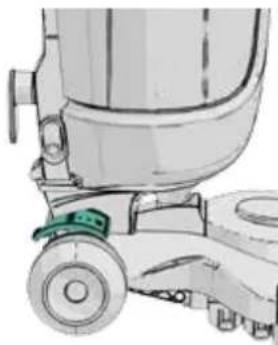
Step on handle release pedal to recline machine.
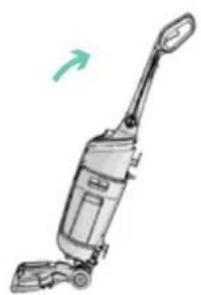
To move your machine from room to room, tilt the machine back on the rear wheels.
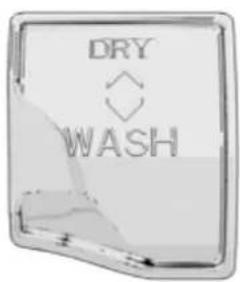
The mode selector allows you to choose DRY mode or WASH mode.
To wet clean with 360^ SpinBrushes turned on, turn the dial to the WASH position.
DRY mode stops the SpinBrush from spinning to increase the amount of water picked up.
3. OPERATION
USING YOUR MACHINE
Note: Wrap cord around hooks for convenient storage. Attach the plug end to the cord.
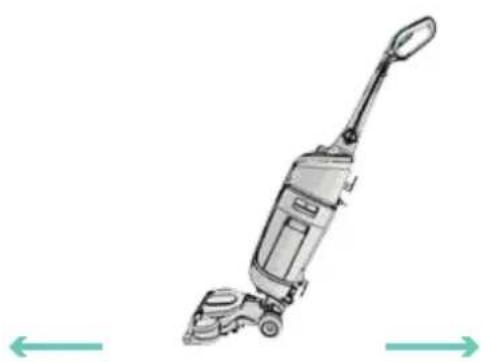
In WASH mode slowly move the machine forward to arms length squeezing the trigger to release the water and solution. Release trigger and pull back the machine to pick up the remaining fluid.
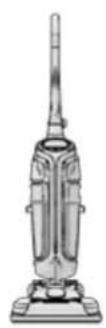
When finished cleaning, return the unit to it's upright position.
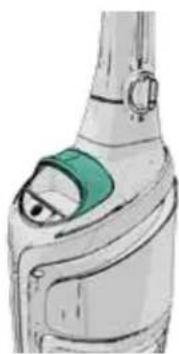
The machine may be moved by using the carry handle at the front of the machine.
4. CLEANING
CLEANING THE FILTER
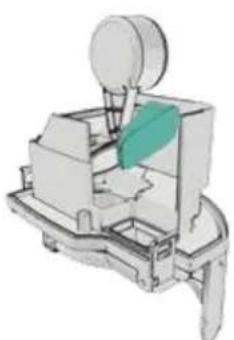
Pull open the recovery tank lid after each use and gently remove the filter.
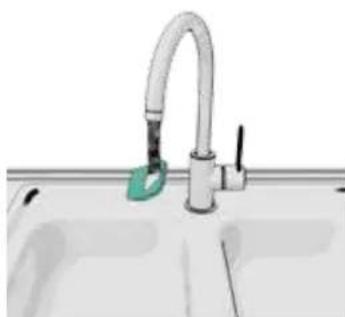
Rinse under water to remove debris (max. 100^) and leave for at least 24 hours or until fully dry before replacing in the machine.
WARNING! TO REDUCE THE RISK OF PERSONAL INJURY-UNPLUG BEFORE CLEANING OR SERVICING.
CLEANING THE NOZZLE AND SPINBRUSH
Important: The tanks should be emptied and cleaned after each use and before storage.
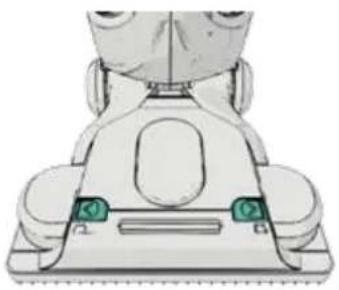
Nozzle can be removed for easy cleaning. Slide the two nozzle release latches outwards.
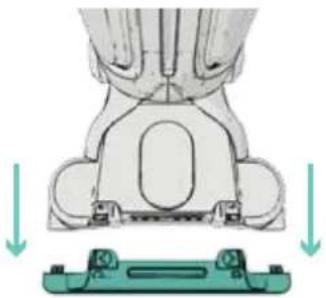
Remove nozzle by tilting downward and then pulling straight out and rinse under running water to clean.
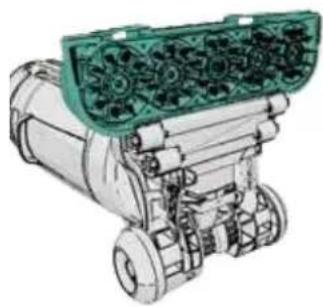
Pull spinbrush bar out. The brushes can be rinsed under water to remove debris (Max 100^ ). To replace the spinbrush, press firmly and lock into place. Then replace nozzle and click nozzle latches back into place
!CAUTION!!
TO REDUCE THE RISK OF INJURY FROM MOVING PARTS-UNPLG BEFORE SERVICING.
LUBRICATION: THE MOTOR IS EQUIPPED WITH BEARINGS WHICH CONTAIN SUFFICIENT LUBRICATION FOR THEIR LIFETIME. THE ADDITION OF LUBRICANT COULD CAUSE DAMAGE. DO NOT ADD LUBRICANT TO MOTOR.
5. TROUBLESHOOTING
If appliance is not working as it should, has been dropped, damaged, left outdoors or dropped into water, take it to a service center prior to continuing use. Any other servicing should be done by an authorized service representative.
| Problem | Resolution |
| Unit does not turn ON | ·If there is no voltage in wall plug, check fuse or breaker in home. ·Replace fuse or reset breaker in home in the event that there is a blown fuse, it has been tripped, or it is broken. |
| Water/solution will not dispense liquid | ·Clean water tank may not be locked in position. ·Clean water tank may be empty and need to be refilled. ·Mode selector switch is set to DRY mode, change to WASH. ·Check the SpinBrush 360TM for blockages. |
| ProblemResolution | |
| Unit will not pick up or has low suction | ·Empty recovery tank, remove any debris from filter. If washing filter allow 24 hours to fully dry before refitting. ·The recovery tank has an automatic shut off to prevent the tank from overflowing. If this is activated, the machine will not pick up and the sound of the motor will change. The recovery tank will need to be emptied. ·Make sure the recovery tank and nozzle are locked into place. |
| Brushes will not spin | ·Mode selector switch is set to DRY mode, change to WASH. ·Check the brushes for blockages. |
5. WARRANTY
Techtronic Floor Care Technology gives you the following limited warranty for this product only if it was originally purchased for residential use, not for resale, from Oreck or an Oreck Authorized Retail Dealer.
Oreck will repair or replace, free of charge, to the original purchaser, any part that is found to be defective in material or workmanship within three (3) years following the date of purchase for all residential models. NOTE: Warranty is void if used in a commercial setting. This limited warranty does not cover the replacement of expendable or consumable parts such as filters, cartridges, and other parts subject to normal wear unless they are defective in material or workmanship.
This limited warranty does not apply to any part subjected to accident, abuse, commercial use, alteration, misuse, damage caused by an act of God, the use of voltages other than on the data plate of this product or service of this product by other than Oreck or a participating Factory Authorized Service Center.
Oreck does not authorize any person or representative to assume or grant any other warranty obligation with the sale of this product.
Oreck's limited warranty is valid only if you retain proof of purchase from Oreck or an Oreck Authorized Retail Dealer for this product. If you purchase this product from any other source, your purchase is "AS IS," which means Oreck grants you no warranty, and that you, not Oreck, assume the entire risk of the quality and performance of this product, including the entire cost of any necessary servicing or repairs of any defects.
Oreck's liability for damages to you for any costs whatsoever arising out of this statement of limited warranty shall be limited to the amount paid for this product at the time of original purchase, and Oreck shall not be liable for any direct, indirect, consequential or incidental damages arising out of the use or inability to use this product. Some states do not allow the exclusion or limitation of incidental or consequential damages, so the above limitation or exclusion may not apply to you.
ALL EXPRESS AND IMPLIED WARRANTY OTHER THAN THE LIMITED WARRANTY SET FORTH ABOVE, FOR THIS PRODUCT. INCLUDING IMPLIED WARRANTY OF MERCHANTABILITY AND FITNESS FOR A PARTICULAR PURPOSE ARE EXPRESSLY DENIED.
This warranty gives you specific legal rights, and you may also have other rights which vary from state to state.
MANUAL DEL PROPIETARIO
Techtronic Floor Care Technology Limited
Distributed by Royal Appliance Mfg. Co. Glenwillow, Oh 44139