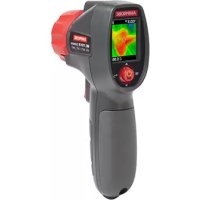
IRC110 - Thermal camera Amprobe - Free user manual and instructions
Find the device manual for free IRC110 Amprobe in PDF.



| Product Type | Infrared Thermal Camera |
| Brand | Amprobe |
| Model | IRC110 |
| Dimensions (H x L x l) | 185 x 54 x 104 mm (7.3 x 2.1 x 4.1 in) |
| Weight | Approximately 260 g (0.57 lb) |
| Power Supply | 3 AA alkaline batteries 1.5 V |
| Battery Life | Approximately 8 hours with display on |
| Auto Power Off | Adjustable: disabled, 1, 2, 5, or 10 minutes |
| Temperature Range | -10 °C to 500 °C (14 °F to 932 °F) |
| IR Accuracy | ≥ 0 °C: ± 2 °C or ± 2% of reading (whichever is greater); < 0 °C: ± 3 °C |
| Display Resolution | 0.1 °C / 0.2 °F |
| Infrared Image Resolution | 128 x 128 pixels (16,384 pixels) |
| Field of View | 33° x 33° |
| Distance to Spot Ratio | 20:1 |
| Spectral Response | 8 μm to 14 μm |
| Adjustable Emissivity | 0.10 to 1.00 in steps of 0.01 |
| Color Palettes | Grayscale, Hot Iron, Rainbow |
| Image Fusion | 5 modes: 0%, 25%, 50%, 75%, 100% |
| Display | 1.77-inch color TFT display, 128 x 160 pixels |
| Operating Temperature | 0 °C to 50 °C (32 °F to 122 °F) |
| Operating Humidity | 10% to 90% RH non-condensing at 30 °C |
| Storage Temperature | -20 °C to 60 °C (-4 °F to 140 °F) without batteries |
| Altitude | Up to 2000 m (6561 ft) |
| Shock Resistance | 1.2 m (4 ft) drop tested |
| Cleaning | Use an air pump, microfiber cloth, or cotton swab with mild soapy water |
Frequently Asked Questions - IRC110 Amprobe
User questions about IRC110 Amprobe
0 question about this device. Answer the ones you know or ask your own.
Ask a new question about this device
Download the instructions for your Thermal camera in PDF format for free! Find your manual IRC110 - Amprobe and take your electronic device back in hand. On this page are published all the documents necessary for the use of your device. IRC110 by Amprobe.
USER MANUAL IRC110 Amprobe
Limited Warranty and Limitation of Liability
Your Amprobe product will be free from defects in material and workmanship for one year from the date of purchase unless local laws require otherwise. This warranty does not cover fuses, disposable batteries or damage from accident, neglect, misuse, alteration, contamination, or abnormal conditions of operation or handling. Resellers are not authorized to extend any other warranty on the behalf of Amprobe. To obtain service during the warranty period, return the product with proof of purchase to an authorized Amprobe Service Center or to an Amprobe dealer or distributor. See Repair Section for details. THIS WARRANTY IS YOUR ONLY REMEDY. ALL OTHER WARRANTYES - WHETHER EXPRESS, IMPLIED OR STATUTORY - INCLUDING IMPLIED WARRANTYES OF FITNESS FOR A PARTICULAR PURPOSE OR MERCHANTABILITY, ARE HEREBY DISCLAIMED. MANUFACTURER SHALL NOT BE LIABLE FOR ANY SPECIAL, INDIRECT, INCIDENTAL OR CONSEQUENTIAL DAMAGES OR LOSSES, ARISING FROM ANY CAUSE OR THEORY. Since some states or countries do not allow the exclusion or limitation of an implied warranty or of incidental or consequential damages, this limitation of liability may not apply to you.
Repair
All Amprobe returned for warranty or non-warranty repair or for calibration should be accompanied by the following: your name, company's name, address, telephone number, and proof of purchase. Additionally, please include a brief description of the problem or the service requested and include the test leads with the meter. Non-warranty repair or replacement charges should be remitted in the form of a check, a money order, credit card with expiration date, or a purchase order made payable to Amprobe.
In-warranty Repairs and Replacement - All Countries
Please read the warranty statement and check your battery before requesting repair. During the warranty period, any defective test tool can be returned to your Amprobe distributor for an exchange for the same or like product. Please check the "Where to Buy" section on amprobe.com for a list of distributors near you. Additionally, in the United States and Canada, in-warranty repair and replacement units can also be sent to an Amprobe Service Center (see address below).
Non-warranty Repairs and Replacement - United States and Canada
Non-warranty repairs in the United States and Canada should be sent to an Amprobe Service Center. Call Amprobe or inquire at your point of purchase for current repair and replacement rates.
USA: Canada:
Amprobe
Amprobe
Everett, WA 98203 Mississauga, ON L4Z 1X9
Tel: 877-AMPROBE (267-7623) Tel: 905-890-7600
Non-warranty Repairs and Replacement - Europe
European non-warranty units can be replaced by your Beha-Amprobe distributor for a nominal charge. Please check the "Where to Buy" section on beha-amprobe.com for a list of distributors near you.
Beha-Amprobe
Division and reg. trademark of Fluke Corp. (USA)
Germany United Kingdom The Netherlands - Headquarters*
In den Engematten 14 52 Hurricane Way Science Park Eindhoven 5110
79286 Glottertal Norwich, Norfolk 5692 EC Son
Germany NR6 6JB United Kingdom The Netherlands
Phone: +49 (0) 7684 8009 - 0 Phone: +44 (0) 1603 25 6662
Phone: +31 (0) 40 267 51 00
beha-amprobe.de
beha-amprobe.com
beha-amprobe.com
*Correspondence only - no repair or replacement available from this address. European customers please contact your distributor.)
**single contact address in EEA Fluke Europe BV
CONTENTS
SYMBOLS 3
SAFETY INFORMATION 3
UNPACKING AND INSPECTION 4
FEATURES AND APPLICATIONS 4
BASIC NAVIGATION 5
MEASUREMENT MODE 6
MENUMODE 7
SPECIFICATIONS 10
MAINTENANCE AND BATTERY REPLACEMENT 12
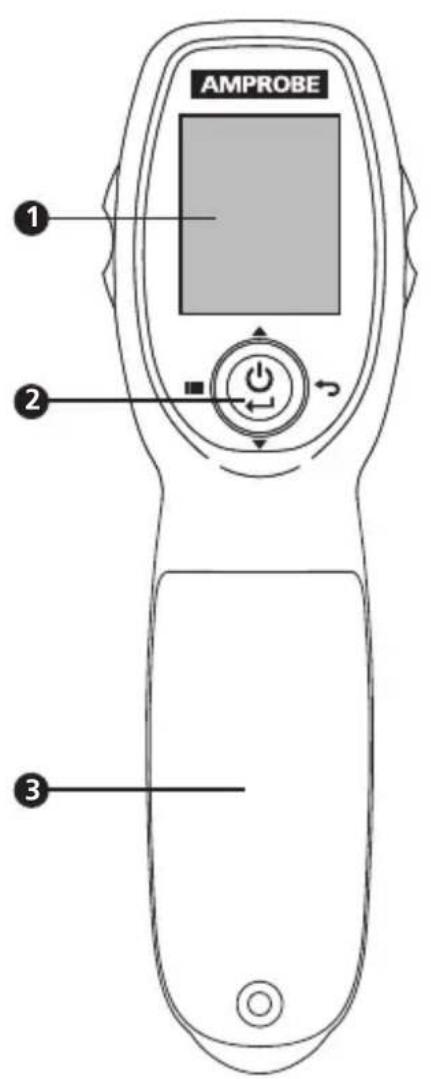
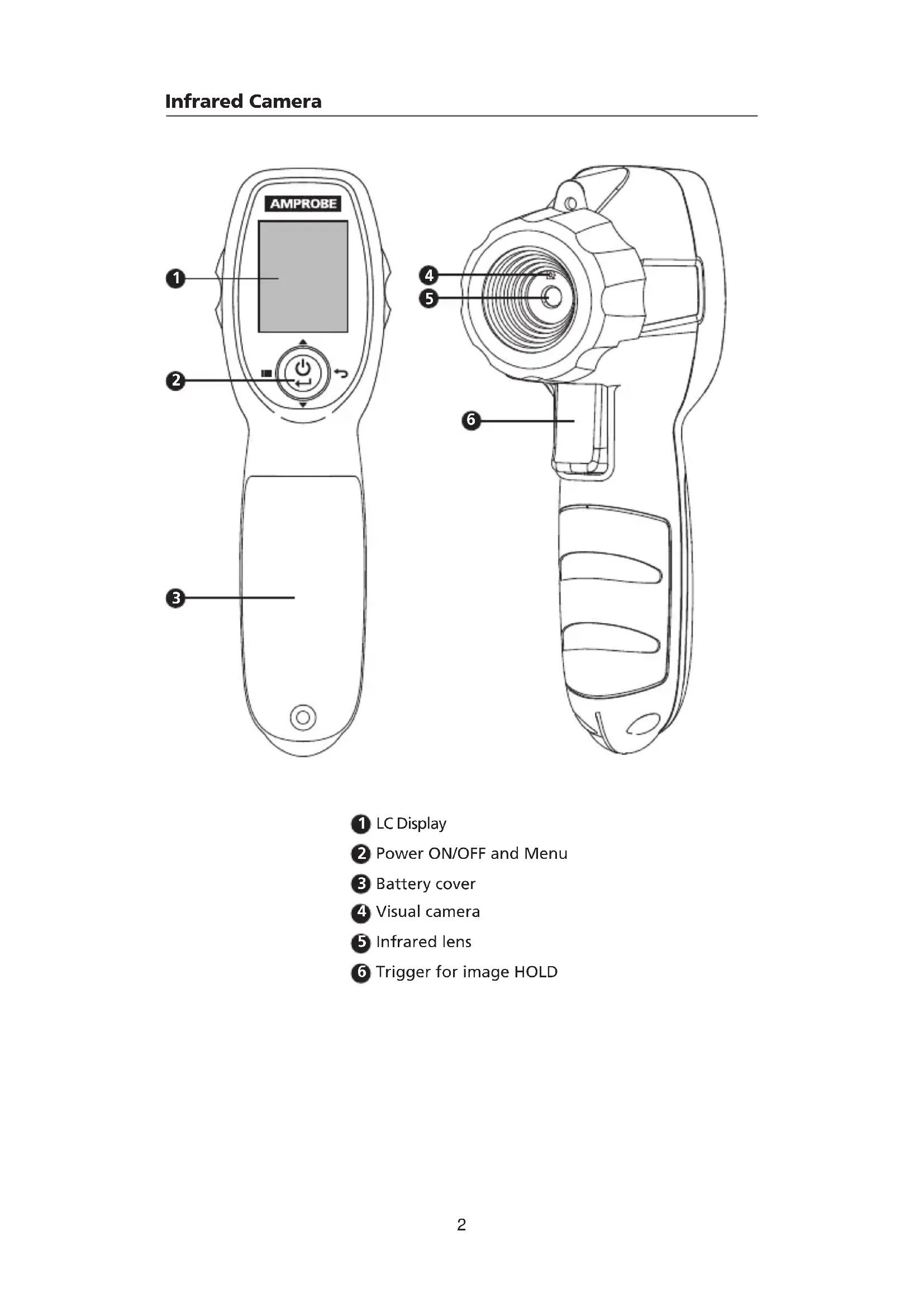
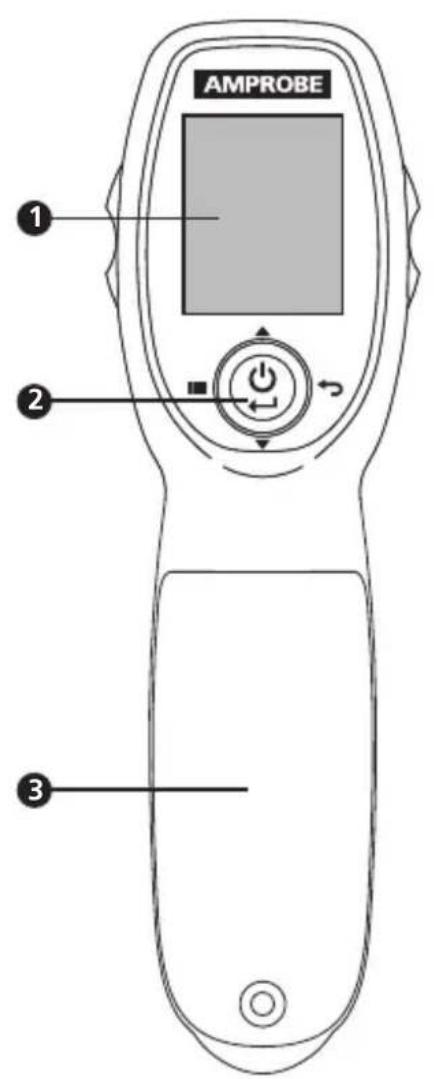
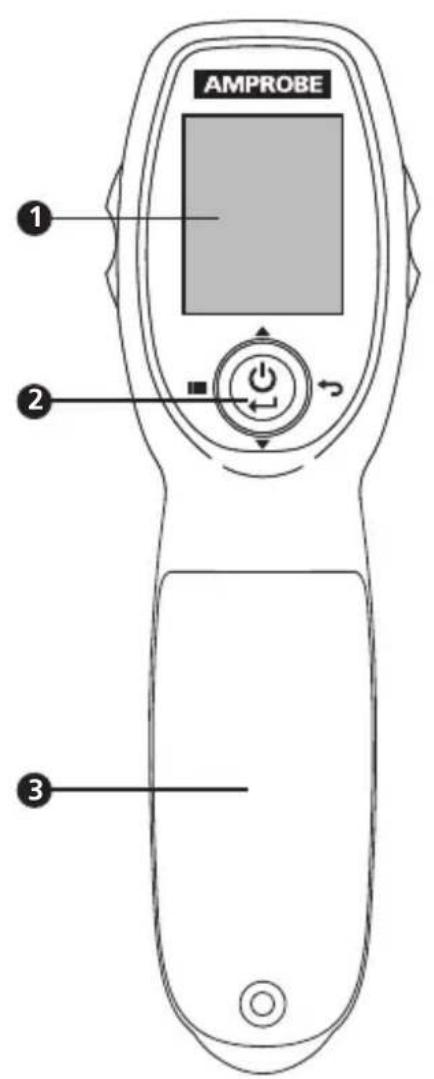
LC Display
Power ON/OFF and Menu
3 Battery cover
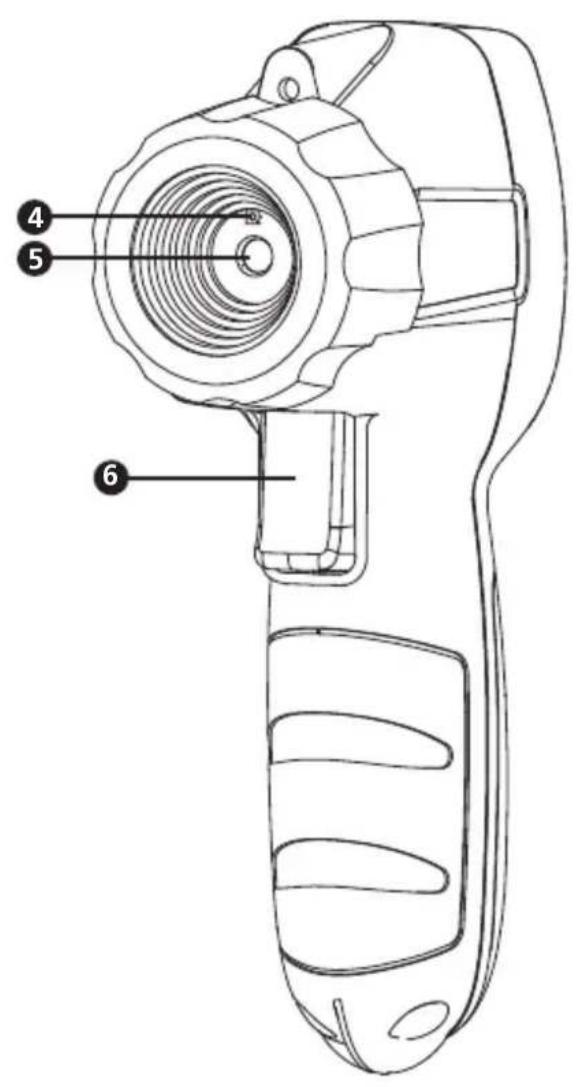
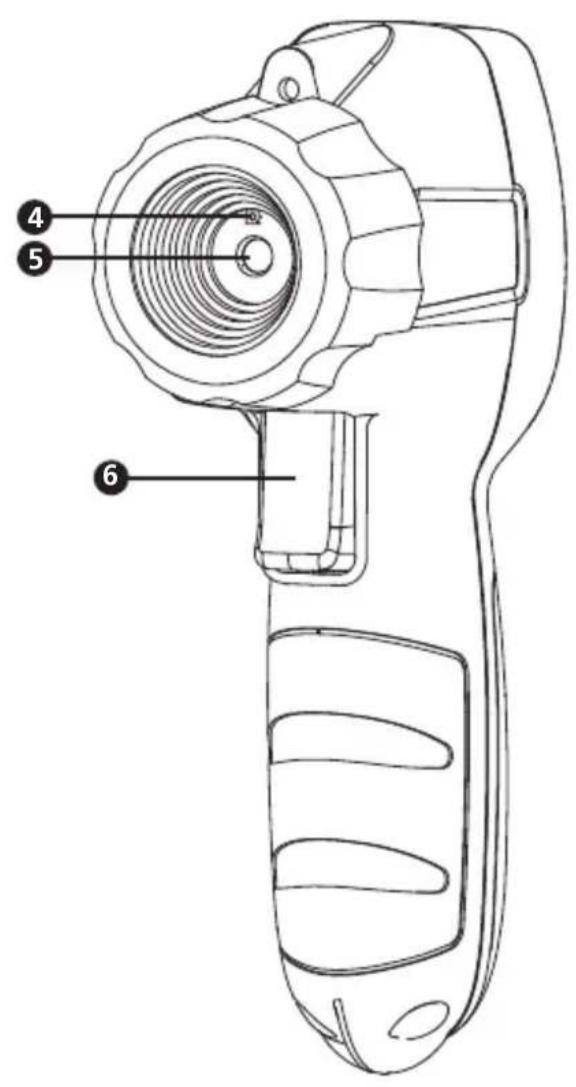
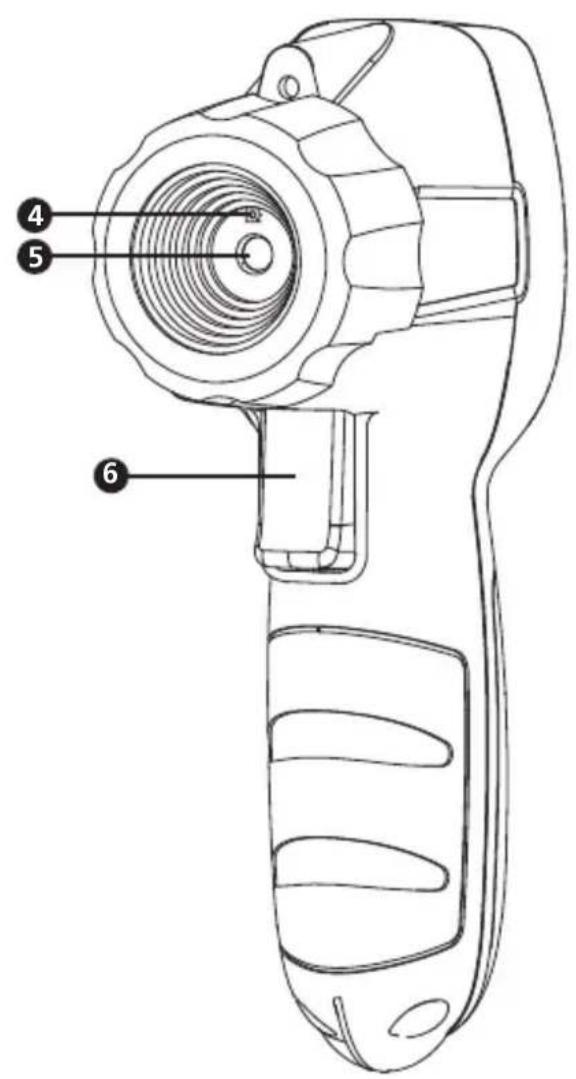
Visual camera
Infrared lens
Trigger for image HOLD
SYMBOLS
| A | Caution! Refer to the explanation in this manual. |
| CE | Complies with European Directives. |
| K | Conforms to relevant South Korean EMC Standards. |
| C | Conforms to relevant Australian standards |
| I | Battery |
| E | This product complies with the WEEE Directive marking requirements. The affixed label indicates that you must not discard this electrical/electronic product in domestic household waste. Product Category: With reference to the equipment types in the WEEE Directive Annex I, this product is classed as category 9 “Monitoring and Control Instrumentation” product. Do not dispose of this product as unsorted municipal waste. |
SAFETY INFORMATION
A Warning identifies hazardous conditions and procedures that are dangerous to the user. A Caution identifies conditions and procedures that can cause damage to the product or the equipment under test.
Warning
To prevent possible electrical shock, fire, or personal injury:
- Read all safety information before you use the product.
- Carefully read all instructions.
- Use the product only as specified, or the protection supplied by the product can be compromised.
- Do not use the product around explosive gas, vapor, or in damp or wet environments.
- Verify the product's operation by measuring on a known temperature source. Do not use the product if it operates incorrectly or abnormally.
- Do not use the product if it is damaged.
- See emissivity information for actual temperatures. Reflective objects result in lower than actual temperature measurements. These objects pose a burn hazard.
- Remove the batteries if the product is not used for an extended period of time, or if stored in temperatures above 50^ . If the batteries are not removed, battery leakage can damage the product.
- Replace the batteries when the low battery indicator shows to prevent incorrect measurements.
- Use only AA alkaline batteries and follow all battery care from the manufacturer.
- Do not leave the product on or near objects of high temperature.
- For use by competent persons only.
Caution
To prevent personal injury and for safe operation and maintenance of the product:
- Batteries contain hazardous chemicals that can cause burns or explode. If exposure to chemicals occurs, clean with water and get medical aid.
- Be sure that the battery polarity is correct to prevent battery leakage.
- Do not short the battery terminals together.
- Keep batteries clean and dry.
To avoid damaging the product under measurement, protect it from the following:
EMF (electro-magnetic fields) from arc welders and induction heaters.
Static electricity.
- Thermal shock (caused by large or abrupt ambient temperature changes — allow 30 minutes for the product to stabilize before use).
- Do not leave the product on or near objects of high temperature.
UNPACKING AND INSPECTION
Your shipping carton should include:
1 IRC-110 or IRC-110-CN Infrared Camera
3 1.5 V AA batteries
1 User manual
1 Wrist Strap
If any of the items are damaged or missing, return the complete package to the place of purchase for an exchange.
Note: Batteries do not come pre-installed. Please refer to the Maintenance and Battery Replacement section for further instruction.
FEATURES AND APPLICATIONS
Features
- Infrared heat map image blending at 0% , 25% , 50% , 75% , and 100% with a joystick button
- Three selectable color palettes (grayscale, hot iron and rainbow)
- Center-point temperature measurement and focus free
- IR measurement 20:1 Distance to Spot ratio
- Adjustable emissivity from 0.10 to 1.00
- Auto off function
- Selectable ^ F and ^ C
- Intuitive joystick navigation to on-screen menu and settings
- Hot and cold markers instantly identify hottest and coldest spots
Applications
- Electrical, HVAC, mechanical, and automotive
- Lower energy costs by finding areas of heat loss and drift
- Locate electrical problems at appliances, machines and installations
- Quickly verify HVAC functionality and performance
- Portable, ergonomic and easy to operate
BASIC NAVIGATION
Taking Measurements
Press and hold the power button for at least 2 seconds to turn the product on or off (Figure 1.1).
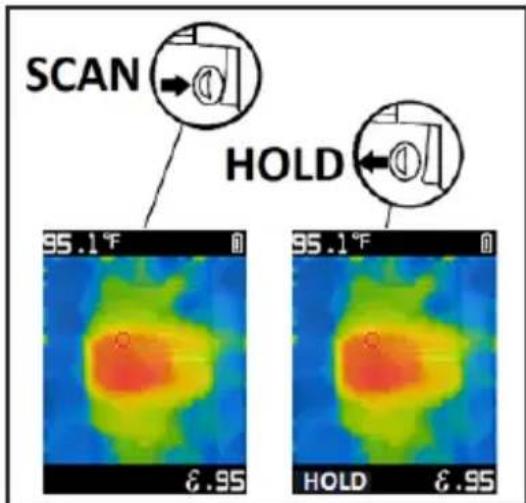
The product will be in measurement mode upon power on. Press down on the trigger to hold an image. Press again to return to live image (Figure 1.2). Hold the product 12 inches (30cm) from the target (>59^ / 15^) and 2.4 inches (6cm) from the target (< 59^ / 15^) for best temperature accuracy.
Note: Higher Distance to Spot ratios require smaller target areas to make accurate measurements. The Distance to Spot ratio of this product is 20:1.
Power ON / OFF HOLD
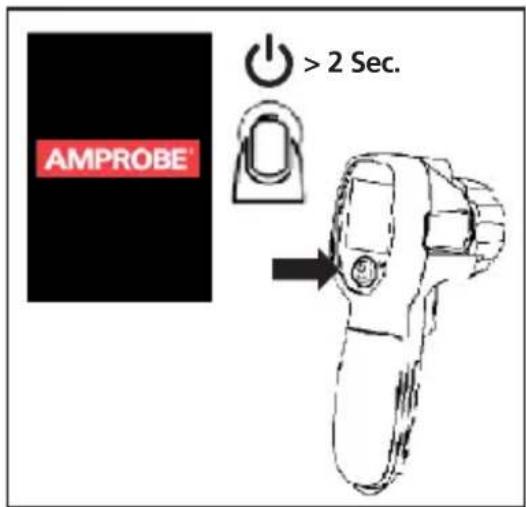
Figure 1.1
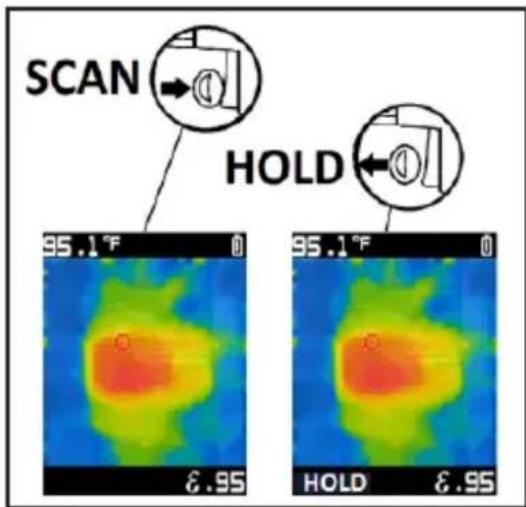
Figure 1.2
Image Blending
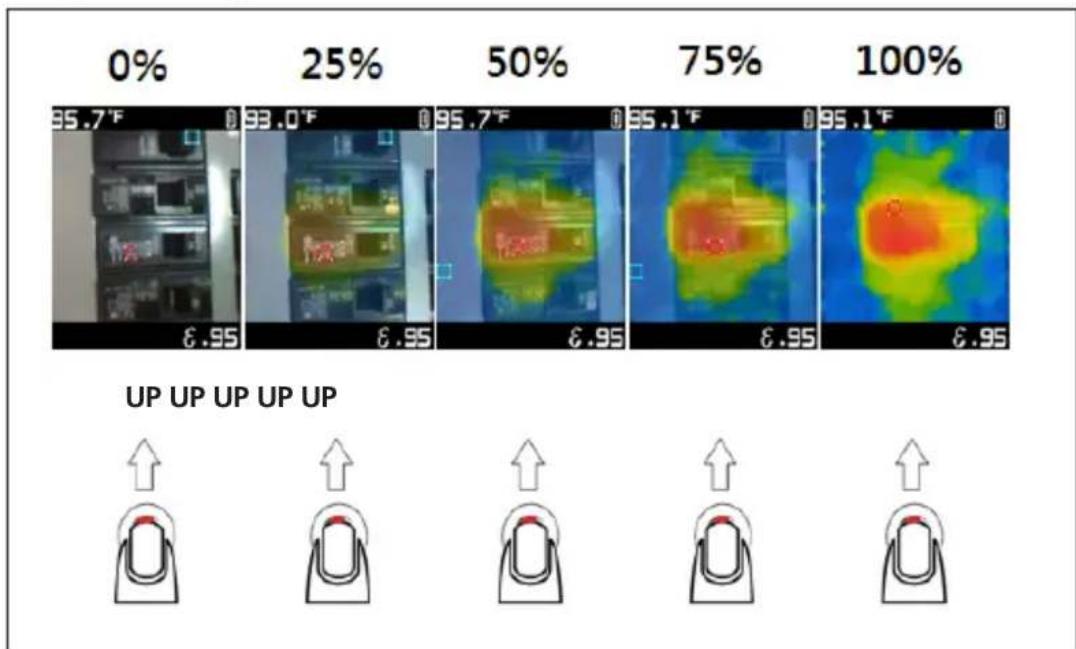
Figure 1.3
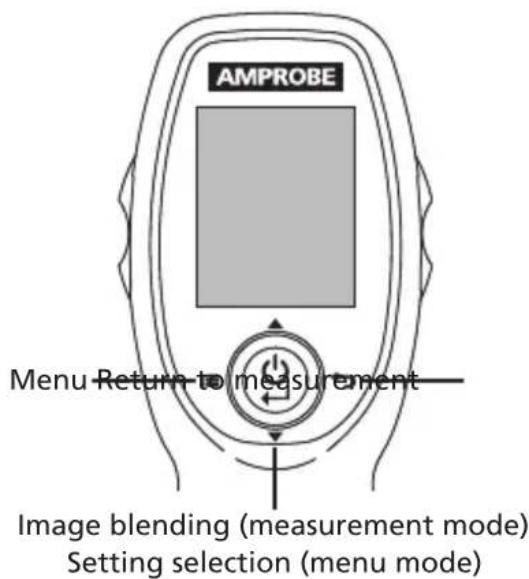
Blending may be adjusted for an easier interpretation between infrared and visible images. To change the level of blending between 0 - 100% , press down or up on the power button while in measurement mode.
Changing Settings in the Menu
Once the product is powered on, reach the menu by clicking left on the power button. Settings that can be manipulated include hot and cold markers, color palette, emissivity, center point marker, selectable ^ F / ^, and timed auto power off. Enabled options will appear as blue squares while disabled options will appear as black squares.
Hot and Cold Markers
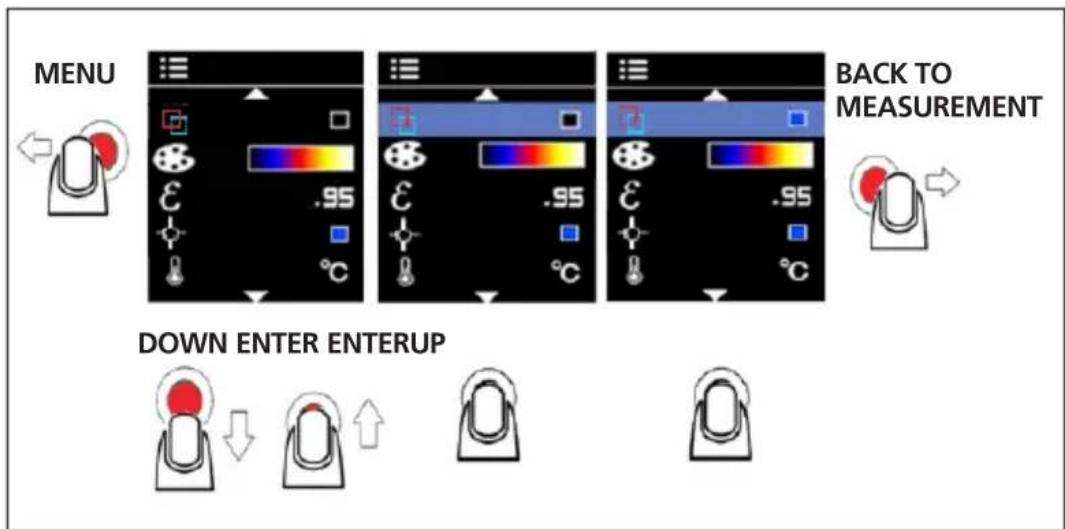
Figure 2.1
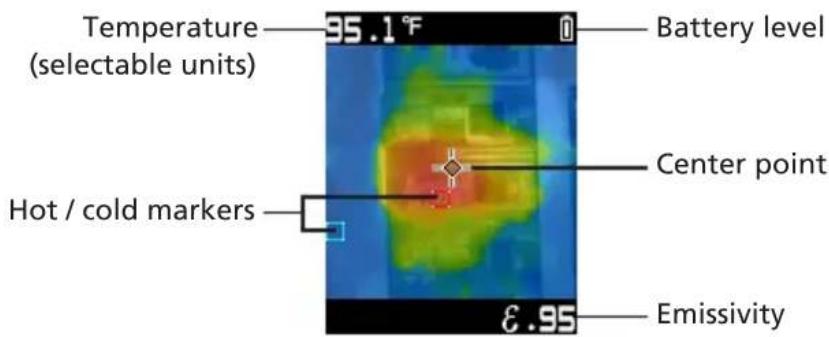
Hot (red square outline) and cold (blue square outline) markers indicate the locations of hottest and coldest areas within a target area. Turn this function on or off in the menu.
Color Palette
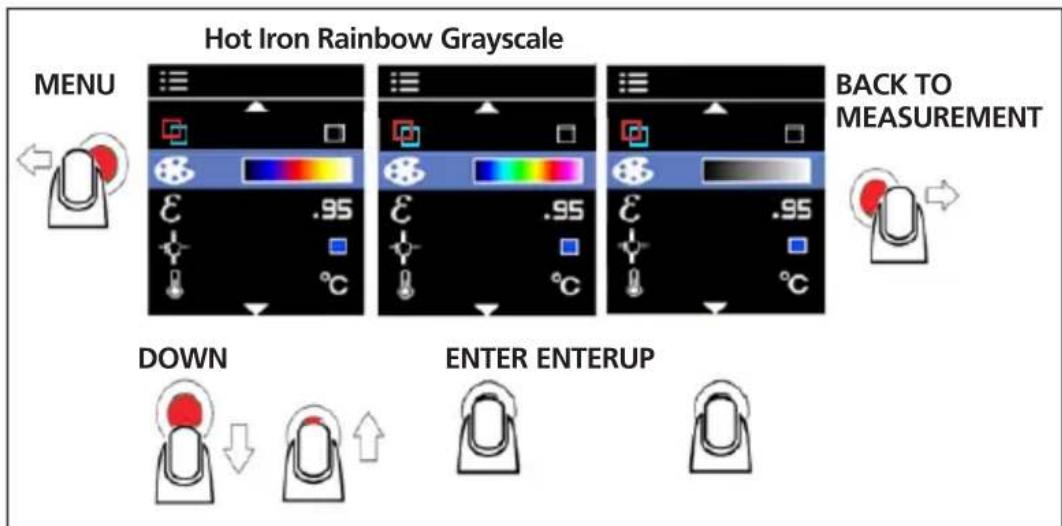
Figure 2.2
The color palette can be changed depending on the specific application of the measurement. This option allows for different viewings of an infrared image by changing the false-color presentation. Grayscale shows a more equal and linear presentation of colors to enhance detail, while Hot Iron and Rainbow combine high contrast with Grayscale.
Emissivity
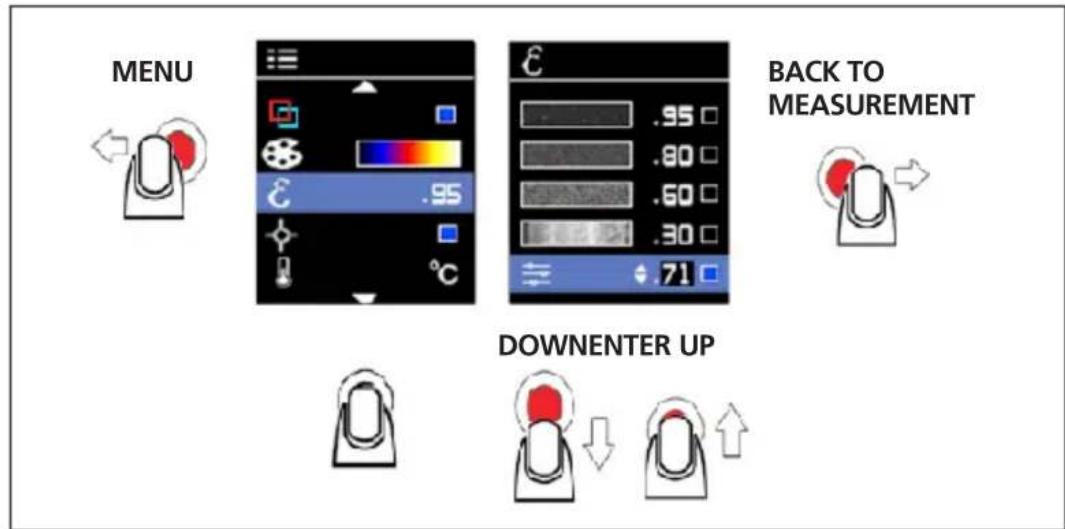
Figure 2.3
The emissivity of the surface of a material describes its effectiveness in emitting energy as thermal radiation. Quantitatively, emissivity is the ratio of the thermal radiation from a surface to the radiation from an ideal black surface at the same temperature as given by the Stefan-Boltzmann law. Refer to Table 1 for the emissivity adjustment.
In measurement mode, emissivity level is shown on the bottom right of the screen. Emissivity can be changed to values between 0.10-1.00 in menu.
Note: Surfaces with an emissivity < 0.60 make reliable and consistent determination of actual temperatures problematic. The lower the emissivity, the more potential error is associated with the temperature measurement calculations of the product, even when emissivity and reflected background adjustments are attempted and performed properly.
Table 1. Nominal surface emissivity for an accurate non-contact infrared temperature measurement.
| Material Value | Material Value |
| Default**** 0.95 | Glass (plate) 0.85 |
| Aluminum* 0.30 | Iron* 0.70 |
| Asbestos 0.95 Lead | Lead* 0.50 |
| Asphalt 0.95 Oil | 94 |
| Brass* 0.50 Paint | 0.93 |
| Ceramic 0.95 Plastic** | 0.95 |
| Concrete 0.95 Rubber | |
| Copper* 0.60 Sand | |
| Food-frozen 0.90 Steel* | Steel* 0.80 |
| Food-hot | 0.93 Water |
| *Oxidized **Opaque, over 20 mils ***Natural ****Factory Setting | |
Center Point Marker
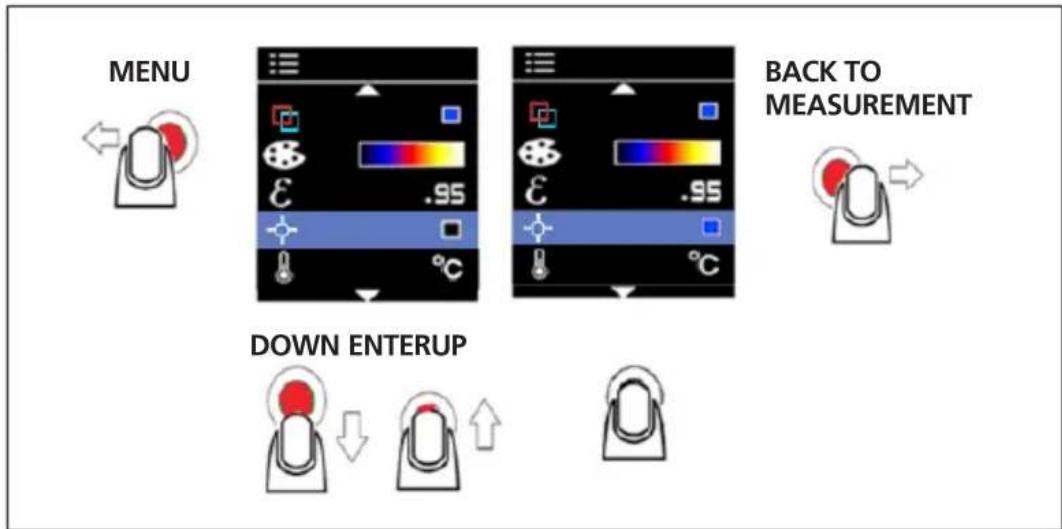
Figure 2.4
The center point marker indicates the center of the infrared thermometer measurement spot and appears in the center of the measurement screen.
Turn this function on or off in the menu.
^ F / C
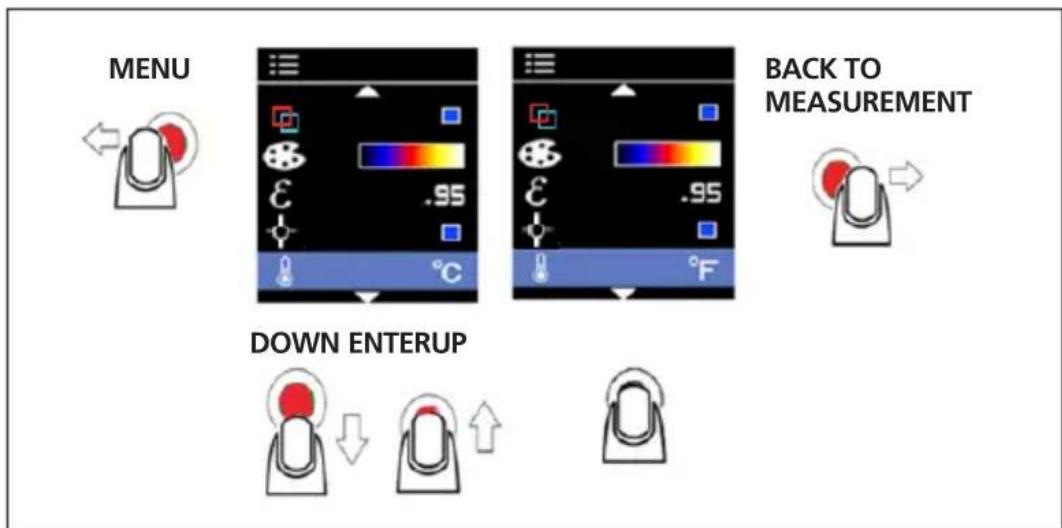
Figure 2.5
Change the temperature units in the menu by selecting ^ F or ^ C .
Auto Power OFF
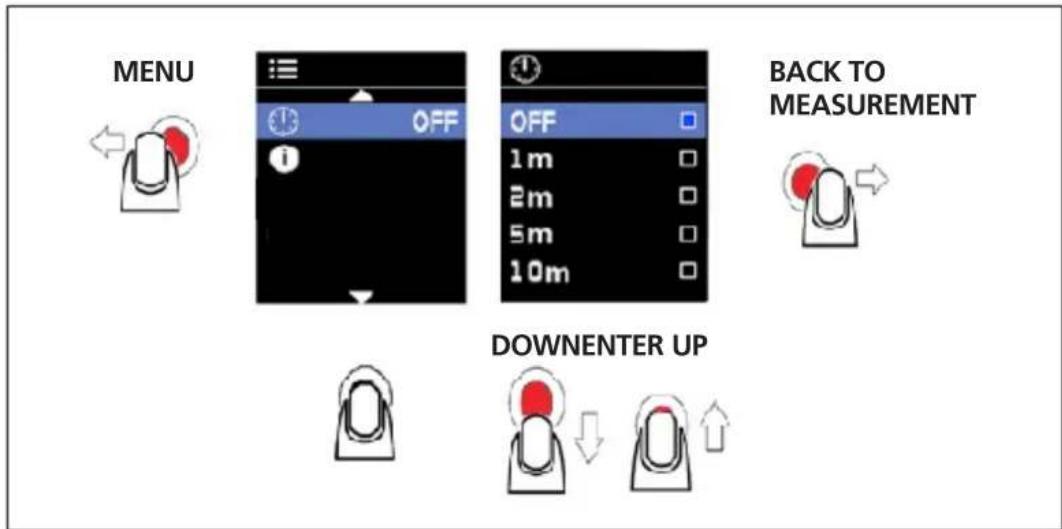
Figure 2.6
By default, the product will automatically power off after 1 minute. To choose when the product will power off after a period of inactivity, change the settings in the menu.
Available options for the Auto Power Off setting:
OFF (the camera will not turn off automatically)
- 1 m (1 minute)
- 2m (2 minutes)
- 5m (5 minutes)
- 10m (10 minutes)
SPECIFICATIONS
| Temperature measurement | Yes, center point |
| Temperature range | 14 °F to 932 °F (-10 °C to 500 °C) |
| IR accuracy (calibration geometry with ambient temperature 23°C ± 2°C) | ≥ 32 °F (≥ 0 °C): ± 4 °F (± 2 °C) or ± 2 % of the reading, whichever is greater < 32 °F (< 0 °C): ± 6 °F (± 3 °C) |
| Display resolution | 0.2 °F / 0.1 °C |
| IR Repeatability | ± 0.8 % of the reading or ± 2 °F (± 1 °C), whichever is greater |
| Temperature Coefficient | 0.1 °C/°C or ± 0.1 %/°C of the reading, whichever is greater |
| Distance to spot | 20:1 |
| Minimum spot size | 8 mm |
| Response time (95 %) | < 125 ms |
| Spectral response | 8 μm to 14 μm |
| Emissivity | Digitally adjustable from 0.10 to 1.00 by 0.01 |
| Visual image with infrared heat map overlay | Five blending modes (0%, 25%, 50%, 75% and 100%) |
| Image resolution | 16,384 pixels (128 x 128 pixels) (Interpolation pixels) |
| Field of view | 33° x 33° |
| Thermal sensitivity | 150 mK |
| Focus system | Focus free |
| Image palettes | Grayscale (white hot), Hot Iron and Rainbow |
| Hot and cold marker | Yes |
| Display | 1.77 in color TFT with 128 x 160 pixels |
| Operating temperature and humidity | 32°F to 122°F (0°C to 50°C) 10 % to 90 % RH non-condensing at 86°F (30°C) |
| Storage temperature | -4°F to 140°F (-20°C to 60°C) without batteries |
| Visual to IR effective image alignment | ≥ 10 inches (25.4 cm), optimal of 1 meter |
| Operating and storage altitude | < 6561 ft (< 2000 m) |
| Drop proof | 4-feet (1.2 m) |
| Vibration and shock | IEC 60068-2-6, 2.5g, 10 to 200 Hz, IEC 60068-2-27, 50g 11ms |
| Power supply | Three (3) 1.5 V AA IEC LR6 alkaline batteries |
| Battery life | 8 hours with display ON (Typical) Power consumption: 150 mA (Typical) |
| Auto power off | Selectable modes: OFF, 1 minute, 2 minutes, 5 minutes and 10 minutes |
| Agency approvals | CEK |
| Electromagnetic Compatibility | EN 61326-1 Korea (KCC): Class A Equipment (Industrial Broadcasting & Communication Equipment) [1] [1] This product meets requirements for industrial (Class A) electromagnetic wave equipment and the seller or user should take notice of it. This equipment is intended for use in business environments and is not to be used in homes. |
| Size (H x W x L) | Approx. 7.3 x 2.1 x 4.1 in (185 x 54 x 104 mm) |
| Weight | Approx. 0.57 lb (0.26 kg) |
Do not use abrasives, isopropyl alcohol, or solvents to clean the case or lens/ window. If used and stored properly, the infrared lens on the product should require only occasional cleaning (Figure 3.1).
When necessary, to clean the lens:
- Use a hand-squeeze air pump to gently blow off any dust or debris from the lens surface.
- If the lens surface requires additional cleaning, use a clean, fine-fiber cloth, micro-fiber cloth, or cotton swab dampened with a mild, soapy water solution. Gently wipe surface of lens to remove smudges and debris.
- Dry with an absorbent, clean fine-fiber or micro-fiber cloth.
Note: Minor smudges and dirt should not significantly affect the performance of the product. However, large scratches or the removal of the protective coating on the infrared lens can affect both image quality and the temperature measurement accuracy.
To avoid incorrect measurements, replace the batteries when the battery indicator is low. Use only AA alkaline batteries and follow all battery care guidelines from the manufacturer. To remove the batteries, first ensure the product is in OFF position, then unscrew the battery cover. When installing the batteries, be sure that the battery polarity is correct to prevent battery leakage. Secure the batteries by screwing the battery cover back in place (Figure 3.2).
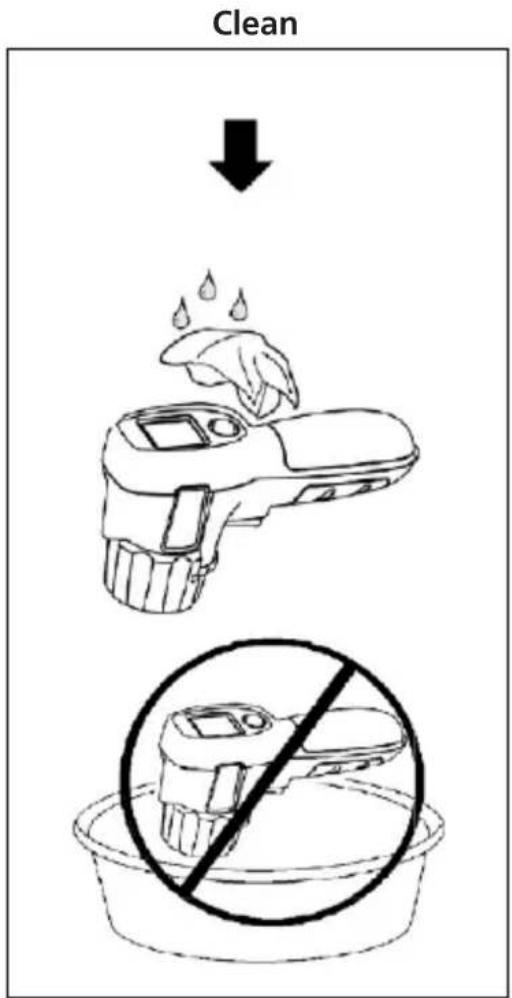
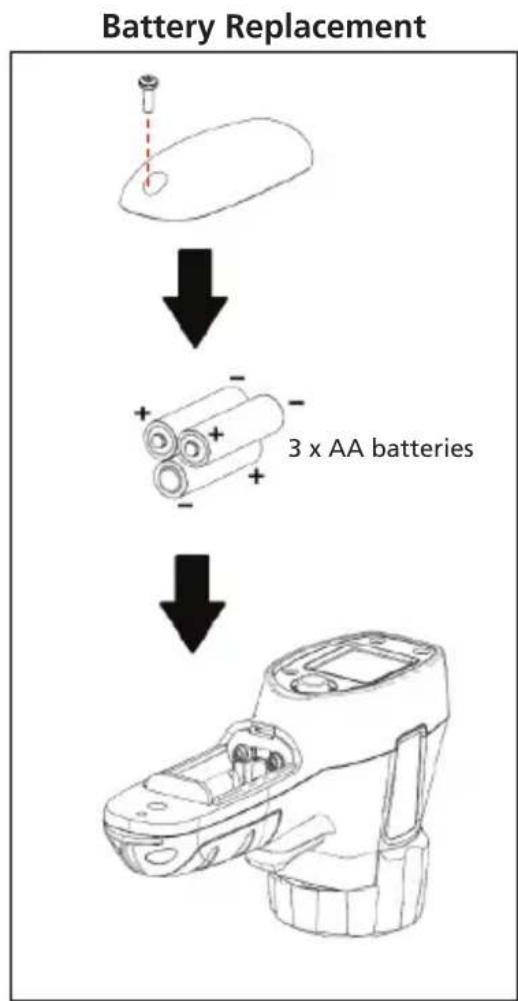

Figure 3.2
Figure 3.1
IRC-110
IRC-110-CN
Camera infrarouge
SYMBOLS 3
SAFETY INFORMATION 3
UNPACKING AND INSPECTION 4
FEATURES AND APPLICATIONS 4
BASIC NAVIGATION 5
MEASUREMENT MODE 6
MENUMODE 7
SPECIFICATIONS 10
MAINTENANCE AND BATTERY REPLACEMENT 12
FONCTIONS ET APPLICATIONS
\section*{Caracteristiques}
CONSERVATION
Figure 1.2
SYMBOLS 3
SAFETY INFORMATION 3
UNPACKING AND INSPECTION 4
FEATURES AND APPLICATIONS 4
BASIC NAVIGATION 5
MEASUREMENT MODE 6
MENUMODE 7
SPECIFICATIONS 10
MAINTENANCE AND BATTERY REPLACEMENT 12
Visit amprobe.com for
- Catalog
Application notes
Product specifications - User manuals
Amprobe
amprobe.com
Division of Fluke Corp.
6920 Seaway Blvd.
M/S 143F
Everett, WA 98203 USA
Tel: 877-AMPROBE (267-7623)
Beha-Amprobe
beha-amprobe.com
c/o Fluke Europe BV
Science Park
Eindhoven 5110
NL-5692 EC Son
Tel.: +49 (0) 7684 8009 - 0

Please
Recycle
- Limited Warranty and Limitation of Liability
- Repair
- In-warranty Repairs and Replacement - All Countries
- Non-warranty Repairs and Replacement - United States and Canada
- Non-warranty Repairs and Replacement - Europe
- CONTENTS
- SYMBOLS
- SAFETY INFORMATION
- Warning
- Caution
- To prevent personal injury and for safe operation and maintenance of the product:
- To avoid damaging the product under measurement, protect it from the following:
- UNPACKING AND INSPECTION
- FEATURES AND APPLICATIONS
- Features
- Applications
- BASIC NAVIGATION
- Taking Measurements
- Power ON / OFF HOLD
- Image Blending
- Changing Settings in the Menu
- Hot and Cold Markers
- Color Palette
- Emissivity
- Center Point Marker
- ° F / ° C
- Auto Power OFF
- SPECIFICATIONS
- FONCTIONS ET APPLICATIONS
- \section*{Caracteristiques}
- Visit amprobe.com for
- Amprobe
- Beha-Amprobe
Brand : Amprobe
Model : IRC110
Category : Thermal camera