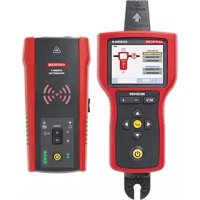
AT8020 - Multimeter Amprobe - Free user manual and instructions
Find the device manual for free AT8020 Amprobe in PDF.




User questions about AT8020 Amprobe
0 question about this device. Answer the ones you know or ask your own.
Ask a new question about this device
Download the instructions for your Multimeter in PDF format for free! Find your manual AT8020 - Amprobe and take your electronic device back in hand. On this page are published all the documents necessary for the use of your device. AT8020 by Amprobe.
USER MANUAL AT8020 Amprobe
Advanced Wire Tracers
AT-8020
AT-8030
User Manual
ENG
FRE
SPA
AT-8000
Advanced Wire Tracer
AT-8020
AT-8030
User Manual
Limited Warranty and Limitation of Liability
Your Amprobe product will be free from defects in material and workmanship for one year from the date of purchase unless local laws require otherwise. This warranty does not cover fuses, disposable batteries or damage from accident, neglect, misuse, alteration, contamination, or abnormal conditions of operation or handling. Resellers are not authorized to extend any other warranty on the behalf of Amprobe. To obtain service during the warranty period, return the product with proof of purchase to an authorized Amprobe Service Center or to an Amprobe dealer or distributor. See Repair Section for details. THIS WARRANTY IS YOUR ONLY REMEDY. ALL OTHER WARRANTYES - WHETHER EXPRESSSED, IMPLIED OR STATUTORY - INCLUDING IMPLIED WARRANTY OF FITNESS FOR A PARTICULAR PURPOSE OR MERCHANTABILITY, ARE HEREBY DISCLAIMED. MANUFACTURER SHALL NOT BE LIABLE FOR ANY SPECIAL, INDIRECT, INCIDENTAL OR CONSEQUENTIAL DAMAGES OR LOSSES, ARISING FROM ANY CAUSE OR THEORY. Since some states or countries do not allow the exclusion or limitation of an implied warranty or of incidental or consequential damages, this limitation of liability may not apply to you.
Repair
All Amprobe products returned for warranty or non-warranty repair or for calibration should be accompanied by the following: your name, company's name, address, telephone number, and proof of purchase. Additionally, please include a brief description of the problem or the service requested and include the test leads with the meter. Non-warranty repair or replacement charges should be remitted in the form of a check, a money order, credit card with expiration date, or a purchase order made payable to Amprobe.
In-warranty Repairs and Replacement – All Countries
Please read the warranty statement and check your battery before requesting repair. During the warranty period, any defective test tool can be returned to your Amprobe distributor for an exchange for the same or like product. Please check the "Where to Buy" section on amprobe.com for a list of distributors near you. Additionally, in the United States and Canada, in-warranty repair and replacement units can also be sent to an Amprobe Service Center (see address below).
Non-warranty Repairs and Replacement – United States and Canada
Non-warranty repairs in the United States and Canada should be sent to an Amprobe Service Center. Call Amprobe or inquire at your point of purchase for current repair and replacement rates.
USA: Canada:
Amprobe
Amprobe
Everett, WA 98203 Mississauga, ON L4Z 1X9
Tel: 877-AMPROBE (267-7623) Tel: 905-890-7600
Non-warranty Repairs and Replacement – Europe
European non-warranty units can be replaced by your Beha-Amprobe distributor for a nominal charge. Please check the "Where to Buy" section on beha-amprobe.com for a list of distributors near you.
Beha-Amprobe
Division and reg. trademark of Fluke Corp. (USA)
Germany* United Kingdom
The Netherlands - Headquarters**
In den Engematten 14 52 Hurricane Way Science Park Eindhoven 5110
79286 Glottertal Norwich, Norfolk 5692 EC Son
Germany NR6 6JB United Kingdom The Netherlands
Phone: +49 (0) 7684 8009 - 0 Phone: +44 (0) 1603 25 6662 Phone: +31 (0) 40 267 51 00
beha-amprobe.de
beha-amprobe.com
beha-amprobe.com
*Correspondence only - no repair or replacement available from this address. European customers please contact your distributor.)
**single contact address in EEA Fluke Europe BV
CONTENTS
1. PRECAUTIONS AND SAFETY MEASURES 2
2. KIT COMPONENTS 5
2.1 AT-8000-R Receiver 6
2.2 AT-8000-T Transmitter 8
2.3 CT-400 Signal Clamp 11
3. MAIN APPLICATIONS 12
3.1 Tracing Energized Wires 13
- Using the Receiver in Energized SMART SENSOR™ mode 14
- Using Receiver in Energized TIP SENSOR mode 15
3.2 Tracing De-Energized Wires 16
- Using Receiver in De-Energized TIP SENSOR mode
3.3 Identifying Breakers and Fuses 17
- Using Receiver in Energized & De-Energized Breaker mode
3.4 Non-Contact Voltage Mode (NCV) 20
4. SPECIAL APPLICATIONS 21
4.1 GFCI-Protected Circuit Wire Tracing 21
4.2 Finding Breaks/Opens 22
4.3 Finding Shorts 22
4.4 Tracing Wires in Metal Conduit: Junction Box Method 23
4.5 Tracing Non-Metallic Pipes and Conduits 23
4.6 Tracing Shielded Wires 24
4.7 Tracing Underground Wires 25
4.8 Tracing Low Voltage Wires and Data Cables 25
4.9 Sorting Bundled Wires 26
4.10 Mapping a Circuit using Test Leads Connection 27
4.11 Tracing Breakers/Fuses on Systems with Light Dimmers 27
4.12 Signal Clamp - Closed Loop Circuits 28
4.13 Signal Clamp - Mapping Circuits 30
5. MAINTENANCE 31
5.1 Battery Replacement 31
5.2 Fuse Replacement 34
6. SPECIFICATIONS 35
General
For your own safety and to avoid damage to the instrument we suggest you to follow the procedures listed below:
NOTE: Before and during measurements be diligent to follow the instructions.
- Make sure that the electrical instrument is operating properly before use.
- Before attaching any of the conductors, make sure that the voltage present in the conductor is in the range of the instrument.
- Keep the instruments in their carrying case when not in use.
- If the Transmitter or Receiver will not be used for a long time, remove the batteries to prevent leakage in the instruments.
- Use Amprobe approved cables and accessories only.
Safety precautions
In many instances, dangerous levels of voltage and/or current may be present. Therefore, it is important to avoid direct contact with any uninsulated voltage/current carrying surfaces. Insulated gloves and protective clothing should be worn in hazardous voltage areas.
- Do not measure voltage or current in wet, damp or dusty places.
- Do not measure voltage in the presence of gas, explosive materials or combustibles.
- Do not touch the circuit under test if no measurement is being taken.
- Do not touch exposed metal parts, such as unused terminals and circuits.
- Do not use the instrument if it appears to be malfunctioning (i.e. if you notice deformations, breaks, leakage of substances, absence of messages on the display, etc).
Safety information
The product complies with:
- UL/IEC/EN 61010-1, CAN/CSA C22.2 No. 61010-1, Pollution Degree 2, Measurement category IV 600 V MAX
IEC/EN 61010-2-030
IEC/EN 61010-2-032
IEC/EN 61010-031 (test leads)
EMCIEC/EN61326-1
Measurement Category IV (CAT IV) is for circuits that are directly connected to the primary utility power source for a given building or between the building power supply and the main distribution board. Such equipment may include electricity tariff meters and primary over current protection devices.
Measurement Category II (CAT II) is for measurements performed on circuit directly connected to the low voltage installation. Examples are measurements on house hold appliances, portable tools and similar equipment.
CENELEC Directives
The instruments conform to CENELEC Low-voltage directive 2014/35/EU and Electromagnetic compatibility directive 2014/30/EU.
Warnings: Read Before Using
To avoid the possibility of electric shock or personal injury:
- Use the Product only as specified in this manual or the protection provided by the instrument may be compromised.
- Avoid working alone so assistance can be rendered.
- Test on a known signal source within the rated voltage range of the Product both before and after use to ensure the Product is in good working conditions.
- Do not use the Product around explosive gas, vapor, or in damp or wet environments.
- Inspect the Product before use and do not use if it appears damaged. Check for cracks or missing plastic. Pay particular attention to the insulation around the connectors.
- Inspect the test leads and other accessories before use. Do not use if insulation is damaged or metal is exposed.
- Do not use the Product if it operates incorrectly. Protection may be impaired. When in doubt, have the Product serviced.
- Check the test leads for continuity. Replace damaged test leads before using the Product.
- Have the Product serviced only by qualified service personnel.
- Use extreme caution when working around bare conductors or bus bars. Contact with the conductor could result in electric shock.
- Do not hold the Product beyond the tactile barrier.
- Do not apply more than the rated voltage and CAT rating, as marked on the Product, between the terminals or between any terminal and earth ground.
- Remove test leads from the Product before opening the Product case or battery cover.
- Never operate the Product with the battery cover removed or the case open.
- Use caution when working with voltages above 30 V AC RMS, 42 V AC peak, or 60 V DC. These voltages pose a shock hazard.
- Do not exceed the Measurement Category (CAT) rating of the lowest rated individual component of a Product, probe, or accessory.
- Do not attempt to connect to any circuit carrying voltage that may exceed the maximum range of the Product.
- Use the proper terminals, functions and ranges for your measurements.
- When using alligator clips and test probes, keep fingers behind the finger guards.
- Use only exact fuse replacement and specified replacement parts.
- When making electrical connections, connect the common test lead before connecting the live test lead; when disconnecting, disconnect the live test lead before disconnecting the common test lead.
- To avoid false readings that can lead to electrical shock and/or injury, replace the batteries as soon as the low battery indicator appears. Check Product operation on a known source before and after use.
- Use only AA batteries, properly installed in the Product case, to power the Product (see Section 5.1: Battery Replacement).
- When servicing, use only specified user serviceable replacement parts.
- Adhere to local and national safety codes. Individual protective equipment must be used to prevent shock and arc blast injury where hazardous live conductors are exposed.
- Only use the test lead provided with the Product or UL Listed Probe Assembly rated CAT IV 600 V or better.
- Do not use the HOT STICK (TIC 410A) to operate the AT-8000-R Receiver at voltages above 600V .
- Remove the batteries if the Product is not used for an extended period of time, or if stored in temperatures above 122^ ( 50^ ). If the batteries are not removed, battery leakage can damage the Product.
- Follow all battery care and charging instructions from the battery manufacturer.
- Do not use the Product to check for absence of voltage. Please use an appropriate voltage tester instead.
Symbols used in this product
| Battery status - Displays the remaining battery charge. | |
| Home - Return to home screen when selected. | |
| ? | Help - Enters to the help guide when selected. |
| Settings - Enters to the settings menu when selected. | |
| Indicates the volume is muted. | |
| Volume - Displays the volume in four levels. | |
| + | Sensitivity indicator - Displays the sensitivity level from 1 to 10. |
| Icon indicating energized system. | |
| Icon indicating de-energized system. | |
| Signal strength indicator - Shows the strength of the signal from 0 to 99. | |
| MAN/AUTO | Shows whether the sensitivity adjustment is in Manual or Automatic mode. |
| Lock indicates if the Auto sensitivity lock is active (Only in Auto sensitivity mode). | |
| Application and removal from hazardous live conductors permitted. | |
| Caution! Risk of electric shock. | |
| Caution! Refer to the explanation in this Manual. | |
| The equipment is protected by double insulation or reinforced insulation. | |
| Earth (Ground). | |
| CAT IV 600V | Overvoltage up to Category IV 600V (transient protection up to 8 kV). |
| Fuse. | |
| US | Conforms to relevant North American Safety Standards. |
| CE | Complies with European Directives. |
| Conforms to relevant Australian standards. | |
| This product complies with the WEEE Directive marking requirements. The affixed label indicates that you must not discard this electrical/electronic product in domestic household waste. Product Category: With reference to the equipment types in the WEEE Directive Annex I, this product is classed as category 9 "Monitoring and Control Instrumentation" product. Do not dispose of this product as unsorted municipal waste. |
This manual contains information and warnings that must be followed for safe operation and maintenance of the instrument. If the Product is used in a manner not specified by the manufacturer, the protection provided by the Product may be impaired. This Product meets water and dust protection IP52 (Receiver) and IP40 (Transmitter and signal clamp) per IEC 60529. Do NOT operate outside during periods of rainfall. The Product is double insulated for protection per EN 61010-1 to CAT IV 600 V.
CAUTION: Do not connect the Transmitter to a separate ground in Electrically Susceptible Patient areas of a health care facility. Make the ground connection first and disconnect it last.
2. KIT COMPONENTS
Your shipping box should include:
| AT-8020 KIT AT-8030 KIT | |
| AT-8000-R RECEIVER 1 1 | |
| AT-8000-T TRANSMITTER 1 1 | |
| TL-8000-INT TEST LEAD AND ACCESSORY KIT* 1 1 | |
| CC-8000 HARD CARRYING CASE 1 1 | |
| BATTERY CHARGERS - 3 | |
| RECHARGEABLE BATTERIES NIMH TYPE 1.2 V AA (IEC LR6) | - |
| BATTERIES ALKALINE 1.5 V AA (IEC LR6) 12 - | |
| CT-400 SIGNAL CLAMP - 1 | |
| HS-1 MAGNETIC HANGER - 1 | |
| USER MANUAL 1 1 | |
| QUICK START GUIDE | 1 1 |
*TL-8000-INT test lead and accessory kit includes:
- 2 × 1 m test leads (red, black): CAT IV 600 V
- 1 × 7 m test lead (green): CAT IV 600 V
- 2 x Alligator clips (red, black): CAT IV 600 V
- 2 x Outlet blade adapters (red, black): CAT II 300 V
- 2 x Outlet round adapters (red, black): CAT II 300 V
Optional Accessories:
- TL-8000-25M 25 m test lead
- ADPTR-SCT Socket adapter
HS-1 Magnetic hanger - CT-400 Signal clamp
2.1 AT-8000-R Receiver
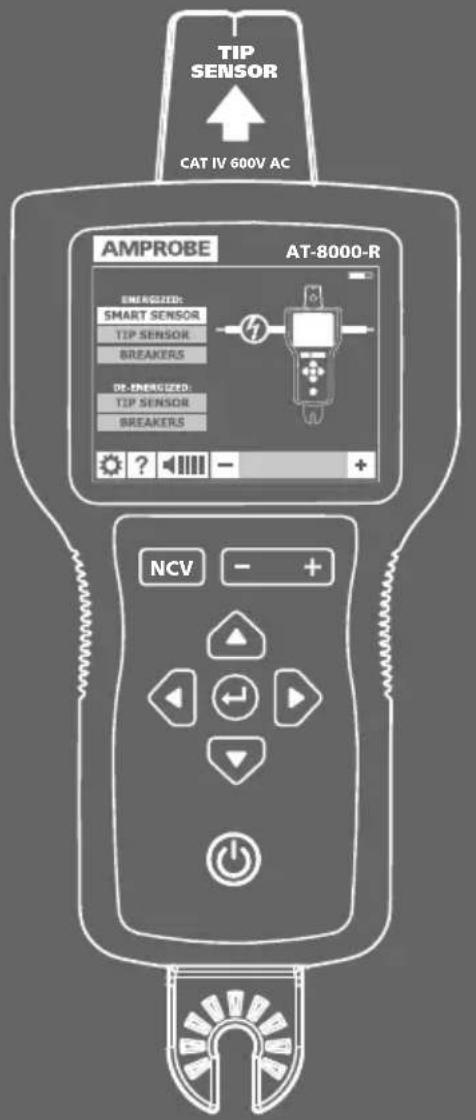
The AT-8000-R Receiver detects the signal generated by the AT-8000-T Transmitter along wires using either the Tip Sensor or Smart Sensor™ and displays this information on the full color TFT LCD display.
Active tracing using a signal generated by the AT-8000-T Transmitter
The Smart Sensor™ works with a 6 kHz signal generated along Energized wires (above 30 V AC/DC) and provides an indication of the wire position and direction relative to the Receiver. The Smart Sensor™ is not designed to work on De-energized systems; for that application the Tip Sensor should be used in De-energized mode.
The Tip Sensor may be used on either Energized or De-energized wires and can be used for general tracing, tracing in tight spaces, locating breakers/fuses, pinpointing wires in bundles or in junction boxes. The TIP SENSOR mode will pinpoint the wire location with both an audible and visual indication of detected signal strength, but unlike SMART SENSOR™ mode it will not provide wire direction or orientation.
Note: The Receiver will NOT detect signals from the wire through metal conduit or shielded cable. Refer to Special Applications, section 4.4 "Tracing Wires In Metal Conduit" for alternative tracing methods.
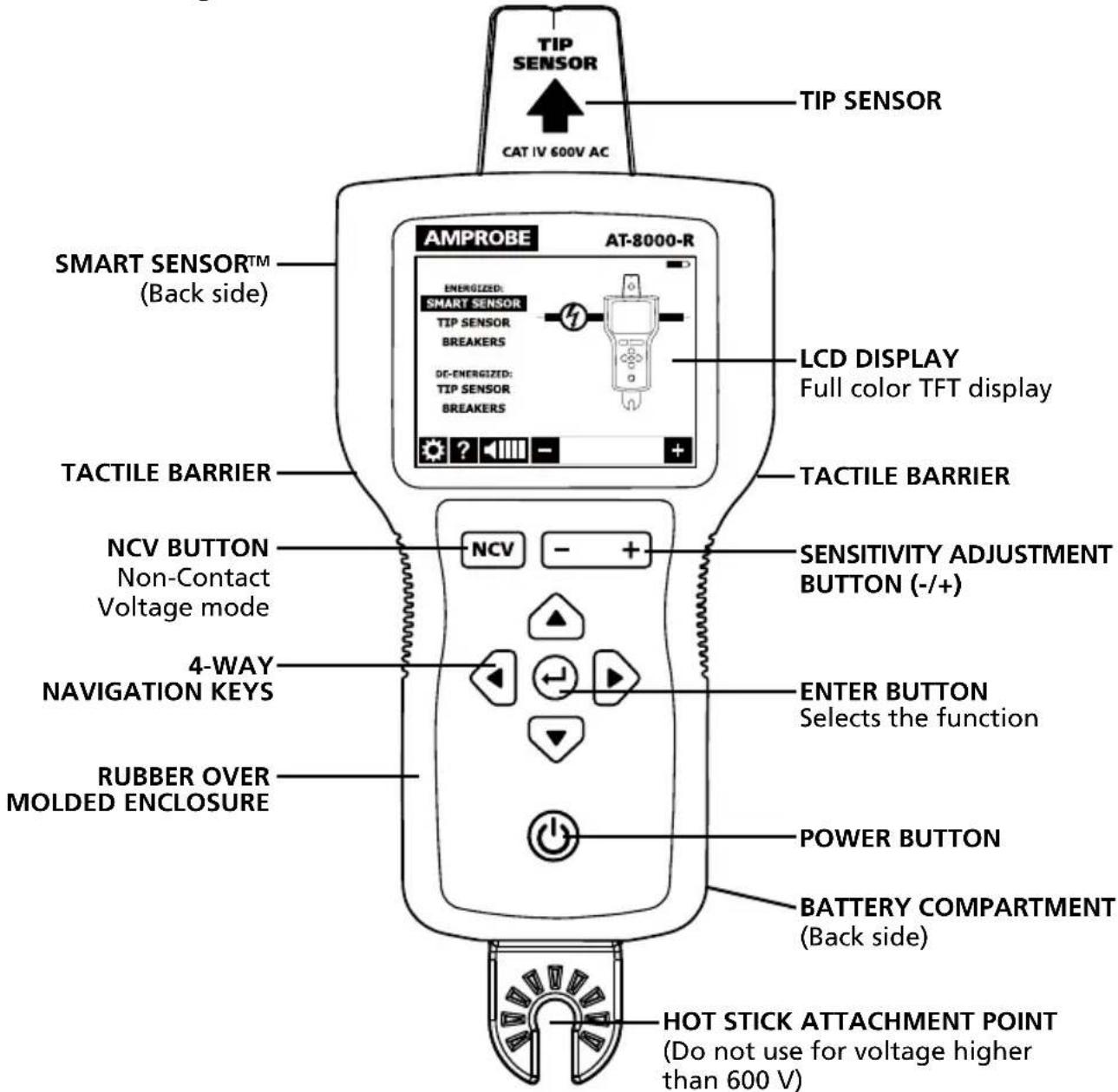
Figure 2.1a: Overview of AT-8000-R Receiver
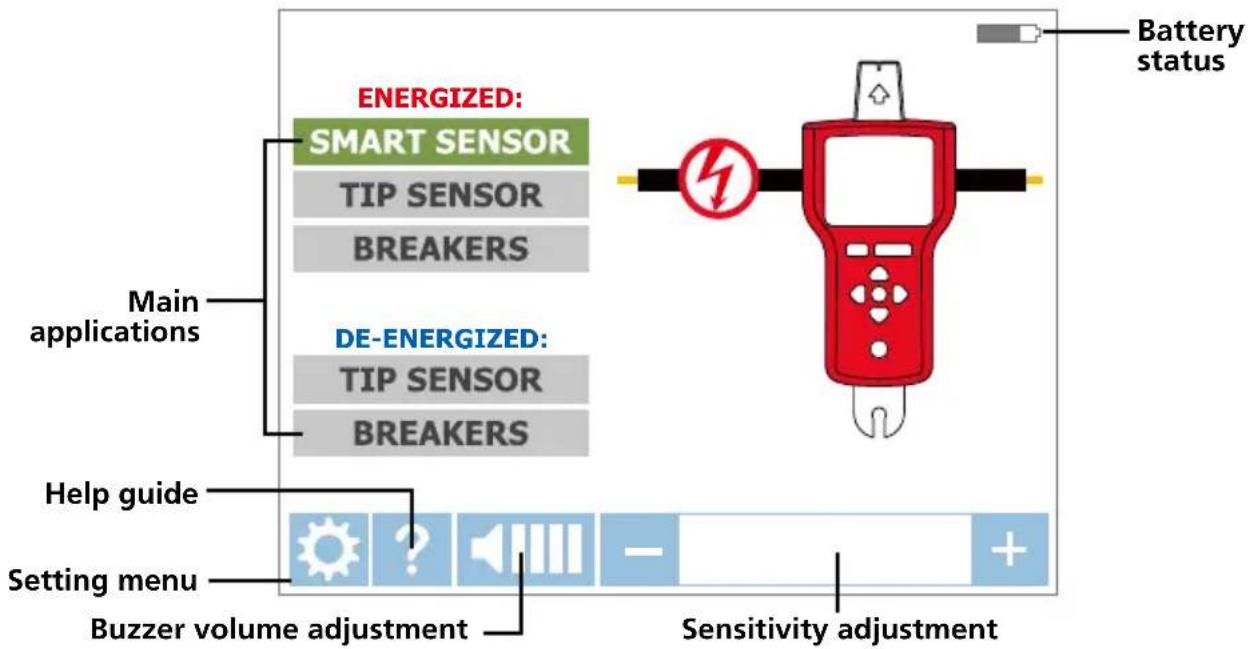
Figure 2.1b: Overview of home screen elements
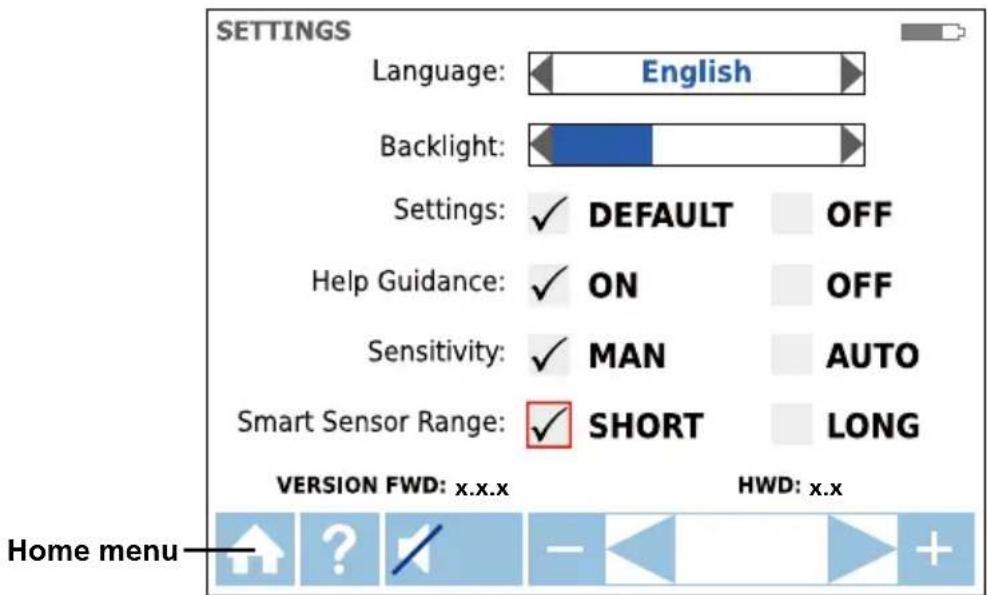
Figure 2.1c: Overview of settings menu elements
| Language English, French, Spanish, Portuguese | |
| Backlight 25%, 50%, 75% | 5%, 100% |
| Setting | DEFAULT:Restore default settings |
| Help Guidance | ON:Device will guide you through each modeOFF:Device will start without guidance |
| Sensitivity* | MAN:Manual sensitivity adjustment (+) and (-) keysAUTO:Auto sensitivity adjustment |
| Smart SensorTMRange | SHORT:For wire detection up to 3 feetLONG:For wire detection between 3 and 20 feet |
*Note: The Auto and Manual sensitivity mode can be easily changed by pressing the + and - key at the same time when the Receiver is in a tracing mode. When sensitivity mode is set to "Auto" manual adjustment is disabled.
2.2 AT-8000-T Transmitter
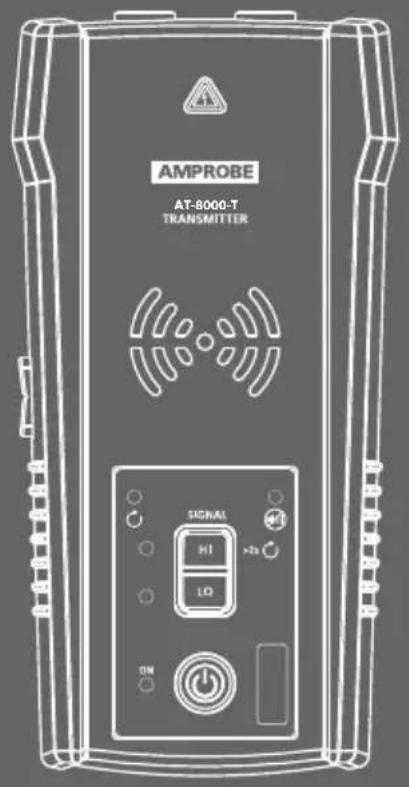
The AT-8000-T Transmitter works on Energized and De-energized circuits up to 600 V AC/DC in Category I through Category IV electrical environments.
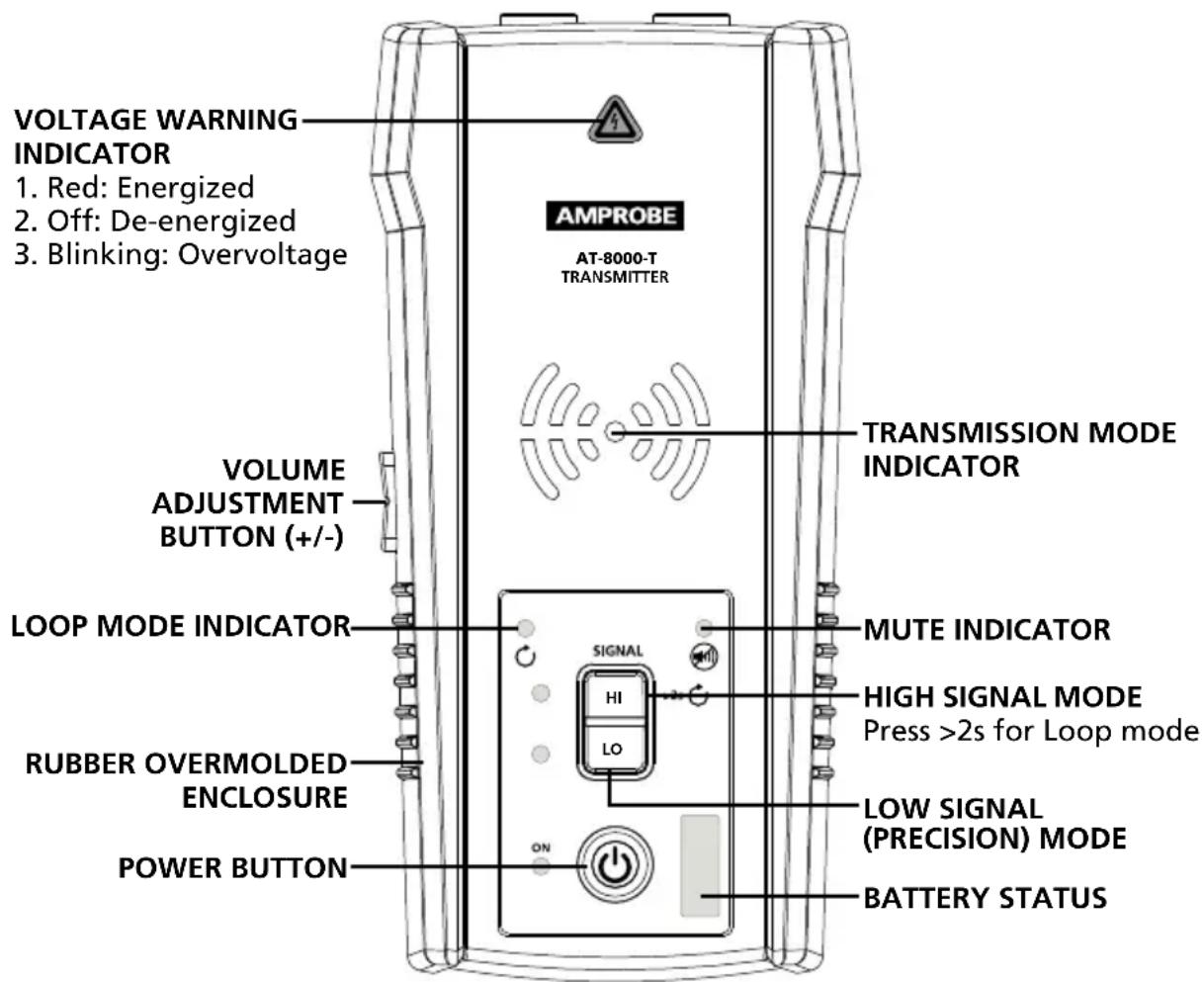
Figure 2.3: Overview of AT-8000-T Transmitter
ON/OFF: Short press to turn the Transmitter on. Long press >2s to turn the Transmitter off.
Volume adjustment: The volume can be changed by short presses on VOLUME UP/DOWN buttons. In addition to mute, four volume levels are available. The chosen volume level will be shown on LED display for a short time. If sound is muted, the MUTE LED light will be on. The sound pattern is different depending on chosen operating mode.
Voltage Warning indicator: The warning light will be ON for Energized circuits (30 to 600 V AC/DC), OFF for De-energized circuits (0 to 30 V AC/DC), and BLINKING if an overvoltage is detected (> 650 V AC/DC).
TRANSMISSION MODE INDICATOR: The LEDs will blink with different rhythm depending on the chosen operating mode.
Transmitting in HIGH mode - Fast blinking
Transmitting in LOW mode - Slow blinking
Transmitting in LOOP mode - Alternating blinking
High mode: Short press on HI to turn on HIGH transmitting mode. Second short press on HI button to turn off transmitting.
Low mode: Short press on LO to turn on LOW transmitting mode. Second short press on LO button to turn off transmitting.
Loop mode: Long press (>2s) on HI to turn on Loop mode. Short or long press on HI button to turn off Loop mode.
Transmitter signal modes:
High Signal (Hi) - The HIGH mode function is recommended for most wire tracing applications on Energized and De-energized circuits including breaker/fuse location. This function will be used the majority of the time.
Low Signal (Lo) – The LOW mode function is only appropriate for the most demanding and precise wire tracing applications, as it limits the signal level generated by the Transmitter in order to pinpoint the wire location more precisely. A lower signal level reduces coupling to neighboring wires and metal objects, which avoids misreadings due to ghost signals. A lower signal also prevents oversaturating the Receiver with a strong signal that covers too large of an area.
Loop mode - This mode is initiated by pressing and holding the HI button for >2 seconds. It should be used when working with closed loop De-energized circuits, such as shorted wires, shielded cables or De-energized wires that are grounded on the far-end.
How is the Loop function different from the Hi or Lo settings when using test leads?
Both HIGH and LOW modes generate a signal in all open branches of the De-energized circuit. This is useful when tracing open wires. Hi/Lo modes will NOT work on wires that are shorted (closed loop) or grounded on the far-end because the signal cannot be generated.
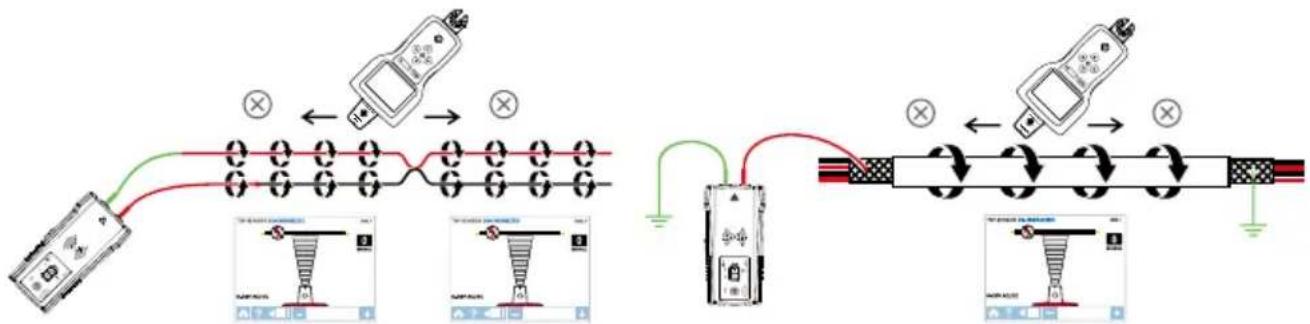
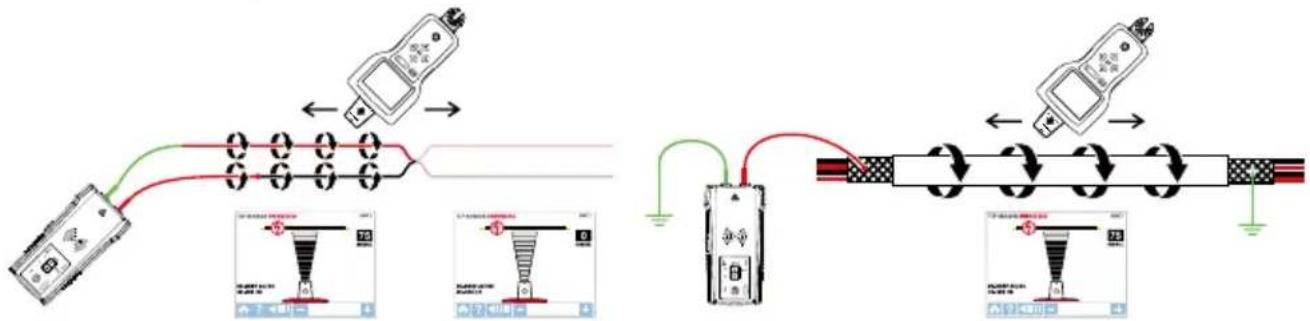
Figure 2.2a: Generating a signal with HIGH and LOW modes and closed loop Loop mode generates a signal (current flow) in closed loop De-energized circuits only. Loop mode is used to pinpoint the location of a short (because the current will not be able to flow in open branches) and to trace wires that are grounded on the far end (because the loop is closed via ground connection).
Figure 2.2b: Generating a signal in Loop mode
Note: Loop mode only works on De-energized circuits. However the receiver needs to be set to Energized sensor mode (the transmitter creates safe low voltage state). It is automatically disabled when the Transmitter is connected to an Energized line with test leads.
Working with the Transmitter
When the Transmitter is on and connected to the circuit with test leads, it checks for voltage. A red Voltage Warning Indicator will light up if the Transmitter detects dangerous voltage levels above 30 V AC/DC.
IMPORTANT!
The Voltage Warning Indicator light will blink when overvoltage (>650V AC/DC) is detected. In case of overvoltage immediately disconnect the Transmitter from the circuit.
This Voltage Waning Indicator is not desinged to check for absence of voltage. Please use a voltage tester therefore.
If the High (HI) or Low (LO) Signal button is pressed momentarily, the Transmitter starts generating a tracing signal. Based on the detected voltage, the Transmitter automatically switches to either:
- Energized mode (30 to 600 V AC/DC) generating 6 kHz frequency
- De-energized mode (0 to 30 V AC/DC) generating 33kHz frequency
Energized mode uses a lower transmission frequency (6 kHz) than De-energized mode (33 kHz) to reduce signal coupling between wires. De-energized mode requires a higher frequency in order to generate a reliable signal.
Energized mode: In Energized mode, the Transmitter draws a very low current from the Energized circuit and generates a 6 kHz signal. This is a very important feature of the Transmitter, since drawing current does not inject any signal that would harm sensitive equipment connected to the circuit. The signal is also generated in a direct path between the Transmitter and the power source, thus NOT placing a signal onto any branches enabling wiring tracing directly back to the breaker/fuse panel. Please note that due to this feature, the Transmitter has to be connected on the load side of the circuit.
De-energized mode: In De-energized mode, the Transmitter injects a 33kHz signal onto the circuit. In this mode, the signal will travel though all the circuit branches because it is injected. The high frequency/low energy signal will not harm any sensitive equipment.
2.3 CT-400 Signal Clamp
(included with AT-8030, optional for AT-8020)
The Signal Clamp accessory is used for applications when where is no access to the bare conductors. The clamp attachment enables the Transmitter to induce a signal through the insulation into either wires. The clamp works on low impedance closed circuits.
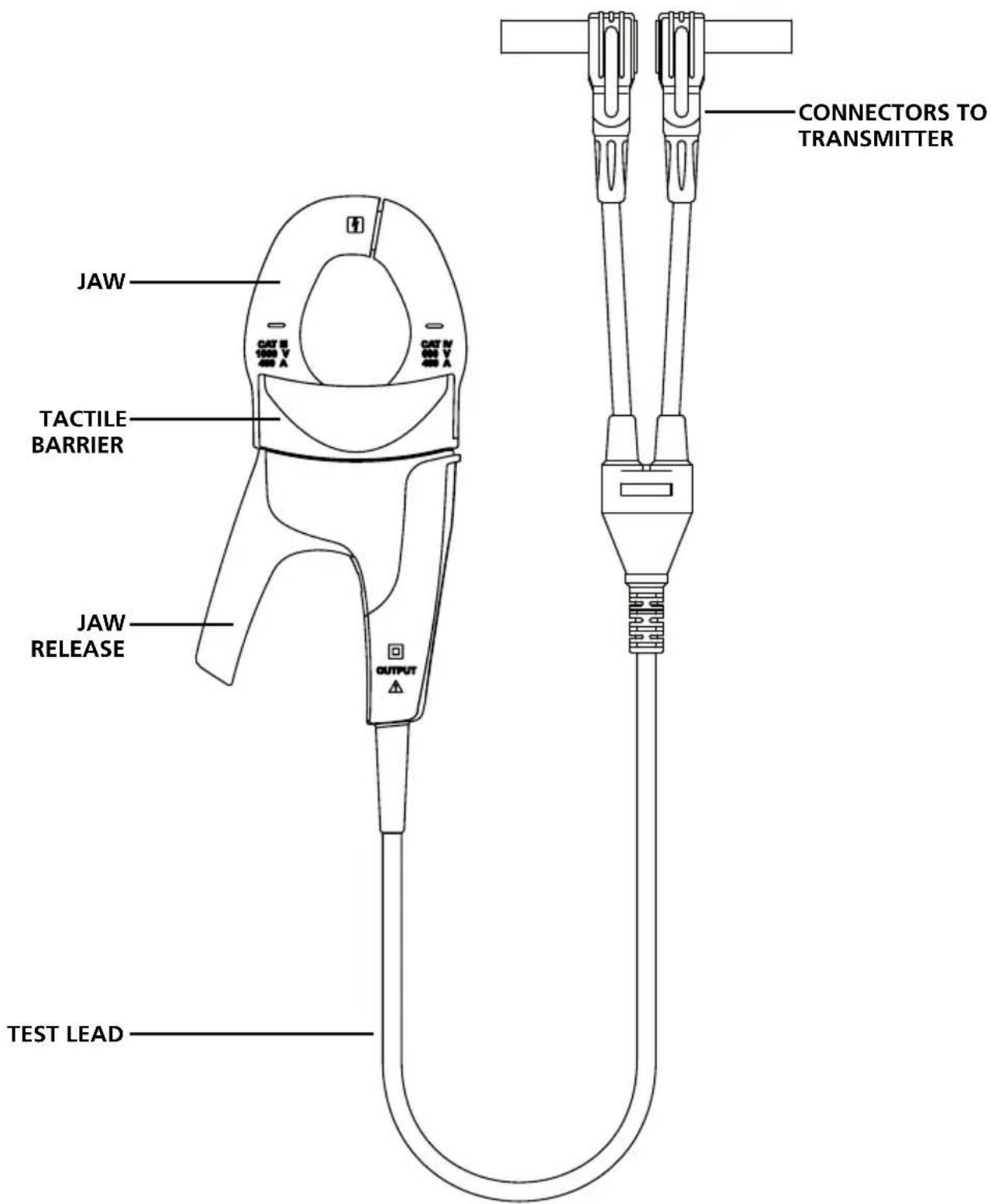
Figure 2.3: Overview of CT-400 Signal Clamp

IMPORTANT NOTICE, PLEASE READ BEFORE STARTING TRACING
Avoiding signal cancellation problems with a separate ground connection
The signal generated by the Transmitter creates an electromagnetic field around the wire. This field is what is detectable by the Receiver. The clearer this signal, the easier it is to trace the wire.
If Transmitter is connected to two adjacent wires on the same circuit (for example, hot and neutral wires on a Romax cable), the signal travels in one direction through the first wire and then returns (in opposite direction) through the second. This causes the creation of two electromagnetic fields around each wire with opposite direction. These opposing fields will partially or completely cancel each other out, making wire tracing difficult if not impossible.
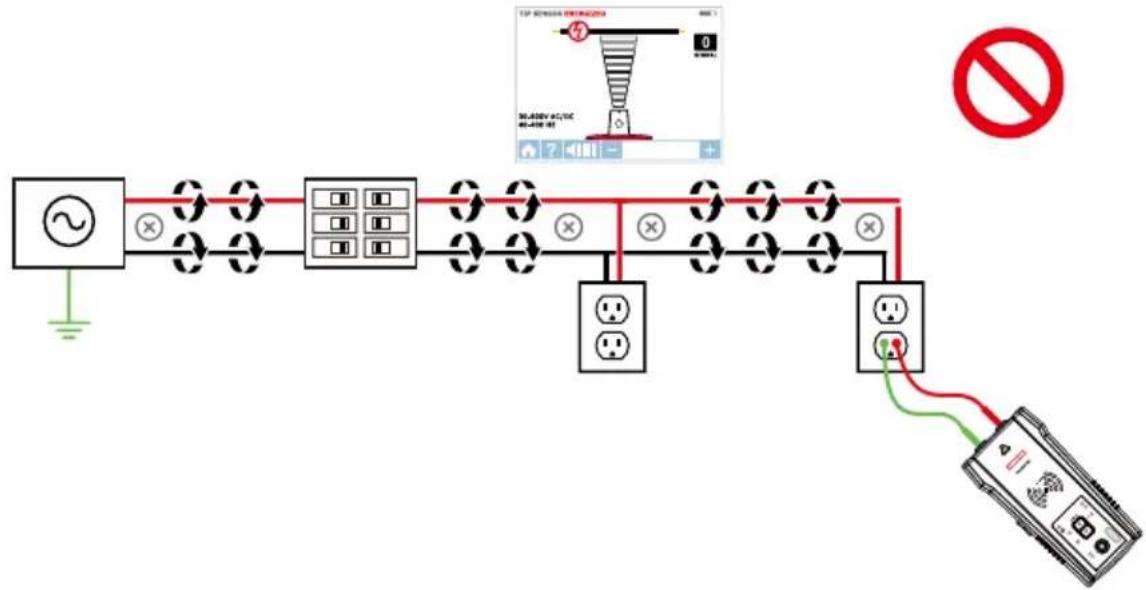
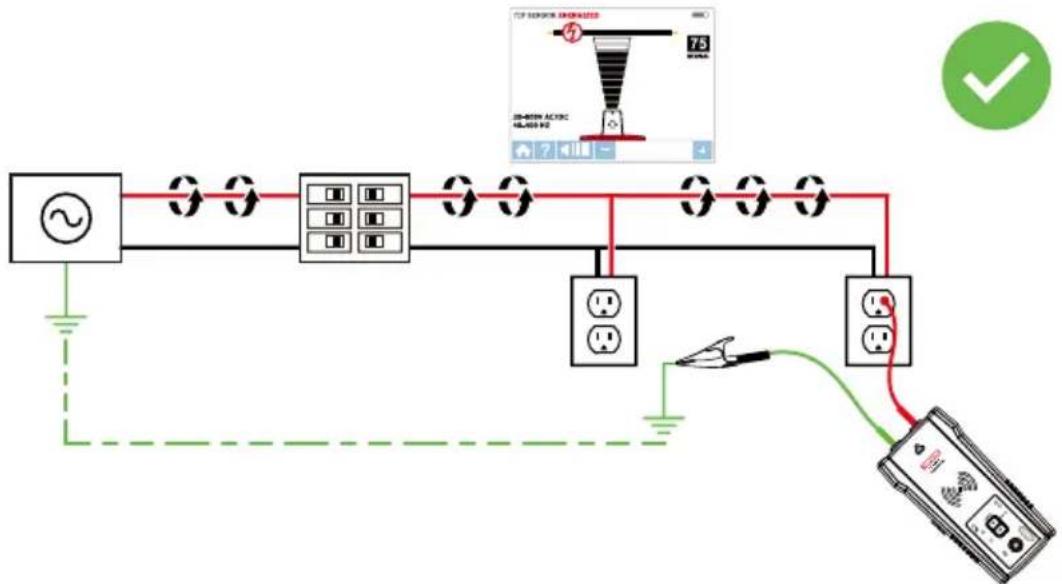
To avoid the cancellation effect, a separate ground connection method should be used. The red test lead of the Transmitter should be connected to the hot wire of the circuit you wish to trace, and the green lead to a separate ground, such as water pipe, ground stake, metal grounded structure of the building, or outlet ground connection of an outlet on a different circuit. It is important to understand that an acceptable separate ground is NOT the grounding terminal of any receptacle on the same circuit as the wire you wish to trace. If hot wire is Energized and the Transmitter is properly connected to a separate ground, the red LED on the Transmitter will light up. The separate ground connection creates maximum signal strength because the electromagnetic field created around the hot wire is not being cancelled by a signal on the return path flowing along an adjacent wire (hot or neutral) in the opposite direction, but rather through the separate ground circuit.
3.1 Tracing Energized Wires Connecting Transmitter test leads
- Connect the green and red test leads to the Transmitter (polarity does not matter).
- Using provided test leads accessories, connect the green wire to a separate ground (metal building structure, metal water pipe, or ground wire on a separate circuit).
- Connect the red test lead to the line/phase wire being traced. For Energized systems the signal will ONLY be transmitted between the load-side to which the Transmitter is connected and the source of power (see Figure 3.1a)
*Note: Please note that if working with GFCI protected circuits, this method will trip the GFCI protection. Refer to Special Applications, section 4.1 "GFCI-Protected Circuit Wire Tracing" for alternative tracing methods.
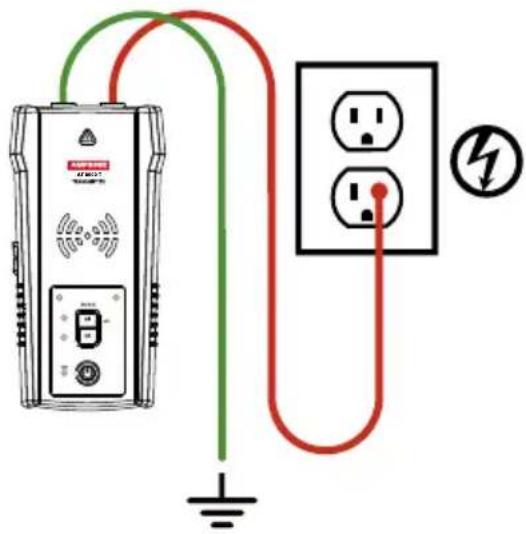
Figure 3.1a:
Proper connection with separate ground
TIP: The Transmitter, with the red test lead, can be directly connected to the live wire of the working electrical equipment under load (motor, electronics, etc). Tracing can be performed without needing to turn off the equipment or switching power off.
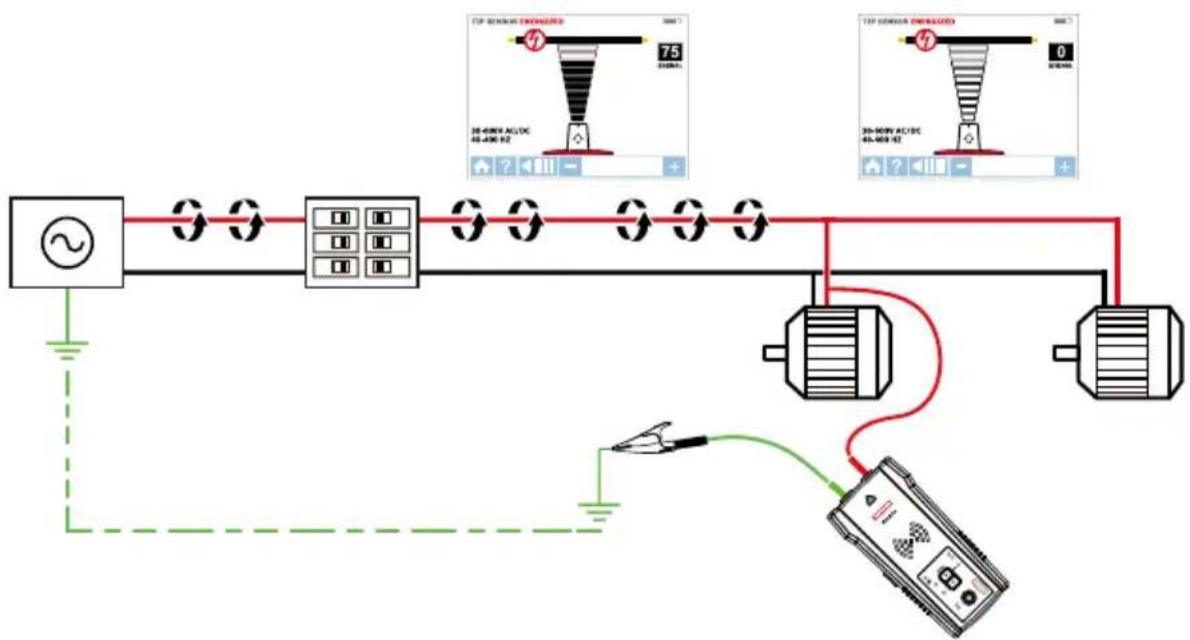
Figure 3.1b: Transmitter set up
Set up the AT-8000-T Transmitter
- Press power button to turn on the Transmitter.
- Verify that the test leads are properly connected; the red LED voltage status light should be on for circuits with voltage above 30V AC/DC.
Note: Make sure to use the separate neutral connection as described above.
- Select HIGH signal mode by pressing HI for most applications. The Transmitter will appear as shown in Figure 3.1c. The LED display will quickly begin to blink.
Note: The LOW signal precision mode can be used to limit the signal level generated by the Transmitter in order to more precisely pinpoint wire location. A lower signal level reduces coupling to neighboring wires and metal objects and helps to avoid misreading due to ghost signals. A lower signal also helps to prevent oversaturating the Receiver with a strong signal that covers too large an area. The LOW mode function is only used for the most demanding and precise wire tracing applications.
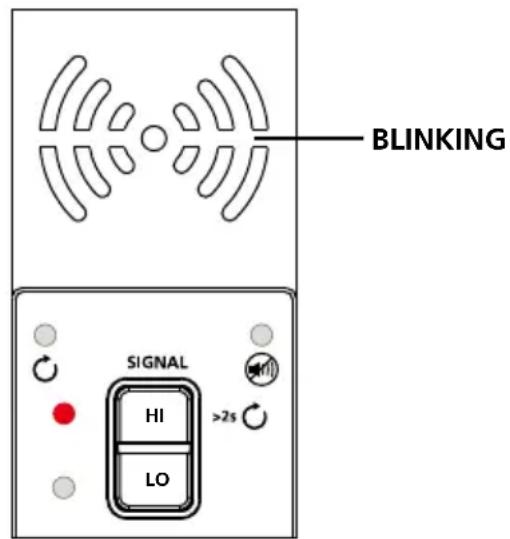
Figure 3.1c: Transmitter indicator showing signal in HIGH mode
Using AT-8000-R Receiver in Energized SMART SENSOR™ mode
The Smart Sensor™ enables easier wire tracing by showing the direction and position of the wire and is the recommended method for tracing Energized wires.
Note: The Smart Sensor™ does not work on de-energized circuits; Tip Sensor should be used instead.
Using AT-8000-R Receiver
- Press power button to turn on the Receiver; home screen may take up to 30 seconds to load.
- Select SMART SENSOR™ mode by using the directional arrows and pressing the yellow ENTER button.
- Hold the Receiver with the Smart Sensor™ facing the target area. If the screen flashes a “?” in a red target then either no signal is detected or the signal is not adequate enough to display direction. (Figure 3.1d). Move the Smart Sensor™ closer to the target area until the signal is detected and you see a directional arrow. If no signal is detected increase the sensitivity using the “+” button on the Receiver.*
- Move the Receiver in direction indicated by the arrow on the screen (Figure 3.1e).
- A green target symbol indicates that the Receiver is directly over the wire (Figure 3.1f). If the Receiver does not lock on the wire, decrease sensitivity using the " - " on the keypad or set the Transmitter to transmit at LOW level for precision tracing.
- Press ENTER when complete to return to the home screen.
*Note: For best results, keep the Receiver at least 3 feet from the Transmitter and its test leads to minimize signal interference and improve wire tracing results. Select the "Long" Smart Sensor™ Range in the Settings Menu if working with wires that are greater than 3 feet deep.
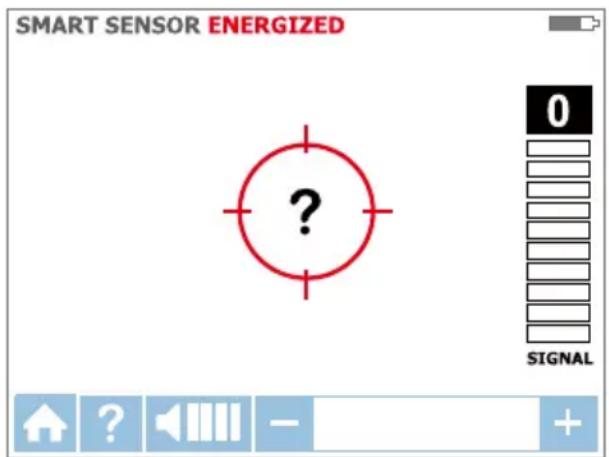
Figure 3.1d: No signal detected
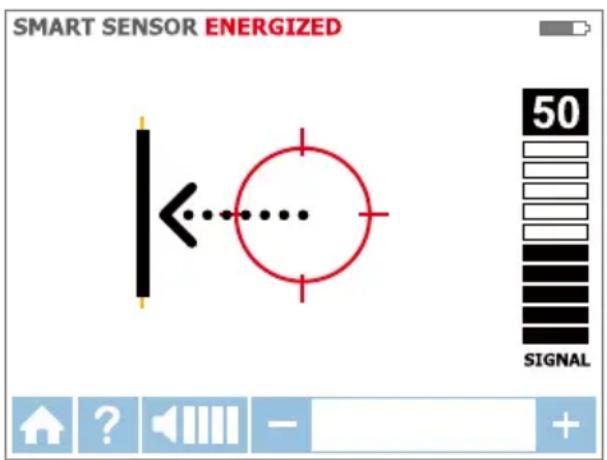
Figure 3.1e: Wire is to the left
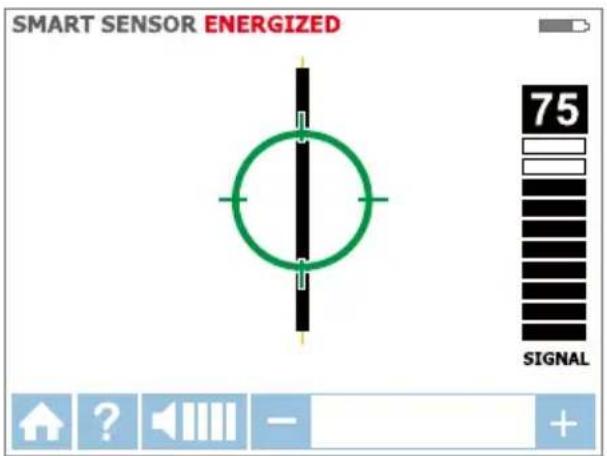
Figure 3.1f: Receiver locked on wire
Using AT-8000-R Receiver in Energized TIP SENSOR mode
TIP SENSOR mode is used for the following applications: pinpointing a wire in a bundle, tracing in corners and confined spaces such as junction boxes or inside enclosures.
- Press power button to turn on the Receiver; home screen may take up to 30 seconds to load.
- Select Energized TIP SENSOR mode by using the directional arrows and pressing the yellow ENTER button.
- Hold the Receiver with the Tip Sensor facing the target area.
- Scan target area with Tip Sensor to find highest signal level (Figure 3.1g). While tracing, periodically adjust sensitivity to keep signal strength near 75. Increase or decrease sensitivity by pressing + or - on the keypad. If signal is too strong for precise locating, change transmitter to LOW mode.
- Receiver Positioning: For best results, align groove on Tip Sensor with wire direction. Signal may be lost if not properly aligned (Figure 3.1h).
- To verify wire direction, periodically rotate the Receiver 90 degrees. Signal strength will be highest when wire is aligned with Tip Sensor groove (Figure 3.1i).
- Press ENTER when complete to return to the home screen.
Note: For best results, keep the Receiver at least 3 feet (1 m) from the Transmitter and its test leads to minimize signal interference and improve wire tracing results.
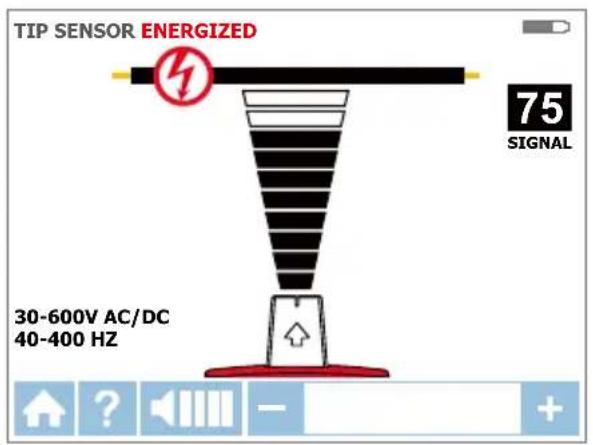
Figure 3.1g: Receiver screen showing signal detected in Energized TIP SENSOR mode
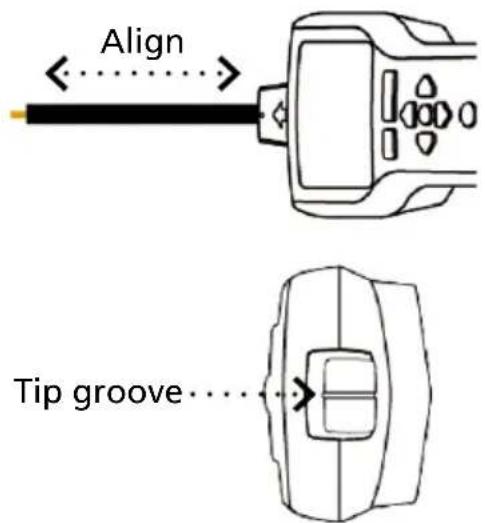
Figure 3.1h: Aligning the Tip Sensor with the wire
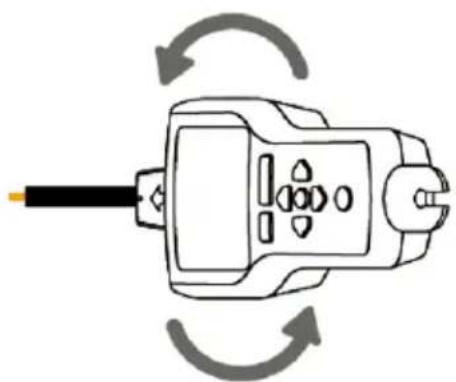
Figure 3.1i: Rotating the Receiver to align with the wire
3.2 Tracing De-energized Wires
Connecting Transmitter test leads
- Connect the green and red test leads to the Transmitter (polarity does not matter).
- Using provided test leads, connect the green wire to a separate ground (metal building structure, metal water pipe, or ground wire on a separate circuit) (Figure 3.2a).
- Connect the red test lead to the wire being traced. For receptacles, make sure to connect the test lead to the line (hot De-energized) wire. For De-energized systems the signal will be transmitted across all branches of the circuit.
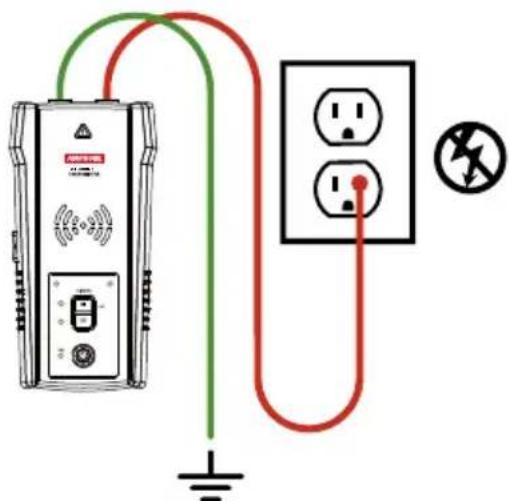
Figure 3.2a: Proper connection with separate ground
Set up the AT-8000-T Transmitter
- Press power button to turn on the Transmitter.
- Verify that the test leads are properly connected; the red LED voltage status light should be off for De-energized circuits below 30 V AC/DC.
Note: Make sure to use the separate ground connection as described above.
- Select HIGH signal mode by pressing HI for most applications. The Transmitter will appear as shown in Figure 3.2b. The LED display will quickly begin to blink.
Note: The LOW signal precision mode can be used to limit the signal level generated by the Transmitter in order to more precisely pinpoint wire location. A lower signal level reduces coupling to neighboring wires and metal objects and helps to avoid misreading due to ghost signals. A lower signal also helps to prevent oversaturating the Receiver with a strong signal that covers too large an area. The LOW mode function is only used for the most demanding and precise wire tracing applications.
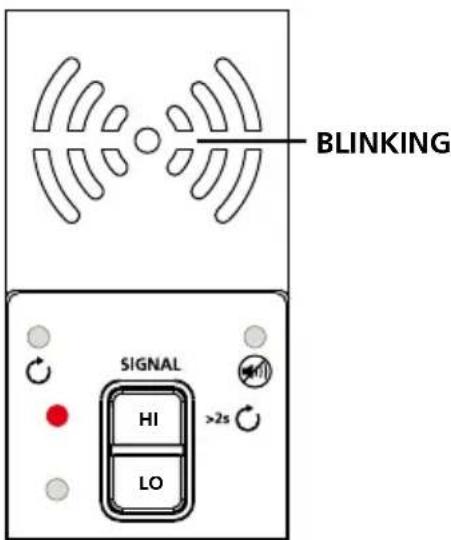
Figure 3.2b: Transmitter indicator showing signal in HIGH mode
Using AT-8000-R Receiver in De-energized TIP SENSOR mode
TIP SENSOR
De-energized TIP SENSOR mode is used for general wire tracing, pinpointing wires in bundles, tracing in tight corners and confined spaces such as junction boxes or inside enclosures.
- Press power button to turn on the Receiver; home screen may take up to 30 seconds to load.
- Select De-Energized TIP SENSOR mode by using the directional arrows and pressing the yellow ENTER button.
- Hold the Receiver with the Tip Sensor facing the target area.*
- Scan target area with Tip Sensor to find highest signal level (Figure 3.2c). While tracing, periodically adjust sensitivity to keep signal strength near 75. Increase or decrease sensitivity by pressing + or - on the keypad. If signal is too strong for precise locating, change transmitter to LOW mode.
- Press ENTER when complete to return to the home screen.
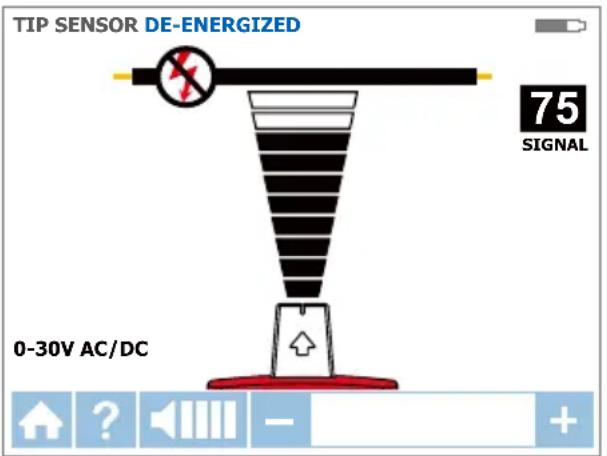
Figure 3.2c: Receiver showing signal detected in De-energized TIP SENSOR mode
*Note: For best results, keep the Receiver at least 3 feet (1 m) from the Transmitter and its test leads to minimize signal interference and improve wire tracing results.
De-energized mode uses a different antenna in the Tip Sensor than Energized mode. Specific alignment of the Tip Sensor groove to the wire is not required. De-energized wire tracing results are based only on how close the Tip Sensor is to the wire.
3.3 Identifying Breakers and Fuses
Breaker mode automatically adjusts the sensitivity of the Receiver. As a result, the Receiver will pinpoint and indicate just one correct breaker/fuse. This enhancement helps to remove signal strength analysis from the breaker/fuse identification process that is typical for less advanced wire tracers.
Note: For breaker/fuse locating, a simplified direct connection to hot and neutral wires can be used because these wires are separated at the breaker/fuse panel. There is no risk of signal cancellation effect if wires are at least a few inches away from each other. However, the separate ground connection (Figure 3.3b) should be used for superior results specifically if wires need to be traced in addition to breaker identification.
The simplified direct connection to hot and neutral wire will NOT trip the GFCI circuit.
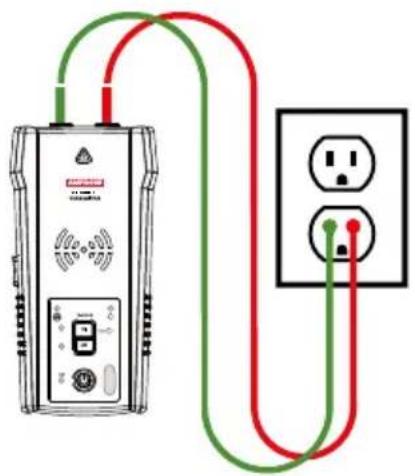
Figure 3.3a: Simplified direct connection
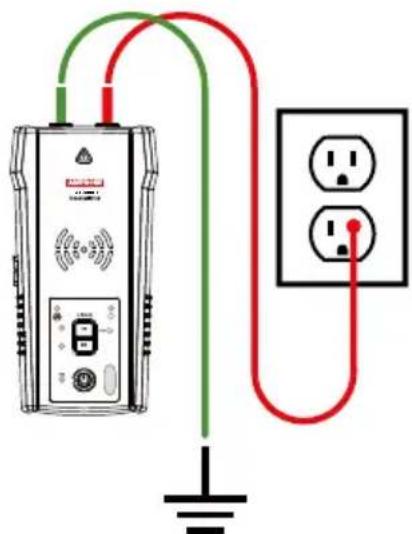
Figure 3.3b: Separate ground connection (Preferred)
Transmitter connection - Energized and De-energized systems
Connection of the Transmitter is the same for Energized and De-energized breaker/fuse locating.
Connecting the test leads
- Connect the Transmitter using either simplified direct connection or separate ground connection.
- If the simplified direct connection method is used, connect the test leads directly to the hot and neutral wires. While locating a breaker, wires will not be traceable as the signals will cancel each other out.
- For separate ground connection, first connect the green lead to a separate ground, such as a metal building structure, metal water pipe, or ground wire on a separate circuit.
- Connect the red lead to the Energized hot wire on the load side of the system. The signal will ONLY be transmitted between the outlet to which the Transmitter is connected and the source of power.
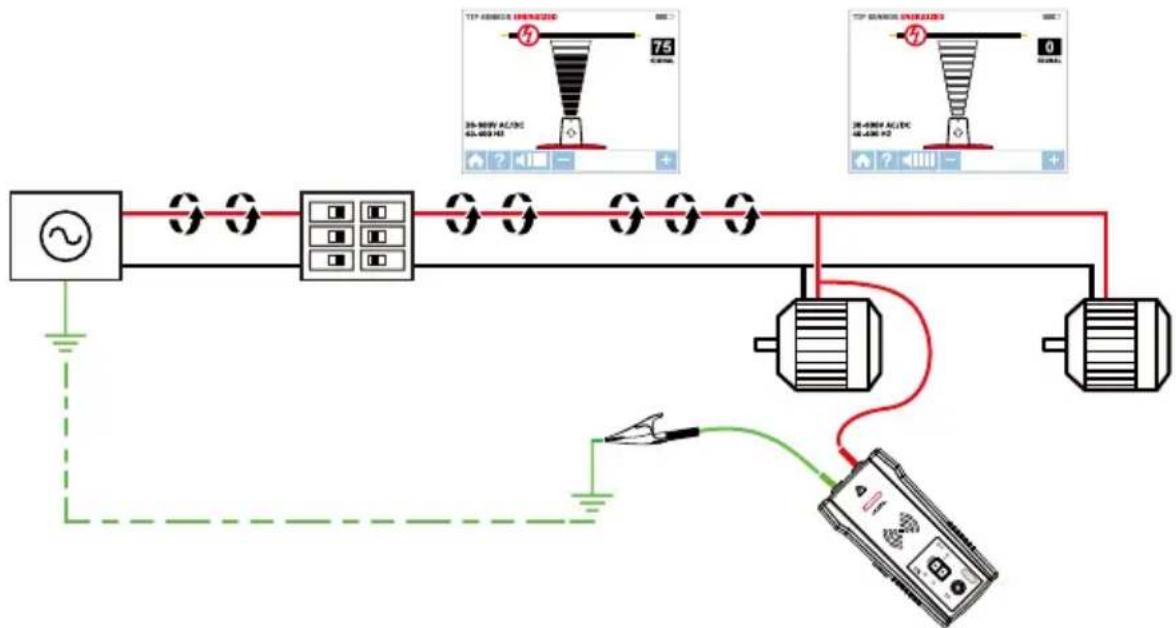
Set up the AT-8000-T Transmitter
- Press the power button to turn on the Transmitter.
- Verify that the test leads are properly connected. The red LED voltage status light will illuminate for Energized circuits with a voltage above 30V AC/DC. If the voltage is De-energized, the light will be off.
- Select the HIGH signal mode for breaker/fuse locating.
Energized and De-energized breaker/fuse locating
BREAKERS 7&
Receiver Process Overview
Tracing breakers/fuses is a two-step process:
SCAN - Scan each breaker/fuse for one second. The Receiver will record tracing signal levels.
LOCATE - The Receiver will indicate the single breaker/fuse with the strongest recorded signal.
Using AT-8000-R Receiver
- Press power button to turn on the Receiver; home screen may take up to 30 seconds to load.
- Select either Energized BREAKERS mode or De-Energized BREAKERS mode by using the directional arrows and pressing the yellow ENTER button.
Step 1 - SCAN
- The unit will automatically start in ① SCAN mode (Figure 3.3c).
- Scan each breaker/fuse for a second by touching it with the Tip Sensor. Make sure the groove on the Tip Sensor is parallel to the breaker/fuse lengthwise (Figure 3.3e).
- To assure sufficient time between the scans, wait for active green arrow and audible alert (2 beeps) before moving to the next breaker/fuse.
- Scan all breakers/fuses - the order of scanning does not matter. You can scan each breakers/fuses multiple times. The Receiver records the highest detected signal.
Usage tip: For best results try to scan at the output of the breaker/fuse.
Important note: Differentiation in breaker/fuse designs, height, internal contact structure may affect precision of breaker/fuse identification. For most reliable results, remove the breaker/ fuse panel cover and perform scan on the wires instead of breakers/fuses. Scan the breakers/ fuses always at the same position and alignment of the Tip Sensor. A variation may affect improper results.
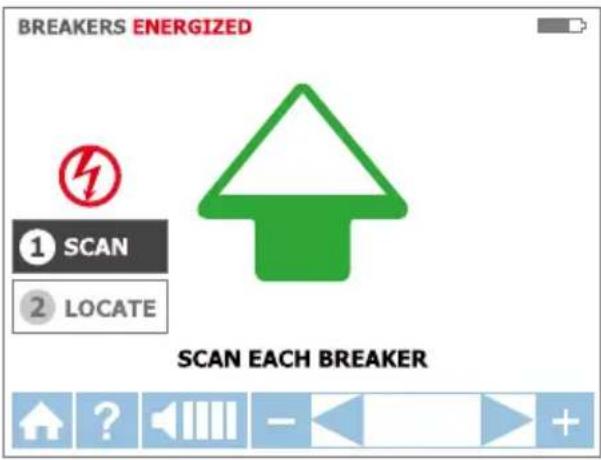
Figure 3.3c: SCAN mode - Scanning breakers/fuses
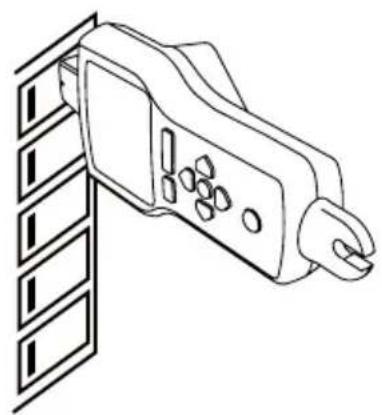
Figure 3.3e: Correct alignment of the Tip Sensor to the breaker
Step 2 - LOCATE
- Select LOCATE mode by using the directional arrows and pressing the yellow ENTER button (Figure 3.3d).
- Rescan each breaker/fuse by touching each with the Tip Sensor for a second. Active red arrow indicates scanning process. Make sure the groove on the Tip Sensor is parallel to the breaker/fuse lengthwise (Figure 3.3e).
Usage Tip: Hold receiver in the same position as during scanning step
- Rescan all breakers/fuses until solid green arrow and audible alert indicates that the correct breaker/ fuse was found (Figure 3.3f).
- Press ENTER when complete to return to the home screen.
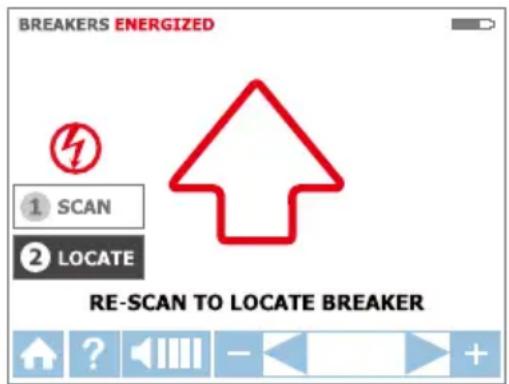
Figure 3.3d:LOCATE mode - Searching for correct breakers/fuses
Usage Tip: The accuracy of breaker/fuse identification results can be verified by switching the Receiver to Energized or De-Energized TIP SENSOR mode and checking that the signal level of the breaker identified by the Receiver is the highest among all breakers/fuses.
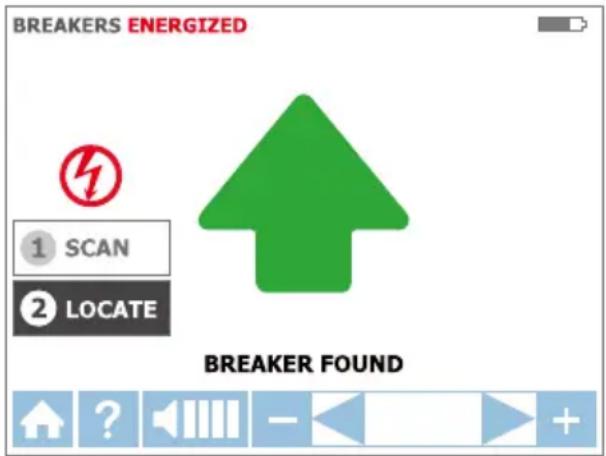
Figure 3.3f:LOCATE mode - breaker/fuse identified
3.4 NCV Mode
The NCV (Non-Contact Voltage) mode is used to verify that a wire is Energized. This method does not require the use of the Transmitter. The Receiver will detect and trace an Energized cable if the voltage is between 90 V and 600 V AC and between 40 Hz and 400 Hz. No current flow is necessary.
Note: For safety, before working with wires, always verify that they are De-energized with an additional voltage tester.
The voltage indication in NCV mode is not sufficient to assure safety. This function is not suitable to test for absence of voltage. This always requires a two-pole voltage test.
NCV mode operation
- Press power button to turn on the Receiver; home screen may take up to 30 seconds to load.
- Press NCV button to select the Non-Contact Voltage mode.
- Hold the Receiver with the Tip Sensor against the wire.
- For precise pinpointing of line/phase wire versus neutral wire, increase or decrease sensitivity by pressing + or - on the keypad.
- Press ENTER when complete to return to the home screen.
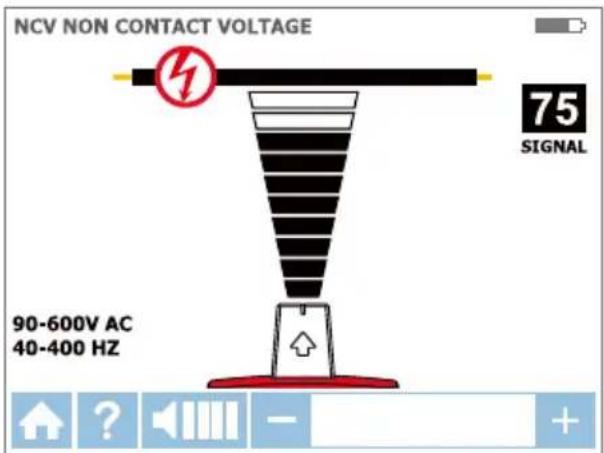
Figure 3.4: Voltage detection in NCV mode using Tip Sensor
4.1 GFCI-Protected Circuit Wire Tracing
Connecting AT-8000-T Transmitter to GFCI protected circuits.
Connecting the Transmitter to an Energized GFCI protected circuit using separate ground method will trip the GFCI protection. Use following methods to work with GFCI protected circuits (for De-energized GFCI-protected outlet that is not tripped, you can connect test leads directly to the outlet contacts using De-energized TIP SENSOR mode)
Method 1 - Bypass the GFCI circuitry to avoid tripping GFCI: (for Energized GFCI-protected outlets only)
- Remove the protective receptacle wall plate.
- Using the alligator clip attach the red test lead to the screw connecting the Energized hot wire to the receptacle.
- Connect the green test lead using separate ground method as described in Energized TIP SENSOR mode.
- Perform tracing as described in one of the Energized modes: SMART SENSOR™, TIP SENSOR or BREAKER.
Method 2 - Do NOT use separate ground to avoid tripping GFCI: (for GFCI-protected outlets and breakers)
- Connect Transmitter test leads to Neutral and Hot wires.
- Perform tracing as described in one of the Energized modes: SMART SENSOR™, TIP SENSOR or BREAKER.
Note: This type of connection causes signal coupling and reduces signal strength. If the signal is too weak or untraceable, use Method 3.
Method 3 - De-energize the circuit:
(for GFCI-protected breakers)
- De-energize the circuit.
- Connect Transmitter directly to the wire as described in De-Energized TIP SENSOR mode.
- Perform tracing as described in the desired De-Energized mode (TIP SENSOR for wire tracing or BREAKER for breaker identification).
4.2 Finding Breaks/Opens
It is possible to pinpoint the exact location where a wire is broken, even if the wire is located behind walls, floors or ceilings.
- Make sure that wire is De-energized.
- Use the steps described in section 3.2 to connect the Transmitter and perform tracing with the Receiver set to De-energized TIP SENSOR mode.
- For best results, ground all De-energized wires that run in parallel with the black test lead (Figure 4.2).
The tracing signal generated by the Transmitter is conducted along the wire as long as there is continuity in the metal conductor. To find a fault, trace the wire until the signal stops. To verify the fault's location, move the Transmitter to the other end of the wire and repeat, tracing from the opposite end. If signal stops at the exact same location, the fault has been located.
Note: If the place of the fault is not found, the result may be a high resistance break (partially open circuit). Such a break would stop higher currents from flowing but will conduct the tracing signal through the break. Such faults will not be detected until the wire is completely open.
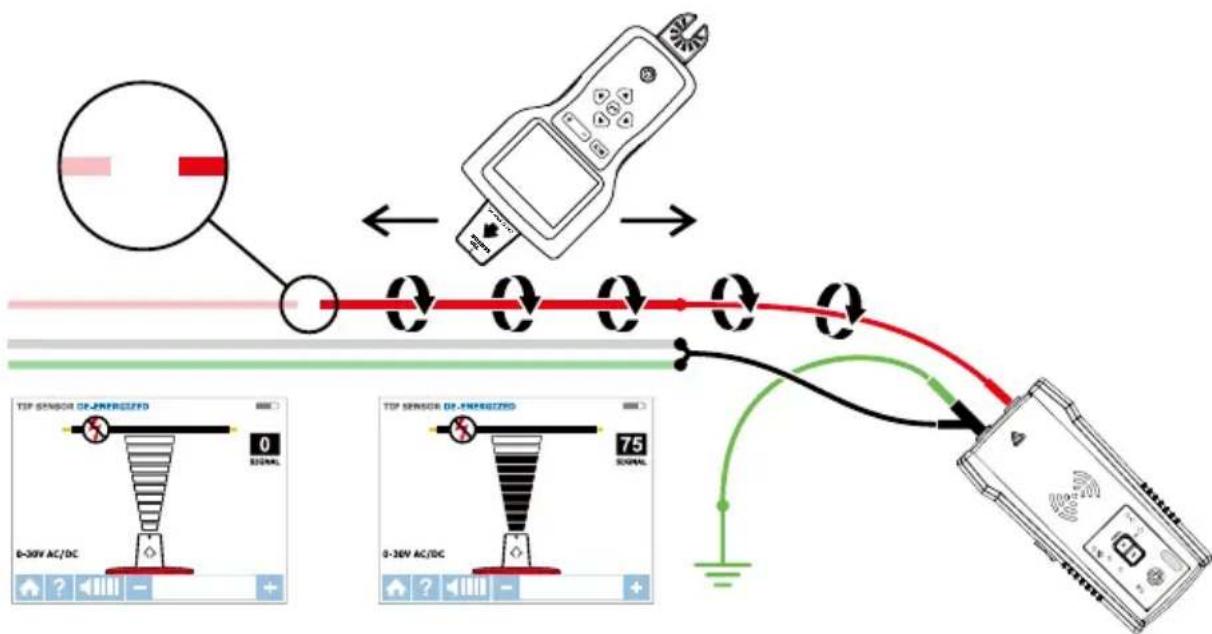
Figure 4.2: Locating the place of the fault
4.3 Finding Shorts
Shorted wires will cause a breaker/fuse to trip. To correct this, disconnect the wires and make sure the ends of the wires on both sides of the cable are isolated from each other and other wires or loads and are De-energized.
- Connect the Transmitter with the test leads to the circuit as shown in Figure 4.3.
- Turn the Transmitter to Loop mode by pressing HIGH button for two seconds. Verify that the Loop LED is ON.
- Set the Receiver to Energized TIP SENSOR mode (the Transmitter will generate safe low voltage tracing signal) and perform tracing.
Start tracing the cable until the signal stops. To verify the place of the fault, move the Transmitter to the other end of the wire and repeat tracing from the opposite end. If the signal stops at the exact same location the fault has been located.
Note: This method will be affected by signal cancellation effect. Expect a relatively weak signal.
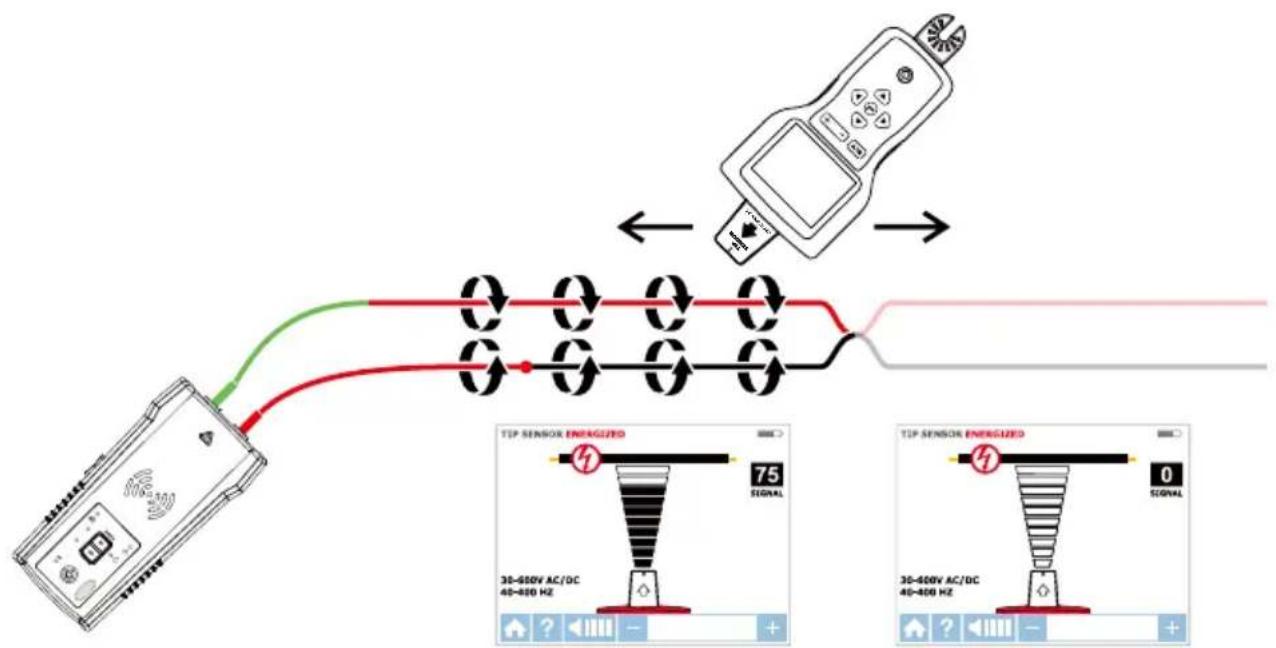
Figure 4.3: Finding a short
4.4 Tracing Wires in Metal Conduit: Junction Box Method
The AT-8000-R Receiver will not be able to pick up the signal from the wire through the metal conduit. The metal conduit will completely shield the tracing signal.
Note: The Receiver will be able to detect wires in non-metallic conduit. For these applications follow general tracing guidelines.
In order to trace wires in conduit:
- Use either Energized or De-energized TIP SENSOR mode as described in sections 3.1 and 3.2.
- Open junction boxes and use the Receiver's Tip Sensor to detect which wire in the junction box is carrying the signal.
- Move from junction box to junction box to follow the path of the wire.
Note: Applying signal directly to the conduit will send signal through all the conduit branches making tracing of one particular conduit path not possible.
4.5 Tracing Non-Metallic Pipes and Conduits
The AT-8000 can indirectly trace plastic conduits and pipes using the following steps:
- Insert conductive fish tape or wire inside the conduit.
- Connect the Transmitter's red test lead to the fish tape and the green ground wire to a separate ground as described in section 3.2.
- Set the Receiver to De-energized TIP SENSOR mode to trace the conduit.
- The Receiver will pick up the signal conducted by fish tape or wire through the conduit.
4.6 Tracing Shielded Wires
Shielded wires prevent the Receiver from detecting a tracing signal when following the standard user instructions. To effectively trace shielded wire, follow these procedures.
If shielded wire is grounded at the far-end:
- Setup Transmitter in Loop mode by pressing HIGH button for two seconds. Verify that the Loop LED is ON.
- Disconnect the ground on the near-end of the shielded wire and connect the shield to one of the terminals of the Transmitter (polarity does not matter) with a test lead.
- Connect the second output of the Transmitter to a separate ground.
- Set the Receiver to De-energized TIP SENSOR mode to trace the shield as described in section 3.2.
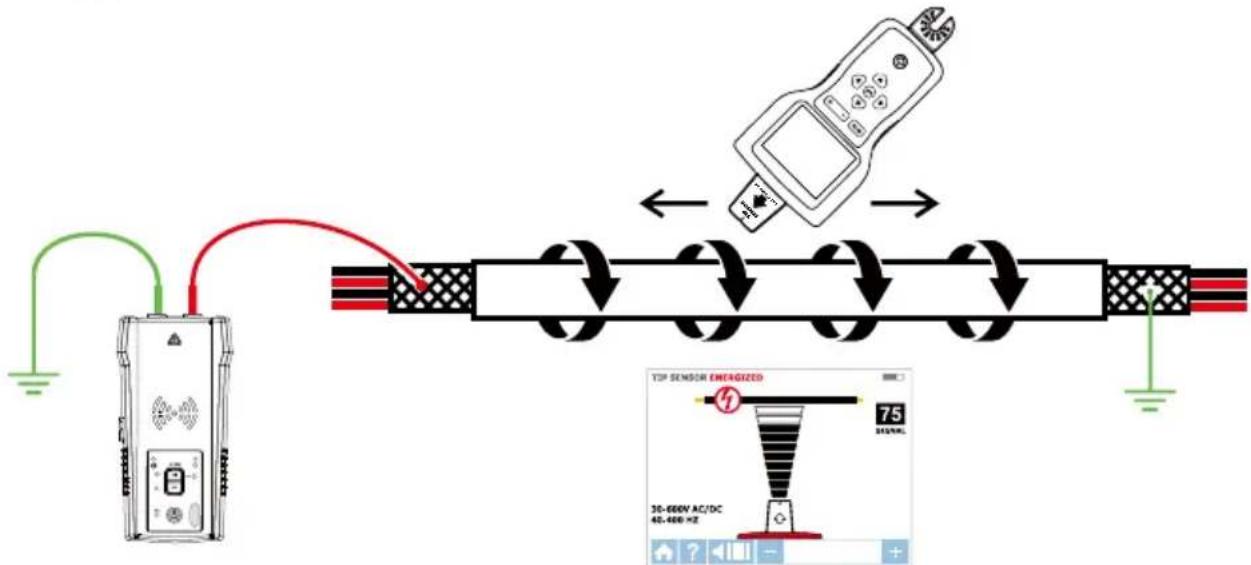
Figure 4.6a: Tracing a shielded wire
If shielded wire is disconnected from ground at the far-end:
- Setup the Transmitter in Wire Tracing mode (see section 3.2).
- Disconnect the ground on the near-end of the shielded wire and connect the shield to one of the terminals of the Transmitter (polarity does not matter) with a test lead.
- Connect the second output of the Transmitter to a separate ground.
- Set the Receiver to a wire tracing mode to trace the shield as described in section 3.2.
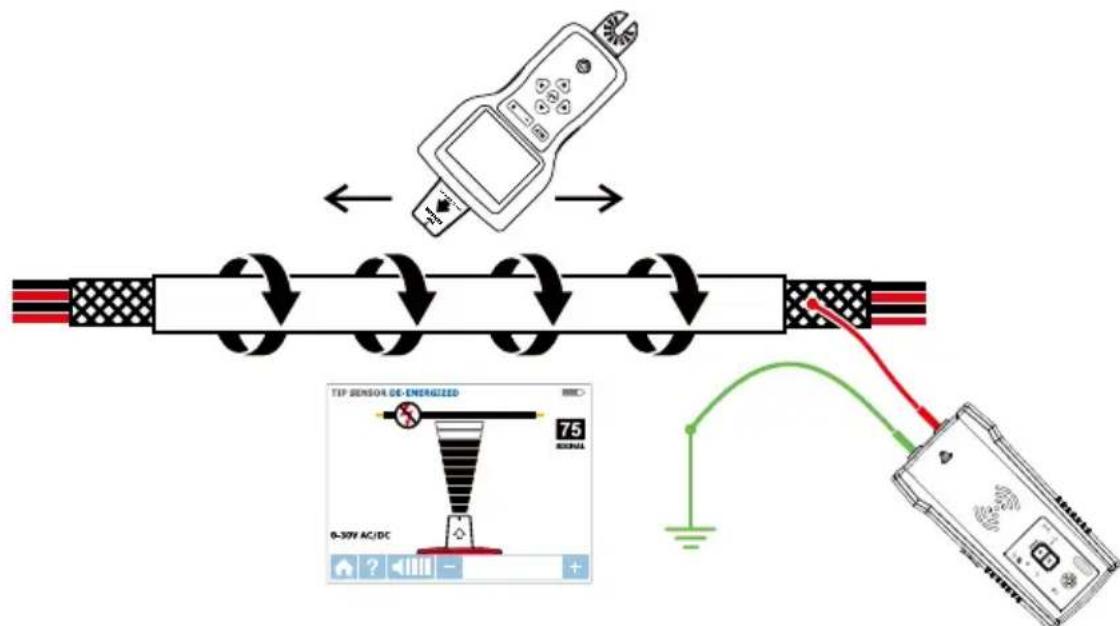
Figure 4.6b: Tracing a shielded wire disconnected from ground at the far-end
4.7 Tracing Underground Wires
The AT-8000 can trace wires underground, the same way it can locate wires behind walls or floors. Perform tracing as described in Energized SMART SNSOR^TM mode or Energized / De-Energized TIP SENSOR modes.
You can use a hot sick attachment to make tracing more ergonomic and convenient.
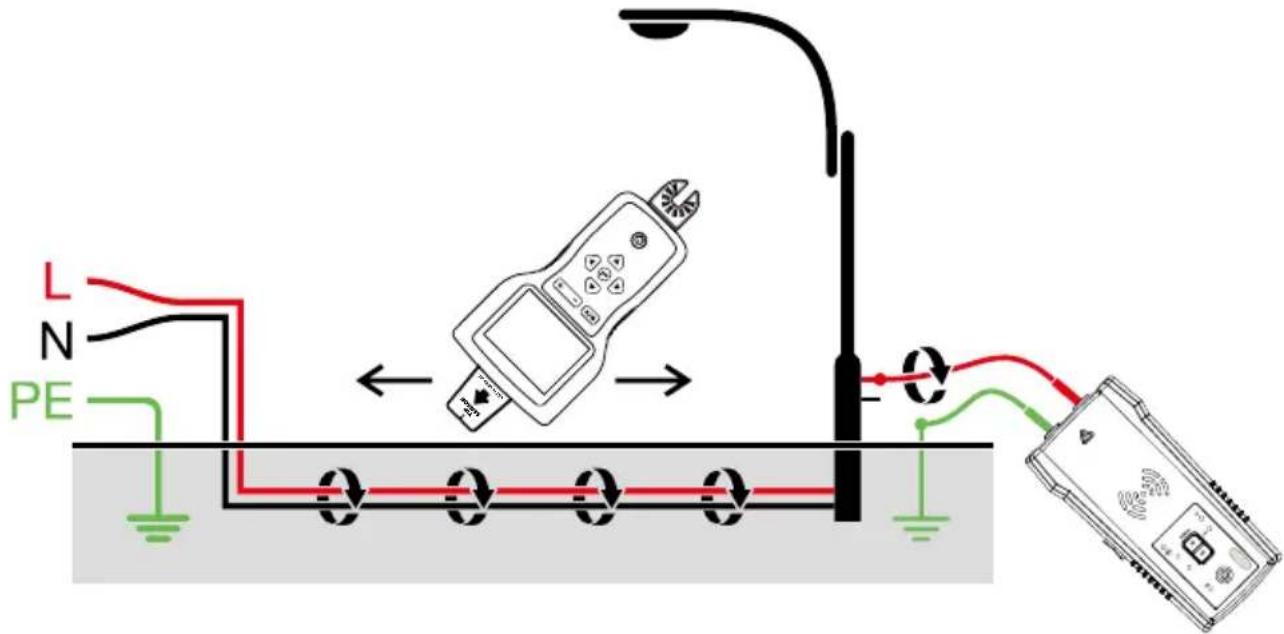
Figure 4.7: Tracing underground wires
4.8 Tracing Low Voltage Wires and Data Cables
The AT-8000 can trace data, audio, and thermostat cables (to trace shielded data cables, refer to section 4.6).
Trace data, audio, and thermostat cables:
- Connect the Transmitter using the separate ground method described in section 3.2.
- Set the Receiver to De-energized TIP SENSOR mode and trace the wire.
4.9 Sorting Bundled Wires
Identifying a specific wire in a bundle:
- Connect the Transmitter using Energized or De-Energized TIP SENSOR mode. If connecting to energized wire, make sure the Transmitter is connected on the load side.
- Select respectively Energized or De-energized TIP SENSOR mode on the Receiver. Pull one wire out as far as possible from other wires in the bundle and touch it with the Tip Sensor. The strongest signal indicates the proper wire in the bundle.
Note: In some special cases it may be necessary to connect all unused wires on the Transmitter side to ground.
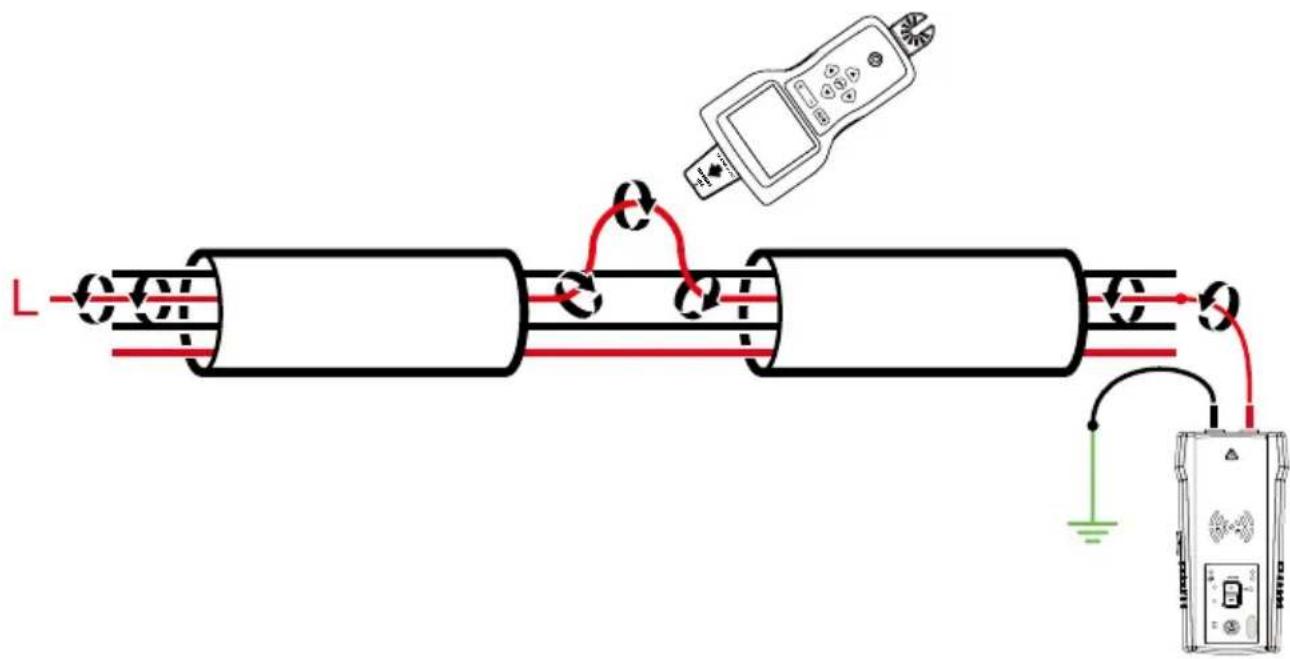
4.9a: Identifying an energized wire in a bundle
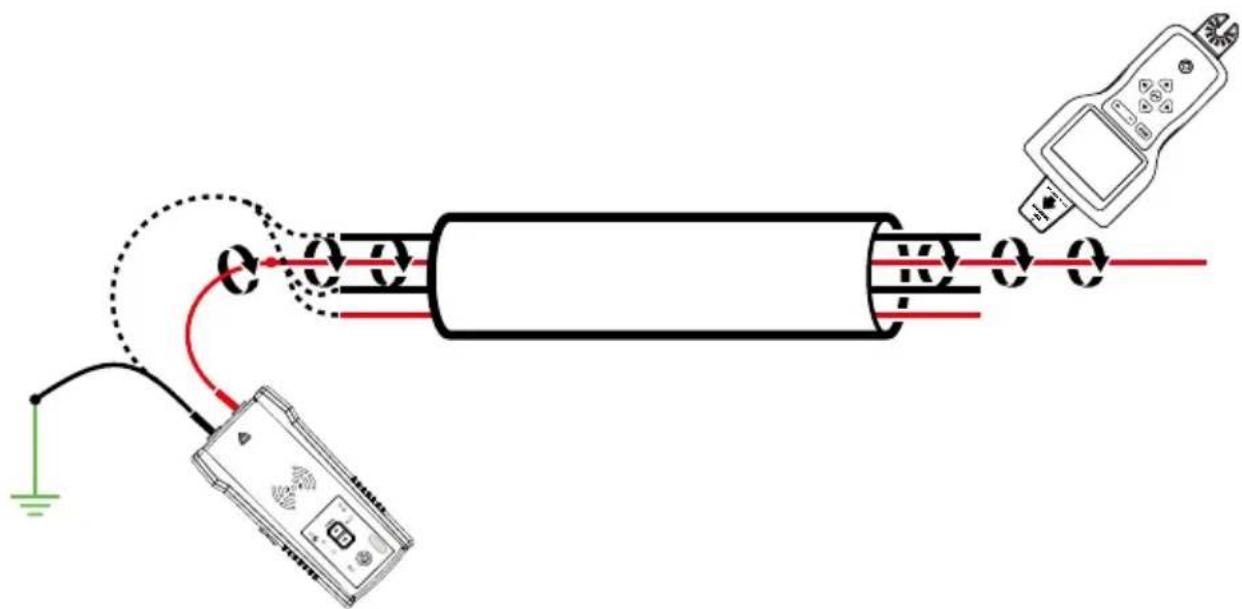
4.9b: Identifying a de-energized wire in a bundle
4.10 Mapping a Circuit using Test Leads Connection
Mapping a circuit can be only performed on a De-energized circuit when using test leads connection.
- Switch the breaker/fuse to the OFF position.
- Set up the Transmitter and Receiver as described in the De-energized Wire Tracing as described in section 3.2.
- Scan face plates of receptacles and wires towards load with the Tip Sensor of the Receiver
- All the wires, receptacles and loads that have a strong signal as indicated by the Receiver are connected to this breaker/fuse.
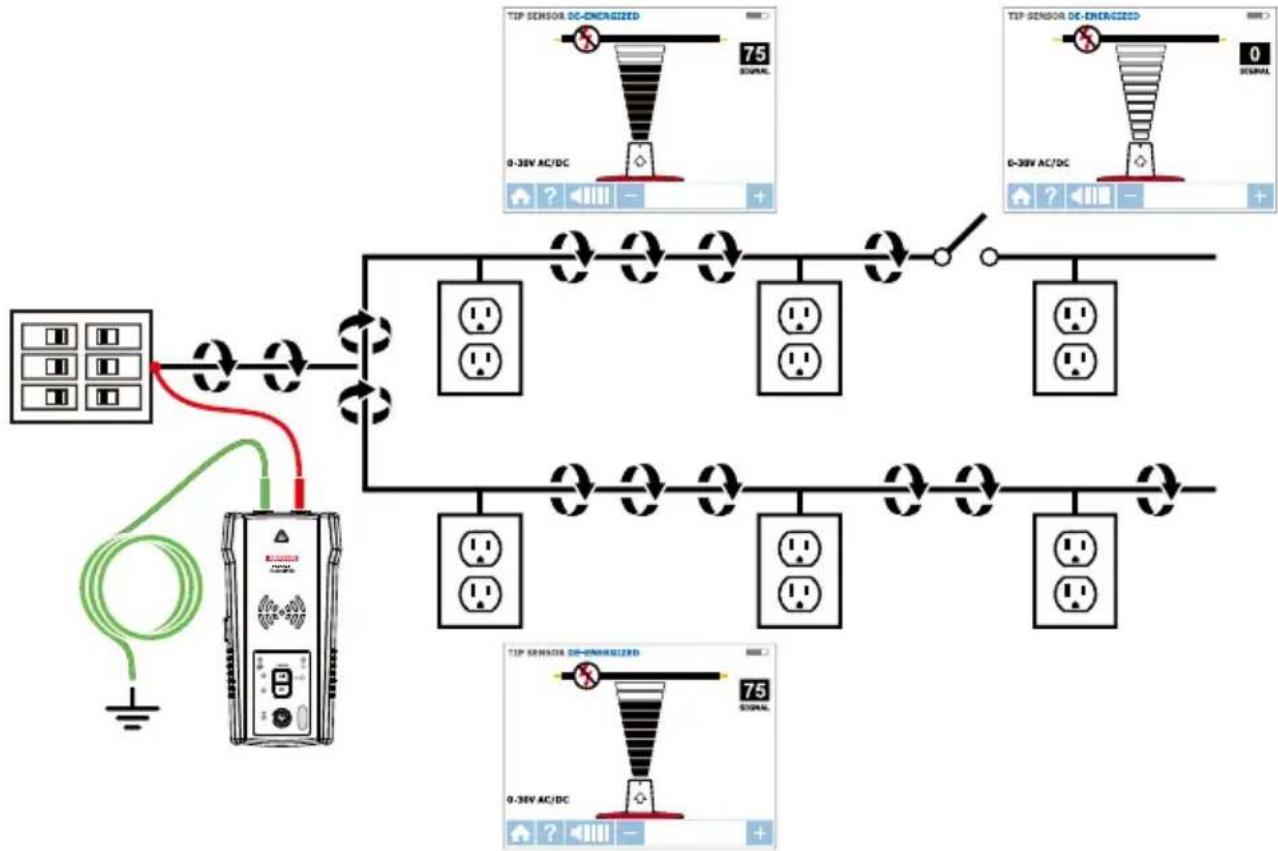
Figure 4.10: Mapping a circuit
4.11 Tracing Breakers/Fuses on Systems with Light Dimmers
Light dimmers can produce a significant amount of electrical "noise" that consists of multifrequency signals. In some rare situations, the Receiver can misread this noise, often called a "ghost" signal, as a Transmitter - generated signal. Therefore, the Receiver may provide misleading readings. When locating breakers or fuses on systems with light dimmers, the dimmer should be off (the light switch is off). This prevents the Receiver from indicating a wrong breaker/fuse.
4.12 Signal Clamp - Closed Loop Circuits
Closed loop, De-energized and low impedance circuits
The clamp accessory is used for applications where there is no access to a bare conductor to connect the test leads. When the clamp is connected to the Transmitter, it enables the Transmitter to induce a signal to the Energized or De-energized wire through the insulation. Typical applications of the Signal Clamp include tracing conduits or shields grounded on both ends. For signal cables and De-energized wires or loads, temporarily ground the circuit on both ends to perform tracing.
Connecting the Signal Clamp
- Connect the CT-400 test leads to the terminals of the Transmitter (polarity does not matter).
- Clamp the CT-400 Signal Clamp around the conductor. To increase the signal strength, wind a few turns of the conductor wire around the clamp if possible.
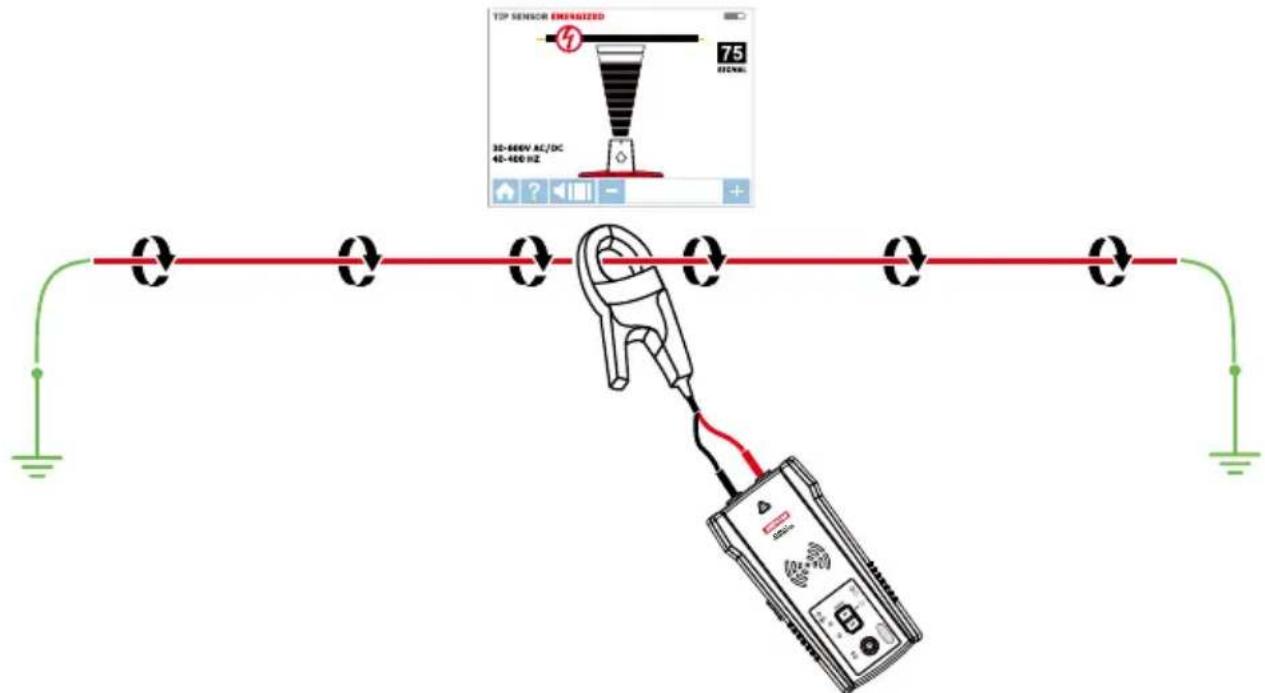
Figure 4.12a: Signal Clamp connection
Set up the AT-8000-T Transmitter
- Press the power button to turn on the Transmitter. The red LED voltage status indicator should be OFF when the clamp is connected and when working with either Energized or De-energized systems.
- Press HIGH signal mode and hold button for >2 seconds to select the Loop mode on the Transmitter. This clamp mode (loop mode) generates a boosted 6 kHz signal in order to provide superior tracing results.
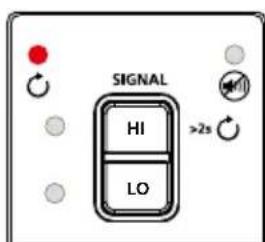
Figure 4.12b: Transmitter indicator showing signal in Loop mode
Using AT-8000-R Receiver
- Press power button to turn on the Receiver; home screen may take up to 30 seconds to load.
- Select Energized TIP SENSOR mode by using the directional arrows and pressing the yellow ENTER button.
- Hold the Receiver with the Tip Sensor facing the target area.
- Scan target area with Tip Sensor to find highest signal level. While tracing, periodically adjust sensitivity to keep signal strength near 75. Increase or decrease sensitivity by pressing + or - on the keypad.
- Receiver Positioning: For best results, align groove on Tip Sensor with wire direction as shown. Signal may be lost if not properly aligned.
- To verify wire direction, periodically rotate Receiver 90 degrees. Signal strength will be highest when wire is aligned with Tip Sensor groove.
- Press ENTER when complete to return to the home screen.
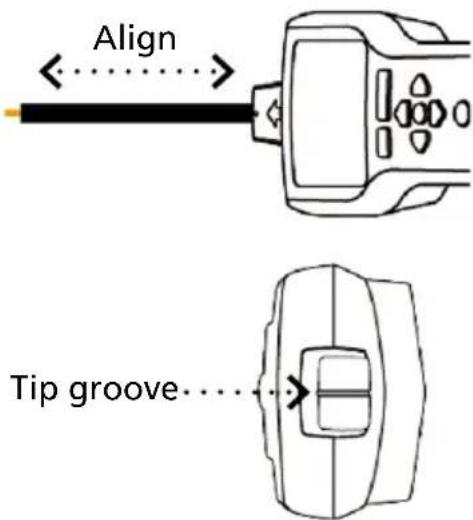
Figure 4.12c: Aligning the Tip Sensor with the wire
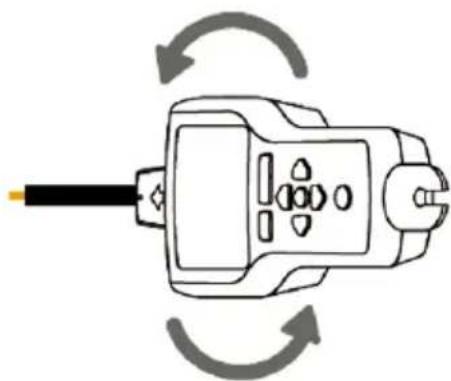
Figure 4.12d: Rotating the Receiver to align with the wire
*Note: For best results, keep the Receiver at least 3 feet from the Transmitter, Signal Clamp and its test leads to minimize signal interference and improve wire tracing results.
4.13 Signal Clamp - Mapping Circuits
The clamp accessory can be used to map loads to specific breakers/fuses on both Energized and De-energized systems. There is no need to disconnect power.
- Clamp the CT-400 around the wire at the breaker/fuse panel.
- Set up the Transmitter and Receiver as described in the previous section 4.12.
- Scan face plates of receptacles and wires connecting loads with the TIP Sensor of the Receiver. While using Loop mode you must set the Receiver to Energized TIP SENSOR mode.
- All the wires, receptacles and loads that have a strong signal as indicated by the Receiver are connected to this breaker/fuse.
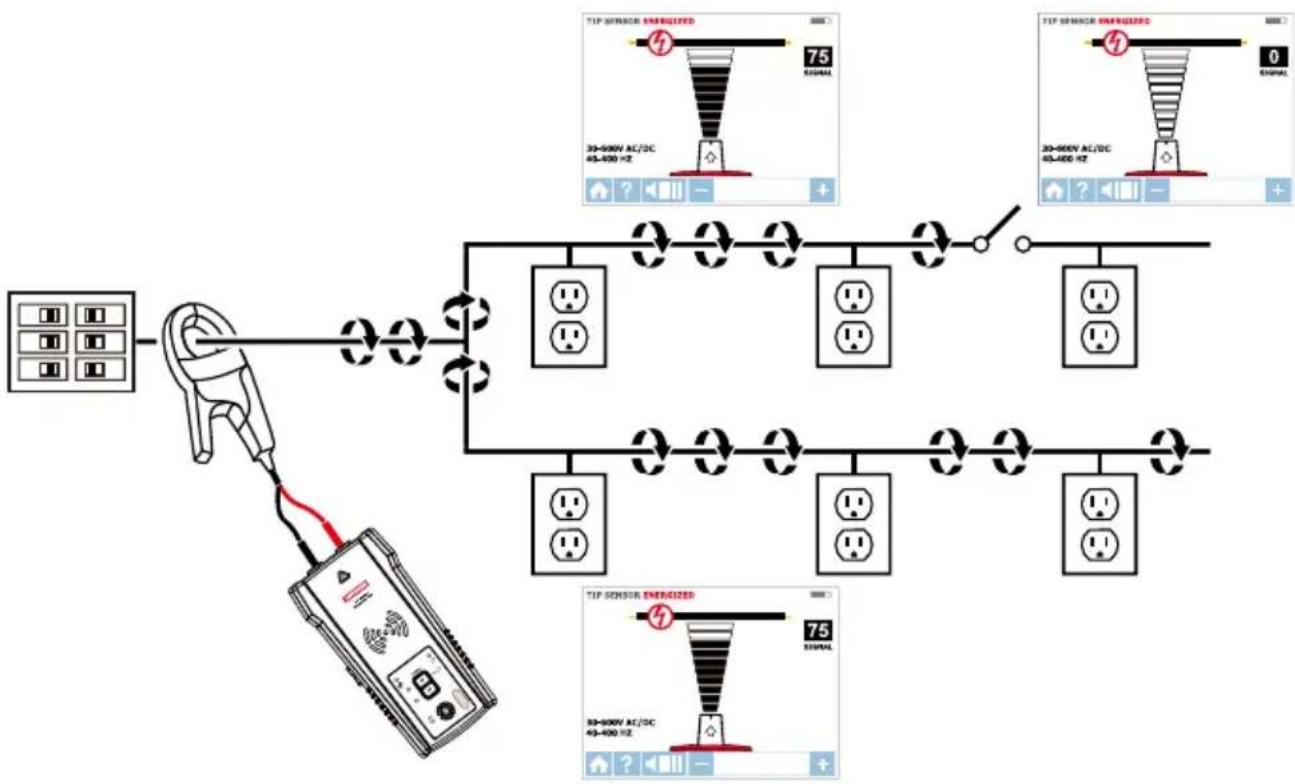
Figure 4.13: Locating loads with the Signal Clamp
5.1 Battery Replacement
Changing the Transmitter Batteries
The battery compartment on the back of the Transmitter is designed to make it easy for the user to change the batteries. A screw is added to secure the battery in case the unit is dropped. Eight (8) AA alkaline or rechargeable NiMH batteries may be used. NiMH batteries need to be removed to be charged.
Note: Batteries do not come pre-installed in the Transmitter.
- Make sure that the Transmitter is turned off and disconnected from the circuit.
- Use a philips screw driver to unscrew the battery compartment screws.
- Remove the battery cover (Figure 5.1a).
- Install batteries.
- Replace the battery cover and secure it with the screws.

Figure 5.1a: Changing Transmitter batteries
Manual Selecting of Transmitter Battery Type
The type of batteries being used-Alkaline or rechargeable NiMH-are recognized automatically during power up of the device or may be defined manually by the user.
Set battery type as alkaline:
- Make sure that the Transmitter is turned off.
- Press and hold the VOLUME UP (+) button.
- While volume up button is pressed, press the power button. The chosen battery type will be alkaline.
Set battery type as rechargeable NiMH:
- Make sure that the Transmitter is turned off.
- Press and hold the VOLUME DOWN (-) button.
- While volume down button is pressed, press the power button. The chosen battery type will be rechargeable NiMH.
If the battery type is not defined manually, it will be recognized automatically. Automatic battery type recognition draws more current and can be unreliable if inadequate or old batteries are used. The automatic battery recognition can also be unreliable if the rechargeable batteries have not been charged in over one month.
Transmitter Battery Status
Related to 8 AA batteries same type and connected in series.
BATTERY TRESHOLD ALKALINE
Device will power off if voltage is below 6.9V
Battery empty - RED LED blinking if voltage is >7.3V and < 9.4V
0-10% - RED LED is ON for voltages >9.6~V and < 9.9~V
10-40% - Two yellow LEDs are ON for voltages >10V and < 10.8V
40-75% - Three green LEDs are ON or voltages >10.9V and < 12V
75% - Four green LEDs are ON for voltages > 12 V
BATTERY TRESHOLD NiMH
Device will power off if voltage is below 6.9V
Battery empty - RED LED blinking if voltage is >7.1V and < 7.3V
0-10% - RED LED is ON for voltages >7.4~V and < 7.6~V
10-40% - Two yellow LEDs are ON for voltages >7.7V and < 8.5V
40-75% - Three green LEDs are ON or voltages >8.6~V and < 9.7~V
75% - Four green LEDs are ON for voltages > 9.8 V
Changing the Receiver Batteries
The battery compartment on the back of the Receiver is designed to make it easy for the user to change the batteries. A screw is added to secure the battery in case the unit is dropped. Four (4) AA alkaline or rechargeable NiMH batteries may be used. NiMH batteries need to be removed to be charged.
Note: Batteries do not come pre-installed in the Receiver.
- Make sure that the Receiver is turned off.
- Use flat screw driver to unscrew the captive screw.
- Remove the battery cover (Figure 5.1b).
- Install batteries.
- Replace the battery cover and secure it with the provided screw.
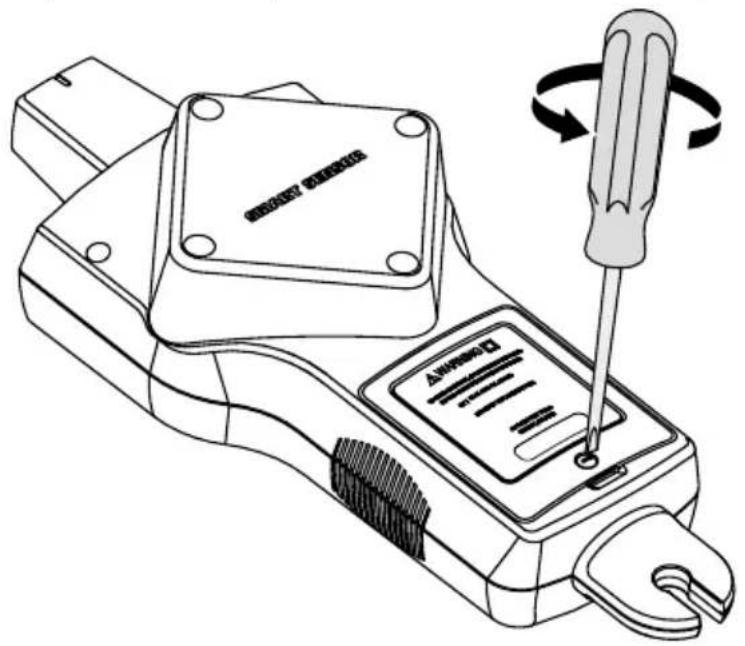
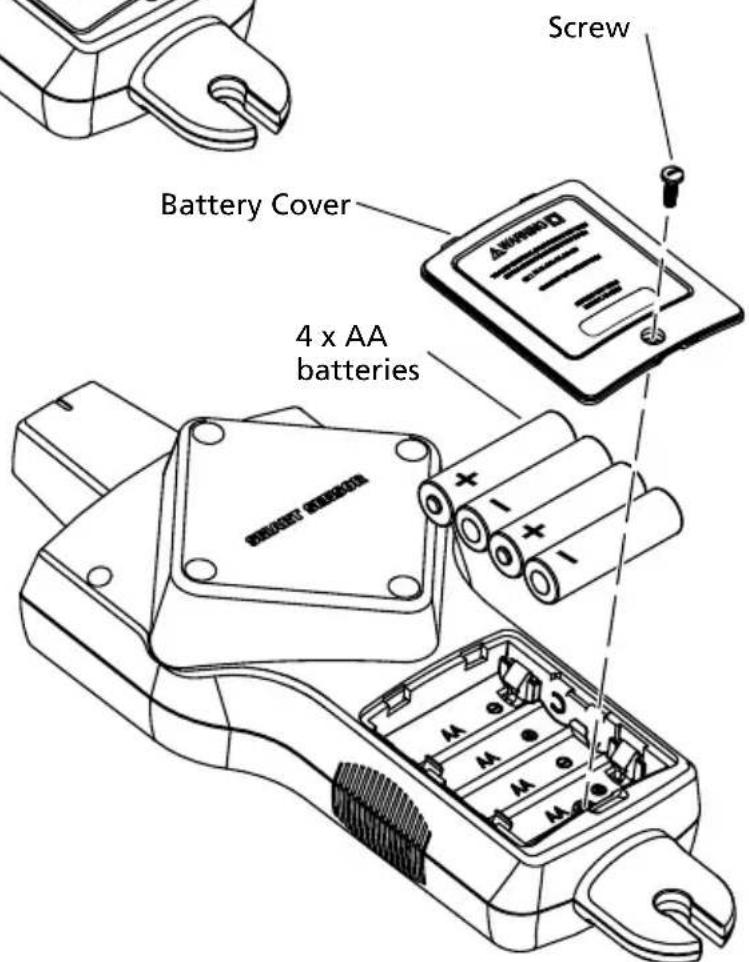
Figure 5.1b: Changing Receiver batteries
5.2 Fuse Replacement
Transmitter Fuse Replacement
Warning: To avoid shock, injury, or damage to the Transmitter, disconnect test leads before opening case.
- Disconnect all test leads from the Transmitter.
- Make sure the Transmitter is turned off.
- Use a philips screw driver to unscrew the tilt-stand screws.
- Remove the battery door and remove all batteries.
- Use a philips screw driver to unscrew holding screws.
- Remove the back cover by pulling it upwards (Figure 5.2).
- Remove the fuse from the fuse holder.
- Insert the new fuse (1.6 A, 700 V MAX, FAST Ø 6X32 mm) in the fuse holder.
- Insert the back cover, secure it with the holding screws and tighten with a star screw driver.
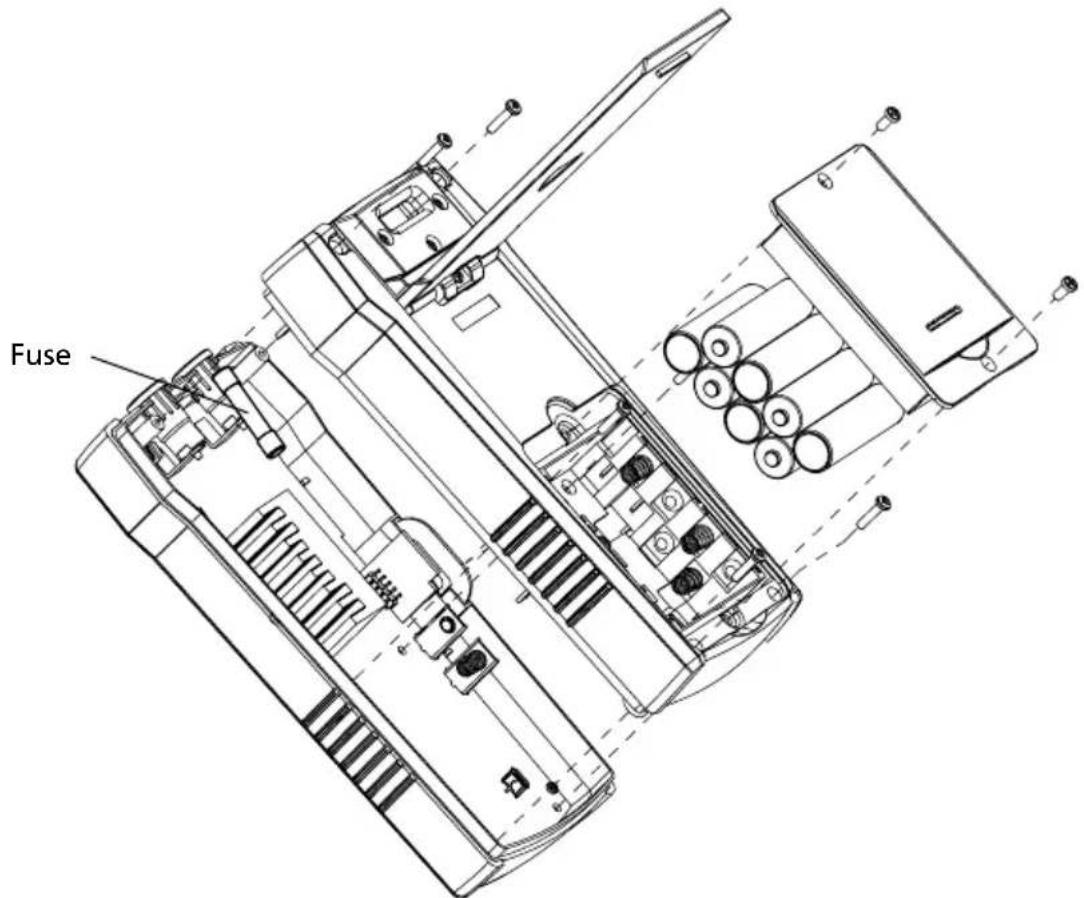
Figure 5.2: Transmitter fuse replacement
| Features AT-8000-R AT-8000-T CT-400 | |||
| Measurement Category | CAT IV 600 V CAT IV 600 V | CAT IV 600 V, | CAT III 1000 V |
| Operating Voltage | 0 to 600 V AC/DC 0 to 600 V | AC/DC 0 to 1000 V AC | |
| Operating Frequency | Energized: 6.25 kHzDe-Energized: 32.768 kHz | Energized/Loop: 6.25 kHzDe-Energized: 32.768 kHz | Loop Mode: 6.25 kHzHigh / Low Mode:32.768 kHzAC current measurement:45 Hz to 400 Hz |
| Voltage Detection | See NCV detection > 30 V AC | DC N/A | |
| Signal Indications | Numeric bar graph display and audible beep | LEDs and audible beep N/A | |
| Response Time Smart | art mode: 750 mSecTip Sensor Energized:300 mSecTip Sensor De-Energized:750 mSecNCV: 500 mSecBattery monitoring: 5 Sec | Line voltage monitoring:1 secBattery voltage monitoring: 5 sec | Instantaneous |
| Current Output of Signal (typical) | N/A Energized circuit: | HI mode: 60 mA RMSLO mode: 30 mA RMSDe-energized circuit:HI mode: 130 mA RMSLO mode: 40 mA RMSLoop mode: 160 mA RMS | 1 mA/A for AC current measurement with multimeter |
| Signal Voltage Output (nominal) | N/A De-energized circuit: | LOW: 29 V RMS, 120 Vp-pHIGH: 33 V RMS, 140 Vp-pLoop model: 31 V RMS, 120 Vp-p | De-energized circuit:2.4 V RMS, 24 Vp-p |
| Range Detection (open air) | Smart modePinpointing: Around1.97-in (5 cm) radius (±2%)Direction indication:Up to 5FT (152.4cm) (±2%)Tip Sensor: EnergizedPinpointing: Around 1.97-in (5 cm) (±1%)Detection: Up to 22-FT(670.56cm) (±1%)Tip Sensor: De-EnergizedDetection: Up to 14-FT(426.72cm) (±5%)NCV (40-400 Hz)Pinpointing: Around 1.97-in (5cm) radius (±5%)Detection: Up to 4-FT(121.92cm) (±5%) | N/A N/A | |
General specifications
| Features AT-8000-R | AT-8000-T CT-400 | ||
| Display Size 3.5 in (89 mm) LEDs N/A | |||
| Display Dimensions (W x H) | 2.76 x 2.07 in (70 x 52 mm) | N/A N/A | |
| Display Resolution 320 x 240 N/A N/A | |||
| Display Type Color TFT LCD LEDs N/A | |||
| Display Color Yes Operating mode LEDs: red | Battery status LEDs: green, yellow, red | N/A | |
| Booting Time | 30 sec | < 2 sec | N/A |
| Backlight | Yes N/A N/A | ||
| Operating Temperature | -4°F to 122°F (-20°C to 50°C) | -4°F to 122°F (-20°C to 50°C) | 32°F to 122°F (0°C to 50°C) |
| Operating Humidity | 45%: -4°F to <50°F (-20°C to <10°C) | 45%: -4°F to <50°F (-20°C to <10°C) | 95%: 50°F to <86°F (10°C to <30°C) |
| 95%: 50°F to <86°F (10°C to <30°C) | 95%: 50°F to <86°F (10°C to <30°C) | 75%: 86°F to <104°F (30°C to <40°C) | |
| 75%: 86°F to <104°F (30°C to <40°C) | 75%: 86°F to <104°F (30°C to <40°C) | 45%: 104°F to <122°F (40°C to <50°C) | |
| 45%: 104°F to 122°F (40°C to 50°C) | 45%: 104°F to 122°F (40°C to 50°C) | ||
| Storage Temperature and Humidity | -4°F to 158°F (-20°C to 70°C), <95% RH | -4°F to 158°F (-20°C to 70°C), <95% RH | -4°F to 140°F (-20°C to 60°C), <95% RH |
| Operating Altitude | 0 to 6561 ft (2000 m) | 0 to 6561 ft (2000 m) | 0 to 6561 ft (2000 m) |
| Transient Protection | N/A 8.00 kV (1.2/50μS surge) | N/A | |
| Pollution Degree | 2 | 2 | 2 |
| IP Rating | IP 52 | IP 40 | IP 40 |
| Drop Test | 3.28 ft (1 m) | 3.28 ft (1 m) | 3.28 ft (1 m) |
| Power Supply | 4 x AA (alkaline or NiMH rechargeable) | 8 x AA (alkaline or NiMH rechargeable) | N/A |
| Power Consumption (typical) | 4 x AA battery: 2W | Hi/Lo mode: 70 mA Loop mode with Clamp: 90 mA Consumption without signal transmission: 10 mA | N/A |
| Battery Life (typical) | Approx. 9 h | Hi/Lo mode: approx. 25 h Loop mode: approx. 18 h | N/A |
| Low Battery Indication | Yes Yes N/A | ||
| Fuse | N/A 1.6 A, 700 V, fast-acting, Ø 6x32mm | N/A | |
| Maximum Conductor Size | N/A N/A 1.26 in (32 mm) | ||
| Dimensions (L x W x H) | Approx. 10.92 x 4.43 x 2.55 in (278 x 113 x 65 mm) | Approx. 7.2 x 3.66 x 1.97 in (183 x 93 x 50 mm) | Approx. 5.9 x 2.75 x 1.18 in (150 x 70 x 30 mm) |
| Weight (batteries installed) | Approx. 1.20 lb (0.544 kg) | Approx. 1.25 lb (0.57 kg) | Approx. 0.25 lb (0.114 kg) |
| Certifications | CE | CE | CE |
Accessory specifications
| Features ADPTR-SCT TL-800 | 00-INT | |
| Measurement Category CAT II | CAT IV 600 V (test leads) | CAT IV 600 V (alligator clips) CAT II 300 V (outlet adapters) |
| Operating Voltage and Current 1 | 02 to 253 V AC, 4 A max. 600 V | 10 A max. (red/black leads) 600 V, 6 A max. (green lead) 600 V, 10 A max. (alligator clips) 300 V, 10 A max. (outlet adapters) |
| Operating Temperature 32 °F to 104 °F (0 °C to 40 °C) 32 °F to | 122 °F (0 °C to 50 °C) | |
| Operating Humidity ≤ 80% RH | 95%: 50 °F to <86 °F (10 °C to | <30 °C) 75%: 86 °F to <104 °F (30 °C to <40 °C) 45%: 104 °F to <122 °F (40 °C to <50 °C) |
| Storage Temperature and Humidity | 32 °F to 104 °F / 0 °C to 40 °C, ≤ 80% RH | -4 °F to 140 °F, (-20 °C to 60 °C), <95% RH |
| Operating Altitude 0 to 2000 m | (6561 ft) 0 to 6561 ft (2000 m) | |
| Pollution Degree 2 | 2 | |
| IP Rating | IP 40 | IP 20 |
| Drop Test | 3.28 ft (1 m) | 3.28 ft (1 m) |
| Dimensions | Approx. 2.95 x 1.97 x 2.56 in (75 x 50 x 65 mm) | Red/black leads: 3.28 ft (1 m) Green lead: 22.97 ft (7 m) Alligator clips: approx. 3.74 x 1.77 x 0.94 in (95 x 45 x 24 mm) Outlet adapters: 2.83 x 0.71 x 0.71 in (72 x 18 x 18 mm) |
| Weight | Approx. 0.125 lb (0.057 kg) | Approx. 0.88 lb (0.4 kg) |
| Certifications | CE | CE |
Telephone: Telephone: Telephone:
+49 (0) 7684 8009 - 0 +44 (0) 1603 25 6662 +31 (0) 40 267 51 00
Visit amprobe.com for
- Catalog
Application notes
Product specifications - User manuals
Amprobe®
amprobe.com
Division of Fluke Corp.
6920 Seaway Blvd.
M/S 143F
Everett, WA 98203 USA
Tel: 877-AMPROBE (267-7623)
Beha-Amprobe®
beha-amprobe.com
c/o Fluke Europe BV
Science Park
Eindhoven 5110
NL-5692 EC Son
Tel.: +49 (0) 7684 8009 - 0

Please
Recycle