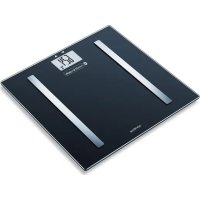
SBF 72 - Scale SANITAS - Free user manual and instructions
Find the device manual for free SBF 72 SANITAS in PDF.

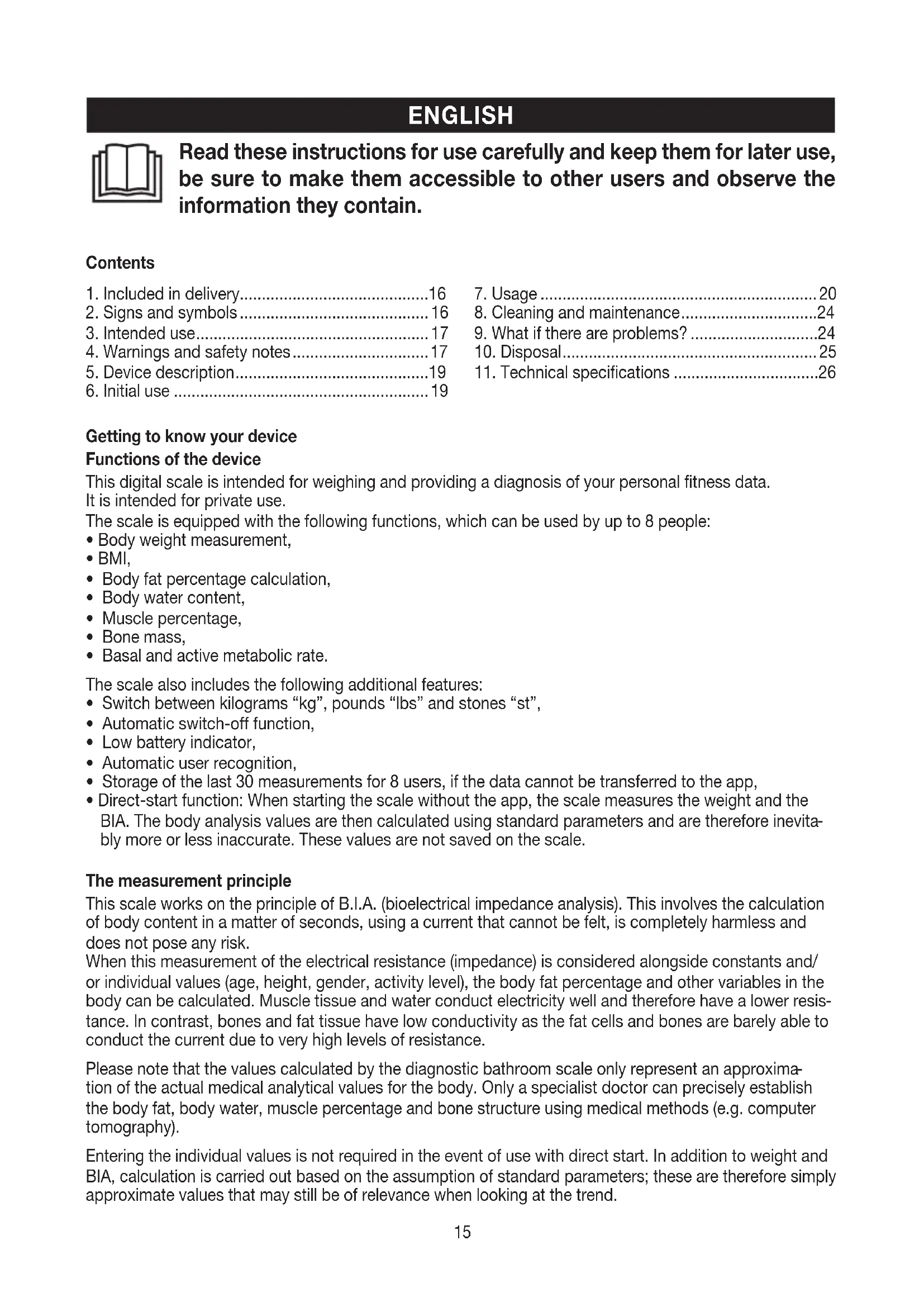


| Product Type | Digital body composition scale |
| Brand | Sanitas |
| Model | SBF 72 |
| Color | White (default) |
| Dimensions (L x W x H) | 30 x 30 x 2.1 cm |
| Weight | Approx. 1.5 kg |
| Power Supply | 1 CR2032 3 V battery |
| Measuring Range | 5 to 180 kg |
| Accuracy | ± 0.4 kg (repeatability), ± 1% + 0.1 kg (absolute) |
| Gradations | Weight: 100 g; Fat/Water/Muscle: 0.1%; Calorie: 1 kcal |
| Main Functions | Weight, BMI, body fat, body water, muscle mass, bone mass, BMR, AMR |
| User Memory | 8 slots with storage of last 30 measurements |
| Connectivity | Bluetooth Low Energy (2,402 - 2,480 MHz, 5 dBm max) |
| Compatible App | Sanitas HealthCoach (iOS ≥ 10.0, Android ≥ 5.0, Bluetooth ≥ 4.0) |
| Direct Start (without app) | Yes, but approximate results and not saved |
| Unit Conversion | kg, lb, st |
| Auto Shut-off | Yes (after approx. 40 seconds) |
| Cleaning | Damp cloth, no solvents or immersion |
| Maintenance | Avoid shocks, humidity, extreme temperatures |
| Safety | Prohibited for wearers of medical implants, pregnant women; do not use with wet feet |
| Package Contents | Scale, CR2032 battery, quick guide, instruction manual |
| Warranty | Not specified, contact dealer |
Frequently Asked Questions - SBF 72 SANITAS
User questions about SBF 72 SANITAS
0 question about this device. Answer the ones you know or ask your own.
Ask a new question about this device
Download the instructions for your Scale in PDF format for free! Find your manual SBF 72 - SANITAS and take your electronic device back in hand. On this page are published all the documents necessary for the use of your device. SBF 72 by SANITAS.
USER MANUAL SBF 72 SANITAS
Read these instructions for use carefully and keep them for later use, be sure to make them accessible to other users and observe the information they contain.
Contents
- Included in delivery.. 16
- Signs and symbols 16
- Intended use 17
4.Warnings and safety notes.. 17 - Device description.. 19
-
Initial use 19
-
Usage 20
- Cleaning and maintenance.. 24
9.What if there are problems? 24 - Disposal 25
- Technical specifications 26
Getting to know your device
Functions of the device
This digital scale is intended for weighing and providing a diagnosis of your personal fitness data.
It is intended for private use.
The scale is equipped with the following functions, which can be used by up to 8 people:
- Body weight measurement,
BMI, - Body fat percentage calculation,
- Body water content,
- Muscle percentage,
Bone mass,
Basal and active metabolic rate.
The scale also includes the following additional features:
- Switch between kilograms "kg", pounds "Ibs" and stones "st",
Automatic switch-off function, - Low battery indicator,
Automatic user recognition,
Storage of the last 30 measurements for 8 users, if the data cannot be transferred to the app, - Direct-start function: When starting the scale without the app, the scale measures the weight and the BIA. The body analysis values are then calculated using standard parameters and are therefore inevitably more or less inaccurate. These values are not saved on the scale.
The measurement principle
This scale works on the principle of B.I.A. (bioelectrical impedance analysis). This involves the calculation of body content in a matter of seconds, using a current that cannot be felt, is completely harmless and does not pose any risk.
When this measurement of the electrical resistance (impedance) is considered alongside constants and/or individual values (age, height, gender, activity level), the body fat percentage and other variables in the body can be calculated. Muscle tissue and water conduct electricity well and therefore have a lower resistance. In contrast, bones and fat tissue have low conductivity as the fat cells and bones are barely able to conduct the current due to very high levels of resistance.
Please note that the values calculated by the diagnostic bathroom scale only represent an approximation of the actual medical analytical values for the body. Only a specialist doctor can precisely establish the body fat, body water, muscle percentage and bone structure using medical methods (e.g. computer tomography).
Entering the individual values is not required in the event of use with direct start. In addition to weight and BIA, calculation is carried out based on the assumption of standard parameters; these are therefore simply approximate values that may still be of relevance when looking at the trend.
1. Included in delivery
Check that the device packaging has not been tampered with and make sure that all contents are present. Before use, ensure that there is no visible damage to the device or accessories and that all packaging material has been removed. If you have any doubts, do not use the device and contact your retailer or the specified Customer Services address.
Quick guide
- SBF 72 diagnostic bathroom scale
- 1 x 3V CR2032 battery
These instructions for use
2. Signs and symbols
The following symbols are used on the device, in these instructions for use, on the packaging and on the type plate for the device:
| WARNING Warning notice indicating a risk of injury or damage to health. | ||
| IMPORTANT Safety note indicating possible damage to the device/accessory. | ||
| i | Note Note on important information | |
| Observe the instructions for use | ||
| Disposal in accordance with the Waste Electrical and Electronic Equipment EC Directive - WEEE | ||
| 20 PAP | Disposition of packaging in an environmentally friendly manner | |
| CE | This product satisfies the requirements of the applicable European and national directives. | |
| The device may not be used by people with medical implants (e.g. pacemakers), as this may affect their functionality. | ||
| Manufacturer | ||
| EAC | Certification symbol for products that are exported to the Russian Federation and members of the CIS. | |
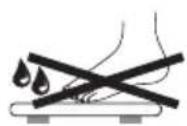
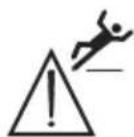
| Danger of tipping: position yourself in the centre of the weighing surface. | Danger of slipping: do not step on the scale with wet feet. | |
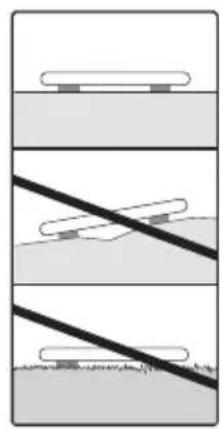
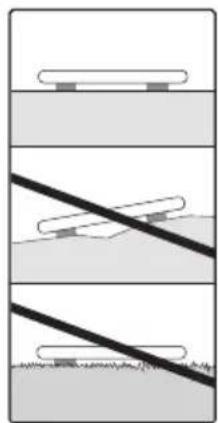
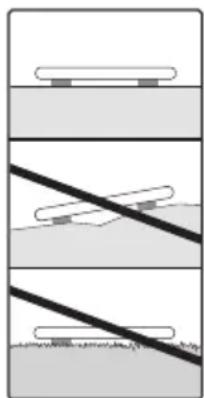
Place the scale on an even surface.
No carpet.

Do not overload the scale 180kg / 396lb / 28 st.
3. Intended use
The device is only intended for weighing humans and for recording your personal fitness data. The device is only intended for private use, and not for medical or commercial purposes.
4.Warnings and safety notes

WARNING
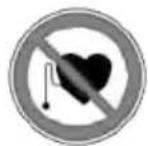
- The scale may not be used by people with medical implants (e.g. pacemakers), as this may affect their functionality.
- Do not use during pregnancy.
- Important: do not step onto the scale with wet feet or if the surface of the scale is damp - danger of slipping!
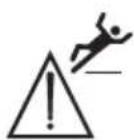
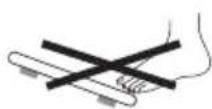
- Do not step onto the outer edge of the scale on just one side: danger of tipping!
- Swallowing batteries can be extremely dangerous. Keep the batteries and scale out of the reach of small children. Should a battery be swallowed, seek medical assistance immediately.
- Keep packaging material away from children (risk of suffocation).
Notes on handling batteries
If your skin or eyes come into contact with battery fluid, rinse the affected areas with water and seek medical assistance.
- Choking hazard! Small children may swallow and choke on batteries. Therefore, store batteries out of the reach of small children!
- Observe the plus (+) and minus (-) polarity signs.
- If a battery has leaked, put on protective gloves and clean the battery compartment with a dry cloth.
- Protect the batteries from excessive heat.
- Risk of explosion! Do not throw batteries into a fire.
- Do not charge or short-circuit batteries.
- If the device is not to be used for a relatively long period, take the batteries out of the battery compartment.
- Do not use rechargeable batteries!
- Do not disassemble, open or crush the batteries.

General notes
- Please note that measuring tolerances are possible for technical reasons, as this scale is not calibrated for use in a professional medical context.
- The scale's maximum capacity is 180kg (396 lb/28 st). The results for the weight measurement and bone mass calculation are displayed in 100-g increments (0.2 lb, 0-19st; 0.2lb; 20-28st; 1lb).
- Measurements of body fat, body water and muscle content are displayed in increments of 0.1% .
- The calorie requirement is indicated in increments of 1 kcal.
- When supplied to the customer, the scale is set to weigh and measure in "cm" and "kg". You can change the unit settings during initial use with the app.
- Place the scale on an even, hard surface; a hard surface is crucial for achieving accurate measurements.
- Repairs may only be carried out by Customer Services or authorised retailers. Before submitting a complaint, please check the batteries first and replace them if necessary.
Storage and maintenance
The accuracy of the measurements and service life of the device depend on its careful handling:

IMPORTANT
- The device should be cleaned from time to time. Do not use any abrasive cleaning products and never submerge the device in water.
- Make sure that no liquids come into contact with the scale. Never submerge the scale in water. Never rinse it in running water.
- Do not place any objects on the scale when it is not in use.
- Do not press the button violently or with pointed objects.
- Do not expose the scale to high temperatures or strong electromagnetic fields.
- Protect the device from knocks, damp, dust, chemicals, marked temperature fluctuations and nearby sources of heat (ovens, heaters).
General tips
- As far as possible, weigh yourself at the same time every day (ideally in the morning), after having been to the toilet, on an empty stomach and without clothing, in order to obtain results which can be compared.
- Important point regarding the measurement: the calculation of body fat may only be made when barefoot; the soles of the feet may be lightly dampened where appropriate.
Results may be unsatisfactory if the soles of the feet are completely dry or have a large amount of hard skin since conductivity will be impaired. - Stand up straight and still during the measurement.
- Wait a few hours after any physical exertion to which your body is unaccustomed.
- Wait approx. 15 minutes after getting up so that the water stored in the body can disperse.
- Remember that only the long-term trend is important. Short-term changes in weight within a few days are normally caused by loss of fluids; however, body water plays an important role in terms of well-being.
Limitations
When calculating body fat and the other values, unusual and implausible results may occur in the case of:
Children under approx. 10 years of age
Performance athletes and body-builders
- Persons with a fever, persons undergoing dialysis, persons with oedema symptoms and persons suffering from osteoporosis
- Persons taking cardiovascular medicine (affecting the heart and vascular system)
- Persons taking vasodilative or vasoconstrictive medication
- Persons with significant anatomical abnormalities in their legs compared with their overall body height (leg length significantly shorter or longer).
5. Device description
Rear
- Unit/Reset button
- Battery compartment
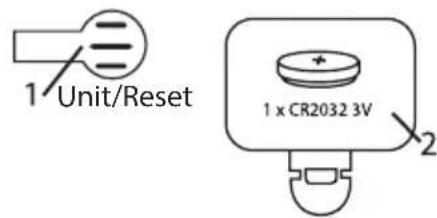
Front side
- UP/DOWN pushbuttons
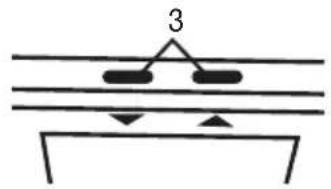
Display
4a. Bluetooth® symbol for connection between scale and smartphone
4b. Synchronisation symbol when transferring measurements
5. Body weight, body data, e.g. BMI, body fat, etc.
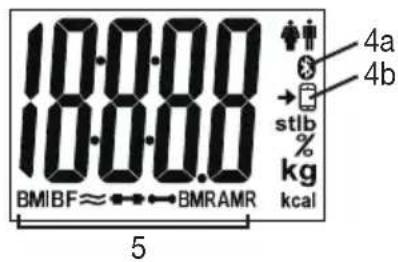
6. Initial use
Inserting the batteries
Remove the batteries from the protective packaging and insert the battery into the scale ensuring that the battery polarity is correct. If the scale does not work, remove the battery completely and reinsert it.
Positioning the scale
Place the scale on an even, hard surface; a hard surface is crucial for achieving accurate measurements. Do not place the scale on carpet.
6.1 Initial use with the app
To be able to calculate your body fat percentage and additional body values correctly, you must save the personal user data on the scale.
The scale has 8 user memory spaces which allow, for example, you and your family members to save personal settings.
It is also possible to activate users via other mobile end devices on which the "Sanitas HealthCoach" app has been installed or by changing the user profile in the app (see the app settings).
- Download the free "Sanitas HealthCoach" app from the Apple App Store (iOS) or from Google Play (Android™).
- Start the app and follow the instructions.
- Select SBF 72 in the app.
- Enter the SBF 72-related data.
The following settings must be set or entered in the "Sanitas HealthCoach" app:
| User data Set values | |
| Height 100 to | 220 cm (3'3.5" to 7'2.5") |
| Age 10 to 100 years | |
| Gender Male | ), female() |
| Activity level The medium-term and long-term perspective is decisive when selecting the activity level. | |
| Physical activity | |
| 1 None. | |
| 2 | Low: little and light physical exertion (e.g. going for walks, light gardening, simple gymnastics). |
| 3 Medium: physical exertion, at least 2 to 4 times a week for 30 minutes each. | |
| 4 High: physical exertion, at least 4 to 6 times a week for 30 minutes each. | |
| 5 | Very high: intensive physical exertion, intensive training or hard physical work for at least 1 hour every day. |
- Assign the user when requested to do so by the app.
For automatic personal recognition, the first measurement must be assigned to your personal user data. Follow the app instructions for this. Step onto the scale with bare feet and ensure that you are standing still with equal weight distribution and with both feet on the electrodes.

Note: Only the measurements displayed on the scale may be used for further observations.
6.2 Use without the app: direct start (alternative)

Note:
In order to display the personalised analysis values, we recommend initial use and making all settings with the "Sanitas HealthCoach" app. Therefore, only carry out this step if initial use is to be carried out entirely without the app. When using the app, go directly to the "Taking measurements" chapter.
Direct-start function:
When using the scale without the app, the scale measures the weight once you step on standing surface. For analysis measurement you have to stand barefoot on the electrodes. The displayed body analysis values such as body fat, BMI, etc. are calculated using standard parameters and may therefore differ from your actual individual values, since individual parameters (e.g. sex, height, etc.) are required to calculate your personal body analysis values. However, these cannot be set on the scale, but only using the app. The measured values are not saved on the scale, as they are not related to created users (e.g. U I").
7. Usage
7.1 Taking measurements
Place the scale on an even, hard surface; a hard surface is crucial for achieving accurate measurements. Do not place the scale on carpet.
Measuring your weight, carrying out diagnostics
Step onto the scale with bare feet and ensure that you are standing still with equal weight distribution and with both feet on the electrodes.

Note: The measurement result will be incorrect if the measurement is taken with socks on.
The following appears:
1. Weight in kg (or lb/st)
2. User memory space (e.g. "U: I")
3.BMI
4. Body fat in % (BF)
5. Body water in % ≈
6. Muscle percentage in %
7. Bone mass in kg
8. Basal metabolic rate in kcal (BMR)
9. Active metabolic rate in kcal (AMR)
The measured values are stored under the user memory space displayed (for later transfer to the app) or transferred immediately if the app is open.
i
Note: If two or more users have potentially been recognised, the display switches between them.
Select your user by pressing the / buttons. The user confirmed in this manner is shown for 3 seconds (you can still change during this time). If no user is selected, the scale automatically switches off after 40 seconds. Nothing is saved on the scale.
If no user is identified (e.g. the current measured value is more than 3kg different to the previously saved value), "U" is displayed. Select your user by pressing the buttons.
If a direct start has been carried out without a user being created (missing in the display, e.g. “ ), the results are calculated assuming standard parameters and are not saved.
Only measuring weight
Now step onto the scale wearing shoes. Stand still with your weight distributed equally on both feet. The scale begins to take measurements straight away.
The BIA measurement cannot be carried out whilst wearing shoes. Four dashes are briefly shown in the display. Then the weight is shown again.
Switching off the scale
The scale switches itself off automatically.
7.2 Evaluating the results
Body fat percentage
The following body fat percentages serve as a guideline (for further information please consult your doctor).
Male Female
| Age Low | Normal | Moderate | High | Age Low | Normal | Moderate | High | |||
| 10-14 <1 | 1% | 11-16% | 16.1-21% | >21.1% | 10-14 <16% | 16-21% | 21.1-26% | >26.1% | ||
| 15-19 <1 | 2% | 12-17% | 17.1-22% | >22.1% | 15-19 <17% | 17-22% | 22.1-27% | >27.1% | ||
| 20-29 <1 | 3% | 13-18% | 18.1-23% | >23.1% | 20-29 <18% | 18-23% | 23.1-28% | >28.1% | ||
| 30-39 <1 | 4% | 14-19% | 19.1-24% | >24.1% | 30-39 <19% | 19-24% | 24.1-29% | >29.1% | ||
| 40-49 <1 | 5% | 15-20% | 20.1-25% | >25.1% | 40-49 <20% | 20-25% | 25.1-30% | >30.1% | ||
| 50-59 <1 | 6% | 16-21% | 21.1-26% | >26.1% | 50-59 <21% | 21-26% | 26.1-31% | >31.1% | ||
| 60-69 <1 | 7% | 17-22% | 22.1-27% | >27.1% | 60-69 <22% | 22-27% | 27.1-32% | >32.1% | ||
| 70-100 <1 | 18% | 18-23% | 23.1-28% | >28.1% | 70-100 <28% | 23-28% | 28.1-33% | >33.1% |
Values will often be lower for fitness enthusiasts. Depending on the sporting activities performed, the training intensity and the physical constitution, the results may still be below the stated standard values. Please note, however, that there may be a risk to health in the case of extremely low values.
Body water content
The body water content in % is normally within the following ranges:
Male Female
| Age Poor | Good Very good | good Age Poor | Good Very good |
| 10-100 <5% 50-65% > | 65% 10-100 <4% 45-60% > | 5% 45-60% | >60% |
Body fat contains relatively little water, therefore body water content may be below the standard values in persons with a high body fat percentage. On the other hand, endurance athletes may exceed the standard values due to having low levels of fat and a high muscle percentage.
The body water calculation performed using this scale is not suitable for drawing medical conclusions, for example in the case of age-related water retention. Consult your doctor where necessary. A high body water content is generally desirable.
Muscle percentage
The muscle percentage is normally within the following ranges:
Male Female
| Age Low Normal High Age Low Normal High | |||||||
| 10-14 <44% 44-57% >57% 10-14 <36% 36-43% | >43% | ||||||
| 15-19 <43% 43-56% >56% 15-19 <35% 35-41% | >41% | ||||||
| 20-29 <42% 42-54% >54% 20-29 <34% 34-39% | >39% | ||||||
| 30-39 <41% 41-52% >52% 30-39 <33% 33-38% | >38% | ||||||
| 40-49 <40% 40-50% >50% 40-49 <31% 31-36% | >36% | ||||||
| 50-59 <39% 39-48% >48% 50-59 <29% 29-34% | >34% | ||||||
| 60-69 <38% 38-47% >47% 60-69 <28% 28-33% | >33% | ||||||
| 70-100 | <37% 37-46% >46% 70-100 | <27% | 27-32% >32% | ||||
Bone mass
Like the rest of our body, our bones are subject to natural growth, shrinking and ageing processes. Bone mass increases rapidly during childhood and reaches its peak between the ages of 30 and 40. As we age, our bone mass then begins to reduce. You can combat this reduction to an extent with the help of a healthy diet (particularly calcium and vitamin D) and regular physical exercise. The stability of your skeleton can be further increased by means of targeted muscle build-up. Please note that this scale does not identify the total bone mass, but rather just the mineral content of the bone (without water content and without organic substances). It is very difficult to influence the bone mass, although it does fluctuate slightly within the scope of influencing factors (weight, height, age, gender). There are no recognised guidelines or recommendations.

IMPORTANT:
Please do not confuse bone mass with bone density.
The bone density can only be determined by means of a medical examination (e.g. computer tomography, ultrasound). It is therefore not possible to draw conclusions on changes to bones and bone hardness (e.g. osteoporosis) using this scale.
BMR
The basal metabolic rate (BMR) is the amount of energy required by the body at complete rest in order to maintain its basic functions (e.g. when lying in bed 24 hours a day). This value is primarily dependent on weight, height and age.
It is displayed on the diagnostic scale in the unit kcal/day and calculated using the scientifically recognised Mifflin equation.
This is the amount of energy that is required by your body under all circumstances and must be re-supplied to the body in the form of food. If your energy intake is below this level in the longer term, this can result in damage to health.
AMR
The active metabolic rate (AMR) is the amount of energy that the active body consumes each day. An individual's energy requirement increases when the level of physical activity increases; the diagnostic bathroom scale calculates this by means of the activity level (1-5) that has been entered.
To maintain the current weight, the energy that the body uses must be replaced in the form of food and drink.
If less energy is taken in than is used over a long period of time, the body primarily takes the difference from the fat stores, with resulting weight loss. However, if the amount of energy taken in exceeds the calculated active metabolic rate (AMR) for a longer period, the body cannot burn off the excess energy. The excess is stored in the body as fat, leading to weight gain.
Temporal context of the results

Note: Please note that only the long-term trend is important. Brief deviations in weight within a few days are normally caused by loss of fluids.
The interpretation of the results is based on changes in total body weight, percentage of body fat, body water and muscle content, as well as on the length of time over which these changes occur.
Rapid changes within the scope of a few days are to be considered separately from medium-term changes (in the scope of weeks) and long-term changes (months).
It can be said as a basic rule that short-term changes in weight are almost entirely changes in water content, whereas medium-term and long-term changes may also relate to the fat percentage and the muscle percentage.
- If your weight drops in the short term but your body fat percentage increases or stays the same, you have only lost water, for example following a training session, visit to the sauna or a diet aimed only at fast weight loss.
If your weight increases in the medium term and your body fat percentage drops or stays the same, you may have built up valuable muscle mass.
If your weight and body fat percentage both fall at the same time, then your diet is working - you are losing fat mass. - Ideally, you should support your diet with physical activity, fitness or strength training. This enables you to increase your muscle percentage in the medium term.
- Body fat, body water and muscle percentages should not be totalled (muscle tissue also contains components made of body water).
7.3 Other functions
User assignment
It is possible to assign up to 8 scale users for a weight-only measurement (with shoes) and for a diagnosis measurement (bare feet).
For a new measurement, the scale assigns the measurement to the user whose most recently saved measurement falls within +/- 3kg . If two or more users have potentially been recognised, the display switches between them. Select your user by pressing the buttons and wait for 3 seconds.
Saving the assigned measurements on the scale
If the app is open and there is an active Bluetooth® connection to the scale, newly assigned user measurements are transferred immediately to the app.
If the app is not open, the newly assigned user measurements are saved on the scale. A maximum of 30 measurements per user can be saved on the scale. The saved measured values are transferred to the app when you switch on the scale (briefly step on the platform).
It is not possible to automatically transfer data when the scale is switched off.
The synchronisation symbol on the scale display appears when new measurements are being transferred to the app. It does not appear if no new measurements are saved or have been assigned for this user.
When operating using direct start (without user setting in the app), no measured values are saved on the scale.
Deleting scale data
If you would like to completely delete all measurements and old user data on the scale, switch on the scale and press the Unit/Reset-Taste on the rear of the scale for approx. 6 seconds.
"CLP" will appear on the display for several seconds.
This is necessary if you would like to delete scale users who have been set up incorrectly or are no longer required, for example.
You must then carry out the actions in chapter 7 (on user assignment) again.
Deleting individual users
Switch on the scale, select the user using the UP button and wait until "0.0 kg" appears; press the Unit/ Reset button for 6 seconds until "dEL" appears.
Replacing the batteries
Your scale is equipped with a low battery indicator. If you operate the scale with flat batteries, "L0" will appear on the display and the scale will automatically switch off. In this case, the battery must be replaced (1 x 3V CR2032).

NOTE:
- Do not use rechargeable batteries.
- Use batteries free from heavy metals.
8. Cleaning and maintenance
The device should be cleaned from time to time.
This should be done using a damp cloth and, if necessary, a small amount of detergent.

IMPORTANT
- Never use abrasive solvents or cleaning products!
- Never submerge the device in water!
- Do not clean the device in a dishwasher!
9. What if there are problems?
These actions are recommended in the following cases:
| Display Cause Solution | ||
| ”,U-“ | Unknown measurement as it is outside the user assignment limit or a unique assignment is not possible. | Select your user by pressing the▲▼but-tons. |
| BF-Err | The proportion of fat is outside the measurable range (less than 3% or greater than 65%). | Please repeat the measurement barefoot, or with the soles of the feet lightly dampened if necessary. |
| oLd | Maximum weight capacity of 180 kg exceeded. | Loads must not exceed 180 kg. |
| Incorrect weight is displayed. | No even, hard surface. Place the scale on an even, hard surface. Not on carpet. | |
| Incorrect weight is displayed. | Not standing still. Stand as still as possible. | |
| Incorrect weight is displayed. | Incorrect zero point of scale. Wait until the scale switches itself off. Acti - vate the scale, wait for “☐☐ kg” to appear and take the measurement again. | |
| ”,BF- | BIA is not possible. Please repeat the measurement barefoot, or with the soles of the feet lightly dampened if necessary. | |
| No Bluetooth® con- nection (®symbol is missing). | Device outside the range. | The minimum range in the open is approx. 10 m. Walls and ceilings reduce the range. Other radio waves may interfere with the transmission. Therefore, do not position the scale near devices such as WiFi routers, microwaves, induction hobs, etc. |
| No connection to the app. | Close the app completely (including in the background). Switch Bluetooth® off and back on again. When doing so, please note that the scale must not be connected from the Bluetooth® settings of the operating sys- tem. If need be, remove it from the devices list in the Bluetooth® settings, and then use the “Sanitas HealthCoach” app. Switch the smartphone off and back on again. Remove the batteries in the scale for a short period and reinsert them. | |
| Measurements are not transferred to the app → -symbol does not appear) | No new user measurement and no Bluetooth® connection with the app. | The user memory space which appears on the scale display must be assigned to the scale in your app settings. Only these measurements can be transferred. There- fore, check your user spaces and your app settings for this user and carry out a user measurement again. In doing so, „U“ for example has to be displayed on the scale and in the app this user „1“ has to be assign- gned in the device settings of the scale. |
| → -symbol appears briefly after measure- ment. | User memory space is full. The oldest measured values are overwritten with newer measured values. | Open the app and switch the scale on. If you do not want to use the app, ignore this message. |
| L0 | The batteries in the scale are empty. | Replace the batteries in the scale. |
10. Disposal
Empty, completely flat batteries must be disposed of through specially designated collection boxes, recycling points or electronics retailers. You are legally required to dispose of the batteries.
The codes below are printed on batteries containing harmful substances:
Pb = Battery contains lead,
Cd = Battery contains cadmium,
Hg = Battery contains mercury.
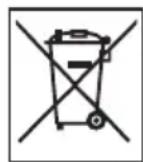
For environmental reasons, do not dispose of the device in the household waste at the end of its service life. Dispose of the device at a suitable local collection or recycling point in your country.
Dispos of the device in accordance with EC Directive - WEEE (Waste Electrical and Electronic
Equipment). If you have any questions, please contact the local authorities responsible for waste disposal.
Dispose of packaging in an environmentally friendly manner.


11. Technical specifications
| Model: SBF 72 | |
| Dimensions: 30 x 30 x 2.1 cm | |
| Weight: Approx. 1.5 kg | |
| Measurement range: 5-180 kg | |
| Scale interval d: The display can be read in | increments of 0.1 kg. |
| Repetition accuracy: The measuring tolerance | once for repeated measurements is +/-0.4 kg (several measurements in direct succession on the same scale with position of scale and person the same as far as possible). |
| Absolute precision: In comparison with a calibrated weight, the measured valueis +/-1% +0.1 kg. E.g. at 40 kg this corresponds to +/- 0.5kg; at 100 kg this corresponds to +/-1.1 kg. | |
| Data transfer via Bluetooth® low energy technology | The product uses Bluetooth® low energy technology, Frequency band 2402 - 2480 MHz,Max. 5 dBm transmission power,Compatible with Bluetooth® ≥ 4.0 smartphones/tablets |
| A list of compatible smartphones, information on software and details on the devices can be found at the following link: sanitas-online.de | |
| System requirements for the “SanitasHealthCoach” app | iOS ≥ 10.0, Android™ ≥ 5.0Bluetooth® ≥ 4.0. |
Subject to technical changes.
We hereby confirm that this product complies with the European RED Directive 2014/53/EU. The CE Declaration of Conformity for this product can be found under:
www.sanitas-online.de/web/de/landingpages/cedeclarationofconformity.php.
FRANÇAIS

| 10-14 | <36% | 36-43% | >43% |
| 15-19 | <35% | 35-41% | >41% |
| 20-29 | <34% | 34-39% | >39% |
| 30-39 | <33% | 33-38% | >38% |
| 40-49 | <31% | 31-36% | >36% |
| 50-59 | <29% | 29-34% | >34% |
| 60-69 | <28% | 28-33% | >33% |
| 70-100 | <27% | 27-32% | >32% |
Masse osseuse
| Età Bassa | normale alta | Età Bassa normale alta | |
| 10-14 | < 44% | 44-57% | >57% |
| 15-19 | < 43% | 43-56% | >56% |
| 20-29 | < 42% | 42-54% | >54% |
| 30-39 | < 41% | 41-52% | >52% |
| 40-49 | < 40% | 40-50% | >50% |
| 50-59 | < 39% | 39-48% | >48% |
| 60-69 | < 38% | 38-47% | >47% |
| 70-100 | < 37% | 37-46% | >46% |
| 10-14 | <36% | 36-43% | >43% |
| 15-19 | <35% | 35-41% | >41% |
| 20-29 | <34% | 34-39% | >39% |
| 30-39 | <33% | 33-38% | >38% |
| 40-49 | <31% | 31-36% | >36% |
| 50-59 | <29% | 29-34% | >34% |
| 60-69 | <28% | 28-33% | >33% |
| 70-100 | <27% | 27-32% | >32% |
Massa ossea
YcTaHaBnBaIte BeCbl Ha yCTOuHbYIO pOBHyIO NOBepXHOCTb. He cTaBbTe BeCbl Ha KOBeP.

He neperpuykae Becbi 180 kg / 396 lb / 28 st.
YCTAHOBITE BeCbI Ha POBHyIO TBepDyIO NOBepXHOCTb; TBePdA IOBepXHOCTb YBJIeTcR HeO6xOIMMbIM ycNoBnEM Ira ToHOrO n3MepeHn. He CTaBBTe BeCbI Ha KOBeP.
6.1 BbD B 3KcIpyatau npn nmooun npnloxehna
YTo6bl npabnIbHO onpeJeNTb DOJIIO JxnpOBoM Maccbl B opraHn3Me n dpyrne
fN3uYeCKNe POKa3aTeJI, Heo6XoJIMO COxpaHTb B NaMaTn BEcOB JInHbIe DaHHbIe
POnb3OBaTeJI.
BecbOcHaueHbI 8 ayeKamn namrTn, B KOTopbIX Bbl, HapnPmep, YneHbBaew Cembn CMOXeTe XpaHHTb JInHbIe daHHbIe.
Kpome TOrO, NOIb3OBaTeJI MOry T NODKJIIOUaTbcra C NOMOcIbMO6nJIbHbIX yCTpoiCTB C yCTaHOBJIeHHbIM npINoJoxHeHem "Sanitas HealthCoach" IIn nYtem IN3MeHEnr IPOΦIIRA NOIb3OBaTeJI B pINoJoxHeHn (CM. HAcTpoI KI npINoJoxHeHn).
- 3açpúyúnte 6ecnlaTHeO npuIoxKeHne «Sanitas HealthCoach» B Apple App Store (iOS) nIi Google Play (Android™).
- 3anyctnte npnloxehne n cneyuTe HNCTpyKUmaM.
- BbI6epuTe B npuJIOxKeHn SBF 72.
- BBeDnTe daHhIe, kacaIoUneecr SBF 72.
B npinoxkeHn Sanitas HealthCoach doJXHb6bTb BbIbpaHb cJeDyIOune HAcToPouKn:
AMR (o6MeH BeueCTB C yueTOM n3nueckOaKTHBHOCTN)
O6MeH BeIeCTB C yueTOM fN3nuecko aKTNBHOCTN (AMR - Active Metabolic Rate) - 3TO KOJIuYeCTBO 3Heprn, KOTOpoe OprAnmEgeJHeBHO paCXOyET B aKTNBHom COcToHnn. PaCxOJ 3Heprn y yeNoBeKa NOBbIaTeCBAmeCTe C yBEJIuYeHemero fN3nuecko aKTNBHOCTN IN ONpeJeIeTc H naIarHOCTNUeCKNX BEcax corlaCHO 3aHaHHo CTeneHn aKTNBHOCTN (1-5).
IJIy IIOJIepKHaHnI IMeIOUeOcR BeCa 3aTpaueHHa 3HeprnA DOJXHa 6bITb BO3BpaUeHa B OprHaH3M C PIIuEi HAnNTkAMN.
EcnB TeueHne npoJXnTeIbHoro BpeMeHN B opaH3M Bo3BpaAaeTcMa Hehwe 3HeprN, Yem pacxOyEtCay, OpraHn3M HaunHaet BO3MeaTaB 3Ty pa3HnUy B OCHOBHom 3a CHT HAKONJIeHHbIX JInpoBbIX OTLOKeHNI, B pe3yIbTaTe Bec cHxaetc. Ecn, HanpoTNB, B teueHne npoJXnTeIbHO BpeMeH NHeprN NOCTynae T6IbWe, Yem paccuTahHoe 3NaueHne 0MeHa BeueCTB C yUeTOM 4n3NuecKoJ AKTINBHOCTN (AMR), n3nnkN 3HeprN B opraHn3Me He cXnIaOTcA, a COxpanHIOCTCB FOpme JInpoBbIX OTLOKeHNI, B pe3yIbTaTe Bec yBeJIuNbBaETc.
B3aHMOCBRA3b pe3yIbTaTOB BO BpeMeHN

Yka3aHne: YUHTTE, YTO 3HaueHne IMeIOT TOnbKO DOnroBpeMeHHbIe TeHdEHN. KpaTKOBpeMeHHbIE OTKIOHeHnBEca B TeueHne HeCKoJIbKx IHeN, KaK npabNIO, ObycIOBJeHbI NOTepeJ XnIKOCTN.
IHTepnpeTaunpe3yIbTaTOBdoJxHa yuITbIbTaN3MeHeHne 6eMaCCbI Tea n npoentHOJIOJXHPoBOIMACCbI,TKaHEBOINKIOCTNI MbIeUHOJ MaCCbl,a TaKxe Bpemr,3a KOTOpoe pOn3OJIIN3MeHeHn.
CJeIyET pa3JIuHaTb 6bICTpbIE N3MeHHeN B TeYeHne HeCKoJIbKx DHei N3MeHHeN, PpOcXoJaLue Co CpeHne (B TeyeHne HeJeB) MAnO (B TeyeHne MecaeB) CKOpOCTbIO.
3a OCHOBHOI npHnIIN npHnHMaETcraTOT paKT, YTO KpaTKOCpOHyIe N3MeHeHn IOHTN BCeTa C83aHbIC N3MeHHeM COepKahn BOdbI B OprAHn3Me, B TO BpeM KaK N3MeHeHn, IPOCXoJxue Co CpeHn IMaON CKOPoCTbIO, MOryT KacaTbcN IGMeHn DOJI IN XInPoBOI N MbISeuHOm MacCbI.
- Ecni 3a KopoTkoB BpemBa CnXkaeTcA, a DOnJ XInpoBO Maccbl YBeiNHyBaetc NIN COxpaHReTc, BaI opraHm3M BCero IINb NoTeprJ XnDkoCTb (HaPpIMep, NocJe TpeHnpOBKn, NocSeHncaayhbl INN dIeTbI, HapBaJIeHHoH Na 6bICTpoe ChNXKeHne BeCa).
- Ecni BeC yBeneuHbaeTcR co CpeDHeckopocbU, DOnJ XnpoBoM Maccbl YMeHbuaeTcNl CoXpaHr eTcHa Tom Ke yPoBHe, To Bbl, Bo3MOxHO, HAnpOTNB, PnpO6peJI ueHHyIO MbIweHyIO Maccy.
- Ecni BeC n DOnJ XInPOBm Maccbl yMeHbShaOTc OndHOBpeMeHHo, Ba7a dIeTa pa6OtaeT: Bbl TepReTe XInPOByIO MAccy.
BnIeane BbI DOJXHbI NOIDepKINBaTb 3ΦΦeKTNBHOCTb DneTbI Pn NOMOuNΦN3NueCKoAKTNBHOCTN, 3aHrTm FHTHECOM IIN CNIOBbIMN BuaAMN CnpTa. TaKIM O6pa3OM Bbl MoKeTe yBeJIuHTb DoJIIOMbIWeHou MaCCbI B CpeHecPoUHbI NepNOd.
3HaueHnIdoJeJxipoBOoMACcbI,TKaHEBOJXuDKOCTUINMbIueHOnMACcbI He CneJeYeTCKlaDbIBaTb (B MbIEueHOITKaHn TKAHN TAKKe COePxAcTcKOMIOHeHTbl, B COCTaBe KOTOpbIX IMeETcR TaKaHeBaJXuDKOCTb).
7.3 Ppoue nФункци
PpncboeHne pe3yNbTaTOB noIb3OBaTeJe
PpncboeHne pe3yIbTaTOB MaKcMym BOCBMn 3aIporpaMMIpOBaHHbIX NJIb30BaTeJeBECOB BO3MOxHO npn IpocTOM B3BeUWBaHN (B O6yBn) n npn dnaarHoctNueckom n3MepeHN (6ocNKoM).
Ipn HOBOM m3MepeHn Becbl 3aHcBbAIO T pe3yNbTaTb I B ayeKe namrTO rO NOb3OBaTeJ, y KOTOPoTO PocJeHHe m3MepeHHoe 3NaeHHe Maccbl TeJa OTnUaETcA O T pe3yNbTaTaN He 60Jee Yem Ha +/- 3 Kr.
Ecnn OcbapyKeHbI Dba HnHcKO B03MOXHbIX NOnb3OBATeJe, NOnb3OBATeJIpeKIOUaETcHa dnCnlee. Bbl6epnte CBOero NoB3OBATeJ, Haxmam KhoNk N ydepxmba Ix 3 ckyHdbI.
CoxpaHeHne npncBOeHHbIX 3HaueHnB namrTb BecOB
EcnO tKpbIto npInoxKeHne n yctaHOBHeNo aKTnBHOe Bluetooth®-coeHHeHne c BecamN, HOBIE npCBOEHHbIe NOJb3OBaTeJIIO pe3yJbTaTbI N3MepeHNI cpa3y nepeJaOTcB n pInoxKeHne.
Ecn npJIOXeHne He OTKpbITo, HOBIE npUCBOeHHbIe NOlb3OBaTeJIIO pe3yJIbTaTbI N3MepeHn COxpaHIOCTcB namrN Becob. Ha Becax MoXHO xpaHTb Do 30 pe3yJIbTAToB N3MepeHn dJa KaKdoTo NOL3OBaTeJIe. CoXpaHHeHbIe N3MepeHHbIe 3HaueHn IpeHocraTcB N npJIOXeHne NoCNe BKIOUeHn BEcoB (KOpOTKO HanaBITE Ha PAnTΦopMy).
ABTomatnueckn nepeHoc daHHbIX npN BbIKIOeHHbIX BEcax HeBO3MOKeH.
CnB0J CnHxPOHn3aUH Na DnCnIe BEcOB NOBJIeTcR, KOrDa HOBbIe N3MepeHnI nepeaIoTcR B npINOxKeHne. OH He 6yJeT OTo6paXaTbcR, ecN dIra 3TOrO nOJIb3ObaTeIe H 6blIN COxpaHeHb IIN eMy He 6blIN pnpCBOeHbI HOBbIe N3MepeHnI.
B cnlyae nCnoJb3OBAHnuepe3 npRm0 3anyck (6e3 hAcTpoKn noJb3OBaTeJI B npIIOXeHN) n3MepeHHbIe 3NaUeHnB BeCaX He CoxpaHraOTc.
YdaJIeHHe DaHHbIX N3 NaMaTn BeCOB
EcIn BbXOTITE NOHOCbIO ydaNTb BCE NOJb3OBaTeIbckne daHHbIE n N3MepeHn I3 NaMrtu BEcOB, BKIOHTe BeCbI u ydepKuBaIte KhoNky Unit/Reset ha o6paTHo CTOpOHe BEcOB haxaToI npImepHO TeueHne 6 cekyHd.
Ha 3kpaHe Ha HeCKoJIbKO CeKHyI NOBITcN HINdkaIaIg «CfR».
3TaФyHKUH Heo6xOUMa,ecn BbXOTnTe,HanpIMep,ydAnITb HnPaBnIbHO HAcTpoEHHbE nn HEnyKHbIe DaHHbIe NOlb3OBaTeJI.
NocJe 3TOro CHOBa BbINOJHnTe DeiCTBnR, ONuCAHHbIe B rI.7 («Ha3HaueHne NOJb3OBaTeNe»).
YdaJIntb OTdJIbHbIX NOJIb3OBATeJei
BkIIOHTe BeCbI, BbI6epNTe NOJIb3OBATeJc NOMOu bIO KHOJKN «BBEPX» n noIOxJnte, NOKa Ha Becax He OTO6pa3rTa CnΦpbl «0.0 Kr», HaxMITE u yIepXnBaIte KhoNky Unit/Reset («eINHua/c6poc») B TeueHne 6 cekyHd, NOKa He NoRbTcraHnDkaun dEL.
3aMeHa 6aTapeek
Becbi nok3bIbaIOT, KOrda Heo6xOIMo 3aMeHITb 6aTapeiKu. Ecni 6aTapeiKn pa3pIINCb, Ha dncnlee OTo6paXaETcRA «L» n Becbi aBTOMaTHueCKN OTKIOUaIOTcR. B 3tOM cIyae Heo6xOIMo 3aMeHITb 6aTapeiKn (1 6aTapeiKa CR2032 3 B).

YKA3AHNE:
He nCnoJb3yIte nepe3apjXaemble aKKMyJrTopbl.
- IcnoIb3yIte 6aTapeiKn, He copejkaunie TjaKeJbIX MeTannIOB.
8. Ounstka n yxod
Bpemr oT BpeMeHn npu6op Heo6xoDmO ouHuaTb.
Iy nCnOJIb3yIe BnaXHyO caIpeTKy, Ha KOtOpYIO npn Heo6xOIMOCTu MOxHO HaHeCTu HEMHOrO MOUcero CpeIcTba.

BHIMAHNE
He nCnoJIb3yIte CNJbHOeIcTByIOuIne paCTBOpNTeIN uNCTraUne cpeIcTBA!
He norpykaiTe npi6op B Body!
He moTe np6op B nocydomoeHou MaunHe!
The Bluetooth® word mark and logos are registered trademarks owned by Bluetooth SIG, Inc. and any use of such marks by Hans Dinslage GmbH is under license. Other trademarks and trade names are those of their respective owners.
Apple and the Apple logo are trademarks of Apple Inc., registered in the U.S. and other countries. App
Store is a service mark of Apple Inc., registered in the U.S. and other countries.
Google Play and the Google Play logo are trademarks of Google LLC.
Android is a trademark of Google LLC.

- Read these instructions for use carefully and keep them for later use, be sure to make them accessible to other users and observe the information they contain.
- Contents
- Getting to know your device
- Functions of the device
- The measurement principle
- Included in delivery
- Signs and symbols
- Intended use
- 4.Warnings and safety notes
- WARNING
- Notes on handling batteries
- General notes
- Storage and maintenance
- IMPORTANT
- General tips
- Limitations
- Device description
- Rear
- Front side
- Display
- Initial use
- Inserting the batteries
- Positioning the scale
- Initial use with the app
- - Enter the SBF 72-related data.
- - Assign the user when requested to do so by the app.
- Use without the app: direct start (alternative)
- Note:
- Direct-start function:
- Usage
- Taking measurements
- Measuring your weight, carrying out diagnostics
- Only measuring weight
- Switching off the scale
- Evaluating the results
- Body fat percentage
- Body water content
- Male Female
- Muscle percentage
- Bone mass
- IMPORTANT:
- BMR
- AMR
- Temporal context of the results
- Other functions
- User assignment
- Saving the assigned measurements on the scale
- Deleting scale data
- Deleting individual users
- Replacing the batteries
- Cleaning and maintenance
- What if there are problems?
- Disposal
- Technical specifications
- FRANÇAIS
- Masse osseuse
- Massa ossea
- BbD B 3KcIpyatau npn nmooun npnloxehna
- - BBeDnTe daHhIe, kacaIoUneecr SBF 72.
- AMR (o6MeH BeueCTB C yueTOM n3nueckOaKTHBHOCTN)
- B3aHMOCBRA3b pe3yIbTaTOB BO BpeMeHN
- Ppoue nФункци
- PpncboeHne pe3yNbTaTOB noIb3OBaTeJe
- CoxpaHeHne npncBOeHHbIX 3HaueHnB namrTb BecOB
- YdaJIeHHe DaHHbIX N3 NaMaTn BeCOB
- YdaJIntb OTdJIbHbIX NOJIb3OBATeJei
- 3aMeHa 6aTapeek
- YKA3AHNE:
- Ounstka n yxod
- BHIMAHNE
Brand : SANITAS
Model : SBF 72
Category : Scale