MEG065 - Microphone Vonyx - Free user manual and instructions
Find the device manual for free MEG065 Vonyx in PDF.



| Product Type | Wireless Microphone |
| Brand | Vonyx |
| Model | MEG065 |
| Dimensions (approx.) | 250 x 50 x 50 mm |
| Weight (approx.) | 300 g (with batteries) |
| Power Supply | 8 C-type batteries (1.5 V) |
| Battery Type | LR14 / R14 |
| Estimated Battery Life | Up to 10 hours depending on usage |
| Transmission | UHF Wireless |
| Maximum Range | Up to 50 m in open field |
| Polar Pattern | Cardioid |
| Frequency Response | 80 Hz - 12 kHz |
| Connectivity | Receiver with XLR and 6.35 mm jack output |
| Care and Cleaning | Clean with a soft, dry cloth. Do not use abrasive products. |
| Safety | Do not expose to water, excessive humidity, or extreme temperatures. |
| Spare Parts | Grille, microphone capsule, batteries available separately |
| Reparability | Professional repair recommended. Contact Vonyx support. |
| Package Contents | Microphone, receiver, audio cable, power adapter, user manual |
| Color | Black |
| Material | ABS plastic with metal grille |
Frequently Asked Questions - MEG065 Vonyx
User questions about MEG065 Vonyx
0 question about this device. Answer the ones you know or ask your own.
Ask a new question about this device
Download the instructions for your Microphone in PDF format for free! Find your manual MEG065 - Vonyx and take your electronic device back in hand. On this page are published all the documents necessary for the use of your device. MEG065 by Vonyx.
USER MANUAL MEG065 Vonyx
natural_image
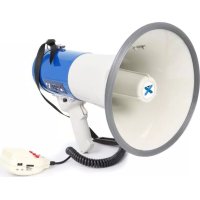
Blue and white megaphone with attached power cord and remote control unit (no visible text or symbols)INSTRUCTION MANUAL GEBRUIKSAANWIJZING GEBRAUCHSANLEITUNG MANUAL DE INSTRUCCIONES NOTICE D'UTILISATION INSTRUKCJA OBSŁUGI
ENGLISH
Thank purchasing this Vonyx megaphone, please read this instruction manual carefully before use to know how to operate it properly and effectively. If the device was damaged in transit, don't use it and contact your dealer.
Warning:
- Do not place in direct sunlight or in a high temperature environment for a long period of time.
- Avoid exposure to rain, water or heavy humidity.
- When cleaning the megaphone body only use a neutral detergent. Never use thinner or benzene.
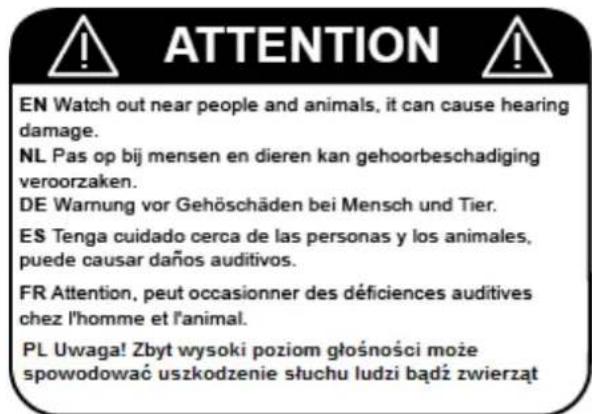
- Never point the megaphone directly at persons or animals. To avoid damaging of the ears, ensure sufficient distance to other persons and ensure a reasonable volume adjustment!
- Keep the device away from children and unauthorized users.
- If not in use for a long period of time, remove the batteries and store them separately to prevent leaking batteries and damaging the circuits inside the megaphone.
- Damage caused by disregard of certain guidelines in this manual is not covered by the warranty and the dealer will not accept responsibility for any defect or problem.
- Unauthorized conversion and/or modification of the product is inadmissible because of safety and approval reasons (CE).
- Do not leave packaging material unattended. Plastic foils or bags etc. might become a dangerous toy for children!

Possible damage by leaking batteries Leaking batteries can cause permanent damage to the device. Take batteries out of the device if it is not going to be used for a longer period.


Electric products must not be put into household waste. Please bring them to a recycling centre. Ask your local authorities or your dealer about the way to proceed. The specifications are typical. The actual values can slightly change from one unit to the other. Specifications can be changed without prior notice.
Do not attempt to make any repairs yourself. This would invalid your warranty. Do not make any changes to the unit. This would also invalid your warranty. The warranty is not applicable in case of accidents or damages caused by inappropriate use or disrespect of the warnings contained in this manual. Vonyx cannot be held responsible for personal injuries caused by a disrespect of the safety recommendations and warnings. This is also applicable to all damages in whatever form.
- Speaker
- Clips for carry strap
- Press-to-talk switch: Press this switch for announcing when holding the megaphone.
- Handle grip
- Battery compartment unlock
- Control panel
- Battery compartment
- Power On/Off
- Microphone
- Volume controller: To increase volume, turn clockwise
- Microphone fixing hanger

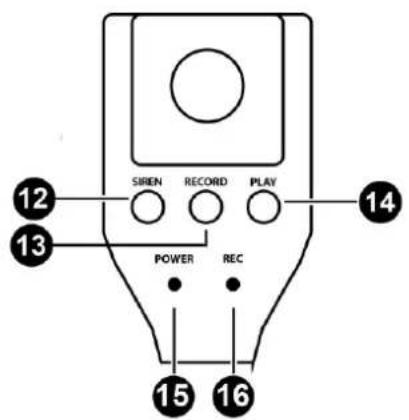
- Siren button
- Record button
- Play button
- Power LED indicator
- Record LED indicator: Light turns on when the device is in record mode
OPERATIONAL INSTRUCTIONS
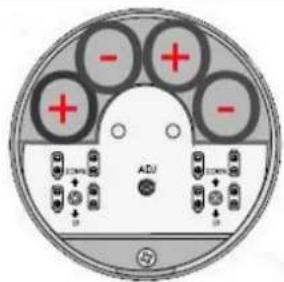
- Installing the batteries: Press the battery unlock button to open the top cover. Put 8 pcs size C-batteries properly (+/- terminals must match) into the battery compartment and close the top cover and the latch.
- Position the horn opening towards the audience, and speak through the microphone. Bring the microphone close to your lips and speak normally.
- Adjust the volume level to optimum without causing howling. Please note that the closer the sound source is to the microphone the better the amplification is.
-
Switch the alarm switch to the alarm position, it will generate a continuous alarm.
-
If the megaphone is activated and the volume of the speaker is weak, the batteries might be empty. Follow step 1 to replace the batteries.
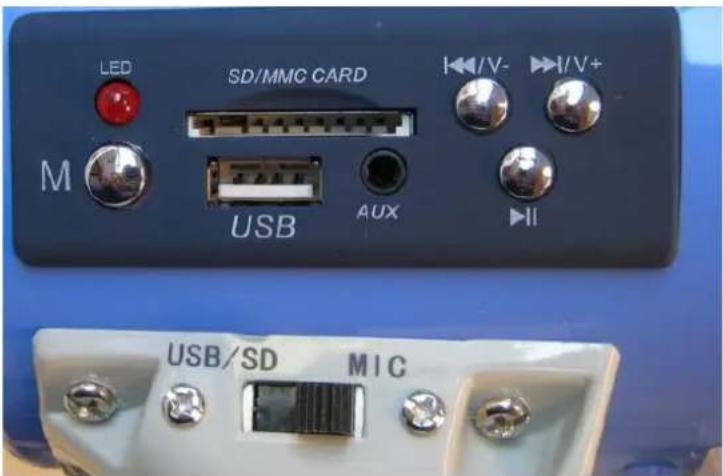
- When a USB stick with MP3 files is inserted in the device, the device will begin to play the first track immediately.
- By pressing the Next or PREV key you can select another track. Press Play/Pause to start/stop playing. If you press and hold the next or PREV key you can change the volume of the MP3 player.
- SD/MMC Card This works the same as for the USB-stick.
- AUX - You can connect an external audio source with a 3.5jack plug.
- Bluetooth By pressing the M (mode) you can select the BT mode (green led blinks), search with your Bluetooth device for the Megaphone and connect, the Led will constant be lit green. You can use your Bluetooth device as the audio source. If you press the M key again you select the MP3 devices again, Led will be lit red.
BASIC TROUBLESHOOTING
- If the megaphone does not work, remove the batteries to check if the +/- terminals match correctly.
- If the terminal match correctly, place back the batteries and press them down into the battery compartment firmly, make sure the batteries are in contact properly
TECHNICAL SPECIFICATION
Power max. : 65Watt
Range : outdoor up to 1000-1200m
Battery : 8pcs Type C-Battery
Battery lifetime : permanent use up to 5 hours
Dimensions : Horn ∅230mm, Length 340mm
Weight (without battery) : 1.65Kg
The specifications are typical. The actual values can slightly change from one unit to the other.
Specifications can be changed without prior notice.
NEDERLANDS


Brand : Vonyx
Model : MEG065
Category : Microphone