MS20 - Microphone Vonyx - Free user manual and instructions
Find the device manual for free MS20 Vonyx in PDF.


| Product Type | Dynamic Microphone |
| Model | Vonyx MS20 |
| Polar Pattern | Cardioid |
| Frequency Response | 50 Hz - 15 kHz |
| Impedance | 600 Ω |
| Sensitivity | -54 dB ± 3 dB |
| Connector | XLR (3-pin) |
| Cable Length | 5 m (16.4 ft) |
| Dimensions (with stand) | 180 x 50 x 50 mm (7.1 x 2.0 x 2.0 in) |
| Weight (without cable) | 350 g (12.3 oz) |
| Material | Zinc alloy body, steel mesh grille |
| Power Requirement | No external power (passive dynamic) |
| On/Off Switch | No |
| Included Accessories | Microphone clip, foam windscreen, carrying pouch |
| Application | Live vocals, PA systems, karaoke |
| Cleaning | Wipe with a soft, damp cloth; avoid solvents |
| Storage | Store in a dry place at room temperature |
| Safety | Keep away from moisture and extreme temperatures |
| Repairability | Replaceable cable and grille; contact Vonyx support |
Frequently Asked Questions - MS20 Vonyx
User questions about MS20 Vonyx
0 question about this device. Answer the ones you know or ask your own.
Ask a new question about this device
Download the instructions for your Microphone in PDF format for free! Find your manual MS20 - Vonyx and take your electronic device back in hand. On this page are published all the documents necessary for the use of your device. MS20 by Vonyx.
USER MANUAL MS20 Vonyx
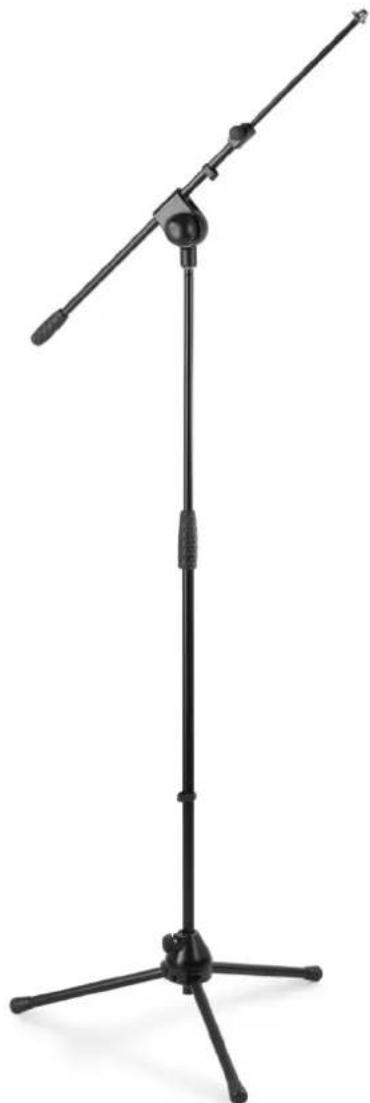
MS20 Microphone Stand HQ 2 section
Ref. nr.: 180.025
natural_image
Black desktop microphone stand with tripod base, no visible text or symbolsINSTRUCTION MANUAL
INSTRUCTIONS
natural_image
Close-up of a black mechanical component with a red circular arrow indicating rotation (no text or symbols)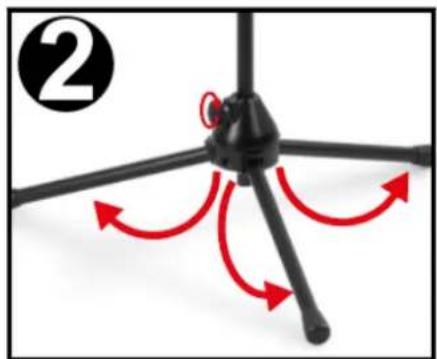
natural_image
Diagram of a tripod-mounted device with red directional arrows indicating rotation or movement (no text or symbols)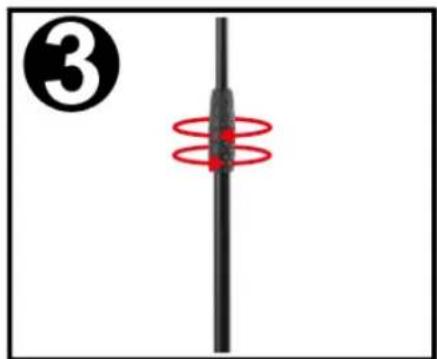
natural_image
Pure diagram of a vertical rod with red circular motion lines, no text or symbols present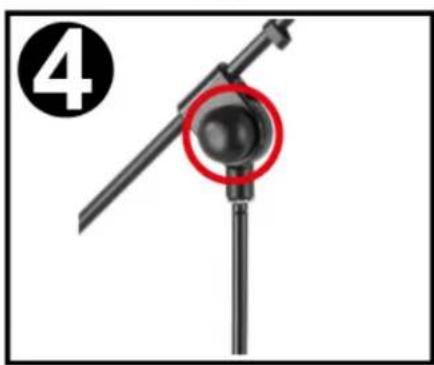
natural_image
Close-up of a mechanical component with a red circle highlighting a circular feature, labeled with number 4 (no text or symbols on the object itself)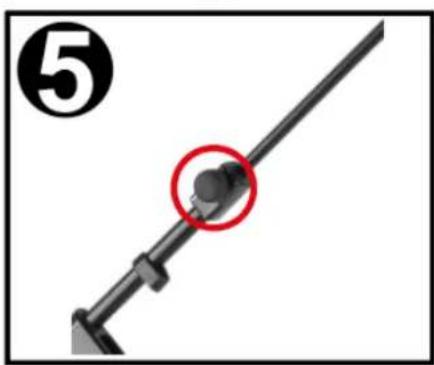
natural_image
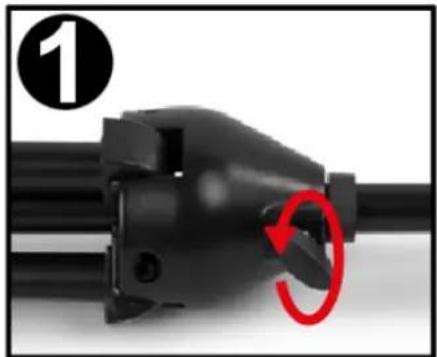
Mechanical lever with a red circle highlighting a specific component (no text or symbols present)- Upon receiving the stand, it will be presented in its most compact form. Turn the knob (as shown in above instructive graphic) in counter-clockwise direction to loosen its grip on the main tube allowing it to slide out, increasing the length of the stand. Turn the knob clockwise to tighten.
- Fold out the legs until they are fully extended. No tightening of knobs or screws is necessary.
- Turn the centre clutch counter-clockwise allowing you to extend the length of the stand. Turn clockwise to tighten.
- Adjust the angle between main- and top tube by using designated knob. Again: turn counter-clockwise to loosen its grip, turn clockwise to tighten again.
- Adjust the length of the top tube by loosening designated knob (counter-clockwise rotation). Once adjusted, rotate the knob clockwise to tighten.
TECHNICAL SPECIFICATION
Material: Metal
Dimensions boom: 90cm
Dimensions folded: 990 x 90 x 85mm
Dimensions min height: 95cm
Dimensions max height: 165cm
Weight (kg): 1.90kg
The specifications are typical. The actual values can slightly change from one unit to the other. Specifications can be changed without prior notice.
Specifications and design are subject to change without prior notice..
www.tronios.com
Copyright © 2019 by TRONIOS the Netherlands