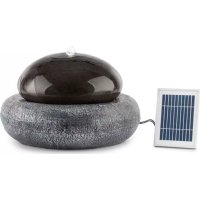
Ocean Planet - Solar fountain Blumfeldt - Free user manual and instructions
Find the device manual for free Ocean Planet Blumfeldt in PDF.




User questions about Ocean Planet Blumfeldt
0 question about this device. Answer the ones you know or ask your own.
Ask a new question about this device
Download the instructions for your Solar fountain in PDF format for free! Find your manual Ocean Planet - Blumfeldt and take your electronic device back in hand. On this page are published all the documents necessary for the use of your device. Ocean Planet by Blumfeldt.
USER MANUAL Ocean Planet Blumfeldt
natural_image
Abstract green circular logo with three curved segments (no text or symbols)
natural_image
Abstract green circular logo with two leaf-like shapes (no text or symbols)
natural_image
Abstract green circular logo with three leaf-like shapes forming a Y-shape (no text or symbols)text_image
QR code image containing encoded data, no visible human-readable textINHALTSVERZEICHNIS
Chal-Tec UK limited Unit 6 Riverside Business Centre Brighton Road Shoreham-by-Sea BN43 6RE United Kingdom
natural_image
Symbol of a trash bin crossed with a diagonal line, no text or numbers presentCongratulations on purchasing this equipment. Please read this manual carefully and take care of the following hints to avoid damages. Any failure caused by ignoring the items and cautions mentioned in the instruction manual is not covered by our warranty and any liability. Scan the QR code to get access to the latest user manual and other information about the product

text_image
QR code image containing encoded data, no visible human-readable textCONTENT
Notes about the Product 10
Assembly 10
Operation 11
Cleaning and Care 13
Troubleshooting 13
Storage 14
Hints on Disposal 14
TECHNICAL DATA
| Item number 10033275 | |
| Power supply (Battery) 6 V DC | |
| Power consumption 2 W | |
| Max. Water flow 200 Liter/Hour |
MANUFACTURER & IMPORTER (UK)
Manufacturer:
Chal-Tec GmbH, Wallstrasse 16, 10179 Berlin, Germany.
Importer for Great Britain:
Chal-Tec UK limited
Unit 6 Riverside Business Centre
Brighton Road
Shoreham-by-Sea
BN43 6RE
United Kingdom
NOTES ABOUT THE PRODUCT
- The solar pump is designed for fountain, pond or outdoor use. In order for the solar pump to operate, the solar panel needs to be in direct sunlight.
- This solar pump is equipped with battery pack and can be switched on and off by a touch switch on the control housing. In evening, four built-in white LEDs will give light automatically to enhance the beauty scene of the water jet.
ASSEMBLY
1 Unpack all components carefully;
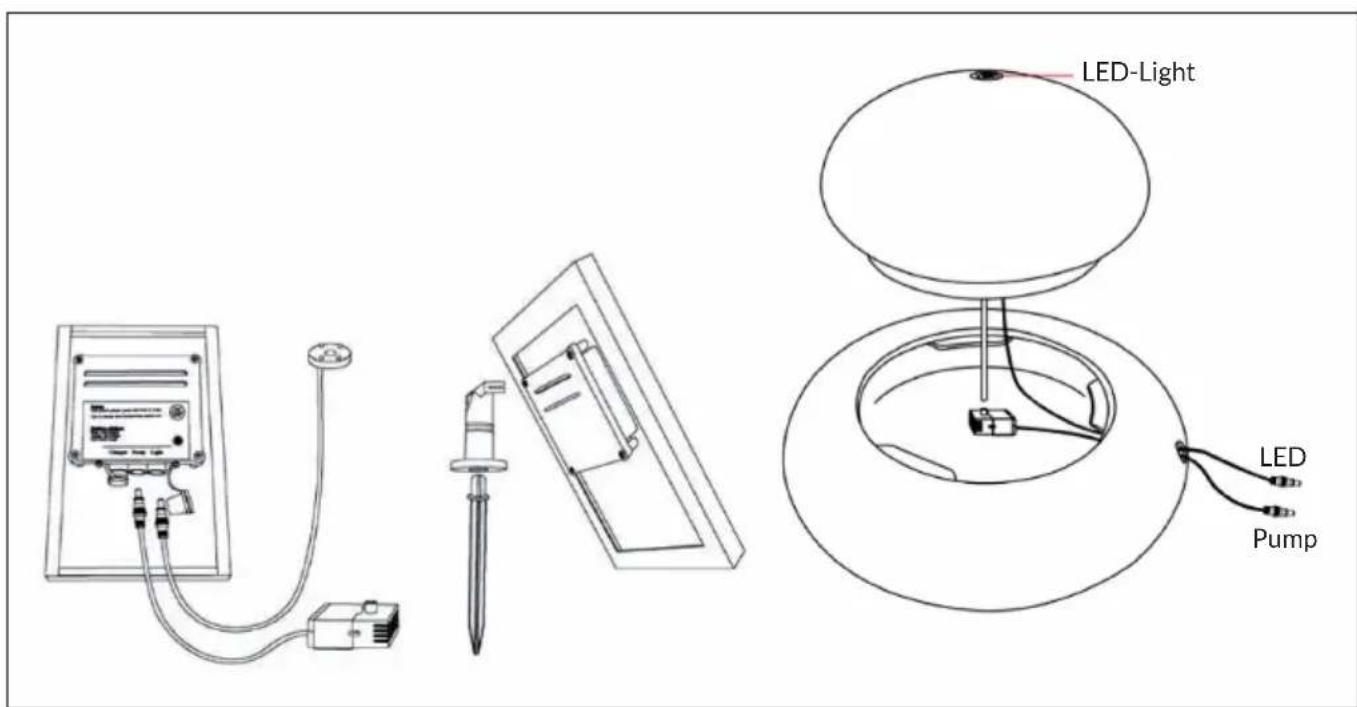
2 Connect the hose from the top jug to the vent of the pump and place the pump underwater and make sure that, it is fully immersed in water;
3 Connect the pump cable to the socket of the control housing on the rear side of the solar panel:
4 Connect the LED light cable to the socket of the control housing;
5 Make sure direct sunlight shines on the solar module when selecting the right place for the solar module. By this way the built-in battery will be charged.
6 The solar fountain is now ready to use.
text_image
LED-Light LED PumpImportant Hints
- Do not strike the solar panel
- Do not let the pump run dry for long time
- Do not lift the pump by the power cord
- Operate in freshwater only
OPERATION
This solar pump is designed primarily to operate in sunlight hours and always charge extra energy to battery to allow use later “on demand” in cloudy day or night time. The pump will turn to solar mode automatically on next day in sunlight hours. The pump will never run on battery mode until your press the button.
Turn on the pump:
Short press to turn on the pump, the pump will run certain hours (ref to battery status) and turn to solar mode. The pump will operate automatically next day insunlight hours.
Quick charge full energy to the battery:
Press and hold on 3 seconds to Turn OFF the pump in sunlight hours and charge the full solar energy to battery to allow use later of “on demand”.
Battery status:
- Green: battery is full charged. Pump will run around 6-8 hours.
- Orange: battery is half charged. Pump will run around 2-6 hours.
- Red: battery needs charges. Pump will run less than 1 hour.
Note: In order to protect battery, don't manually turn on the pump frequently. The indicator light is solid when charging battery.
Pump performance in different weather condition:
| Weather | Pump on. Charge extra solar energy to battery. | Pump off. Charge full solar energy to battery. |
 | Solar runs the pump and charges the battery. Pump performance is maintained when the clouds pass. Pump runs on fully half an hour longer into the evening. | Battery should be fully charged in 1day. |
 | Solar runs the pump and supplies extra energy to the battery. Performance is maintained when the clouds pass. Pump will only run a shorter period of time into the evening. | Battery will take 2 to 3 days to fully charge. |
 | Pump will only run when there is sufficient power from the battery. Little or no battery charging occurs so pump performance is not maintained. | Battery will take several days to fully charge. |
 | No solar power is available, pump will not run and battery will not charge. | Battery will not charge. |
Note: If the pump stop running when cloudy or night, and you want to force the pump running for certain hours, short press to turn on the pump, the pump will run certain hours until battery flat. LED lights will only function at night.
CLEANING AND CARE
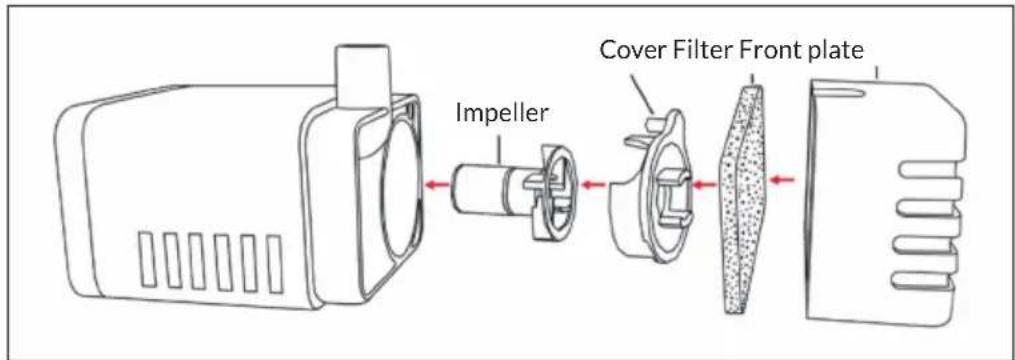
Pump: If, after a period of time, the pump starts to lose power or stops working check for the build up of sediment, scale or dirt in the filter. Remove the pump cover and the impeller cover. Clean them and the filter by fresh water.
Solar panel: The panel should be cleaned periodically with a soft tissue.
Regular cleaning of the panel is advised to maintain optimum conversion of the sun's energy into direct current.
text_image
Impeller Cover Filter Front plateTROUBLESHOOTING
Pump does not operate even thought the solar module is in full sunlight.
- No connection to the solar module – check connection to the solar module.
- Impeller is blocked – To clean the pump, remove the front plate and the impeller. Use a small brush or steam of water to remove any debris.
Pump does operate but there is no water running through the fountainhead.
- Check for the build up of sediment or scale in the tubes or the filter-clean the tubes and the filter.
STORAGE
- Please charge the battery for at least a day in direct sunlight when the first time using the solar pump or when you store the solar pump for a winter.
- In order to keep the battery long life, please charge the solar pump to fully charge status and plug-out the pump from the solar panel before you store the solar pump into warehouse.
HINTS ON DISPOSAL

natural_image
Symbol of a trash bin crossed with a diagonal line, no text or numbers presentIf there is a legal regulation for the disposal of electrical and electronic devices in your country, this symbol on the product or on the packaging indicates that this product must not be disposed of with household waste. Instead, it must be taken to a collection point for the recycling of electrical and electronic equipment. By disposing of it in accordance with the rules, you are protecting the environment and the health of your fellow human beings from negative consequences. For information about the recycling and disposal of this product, please contact your local authority or your household waste disposal service.
This product contains batteries. If there is a legal regulation for the disposal of batteries in your country, the batteries must not be disposed of with household waste. Find out about local regulations for disposing of batteries. By disposing of them in accordance with the rules, you are protecting the environment and the health of your fellow human beings from negative consequences.
Estimado cliente:
text_image
QR code image containing encoded data, no visible human-readable textÍNDICE DE CONTENIDOS
Unit 6 Riverside Business Centre
Brighton Road
Shoreham-by-Sea
BN43 6RE
United Kingdom
NOTAS SOBRE EL PRODUCTO
text_image
luz LED LED PompaNotas importantes
natural_image
Symbol of a trash bin crossed with a diagonal line, no text or numbers presenttext_image
QR code image containing encoded data, no visible human-readable textSOMMAIRE
DÉCLARATION DE CONFORMITÉ
Fabricant :
text_image
lampe LED LED PompeRemarques importantes
natural_image
Symbol of a trash bin crossed with a diagonal line, no text or numbers presenttext_image
QR code image containing encoded data, no visible human-readable textINDICE
Unit 6 Riverside Business Centre
Brighton Road
Shoreham-by-Sea
BN43 6RE
United Kingdom