USER MANUAL Bluetooth Mouse CD23 HUAWEI
Contents
English....1
English (United Kingdom)......6
Français....10
Deutsch....15
Italiano....19
Español....24
Português....28
Polski....32
Svenska....38
Norsk 42
Dansk......46
Suomi....50
Türkçe....54
Русский 62
Українська....71
*The indicator will blink red to indicate that the battery level is low and the battery needs to be changed.
Inserting a battery
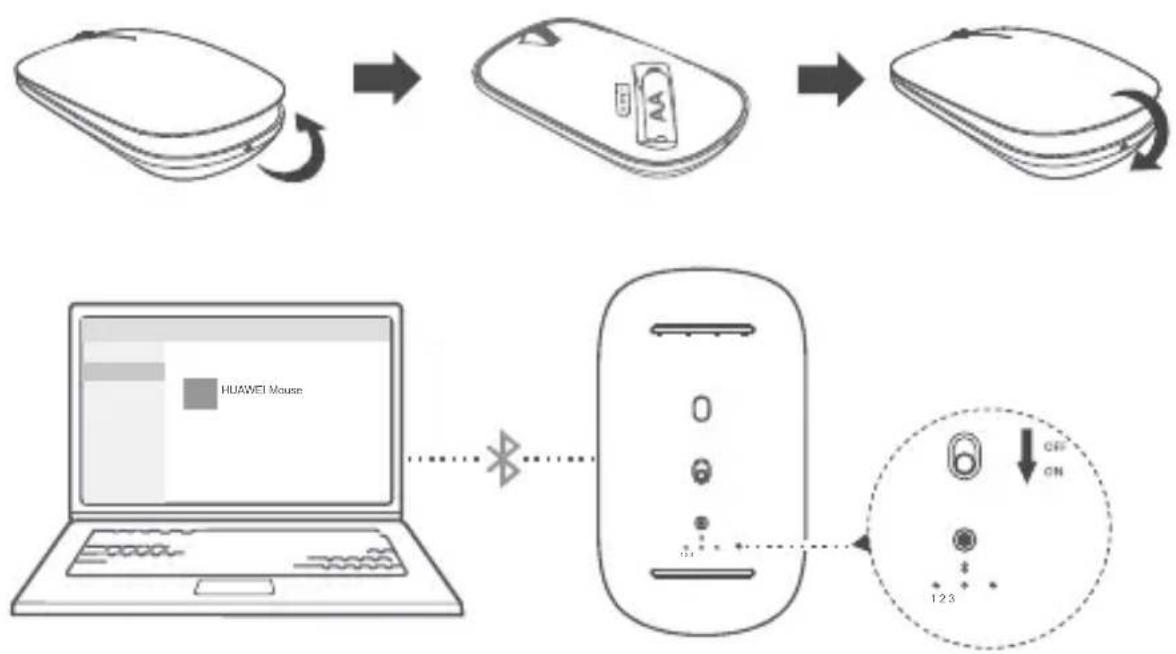
Open the upper shell along the mark on the back of the mouse, insert an AA battery into the battery compartment, and close the upper shell.
Pairing
You need to pair the mouse with Bluetooth devices before using it. A maximum of three Bluetooth devices can be connected.
1 Flip down the Power switch at the bottom of the mouse to power it on.
2 Press and hold the Multi-device switch button for 3 seconds. A Multi-device indicator will then blink quickly and the mouse will be ready for pairing. (When you pair the mouse for the first time, you do not need to press and hold the Multi-device
switch button. After the mouse is powered on, a Multi-device indicator will blink quickly and the mouse will automatically be ready for pairing.)
3 Start pairing on a Bluetooth device, select the name of the mouse, and follow the onscreen instructions to finish pairing.
4 Press the Multi-device switch button for the corresponding Multi-device indicator to turn on. Then press and hold the Multi-device switch button for 3 seconds and perform the preceding steps to pair with other Bluetooth devices.
The mouse only supports devices running Windows 10, Windows 8.1, macOS 10.10, iOS 13.1, HarmonyOS 2, Android 5.0 or later, or Linux.
Using
Press the Multi-device switch button to switch between multiple Bluetooth devices.
- Please consult your doctor and the device manufacturer to determine if using your device may interfere with the operation of your medical device.
- Avoid using the device in a dusty, damp, or dirty place, or near a magnetic field.
- Ideal temperatures: 0^ to 35^ for operating, -10^ to +45^ for storage.
- The device has its nameplate in the battery compartment. To see the nameplate, open the upper cover of the device and remove the battery.
- Keep the battery away from fire, excessive heat, and direct sunlight. Do not place it on or in heating devices. Do not disassemble, modify, throw, or squeeze it. Do not insert foreign objects into it, submerge it in liquids, or expose it to external force or pressure, as this may cause it to leak, overheat, catch fire, or even explode.
- Keep this device and its accessories that may contain small components out of the reach of children. Otherwise, children may damage this device and its accessories by mistake, or swallow the small components, which may cause choking.
The symbol on the product, battery, literature, or packaging means that the products and batteries should be taken to separate waste collection points designated by local authorities at the end of the lifespan. This will ensure that EEE waste is recycled and treated in a manner that conserves valuable materials and protects human health and the environment. For more information, please contact your local authorities, retailer, or household waste disposal service or visit the website https://consumer.huawei.com/en/.
Reduction of hazardous substances
This device and its electrical accessories comply with local applicable rules on the restriction of the use of certain hazardous substances in electrical and electronic equipment, such as EU REACH regulation, RoHS and Batteries (where included) directive. For declarations of conformity about REACH and RoHS, please visit the website https://consumer.huawei.com/certification.
Your device is a low-power radio transmitter and receiver. As recommended by international guidelines, the device is designed to comply with the limits established by the market that the device will be placed on.
Hereby, Huawei Device Co., Ltd. declares that this device CD23 is in compliance with the following Directive: RED 2014/53/EU, RoHS 2011/65/EU. The full text of the EU declaration of conformity, and most recent information about accessories & software are available at the following internet address: https://consumer.huawei.com/certification.
Frequency Bands and Power
Bluetooth 2.4GHz: 13dBm
This symbol on the device or on its packaging indicates that the device (including its electrical accessories) should not be disposed of as normal household garbage.
Do not dispose this product with Regular Household, Dry and Wet Waste. If you wish to discard this product, please contact on the details below and follow the correct method of disposal as guided:
E-mail: service.hw.in@huawei.com, Service hotline: 1800-209-6555 (Toll-Free) 9AM-9PM all 7 days, except public holidays.
For further information, log on to:
Huawei E-waste Policy: https://consumer.huawei.com/in/support/e-waste-process-policy/.
Official Recycling Partner: Reteck Envirotech Private Limited.
Plot-4A, Sanghi Udyog, Near Navade Railway Station, Tal-Panvel, Dist. - Raigad, Taloja MIDC-410208.
info@reteck.in
www.reteck.in / www.reteck.co
Reduction of hazardous substances(India)
This device is compliant with the E-Waste (Management) Rules, 2016 and does not contain hazardous substances regulated by the Rules except for the applications of exemption.
ISED Canada Compliance
ISED Statement
This device complies with CAN ICES-3 (B)/NMB-3(B).
This device complies with the Innovation, Science and Economic Development Canada (ISED) license-exempt RSS standard(s). Operation is subject to the following two conditions: (1) this device may not cause interference, and (2) this device must accept any interference, including interference that may cause undesired operation of the device.
Radiation Exposure Statement
This device complies with the Canada portable RF exposure limit set forth for an uncontrolled environment and are safe for intended operation as described in this manual. The further RF exposure reduction can be achieved if the product can be kept as far as possible from the user body or set the device to lower output power if such function is available.
Copyright © Huawei 2021. All rights reserved.
The Bluetooth ^® word mark and logos are registered trademarks owned by Bluetooth SIG, Inc. and any use of such marks by Huawei Technologies Co., Ltd. is under license. Huawei Device Co., Ltd. is an affiliate of Huawei Technologies Co., Ltd. Other trademarks, product, service and company names mentioned may be the property of their respective owners.
Privacy Policy
To better understand how we protect your personal information, please see the privacy policy at
https://consumer.huawei.com/privacy-policy.
ALL PICTURES AND ILLUSTRATIONS IN THIS GUIDE, INCLUDING BUT NOT LIMITED TO THE DEVICE COLOR, SIZE, AND DISPLAY CONTENT, ARE FOR YOUR REFERENCE ONLY. THE ACTUAL DEVICE MAY VARY. NOTHING IN THIS GUIDE CONSTITUTES A WARRANTY OF ANY KIND, EXPRESS OR IMPLIED.
English (United Kingdom)
Introduction
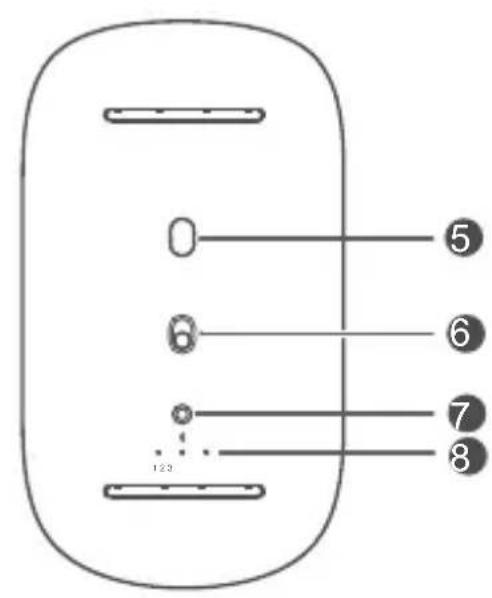
| 1 | Left button | 2 | Scroll wheel + Middle button |
| 3 | Right button | 4 | LED indicator* |
| 5 | Sensor | 6 | Power button |
| 7 | Multi-device switch button | 8 | Multi-device indicators |
*The indicator will blink red to indicate that the battery level is low and the battery needs to be changed.
Inserting a battery
Open the upper shell along the mark on the back of the mouse, insert an AA battery into the battery compartment, and close the upper shell.
Pairing
You need to pair the mouse with Bluetooth devices before using it. A maximum of three Bluetooth devices can be connected.
1 Flip down the Power switch at the bottom of the mouse to power it on.
2 Press and hold the Multi-device switch button for 3 seconds. A Multi-device indicator will then blink quickly and the mouse will be ready for pairing. (When you pair the mouse for the first time, you do not need to press and hold the Multi-device switch button. After the mouse is powered on, a Multi-device indicator will blink quickly and the mouse will automatically be ready for pairing.)
3 Start pairing on a Bluetooth device, select the name of the mouse, and follow the onscreen instructions to finish pairing.
4 Press the Multi-device switch button for the corresponding Multi-device indicator to turn on. Then press and hold the Multi-device switch button for 3 seconds and perform the preceding steps to pair with other Bluetooth devices.
The mouse only supports devices running Windows 10, Windows 8.1, macOS 10.10, iOS 13.1, HarmonyOS 2, Android 5.0 or later, or Linux.
Using
Press the Multi-device switch button to switch between multiple Bluetooth devices.
- Please consult your doctor and the device manufacturer to determine if using your device may interfere with the operation of your medical device.
- Avoid using the device in a dusty, damp, or dirty place, or near a magnetic field.
- Ideal temperatures: 0^ to 35^ for operating, -10^ to +45^ for storage.
- The device has its nameplate in the battery compartment. To see the nameplate, open the upper cover of the device and remove the battery.
- Keep the battery away from fire, excessive heat, and direct sunlight. Do not place it on or in heating devices. Do not disassemble, modify, throw, or squeeze it. Do not insert foreign objects into it, submerge it in liquids, or expose it to external force or pressure, as this may cause it to leak, overheat, catch fire, or even explode.
- Keep this device and its accessories that may contain small components out of the reach of children. Otherwise, children may damage this device and its accessories by mistake, or swallow small components, which may cause choking.

The symbol on the product, battery, literature, or packaging means that the products and batteries should be taken to separate waste collection points designated by local authorities at the end of the lifespan. This will ensure that EEE waste is recycled and treated in a manner that conserves valuable materials and protects human health and the environment. For
more information, please contact your local authorities, retailer, or household waste disposal service or visit the website https://consumer.huawei.com/en/.
Reduction of hazardous substances
This device and its electrical accessories comply with local applicable rules on the restriction of the use of certain hazardous substances in electrical and electronic equipment, such as EU REACH regulation, RoHS and Batteries (where included) directive. For declarations of conformity about REACH and RoHS, please visit the website https://consumer.huawei.com/certification.
Your device is a low-power radio transmitter and receiver. As recommended by international guidelines, the device is designed to comply with the limits established by the market that the device will be placed on.
Hereby, Huawei Device Co., Ltd. declares that this device CD23 is in compliance with the following Directive: RED 2014/53/EU, RoHS 2011/65/EU. The full text of the EU declaration of conformity, and most recent information about accessories & software are available at the following internet address: https://consumer.huawei.com/certification.
Frequency Bands and Power
Bluetooth 2.4GHz: 13dBm
Hereby, Huawei Device Co., Ltd. declares that this radio equipment is in compliance with the relevant statutory requirements in the UK. The full text of the declaration of conformity is available at the following internet address: https://consumer.huawei.com/certification.
Copyright © Huawei 2021. All rights reserved.
The Bluetooth ^® word mark and logos are registered trademarks owned by Bluetooth SIG, Inc. and any use of such marks by Huawei Technologies Co., Ltd. is under license. Huawei Device Co., Ltd. is an affiliate of Huawei Technologies Co., Ltd. Other trademarks, products, services and company names mentioned herein may be the property of their respective owners.
Privacy Policy
To better understand how we protect your personal information, please see the privacy policy at https://consumer.huawei.com/privacy-policy.
ALL PICTURES AND ILLUSTRATIONS IN THIS GUIDE, INCLUDING BUT NOT LIMITED TO THE DEVICE COLOUR, SIZE, AND DISPLAY CONTENT, ARE FOR YOUR REFERENCE ONLY. THE ACTUAL DEVICE MAY VARY. NOTHING IN THIS GUIDE CONSTITUTES A WARRANTY OF ANY KIND, EXPRESS OR IMPLIED.
Français
Présentation
https://consumer.huawei.com/certification.
https://consumer.huawei.com/tr/support/warranty-policy/
https://consumer.huawei.com/tr/legal/privacy-policy/
No.2 of Xincheng Road, Songshan Lake Zone, Dongguan, Guangdong 523808, People's Republic of China
Tel:0086-755-28780808
Web: www.huawei.com
E-mail: mobile.tr@huawei.com
https://consumer.huawei.com/tr/
mobile.tr@huawei.com

Yetkili Servisler:
https://consumer.huawei.com/certification.
https://consumer.huawei.com/certification.

https://consumer.huawei.com/certification
https://consumer.huawei.com/certification
ย่านความถี่และกำลัง
Bluetooth 2.4GHz: 13dBm
Your device is a low-power radio transmitter and receiver. As recommended by international guidelines, the device is designed to comply with the limits established by the market that the device will be placed on.
Copyright © Huawei 2021. All rights reserved.
Your device is a low-power radio transmitter and receiver. As recommended by international guidelines, the device is designed to comply with the limits established by the market that the device will be placed on.
EU 규정 준수
Copyright © Huawei 2021. All rights reserved.