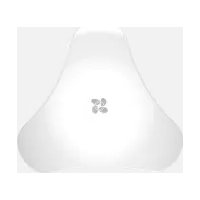
T10 - Door/window sensor EZVIZ - Free user manual and instructions
Find the device manual for free T10 EZVIZ in PDF.



User questions about T10 EZVIZ
0 question about this device. Answer the ones you know or ask your own.
Ask a new question about this device
Download the instructions for your Door/window sensor in PDF format for free! Find your manual T10 - EZVIZ and take your electronic device back in hand. On this page are published all the documents necessary for the use of your device. T10 by EZVIZ.
USER MANUAL T10 EZVIZ
natural_image
Colorful abstract logo with four overlapping petal shapes in blue, green, magenta, and orange (no text or symbols)ezviz
T10
Quick Start Guide
COPYRIGHT ©2016 Hangzhou Hikvision Digital Technology Co., Ltd. or its subsidiaries. ALL RIGHTS RESERVED.
About this Manual
The Manual includes instructions for using and managing the product. Pictures, charts, images and all other information hereinafter are for description and explanation only. The information contained in the Manual is subject to change, without notice, due to firmware updates or other reasons.
Please find the latest version in the ™website (http://www.ezvizlife.com).
Any and all information, including, among others, wordings, pictures, graphs are the properties of Hangzhou Hikvision Digital Technology Co., Ltd. or its subsidiaries (hereinafter referred to be "Hikvision"). This user manual (hereinafter referred to be "the Manual") cannot be reproduced, changed, translated, or distributed, partially or wholly, by any means, without the prior written permission of Hikvision. Unless otherwise stipulated, Hikvision does not make any warranties, guarantees or representations, express or implied, regarding to the Manual.
Trademarks Acknowledgement
ezviz™, ™, and other Hikvision's trademarks and logos are the properties of Hikvision in various jurisdictions. Other trademarks and logos mentioned below are the properties of their respective owners.
Legal Disclaimer
TO THE MAXIMUM EXTENT PERMITTED BY APPLICABLE LAW, THE PRODUCT DESCRIBED, WITH ITS HARDWARE, SOFTWARE AND FIRMWARE, IS PROVIDED "AS IS", WITH ALL FAULTS AND ERRORS, AND HIKVISION MAKES NO WARRANTIES, EXPRESS OR IMPLIED, INCLUDING WITHOUT LIMITATION, MERCHANTABILITY, SATISFACTORY QUALITY, FITNESS FOR A PARTICULAR PURPOSE, AND NON-INFRINGEMENT OF THIRD PARTY. IN NO EVENT WILL HIKVISION, ITS DIRECTORS, OFFICERS, EMPLOYEES, OR AGENTS BE LIABLE TO YOU FOR ANY SPECIAL, CONSEQUENTIAL, INCIDENTAL, OR INDIRECT DAMAGES, INCLUDING, AMONG OTHERS, DAMAGES FOR LOSS OF BUSINESS PROFITS, BUSINESS INTERRUPTION, OR LOSS OF DATA OR DOCUMENTATION, IN CONNECTION WITH THE USE OF THIS PRODUCT, EVEN IF HIKVISION HAS BEEN ADVISED OF THE POSSIBILITY OF SUCH DAMAGES. TO THE MAXIMUM EXTENT PERMITTED BY APPLICABLE LAW, IN NO EVENT SHALL HIKVISION'S TOTAL LIABILITY FOR ALL DAMAGES EXCEED THE PURCHASE PRICE THE PRODUCT.
HIKVISION does not undertake any liability for personal injury or property damage, as the result of product interruption or service termination cause by: a) improper installation or usage other than as requested; b) the protection of national or public interests; c) Force Majeure; d) yourself or the third
party, including not limitation, using any third party's products, software, applications, and among others.
REGARDING TO THE PRODUCT WITH INTERNET ACCESS, THE USE OF PRODUCT SHALL BE WHOLLY AT YOUR OWN RISKS. HIKVISION SHALL NOT TAKE ANY RESPONSIBILITES FOR ABNORMAL OPERATION, PRIVACY LEAKAGE OR OTHER DAMAGES RESULTING FROM CYBER ATTACK, HACKER ATTACK, VIRUS INSPECTION, OR OTHER INTERNET SECURITY RISKS; HOWEVER, HIKVISION WILL PROVIDE TIMELY TECHNICAL SUPPORT IF REQUIRED.
SURVEILLANCE LAWS VARY BY JURISDICTION. PLEASE CHECK ALL RELEVANT LAWS IN YOUR JURISDICTION BEFORE USING THIS PRODUCT IN ORDER TO ENSURE THAT YOUR USE CONFORMS TO THE APPLICABLE LAW. YOU FUTHER AGREE THAT THIS PRODUCT IS ONLY FOR CIVIL USE, AND HIKVISION SHALL NOT BE LIABLE IN THE EVENT THAT THIS PRODUCT IS USED WITH ILLEGITIMATE PURPOSES, SUCH AS THIRD PARTY RIGHTS INFRINGEMENT, MEDICAL TREATMENT, SAFETY EQUIPMENT OR OTHER SITUATIONS WHERE THE PRODUCT FAILURE COULD LEAD TO DEATH OR PERSONAL INJURY, OR WEAPON OF MASS DESTRUCTION, CHEMINCAL AND BIOLOGICAL WEAPON, NUCLEAR EXPLOSION, AND ANY UNSAFE NUCLEAR ENERGY USES OR ANTI-HUMANITY USAGES. YOU SHOULD UNDERTAKE ALL RESPONSIBILITIES FOR LOSSES OR DAMAGES RESULTING FROM THE ABOVE USAGES WHATSOEVER.
IN THE EVENT OF ANY CONFLICTS BETWEEN THE ABOVE AND THE APPLICABLE LAW, THE LATER PREVAILS.
Safety Instruction
CAUTION: THE PRODUCT IS BUILT IN A REPLACEABLE BATTERY. RISK OF EXPLOSION IF BATTERY IS REPLACED BY AN INCORRECT TYPE. DISPOSE OF USED BATTERIES ACCORDING TO THE INSTRUCTIONS.
Due to the product shape and dimension, the name and address of the importer/manufacturer are printed on the package.
Regulatory Information

EU Conformity Statement
This product and - if applicable - the supplied accessories too are marked with "CE" and comply therefore with the applicable harmonized European standards listed under the Radio Equipment Directive 2014/53/EU, the EMC Directive 2014/30/EU, the RoHS Directive 2011/65/EU.
natural_image
Symbol of a trash bin with crossed lines indicating no waste or discharge (no text or labels)2012/19/EU (WEEE directive): Products marked with this symbol cannot be disposed of as unsorted municipal waste in the European Union. For proper recycling, return this product to your local supplier upon the purchase of equivalent new equipment, or dispose of it at designated collection points. For more information see: www.recyclethis.info.
natural_image
Simple line drawing of a trash bin with two crossed lines indicating no waste or prohibition (no text or symbols)2006/66/EC and its amendment 2013/56/EU (battery directive): This product contains a battery that cannot be disposed of as unsorted municipal waste in the European Union. See the product documentation for specific battery information. The battery is marked with this symbol, which may include lettering to indicate cadmium (Cd), lead (Pb), or mercury (Hg). For proper recycling, return the battery to your supplier or to a designated collection point. For more information see: www.recyclethis.info.
EC DECLARATION OF CONFORMITY
Hereby, Hangzhou Hikvision Digital Technology Co., Ltd. declares that the radio equipment type [CS-T10-A] is in compliance with Directive 2014/53/EU.
The full text of the EC DECLARATION OF CONFORMITY is available at the following web link: http://www.ezvizlife.com/declaration-of-conformity.
SAVE THIS MANUAL FOR FUTURE REFERENCE
Operations

T10 should be used cooperating with an Internet Alarm Hub (such as A1). And it is required to be purchased separately.
Step 1 Adding T10 to Internet Alarm Hub
• Option 1 (Recommended) Adding by EZVIZ App
1 Installing EZVIZ App
- Connect your mobile phone to Wi-Fi.
- Download and install the EZVIZ app by searching "EZVIZ" in App Store (iOS version) and Google Play™ (Android version).
- Launch the app and register for an EZVIZ user account.

OR

2 Adding T10
- Log in the EZVIZ app.
- Find your Internet Alarm Hub and enter the Linked Device list.
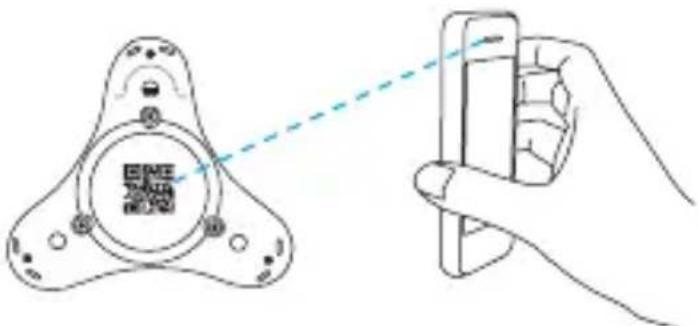
- Tap the “+” of the Linked Device and scan the QR code of T10, which is on the bottom of T10, to link T10 to the Internet Alarm Hub.
text_image
Diagram showing a hand holding a smartphone with a QR code inside a device, connected to a screen with a dashed line indicating scanning.i T10 has a built-in battery by default. You are not required to install a battery again.
• Option 2 Adding by Operating the Internet Alarm
1 Enable the "Adding Detectors Mode" of your Internet Alarm Hub. Refer to Quick Start Guide of your Internet Alarm Hub for details.
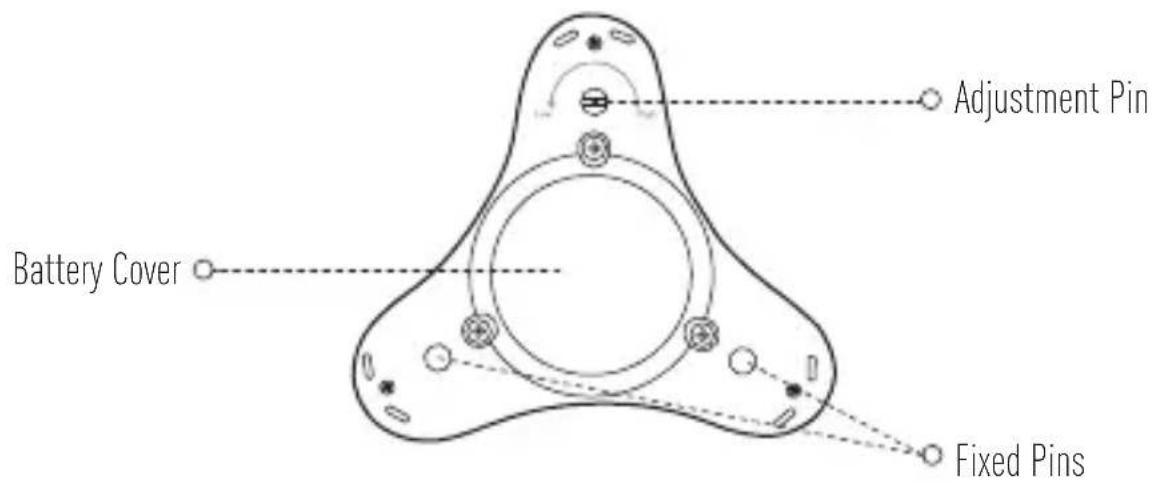
2 Take T10 close to the Internet Alarm Hub (within 50cm) and touch the Adjustment Pin and at least one Fixed Pin at the same time with your hands. T10 alarms indicating the adding signal has been sent.
text_image
e2v12 Internet Alarm Hub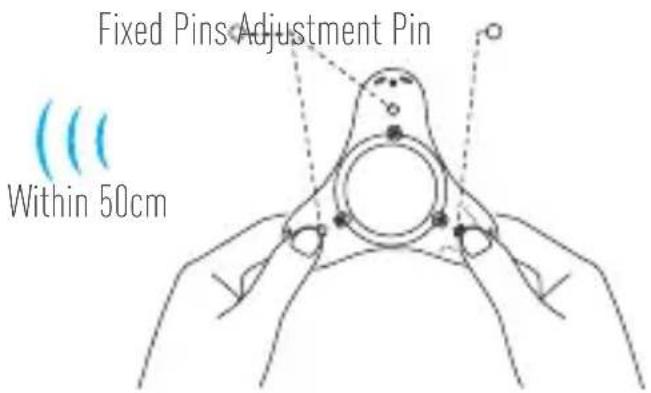
text_image
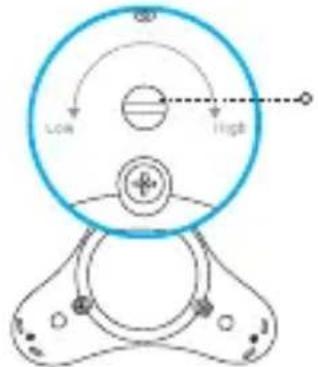
Fixed Pins Adjustment Pin Within 50cmi The Adjustment Pin looks different from other two Fix Pins, as shown below.
text_image
LOW HighAdjustment Pin
3 The Internet Alarm Hub issues a voice prompt of the device type and serial No. indicating T10 is added.
Step 2 Setting the Alarm Water Level
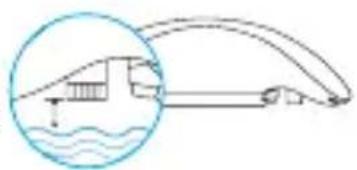
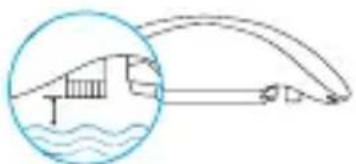
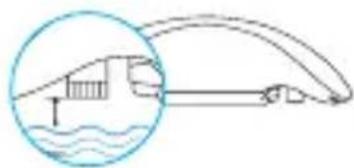
1 Set the height of the adjustment pin with your hand or a screw driver to set the alarm water level as desired.
The alarm water level is the height between the pin and the ground. When water reaches the level, an alarm will be triggered. The level ranges from 0.4 mm to 3.2 mm. The default level is 0.4 mm.
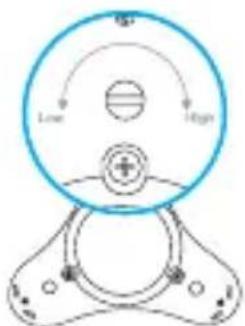
text_image
Low High0.4\~3.2mm
natural_image
Diagram showing a dam and river with an arc, no text or symbols present2 Choose a installation place, such as kitchen, balcony, or washroom.

- Place T10 at a place that with the water leak possibility.
• Do not place T10 at a place that is already immersed by water.
• Do not place T10 at a place that with busy passenger, in case it is kicked away. - Do not place T10 at a place that is in corrosive or high-intensity magnetic environment.
- You are recommended to use T10 at a place that is smaller than 200m2. If the place is too large, the communication between T10 and Internet Alarm Hub may be interrupted. You can purchase several Internet Alarm Hub if you want to use T10 at a larger place.
3 Test T10 after you choose a place: Place T10 in water to trigger alarm, then T10 beeps for 15 seconds, if the connected Internet Alarm Hub receives the alarm and issues an alarm voice prompt, the connection and installation is complete.
Appendix
Appearance
text_image
Battery Cover Adjustment Pin Fixed PinsWhen the water level immerses the adjustment pin and at least one of the fixed pins, T10 alarms and sends an alarm signal to the connected Internet Alarm Hub.
Function
Using the conductivity of water, T10 is able to detect the water leak and send alarm to the connected Internet Alarm Hub.
Changing Battery
The battery model is CR123A and it can work for up to 24 months.
When the battery runs out, T10 sends a low battery signal to the connected Internet Alarm Hub to remind you to change the battery.
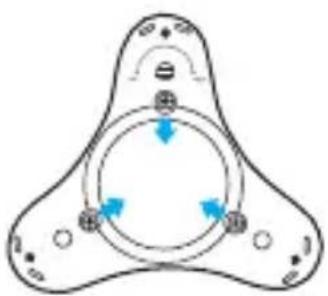
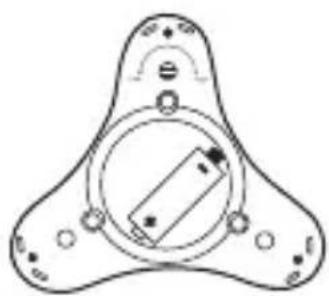
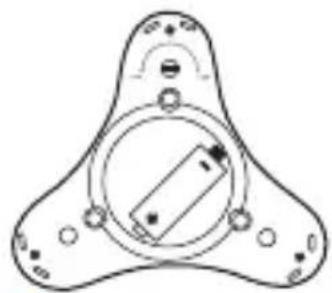
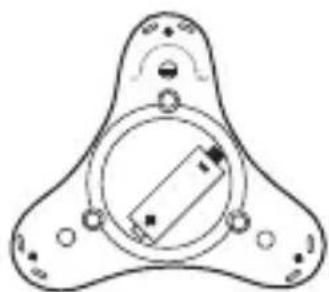
- Loosen the three lock screws on the bottom of T10 with a screw driver and take off the battery cover.
- Change the battery.
Do not oppositely place the positive and negative poles of the battery. - Replace the battery cover and tighten the three lock screws back in place.
natural_image
Pure diagram of a three-blade mechanical component with no text, numbers, or symbols1 Loosen the three lock screws.
natural_image
Pure technical diagram of a three-pronged mechanical component without any text, numbers, or symbols2 Change the battery.
Do not move the black waterproof rubber ring inside the battery cover.
Troubleshooting
Q: Unable to trigger the alarm signal when you try to add T10 to Internet Alarm Hub.
A: Touch the Adjustment Pin and at least one Fixed Pin of T10 at the same time with your wet hands or other conductive objects.
The distance between T10 and Internet Alarm Hub should be less than 50 cm.
Q: Unable to add T10 to Internet Alarm Hub by scanning its QR code.
A: When you use EZVIZ app to add T10 to Internet Alarm Hub, make sure your Internet Alarm Hub is working properly.
Q: In EZVIZ app, the detector is offline.
A: Take T10 close to Internet Alarm Hub (within 50 cm) and manually trigger the T10 alarm.
- If the connected Internet Alarm Hub alarms, the connection is normal. Please place T10 as close to Internet Alarm Hub as possible to make sure the connection not interrupted.
• If not, the battery has run out. Please change the battery.

For more information, please visit www.ezvizlife.com.
Betrieb

text_image
Diagram showing a QR code scanning into a smartphone screen, with a hand holding the device.natural_image
Diagram showing a dam or river with water flow and an arch bridge, no text or symbols presentnatural_image
Pure diagram of a three-blade mechanical component with no text, numbers, or symbolsnatural_image
Pure technical diagram of a mechanical component with no text or symbolstext_image
Diagram showing a QR code scanning into a device, with a hand holding the device's screen.natural_image
Simple line drawing of a dam or river with an arch bridge and water level indicator (no text or symbols)natural_image
Pure technical diagram of a mechanical component with no text or symbolstext_image
Diagram showing a QR code scanning into a smartphone, with a hand holding the device.
text_image
OUS. LOW HighBroche de réglage
natural_image
Diagram of a curved road with water below, showing a bridge and adjacent vehicle (no text or symbols)natural_image
Pure diagram of a three-blade mechanical component with no text, numbers, or symbolsnatural_image
Pure technical diagram of a mechanical component with no text or symbols2 Remplacez la batterie.
text_image
Diagram showing a hand holding a smartphone scanning a QR code on a device, with a dashed line indicating the scanning process.natural_image
Line drawing of a human shoulder joint with measurement markings (no text or symbols)natural_image
Simple line drawing of a boat on water with an inset circular detail showing the same scene (no text or symbols)natural_image
Pure diagram of a three-blade mechanical component with no text, numbers, or symbolsnatural_image
Pure technical diagram of a mechanical component with no text or symbolstext_image
Diagram showing a hand holding a smartphone scanning a QR code on a device, with a dashed line indicating the scanning process.natural_image
Simple line drawing of a car approaching toward water, with an inset showing a bridge structure (no text or symbols)natural_image
Pure diagram of a three-blade mechanical component with no text, numbers, or symbolsnatural_image
Pure technical diagram of a mechanical component with no text or symbols2 Substitua a bateria.
text_image
Diagram showing a hand holding a smartphone with a QR code inside a device, connected to a screen interface.RU
natural_image
Simple line drawing of a circular device with internal components and directional arrows (no text or symbols)0,4-3,2 mm
natural_image
Simple line drawing of a bridge over water with an arch, no text or symbols presentnatural_image
Pure diagram of a symmetrical mechanical or biological structure with no text, numbers, or symbolsnatural_image
Pure technical diagram of a mechanical component with no text or symbols2 Заменитебатарею.
text_image
Diagram showing a device with a sensor and a hand holding a handheld device, with Chinese text labels.i T10-l on vaikimisi integreeritud patarei. Patarei uuesti paigaldamine ei ole tarvilik.
• Valik 2 Lisamine Internet Alarmi kasutades
natural_image
Diagram showing a dam or bridge with water flow and an inset circular detail (no text or symbols)natural_image
Pure diagram of a symmetrical mechanical or electrical component with three circular arrows indicating direction (no text or symbols)1
natural_image
Pure technical diagram of a mechanical component with no text or symbols2 Vahetage patarei.Keerake kolm kinnituskruv
text_image
Diagram showing a QR code scanning through a smartphone to interact with a device, with a hand holding the device.natural_image
Diagram showing a curved road with water below and a car approaching (no text or symbols)natural_image
Pure diagram of a symmetrical mechanical or electrical component with no text, numbers, or symbolsnatural_image
Pure technical diagram of a mechanical component with no text, numbers, or symbols2 Nomainietbateriju.
natural_image
Line drawing showing a hand holding a smartphone with a QR code inside a device (no text or symbols)i T10pagalnumatytajaparinktijturimaitinimoelementą.Maitinimoelemento papildomai jdèti nereikia.
• 2 parinktis. Ítraukimas internetiniu pavjoaus signalu
natural_image
Diagram of a circular mechanical component with labeled parts (no text or symbols present)0,4–3,2 mm
natural_image
Simple line drawing of a dam and river with an arch bridge, no text or symbols present2 Pasirinkitejrengimovietą,pvz.,virtuve,balkonąarvonioskambarj.
i
• Padèkite T10 ten, kur gali nutekèti vandens.
natural_image
Diagram of a three-pointed triangular structure with internal circular elements and directional arrows (no text or symbols)1
natural_image
Pure technical diagram of a mechanical component with no text or symbols2 Pakeiskitemaitinimoelementą.Atlaisvinkitetrisl
| Battery Model CR123A | |
| Battery Voltage 3V | |
| Battery Life 24 Months | |
| Ingress Protection Rating IP 67 | |
| Communication Range Within 200m | 2 |
| Detection Target Water Leak | |
| Working Temperature -10°C to 55°C (14°F to 131°F) | |
| Working Humidity 0% to 100%RH | |
| Weight (With Battery) 97g | |
| Dimension (Diameter*Height) | 103.4mm*31.4mm ( 4.1"*1.2") |
LIMITED WARRANTY
Thank you for purchasing EZVIZ products. This limited warranty gives you, the original purchaser of the EZVIZ product, specific legal rights. You may also have other legal rights that vary by state, province or jurisdiction. The disclaimers, exclusions, and limitations of liability under this limited warranty will not apply to the extent prohibited by applicable law. No distributor, reseller, agent, or employee is authorized to make any medication, extension, or addition to this limited warranty.
Your EZVIZ product is warranted for a period of one (1) year from the date of purchase against defects in materials and workmanship, or such longer period as may be required by law in the country or state where this product is sold, when used normally in accordance with user manual.
You can request warranty service by emailing us at support@ezvizlife.com.
For any defective EZVIZ products under warranty, HANGZHOU HIKVISION DIGITAL TECHNOLOGY CO., LTD. ("the Company") will, at its option, (i) repair or replace your product free of charge; (ii) exchange your product with a functional equivalent product; (iii) or refund the original purchase price, provided you provide the original purchase receipt or copy, brief explanation of the defect, and return the product in its original packaging. At the sole discretion of the Company, repair or replacement may be made with a new or refurbished product or components. This warranty does not cover the postal cost, insurance and any other incidental charges incurred by you in returning the product.
Except where prohibited by applicable law, this is your sole and exclusive remedy for breach of this limited warranty. Any product that has either been repaired or replaced under this limited warranty will be covered by the terms of this limited warranty for the longer of ninety (90) days from the date of delivery or the remaining original warranty period.
This warranty does not apply and is void:
- If the warranty claim is made outside the warranty period or if the proof of purchase is not provided.
- For any malfunction, defect or failure caused by or resulting from the evidence of impact, mishandling .tampering, use contrary to the applicable instruction manual, incorrect power line voltage, accident, loss, theft, fire, flood or other Acts of God, shipping damage or damage resulting from repairs performed by unauthorized personnel.
- For any consumable parts, such as batteries, where the malfunction is due to the normal aging of the product.
- Cosmetic damage, including but not limited to scratches, dents and broken plastic on ports.
- Any software, even if packaged or sold with EZVIZ hardware.
- For any other damages free from defects in material or workmanship.
- Routine cleaning, normal cosmetic and mechanical wear and tear.
Please do not hesitate to contact your seller, or send e-mails to us support@ezvizlife.com, with any questions.
COPYRIGHT ©2016 HANGZHOU HIKVISION DIGITAL TECHNOLOGY CO., LTD. ALL RIGHTS RESERVED.