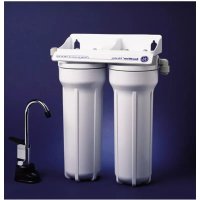
GXSV10C - Water filter GE - Free user manual and instructions
Find the device manual for free GXSV10C GE in PDF.


User questions about GXSV10C GE
0 question about this device. Answer the ones you know or ask your own.
Ask a new question about this device
Download the instructions for your Water filter in PDF format for free! Find your manual GXSV10C - GE and take your electronic device back in hand. On this page are published all the documents necessary for the use of your device. GXSV10C by GE.
USER MANUAL GXSV10C GE
Water Filtration System
Safety Information .....2
Operating Instructions ...3, 4
Specification Guidelines .....3
Using the System 4
Installation
Instructions 5–11
Battery Pack Installation .....8
Faucet Installation....7,8
Feed Water Supply 6
Filter Cartridge Installation
or Replacement....10, 11
Flush Procedure .....11
Important Recommendations .....5
Step-by-Step Instructions .....7–9
Tools/Materials Required .....5
Tubing Connections .....9
Wall Mounting 9
Troubleshooting Tips
Before You Call For Service .....12
Consumer Support
Consumer Support 16
Parts List/Catalog 13
Warranty 16
Owner's Manual and Installation Instructions
GXSL03C (rev. 2)
GXSV10C
NSF ^®
GXSL03C (rev. 2) is Tested and Certified by NSF International against ANSI/NSF Standard 42 for the reduction of Particulate Class I, Chlorine and Taste/Odor and Standard 53 for the reduction of Lead, Mercury, Cyst, Turbidity, Asbestos, Atrazine and Lindane.
GXSV10C is Tested and Certified by NSF International against ANSI/NSF Standard 42 for the reduction of Particulate Class I, Chlorine and Taste/Odor and Standard 53 for the reduction of Lead, Mercury, Cyst, Turbidity, Asbestos and VOC.
Write the model and serial numbers here:
Model # ____
Serial # ____
You can find them on the sump bracket.

natural_image
Abstract decorative swirl design with no text or symbols215C1044P009-3
7238769
49-50039-3 05-02 JR
▲ WARNING!
For your safety, the information in this manual must be followed to minimize the risk of property damage or personal injury.
SAFETY PRECAUTIONS
■Check with your local public works department for plumbing codes. You must follow these guidelines as you install the Water Filtration system.
■Use the Water Filtration system on a potable, safe-to-drink, home COLD water supply only. The filter cartridges will not purify the water, or make it safe to drink.
■ Do not use on a hot water supply (100°F max.).
WARNING:
Do not use with water that is unsafe or of unknown quality without on before or after the system. Systemsduction may be used on disinfectedain filterable cysts.
PROPER INSTALLATION
This Water Filtration system must be properly installed and located in accordance with the Installation Instructions before it is used.
■Install or store where it will not be exposed to temperatures below freezing or exposed to any type of weather. Water freezing in the system will damage it. Do not attempt to treat water over 100^ F.
■Your Water Filtration system will withstand up to 125 pounds per square inch (psi) water pressure. If your house water supply pressure is higher than 100 psi, install a pressure reducing valve before installing the Water Filtration system.
⚠ WARNING: Discard all unused and packaging material after installation. Small parts remaining after installation could be a choke hazard.
READ AND FOLLOW THIS SAFETY INFORMATION CAREFULLY.
SAVE THESE INSTRUCTIONS
Many bad tastes and/or odors are removed from water using activated carbon filter cartridges. They are most often used to remove a chlorine taste and odor. They can also reduce other undesirable elements from drinking water supplies, such as organic chemical contaminants and lead.
NOTE: Small amounts of hydrogen sulfide (noticeable as “rotten egg” odor) may be reduced by taste and odor filters for a short time, but the carbon media is quickly exhausted. Other water conditioning equipment is usually required for the continuous treatment of hydrogen sulfide.
The Water Filtration system uses two filter cartridges.
For Model GXSL03C (rev. 2)
FXSLC (rev. 2) Filter Set (600-Gallon Capacity)
Filter I - White with no end caps
Filter II - White with yellow end caps
- Reduces dirt, rust and sediment
- Reduces unpleasant tastes and odors
- Reduces Chlorine: Taste and Odor
- Reduces Lead
- Reduces Asbestos
- Reduces Mercury
- Reduces Atrazine
- Reduces filterable cysts (such as cryptosporidium and giardia)
- Reduces Lindane (a pesticide)
- 0.5–1 micron nominal particulate reduction
For Model GXSV10C
FXSVC (rev. 2) Filter Set (600-Gallon Capacity)
Filter I – White with green end caps
Filter II - Gray
- Reduces dirt, rust and sediment
- Reduces unpleasant tastes and odors
- Reduces Chlorine: Taste and Odor
- Reduces Lead
- Reduces Asbestos
- Reduces Mercury
- Reduces filterable cysts (such as cryptosporidium and giardia)
- Reduces Volatile Organic Chemicals (VOCs)
- 0.5–1 micron nominal particulate reduction
This system conforms to ANSI/NSF 42 and 53 for the specific performance claims as verified and sustained by test data.
Minimum - Maximum Supply Water Pressure - 40–125 pounds per square inch (psi)
Minimum - Maximum Supply Water Temperature - 40°-100°F
Inlet - Outlet - 3/8 " NPT, fittings and tubing included
Rated Service Flow - 0.6 gpm (GXSL03C [rev. 2]) 0.6 gpm (GXSV10C)
Depending on the treatment needed for a specific water supply, the water filtration system can be customized using any combination of the preceding filter cartridge sets.
Using the Water Filtration System and About the Filter Cartridge
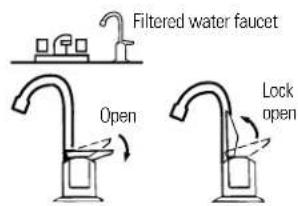
The countertop faucet dispenses filtered drinking water when opened. It has a hand-operated, spring-loaded closed lever to prevent waste. You can keep the faucet open by pushing upward on the lever to lock it against the faucet spout.
Filter Cartridge Life – Several variables determine how long the cartridges will last in your Water Filtration system. These include:
1 How much water you use.
2 How much sediment, taste and/or odor, lead or other unwanted substance is in the water.
No matter which Water Filtration system you have, you should replace the cartridges every six months, when indicated by the electronic indicator light on the base. In extremely poor water supplies, you may notice the return of the unwanted substance in your water before the six months are up. In this case the cartridges should be replaced immediately. If the system is also for lead or chemical contaminant removal, it is MORE IMPORTANT to replace the cartridges at least every six months.
NOTE: If the water supply contains high amounts of sediments, the carbon filters may plug prematurely, reducing filtered water flow to the system faucet. Cartridge replacement is needed to restore flow.
Electronic Indicator Light (GXSV10C only) – The electronic indicator light on the base of the faucet is a six-month timer that shows you when to replace the filter cartridges. When the battery pack is first installed, the indicator light will light briefly to show that the electronics are operating. If this does not happen, the batteries may be installed backwards or the lead wires are not connected.
After about six months, the indicator light begins to flash. It is time to replace the filter cartridges. When replacing the filter cartridges, also replace the batteries in the battery pack. Two AA batteries are required.
text_image
Filtered water faucet Open Lock open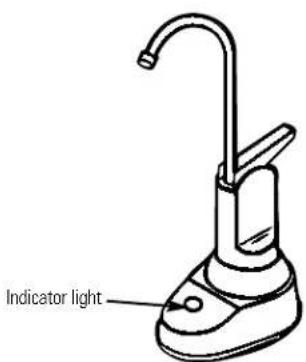
text_image
Indicator lightImportant Installation Recommendations
Read entire manual. Failure to follow all guides and rules could cause personal injury or property damage.
■Check with your local public works department for plumbing codes. You must follow their guides as you install the Water Filtration system.
Use the Water Filtration system on a potable, safe-to-drink, home COLD water supply only. The filter cartridges will not purify water or make unsafe water safe to drink. DO NOT use on HOT water (100°F max.).
■Protect the Water Filtration system and piping from freezing. Water freezing in the system will damage it.
■Your Water Filtration system will withstand up to 125 psi water pressure. If your house water supply pressure is higher than 100 psi during the day (it may reach higher levels at night), install a pressure-reducing valve before the system.
⚠ WARNING: Do not use with water that is microbiologically unsafe or of unknown quality without adequate disinfection before or after the system. GXSL03C (rev. 2) and GXSV10C are certified for cyst reduction and may be used on disinfected water that may contain filterable cysts. The water should be tested periodically to verify that the system is performing satisfactorily. Small parts remaining after the installation could be a choke hazard. Discard safely.
Tools and Materials Required for Installation
■Slotted and Phillips screwdrivers
■Pliers and adjustable jaw wrench
■ Hand- or battery-powered drill and 1/4" bit (saddle valve installation)
■ Electric drill and drill bit to drill 1"–1 1/4" hole (type as required) if mounting hole is needed for faucet
▲ CAUTION: To avoid damaging the sink, consult a qualified plumber or installer for drilling procedures. Special drill bits may be needed for porcelain or stainless steel.
Contents included with the product:
■Water filter assembly, including mounting bracket and screws
■Product Literature (Owner's Manual and Installation, Product Data Sheet, Owner Product Registration Card)
■Water supply/saddle valve
■Filtered water faucet for sink or countertop mounting
■Electronic indicator faucet base and battery pack (GXSV10C only)
■3 /8" tubing and fittings to make all needed connections
■Sump wrench
Installation Overview
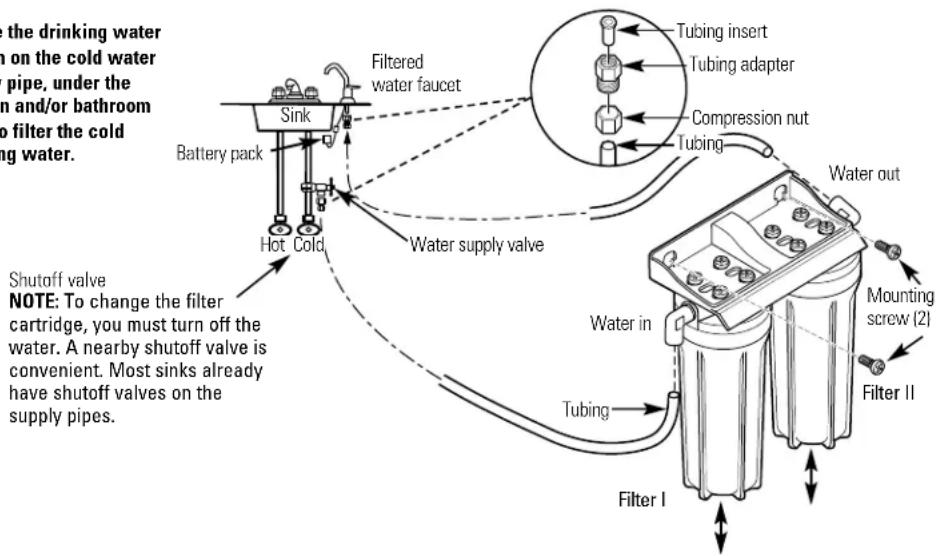
Locate the drinking water system on the cold water supply pipe, under the kitchen and/or bathroom sink, to filter the cold drinking water.
text_image
the drinking water on the cold water pipe, under the in and/or bathroom o filter the cold ing water. Battery pack Sink Hot Cold Filtered water faucet Water supply valve Tubing insert Tubing adapter Compression nut Tubing Water out Shutoff valve NOTE: To change the filter cartridge, you must turn off the water. A nearby shutoff valve is convenient. Most sinks already have shutoff valves on the supply pipes. Water in Tubing Filter I Mounting screw (2) Filter IIFeed Water Supply
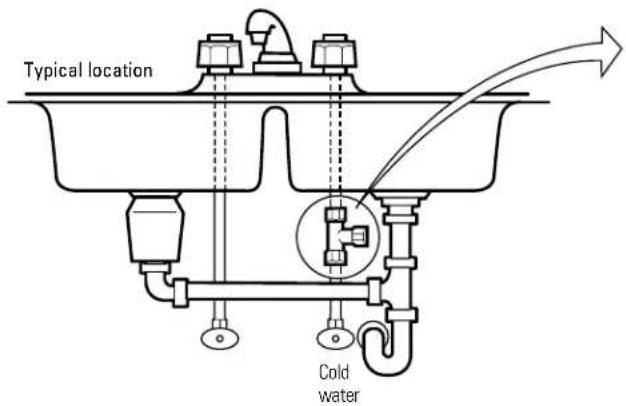
Check and comply with local plumbing codes as you plan; then install a cold feed water supply fitting. For new home installation using standard plumbing fittings, see first two illustrations below. A typical installation for existing homes using the saddle valve is shown in third illustration below.
A. PREFERRED INSTALLATION
Turn off the cold water supply.
2 Complying with plumbing codes, install a fitting on the cold water pipe to adapt 3/8 "OD tubing. A typical connection is shown in illustrations at right (parts not included). Make sure a water supply valve is used.
text_image
Typical location Cold waterB. OPTIONAL HOME INSTALLATION Where codes permit
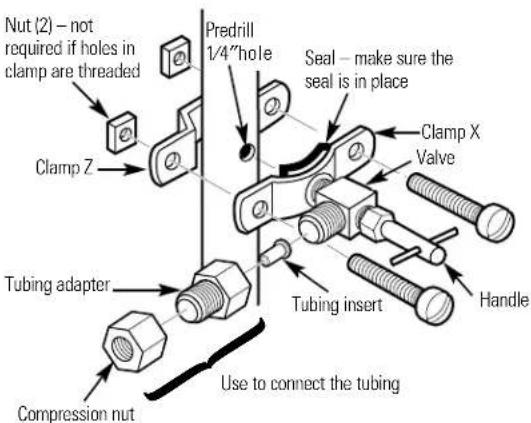
*For 1/2" OD or larger metal tubing only.
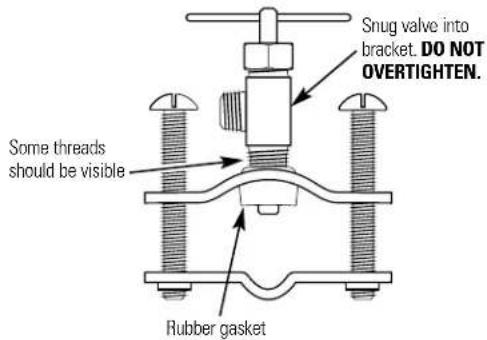
NOTE: Codes in the state of Massachusetts require installation by a licensed plumber and do not permit the use of the saddle valve. For installation, use plumbing code 248-CMR of the Commonwealth of Massachusetts.
1 Turn off the cold water supply and attach saddle valve as shown in illustration at right.
▲ DANGER: To protect yourself from serious injury or fatal shock, use a battery-powered hand drill only to make the hole. DO NOT USE AN ELECTRIC DRILL.
2 Close the water supply valve by turning the handle clockwise.
3 Open the main water supply valve and several house faucets to purge air from the system. Close faucets when water runs smoothly.
text_image
Snug valve into bracket. DO NOT OVERTIGHTEN. Some threads should be visible Rubber gasket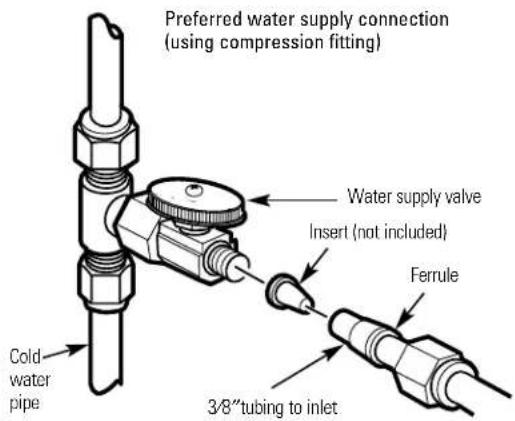
text_image
Preferred water supply connection (using compression fitting) Water supply valve Insert (not included) Ferrule Cold water pipe 3/8" tubing to inletOptional water supply connection (using saddle valve)*
*For 1/2" OD or larger metal tubing only.
text_image
Nut (2) - not required if holes in clamp are threaded Predrill 1/4"hole Seal - make sure the seal is in place Clamp Z Tubing adapter Compression nut Use to connect the tubing Tubing insert Handle Clamp X ValveFaucet Installation for Models GXST03C and GXSL03C (rev. 2)
Be sure there is room underneath the sink to make the needed connections. Select one of the following places to install the faucet:
—IN an existing sink spray attachment or soap dispenser hole.
—IN a hole to be drilled in the sink top.
—IN a hole to be drilled in the countertop, next to the sink.
NOTE: Looking at second illustration at right, be sure the faucet base will fit flat against the surface at the selected location so the gasket will seal.
If drilling is needed, make a 3/4" dia. hole. Be sure to use the proper procedure for drilling porcelain or stainless steel. Special drill bits may be needed.
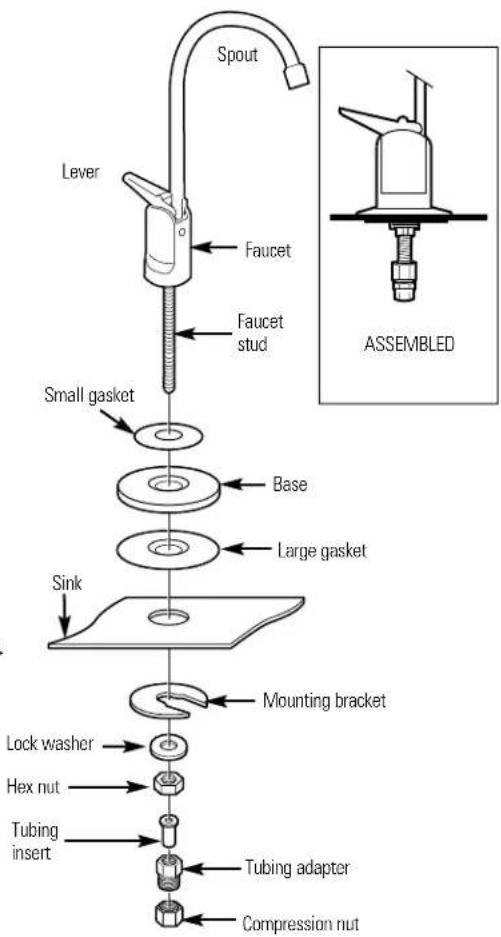
2 Place small gasket, base and large gasket (in that order) onto the faucet stem. Next, place lock washer and hex nut onto faucet stud.
3 Insert washer into tubing adapter. Securely tighten to faucet stud.
4 Feed the length of 3/8 "OD tube from the bottom up through the mounting hole. Connect to the tubing adapter as shown in second illustration, tightening the compression nut securely.
5 Remove the short shipping tube and insert the spout into the faucet body. Rotate spout into place.
6 Lower the faucet assembly into place on the underside of the mounting hole. Place the mounting bracket above the lock washer. While holding the mounting bracket in place, securely tighten the hex nut.
text_image
Spout Lever Faucet Faucet stud Small gasket Base Large gasket Sink Mounting bracket Lock washer Hex nut Tubing insert Tubing adapter Compression nut ASSEMBLED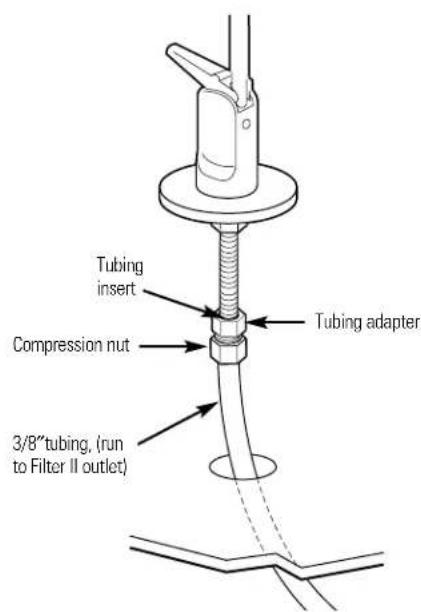
text_image
Tubing insert Compression nut 3/8"tubing, (run to Filter II outlet) Tubing adapterElectronic Faucet Installation for Model GXSV10C
Be sure there is room underneath the sink to make the needed connections. Select one of the following places to install the faucet:
—IN an existing sink spray attachment or soap dispenser hole.
—IN a hole to be drilled in the sink top.
—IN a hole to be drilled in the countertop, next to the sink.
NOTE: Looking at fourth illustration at right, be sure the faucet base will fit flat against the surface at the selected location so the gasket will seal. The base may have to be angled sideways or diagonally.
If drilling is needed, make a 1"-1 1/4" dia. hole. Be sure to use the proper procedure for drilling porcelain or stainless steel. Special drill bits may be needed.
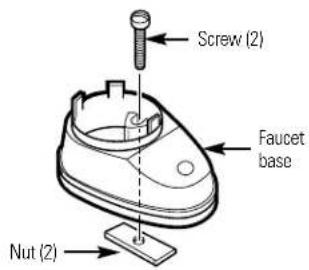
2 Looking at first illustration, insert a screw into the NON-SLOTTED base mounting hole. Turn a flat nut a few turns onto the screw.
3 Position the base gasket over the mounting hole. Set the base on the gasket, routing the leadwire through the mounting hole. Holding the flat nut under the sink with one finger, tighten the screw until just snug.
4 Turn the remaining flat nut a few turns onto the other screw. Position the screw in the slotted base mounting hole and tighten until snug. Make sure the gasket position is properly aligned and carefully tighten both screws until the base is held firmly in place. Do not overtighten and break the base.
5 Assemble the top faucet base and hex nut onto the faucet stud (third illustration). Tighten the nut until snug.
6 Insert tubing insert into tubing adapter. Securely tighten to faucet stud.
7 Feed the length of 3/8" OD tubing from the bottom up through the faucet base. Connect to the tubing adapter as shown in fourth illustration, tightening the compression nut securely.
8 Remove the short shipping tube and screw the spout into the faucet body.
9 Lower the faucet assembly and lock into place on the faucet base.
Battery Pack Installation and Connection
In a dry location, within reach of the electronic base 3' lead wire, select a place for the battery pack (see illustration on page 5). The battery pack attaches to most surfaces, using the included "sticky-back" Velcro ^™ strip.
2 The battery pack uses two size AA batteries. Check to be sure they are installed correctly. Then, remove the paper backing on the Velcro ^™ strip and secure the pack in place.
3 Fasten electronic base lead wire and battery pack connector together.
text_image
Screw (2) Faucet base Nut (2)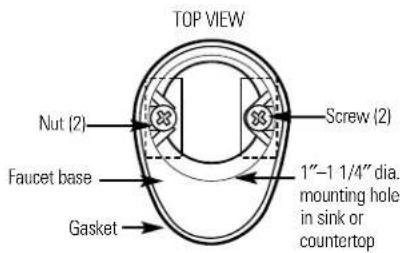
text_image
TOP VIEW Nut (2) Screw (2) Faucet base 1"-1 1/4" dia. mounting hole in sink or countertop Gasket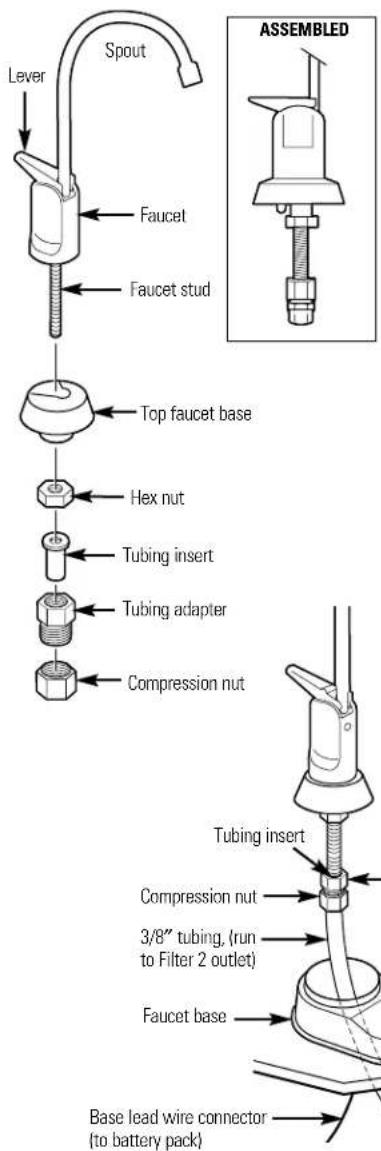
text_image
Spout Lever Faucet Faucet stud Top faucet base Hex nut Tubing insert Tubing adapter Compression nut Tubing insert Compression nut 3/8" tubing. (run to Filter 2 outlet) Faucet base Base lead wire connector (to battery pack) ASSEMBLEDMounting Bracket to Cabinet Wall
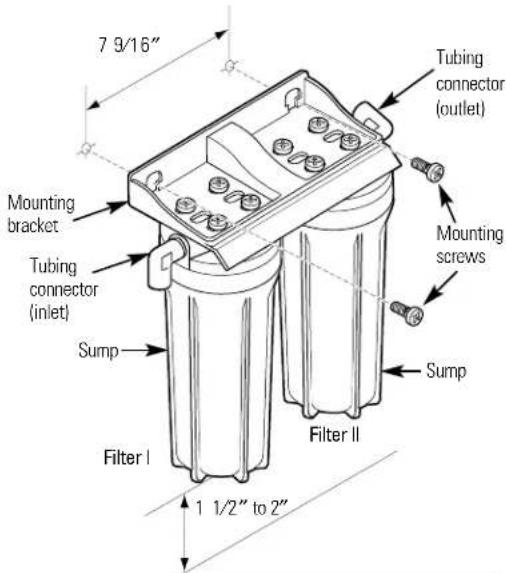
The bracket can be used as a template for marking the location of the mounting screws. When determining the location of the bracket, make sure you leave 1 1/2" to 2" of free area under the sumps to allow for sump removal and enough space on either side to make the tubing connections.
text_image
7 9/16" Mounting bracket Tubing connector (inlet) Sump Filter I 1 1/2" to 2" Filter II Tubing connector (outlet) Mounting screws SumpTubing Connections - Push-In Style (Models GXSL03C [rev. 2] and GXSV10C)
7 Run the length of the 3/8" tubing, connected to the bottom of the faucet, to the filter system outlet (illustration above). Allow enough slack in the tubing so that the unit can be easily removed.
2 Measure and cut the end of the tubing square using a sharp cutter or knife. Remove any burrs (illustration A).
3 Inspect the end of the tubing, about 1 inch, to be sure there are no imperfections. It may be necessary to cut the tubing again.
4 Mark the tubing for length of insertion. For 3/8" OD tubing the insertion length should be approximately 3/4 of an inch. Tubing must be fully inserted to avoid leaks.
DO NOT REMOVE GRAY COLLET. Push the tubing all the way into the fitting until it bottoms out. The insertion line should be hidden or barely visible (illustration B and C). Slightly pull on the tubing to verify engagement.
6 Repeat the procedure to connect the tubing between the filter system inlet and the water supply/saddle valve (illustration in the Installation Overview section).
7 To remove tubing (illustration D), depress and hold gray collet. Pull tubing to remove.
NOTE: Avoid installing the unit where the tubing is pulled at a sharp angle. This type of installation may cause the fittings to leak. If using tubing other than what is supplied, be sure it is high quality, exact size and roundness, and has a smooth surface.
![GE GXSV10C - Tubing Connections - Push-In Style (Models GXSL03C [rev. 2] and GXSV10C) - 1](/content/2026/03/548666/images/6cad8abf05a257531ce2ccd578ea9d8d02718f5e1ff13333d757f46f86810f58.jpg)
text_image
Cut tubing square End of tubing round and smooth, with no cuts, nick or flat spots (approximately 1 inch)![GE GXSV10C - Tubing Connections - Push-In Style (Models GXSL03C [rev. 2] and GXSV10C) - 2](/content/2026/03/548666/images/24d5c446fd0c6e6f4e414bcfece502b108db7e81ce7cea0fa22583e9288dd98c.jpg)
text_image
Gray Collet (DO NOT REMOVE) Insertion line Tubing 3/4" Insert Tubing must be fully inserted to avoid leaks.![GE GXSV10C - Tubing Connections - Push-In Style (Models GXSL03C [rev. 2] and GXSV10C) - 3](/content/2026/03/548666/images/b35e05d892da0380bbed4b223c32441a93567900017dd2c844e9413260de09f7.jpg)
text_image
Gray Collet (DO NOT REMOVE) Insertion line Insert tubing 3/4" Engagement 3/4" (3/8" tubing)![GE GXSV10C - Tubing Connections - Push-In Style (Models GXSL03C [rev. 2] and GXSV10C) - 4](/content/2026/03/548666/images/3b38a60c6ed8006cbfcbcde0f2d075696599e56d45ca964e79fa9c216ffcfc24.jpg)
text_image
Gray Collet Tubing Depress gray collet and pull tubing to remove.Filter Cartridge Installation or Replacement
A CAUTION: Never remove the stumps when water pressure is in the Water Filtration system.
1 Close the water supply/saddle valve to the filter. (See illustration in the Installation Overview section for location of the water supply valve.) Open the filtered water faucet.
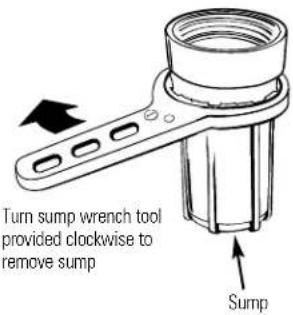
2 Remove the sump, using the sump wrench tool provided, from the filter head by rotating the sump as shown in the below illustration. Be careful, the sump may be full of water. Be sure to keep the large o-ring seal.
3 If you are replacing a filter cartridge, remove and discard the used filter cartridge.
4 Be sure the inside of the sump is clean. Thoroughly wash the inside of the sump with hot, soapy water and rinse.
5 Remove the wrapper from the new filter cartridge and insert the filter cartridge in the sump. Some cartridges fit either way, while others fit only one way. Observe markings on the cartridge.
NOTE: The Water Filtration system uses two different types of filter cartridges. Be sure to install them correctly. Filter I cartridge should always be placed in the Filter I sump. Filter II cartridge should always be placed in the Filter II sump. See page 3 for a complete list of filter performance characteristics.
For Model GXSL03C (rev. 2)
For Model GXSV10C
FXSLC (rev. 2) Filter Set (600-Gallon Capacity)
FXSVC (rev. 2) Filter Set (600-Gallon Capacity)
Filter I – White with no end caps
Filter I – White with green end caps Filter II – Gray
Filter II - White with yellow end caps
6 Lightly lubricate the o-ring seal in the sump with clean food-grade silicone grease (silicone grease is available through GE Parts and Services: 1-800-626-2002, Part Number: WS60X10005). Be sure it is fully seated in its groove.
7 Hold the sump up to the filter head, aligning the center hole in the cartridge with the protrusion on the bottom of the head. Failure to obtain proper alignment may cause damage to the filter and/or filtration system, which will degrade filter performance.
8 Being careful not to cross-thread, rotate the sump onto the filter head and tighten securely by hand.
NOTE: If the sump will not tighten up to the head or if you feel resistance, you may have the cartridge in upside down or misaligned. Take the cartridge out and check for correct orientation or alignment and reassemble.
9 Repeat steps 2 through 8 for the Filter II cartridge in the Filter II sump.
text_image
Turn sump wrench tool provided clockwise to remove sump Sump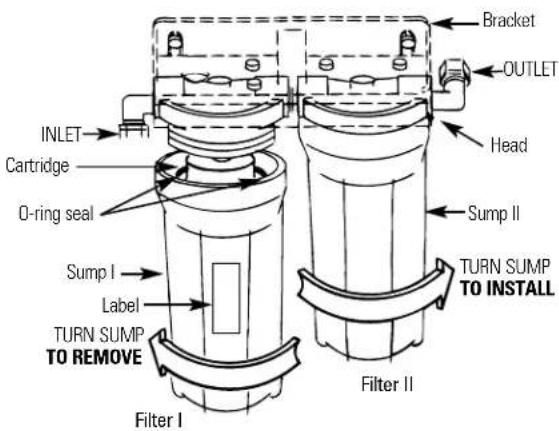
text_image
INLET Cartridge O-ring seal Sump I Label TURN SUMP TO REMOVE Filter I Bracket OUTLET Head Sump II TURN SUMP TO INSTALL Filter II10 Turn on the filtered water faucet. Then, slowly open the water supply/saddle valve and allow the filter housing to fill.
11 Close the filtered water faucet. Then, check for leaks between the sump and the head.
NOTE: If leaking, turn off the water supply and turn on the filtered water faucet. Disassemble the filter housing and check the o-ring for cuts, flat spots, etc., and sealing surfaces for foreign material. Clean the o-ring and lightly lubricate with clean silicone grease. Carefully press into the groove in the sump. Reassemble and check for leaks.
12 If you are replacing the batteries, remove, properly discard and install two new AA alkaline batteries in the battery pack. Removing the batteries or momentarily disconnecting the lead wires resets the six-month electronic timer. It is recommended that you change your batteries at least once a year.
The filter cartridges contain activated carbon. When new, turn on the filtered water faucet for ten minutes to flush the system.
14 Place filter change label on sump, inside cabinet door, or in another convenient location. Write in date of filter change for future reference. Filters should be changed every six months.
Flush Procedure
Whenever water of unknown quality is passed through the GE Water Filtration system, filter elements should be discarded and the filtration system flushed.
Circumstances that may require flushing the system are:
■Boil-water advisory.
■Flooding of the GE Water Filtration system.
■Long-term non-use.
The procedure for flushing the GE Water Filtration system is:
1 See Filter Cartridge Replacement section and follow steps 1, 2, 3 and 4.
2 Next, reinstall the sumps (without the filter elements), turn water on and flush water through the faucet for one minute.
3 Then, turn water off, remove sumps, empty water out of sumps and install new filter elements.
4 Follow steps 5–11 in the Filter Cartridge Replacement section to complete.
Before you call for service...

Troubleshooting Tips
Save time and money! Review the chart below
first and you may not need to call for service.
| Problem Possible Causes What To Do | ||
| Water contains tiny black particles | New filter cartridges contain activated carbon, which is a harmless black powder. when the water is clear. | ·Turn on the filtered water faucet and allow these harmless carbon particles to purge from the cartridge. Turn off the faucet |
| Water has air bubbles and is cloudy | Air in system after installation. | ·Will go away after water runs for a while. |
| Indicator light on the faucet base is flashing This is the maximum life of the (GXSV10C only) filter cartridges. | Six months usage has occurred. | ·Replace both filter cartridges and batteries in the battery pack. |
| Indicator light on the faucet base is not working (GXSV10C only) pack lead wire. | The faucet base lead wire is not connected to the battery | ·Connect. |
| Batteries may need to be replaced or they may have been installed incorrectly. | ·Observe orientation markings on the holder and install correctly. Replace batteries if they are old. | |
| Lead wires damaged. | ·Inspect and repair as needed. | |
| Chlorine taste and /or odor in the product water | The filter cartridges are no longer removing chlorine from the water supply. | ·Replace both filter cartridges. |
| Water dispenses very slowly | Filter may have an integral flow restrictor. | ·A slower flow (approx. 0.6 g/min.) is normal with this style of filter. If flow rate is unacceptable, replace the filters with ones that do not have integral flow restrictors. |
| The filters have been installed for too long. | ·A six-month change-out period is recommended. Replace both filter cartridges. | |
| The filter cartridges have become clogged. | ·High sediment levels can cause premature clogging. Replace both filter cartridges. | |
| Fittings are leaking | Tubing may not be installed properly. | ·Fully follow the installation instructions (page 9) and be sure the tubing is installed to the proper depth. |
| Tubing may be damaged. | ·Examine the end of tubing (approx. 1 inch) for defects such as scratches, grooves, roundness, etc. Trim tubing and fully reinstall. | |
text_image
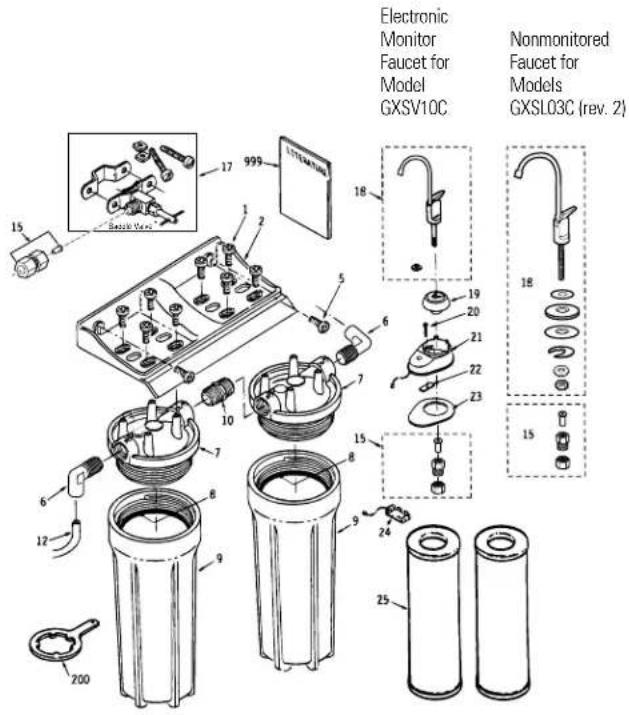
Electronic Monitor Faucet for Model GXSV10C Nonmonitored Faucet for Models GXSL03C (rev. 2) 15 999 17 18 19 20 21 22 23 15 16 17 18 19 20 21 22 23 15 16 17 18 19 20 21 22 23 15 16 17 18 19 20 21 22 23 15 16 17 18 19 20 21 22*NOTE: Codes in the state of Massachusetts require installation by a licensed plumber and do not permit the use of the saddle valve. For installation, use plumbing code 248-CMR of the Commonwealth of Massachusetts.
To obtain replacement parts, call toll-free 800.626.2002 (US), 800.663.6060 (Canada-English), 800.361.3869 (Canada-French)
General Electric parts catalog.
| G | ||||
| X | ||||
| S | ||||
| L | ||||
| 0 | G | |||
| 3 | X | |||
| C | S | |||
| R | V | |||
| E | 1 | |||
| V | 0 | |||
| 2 | C | |||
| 0 | 0 | |||
| 1 | 1 | |||
| REF. NO. PART NO. PART DESCRIPTION | ||||
| 0001 WS02X10001 SCREW, #10-14 X 3/4" 8 8 | ||||
| 0002 WS28X10010 MOUNTING BRACKET 1 1 | ||||
| 0005 WS02X10003 SCREW, #10-14 X 1 1/4" 2 2 | ||||
| 0006 | WS22X10002 | ELBOW, 3/8" NPT X 3/8" (compression) | - | - |
| 0006 | WS22X10032 | ELBOW, 3/8" NPT X 3/8" (push-in) | 2 | 2 |
| 0007 WS19X10011 HEAD 2 2 | ||||
| 0008 | WS03X10001 | O-RING, 3 3/8" X 3 5/8" | 2 | 2 |
| 0009 WS30X10002 SUMP | 2 2 | |||
| 0010 | WS22X10003 | NIPPLE, 3/8" NPT X 1 1/2" | 1 | 1 |
| 0012 WS07X10008 TUBING, 3/8" X 20 FT-WH | 1 1 | |||
| 0015 WS03X10044 TUBING ADAPTER ASM. | 2 2 | |||
| 0017 WS15X10008 SADDLE VALVE/SUPPLY | 1 1 | |||
| 0018 WS15X10002 FAUCET ASM. (monitored) | -1 | |||
| WS15X10022 FAUCET ASM. (nonmonitored) | 1 - | |||
| 0019 WS10X10008 TOP FAUCET BASE BLACK | -1 | |||
| 0020 | WS02X10007 | SCREW, #6-32 X 1 3/8" | - | 2 |
| 0021 WS10X10002 BASE FAUCET KIT | -1 | |||
| 0022 WS02X10008 NUT | -2 | |||
| 0023 WS08X10003 GASKET FAUCET | -1 | |||
| 0024 WS06X10001 HOLDER BATTERY | -1 | |||
| 0025 FXSLC (rev. 2) | FILTER SET - LEAD/CYST | 1 - | ||
| FXSVC (rev. 2) | FILTER SET - VOC | -1 | ||
| 0200 WX5X140 | WRENCH SUMP | 1 1 | ||
| 0999 49-50039 | PM MANUAL USE & CARE/INSTALLATION | |||
| 1 1 | ||||
Notes.
Consumer Support.
GE Appliances Website
www.GEAppliances.com
Have a question or need assistance with your appliance? Try the GE Appliances Website 24 hours a day, any day of the year! For greater convenience and faster service, you can now download Owner's Manuals, order parts, catalogs, or even schedule service on-line. You can also "Ask Our Team of Experts" your questions, and so much more...

Schedule Service www.GEAppliances.com
Expert GE repair service is only one step away from your door. Get on-line and schedule your service at your convenience 24 hours any day of the year! Or call 800.GE.CARES (800.432.2737) during normal business hours.
Real Life Design Studio www.GEAppliances.com
GE supports the Universal Design concept—products, services and environments that can be used by people of all ages, sizes and capabilities. We recognize the need to design for a wide range of physical and mental abilities and impairments. For details of GE's Universal Design applications, including kitchen design ideas for people with disabilities, check out our Website today. For the hearing impaired, please call 800.TDD.GEAC (800.833.4322).

Extended Warranties www.GEAppliances.com
Purchase a GE extended warranty and learn about special discounts that are available while your warranty is still in effect. You can purchase it on-line anytime, or call 800.626.2224 during normal business hours. GE Consumer Home Services will still be there after your warranty expires.
Parts and Accessories www.GEAppliances.com
Individuals qualified to service their own appliances can have parts or accessories sent directly to their homes (VISA, MasterCard and Discover cards are accepted). Order on-line today, 24 hours every day or by phone at 800.626.2002 during normal business hours.
Instructions contained in this manual cover procedures to be performed by any user. Other servicing generally should be referred to qualified service personnel. Caution must be exercised, since improper servicing may cause unsafe operation.

Contact Us www.GEAppliances.com
If you are not satisfied with the service you receive from GE, contact us on our Website with all the details including your phone number, or write to: General Manager, Customer Relations
GE Appliances, Appliance Park
Louisville, KY 40225
Register Your Appliance www.GEAppliances.com
Register your new appliance on-line—at your convenience! Timely product registration will allow for enhanced communication and prompt service under the terms of your warranty, should the need arise. You may also mail in the preprinted registration card included in the packing material.
GE Water Filtration System Warranty.
LIMITED ONE-YEAR WARRANTY
• What does this warranty cover?
— Any defect in materials or workmanship in the manufactured product.
• What does this warranty not cover?
— Filter Cartridges.
— Service trips to your home to teach you how to use the product.
— Improper installation.
— Failure of the product if it is abused, misused, altered or used for other than the intended purpose.
— Defects that result from improper installation or damage not caused by GE.
— Liability on the part of GE under this or any other warranty for any indirect or consequential damage.
— Products that are used for commercial or industrial applications.
— Use of this product where water is microbiologically unsafe or of unknown quality, without adequate disinfection before or after the system. Systems certified for cyst reduction may be used on disinfected water that may contain filterable cysts.
— Damage to the product caused by accident, fire, floods or acts of God.
— Incidental or consequential damage caused by possible defects with this appliance, its installation or repair.
- For how long after the original purchase?
One year.
• How do I make a warranty claim?
— Return to the retailer from which it was purchased, along with a copy of the “Proof of Purchase.” This warranty excludes the cost of shipping or service calls to your home.
• How does state law relate to this warranty?
— This warranty gives you specific legal rights, and you may also have other rights which vary from state to state. THIS WARRANTY IS INTENDED TO BE IN LIEU OF ALL OTHER WARRANTIES, WHETHER EXPRESS OR IMPLIED, INCLUDING THE WARRANTIES OF MERCHANTABILITY AND FITNESS FOR A PARTICULAR PURPOSE.
Contact us at www.GEAppliances.com, or call 800.GE.CARES (800.432.2737) in the U.S., or toll-free 866.777.7627 in Canada.
text_image
ROBINET ASSEMBLÉ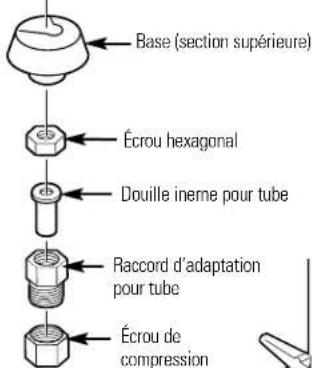
GARANTIE LIMITÉE D'UN AN
- Que couvre la garantie?
General Manager, Customer Relations
GE Appliances, Appliance Park
Louisville, KY 40225