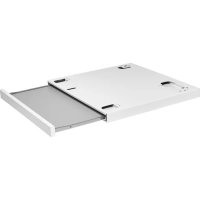
576730 - Washing machine ASKO - Free user manual and instructions
Find the device manual for free 576730 ASKO in PDF.



| Product Type | Front-loading washing machine |
| Brand | Asko |
| Model | 576730 |
| Washing capacity | 8 kg |
| Maximum spin speed | 1400 rpm |
| Energy efficiency class | A+++ |
| Noise level (wash/spin) | 49 dB / 73 dB |
| Dimensions (H × W × D) | 85 × 60 × 60 cm |
| Net weight | 75 kg |
| Electrical supply | 230 V / 10 A / 50 Hz |
| Wash programs | Cotton, synthetics, delicates, wool, hand wash, quick, etc. |
| Additional options | Delayed start, prewash, extra rinse, anti-crease |
| Safety system | Child lock, automatic stop if door open, overflow protection |
| Maintenance level | Regular cleaning of filter and detergent drawer, periodic descaling |
| Available spare parts | Belt, drain pump, filter, door seal, heating element |
| Repairability | Repairability index: 8.2/10 (estimate) |
| Included accessories | Anti-tip kit for stacking with dryer (depending on model) |
| Warranty | 2 years (parts and labor) |
Frequently Asked Questions - 576730 ASKO
User questions about 576730 ASKO
0 question about this device. Answer the ones you know or ask your own.
Ask a new question about this device
Download the instructions for your Washing machine in PDF format for free! Find your manual 576730 - ASKO and take your electronic device back in hand. On this page are published all the documents necessary for the use of your device. 576730 by ASKO.
USER MANUAL 576730 ASKO
natural_image
Simple line drawing of a horizontal rod or rod with a small protrusion at the end (no text or symbols)| Instructions for use of a hidden helper | EN |
| Instruktioner för användning av en hidden helper | SE |
| Bruksanvisning for en skjult hjelper | NO |
| Brugsanvisning for Hidden Helper | DK |
| Ulosvedettävän aputason käyttöohjeet | FI |
| Gebrauchsanleitung für versteckte Helfer | D |
| Notice d’utilisation d’un accessoire de buanderie | FR |
| Instrucciones de uso Ayuda oculta | ES |
| Istruzioni per l’uso degli Accessori Lavanderia | IT |
| Инструкция по использованию аксессуара Hidden Helper | RU |
| Інструкція з експлуатації висувної полиці | UA |
| 隱藏幫手操作指南 | TCN |
| 隱藏帮手操作指南 | SCN |
| Navodilo za uporabo skritega pomočnika | SI |
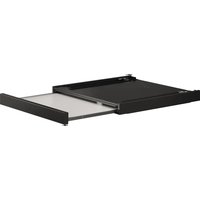
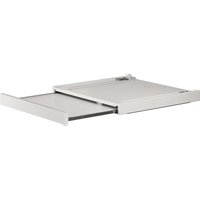
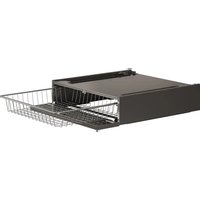
OPERATING INSTRUCTIONS Hidden Helpers
EN - SAFETY PRECAUTIONS 3
Installing a Hidden Helper between a washing machine and a dryer 4
Installing a Hidden Helper onto the appliance 5
Using a Hidden Helper 6
SV - SÄKERHETSANVISNINGAR 7
Please read the instruction manual and save it for future reference.
To reduce the risk of fire, electric shock or injury to persons during the use of your appliance, follow the basic precautions, including the following:
- Before using the product for the first time, please read all instructions and save them for future reference.
- Instructions for use are available on our website at www.asko.com.
- The product is intended solely for household use.
- Do not repair and do not attempt to replace any part of the product or to service it in any other way, unless this is expressly recommended in the instructions for use and maintenance or in the instructions for user repairs. Also, do not attempt any repairs or servicing if you do not understand the instructions entirely or if you lack the skills for such repairs.
- Any product repair and maintenance pertaining to safety or performance should be done by trained experts.
- In case of incorrect use or product servicing by an unauthorized person, the user shall be solely responsible for covering any damage or expenses.
- Do not allow children to play with the product or on the product. Watch children closely when you are using the product near them.
- The product is not intended for use by persons (including children) with impaired physical or mental capabilities or lack of experience and knowledge. Such persons should be instructed on safe use of the product by the person responsible for their safety.
- Do not let children younger than three years to come near the appliance, unless they are under constant supervision.
- Do not install or store the product in places where it could be exposed to the elements.
The following symbols are used throughout the manual and they have the following meanings:
| Information, advice, tip, or recommendation | |
| Warning – general danger | |
| Warning – danger of electric shock |
INSTALLING A HIDDEN HELPER BETWEEN A WASHING MACHINE AND A DRYER

The hidden helper may only be used with a washing machine and a dryer by the manufacturer Asko Appliances.
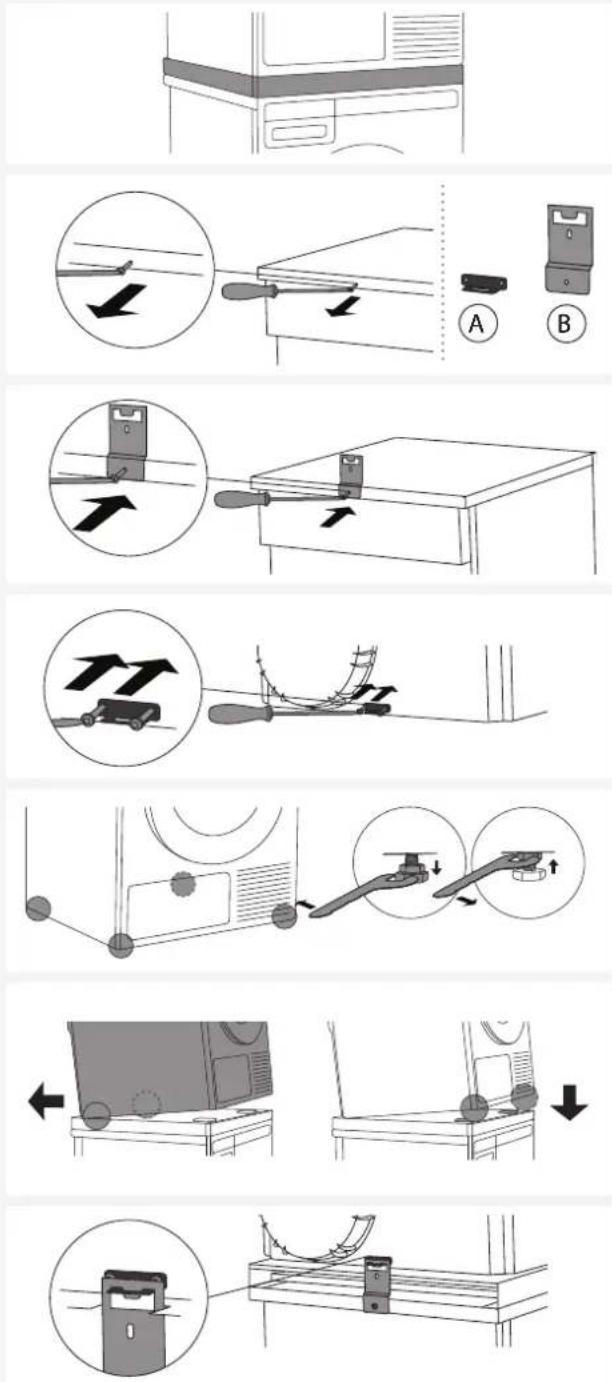
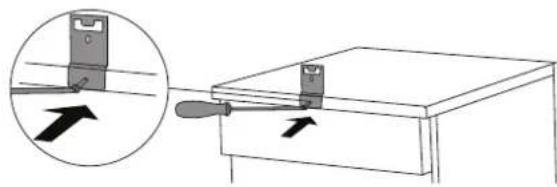
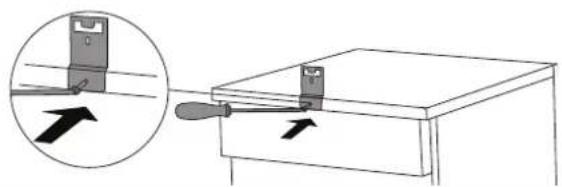
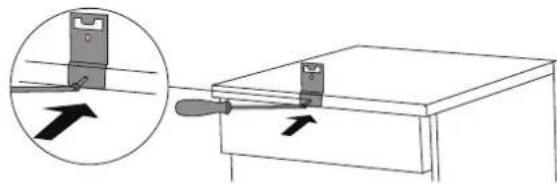
1 Undo the middle screw on the back side of the washing machine.
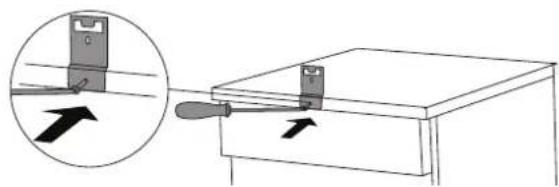
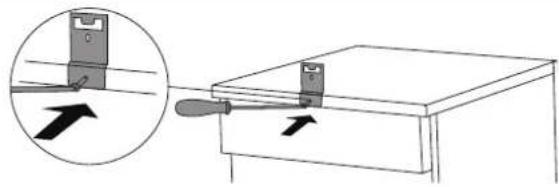
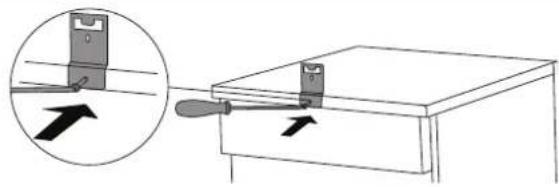
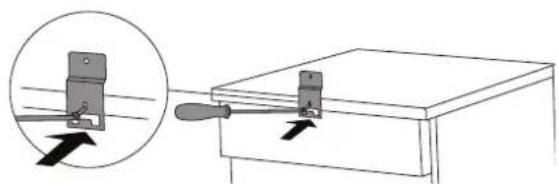
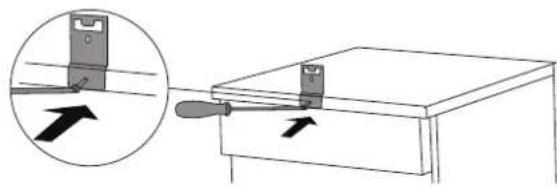
2 Attach the anti-tip bracket (B) to the upper edge of the back of the washing machine.
The anti-tip bracket (B) is supplied in the hidden helper.
3 Attach the anti-tip bracket (A) to the lower edge of the back of the dryer.
The anti-tip bracket (A) is supplied in the dryer cardboard box.
4 Before placing the dryer onto the hidden helper, undo the dryer legs by fi ve turns from the fully retracted position, and tighten the safety nuts all the way.
5 Lift the dryer and tilt it towards the back. Insert the back feet of the dryer into the slots in the hidden helper and push the dryer back towards the back of the hidden helper until the anti-tip bracket (A) locks in with the anti-tip bracket (B). Anti-tip bracket position so that the bracket on the dryer and the bracket on the washing machine are fully aligned.
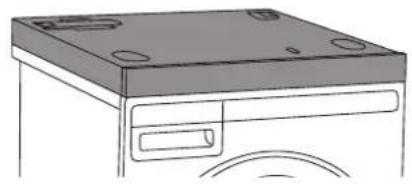
6 Final installation of the hidden helper between a washing machine and a dryer, from the back.

To install a hidden helper between a washing machine and a dryer that are already stacked in a tower, first follow the functions for dismounting the tower. This means that the anti-tip bracket has to be removed first.
INSTALLING A HIDDEN HELPER ONTO THE APPLIANCE

The hidden helper may only be used with a washing machine and a dryer by the manufacturer Asko Appliances.
natural_image
Illustration of a computer drive chassis with no visible text or symbols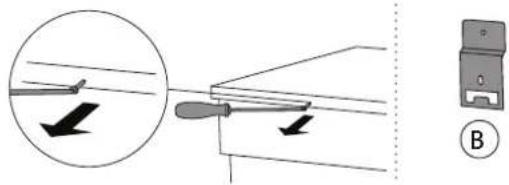
1 Undo the middle screw on the back side of the washing machine or dryer.
natural_image
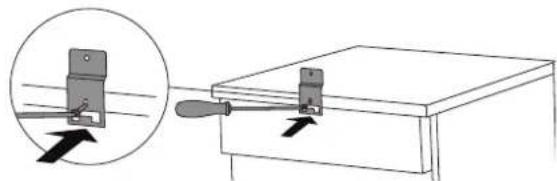
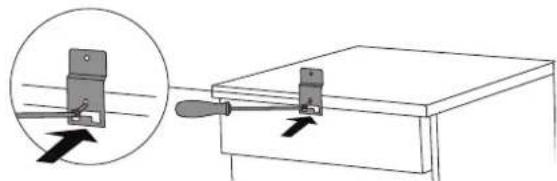
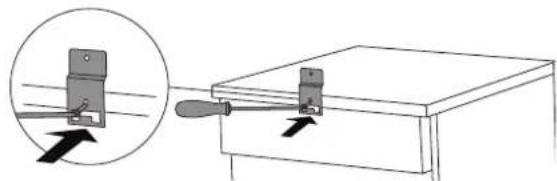
Diagram showing a mechanical clamp or bracket being inserted into a box, with an inset magnified view of the clamp (no text or symbols present)2 Attach the anti-tip bracket (B) to the washing machine or dryer.

The anti-tip bracket (B) is supplied in the hidden helper.
natural_image
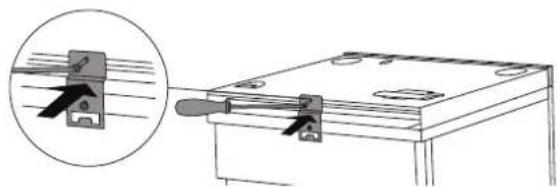
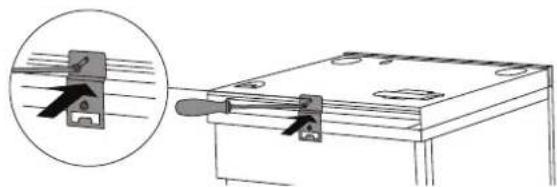
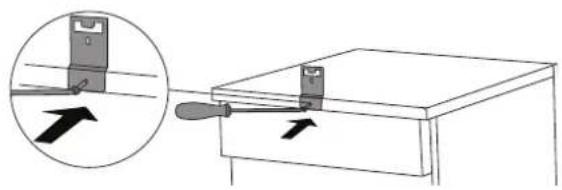
Technical line drawing of a mechanical clamp or bracket assembly with a magnified inset showing the clamping mechanism (no text or symbols present)3 The hidden helper can be installed onto a washing machine or onto a dryer.
Attach the anti-tip bracket (B) onto the hidden helper and make sure it is aligned with the washing machine and dryer.
natural_image
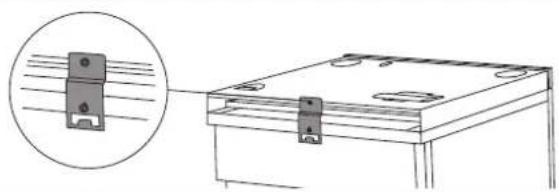
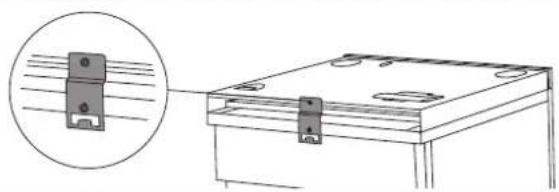
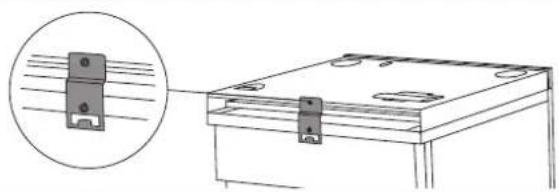
Technical line drawing of a mechanical bracket assembly with a magnified inset showing a detail (no text or symbols)4 Final installation of the hidden helper on a washing machine or dryer, from the back.

Before tightening the anti-tip bracket, make sure the edges of the hidden helper are accurately aligned with the edges of the washing machine or dryer.
USING A HIDDEN HELPER
natural_image
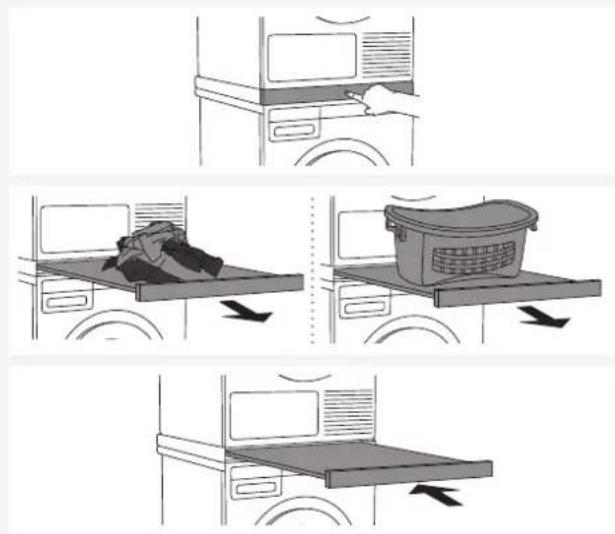
Three-step diagram showing a kitchen appliance with a bag being placed on a tray, illustrating the process (no text or symbols)1 Press on the hidden helper to open it.
2 Pull the shelf out towards you.
3 After use, push the shelf back inside the hidden helper.

natural_image
Pure technical line drawing of a mechanical component without any text, numbers, or symbols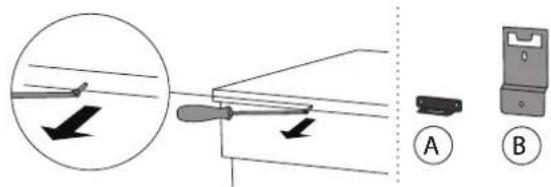

natural_image
Diagram showing a door handle being adjusted to a box, with an inset magnified view of the handle (no text or symbols)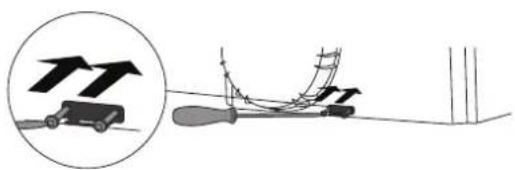
natural_image
Diagram showing a car with upward arrows and a ship with another vessel, no text or symbols present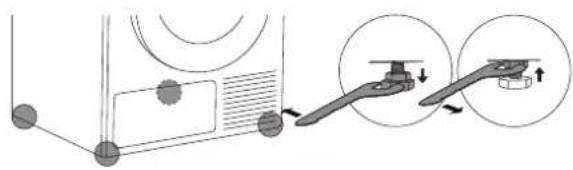
natural_image
Diagram showing a device with wheels and a lever mechanism, illustrating mechanical assembly (no text or symbols)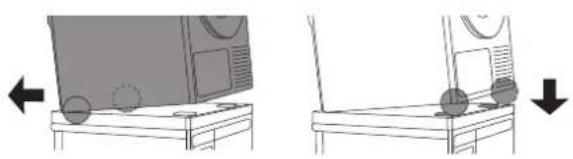
natural_image
Two technical diagrams showing a device with circular components mounted on a base, with arrows indicating left and right motion (no text or symbols)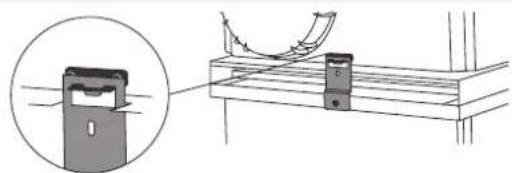
natural_image
Diagram showing a device with a magnified inset of its handle, no text or symbols present
natural_image
Illustration of a computer drive chassis with no visible text or symbols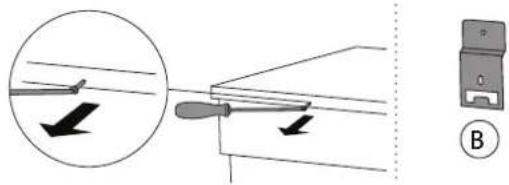
natural_image
Diagram showing a mechanical clamp or bracket being inserted into a box, with an inset magnified view of the clamp (no text or symbols present)natural_image
Technical line drawing of a mechanical clamp or bracket assembly with a magnified inset showing the clamping mechanism (no text or symbols)natural_image
Technical line drawing of a mechanical bracket assembly with a magnified inset showing a detail (no text or symbols)natural_image
Pure technical line drawing of a mechanical component or bracket (no text or symbols)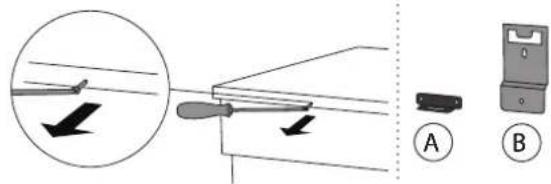
natural_image
Diagram showing a device being inserted into a drawer with an arrow indicating direction (no text or symbols present)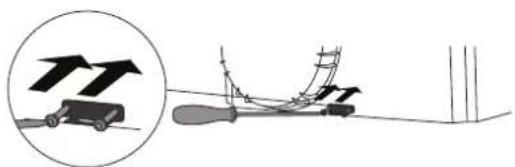
natural_image
Diagram showing a car on a ramp with directional arrows indicating motion, alongside a mechanical structure (no text or symbols)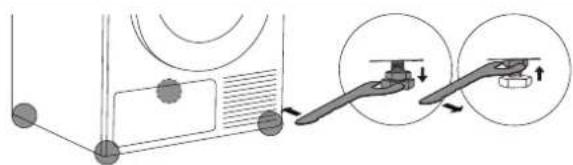
natural_image
Diagram showing mechanical components with arrows indicating motion, no text or symbols present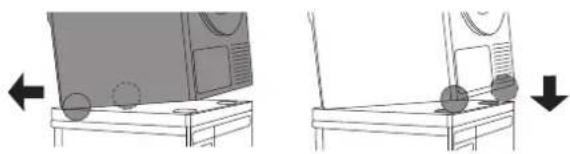
natural_image
Two-step diagram showing a device on a table with circular components, no text or symbols present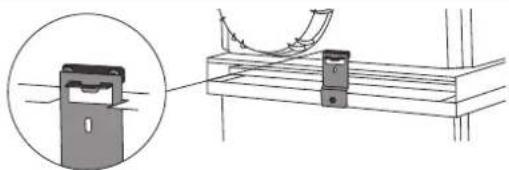
natural_image
Technical illustration of a mechanical device with a magnified inset showing a component detail (no text or symbols)
natural_image
Illustration of a computer drive chassis with no visible text or symbols
1 Løsne den midterste skruen på baksiden av vaskemaskinen eller tørketrommelen.
natural_image
Diagram showing a mechanical clamp or bracket being inserted into a box, with an inset magnified view of the clamp (no text or symbols present)2 Fest veltesikringsbeslaget (B) på vaskemaskinen eller tørketrommelen.
Veltesikringsbeslaget (B) følger med i leveransen av den skjulte hjelperen.
natural_image
Technical line drawing of a mechanical clamp or bracket assembly with an inset showing a close-up view of the clamp (no text or symbols present)3 Den skjulte hjelperen kan monteres oppå en vaskemaskin eller en tørketrommel.
Fest veltesikringsbeslaget (B) på den skjulte hjelperen, og kontroller at det fl ukter med vaskemaskinen og tørketrommelen.
natural_image
Technical line drawing of a mechanical bracket assembly with a magnified inset showing a detail (no text or symbols)natural_image
Pure technical line drawing of a mechanical component without any text, numbers, or symbols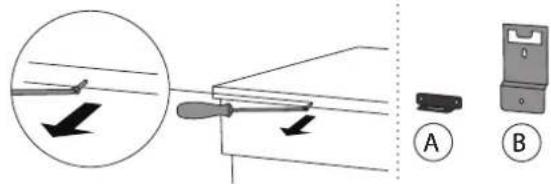
natural_image
Diagram showing a door handle being inserted into a drawer, with an inset magnified view of the handle (no text or symbols present)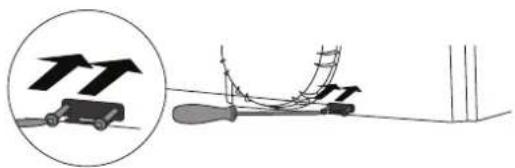
natural_image
Diagram showing a car with upward arrows and a rope being pulled by a cable (no text or symbols)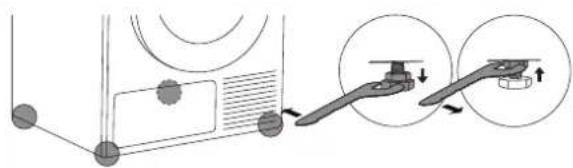
natural_image
Diagram showing a mechanical device with two views of a lever mechanism (no text or symbols present)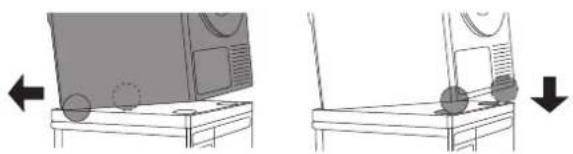
natural_image
Diagram showing two views of a computer monitor with wheels, one left and one right, both pointing downward (no text or symbols)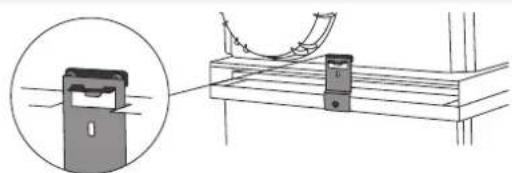
natural_image
Technical diagram showing a mechanical component with a magnified inset view (no text or symbols)
natural_image
Illustration of a computer drive chassis with no visible text or symbols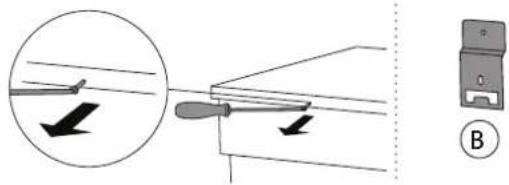
natural_image
Diagram showing a mechanical clamp or bracket being inserted into a box, with an inset magnified view of the clamp (no text or symbols present)2 Monter antivippebeslaget (B) på vaskemaskinen eller tørretumbleren.
natural_image
Technical line drawing of a mechanical clamp or bracket assembly with an inset showing a close-up view of the clamp (no text or symbols present)3 Hidden Helper kan monteres på en vaskemaskine eller en tørretumbler.
Monter antivippebeslaget (B) på Hidden Helper, og sørg for, at det fl ugter med vaskemaskinen og tørretumbleren.
natural_image
Technical line drawing of a mechanical bracket assembly with a magnified inset showing a detail (no text or symbols)natural_image
Pure technical line drawing of a mechanical component or bracket (no text or symbols)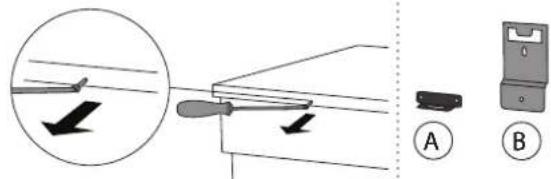
natural_image
Diagram showing a device with a handle and directional arrows, no text or symbols present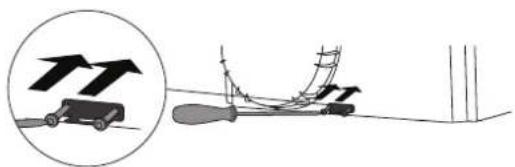
natural_image
Illustration of a vehicle with upward arrows and a ship, no text or symbols present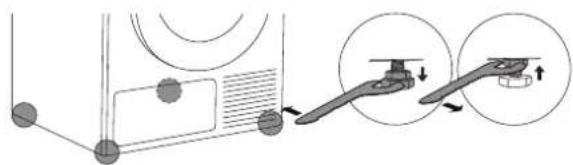
natural_image
Diagram showing mechanical assembly with pulleys and a lever mechanism (no text or symbols)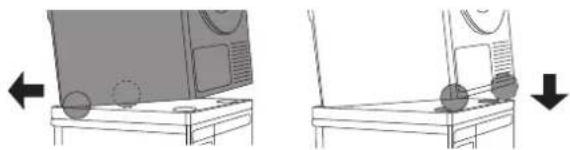
natural_image
Two-step diagram showing a computer monitor on a stand with two circular objects, one pointing left and the other down (no text or symbols)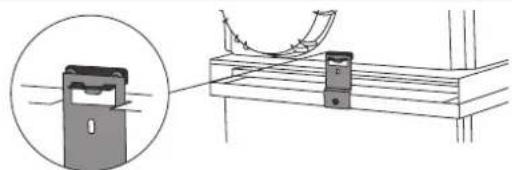
natural_image
Diagram showing a device with a lock and a curved cable on a platform, with an inset close-up of the lock component (no text or symbols)
natural_image
Illustration of a computer drive chassis with no visible text or symbols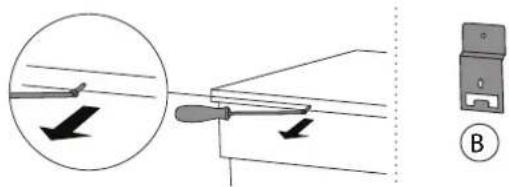
natural_image
Diagram showing a mechanical clamp or bracket being inserted into a workbench, with an inset magnified view of the clamp (no text or symbols present)natural_image
Technical line drawing of a mechanical clamp or bracket assembly with a magnified inset showing the clamping mechanism (no text or symbols)natural_image
Technical line drawing of a mechanical bracket assembly with a magnified inset showing a detail (no text or symbols)natural_image
Three-step diagram showing a kitchen appliance with a bag being placed on a tray, illustrating the process (no text or symbols)natural_image
Pure technical line drawing of a mechanical component without any text, numbers, or symbols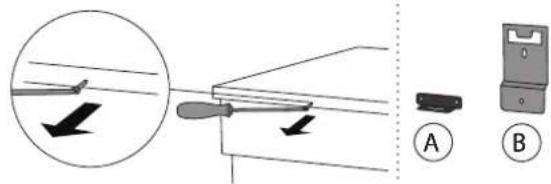
natural_image
Diagram showing a hand operating a device with an arrow indicating direction (no text or symbols present)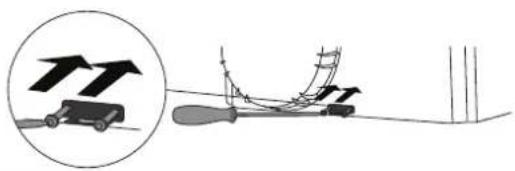
natural_image
Diagram showing a car with upward arrows and a ship with a flag, alongside a boat on water (no text or symbols)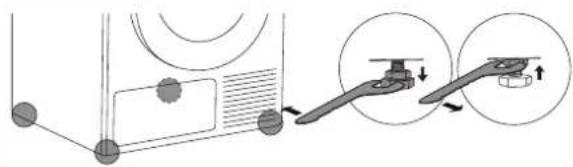
natural_image
Diagram showing mechanical assembly with arrows indicating motion, no text or symbols present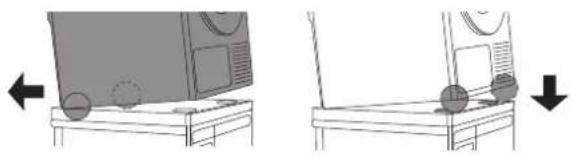
natural_image
Two-step diagram showing a computer monitor on a stand before and after adjustment, with no text or symbols present.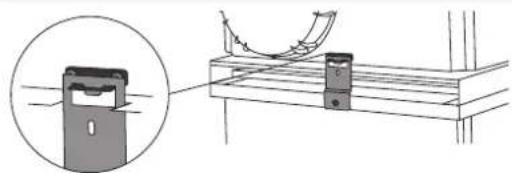
natural_image
Diagram showing a device with a lock and a curved cable on a platform, with an inset close-up of its lock component (no text or symbols present)natural_image
Illustration of a computer drive chassis with no visible text or symbols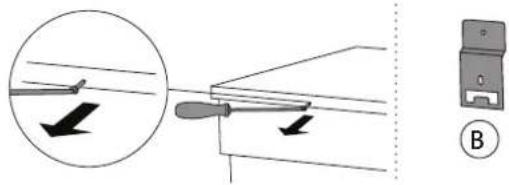
natural_image
Diagram showing a mechanical clamp or bracket being inserted into a box, with an inset magnified view of the clamp (no text or symbols present)natural_image
Technical line drawing of a mechanical clamp or bracket assembly with a magnified inset showing the clamping mechanism (no text or symbols present)natural_image
Technical line drawing of a mechanical bracket with mounting holes and a magnified inset showing a detail (no text or symbols)natural_image
Three-step diagram showing a kitchen appliance with a bag being placed on a tray, illustrating the process (no text or symbols)natural_image
Pure technical line drawing of a mechanical component without any text, numbers, or symbols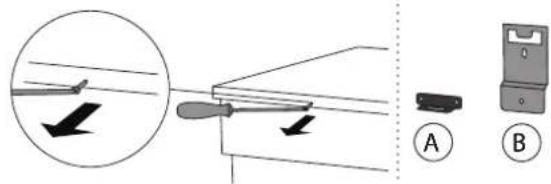
natural_image
Diagram showing a device being inserted into a drawer with an arrow indicating direction (no text or symbols present)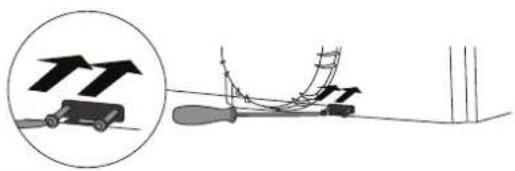
natural_image
Diagram showing a car with upward arrows and a ship with a flag, alongside a boat on water (no text or symbols)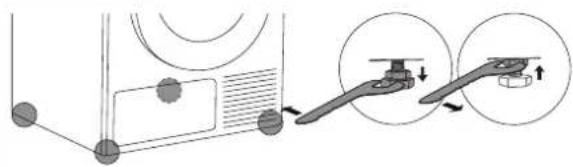
natural_image
Diagram showing mechanical components with arrows indicating motion, no text or symbols present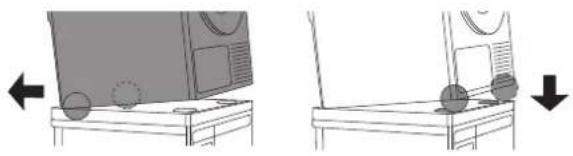
natural_image
Two-step diagram showing a computer monitor with wheels and a monitor on a stand, connected by arrows indicating motion (no text or symbols)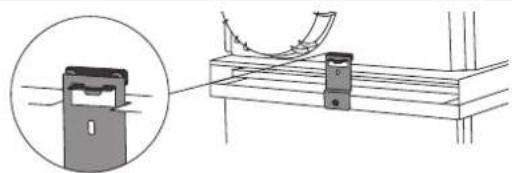
natural_image
Diagram showing a device with a magnified inset of its internal structure (no text or symbols present)
natural_image
Illustration of a computer drive chassis with no visible text or symbols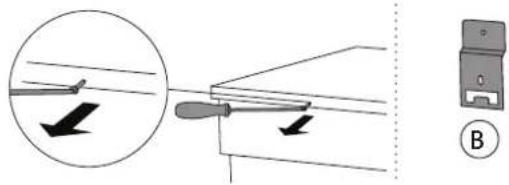
natural_image
Diagram showing a mechanical device with directional arrows and a magnified circular view (no text or symbols)natural_image
Diagram showing a mechanical clamp or bracket being inserted into a box, with an inset magnified view of the clamp (no text or symbols present)natural_image
Technical line drawing of a mechanical clamp or bracket assembly with a magnified inset showing the clamping mechanism (no text or symbols present)natural_image
Technical line drawing of a mechanical bracket assembly with a magnified inset showing a detail (no text or symbols)natural_image
Two-panel illustration showing a person sleeping on a bed and a container with a lid, both with arrows indicating motion (no text or symbols)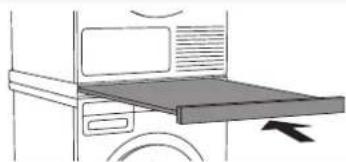
natural_image
Diagram of a door with a tray and arrow indicating direction (no text or symbols)natural_image
Pure technical line drawing of a mechanical component or bracket (no text or symbols)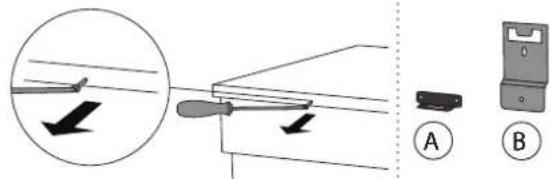
natural_image
Diagram showing a hand operating a device with an arrow indicating direction (no text or symbols present)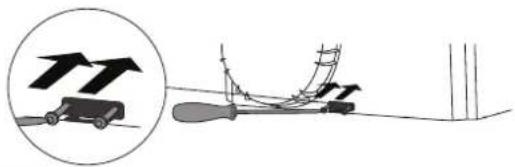
natural_image
Diagram showing a car with upward arrows and a rope being lifted by a ladder (no text or symbols)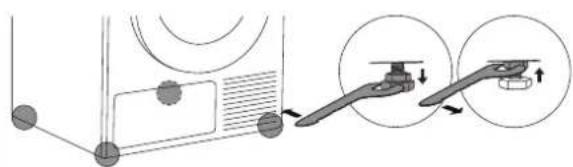
natural_image
Mechanical assembly diagram showing a device with wheels and a lever mechanism (no text or symbols)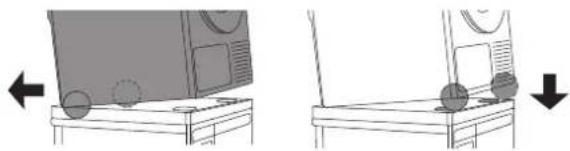
natural_image
Two-step diagram showing a computer monitor on a stand with wheels, before and after assembly (no text or symbols)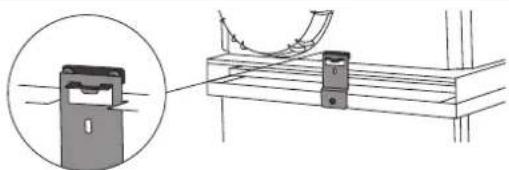
natural_image
Diagram showing a device with a magnified inset view of its internal structure (no text or symbols present)
natural_image
Illustration of a computer drive with a rear panel and ventilation slots (no text or symbols)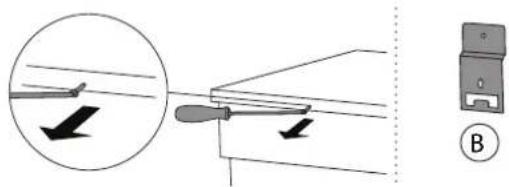
natural_image
Diagram showing a mechanical clamp or bracket being inserted into a workbench, with an inset magnified view of the clamp (no text or symbols present)natural_image
Technical line drawing of a mechanical clamp or bracket assembly with a magnified inset showing the clamping mechanism (no text or symbols present)natural_image
Technical line drawing of a mechanical bracket with mounting holes and a magnified inset showing a detail (no text or symbols)natural_image
Two-panel illustration showing a person sleeping on a bed and a container with a lid, both with arrows indicating motion (no text or symbols)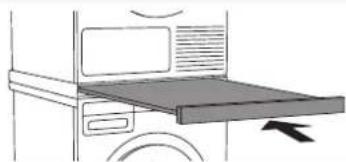
natural_image
Diagram of a door with a tray and directional arrow indicating motion (no text or symbols)natural_image
Illustration of a CD-ROM drive with a rear panel and control panel (no text or symbols)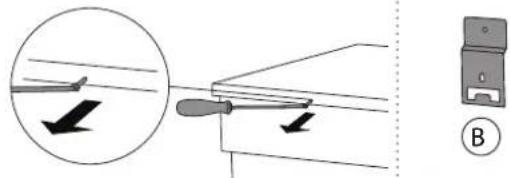
natural_image
Diagram showing a mechanical clamp or bracket being inserted into a box, with an inset magnified view of the clamp (no text or symbols present)natural_image
Technical illustration of a mechanical clamp or bracket assembly with a magnified inset showing the clamp detail (no text or symbols present)natural_image
Technical line drawing of a mechanical bracket with mounting holes and a magnified inset showing a detail (no text or symbols)natural_image
Pure technical line drawing of a mechanical component or bracket (no text or symbols)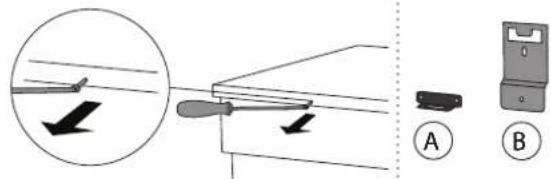
natural_image
Diagram showing a hand operating a drawer with an arrow indicating direction (no text or symbols present)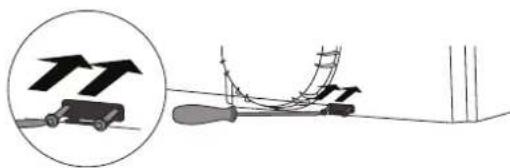
natural_image
Diagram showing a car and a ship with directional arrows, no text or symbols present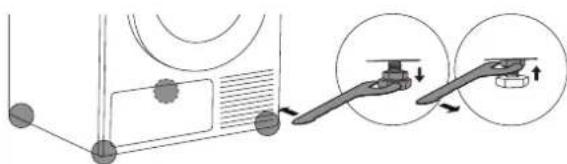
natural_image
Mechanical assembly diagram showing a device with wheels and a lever mechanism (no text or symbols)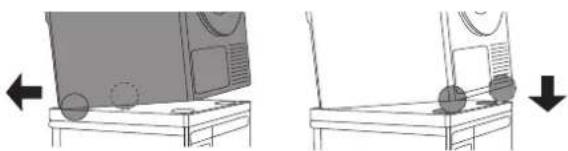
natural_image
Two-step diagram showing a computer monitor on a desk and a monitor on a stand, with arrows indicating left and right motion (no text or symbols)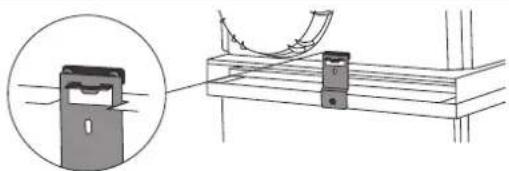
natural_image
Diagram showing a device with a magnified inset view of its internal structure (no text or symbols present)
natural_image
Illustration of a computer drive chassis with no visible text or symbols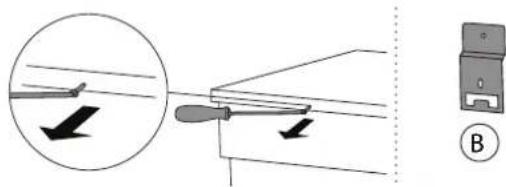
natural_image
Diagram showing a mechanical clamp or bracket being inserted into a box, with an inset magnified view of the clamp (no text or symbols present)natural_image
Technical line drawing of a mechanical clamp or bracket assembly with an inset magnified view (no text or symbols)natural_image
Technical line drawing of a mechanical assembly with a magnified inset showing a bracket detail (no text or symbols)natural_image
Three-step diagram showing a person pressing down on a machine, pushing a bucket, and finally moving a flat tray (no text or symbols)natural_image
Illustration of a computer drive with a rear panel and ventilation slots (no text or symbols)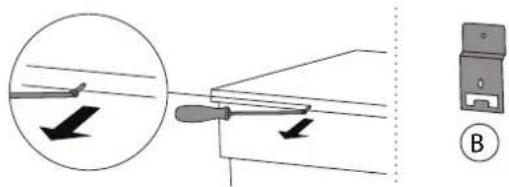
natural_image
Diagram showing a mechanical clamp or bracket being inserted into a workbench, with an inset magnified view of the clamp (no text or symbols present)natural_image
Technical line drawing of a mechanical clamp or bracket assembly with a magnified inset showing the clamping mechanism (no text or symbols present)natural_image
Technical line drawing of a mechanical bracket with mounting holes and a magnified inset showing a detail (no text or symbols)natural_image
Two-panel illustration showing a person sleeping on a bed and a container with a lid, both with arrows indicating motion (no text or symbols)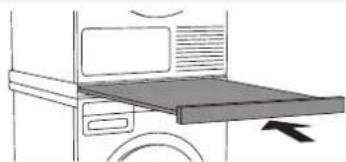
natural_image
Diagram of a door panel with an arrow indicating direction (no text or symbols)natural_image
Illustration of a computer drive chassis with no visible text or symbols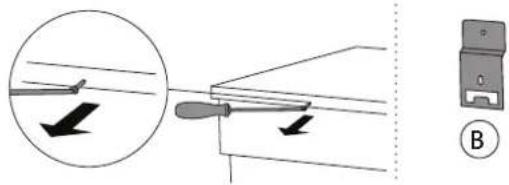
natural_image
Diagram showing a mechanical clamp or bracket being inserted into a box, with an inset magnified view of the clamp (no text or symbols present)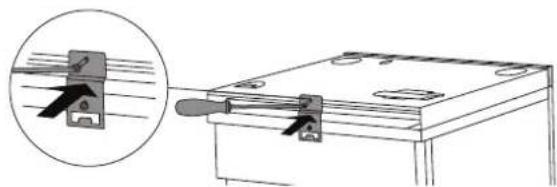
natural_image
Technical line drawing of a mechanical clamp or bracket assembly with a magnified inset showing the clamping mechanism (no text or symbols present)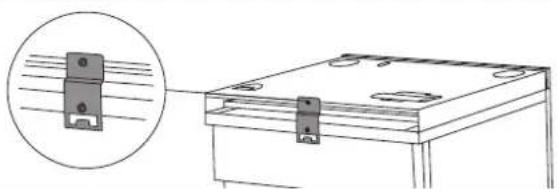
natural_image
Technical line drawing of a mechanical bracket assembly with a magnified inset showing a detail (no text or symbols)1
擰下洗衣機或乾衣機背面中間的螺絲。
2
natural_image
Three-step diagram showing a kitchen appliance with a bag placed on a tray, illustrating the process (no text or symbols)1 輕推隱藏幫手,令其打開。
2 將抽屉板向外拉出。
3 使用後,將抽屜板推回隱藏幫手內。

请阅读本指南并妥善保存,以备将来参考。
natural_image
Illustration of a CD-ROM drive with a rear panel and indicator lights (no text or symbols)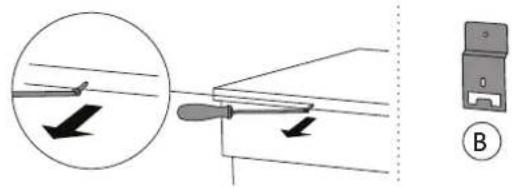
natural_image
Diagram showing a mechanical clamp or bracket being inserted into a box, with an inset magnified view of the clamp (no text or symbols present)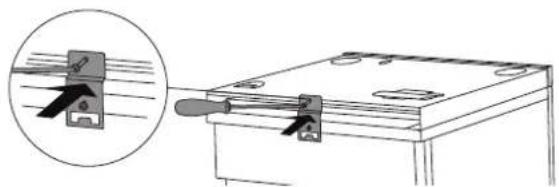
natural_image
Technical line drawing of a mechanical clamp or bracket assembly with a magnified inset showing the clamping mechanism (no text or symbols present)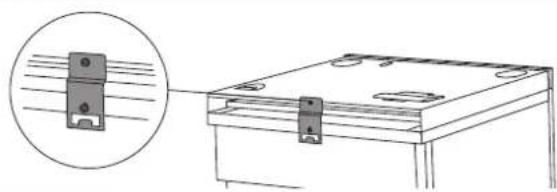
natural_image
Technical line drawing of a mechanical bracket assembly with a magnified inset showing a detail (no text or symbols)1
拧下洗衣机或干衣机背面中间的螺丝。
2
natural_image
Three-step diagram showing a kitchen appliance with a bag placed on a tray, illustrating the process (no text or symbols)1 轻推隐藏帮手,令其打开。
2 将抽屉板向外拉出。
3 使用后,将抽屉板推回隐藏帮手内。

Preberite navodila za uporabo in jih shranite na varno mesto.
natural_image
Pure technical line drawing of a mechanical component or bracket (no text or symbols)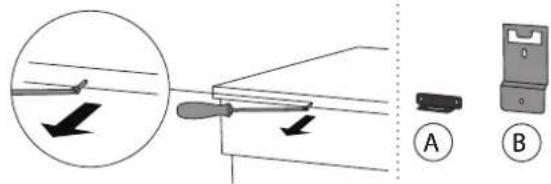
natural_image
Diagram showing a hand operating a device with an arrow indicating direction, alongside a magnified inset of the device's handle (no text or symbols present)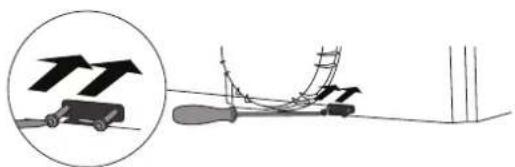
natural_image
Diagram showing a car on a ramp with directional arrows indicating motion, alongside a mechanical structure (no text or symbols)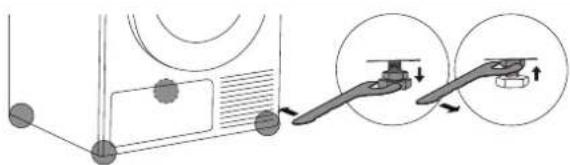
natural_image
Diagram showing mechanical assembly with arrows indicating motion, no text or symbols present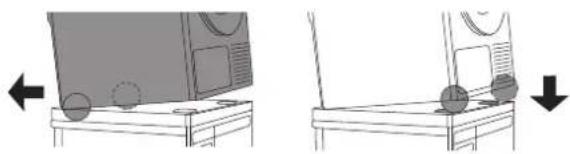
natural_image
Two-step diagram showing a device on a table with circular components, no text or symbols present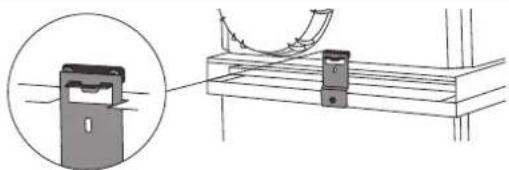
natural_image
Technical illustration of a mechanical device with a magnified inset showing a component detail (no text or symbols)
natural_image
Illustration of a computer drive chassis with no visible text or symbols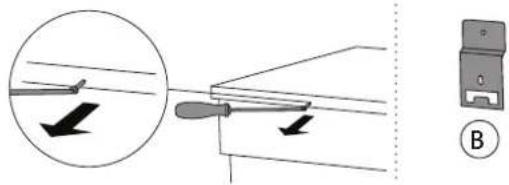
natural_image
Diagram showing a mechanical device with directional arrows and a magnified circular view, no text or symbols present.natural_image
Diagram showing a mechanical clamp or bracket being inserted into a box, with an inset magnified view of the clamp (no text or symbols present)natural_image
Technical line drawing of a mechanical clamp or bracket assembly with an inset magnified view (no text or symbols)natural_image
Technical line drawing of a mechanical assembly with a magnified inset showing a bracket detail (no text or symbols)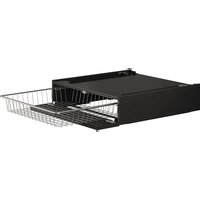

- OPERATING INSTRUCTIONS Hidden Helpers
- EN - SAFETY PRECAUTIONS 3
- SV - SÄKERHETSANVISNINGAR 7
- Please read the instruction manual and save it for future reference.
- To reduce the risk of fire, electric shock or injury to persons during the use of your appliance, follow the basic precautions, including the following:
- INSTALLING A HIDDEN HELPER BETWEEN A WASHING MACHINE AND A DRYER
- INSTALLING A HIDDEN HELPER ONTO THE APPLIANCE
- USING A HIDDEN HELPER
- 1
- 2
- 请阅读本指南并妥善保存,以备将来参考。
- Preberite navodila za uporabo in jih shranite na varno mesto.
Brand : ASKO
Model : 576730
Category : Washing machine