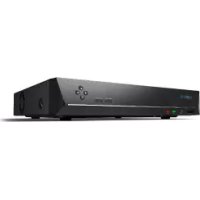
RLN8410 - Digital Video Recorder (NVR) REOLINK - Free user manual and instructions
Find the device manual for free RLN8410 REOLINK in PDF.



| Product Type | Digital Video Recorder (NVR) |
| Brand | Reolink |
| Model | RLN8410 |
| Dimensions | 260 x 41 x 230 mm |
| Weight | 2.0 kg |
| Power Supply | AC Adapter (included) |
| HDMI Video Output | Up to 8MP |
| VGA Video Output | Up to 2MP |
| Audio Output | 1 channel RCA |
| Video Formats | H.264, H.265 |
| Decoding Resolution | Up to 12MP |
| Synchronous Playback | Up to 4 channels |
| Network Ports | 1 LAN port, 8 PoE ports |
| Internal Storage | Hard Drive (not included) |
| Access | Local and remote via Reolink app or PC client |
| Security | Password, UID activation |
| Operating Temperature | -10°C to 45°C |
| Box Contents | NVR, adapter, HDMI cable, USB mouse, 1m Ethernet cable, quick start guide |
| Warranty | 2 years limited |
| Compliance | FCC, CE |
| Maintenance | Format the hard drive before returning the product |
Frequently Asked Questions - RLN8410 REOLINK
User questions about RLN8410 REOLINK
0 question about this device. Answer the ones you know or ask your own.
Ask a new question about this device
Download the instructions for your Digital Video Recorder (NVR) in PDF format for free! Find your manual RLN8410 - REOLINK and take your electronic device back in hand. On this page are published all the documents necessary for the use of your device. RLN8410 by REOLINK.
USER MANUAL RLN8410 REOLINK
If you need any technical help, please visit our official support site and contact our support team before returning the products, https://support.reolink.com.
Hoferstasse 9B, 71636 Ludwigsburg, Germany prodsg@libelleconsulting.com

APEX CE SPECIALISTS LIMITED
89 Princess Street, Manchester, M1 4HT, UK info@apex-ce.com
Aug 2021
QSG1_B
58.03.005.0018

Be Prepared, Be Reblink
EN/DE/FR/IT/ES
Operational Instruction
Apply to: RLN8-410, RLN16-410

@ReolinkTech https://reolink.com
EN
Contents
What's in the Box 2
NVR Introduction 3
Connection Diagram 4
Set up PoE NVR System 6
Troubleshooting 7
Specifications 8
Notification of Compliance 8
What's in the Box
NVR
x1

NVR
Power Adapter
x1

HDMI Cable
x1

USB Mouse x1

1m Ethernet Cable
x1

Quick Start Guide x1
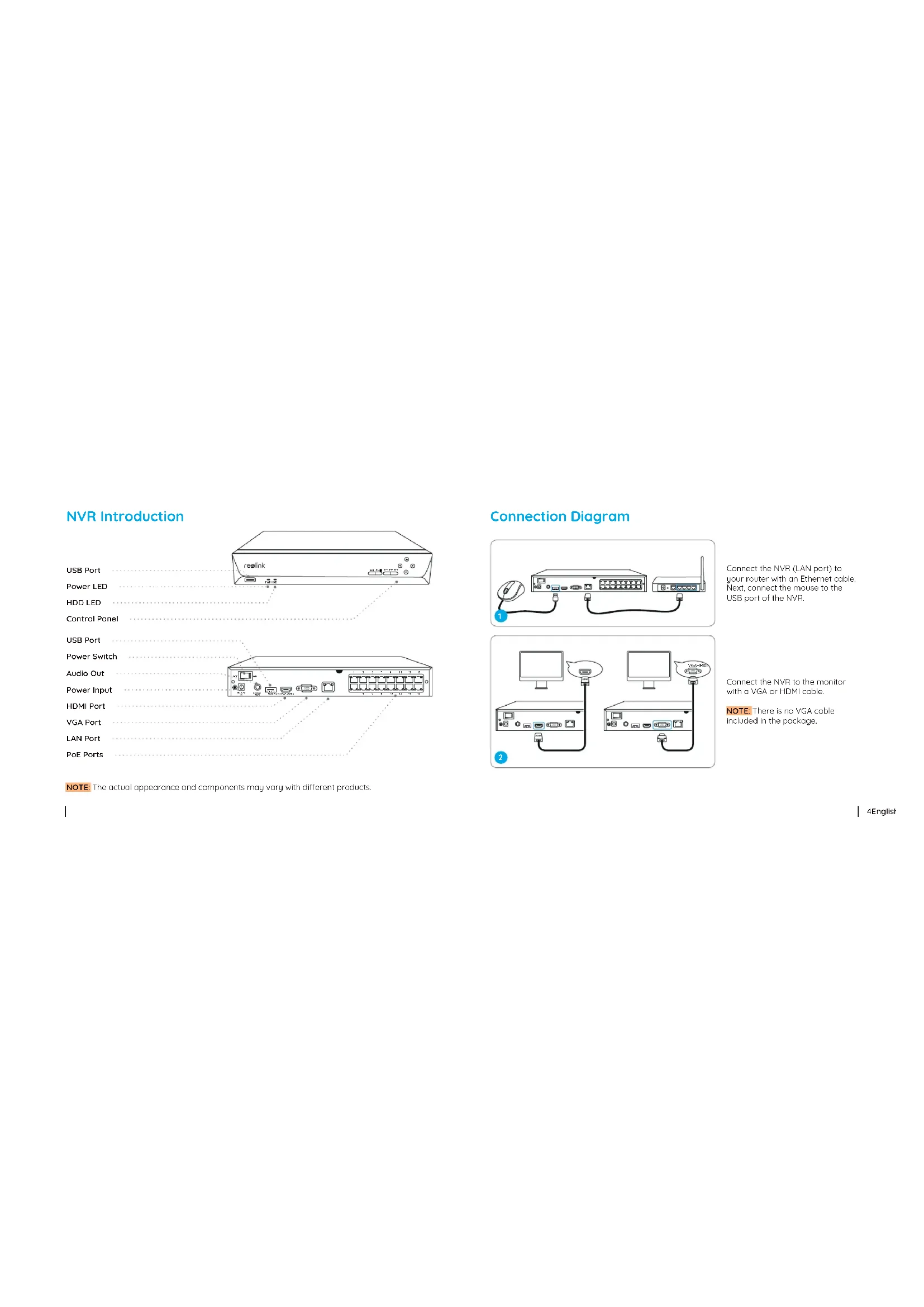
NVR Introduction
USB Port
Power LED
HDD LED
Control Panel
USB Port
Power Switch
Audio Out
Power Input
HDMI Port
VGA Port
LAN Port
PoE Ports
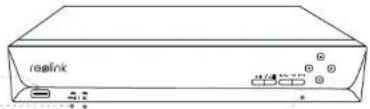
natural_image
Line drawing of a rectangular electronic device labeled 'reelink' with ports and connectors (no text beyond label)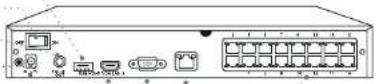
NOTE: The actual appearance and components may vary with different products.
Connection Diagram
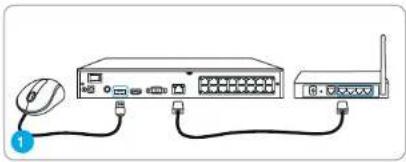
natural_image
Diagram of a network device showing a computer, mouse, and router connected by cables (no text or labels)Connect the NVR (LAN port) to your router with an Ethernet cable. Next, connect the mouse to the USB port of the NVR.
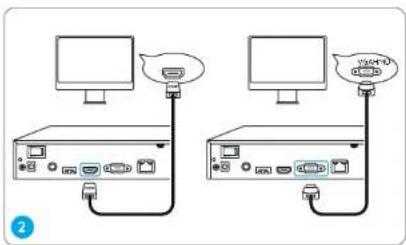
text_image
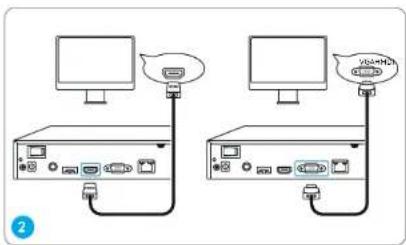
Diagram showing two computer setups connected via USB cable, with one setup emitting a device and the other emitting a USB cable.Connect the NVR to the monitor with a VGA or HDMI cable.
NOTE: There is no VGA cable included in the package.
text_image
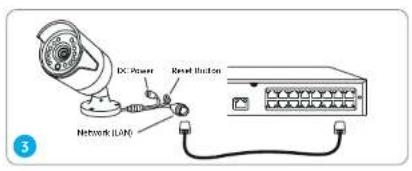
DC Power Reset Connection Network LANConnect cameras to PoE ports on the NVR.
natural_image
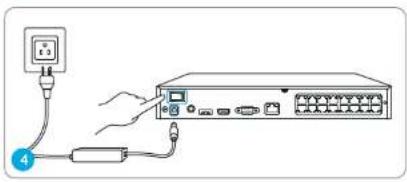
Diagram of a network device with an attached power outlet and cable, showing connections without any text or symbols.Connect the NVR to a power outlet and turn on power switch.
NOTE: Some Reolink WiFi cameras also work with Reolink PoE NVR. For more information, visit https://support.reolink.com and search Make Reolink WiFi Cameras Work with Reolink PoE-NVRs.
Set up PoE NVR System
A setup wizard will guide you through the NVR system configuration process. Please set a password for your NVR (for the initial access) and follow the wizard to configure the system.
NOTE: The password should be at least 6 characters. It is recommended that you note down the password and keep it in a secure place.
Access the NVR via Smartphone or PC
Download and launch the Reolink App or Client software and follow the instructions to access the NVR.
- On Smartphone
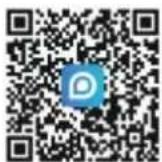
Scan to download the Reolink App.
- On PC
Download path: Go to https://reclink.com > Support > App & Client.
6English
Troubleshooting
No Video Output on the Monitor
If there's no video output on the monitor from Reolink NVR, please try the following solutions:
- TV/monitor resolution should be at least 720p or above. - Make sure your NVR is powered on - Double check the HDMI/VGA connection, or swap another cable or monitor to test.
If it still doesn't work, please contact Reolink Support https://support.reolink.com
Failed to Access the PoE NVR Locally
If you failed to access the PoE NVR locally via mobile phone or PC, please try the following solutions:
- Connect the NVR (LAN port) to your router with a network cable.
- Swap another Ethernet cable or plug the NVR to other ports on the router. - Go to Menu -> System -> Maintenance and restore all settings.
If it still doesn't work, please contact Reolink Support https://support.reolink.com
Failed to Access the PoE NVR Remotely
If you failed to access the PoE NVR remotely via mobile phone or PC, please try the following:
- Make sure you can locally access this NVR system. - Go to NVR Menu -> Network -> Network Advanced and make sure that UID Enable is selected. - Please connect your phone or PC under the same network (LAN) of your NVR and see if you can visit any website to verify whether there is Internet access available. - Please reboot your NVR and home router and try again.
- If it still doesn't work, please contact Reolink Support https://support.reolink.com
Specifications
Video/Audio Output
HDMI Output: Up to 8MP VGA Output: Up to 2MP Audio output: 1CH RCA
Decoding
Decoding Resolution: 12MP/8MP/5MP/4MP/3MP/1080p/720p Video Format: H.264,H.265 Synchronous Playback: Up to 4 Channels
General
Operating Temperature: -10°C to 45°C (-10°C to 55°C for RLN16-410) Size: 260 x 41 x 230mm, (330 x 45 x 285mm for RLN16-410) Weight: 2.0kg, (3.0kg for RLN16-410)
Notification of Compliance
FCC Compliance Statement
This device complies with Part 15 of FCC
Rules. Operation is subject to the following two conditions: (1) this device may not cause harmful interference, and (2) this device must accept any interference received, including interference that may cause undesired operation. For more information, visit: https://reolink.com/fcc-compliance-notice/.

Simplified EU Declaration of Conformity
Reolink declares that this device is in compliance with the essential requirements and other relevant provisions of Directive 2014/30/EU.

Correct Disposal of This Product
This marking indicates that this product cannot be disposed with other household wastes throughout the EU. To prevent possible harm to the environment or human health from uncontrolled waste disposal and promote the sustainable reuse of material resources, please recycle it responsibly. To return your used device, please visit the Return and Collection System or contact the retailer from whom the product was
8English
purchased. They can take this product away for environmentally safe recycling.
Limited Warranty
This product comes with a 2-year limited warranty that is valid only if purchased from Reolink Official Store or a Reolink authorized reseller. Learn more:
https://reolink.com/warranty-and-return/.
NOTE: We hope that you enjoy your new purchase. But if you are not satisfied with the product and plan to return it, we strongly suggest that you format the inserted HDD first.
Terms and Privacy
Use of the product is subject to your agreement to the Terms of Service and Privacy Policy at reolink.com. Keep it out of reach of children.
End User License Agreement
By using the Product Software that is embedded on the Reolink product, you agree to the terms of this End User License Agreement ("EULA") between you and Reolink. Learn more: https://reolink.com/eula/.
DE
Überblick
Lieferumfang 11
NVR-Einführung 12
natural_image
Diagram of a network device with a mouse, switch, and router connected by cables (no text or labels)text_image
DC Player Signal Switch Network LACnatural_image
Diagram showing connection between a network switch and a device, with no visible text or symbolsnatural_image
Line drawing of a rectangular electronic device labeled 'realink' with ports and connectors (no readable text beyond label)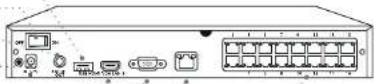
natural_image
Diagram of a network device with ports, cables, and a mouse (no text or labels)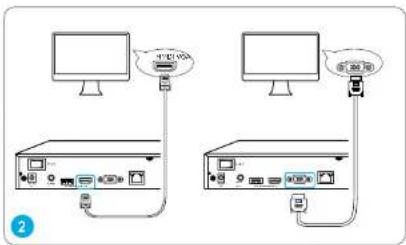
text_image
Diagram showing two computer setups connected via USB cable, with Chinese labels indicating ports and connection points.text_image
Diagram showing a device connected to a control panel with labeled ports and cablesnatural_image
Diagram showing connection between a power outlet and a network switch (no text or symbols present)contacter le support Reolink https://support.reolink.com
Spécifications
Sortie Vidéo/Audio
https://reolink.com/warranty and return/.
natural_image
Line drawing of a realink electronic device with ports and indicator lights (no text or symbols on body)
natural_image
Diagram of a network device with a mouse, ports, and WiFi connection (no text or symbols)text_image
DC Player Signal Switch Network LACnatural_image
Diagram showing connection between a network switch and a power outlet (no text or symbols present)https://reolink.com/ce-compliance-notice/.

https://reolink.com/warranty-and-return/
natural_image
Line drawing of a rectangular electronic device labeled 'realink' with ports and connectors (no text beyond label)
natural_image
Diagram of a network device showing a computer connected to a router via cables (no text or labels)