IAN 279592 - Remote control toy Playtive - Free user manual and instructions
Find the device manual for free IAN 279592 Playtive in PDF.



| Brand | Playtive |
| Model | IAN 279592 |
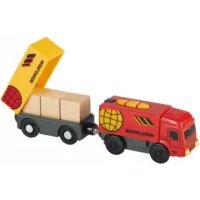
| Product type | Remote-controlled toy (truck with trailer) |
| Recommended age | 3 to 8 years |
| Power supply | 4 AA batteries (2 in the truck, 2 in the remote control) |
| Battery type | Non-rechargeable alkaline AA batteries included |
| Remote control range | Infrared, range approx. 5 meters |
| Communication channels | 2 channels (A and B) to avoid interference |
| Main functions | Forward/reverse, front/rear lights, sound effects, auto shut-off after 5 minutes of inactivity |
| Truck dimensions (approx.) | Approx. 30 cm long, 15 cm wide, 15 cm high |
| Trailer dimensions (approx.) | Approx. 25 cm long, 12 cm wide, 10 cm high |
| Total weight (approx.) | Approx. 600 g (with batteries) |
| Materials | Plastic, metal (screws) |
| Cleaning and maintenance | Wipe with a damp cloth, do not use harsh chemicals |
| Safety | Not suitable for children under 36 months (choking hazard). Use under adult supervision. |
| Warranty | 3 years (material and manufacturing defects) |
| Spare parts | Available at delta-sport.com, under the Lidl spare parts service section |
| Customer service (Switzerland) | Tel.: 0842 665566 (CHF 0.08/min), email: deltasport@lidl.ch |
| Box contents | 1 remote-controlled truck, 1 trailer, 3 loads, 1 remote control, 4 AA batteries, 1 manual |
Frequently Asked Questions - IAN 279592 Playtive
User questions about IAN 279592 Playtive
0 question about this device. Answer the ones you know or ask your own.
Ask a new question about this device
Download the instructions for your Remote control toy in PDF format for free! Find your manual IAN 279592 - Playtive and take your electronic device back in hand. On this page are published all the documents necessary for the use of your device. IAN 279592 by Playtive.
USER MANUAL IAN 279592 Playtive
Instructions for use
CE
IAN 279592



With your purchase you have decided on a high-quality product. Get to know the product before you start to use it.
Carefully read the following instructions for use.
Use the product only as described and only for the given areas of application. Keep these instructions safe. When passing the product on to a third party, always make sure that the documentation is included.
Included in this product
1 x Remote control truck
4 x Batteries (type AA)
1 x Trailer
3 x Load
1 x Remote control
1 x Instructions for use
Intended use
This item is a toy for children aged 3 to 8 for private use.

Safety instructions
- Warning! Not suitable for children under 36 months. Risk of suffocation: small parts can be swallowed or inhaled!
- Warning! The packaging and retaining materials are not a part of the toy and must always be removed for safety purposes before allowing children to play with this product.
Children may play with this article only under adult supervision.

Warning notes regarding batteries!
- Only use batteries from the same manufacturer and of the same type.
- Remove batteries once they are dead or if the item is not being used for a long period of time.
- Do not use new and used batteries at the same time.
-
Warning! Batteries must not be charged or otherwise reactivated; batteries must not be dismantled, thrown into the fire, or short-circuited.
-
Always keep batteries out of reach of children.
- Non-rechargeable batteries must not be recharged.
- Rechargeable batteries may only be charged under supervision of an adult.
- Rechargeable batteries must be removed from the item before being recharged.
- Terminals must not be short-circuited. Danger!
- Handle a damaged or leaking battery with great care and dispose of it immediately in compliance with local requirements. Please wear gloves.
- If you come into contact with battery acid, wash the affected area with water and soap. If battery acid gets into your eye, rinse thoroughly with water, and seek medical treatment immediately.

Hazard!
- Handle damaged or leaking batteries with great care and dispose of them immediately and correctly. Wear gloves during this process.
- If you come into contact with battery acid then wash the relevant area with soap and water. If battery acid gets in your eyes then rinse with water and seek medical treatment immediately.
Insert batteries
CAUTION! Follow these instructions in order to avoid mechanical and electrical damage.
Insert the enclosed batteries before using the article for the first time.
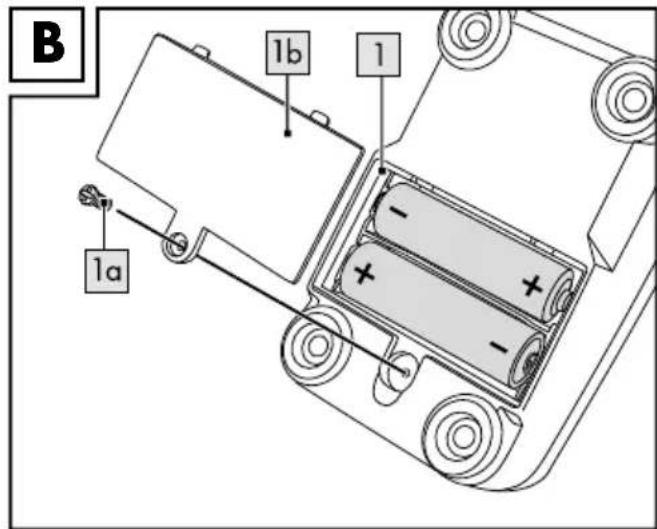
Inserting the batteries into the remote control (figure B)
- Unscrew the screw (1a) on the battery compartment (1) on the underside of the article using a suitable screwdriver.
- Remove the cover (1b) and carefully insert two batteries into the battery compartment. The batteries must be entirely inside the battery compartment.
Note: Pay attention to the positive and negative poles on the batteries and make sure you insert them correctly.
- Screw the cover on the underside tightly back in place.
Inserting the batteries into the lorry (figure C)
- Unscrew the screw (1a) on the battery compartment (1) on the back of the article using a suitable screwdriver.
- Remove the cover (1b) and carefully insert two batteries into the battery compartment. The batteries must be entirely inside the battery compartment.
Note: Pay attention to the positive and negative poles on the batteries and make sure you insert them correctly.
3. Screw the cover on the back tightly back in place.
Changing the batteries
CAUTION! Follow these instructions in order to avoid mechanical and electrical damages.
When the batteries stop working, change the batteries as described above. Remove the batteries from the article before inserting the new batteries.
Function
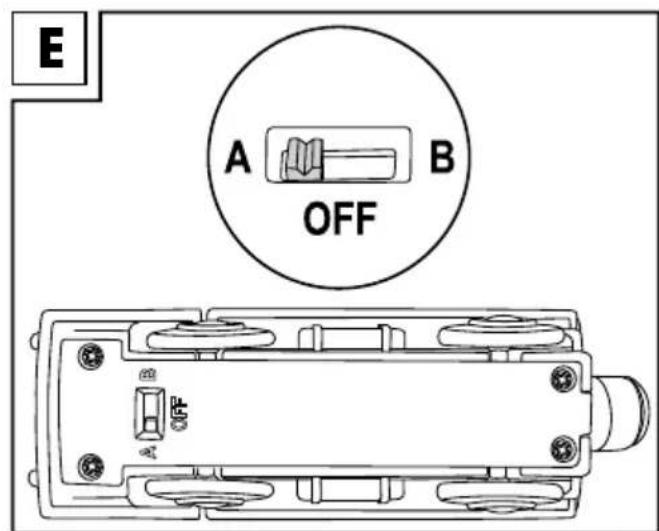
The remote control and the lorry must be set to one channel in order to control the lorry with the remote control.
- Set the control switch (2) on the remote control to A (2b) or B (2a) (figure A).
The lorry is switched off if the control switch is in the central position (figure E). - Set the control switch to the same position (A or B) as the remote control (figure E).
Remote control (figure A)
Push the lever (1) forwards or pull it backwards to make the lorry go. Let go of the lever in order to stop.
Note: If the lever is pushed forwards for longer than 1.5 seconds then the lorry will automatically continue travelling forwards. Pull the lever back once in order to stop.
If the lever is pulled backwards for longer than 1.5 seconds then the lorry will automatically continue travelling backwards. Push the lever forwards once in order to stop.
Activating the remote control
The infrared receiver on the lorry must be active in order to control the lorry with the remote control.
Press any button on the lorry in order to activate it. Only then can the lorry receive the signal from the remote control.
Note: The lorry will switch off automatically after approximately 5 minutes of inactivity. It is necessary to press any button on the lorry again in order to activate the remote control again.
Activating light and sound
Press the light button (3) in order to activate the light.
Press the sound button (4) in order to start the sound.
Lorry (figure D)
Press the front button (3) in order to activate the front light, the sound, and forward motion.
Press the middle button (2) in order to stop the sound, the light, and the lorry.
Press the back button (1) in order to activate the back light, the sound, and backward motion.
Note: The sound and light are active for approximately 5 seconds.
Note: Should the vehicle stop after a collision, activate it again by pressing one of the direction keys.
Care and storage
Always store the article in a clean, dry place at room temperature. Never clean with abrasive cleaning materials, only wipe clean with a dry cleaning cloth.
Disposal
Please dispose of the product and packaging in an environmentally friendly manner, separating different materials for recycling as required! Dispose of this item through an authorised disposal company or through your local waste disposal facilities - ask your local authority for information if further guidance is required.
Ensure that you comply with all regulations currently in force.

Dispose of batteries carefully
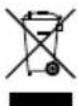
Batteries must not be disposed of along with normal domestic waste! Return batteries to recycling facilities or the dealer who sold them. Batteries are marked with
a dustbin with a red cross through it and chemical pollutant symbols "Cd" for cadmium, "Hg" for mercury and "Pb" for lead. Contact your local authority for further information if in doubt.
3-year warranty
The product was produced with great care and under constant supervision. You receive a three-year warranty for this product from the date of purchase. Please retain your receipt.
The warranty applies only to material and workmanship and does not apply to misuse or improper handling. Your statutory rights, especially the warranty rights, are not affected by this warranty. With regard to complaints, please contact the following service hotline or contact us by e-mail. Our service employees will advise as to the subsequent procedure as quickly as possible. We will be personally available to discuss the situation with you.
Any repairs under the warranty, statutory guarantees or through goodwill do not extend the warranty period. This also applies to replaced and repaired parts.
Repairs after the warranty are subject to a charge.
IAN:279592
GB
Service Great Britain
Tel.: 0871 5000 720
(£0.10/Min.)
E-Mail: deltasport@lidl.co.uk
You can also find spare parts for your product at: www.delta-sport.com, category Service - Lidl Spare Parts Service

- Download the free PLAYTIVE JUNIOR app for your iOS or Android device from the store.
- Launch the app and experience:
mini games, e.g. memory, puzzle or colour pictures.
the entire variety of wooden toys. - scan & play for an exciting 3D world.

DELTA-SPORT HANDELSKONTOR GMBH
Wragekamp 6 · D-22397 Hamburg
Mitglied im:

Version: 10/2016
Activating the remote control
The infrared receiver on the vehicle must be activated in order to steer the vehicle with the remote control.
- Insert the batteries into the remote control and into the vehicle.
- Set the same channel on the remote control and on the vehicle.
- Press any button on the vehicle in order to activate it. Note: The vehicle switches off automatically after approximately 5 minutes of inactivity.
IAN:279592
GB Service Great Britain
Tel.: 08715000720
(£0.10/Min.)
E-Mail: deltasport@lidl.co.uk
You can also find spare parts for your product at: www.delta-sport.com, category Service - Lidl Spare Parts Service
DELTA-SPORT HANDELSKONTOR GMBH
Wragekamp 6 · D-22397 Hamburg
Mitglied im:

Version: 10/2016
- CAREFULLY READ THE FOLLOWING INSTRUCTIONS FOR USE
- INCLUDED IN THIS PRODUCT
- INTENDED USE
- SAFETY INSTRUCTIONS
- WARNING NOTES REGARDING BATTERIES
- HAZARD
- INSERT BATTERIES
- CAUTION! FOLLOW THESE INSTRUCTIONS IN ORDER TO AVOID MECHANICAL AND ELECTRICAL DAMAGE
- INSERTING THE BATTERIES INTO THE REMOTE CONTROL (FIGURE B)
- INSERTING THE BATTERIES INTO THE LORRY (FIGURE C)
- CHANGING THE BATTERIES
- CAUTION! FOLLOW THESE INSTRUCTIONS IN ORDER TO AVOID MECHANICAL AND ELECTRICAL DAMAGES
- FUNCTION
- REMOTE CONTROL (FIGURE A)
- ACTIVATING THE REMOTE CONTROL
- ACTIVATING LIGHT AND SOUND
- LORRY (FIGURE D)
- CARE AND STORAGE
- DISPOSAL
- DISPOSE OF BATTERIES CAREFULLY
- 3-YEAR WARRANTY
- DELTA-SPORT HANDELSKONTOR GMBH
Brand : Playtive
Model : IAN 279592
Category : Remote control toy