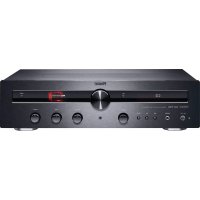
MR 750 - Receiver MAGNAT - Free user manual and instructions
Find the device manual for free MR 750 MAGNAT in PDF.



| Product Type | Stereo tube receiver |
| Dimensions (WxHxD) | 433 x 116 x 345 mm (with controls) |
| Weight | 7.6 kg |
| Power supply | 230 V / 50 Hz (adjustable 115 V) |
| Power consumption | Max. 300 W, standby < 0.5 W |
| Output power | 2 x 70 W (4 Ω, 20 Hz-20 kHz, THD < 1%); 2 x 50 W (8 Ω) |
| Frequency response | 5 Hz - 90 kHz (-3 dB) on CD/Streamer/Aux/Line |
| Signal-to-noise ratio | 102 dB (CD/Streamer/Aux/Line) |
| Analog inputs | Phono MM, CD, Streamer, AUX1/2, Line In (front) |
| Digital inputs | 1 optical (Toslink), 1 coaxial (RCA) |
| HDMI ARC input | Yes |
| Bluetooth | Bluetooth 5.0 with Qualcomm® aptX™ |
| Tuner | FM (87.5-108 MHz) and DAB/DAB+ (174.928-239.2 MHz) |
| Outputs | Speakers (4-8 Ω), Subwoofer (Sub Out), Rec Out, Headphones (6.3 mm) |
| Tube preamplifier | 1 x ECC88 |
| Functions | Balance, Bass/Treble, Direct, Dim, Auto standby, 40 FM and DAB station memory |
| Included accessories | Remote control (AAA batteries included), power cable, DAB/FM antenna, manual |
| Maintenance | Dry soft cloth; avoid chemicals; tube replacement by specialist |
| Safety | Do not expose to water, do not open the housing, use appropriate cord |
| Warranty | Warranty for the first owner, wear parts excluded |
Frequently Asked Questions - MR 750 MAGNAT
User questions about MR 750 MAGNAT
0 question about this device. Answer the ones you know or ask your own.
Ask a new question about this device
Download the instructions for your Receiver in PDF format for free! Find your manual MR 750 - MAGNAT and take your electronic device back in hand. On this page are published all the documents necessary for the use of your device. MR 750 by MAGNAT.
USER MANUAL MR 750 MAGNAT
Important notes for installation / warranty card
The Bluetooth ^® word mark and logos are registered trademarks owned by Bluetooth SIG, Inc. and any use of such marks by Magnat Audio-Produkte GmbH is under license. Other trademarks and trade names are those of their respective owners.
Qualcomm® aptX™ is a product of Qualcomm Technologies, Inc. and/or its subsidiaries. Qualcomm is a trademark of Qualcomm Incorporated, registered in the United States and other countries. aptX is a trademark of Qualcomm Technologies International, Ltd., registered in the United States and other countries.

At the end of the product's useful life, please dispose of it at appropriate collection points provided in your country.
13 Instructions for disposal
13 Declaration of conformity
13 Use as directed
14 - 16 Operational elements and connections
Front panel
Rear panel
Remote control
17 Initial Operation
17 Connecting the device to a Bluetooth audio source
17 Preset Memory
18 RDS function of the tuner
18 DAB function of the tuner
18 Auto standby function
18 Tube replacement
18 Service and technical problems
19 Specifications
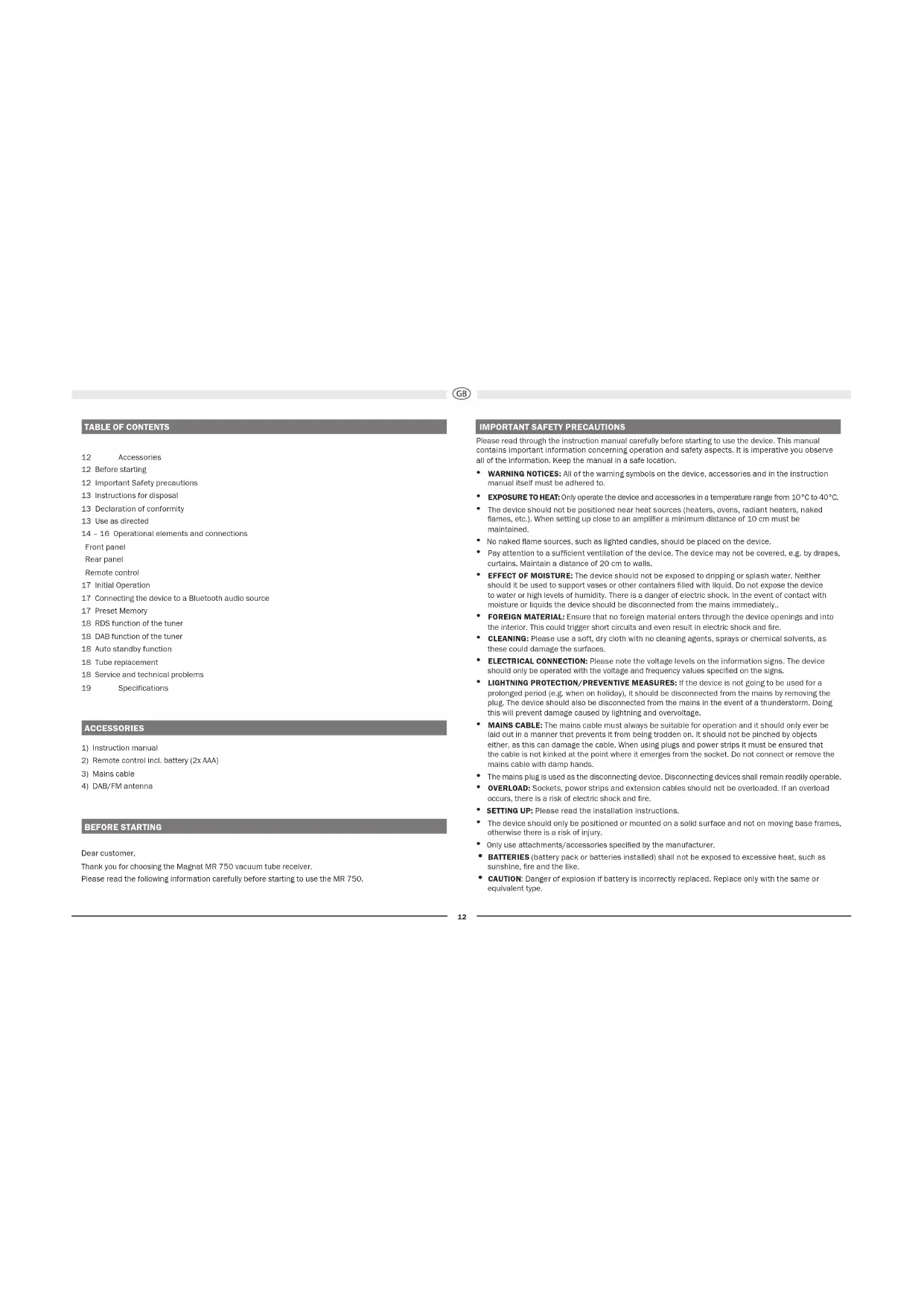
ACCESSORIES
1) Instruction manual
2) Remote control incl. battery (2x AAA)
3) Mains cable
4) DAB/FM antenna
BEFORE STARTING
Dear customer,
Thank you for choosing the Magnat MR 750 vacuum tube receiver.
Please read the following information carefully before starting to use the MR 750.
IMPORTANT SAFETY PRECAUTIONS
Please read through the instruction manual carefully before starting to use the device. This manual contains important information concerning operation and safety aspects. It is imperative you observe all of the information. Keep the manual in a safe location.
- WARNING NOTICES: All of the warning symbols on the device, accessories and in the instruction manual itself must be adhered to.
- EXPOSURE TO HEAT: Only operate the device and accessories in a temperature range from 10°C to 40°C.
- The device should not be positioned near heat sources (heaters, ovens, radiant heaters, naked flames, etc.). When setting up close to an amplifier a minimum distance of 10 cm must be maintained.
- No naked flame sources, such as lighted candles, should be placed on the device.
- Pay attention to a sufficient ventilation of the device. The device may not be covered, e.g. by drapes, curtains. Maintain a distance of 20 cm to walls.
- EFFECT OF MOISTURE: The device should not be exposed to dripping or splash water. Neither should it be used to support vases or other containers filled with liquid. Do not expose the device to water or high levels of humidity. There is a danger of electric shock. In the event of contact with moisture or liquids the device should be disconnected from the mains immediately..
- FOREIGN MATERIAL: Ensure that no foreign material enters through the device openings and into the interior. This could trigger short circuits and even result in electric shock and fire.
- CLEANING: Please use a soft, dry cloth with no cleaning agents, sprays or chemical solvents, as these could damage the surfaces.
- ELECTRICAL CONNECTION: Please note the voltage levels on the information signs. The device should only be operated with the voltage and frequency values specified on the signs.
- LIGHTNING PROTECTION/PREVENTIVE MEASURES: If the device is not going to be used for a prolonged period (e.g. when on holiday), it should be disconnected from the mains by removing the plug. The device should also be disconnected from the mains in the event of a thunderstorm. Doing this will prevent damage caused by lightning and overvoltage.
- MAINS CABLE: The mains cable must always be suitable for operation and it should only ever be laid out in a manner that prevents it from being trodden on. It should not be pinched by objects either, as this can damage the cable. When using plugs and power strips it must be ensured that the cable is not kinked at the point where it emerges from the socket. Do not connect or remove the mains cable with damp hands.
- The mains plug is used as the disconnecting device. Disconnecting devices shall remain readily operable.
• OVERLOAD: Sockets, power strips and extension cables should not be overloaded. If an overload occurs, there is a risk of electric shock and fire.
- SETTING UP: Please read the Installation Instructions.
- The device should only be positioned or mounted on a solid surface and not on moving base frames, otherwise there is a risk of injury.
• Only use attachments/accessories specified by the manufacturer.
- BATTERIES (battery pack or batteries installed) shall not be exposed to excessive heat, such as sunshine, fire and the like.
- CAUTION: Danger of explosion if battery is incorrectly replaced. Replace only with the same or equivalent type.

RISK OF SWALLOWING BATTERIES!
The product/remote control may contain a battery, which can be swallowed. Keep the battery out of reach of children at all times! If swallowed, the battery can cause serious injury or death. Severe internal burns can occur within two hours of ingestion.
- If you suspect that a battery has been swallowed or placed inside any part of the body, seek immediate medical attention.
- When you change the batteries, always keep all new and used batteries out of reach of children. Ensure that the battery compartment is completely secure after you replace the battery.
- If the battery compartment cannot be completely secured, discontinue use of the product. Keep out of reach of children and contact the manufacturer.
DAMAGE THAT MUST BE RECTIFIED BY A SPECIALIST:
If any of the following damage occurs, disconnect the device from the mains immediately and contact a specialist to conduct the repair work:
- The device should not continue to be operated if there is visible damage to the mains cable. A damaged cable should not be repaired, but must be replaced.
• Damage to the mains socket at the device.
• If moisture or water has entered the device or foreign objects have fallen into the device.
• If the device has fallen and the housing is damaged. - If the device does not work properly, even though all of the information in the instruction manual has been observed.
Only those subsequent alterations approved by the manufacturer may be conducted.
Only original spare parts should be used for repair.
After conducting any repairs the safety of device should be checked to ensure it is functioning correctly and safely.
Repairs must always be conducted by qualified specialists, as you might otherwise be exposed to dangerous high voltage levels or other hazards.

This symbol warns the user that high voltage is used within the device which can result in electric shock.

This symbol makes the user aware that there are important notes in the enclosed instruction manual which must be observed.
WARNING:DO NOT OPEN! RISK OF ELECTRIC SHOCK!
To reduce the risk of fire or electric shock, do not expose this unit to rain or moisture.

This is Class II apparatus with double insulation, and no protective earth provided.
INSTRUCTIONS FOR DISPOSAL
In accordance with European Directive 2012/19/EU all electrical and electronic appliances must be disposed of separately via local collection points. Please observe the local regulations and do not dispose of your old appliances with normal household waste.
Battery disposal
Old batteries are hazardous waste and must be disposed of in accordance with current regulations.
DECLARATION OF CONFORMITY

Hereby, Magnat Audio-Produkte GmbH declares that the device Magnat MR 750 is in compliance with the essential requirements and other relevant provisions of directive 2014/53/EU. The Declaration of Conformity can be found at www.magnat.de in the download area of the device.
USE AS DIRECTED
This device is designed for indoor use only.

OPERATIONAL ELEMENTS AND CONNECTIONS - FRONT PANEL
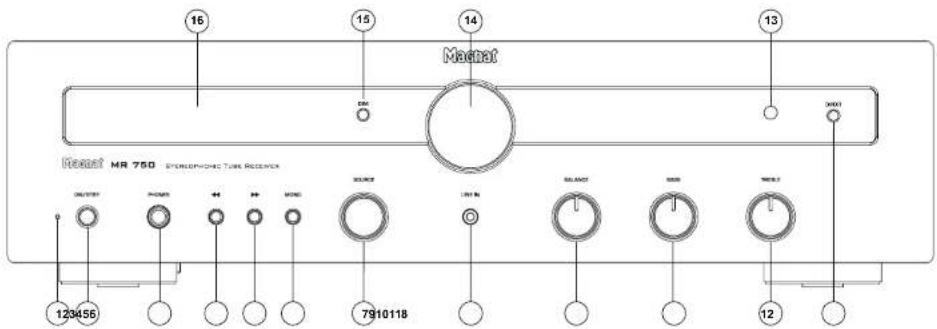
1 LED STATUS INDICATION
This illuminated display indicates the MR 750's 2 possible states:
• LED is illuminated green: The MR 750 is
switched on. The device is ready for use.
- LED is illuminated red: The MR 750 is in the standby mode.
2 ON/STBY
Switches the device on when it is in the standby mode. If the LED does not illuminate, actuate the power switch located on the rear of the device. Conversely the device can be switched from power operation to the standby mode.
3 HEADPHONES
6.3 mm stereo output jack for headphones. The speakers are deactivated when this jack is used. Set the volume to a low level before connecting headphones.
4.5 ◀◀,▶▶
EM mode:
- Brief press: Changes the receiving frequency in 50kHz increments (FM) (manual station search).
- Press and hold: Searches for the next station (automatic station search).
DAB mode: - Selects the next or previous station in the DAB band.
6 MONO (IN FM MODE ONLY)
Switches between FM-Stereo and FM-Mono for FM stations.
In stereo mode, the system will automatically switch to mono reception when the signal is weak in order to improve signal-to-noise ratios.
7 SOURCE (INPUT SELECTOR SWITCH)
Switches between the different audio sources:
- PHONO: Record players with a magnet system (MM).
• CD: CD player.
• STREAMER: Streamer/DVD/BD player
• AUX 1/2: Other audio devices.
• LINE IN: Front input for portable devices
• HDMI: HDMI (ARC) input
• BT: Connection to a Bluetooth device
• DIGITAL OPT, DIGITAL COAX
Connecting to digital audio sources.
• FM INPUT: Selection of the FM tuner
• DAB INPUT: Selection of the DAB/DAB+ tuner
8 LINE IN
3.5 mm stereo Input jack for an auxiliary audio device (e.g. MP3 player, etc.).
9 BALANCE
For adjusting the stereo balance between the speakers to the right or to the left.
10.11 EQUALISATION: BASS / TREBLE
The bass and treble reproduction can be set individually with these controls.
12 DIRECT
The device is switched to the linear mode. The TREBLE and BASS levels cannot be adjusted in this mode. DIRECT ON appears in the display.
13 SENSOR FOR THE REMOTE CONTROL
Please aim at this sensor when using the remote control.
14 VOLUME
For adjusting the overall volume of the music.
15 DIM
This button can be used to adjust the brightness of the display (3 levels).
16 DISPLAY
The following information is indicated in the display:
• Heating phase of the tube.
This lasts for around 30 seconds after the
device has been switched on.
- Selected audio input
• Volume information
- Station and reception information in FM and DAB mode. See also the INFO button on the remote control in this regard.

OPERATIONAL ELEMENTS AND CONNECTIONS - REAR PANEL
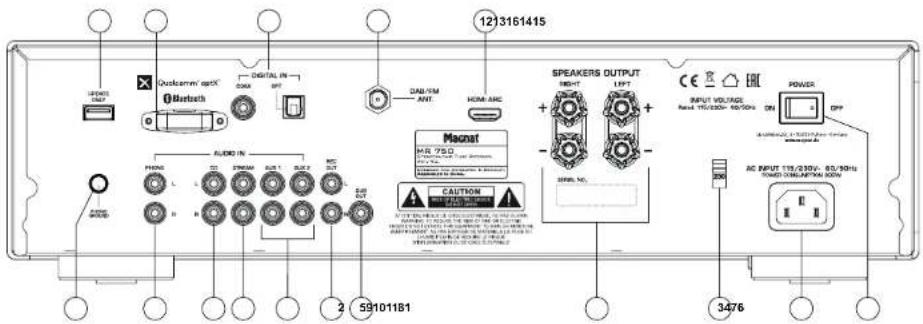
1 POWER SWITCH
Switches the device on and sets it in the standby mode. If the switch is set to the "OFF" position, the device is disconnected from the mains supply.
2 MAINS CONNECTION
For connecting the supplied mains cable. The safety fuse should only be changed by qualified service personnel.
3 115/230V (VOLTAGE SELECTOR)
The voltage selector has been set at the factory to 230 V for operation in Europe.
Warning: Connecting the device to a 230 V mains outlet while the voltage selector is set to 115 V will lead to immediate destruction of the amplifier!
4 SPEAKER TERMINALS
For the connection of stereo speakers with an impedance rating of 4-8 ohms (the correct polarity must be taken into account). (See also INITIAL OPERATION).
5 SUB OUT
For the connection of an active subwoofer.
6 REC OUT
For connecting devices for analogue sound recording (e.g. tape recorder). The signal for the selected audio source with fixed level applies for this output, i.e. it is independent of the position of the volume knob.
ANALOGUE RCA CONNECTIONS (7 - 10)
For connecting analogue audio sources. Please observe the coloured marking of the sockets and connectors. Red is always the right channel.
7 AUX INPUTS
Connecting other audio sources (e.g. MP3 or Minidisc player).
8 STREAMER INPUT
Connecting a Streamer, DVD or Bluray player.
9 CD INPUT
Connection of a CD player.
10 PHONO INPUT
Connection of a record player with a magnet system (MM) or MC system with high output level (high output MC).
11 PHONO EARTH CONNECTION
Connection of the phano cable's earth wire in order to prevent humming.
12 HDMI ARC
Connect your TV to this port if it has an HDMI ^ socket with ARC functionality (Audio Return Channel, HDMI ^ 1.4 standard). Only basic functions of the loudspeaker such as volume and mute can be controlled via your TV's remote control. The necessary HDMI ^ connecting cable is not included in delivery.
13 DAB/FM ANTENNA CONNECTION
For connecting the supplied DAB/FM antenna or a house antenna.
14 DIGITAL IN OPT. COAX
Connect the MR 750 to the digital output on your CD player/computer/games console/network player, etc. by using an optical or coaxial digital audio cable.
15 BLUETOOTH ANTENNA
16 UPDATE
This connection is intended exclusively for system updates.
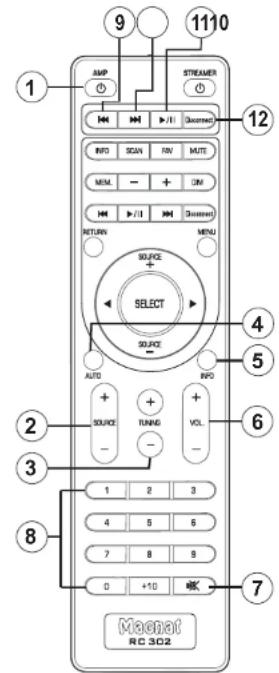

OPERATIONAL ELEMENTS AND CONNECTIONS - REMOTE CONTROL
- Before using the remote control the supplied batteries must be inserted into the battery compartment located at the rear of the remote control.
- If the batteries have run out after prolonged use, please replace them (type AAA).
- To prevent causing damage to the remote control please remove the batteries if the device is not going to be used for a prolonged period.
1 AMP
Switches the device on when it is in the standby mode. If the LED does not illuminate, actuate the power switch located on the rear of the device. Conversely the device can be switched from power operation to the standby mode.
2 SOURCE (INPUT SELECTION)
Switches between the different audio sources: (see also FRONT PANEL, Pos. 7). The active input is indicated in the display..
3 TUNING
FM mode:
- Brief press: Changes the receiving frequency in 50kHz increments (FM) (manual station search).
- Press and hold: Searches for the next station (automatic station search).
DAB mode:
- Selects the next or previous station in the DAB band.
4 AUTO (DAB MODE)
This function scans the DAB frequency range (band III) for stations. These can then be accesses via the TUNING buttons.
5 INFO
FM mode:
Retrieving RDS Information (if supported by the station).
Further details about the RDS station information can be found in the "RDS functions of the tuner" section.
DAB mode:
Retrieving DAB station information (if supported by the station).
Further details about the DAB station information can be found in the "DAB functions of the tuner" section.
Bluetooth mode:
The display shows the device ID of the paired device, the data rate and the ID3 tag information of the current title.
Pressing this button displays the individual ID3 tag information items in the following order:
Title - performer - album - no display
Digital Inputs:
The display shows the data rate of the current title for around 5 seconds.
6 VOLUME
Increases (▲) or decreases (▼) the volume.
7 MUTE
Switches the sound on and off.
8 NUMERICAL BUTTONS
Pressing this once starts the track currently being played on a Bluetooth source device from the beginning. Repeatedly pressing the button allows you to skip to previous tracks.
10 SKIP TRACK FORWARDS (BLUETOOTH OPERATION)
Pressing this once starts the track currently being played on a Bluetooth source device from the beginning. Repeatedly pressing the button allows you to skip to subsequent tracks.
11 PLAY/PAUSE (BLUETOOTH OPERATION)
Pauses the current track on a Bluetooth device or resumes playback.
12 DISCONNECT (BLUETOOTH OPERATION)
Closes an existing Bluetooth connection and starts the pairing mode
The non-numbered buttons are reserved for operating the Magnat MMS 730 and have no function for the MR 750.

INITIAL OPERATION
- Place the MR 750 on an even surface. Observe the relevant clearance gaps as specified under "Important safety instructions".
IMPORTANT: Do not place any objects on top of the device (magazines, CD/record cases, etc.). The ventilation slots located on top of the device must be unobstructed at all times! - Connect your speakers:
The stereo speakers (impedance of 4 to 8 ohms) are connected to the rear as follows:
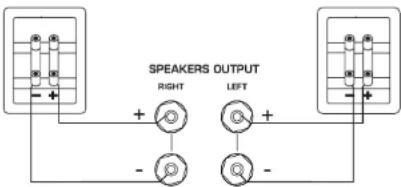
flowchart
graph TD
    A["Speaker Output"] --> B["Left"]
    A --> C["Right"]
    B --> D["+"]
    C --> E["-"]
    D --> F["○"]
    E --> G["○"]
    F --> H["+"]
    G --> I["-"]
    H --> J["○"]
    I --> K["○"]
Only use high-quality audio speaker cables with a conductor cross section of min. 1.5 - 2.5 mm ^2 . Strip approx. 10 mm from the cables and twist the ends. Loosen the terminal screws one after the other and insert the stripped ends into the holes. Re-tighten the terminal screws. Make sure you pay attention to the correct polarity.
You can also use prefabricated cables with 4mm banana plugs or forked fittings. Also observe the operating instructions for the speakers you are using.
- Connect your audio sources.
- Connect the DAB/FM antenna to the antenna connection point at the rear of the device. For later operation, the position of the antenna should then be determined according to where the best reception is. The end of antenna should then be secured in the appropriate position, e.g. using a drawing pin.
Reception can be Improved by a suitable indoor or outdoor household antenna if the reception is not so good. - Connect the supplied mains cable to the rear and then insert the other end into a 230V socket.
- Actuate the on/off switch on the rear side, the device is now in the standby mode.
- Now switch on the device using the remote control or with the ON/STBY key on the front.
- When the tube has heated up the device is ready for use.
- Select your desired audio source using the input selector switch.
CONNECTING THE DEVICE TO A BLUETOOTH AUDIO SOURCE
Select Bluetooth input. If you have previously connected a Bluetooth device, the MR 750 will automatically attempt to re-establish a connection with this device. If this is the case, you may be required to manually reconfirm the connection on the source device.
If a connection has not already been made or the connection cannot be re-established, the MR 750 will automatically activate the ,pairing mode'. ,BT" will flash on the display.
Now activate the Bluetooth mode on your source device. The MR 750 will appear in the list of Bluetooth devices as "MR 750". If it is not displayed in the list, set your source device to search for Bluetooth devices manually and make sure that the MR 750 has been switched to the pairing mode.
Depending on the source device, you may be asked whether the password is to be accepted during the pairing procedure. You can confirm this by simply pressing „Accept“. If you are still asked for a password, use the default passwords „0000“ or „1234“. If you are asked if you want to establish a connection after pairing, please select „Yes“. When the device has been paired and connected successfully the „BT“ indicator will illuminate continuously.
The MR 750 supports the „Qualcomm® aptX™* high quality audio transmission standard. If your source device also supports this standard, „Qualcomm® aptX™* will be selected automatically as the transfer mode when establishing a Bluetooth connection.
PRESET MEMORY
The device is equipped with two independent PRESET memories for FM and DAB stations. Each memory can store up to 40 stations.
Storing stations:
Set the desired DAB or FM stations using the TUNING buttons on the unit or via the remote control.
- Select the desired storage location by holding down the corresponding key on the numeric keypad.
- In the case of two-digit storage location numbers (10 - 40), the +10 key first has to be pressed for a longer time and the desired digits then entered.
- Successful storage is confirmed on the display with the appearance of STORED PRESET. In the first line, the storage location number is played permanently before the station frequency.
Select a station from the list of stations:
Select the desired storage location via the numerical keyboard (by pressing briefly).

RDS (RADIO DATA SYSTEM)-FUNCTION OF THE TUNER (FM ONLY)
RDS is a system which provides information about FM stations that is broadcast together with the station's signal. The MT 520 can present this information (about the station, broadcast, etc.) in the display.
The RDS information can be retrieved by repeatedly pressing the INFO button (remote control) in the following order:
• PS (Program Service Name): Displays the name of the programme.
• RT (Radio Text): Shows station information and messages.
• PTY (Program Type): Displays the type of programme.
• Time / Date
If one of these functions is not supported despite reception of an RDS signal, N/A^* will appear in the display.
DAB FUNCTIONS OF THE TUNERS (DAB ONLY)
The DAB transmission system provides further data and information that can be accessed via the INFO button (remote control) in the following order:
- Station name
- DLS (Dynamic Label Segment): Shows station Information and messages (e.g. title and artist of the current song, news messages, other information about the current programme or station)
- Programme type (e.g. pop, news, classical)
• DAB multiplex number and frequency of the current station
• Time / Date - Bit rate of the current audio signal
• DAB multiplex name
AUTO STANDBY FUNCTION
The unit has an auto standby function that automatically switches the device to standby mode around 4 hours after the last time it was operated (via the controls on the unit or via the remote control). This function implements an EU energy-saving regulation (1275/2008 EC), reducing power consumption if the device is accidentally left turned on after use.
This function can be deactivated as follows:
Press the DIM button on the device for around 5 seconds. APO MODE OFF appears in the display.
Pressing the button again for around 5 seconds activates the function again.
APO MODE ON then appears in the display.
TUBE REPLACEMENT
The device has a high-quality preamplifier stage fitted with one tube. The tube has a very long service life when used under normal operating conditions (min. 20,000-50,000 hours).
If it is necessary to replace the tube, please refer to a specialist dealer.
SERVICE AND TECHNICAL PROBLEMS
If you should encounter any technical problems, please contact your specialist dealer or Magnat Audio-Produkte GmbH, Tel.: 02234807-0.

SPECIFICATIONS
FM Tuner
Frequency range: FM: 87.5 - 108 MHz
DAB/DAB+: 174.928 - 239.200 MHz (Band III)
Sensitivity FM: -108 dBm
DAB/DAB+: -100 dBm
Amplifier
Power output:
Rated power 20 Hz - 20 kHz, THD < 1.0%, 4 ohm 2 x 70 W
20 Hz - 20 kHz, THD < 1.0%, 8 ohm 2 x 50W
Peak power: 1 kHz, 4 ohm 2 x 125 W
Frequency response:
CD/Streamer/Aux/Line 5 Hz - 100 kHz (-3 dB)
20 Hz - 20 kHz (+/- 0.3 dB)
Phono 20 Hz - 20 kHz (+/- 0,8 dB)
Subsonic filter: 16 Hz, 18 dB/octave
Signal to noise ratio:
CD/Streamer/Aux/Line 102 dB
Phono 82 dB
Input sensitivity/impedance:
CD/Streamer/Aux/Line 470 mV / 100 kohm
Phono MM 5 mV / 47 kohm
Digital inputs
1x coaxial (cinch)
Supported sampling frequencies: 44.1/48/88.2/96/176.4/192kHz
Supported bit depths: 16/24bits
Bluetooth® input
Operating frequency:
1x optical (Toslink™)
Bluetooth® 5.0 / Qualcomm® aptX™
2402 - 2480 MHz
Maximum emitted power according
to EN 62479: 1.02 dBm
Electricity consumption: Max. 300 W
Standby <0.5 W
Fitted with:
Phono Preamplifier: 1 x ECC 88
Dimensions {wxhxd}:
Main device: 433 x 116 x 300 mm
Main device incl. operational
elements/connecting terminals: 433 x 116 x 345 mm
Remote Control: 45 x 175 x 20 mm
Weight: 7.6 kg
SUBJECT TO TECHNICAL CHANGE.
For further information please visit our website: http://www.magnat.de.

SOMMAIRE
20
Accessoires
INSTRUCTIONS POUR LA MISE AU REBUT
DÉCLARATION DE CONFORMITÉ

PRISES CINCH ANALOGIQUES (7 - 10)
14 DIGITAL IN OPT, COAX
9 SAUT AU TITRE PRÉCÉDENT (MODE BLUETOOTH)
REMPLACEMENT DES TUBES
ATTACCHI ANALOGICI CINCH (7 - 10)
14 DIGITAL IN OPT, COAX
(MODALITÀ BLUETOOTH)
(MODALITÀ BLUETOOTH)
14 DIGITAL IN OPT, COAX
Congratulations! You have made a wise selection in becoming the owner of a MAGNAT HiFi equipment.
The equipments are checked and tested continuously during the entire production process. In case you have problems with HiFi equipment, kindly observe the following:
-
The warranty period commences with the purchase of the component and is applicable only to the original owner.
-
During the warranty period we will rectify any defects due to faulty material or workmanship by replacing or repairing the defective part at our discretion. Further claims, and in particular those for price reduction, cancellation of sale, compensation for damages or subsequent damages, are excluded.
-
Unauthorized tampering with the equipment will invalidate this warranty.
-
Consult your authorized dealer first, if warranty service is needed. Should it prove necessary to return the component to the factory, please insure that • the component is packed in original factory packing in good condition • your enclose your receiat as proof of purchase.
-
Excluded from the warranty are: • Illumines • Valves • Batterias • Wear parts • Slipping damages, either readily apparent or concealed (claims for such damages must be Inded immediately with forwarding agent, the railway express office or past office), • Scratches in cases, metal components, front panels, etc. (You must notify your easier directly of such defects within three days of purchase.) • Defects ceased by incorrect installation or connection, by operation errors (see operating instructions), by overading or external force. • Equipments which have been repaired incorrectly or modified or where the case has been opened by persons other than any subsequent marital defects to other equipments. • Reimbursement of cards, without our prior consent, where repairing damage by third parties.

Toutes nos félicitations!
Name and address of the dealer/stamp
Käufer/Customer
Name/Name
Straße/Street
PLZ, Ort/City
Land/Country
Kaufdatum/buying date