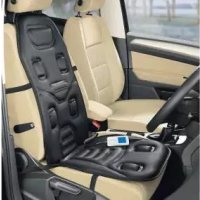
UAMM 12 B2 - Massage chair ULTIMATE SPEED - Free user manual and instructions
Find the device manual for free UAMM 12 B2 ULTIMATE SPEED in PDF.

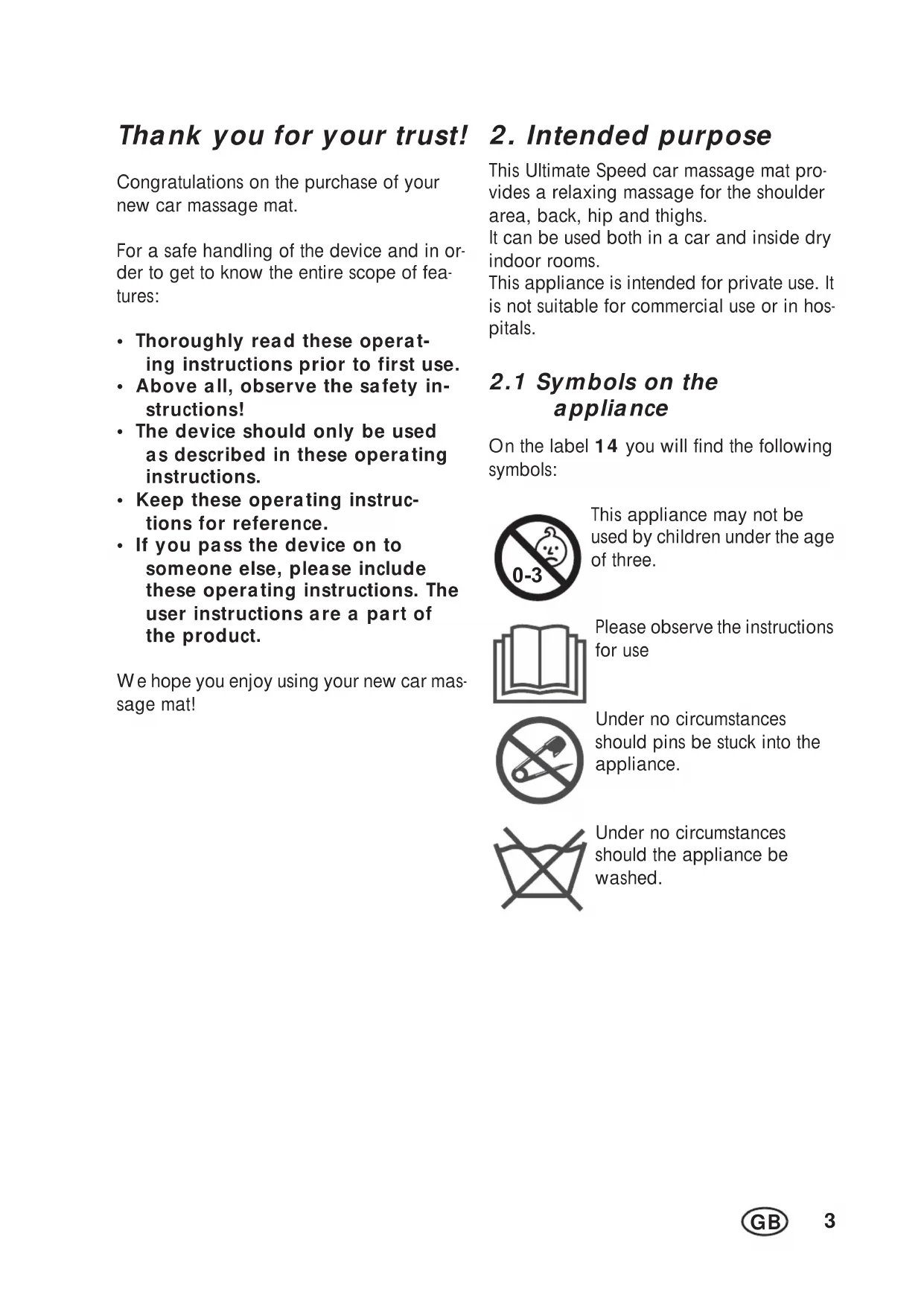


| Product type | Massage seat |
| Brand | Ultimate Speed |
| Model | UAMM 12 B2 |
| Power supply | Mains adapter 100-240 V~50/60 Hz (output 12 V / 1 A) or 12 V car cigarette lighter cable |
| Power consumption | 12 V, 900 mA (max. 10.8 W) |
| Number of programs | 5 (including AUTOMATIC program) |
| Massage zones | 4 (neck, back, lumbar, thighs) |
| Intensity levels | 2 (high and low) |
| Heating function | Yes, activation/deactivation via HEAT button |
| Timer | Automatic shut-off after 30 minutes |
| Car use | Yes, via included 12 V cigarette lighter cable |
| Home use | Yes, via included mains adapter |
| Remote control | Yes, with POWER, HEAT, INTENSITY, MODE and zone functions |
| Attachment | Fixing straps for car seat or armchair |
| Car cable fuse | Type F3AL 250 V, replaceable |
| Approximate dimensions | 120 x 50 x 5 cm (length x width x thickness) |
| Approximate weight | 4 kg |
| Care and cleaning | Clean with a damp cloth and a little mild dish soap; do not immerse |
| Warranty | 3 years (manufacturer warranty HOYER Handel GmbH) |
| Spare parts | Available via customer service (IAN: 305230) |
| Safety instructions | Not suitable for children under 3 years; supervision required for ages 3-8; do not use while driving |
Frequently Asked Questions - UAMM 12 B2 ULTIMATE SPEED
User questions about UAMM 12 B2 ULTIMATE SPEED
0 question about this device. Answer the ones you know or ask your own.
Ask a new question about this device
Download the instructions for your Massage chair in PDF format for free! Find your manual UAMM 12 B2 - ULTIMATE SPEED and take your electronic device back in hand. On this page are published all the documents necessary for the use of your device. UAMM 12 B2 by ULTIMATE SPEED.
USER MANUAL UAMM 12 B2 ULTIMATE SPEED
CAR MASSAGE SEAT COVER UAMM 12 B2
- Overview 2
- Intended purpose 3
2.1 Symbols on the appliance.. 3
- Safety information 4
- Items supplied 6
5.Unpacking and connecting 6
5.1 Using the massage mat in a car 6
5.2 Using the massage mat at home 6
- Operation 6
6.1 Switching the device on and off.. 6
6.2 Selecting a program 7
6.3 Switching massage areas on and off.. 7
6.4 Switching the heating on and off 7
- Cleaning and maintenance 7
7.1 Cleaning the appliance 7
7.2 Changing the fuse in the car lead 8
- Disposal 8
- Technical specifications 8
- Warranty of the HOYER Handel GmbH 9
1. Overview
1 PO W E R On/off button with LED display
2 HE A T Heating button with LED display
3 I N T E N S I T Y Select from two massage intensity settings
HIGH with red LED / LOW with yellow LED
4 MODE Select different programs - with LED display
5 Switch massage of individual body areas on and off
6 Massage mat
7 Power plug
8 Mains adapter
9 Car lead
10 Power socket
11 Securing strap
12 Remote control
13 Pocket for remote control
14 Label
Thank you for your trust!
Congratulations on the purchase of your new car massage mat.
For a safe handling of the device and in order to get to know the entire scope of features:
- Thoroughly read these operating instructions prior to first use.
- Above all, observe the safety instructions!
- The device should only be used as described in these operating instructions.
- Keep these operating instructions for reference.
- If you pass the device on to someone else, please include these operating instructions. The user instructions are a part of the product.
We hope you enjoy using your new car massage mat!
2. Intended purpose
This Ultimate Speed car massage mat provides a relaxing massage for the shoulder area, back, hip and thighs.
It can be used both in a car and inside dry indoor rooms.
This appliance is intended for private use. It is not suitable for commercial use or in hospitals.
2.1 Symbols on the appliance
On the label 14 you will find the following symbols:
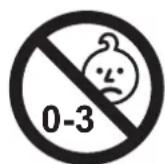
This appliance may not be used by children under the age of three.

Please observe the instructions for use

Under no circumstances should pins be stuck into the appliance.
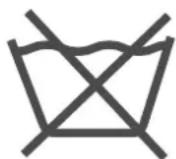
Under no circumstances should the appliance be washed.
3. Safety information
Warnings
If necessary, the following warnings will be used in these operating instructions:

DANGER! High risk: failure to observe this warning may result in injury to life and limb.
WARNING! Moderate risk: failure to observe this warning may result in injury or serious material damage.
CAUTION: low risk: failure to observe this warning may result in minor injury or material damage.
NOTE: circumstances and specifics that must be observed when handling the device.
Instructions for safe operation
Children younger than three may not use this appliance because they are unable to react appropriately to it overheating.
Children aged between three and eight may use the appliance only provided the remote control has been previously set up by a parent or guardian or the child has been adequately instructed on the safe use of the remote control.
- This appliance may be used by children older than eight, and by persons who have reduced physical, sensory or mental ability or are lacking in experience and/ or knowledge, provided they are supervised or have been instructed in the safe use of the appliance and have understood the associated hazards.
- The surfaces of the appliance are liable to be hot. The appliance may not be used by persons with impaired sensitivity to heat, nor by other vulnerable persons who are unable to react appropriately to it overheating.
- Do not allow children to play with the appliance.
- Unsupervised children may not be permitted to carry out cleaning or maintenance of the appliance.
- Always take the mains plug out of its socket before cleaning.
- Never immerse the appliance in water, and protect it from splashes and water droplets.
- Do not use the appliance while it is wet.
- When the appliance is not in use it should be stored as described below:
-
Always allow the appliance to cool down before folding it up.
-
While it is in storage, do not allow the appliance to be excessively compressed or distorted by objects placed on top of it.
-
Frequently check the appliance for signs of damage or wear. If such signs are observed, or if the appliance has been used inappropriately or fails to work, it must be returned to the dealer before any further use.

DANGER for children
- Packing materials are not children's toys. Children should not be allowed to play with the plastic bags: there is a risk of suffocation!
- Keep the device out of the reach of children.

DANGER to and from pets and livestock
- Electrical devices can represent a hazard to pets and livestock. In addition, animals can also cause damage to the device. For this reason you should keep animals away from electrical devices at all times.
General information
Follow the instructions given below to prevent material damage: Never use scouring, corrosive or abrasive cleaning materials.
- Check that the mains voltage required (see type plate on the mains adapter) is compatible with your mains voltage.
Please note that any claim under the warranty or for liability will be invalid if accessories are used that are not recommended in these user instructions, or if original spare parts are not used for repairs. This also applies to repairs undertaken by unqualified persons.
- If the appliance should develop a fault during the warranty period, it may only be repaired by our Service Centre. Otherwise all claims under warranty are null and void.
Do not use any mains adapter other than the one supplied.
- Ensure that it is not possible for anyone to trip over or to get caught up in or step on the car plug lead or mains adapter lead.
The appliance must not be left operating without supervision. The development of an odour is usually the first indication of major damage, such as overheating.
- If using the appliance for a prolonged time with power supplied via the cigarette lighter, take care that the car battery does not become fully discharged.
- To avoid overheating, the appliance must not be operated near to heat sources or in direct sunlight.

DANGER! Risk of electric shock
The appliance must not under any circumstances be used if the appliance or parts of it is damaged. Have the car massage mat repaired in such cases by a qualified technician.
Water or other liquids must never be allowed to enter the appliance. For this reason:
- never use it outdoors;
- never use it in very humid environments;
- never place drinks or other liquids on the appliance;
-
always keep the mains adapter or car lead away from moisture.
-
If liquid should enter the appliance, unplug the power plug immediately and have the appliance repaired by a qualified technician.
-
Never pick up the mains adapter when your hands are wet.
- If you are not using the appliance for a prolonged period of time, unplug the mains adapter or car lead. This is the only way to ensure the complete absence of electric power and to protect against the appliance being switched on accidentally.

DANGER in road traffic
In the case of side airbags, the middle and upper fastening strap must not be used.
- If you have any questions about the airbag, please consult your car manual or ask at your car workshop.
- Never use the appliance in the car while it is in motion. It may cause a distraction and endanger traffic safety. If you wish to change the settings, stop the vehicle.
4. Items supplied
1 car massage mat 6
1 mains adapter 8
1 car lead 9
1 set of user instructions
5. Unpacking and connecting
Unpacking
- Remove all parts from the packaging.
- Check that all parts are present and intact.
5.1 Using the massage mat in a car
-
Place the massage mat 6 on the car seat.
-
Figure A/B: Fasten the massage mat 6 carefully with the securing straps 11.
- Plug the car lead 9 into the cigarette lighter or another suitable 12V connection.
- Plug the power plug 7 on the car lead 9 into the power socket 10.
5.2 Using the massage mat at home
- Place the massage mat 6 on a suitable chair or armchair.
- Fasten the massage mat 6 carefully with the securing straps 11.
- Plug the mains adapter 8 into a mains socket that complies with the technical data.
- Plug the power plug 7 on the mains adapter 8 into the power socket 10.
6. Operation
6.1 Switching the device on and off
-
Switch the device on by pressing the POWER 1 button. The LED next to POWER is lit red continuously during operation.
-
The device always starts in the program AUTOMATIC at the setting LOW. The corresponding LEDs are lit.
-
As soon as the device is switched on, an internal timer starts. To protect the device against accidental continuous operation, it switches off automatically after 30 minutes.
-
To switch off the device before 30 minutes have passed, press the POWER 1 button again.
6.2 Selecting a program
There are a total of 5 programs available. The device always starts in the program AUTOMATIC. The programs differ in their intensity and the massage rhythm.
- During operation, press the MODE 4 button to switch to the next program. The LED next to the active program is lit green.
- Press the MODE 4 button again to switch to the next program.
NOTE: in the selected programs, you can use the buttons 5 to switch the motors in individual massage areas on and off, the INTENSITY 3 button can be used to determine general intensity, and the HEAT 2 button can be used to add the heating function.
6.3 Switching massage areas on and off
Each of the 4 massage areas (NECK, BACK, LUMBAR, THIGHS) can be switched on and off individually.
- During operation, press one of the 4 buttons 5 to switch the corresponding motor on or off. The LED next to the active area is lit red. If an area is not active, the LED is off.
6.4 Switching the heating on and off
- Press the HEAT 2 button to switch on the heating function. The red LED next to HEAT is lit. The massage mat is now heated from inside.
- Press the HEAT 2 button again to switch off the heating function. The red LED next to HEAT goes out.
NOTE: you can use the buttons 5 to switch off all motors. Then, only the heating function is active.
7. Cleaning and maintenance
7.1 Cleaning the appliance
To ensure your product gives you lasting service, you should clean it regularly.

DANGER! To avoid the danger of an electric shock or damage!
Always disconnect the power supply before cleaning.
Never immerse the machine in water.
- Never allow water or cleaning agent to run into the machine.
CAUTION :
-
Never use caustic or abrasive cleaning agents, as they could damage the parts.
-
Unplug the power plug 7 from the power socket 10.
- Clean the massage mat 6 with a clothes brush.
- If badly soiled, clean the massage mat 6 as well as the remote control 12 with a damp cloth. You could also use a little mild washing-up liquid.
- Wipe off with clean water.
- Do not use the appliance again until it is fully dry.
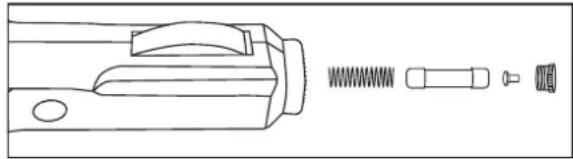
7.2 Changing the fuse in the car lead
There is a fuse in the car lead 9 to protect the car's electrical system. If there is no power supply and the car lead 9 stops working, you should check and, if applicable, change this fuse.
- Unscrew the cap on the top of the car lead 9.
- Remove the fuse.
- Insert a new type F3AL 250V fuse.
- Screw the car lead 9 together again.
8. Disposal
This product is subject to the provisions of European Directive 2012/19/EC. The symbol showing a wheelie bin crossed through indicates that the product requires sep
arate refuse collection in the European Union. This applies to the product and all accessories marked with this symbol. Products identified with this symbol may not be discarded with normal household waste, but must be taken to a collection point for recycling electric and electronic appliances. Recycling helps to reduce the consumption of raw materials and protect the environment.
Packaging
When disposing of the packaging, make sure you comply with the environmental regulations applicable in your country.
9. Technical specifications
| Model: UAMM 1 | 2 B2 |
| Mains adapter: RSS1002-120120-W3U | |
| Input: | 100 - 240 V~ 50 / 60 Hz, 0, 6 A |
| Output: | 12 V±1A/ max. 12 W |
| Protection class: | II □ |
| Massage mat | |
| Power supply: 12 V | --- |
| Current consumption: 900 mA | |
Symbols used
| Double insulation |
| With the CE marking, HOYER Handel GmbH declares the conformity with EU guidelines. |
| This symbol reminds you to dispose of the packaging in an environmentally friendly manner. |
| Recyclable materials: cardboard (except corrugated cardboard) |
Subject to technical modifications.
10. Warranty of the HOYER Handel GmbH
Dear Customer,
your device is provided with a 3 year warranty starting with the purchase date. In the event of product defects, you are entitled to statutory rights against the vendor. These statutory rights are not restricted by our warranty presented in the following.
Warranty conditions
The warranty period starts with the purchase date. Please keep the original purchase receipt in a safe place. This document is required to verify the purchase.
If within three years from the purchase date of this product a material or factory defect occurs, the product will be repaired or replaced by us - at our discretion - free of charge to you. This warranty implies that within the period of three years the defective device and the purchase receipt are presented, including a brief written description of the defect and the time it occurred.
If the defect is covered by our warranty, the repaired or a new product will be returned to you. No new warranty period starts with a repair or replacement of the product.
Warranty period and statutory claims for defects
The warranty period is not extended when the warranty has been claimed. This also applies to replaced and repaired parts. Any damages and defects already existing at the time of purchase must be reported immediately upon unpacking. Repairs arising after the expiration of the warranty period are subject to a charge.
Warranty coverage
The device was produced carefully according to strict quality guidelines and tested diligently prior to delivery.
The warranty applies to material or factory defects.
Excluded from the warranty are wear parts subject to normal wear and damages to fragile parts, e.g. switches, batteries, lamps or other parts manufactured from glass.
This warranty expires if the product is damaged, not used as intended or not serviced. For the proper operation of the product, all instructions listed in the operating instructions must be observed carefully. Any form of use and handling that is advised against in the operating instructions or warned against must always be avoided.
The product is only intended for private and not for commercial use. In the case of incorrect and improper treatment, use of force and interventions not performed by our authorised Service Centre, the warranty shall cease.
Handling in case of a warranty claim
In order to ensure prompt processing of your matter, please observe the following notes:
- Please keep the article number
IAN: 305230 and the purchase receipt as a purchase verification for all inquiries.
- The article number can be found on the rating plate, an engraving, the title page of your instructions (in the bottom left), or as a label on the rear or underside of the device.
- If faulty operation or other defects occur, first contact the Service Centre listed in the following by telephone or email.
- Then, you are able to send a product reported as defective free of charge to the service address specified to you, including the purchase receipt and the information on the defect and when it occurred.

Please visit www.lidl-service.com to download this and many other manuals, product videos and software.
GB Service Great Britain
Tel.: 0871 5000 720 (£ 0.10/ Min.)
E-Mail: hoyer@lidl.co.uk
IE Service Ireland
Tel.: 1890 930 034
(0,08 EUR/ Min., (peak))
(0,06 EUR/ Min., (off peak))
E-Mail: hoyer@lidl.ie
MT Service Malta
Tel.: 80062230
E-Mail: hoyer@lidl.com.mt
CY Service Cyprus
Tel.: 80094409
E-Mail: hoyer@lidl.com.cy
IAN:305230

Supplier
Please note that the following address is no service address. First contact the aforementioned Service Centre.
HOYER Handel GmbH
Taskoprustraße 3
DE-22761 Hamburg
GERMANY
Indhold


- CAR MASSAGE SEAT COVER UAMM 12 B2
- Overview
- Thank you for your trust!
- Intended purpose
- Symbols on the appliance
- Safety information
- Warnings
- Instructions for safe operation
- DANGER for children
- DANGER to and from pets and livestock
- General information
- DANGER! Risk of electric shock
- DANGER in road traffic
- Items supplied
- Unpacking and connecting
- Unpacking
- Using the massage mat in a car
- Using the massage mat at home
- Operation
- Switching the device on and off
- Selecting a program
- Switching massage areas on and off
- Switching the heating on and off
- Cleaning and maintenance
- Cleaning the appliance
- DANGER! To avoid the danger of an electric shock or damage!
- CAUTION :
- Changing the fuse in the car lead
- Disposal
- Packaging
- Technical specifications
- Symbols used
- Warranty of the HOYER Handel GmbH
- Warranty conditions
- Warranty period and statutory claims for defects
- Warranty coverage
- Handling in case of a warranty claim
- Supplier
- Indhold
Brand : ULTIMATE SPEED
Model : UAMM 12 B2
Category : Massage chair