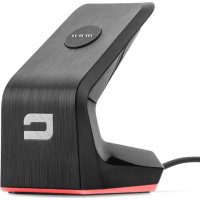
XDOCK - Docking station CROSSCALL - Free user manual and instructions
Find the device manual for free XDOCK CROSSCALL in PDF.



User questions about XDOCK CROSSCALL
0 question about this device. Answer the ones you know or ask your own.
Ask a new question about this device
Download the instructions for your Docking station in PDF format for free! Find your manual XDOCK - CROSSCALL and take your electronic device back in hand. On this page are published all the documents necessary for the use of your device. XDOCK by CROSSCALL.
USER MANUAL XDOCK CROSSCALL
natural_image
Line drawings of two electronic devices with no visible text or symbols
X-LINK™ MAGNETIC CONNECTOR
- CHARGE (UP TO 3A) AND DATA TRANSFER
PORTRAIT OR LANDSCAPE MODE
CHARGE (UP TO 1A MAX) AND
DATA TRANSFER
CHARGE (JUSQU'À 1A MAX) ET
TRANSFERT DE DONNÉES
X-LINK™ CHARGE INDICATOR
INDICATEUR DE CHARGE X-LINK™
CHARGE IN PROGRESS
CHARGE EN COURS
STANDBY/100% CHARGED
VEILLE/CHARGE 100%
| 1 | ES: Conector magnético X-LINKTM*: carga (3A) y transferencia de datos / modo retrato o paisaje / DE: X-LINKTM* Magnetverbinder: Laden (3A) und Datenübertragung / Portrait- oder Landschaftsmodus / IT: Connettore magnetico X-LINKTM*: carica (3A) e trasferimento di dati / modalità ritratto o landscape / PT: Conector magnético X-LINKTM*: carga (3A) e transferência de dados / modo retrato ou paisagem / NL: Magnetische X-LINKTM* aansluiting: laadt op (3A) en draagt gegevens over / portrait- of landscape-positie / HR: X-LINKTM* magnetski priključak: punjenje (3A) i prijenos podataka / portretni ili pejzažni način / PL: Złącze magnetyczne X-LINKTM*: ładowanie (3A) i transfer danych / tryb portretowy lub krajobrazu / SL: Magnetni konektor X-LINKTM*: polnjenje (3A) in prenos podatkov / pokončni ali ležeči način / SR: Магнетни прикључак X-LINKTM*: пуњење (3A) и пренос података / режим портрет или пејзаж /الشحن (3 LIMITED) ونقل البيانات / الوضع العمودي : *TMX-LINK موصّل مغناطيسي :AR أو الوضع الأفقي |
| 2 | ES: Almohadilla antideslizante / DE: Rutschfestes Pad / IT: Pad antiscivolo / PT: Autocolante antiderrapante / NL: Antislip pad / HR: Neklizajući jastučić / PL: Podkładka antypoślizgowa / SL: Nedrseča podloga / SR: Неклизајућа подлога /لوحة مقاومة للاenzلاق :AR |
| 3 | ES: Conector USB: carga (1A) y transferencia de datos / DE: USB-Anschluss: Laden (1A) und Datenübertragung / IT: Porta USB: carica (1A) e trasferimento di dati PT: Conector USB: carga (1A) e transferência de dados / NL: USB-aansluiting: laadt op (1A) en draagt gegevens over / HR: USB priključak: punjenje (1A) i prijenos podataka / PL: Złącze USB: ładowanie (1A) i transfer danych / SL: Priključek USB: polnjenje (1A) in prenos podatkov / SR: USB прикључак: пуњење (1A) и пренос података /الشحن (1 LIMITED) ونقل البيانات :USB موصّل :AR |
| 4 | ES: Cable USB / DE: USB-Kabel / IT: Cavo USB / PT: Cabo USB / NL: USB-kabel / HR: USB kabelom / PL: Kablem USB / SL: Kablom USB / SR: USB kablom /USB كابل :AR |
| 5 | ES: Indicador de carga X-LINKTM* : carga en curso modo de espera/100 % cargado / DE: X-LINKTM* Ladeanzeige : ladevorgang läuft standbymodus / 100% geladen / IT: Indicatore di carica X-LINKTM* : ricarica in corso standby / ricarica completa / PT: Indicador de carga X-LINKTM* : carga em curso standby/carga 100 % / NL: Oplaadlampje X-LINKTM* : bezig met opladen standby/100% opgeladen / HR: Indikator punjenja baterije X-LINKTM* : progres punjenja mirovanje / punjenje 100% / PL : Wskaźnik ładowania X-LINKTM* : podczas ładowania czuwanie / 100% naładowania / SL: Indikator napolnjenosti X-LINKTM* : polnjenje v teku pripravljenost / 100% napolnjenost / SR: Показатель напуњености батерије X-LINKTM* : progres punjenja mirovanje / punjenje 100% /100% جإillyشحن وضع الخمول / الشحن *TMX-LINK موشر الشحن AR |
*By Magconn Technology / Technologie Magconn

92x66x55 mm / 3,6x2,6x2,2 in 205 g / 0.45 lb
X-DOCK
Designed in France / Conçu en France
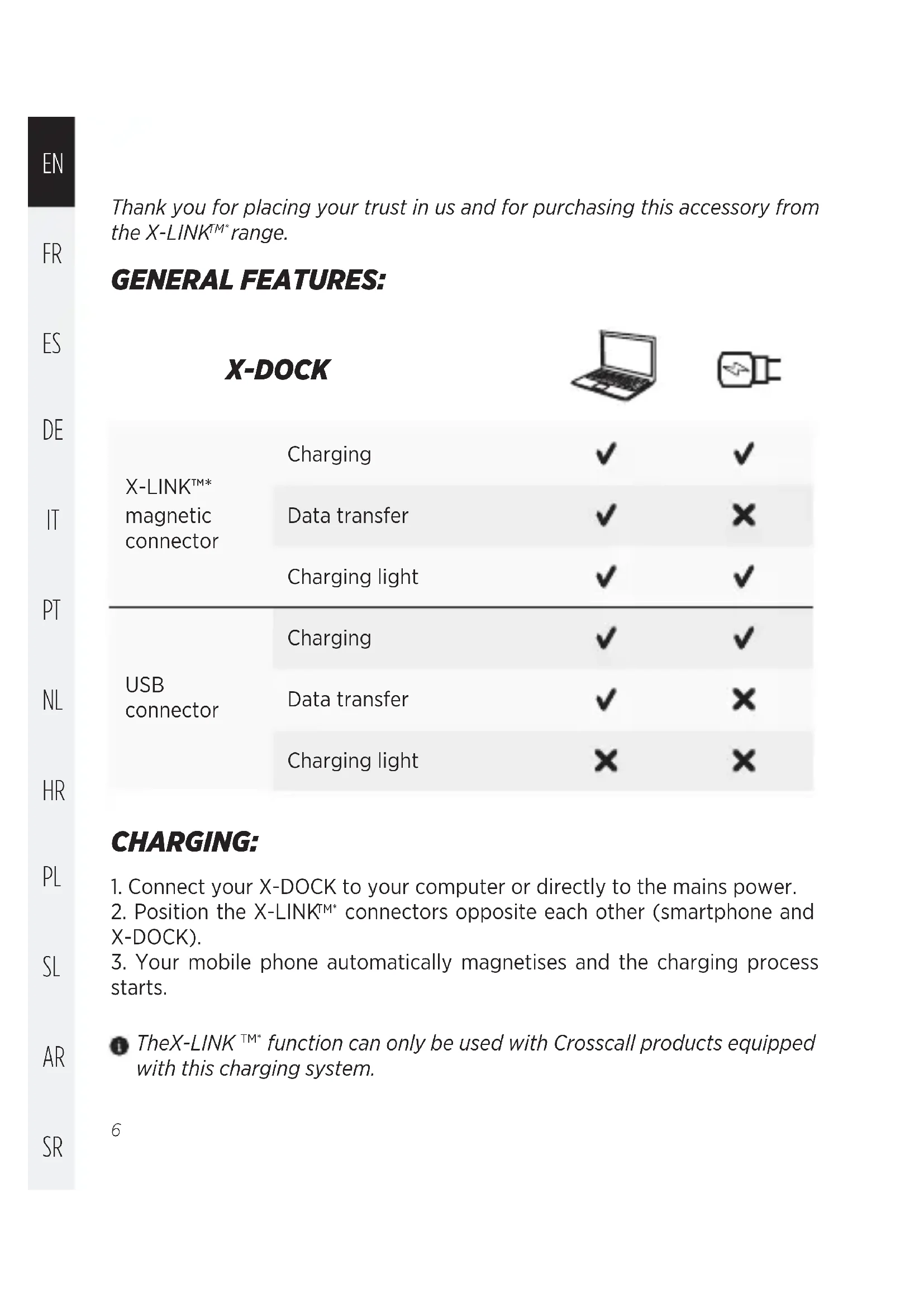
Thank you for placing your trust in us and for purchasing this accessory from the X-LINK™* range.
GENERAL FEATURES:
| X-DOCK | |||
| X-LINKTM* magnetic connector | Charging | √ | √ |
| Data transfer | √ | × | |
| Charging light | √ | √ | |
| USB connector | Charging | √ | √ |
| Data transfer | √ | × | |
| Charging light | × | × | |
CHARGING:
- Connect your X-DOCK to your computer or directly to the mains power.
- Position the X-LINK™* connectors opposite each other (smartphone and X-DOCK).
- Your mobile phone automatically magnetises and the charging process starts.
TheX-LINK ^TM* function can only be used with Crosscall products equipped with this charging system.
While charging the X-LINK™, it is possible to charge another product by connecting a cable to the USB connector located on the back of the X-DOCK (1A max).
When charging using the X-LINK™* and USB at the same time, the charging power is shared between the 2 charging points (the USB delivers 1A max and X-LINK™* up to 3A)
The charging time depends on the type and method of charging used.
The X-DOCK charge indicator lights up in red only when the charging is done using the X-LINK™*. When the phone is fully charged or the X-DOCK is in standby, the charge indicator is off.
To avoid prematurely draining the smartphone battery, we recommend that you follow the battery charging instructions for each charging cycle. To do this, it is better to top up the battery when it reaches 20% and avoid charging it beyond 80%, rather than topping it all the way up to 100% from zero.
DATA TRANSFER (COMPUTER ONLY):
- Connect the X-DOCK to your computer.
- Position the 2 X-LINK ^M* connectors opposite each other (smartphone and X-DOCK)
- Your mobile phone automatically magnetises and the charging process starts.
-
Open the different modes in the drop-down menu available in the notification bar. NB: Depending on the version of Android, this menu may vary slightly.
-
File transfer: direct access to the internal memory and micro SD card (if inserted).
- PTP: for transferring photos
• CD-ROM: Driver installation for PC - No data transfer: Charge mode
Navigation in the different modes is the same as when connecting via the USB connector on the back of the X-DOCK.
Depending on the type of computer – Mac or PC – the correct drivers must be installed in order to access all of the functions. For use on Mac, Android file transfer must be downloaded.
Data can be transferred via the X-LINK ^TM* connector or the USB connector, but it must go through the computer.
WARNING:
- This device is not intended to be used by people (including children) with reduced physical, sensory or mental capacities, or whose lack of experience or knowledge prevents them from safely using the device, if they are not supervised or have not been given instructions beforehand by the person responsible for their safety.
- Small parts may cause choking.
- Do not allow your children or pets to chew or lick the device.
- Do not press on your eyes, ears or any part of the body with your device and do not put it in your mouth.
- Avoid extreme temperatures. Do not expose the device to extreme temperatures (-10^ / + 60^) .
- Do not throw the product into a fire or incinerate it.
- Do not submerge your product.
- Do not place the device near water or a source of moisture, such as a bathtub, sink, kitchen sink, pool, damp basement or other damp locations. In general, do not use in case of inclement weather and thunderstorms.
- Do not use your device outside during a thunderstorm.
- Use only original accessories with this charger.
- Do not attempt to disassemble or modify this product or any of its components.
-
Do not attempt to change a part by yourself. If a part needs to be changed, contact your dealer.
-
Avoid impacts or damage to your device.
- Stop using your device if any of its parts are cracked, broken or if it overheats.
- Do not use the connector to perform several actions and ensure that the terminals of the battery do not touch any conductive elements, such as metals or liquids.
- Before cleaning the device, unplug it from the power supply. Clean the device with a soft, dry cloth. Do not use aggressive cleaning agents or solvents such as petrol or alcohol, as the latter can damage the device
- If the X-LINK™* of the device should get wet, remember to dry it before placing it on the X-DOCK.
- Before connecting the Crosscall phone to the dock using the magnetic X-LINK™* connector, check that it is clean and dry. This is to avoid short-circuits.
- Do not touch the pins on the magnetic X-LINK™* connector with your hands or any other object, so as not to damage them.
ENVIRONMENTAL PROTECTION:

This symbol affixed on the product means that it is a device whose treatment as waste is subject to Waste Electrical and Electronic Equipment (WEEE) regulations.
Please observe the local regulations on the charger's package concerning the battery and the disposal of used chargers, by depositing them in the selective collection points so that they can be properly recycled. Do not dispose of chargers or used batteries with ordinary waste.
Please dispose of used lithium batteries that you do not want to keep in a designated place for this purpose. Do not dispose of them with household waste.
Check out the whole range of X-LINK™* accessories at www.crosscall.com
natural_image
Abstract black and white geometric shape resembling a stylized letter 'C' (no text or symbols)CROSSCALL™
OUTDOOR MOBILE TECHNOLOGY
CROSSCALL.COM