CM1251W - Coffee machine BLACK & DECKER - Free user manual and instructions
Find the device manual for free CM1251W BLACK & DECKER in PDF.



| Product Type | Programmable Coffee Maker |
| Brand | Black & Decker |
| Model | CM1251W |
| Capacity | 12 cups (approx. 1.8 L) |
| Approximate Dimensions (L x D x H) | 30 x 20 x 35 cm |
| Approximate Weight | 2.5 kg |
| Power Supply | 120 V, 60 Hz, 1000 W |
| Filter Type | Basket-type paper filter (8-12 cups) |
| Main Functions | Programmable (delayed) brewing, brew strength selection (regular/strong), adjustable keep warm (30-120 min or off), Sneak-A-Cup function, automatic shut-off |
| Cleaning | Dishwasher-safe removable parts (filter basket, carafe, lid); Auto Clean automatic cleaning system with vinegar |
| Maintenance | Regular descaling recommended (every 60 brew cycles or once a month) |
| Safety | Polarized plug, short power cord, automatic shut-off, hot surface (caution) |
| Included Replacement Parts | Carafe with lid (ref. CM1251W-01), removable filter basket (ref. CM1231-02) |
| Repairability | No user-serviceable parts; refer to authorized technician |
| Warranty | 2 years (limited, United States and Canada) |
| General Information | Made in China; customer service: 1 800 465-6070 (United States and Canada) |
Frequently Asked Questions - CM1251W BLACK & DECKER
User questions about CM1251W BLACK & DECKER
0 question about this device. Answer the ones you know or ask your own.
Ask a new question about this device
Download the instructions for your Coffee machine in PDF format for free! Find your manual CM1251W - BLACK & DECKER and take your electronic device back in hand. On this page are published all the documents necessary for the use of your device. CM1251W by BLACK & DECKER.
USER MANUAL CM1251W BLACK & DECKER
natural_image
White coffee maker with digital display and glass cup, no visible text or symbols on device body
natural_image
Black and white photo of a black and white coffee maker with digital display and control buttons (no visible text or symbols on device body)
We want you to have a 5-star experience!
Should you have any questions or concerns about your new product, please call our Customer Service Line at 1-800-465-6070 (U.S. and Canada). Please do not return to the store.
Congratulations on your purchase of the Black+Decker™ 12-Cup Programmable Coffeemaker. We have developed this guide to ensure optimal product performance and your complete satisfaction. Save this use and care manual and be sure to register your appliance online at www.prodprotect.com/blackanddecker.
CONTENTS
IMPORTANT SAFEGUARDS.... 3
GETTING TO KNOW YOUR COFFEEMAKER.... 4
GETTING STARTED 5
SETTING THE CLOCK 5
BREW STRENGTH SELECTION 5
KEEP WARM....5
BREWING COFFEE 6
SNEAK-A-CUP ^TM FEATURE 6
AUTO BREW (BREW LATER) 7
CARE AND CLEANING 7
AUTO CLEAN® SYSTEM....8
TROUBLESHOOTING 9
WARRANTY AND CUSTOMER SERVICE INFORMATION....10

WARNING
RISK OF FIRE OR ELECTRIC SHOCK. DO NOT OPEN.
The lightning symbol refers to "dangerous voltage"; the exclamation symbol refers to maintenance instructions. See below.
Warning: To reduce the risk of fire or electric shock, do not remove the cover of the coffeemaker. There are no user-serviceable parts inside. Repair should be done by authorized service personnel only.
SAVE THESE INSTRUCTIONS.
This product is for household use only.
IMPORTANT SAFEGUARDS.
When using electrical appliances, basic safety precautions should always be followed to reduce the risk of fire, electric shock, and/or injury, including the following:
- Read all instructions.
- Do not touch hot surfaces. Use handles or knobs.
- To protect against fire, electric shock and injury to persons do not immerse cord, plugs or appliance in water or other liquid.
- Close supervision is necessary when any appliance is used by or near children.
- Unplug from outlet when either the appliance or display clock is not in use, and before cleaning. Allow to cool before putting on or taking off parts, and before cleaning the appliance.
- Do not operate any appliance with a damaged cord or plug, or after the appliance malfunctions or has been damaged in any manner. Contact Consumer Support at the number listed in this manual.
- The use of accessory attachments not recommended by the appliance manufacturer may result in fire, electric shock or injury to persons.
- Do not use outdoors.
- Do not let cord hang over edge of table or counter, or touch hot surfaces.
-
Do not place on or near a hot gas or electric burner, or in a heated oven.
-
To disconnect, press the Start/Power button ⏻ to turn the appliance off, then remove plug from wall outlet.
- Do not use this appliance for other than intended use.
- Keep lid on the carafe when in use.
- Scalding may occur if the lid is removed during the brewing cycles.
- The carafe is designed for use with this appliance. It must never be used on a range top.
- Do not set a hot carafe on a wet or cold surface.
- Do not use a cracked carafe or a carafe having a loose or weakened handle.
- Do not clean carafe with cleansers, steel wool pads or other abrasive material.
- This appliance is not intended for use by persons (including children) with reduced physical, sensory or mental capabilities, or lack of experience and knowledge, unless they have been given supervision or instruction concerning use of the appliance by a person responsible for their safety.
• Children should be supervised to ensure that they do not play with the appliance.
SAVE THESE INSTRUCTIONS.
This product is for household use only.
POLARIZED PLUG (120V models only
This appliance has a polarized plug (one blade is wider than the other). To reduce the risk of electric shock, this plug is intended to fit into a polarized outlet only one way. If the plug does not fit fully into the outlet, reverse the plug. If it still does not fit, contact a qualified electrician. Do not attempt to modify the plug in any way.
TAMPER-RESISTANT SCREW
Warning: This appliance is equipped with a tamper-resistant screw to prevent removal of the outer cover. To reduce the risk of fire or electric shock, do not attempt to remove the outer cover. There are no user-serviceable parts inside. Repair should be done only by authorized service personnel.
ELECTRICAL CORD
a) A short power-supply cord is provided to reduce the risks resulting from becoming entangled in or tripping over a longer cord.
b) Extension cords are available and may be used if care is exercised in their use.
c) If an extension cord is used:
1) The marked electrical rating of the extension cord should be at least as great as the electrical rating of the appliance;
2) If the appliance is of the grounded type, the extension cord should be a grounding-type 3-wire cord; and
3) The cord should be arranged so that it will not drape over the counter top or tabletop where it can be pulled on by children or tripped over.
Note: If the power cord is damaged, please contact the warranty department listed in these instructions.
GETTING TO KNOW YOUR COFFEE MAKER
USE WITH THESE FILTERS:


Basket


natural_image
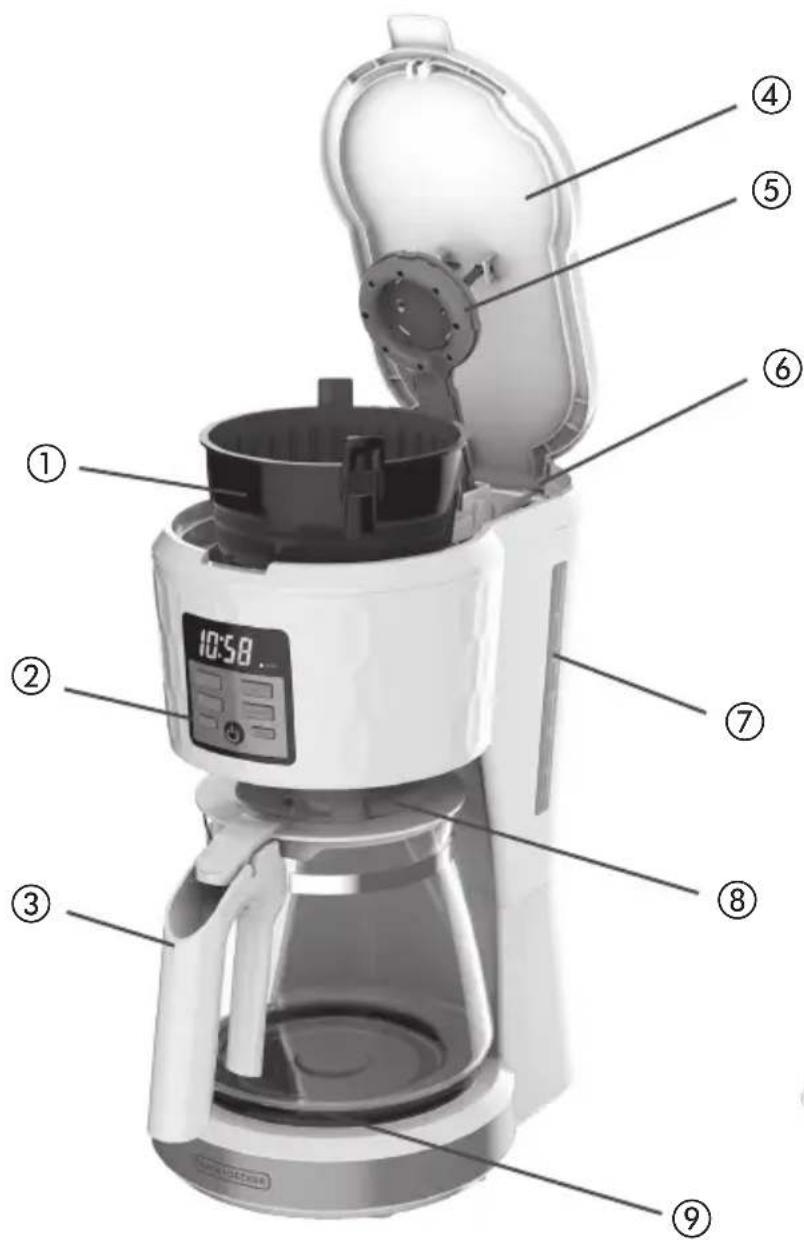
Clear glass coffee maker with black handle and lid, labeled with number ③ (no text or symbols on the object itself)- Brew basket (Part # CM1231-02)
- Control panel
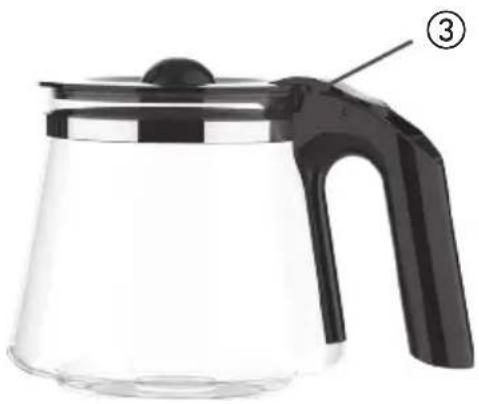
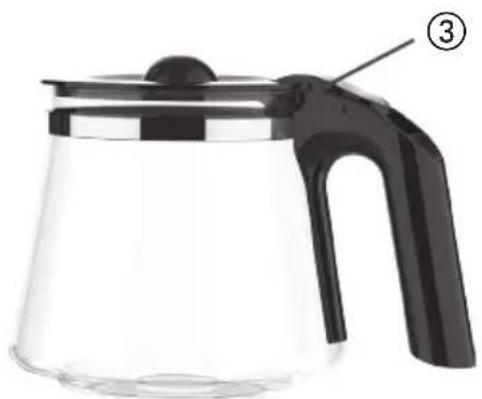
- Carafe with lid
(Part # CM1251W-01) white
(Part # CM1331-02) black
- Lid
-
Vortex showerhead
-
Water reservoir
- Water level markings
- Sneak-A-Cup ^TM interrupt feature
- Nonstick "keep hot" carafe plate
- Built-in cord storage (not shown)
HOW TO USE
This product is for household use only.
GETTING STARTED
- Remove all packing material, any stickers, and the plastic band around the power plug.
- Go to www.prodprotect.com/blackanddecker to register your product.
- Wash removable parts as instructed in CARE AND CLEANING.
- Pour fresh cold water up to 12-cup level mark into the water reservoir.
- Place basket-style paper filter into removable filter basket. Place basket into filter basket holder. Make sure the word "Back" is towards the back of the unit.
- Plug cord into standard electrical outlet.
- Brew water through appliance without adding coffee grounds. We recommend filtered water.
- Discard water from the carafe and paper filter from filter basket.
- Turn off appliance; unplug and allow to cool down.
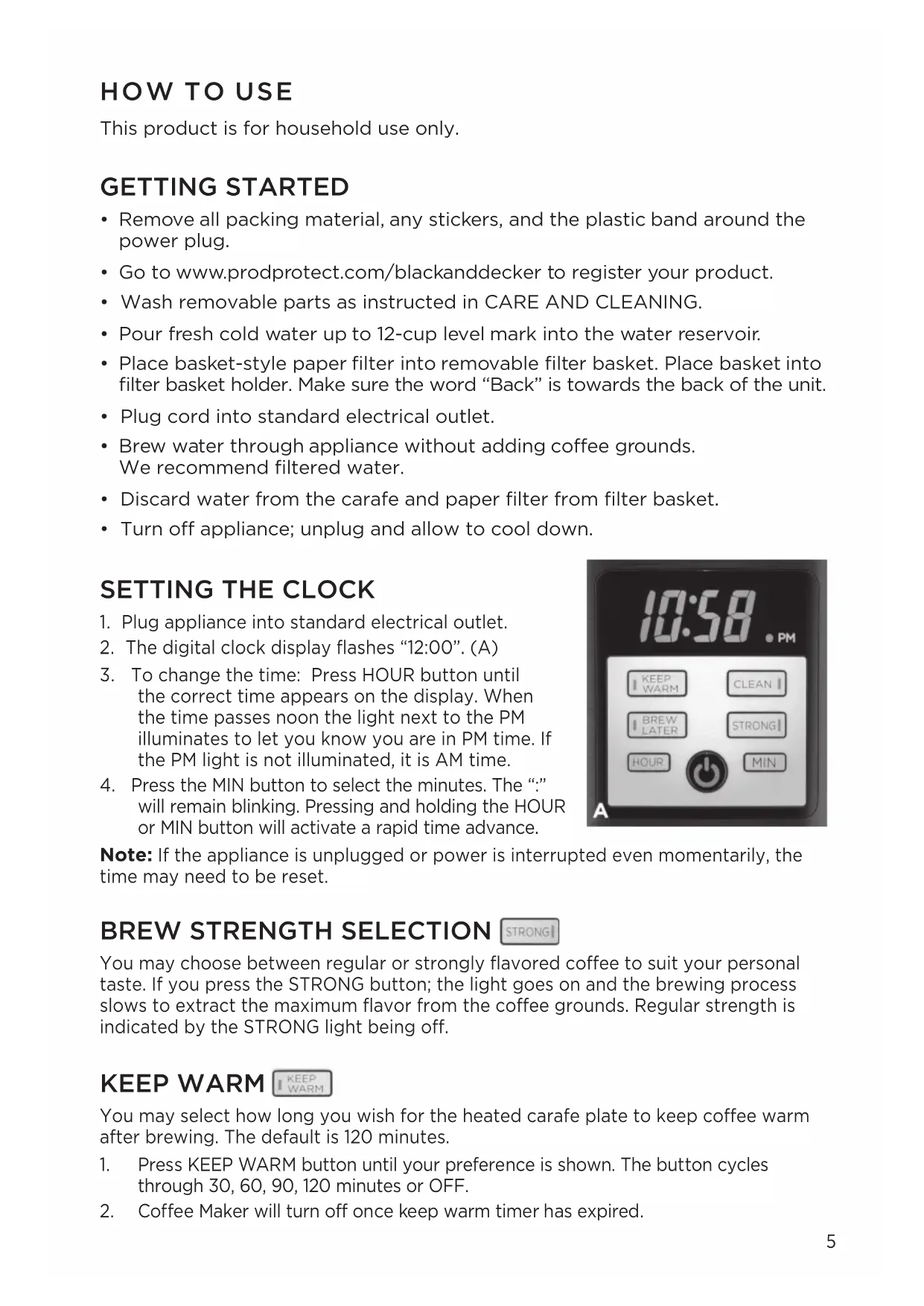
SETTING THE CLOCK
- Plug appliance into standard electrical outlet.
- The digital clock display flashes "12:00". (A)
- To change the time: Press HOUR button until the correct time appears on the display. When the time passes noon the light next to the PM illuminates to let you know you are in PM time. If the PM light is not illuminated, it is AM time.
- Press the MIN button to select the minutes. The “:” will remain blinking. Pressing and holding the HOUR or MIN button will activate a rapid time advance.

Note: If the appliance is unplugged or power is interrupted even momentarily, the time may need to be reset.
BREW STRENGTH SELECTION
STRONG
You may choose between regular or strongly flavored coffee to suit your personal taste. If you press the STRONG button; the light goes on and the brewing process slows to extract the maximum flavor from the coffee grounds. Regular strength is indicated by the STRONG light being off.
KEEP WARM
KEEP WARM
You may select how long you wish for the heated carafe plate to keep coffee warm after brewing. The default is 120 minutes.
-
Press KEEP WARM button until your preference is shown. The button cycles through 30, 60, 90, 120 minutes or OFF.
-
Coffee Maker will turn off once keep warm timer has expired.
BREWING COFFEE
- Open cover.
- Fill water reservoir with desired amount of water. The 12 Cup line represents a full carafe of coffee. Do not fill reservoir past this 12 Cup (maximum) line.
Note: Use spring water or filtered water. Distilled water lacks the minerals necessary to bind to elements of coffee.
Note: Filtered water will limit impurities and excessive minerals that can detrimentally impact coffee flavor and machine performance.

natural_image
Close-up of a turbine blade with two white arrows pointing to specific features (no text or symbols)- Place an 8-12 cup basket-style paper filter into the brew basket. Make sure the tab on the brew basket fits into its slot on the right side of the opening (B) so that the lid closes.
- Add desired amount of ground coffee. Close cover.
- Make sure carafe lid is properly attached to the empty carafe. Close the lid.
Note: Coffee may overflow if carafe lid is not properly placed.
- Place empty carafe on the carafe plate.
- If not already plugged in, plug power cord into an outlet.
- If regular brew strength is desired, your coffeemaker is set to brew coffee.
- If strong coffee is desired, press the STRONG button once to select the strong brew. The light next to the STRONG button illuminates.
- Press the Start/Power button ⏻, and brewing begins. The ⏻ button illuminates.
- Once coffee grounds have cooled, carefully open cover and discard used grounds. Close cover.
- The coffeemaker will keep brewed coffee hot for how long is selected with the Keep Warm feature. Then the coffeemaker automatically turns off.
To turn off the coffeemaker at any time press the Start/Power button ⏻. The Start/Power button ⏻ light goes off. Unplug appliance when not in use.
SNEAK-A-CUP™ FEATURE
Remove the carafe and brewing will pause. The carafe must be placed back on the carafe plate in 30 seconds to prevent overflow. Brewing will begin again.
AUTO BREW

- Make sure clock has been set to correct time of day.
- Follow steps 1 through 9 under BREWING COFFEE.
- Press the BREW LATER button.
- The digital clock will flash 12:00.
Note: If the coffeemaker has not been unplugged, the last programmed brewing time will appear on the digital display.
- To change the time: press HOUR button until the desired correct time appears on the display. Press the MIN button to select the minutes.
- Delayed brewing is activated after 3 seconds with no button press. The light in the BREW LATER button will illuminate.
- To check the preset auto time, press BREW LATER button. The delayed brewing time will flash for three seconds. Then the clock time will display again.
- To change the delayed brew time, follow steps 1-5.
Note: To brew immediately and cancel AUTO BREW, press the ⏻ button. If you don't want to brew then, immediately press the ⏻ button again to turn off the coffeemaker. The ⏻ button light goes off.
CARE AND CLEANING
This product contains no user serviceable parts. Refer service to qualified service personnel.
CLEANING
- Be sure the unit is unplugged and has cooled.
- Open the cover.
- To remove the filter basket, grip the handle and lift straight up. Discard the paper filter and the coffee grounds.
- Wash the filter basket, carafe and carafe lid in the top rack of the dishwasher or wash by hand with hot water and soap.
- Wipe the appliance's exterior surface, control panel and carafe plate with a soft damp cloth. Do not use abrasive cleansers or scouring pads. Never immerse the coffeemaker in water.
- To clean the inside of the cover, open the cover and leave in the open position. Wipe surfaces with a damp cloth.
AUTO CLEAN™ SYSTEM | CLEAN |
De-scaling With Auto Clean™
Over time, calcium deposits or “scale” may build up in your brewer. Scale is non-toxic but if left unattended can hinder brewer performance and cause premature failure. Regularly de-scaling your brewer helps to maintain quality coffee as well as the lifespan of the heating element, and other internal parts that come in contact with water throughout the brew process.
To make the de-scaling process as effortless as possible, an Auto Clean system has been programmed into your coffeemaker.
When should I use Auto Clean?
After every 60 brews, “CL” will be displayed and blink. This notifies you it is time to run the Auto Clean system. “CL” will be displayed until you run the Auto Clean system. If you would like to clean your coffeemaker prior to 60 brew cycles, you may do so by following the steps below.
Please note: If the unit is unplugged, the counter that keeps track of reminding you to clean your coffeemaker will reset to 0.
If you have unplugged the coffeemaker, or if there have been power outages, we recommend cleaning the unit once a month.
How do I use Auto Clean?
Follow the simple steps below. Your coffeemaker will take care of the rest.
- Combine 6 cups of white vinegar and 4 cups of cold water in carafe. We recommend filtered water.
- Pour into water reservoir.
- Place an 8 to 12 cup basket style paper filter in the removable filter basket. Insert filter basket into filter basket holder and close cover.
- Make sure the lid of the carafe is in place and place empty carafe on the carafe plate.
- Plug power cord into an outlet.
- Press CLEAN to activate cleaning cycle; “CL” is displayed and the Start/Power button ⏻ illuminates. The word, “CLEAN” scrolls across the display.
- Part of the mixture will brew through. The remaining mixture will be held in the coffeemaker for 30 minutes before completing its brew through.
Note: The entire cleaning cycle will take 45-60 minutes to complete.
-
When the coffeemaker completes the AUTO CLEAN cycle, it shuts off automatically.
-
Brew fresh water through appliance following instructions given in GETTING STARTED before brewing coffee again.
TROUBLESHOOTING
| PROBLEM POSSIBLE | CAUSE SOLUTION | |
| Coffeemaker does not turn on. | Coffeemaker is not plugged in. | Make sure appliance is plugged into a working outlet. |
| Coffeemaker is leaking. | Water reservoir may have been overfilled. | Make sure you don't fill the water reservoir beyond the 12-cup line. |
| Cover may not be correctly placed on carafe. | Make sure cover is correctly placed and tightened on carafe | |
| Carafe may not be correctly placed on the carafe plate. | Make sure carafe is placed securely onto the carafe plate. | |
| The filter basket overflows. | The carafe has been removed for longer than 30 seconds when using the Sneak-A-CupTM feature. | Make sure to replace the carafe within 30 seconds during the brewing cycle. |
| Excessive amount of coffee is used. | Reduce the amount of coffee used. | |
| Brewing with softened water. | Always brew with cold, filtered water. | |
| Coffee sediment in brewed cup of coffee. | The paper filter and/or the filter basket are not properly placed. | Insert basket-shaped paper filter into filter basket and insert basket properly into holder. |
| The coffeemaker brews slowly. | The coffeemaker needs cleaning. | Follow the instructions in the “Auto Clean” section. More than one cleaning cycle may be required if the coffeemaker is heavily calcified. |
If additional assistance is needed, please contact our consumer service team at 1-800-465-6070.
NEED HELP?
For service, repair or any questions regarding your appliance, please call our Customer Service Line at 1-800-465-6070. Please DO NOT return the product to the place of purchase. Also, please DO NOT mail product back to manufacturer, nor bring it to a service center. You may also want to consult the website listed on the cover of this pamphlet.
Warranty Information
(Applies only in the United States and Canada)
What does it cover?
- Any defect in material or workmanship provided; however, Spectrum Brands' liability will not exceed the purchase price of product.
For how long?
- Two years from the date of original purchase with proof of such purchase.
What will we do to help you?
- Provide you with a reasonably similar replacement product that is either new or factory refurbished.
How do you get service?
- Save your receipt as proof of date of sale.
- Visit the online service website at www.prodprotect.com/blackanddecker, or call toll-free 1-800-465-6070 for general warranty service.
- If you need parts or accessories, please call 1-800-738-0245
How does state law relate to this warranty?
- This warranty gives you specific legal rights. You may also have other rights that vary from state to state or province to province.
What does your warranty not cover?
• Damage from commercial use
- Damage from misuse, abuse or neglect
- Products that have been modified in any way
- Products used or serviced outside the country of purchase
• Glass parts and other accessory items that are packed with the unit
- Shipping and handling costs associated with the replacement of the unit
- Consequential or incidental damages (Please note, however, that some states do not allow the exclusion or limitation of consequential or incidental damages, so this limitation may not apply to you.)
Are there additional warranty exclusions?
- This warranty shall not be valid where it is contrary to U.S. and other applicable laws, or where the warranty would be prohibited under any economic sanctions, export control laws, embargos, or other restrictive trade measures enforced by the United States or other applicable jurisdictions. This includes, without limitation, any warranty claims implicating parties from, or otherwise located in, Cuba, Iran, North Korea, Syria and the disputed Crimea region.
¡BIENVENIDO!
CÓMO PREPARAR CAFÉ....15

natural_image
Clear glass coffee maker with black handle and lid, labeled with number 3 (no text or symbols on the object itself)natural_image
Close-up of a jet engine turbine blade with two white arrows pointing to specific blades (no text or symbols)C.A.B.A. - Argentina
Chile
Col. Centro, Cuauhtemoc,
México, D.F.
Tel. 01 800 714 2503
Nicaragua
LRM ELECTRONICA
Managua - Sinsa Altamira 1.5
kilómetros al norte
Nicaragua
Tel. (505) 2270-2684
Panamá
Supermarcas
City Market Nivel Plaza Local 153
Diagonal Hotel Melia,
Caracas.
Tel. (582) 324-0969
BIENVENUE!
UTILISER AVEC CES FILTRES:

natural_image
Transparent glass coffee maker with black handle and lid, labeled with number 3 (no text or symbols on the object itself)natural_image
Close-up of a mechanical component with two white arrows pointing to features, labeled 'B' in the corner (no text or symbols on the object itself)Household Products Chile Commercial
Ltda
BLACK+DECKER and the BLACK+DECKER logos and product names are trademarks of The Black & Decker Corporation, used under license. All rights reserved.
All other marks are Trademarks of Spectrum Brands, Inc.
natural_image
Black and white photo of a ceramic coffee cup filled with dark liquid, no text or symbols visible
We want you to have a 5-star experience!
Should you have any questions or concerns about your new product, please call our Customer Service Line at 1-800-465-6070 (U.S. and Canada). Please do not return to the store.

- We want you to have a 5-star experience!
- CONTENTS
- WARNING
- RISK OF FIRE OR ELECTRIC SHOCK. DO NOT OPEN.
- SAVE THESE INSTRUCTIONS.
- IMPORTANT SAFEGUARDS.
- This product is for household use only.
- POLARIZED PLUG (120V models only
- TAMPER-RESISTANT SCREW
- ELECTRICAL CORD
- GETTING TO KNOW YOUR COFFEE MAKER
- HOW TO USE
- GETTING STARTED
- SETTING THE CLOCK
- BREW STRENGTH SELECTION
- KEEP WARM
- BREWING COFFEE
- SNEAK-A-CUP™ FEATURE
- AUTO BREW
- CARE AND CLEANING
- CLEANING
- AUTO CLEAN™ SYSTEM | CLEAN |
- De-scaling With Auto Clean™
- When should I use Auto Clean?
- How do I use Auto Clean?
- NEED HELP?
- Warranty Information
- What does it cover?
- For how long?
- What will we do to help you?
- How do you get service?
- How does state law relate to this warranty?
- What does your warranty not cover?
- Are there additional warranty exclusions?
- ¡BIENVENIDO!
- Chile
- Nicaragua
- Panamá
- BIENVENUE!
Brand : BLACK & DECKER
Model : CM1251W
Category : Coffee machine