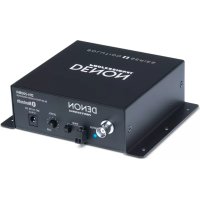
DN200BR - Microphone DENON - Free user manual and instructions
Find the device manual for free DN200BR DENON in PDF.



User questions about DN200BR DENON
0 question about this device. Answer the ones you know or ask your own.
Ask a new question about this device
Download the instructions for your Microphone in PDF format for free! Find your manual DN200BR - DENON and take your electronic device back in hand. On this page are published all the documents necessary for the use of your device. DN200BR by DENON.
USER MANUAL DN200BR DENON
User Guide (English)
Introduction
DN-200BR is a Bluetooth ^® audio receiver with professional-grade audio outputs. It lets you add wireless stereo Bluetooth audio reception to any professional audio system. Once you pair your Bluetooth device to DN-200BR, you can send your device's audio signal out DN-200BR's balanced XLR or unbalanced 1/4" (6.35 mm) outputs to your mixer, loudspeakers, or amplification system.
Please see this guide's Setup chapter to learn how to integrate DN-200BR with your audio system, and then refer to the Operation chapter to start using DN-200BR.
Box Contents
DN-200BR
Removable Bluetooth Antenna
2-Pin Euroblock Connector
Power Adapter
User Guide
Safety & Warranty Manual
Support
For the latest information about this product (system requirements, compatibility information, etc.) and product registration, visit denonpro.com.
Features
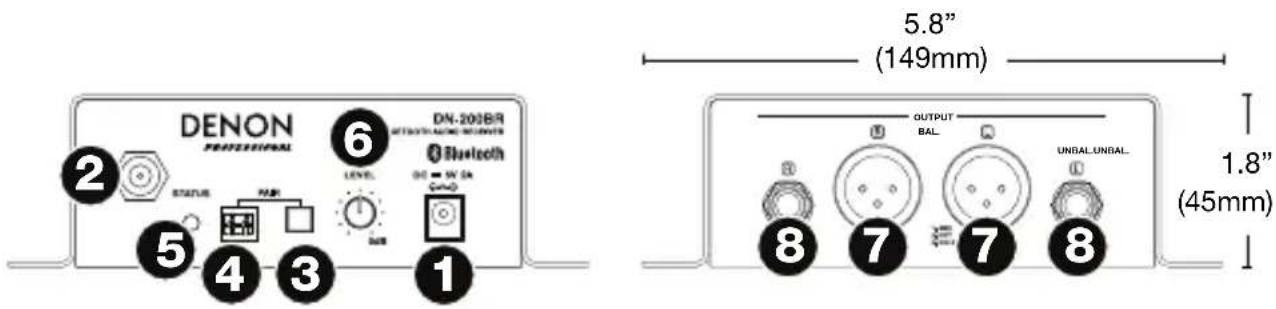
- Power Input: Use the included power adapter to connect this input to a power outlet. See Setup for more information.
- BNC Antenna Terminal: Connect the included removable Bluetooth antenna to this BNC connector. The antenna receives and transmits the Bluetooth signal from a paired Bluetooth device. DN-200BR has a range of up to 82 feet (25 meters).
- Pair Button: Press and hold this button for 3 seconds to make DN-200BR available for pairing to a nearby Bluetooth device. See Operation for more information.
-
Remote Pairing Connector: Use the included 2-pin Euroblock connector to add a remote pairing button (not included) to this connector.
-
Status Light: This LED indicates the DN-200BR's Bluetooth pairing status:
-
Flashing slowly (approximately twice every 2 seconds): DN-200BR is not paired to a Bluetooth device.
- Flashing quickly (approximately twice per second): DN-200BR can be paired to a Bluetooth device.
• Solidly lit: DN-200BR is paired to a Bluetooth device.
See Operation to learn how to pair/unpair a Bluetooth device to/from DN-200BR.
-
Level Knob: Turn this knob to adjust the output volume level (sent to the balanced and unbalanced outputs).
-
Outputs (Balanced XLR): These outputs send the audio from a paired Bluetooth device. Use XLR cables to connect these outputs to your loudspeakers, mixer, etc. See Setup for more information.
-
Outputs (Unbalanced 1/4" / 6.35mm): These outputs send the audio from a paired Bluetooth device. Use standard 1/4" (6.35mm) cables to connect these outputs to loudspeakers, mixer, etc. See Setup for more information.
Setup
Items not listed under Introduction > Box Contents are sold separately.
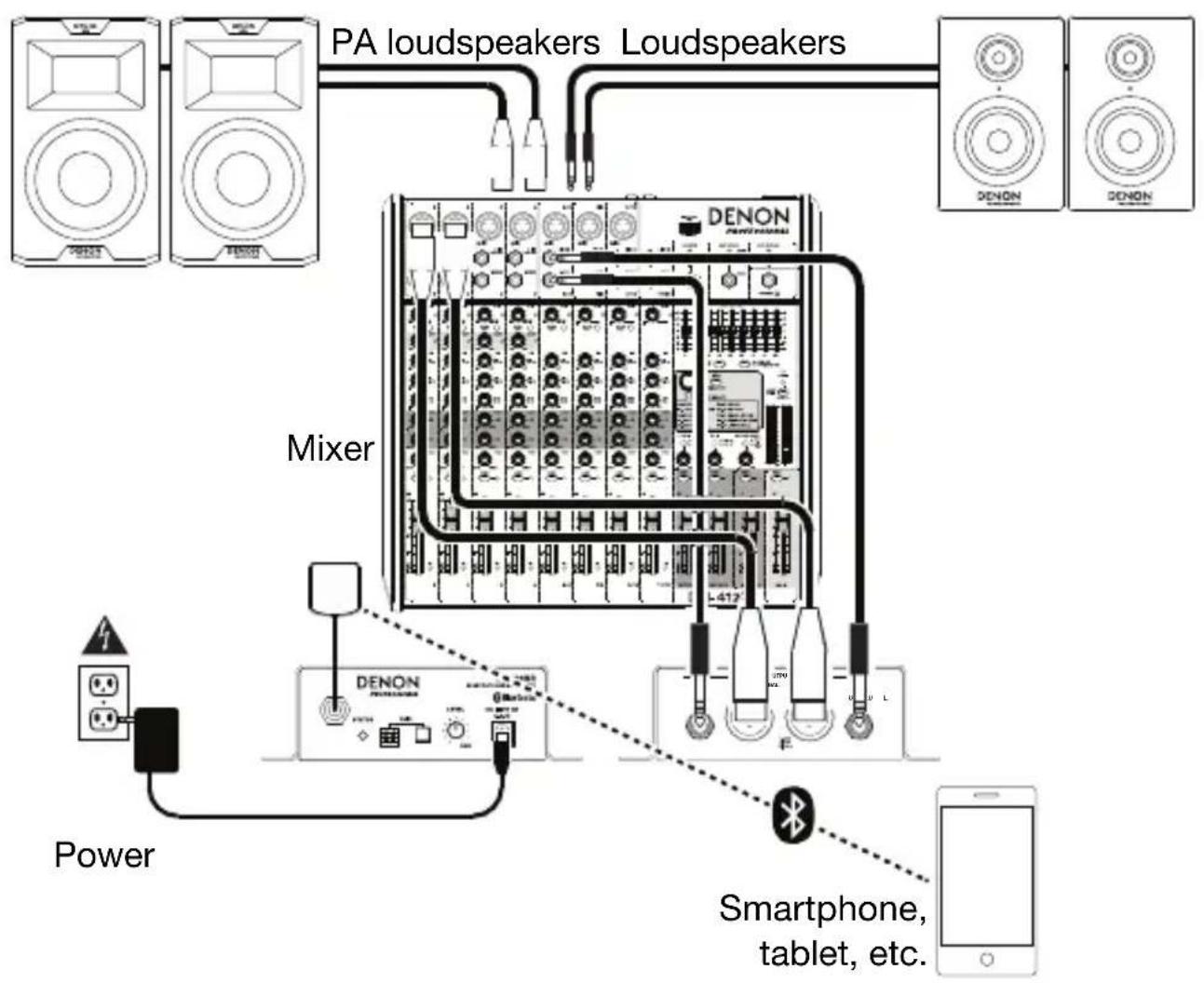
- Use either XLR cables or 1/4" (6.35mm) cables to connect the DN-200BR's outputs (balanced or unbalanced) to your loudspeakers, mixer, amplifier, or other device that accepts line-level inputs (this device must be powered off).
Important: For stereo operation, make sure all left (L) and right (R) outputs are connected to left and right inputs, respectively.
- Use the included power adapter to connect DN-200BR's power input to your power source.
Important: Do not use DN-200BR near a microwave oven, which can interfere with the reception.
-
If you are using a mixer, make sure all of its connections are secure, and power it on.
-
Power on your loudspeakers last.
Example
flowchart
graph TD
    A["DAU loudspeakers"] --> B["Mixer"]
    C["PA loudspeakers"] --> B
    D["Loudspeakers"] --> B
    B --> E["Power"]
    B --> F["DENON"]
    F --> G["Smartphone, tablet, etc."]
    G --> H["Mobile Device"]
Operation
You can play audio from an audio device that sends its signal over a Bluetooth connection (e.g., smartphones, tablet computers, etc.). DN-200BR uses Bluetooth CSR 4.0 and has a range of up to 82 feet (25 meters).
Once you “pair” your Bluetooth device with DN-200BR, they are “connected” wirelessly. You can play audio on your Bluetooth device, and it will be sent out of DN-200BR’s outputs (balanced and unbalanced).
Important:
- DN-200BR will not receive audio from a phone call. While using it, we recommend disabling your cellular connection, if possible.
- Do not use DN-200BR near a microwave oven, which can interfere with the reception.
- While DN-200BR is paired with a Bluetooth device, other Bluetooth devices cannot pair to it. You must unpair (“disconnect”) the current Bluetooth device from DN-200BR to make it available to others.
To pair your Bluetooth device to DN-200BR:
-
If DN-200BR is off, use the included power adapter to connect its power input to your power source. The Status Light will flash slowly.
-
Make sure your desired Bluetooth device has its Bluetooth connectivity on and is within range. DN-200BR will automatically try to pair with the last-paired Bluetooth device, if any.
If you are using that Bluetooth device again, you can start playing audio immediately.
If you want to use a different Bluetooth device, continue to Step 3.
-
Press and hold DN-200BR's Pair button for 3 seconds. When the Status Light starts flashing quickly, release the Pair button.
-
On your Bluetooth device, enter its Bluetooth settings menu, and select DN-200BR.
Note: (Some older Bluetooth devices may require you to enter a PIN. If this is the case, enter 0000 as the PIN.)
- On your Bluetooth device, start playing audio.
To adjust your volume level, we recommend setting the volume control of each of your devices in the following order:
i. your Bluetooth device
ii. DN-200BR, using its Level Knob
iii. your mixer, if any (its input channel level[s], then its main output level)
iv. your loudspeakers
Set each volume level as high as possible without creating distortion or any “clipping” of the sound.
Important: DN-200BR will not receive audio from a phone call. While using it, we recommend disabling your cellular connection, if possible.
To unpair your Bluetooth device from DN-200BR, do one of the following:
- Enter your Bluetooth device's Bluetooth settings menu, and disconnect from DN-200BR.
- Press and hold DN-200BR's Pair button for 3 seconds, and then release it. DN-200BR will unpair from your Bluetooth device and be available to pair to another one.
Troubleshooting
If you encounter a problem, try doing these things first:
- Make sure all cables and other connected devices are properly and securely connected.
• Make sure you are using DN-200BR as described in this User Guide.
• Make sure your other devices or media are working properly. - If you believe DN-200BR is not working properly, check the following table for your problem and solution.
| Problem: | Solution: Please | see: |
| Power does not turn on. | Make sure DN-200BR's power input is properly connected to a power outlet using the included power adapter. | Setup |
| DN-200BR does not produce any sound, or the sound is distorted. | Make sure all cable and device connections are secure and correct.Make sure none of the cables are damaged.Make sure the settings on your Bluetooth device, loudspeaker, mixer, etc. are correct. | Setup |
| Problem: | Solution: | Please |
| Audio from my Bluetooth device does not play through DN-200BR. | Make sure you have properly paired your Bluetooth device.Improve the Bluetooth signal reception by moving your Bluetooth device closer to DN-200BR. Also, remove obstacles (walls, furniture, etc.) so there is a clear line of sight between your Bluetooth device and DN-200BR. | Setup and Operation |
| Pairing my Bluetooth device to DN-200BR requires a PIN. | Enter 0000 as the PIN. (Some older Bluetooth devices may require you to enter a PIN.) | Operation |
see:
Assistance technique
Technical Specifications
All values are measured with a 1 KHz audio signal with Level knob at "unity" position. Specifications are subject to change without notice.
Bluetooth range is affected by walls, obstructions, and movement. For optimal performance, place the product in the center of the room so it is unobstructed by walls, furniture, etc.
| Frequency Response | 20 Hz – 20 KHz (±1 dBu) | |
| Signal-to-Noise Ratio | ≥ 75 dB | |
| THD | ≤ 0.01% | |
| Analog Output | Balanced (XLR) | +4 dBu (±1 dB) |
| Unbalanced (1/4” / 6.35mm) | -2 dBu (±1 dB) | |
| Bluetooth Specifications | Version | CSR 4.0 |
| Maximum Receiver Power | Class 2, 4 dBm | |
| Receiver Frequency | 2.4 GHz – 2.480 GHz | |
| Receiver Range | Up to 82 ft. / 25 m | |
| Receiver Sensitivity | -80 dBm @ 0.1% BER | |
| Supported Profiles | AVCTP 1.0AVRCP 1.0GAVDP 1.2AVDTP 1.0A2DP 1.2Hands-Free Profile (HFP) 1.5Headset Profile (HSP) 1.1 | |
| Supported Codec | SBC, MP3, AAC | |

| Operation Temperature | 41–95°F / 5–35°C |
| Power | Power Adapter: 5 V DC, 2 Input Voltage: 100–240 V AC, 50/60 Hz |
| Dimensions(width x depth x height) | 5.8” x 4.6” x 1.8”149 x 117 x 45 mm |
| Weight | 1.3 lbs.0.6 kg |
Trademarks and Licenses
Denon is a trademark of D&M Holdings Inc., registered in the U.S. and other countries.
The Bluetooth word mark and logos are registered trademarks owned by Bluetooth SIG, Inc. and any use of such marks by Denon Professional is under license.
All other product or company names are trademarks or registered trademarks of their respective owners.
FCC Information
This device complies with Part 15 of the FCC Rules. Operation is subject to the following two conditions: (1) this device may not cause harmful interference, and (2) this device must accept any interference received, including interference that may cause undesired operation. Changes or modifications not expressly approved by the party responsible for compliance could void the user's authority to operate the equipment.
Note: This equipment has been tested and found to comply with the limits for a Class B digital device, pursuant to Part 15 of the FCC Rules. These limits are designed to provide reasonable protection against harmful interference in a residential installation. This equipment generates, uses instructions, may cause harmful interference to radio communications. However, there is no guarantee that interference will not occur in a particular installation. If this equipment does cause harmful interference to radio or television reception, which can be determined by turning the equipment off and on, the user is encouraged to try to correct the interference by one or more of the following measures:
- Reorient or relocate the receiving antenna.
- Increase the separation between the equipment and receiver.
- Connect the equipment into an outlet on a circuit different from that to which the receiver is connected.
- Consult the dealer or an experienced radio/TV technician for help.
Warnings
This device complies with Industry Canada's licence-exempt RSSs Operation is subject to the following two conditions: (1) This device may not cause interference and (2) this device must accept any interference, including interference that may cause undesired operation of the device.
Under Industry Canada regulations, this radio transmitter may only operate using an antenna of a type and maximum (or lesser) gain approved for the transmitter by Industry Canada. To reduce potential radio interference to other users, the antenna type and its gain should be so chosen that the equivalent isotropically radiated power (e.i.r.p.) is not more than that necessary for successful communication.
This radio transmitter (identify the device by certification number, or model number if Category II) has been approved by Industry Canada to operate with the antenna types listed below with the maximum permissible gain and required antenna impedance for each antenna type indicated. Antenna types not included in this list, having a gain greater than the maximum gain indicated for that type, are strictly prohibited for use with this device.
FCC Radiation Exposure Statement: This equipment complies with FCC radiation exposure limits set forth for an uncontrolled environment. Maintain a distance of at least 8 inches / 20 centimeters of separation between the transmitter's radiating structure(s) and your body or other people nearby.
Brand : DENON
Model : DN200BR
Category : Microphone