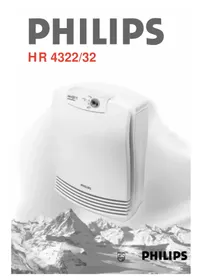
HR4332 - Air purifier PHILIPS - Free user manual and instructions
Find the device manual for free HR4332 PHILIPS in PDF.



| Product type | Air purifier |
| Brand | Philips |
| Model | HR4332 |
| Maximum power | 80 Watts |
| Maximum room area | 50 m² |
| Maximum room volume | 120 m³ |
| CADR (dust) | 153 m³/h |
| CADR (pollen/spores) | 164 m³/h |
| CADR (allergens) | 160 m³/h |
| Filtration system | Pre-filter, Rota filter, 3 HEPA filters |
| Replacement HEPA filter | HR 4920 |
| Operating speeds | Off, 1 (low), 2 (normal), Turbo |
| HEPA filter replacement indicator | Yes, by color comparison |
| Mounting type | Floor or wall |
| Cord storage | At the back of the unit |
| Automatic safety | Anti-overheating and anti-opening of front panel |
| Pre-filter maintenance | Clean every 2 months, washable with water or vacuum cleaner |
| Rota filter maintenance | Washable with water or dishwasher, every 2 months |
| Number of HEPA filters | 3 |
| Usage advice | Continuous operation on speed 1 or 2 for clean air |
Frequently Asked Questions - HR4332 PHILIPS
User questions about HR4332 PHILIPS
0 question about this device. Answer the ones you know or ask your own.
Ask a new question about this device
Download the instructions for your Air purifier in PDF format for free! Find your manual HR4332 - PHILIPS and take your electronic device back in hand. On this page are published all the documents necessary for the use of your device. HR4332 by PHILIPS.
USER MANUAL HR4332 PHILIPS
Keep page 3 open when reading these operating instructions.
English
Important
- Read the instructions carefully before you start using the appliance.
- Never immerse the appliance in water or any other liquid.
- Do not use the appliance outside or in a humid environment.
- The appliance influences the air circulation in the room in which it is used. It is recommended not to use the appliance next to an open fire.
- Always remove the plug from the wall socket before you open the appliance or before you start cleaning it.
- Do not touch any moving parts when you open the appliance. Let the Rota filter come to a halt by itself.
- Keep the cord away from hot objects.
- If the cord of this appliance is damaged, it may only be replaced by an authorised Philips service centre, since repair requires special tools and/or parts.
Clean air in your house is a prerequisite for the prevention of inhalant allergies. Your Philips air cleaner will help you remove airborne particles from the air effectively. These particles also include allergens, such as house dust, pollen and pet allergens as well as viruses, bacteria and mould spores.
When comparing air cleaners you will notice that a number of terms are used by suppliers as an indication of the effectiveness of their appliances. The standard that best reflects the effectiveness of an air cleaner is CADR (Clean Air Delivery Rate). In general, an air cleaner with a high CADR will remove particles from the air more quickly than an air cleaner with a low CADR.
Additional measures
- In urban areas: keep your windows closed during the hours in which there is a lot of traffic and when factories etc. are polluting the air. • Vacuum clean your house regularly. Hard floors are better than carpets.
- Use mite-proof coverings and sheets to limit the amount of house dust allergens coming out of mattresses and blankets.
How does the Philips air cleaner work?
The air cleaner sucks in air through its front and both sides. The sucked-in air is filtered by the air cleaner. After filtering, clean air is blown out from the top of the appliance. To be able to remove even the smallest particles from the air, the air cleaner has been equipped with a unique three-stage filter system.
① Prefilter
The washable prefilter catches the larger airborne particles, such as fluff, hairs, etc.
② Rota filter
This rotating filter catches particles of down to 2 microns in size (for instance pollen). When a particle enters one of the ducts of the filter, it is pressed to the wall of the duct as a result of the centrifugal force. The air is allowed to pass through the duct while the particle remains behind in the filter. The Rota filter is washable.
③ HEPA filters
Finally, the HEPA filters remove all remaining particles from the air, small particles in particular. The filter is made of glass fibres which are packed so closely together that they prevent even very small particles from passing through the filter. The same type of filter is also used in most operating rooms in hospitals.
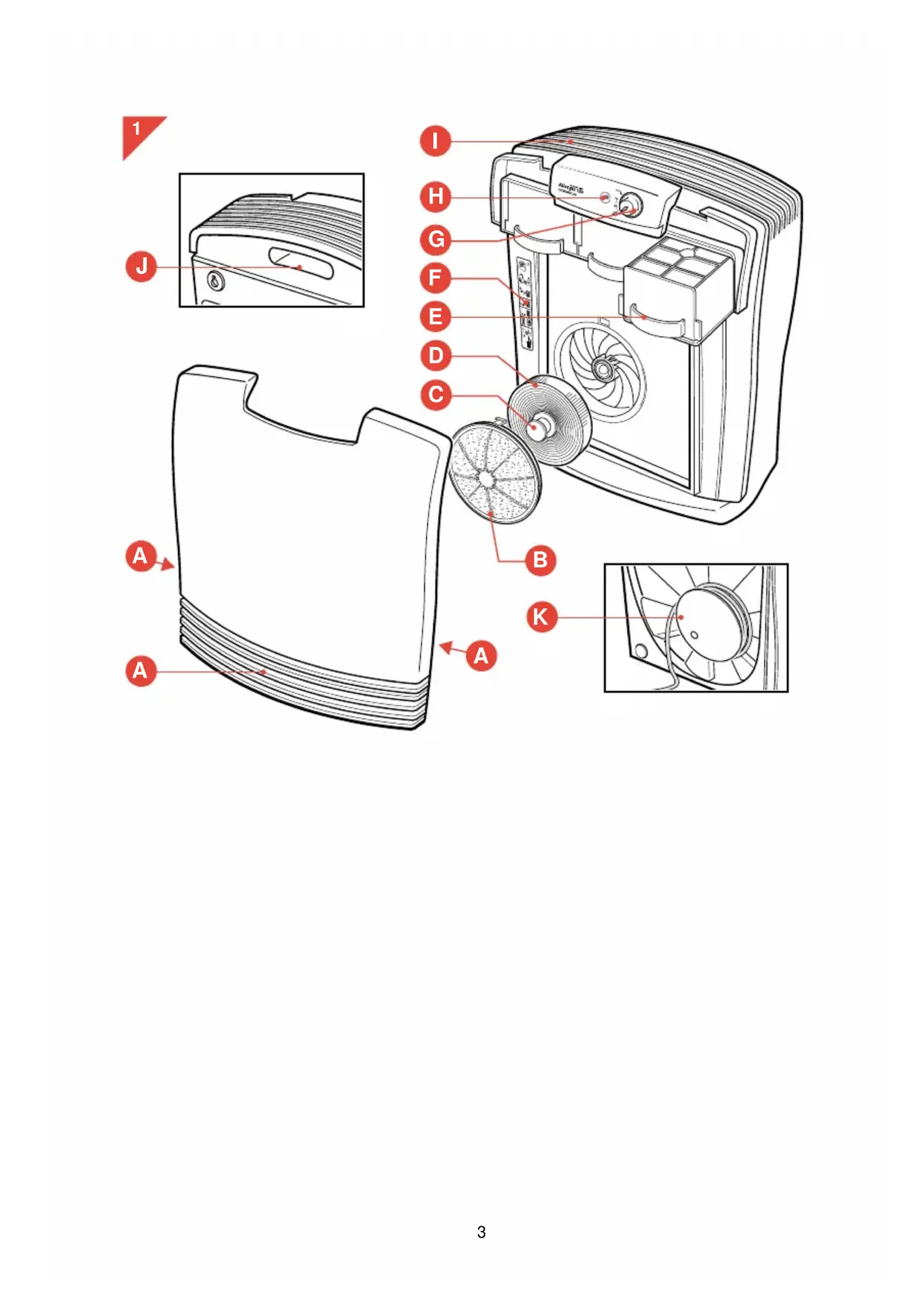
General description (fig. 1)
A Air inlets
B Prefilter
C Locking button for Rota filter
D Rota filter
HEPA filters
type HR 4322: 2 filters
type HR 4332: 3 filters
F HEPA filter replacement indicator
G Speed control
O = off
1 = low speed
2 = normal speed
turbo = high speed
H 'On' pilot light
Air outlet
J Handle
K Cord storage facility
Placing the air cleaner
![graph TD A["Start"] --> B{Loop} B --> C["End"] style A fill:#f9f,stroke:#333 style C fill:#bbf,stroke:#333](/content/2026/03/535683/images/f78e3b4c7c47f78cebb3c47240bfdaa6904fa39fad32cef9fa3c2682dcc4e7e0.jpg)
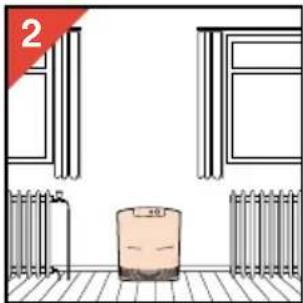
- As a rule, the air cleaner should be placed on the floor in a central position with its back against the wall (fig. 2-3).
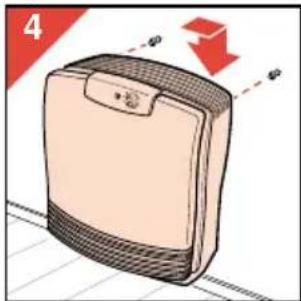
• You can also hang the air cleaner on the wall (fig. 4).
- Excess cord can be stored at the back of the appliance (fig. 1).
- It is also possible to use more than one air cleaner in a room. This is advisable if the room is very big and/or has an irregular shape. In this case it is best to put both appliances against the same wall, yet as far removed from each other as possible.
- For proper cleaning of the air in a room, we advise you to use:
- one HR 4322 air cleaner for rooms with a surface area of up to 30 m2 ( 75 m3 ).
- one HR 4332 air cleaner for rooms with a surface area of up to 50 m 2 (120 m 3 ).
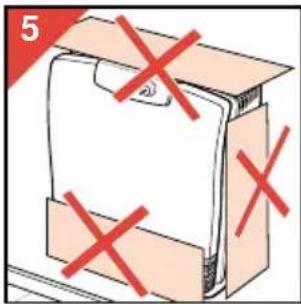
- Never cover the air inlets or outlet (fig. 5).
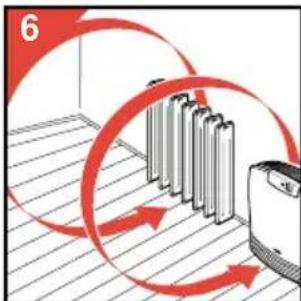
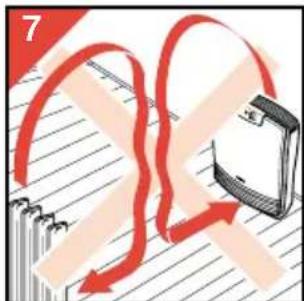
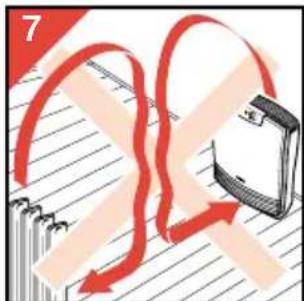
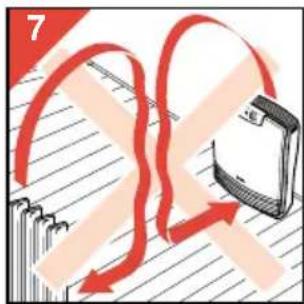
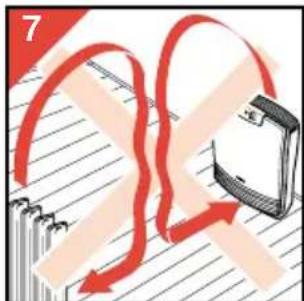
- When you are using a heating device: position the air cleaner in
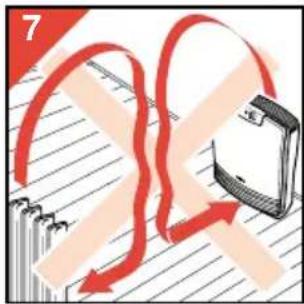
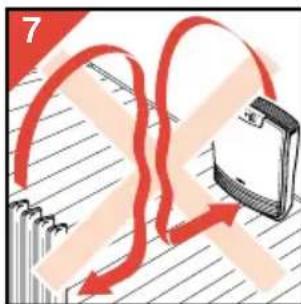
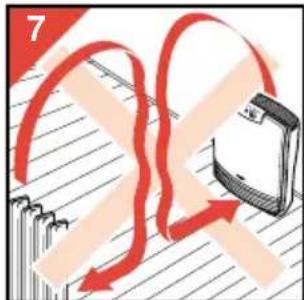
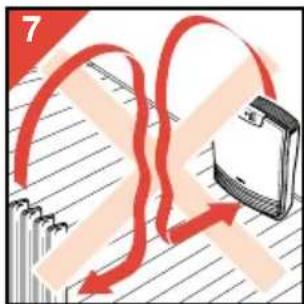
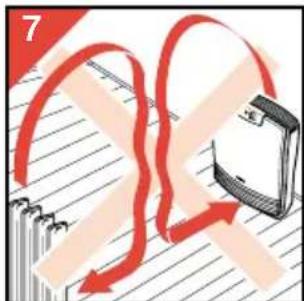
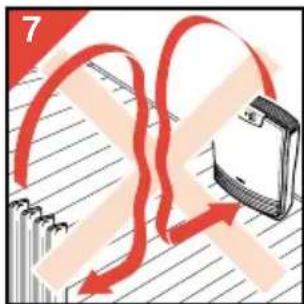
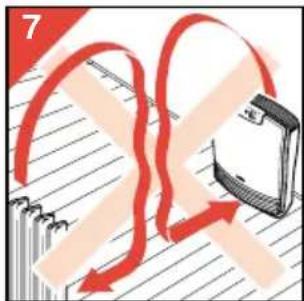
such a way that the airflow caused by the appliance coincides with the convective airflow of the heating device. You should therefore place the air cleaner next to the radiator or other heating appliance (fig. 6-7).
• Particularly people who suffer from allergies are advised to put an air cleaner in the living room as well as in the bedroom and to let both air cleaners run continuously.
Using the air cleaner
- For a continuous supply of fresh, clean air in your room, run the appliance continuously at low (1) or normal (2) speed.
- For quick air cleaning, set the speed control (G) to the turbo setting and switch to speed 1 or 2 after approximately 30 minutes.
- Check regularly if the filters need to be cleaned and/or replaced.
Opening the air cleaner
Note that the front of the air cleaner has been provided with an automatic safety lock which makes it impossible for you to open the appliance while it is running. The automatic safety lock also ensures that you cannot switch the appliance on when the front has been removed.
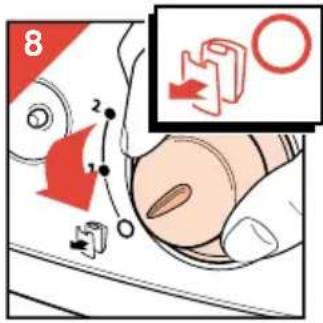
- Set the speed control to O (fig. 8).
- Remove the plug from the wall socket.
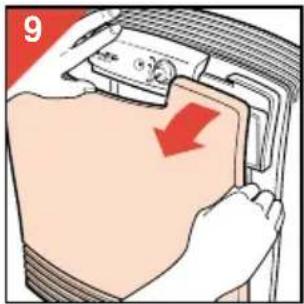
- Remove the front of the appliance by pulling it towards you on one side (fig. 9).
Cleaning the prefilter and the Rota filter
- Clean the prefilter and the Rota filter at least once every two months and more often if the appliance becomes noisier and if it is used in a room in which people smoke.
Prefilter:
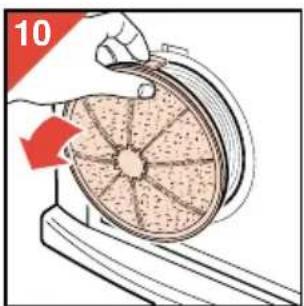
- Remove the prefilter (fig. 10).
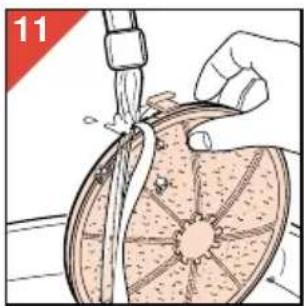
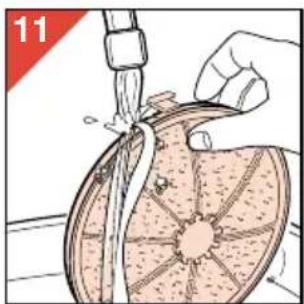
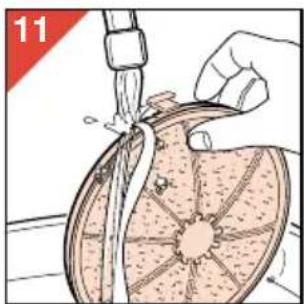
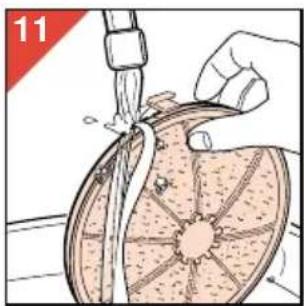
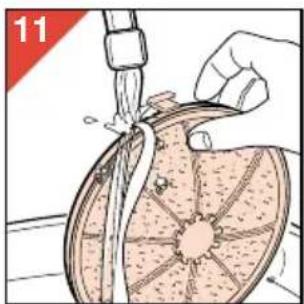
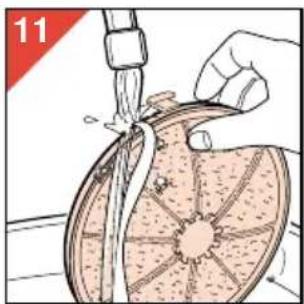
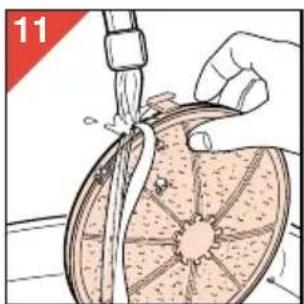
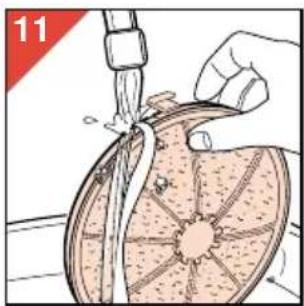
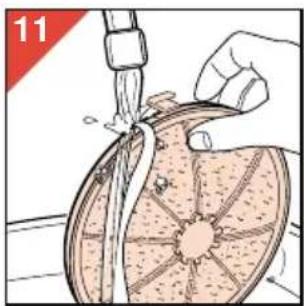
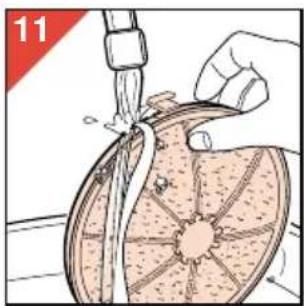
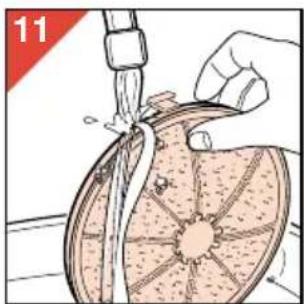
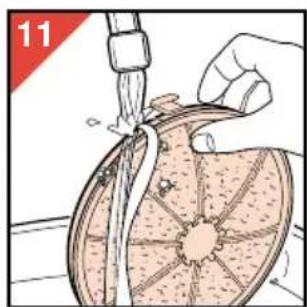
- Clean the prefilter by washing it (fig. 11) or vacuum cleaning it.
Rota filter:
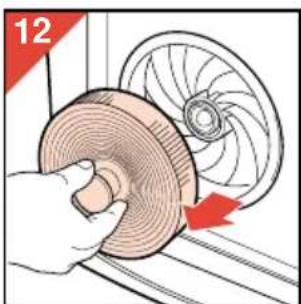
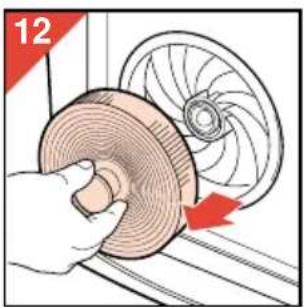
- Remove the Rota filter (fig. 12).
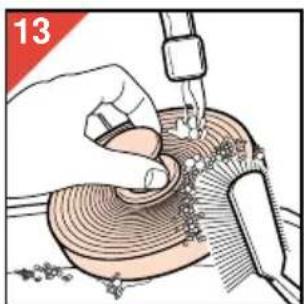
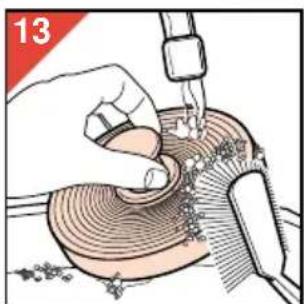
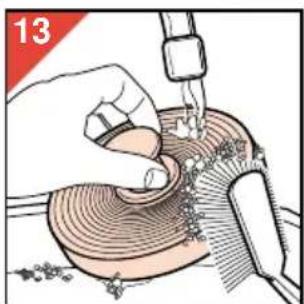
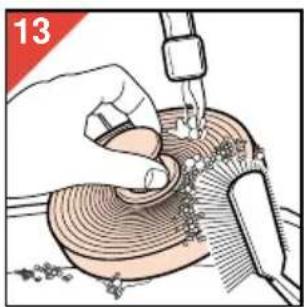
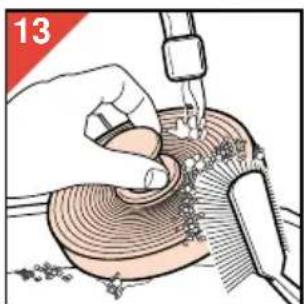
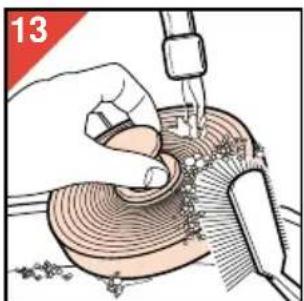
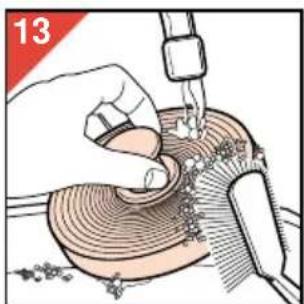
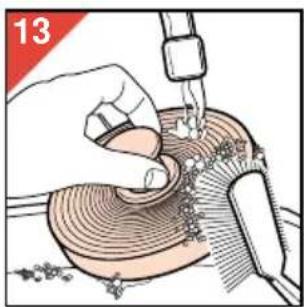
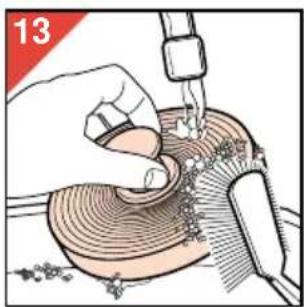
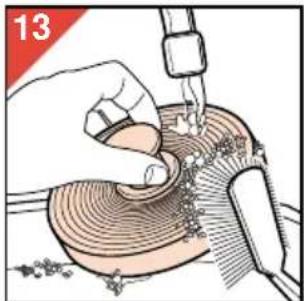
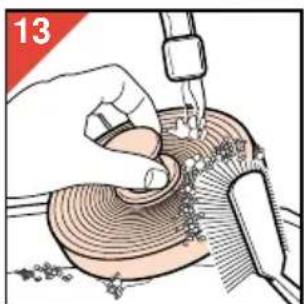
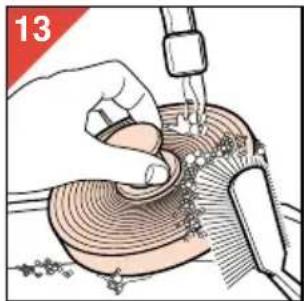
- Clean the Rota filter by washing it (fig. 13) or vacuum cleaning it. The Rota filter can also be cleaned in the dishwasher.
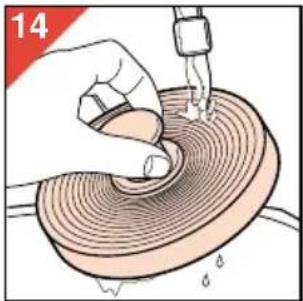
If you have used washing-up liquid, rinse the filters with clean water (fig. 14).
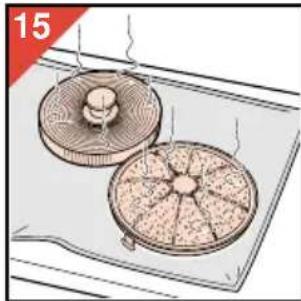
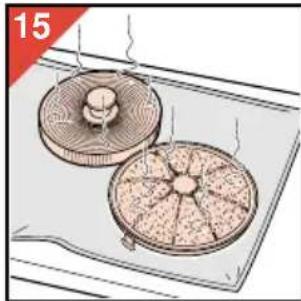
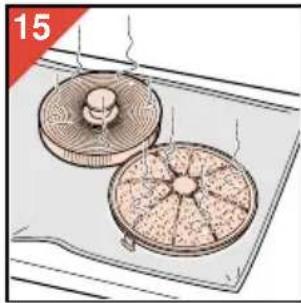
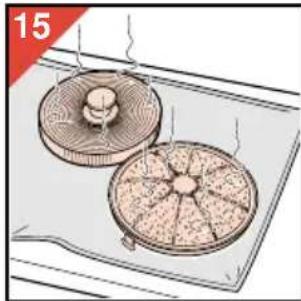
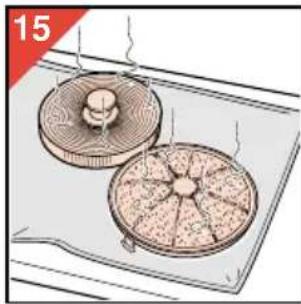
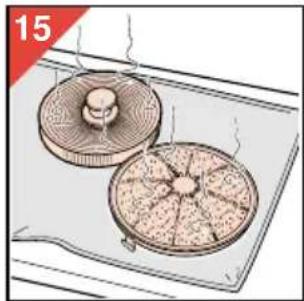
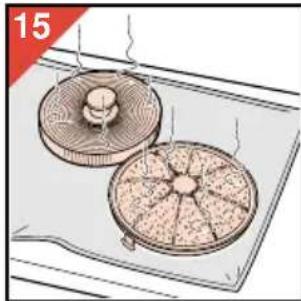
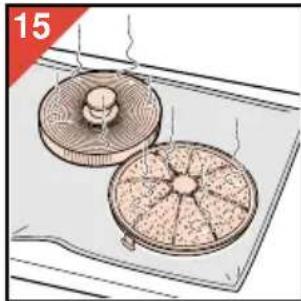
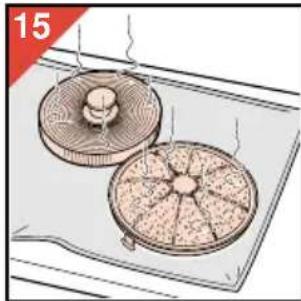
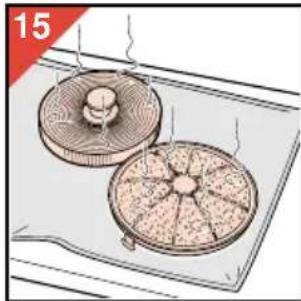
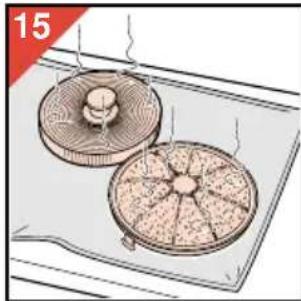
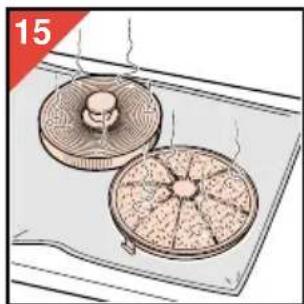
- Let the filters dry naturally (fig. 15).
- Proceed in reverse order and direction to put the filters back into the appliance.
- Press the Rota filter firmly until it snaps home.
Checking/replacing the HEPA filters
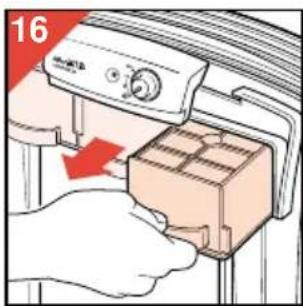
- Remove the HEPA filters from the air cleaner (fig. 16).
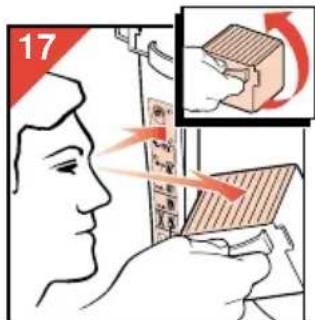
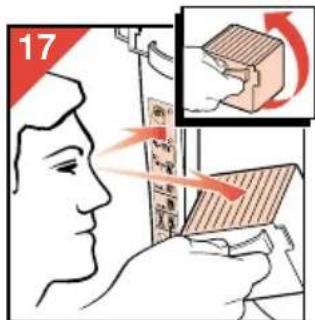
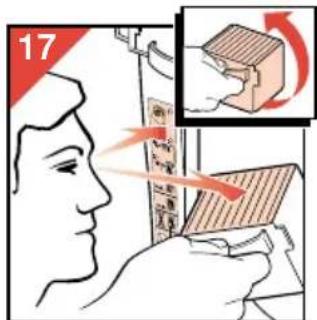
- Turn the HEPA filters upside down and compare the colour of their base with the colours on the HEPA filter replacement indicator (F) (fig. 17).
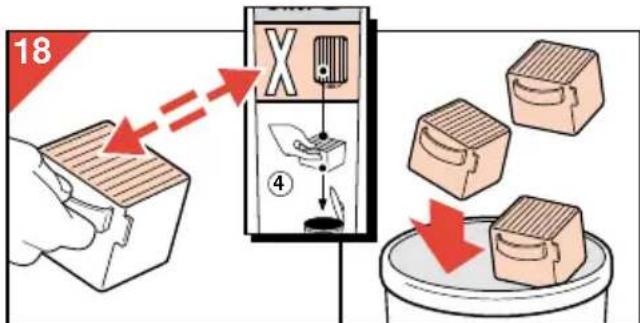
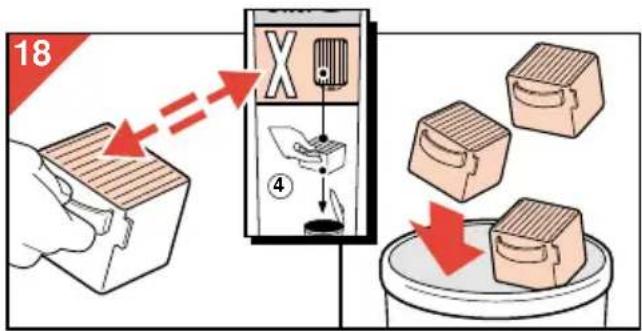
- Replace the HEPA filters if the colour of their base corresponds to the darkest shade of grey on the HEPA filter replacement indicator (fig. 18).
- Check the filters right away if the appliance starts to produce more noise. If the air cleaner is being used in a room in which people smoke,
it may be necessary to replace the HEPA filters more often.
- NB: new HEPA filters are available from your retailer under number HR 4920.
If the automatic cut-out is activated time and again, we advise you to take your appliance to your dealer for a technical inspection.
Automatic cut-out to prevent overheating
To prevent damage to the appliance due to overheating and to limit the risks, the automatic cut-out ensures that the motor is switched off when it becomes too hot.
To indicate that the appliance is still switched on and connected to the mains, the pilot light will continue to burn.
If this happens:
- Set the speed control to position O (= off).
- Unplug the air cleaner.
- Allow the appliance to cool down (approx. 15 minutes).
- Open the appliance. Make sure that the filters are not covered or blocked and that the airflow is not obstructed.
- Check if the Rota filter is able to rotate freely by turning it with your hand (fig. 19).
- Close the appliance. Put the plug in the wall socket and switch the appliance back on.

Specifications/technical data
HR 4322 HR 4332
Power consumption (highest setting) 70 Watt 80 Watt
CADR (highest setting)
| - dust 126 m | 3 /hour 153 m | 3 /hour |
| - pollen 135 m | 3 /hour 164 m | 3 /hour |
| - pet allergens 132 m | 3 /hour 160 m | 3 /hour |
| - mould spores 135 m | 3 /hour 164 m | 3 /hour |
Filter system:
- Prefilter 1 1
- Rota filter 1 1
- HEPA filter 2 3
Number HEPA replacement filters HR 4920 HR 4920
Maximum size of room 30m
2/75m3
50m²/120m³
French
Important
![graph TD A["Start"] --> B{Loop Back} B --> C["End"] style A fill:#f9f,stroke:#333 style C fill:#bbf,stroke:#333](/content/2026/03/535683/images/6f8780fdead61f42d46d8960c77b8c55c2e6756d2e8f6e719138d37b16bf1ce5.jpg)
![graph TD A["Start"] --> B{Condition} B --> C["End"] style A fill:#f9f,stroke:#333 style C fill:#ccf,stroke:#333](/content/2026/03/535683/images/378af96ed23c93c4a6956f0f2d30a214df8f1db4ea336602c348fa56191bc39e.jpg)

Technical data
HR 4322 HR 4332
Power consumption (max.) 70 W 80 W
CADR (max.)
- Dust 126 m
- Pollen 135 m
- Pet allergens 132 m
- Mold spores 135 m
153 m³/h 164 m³/h 160 m³/h 164 m³/h
Filter system:
- Pre-filter 1 1
- Rota-Filter 1 1
- HEPA filter 2 3
HEPA replacement filter type 2 x HR 4920 3 x HR 4920
Maximum room size
30m2/75m3
50m²/120m³
Dutch
Important
type HR 4332: 3 filters
HEPA filter replacement indicator
G Speed control
O = off
1 = low speed
2 = normal speed
![graph TD A["Start"] --> B{Step 1} B --> C["Step 2"] C --> D["Step 3"] D --> E["End"]](/content/2026/03/535683/images/06cbc5567009ca7163e5c19b2b42f43df521f758efb94cc4304cdcd966e8ed14.jpg)
HR 4322 HR 4332
![graph TD A["Start"] --> B{Step 1} B --> C["Step 2"] C --> D["Step 3"] D --> E["End"]](/content/2026/03/535683/images/ac9d11cc3590a311f75d03a2a671d93a41994d4bdb699f59afc89458ef62ee46.jpg)
![graph TD A["Start"] --> B{Loop} B --> C["Tree"] C --> D["End"]](/content/2026/03/535683/images/2237951f2ae43d7d3295df7b786de029850d241355caa8ca702d3284ae4e599a.jpg)
![graph TD A["Start"] --> B{Cyclopy} B --> C["End"] style A fill:#f9f,stroke:#333 style C fill:#bbf,stroke:#333](/content/2026/03/535683/images/8b1491f2e87cd88171daa329a4bf7163dae4d53e9b88aa2fafb586ce873ebd8e.jpg)
![graph TD A["Start"] --> B{Loop} B --> C["End"] style A fill:#f9f,stroke:#333 style C fill:#bbf,stroke:#333](/content/2026/03/535683/images/4cb4697e4a02add862d74a1ec3c29461aaaa67da6ede5dbaa359e1845cd53225.jpg)
- Pull out the pre-filter (fig. 10).
- Clean the pre-filter by washing it (fig. 11) or vacuuming it.
Rota filter:
- Prefilter 1 1
- Rota filter 1 1
- HEPA filter 2 3
New HEPA filters HR 4920 HR 4920
© Locking nut for the rotating filter
D Rotating filter
E HEPA filter
type HR 4322: 2 filters
type HR 4332: 3 filters
![graph TD A["Start"] --> B{Loop} B --> C["End"] style A fill:#f9f,stroke:#333 style C fill:#bbf,stroke:#333](/content/2026/03/535683/images/94faffba3dbcddfc6c940f530d5649756cb72987e14373314d96181f83ad5ef4.jpg)
- People suffering from respiratory allergies are especially recommended to place an air purifier in the living room and one in the bedroom, and to have both air purifiers on at the same time.
- Remove the HEPA filter from the air purifier (fig. 16).
- Turn the HEPA filter upside down and compare the shade of the filter with the shade on the indicator (F) (fig. 17).
![graph TD A["Start"] --> B{Loop} B --> C["End"] style A fill:#f9f,stroke:#333 style C fill:#bbf,stroke:#333](/content/2026/03/535683/images/7154712fe9346095aa5f383d5a8faa7f3d5d8e16c5b921b685aabaf006b86e08.jpg)
![graph TD A["Start"] --> B{Loop} B --> C["End"] style A fill:#f9f,stroke:#333 style C fill:#bbf,stroke:#333](/content/2026/03/535683/images/075240292f1f8bdcf1acfcde1c43da969b3172190609ccf6d08c89ab9b4f4663.jpg)
Technical specifications
Power consumption (max. setting) 70 W 80 W
CADR (max. setting)
| - pöly 126 m | 3/t 153 m | 3/t |
| - siitepöly 135 m | 3/t 164 m | 3/t |
| - eläinpöly 132 m | 3/t 160 m | 3/t |
| - homeitiöt 135 m | 3/t 164 m | 3/t |
Filters:
![graph TD A["Start"] --> B{Step 1} B --> C["Step 2"] C --> D["Step 3"] D --> E["End"]](/content/2026/03/535683/images/f1ffef215e9408c6d17c3732fe620460566ac7ac5eab6938ac7e93bcd9d140e0.jpg)
50 m² / 120 m³
- ENGLISH
- IMPORTANT
- ADDITIONAL MEASURES
- HOW DOES THE PHILIPS AIR CLEANER WORK
- ① PREFILTER
- ② ROTA FILTER
- ③ HEPA FILTERS
- GENERAL DESCRIPTION (FIG. 1)
- PLACING THE AIR CLEANER
- USING THE AIR CLEANER
- OPENING THE AIR CLEANER
- CLEANING THE PREFILTER AND THE ROTA FILTER
- CHECKING/REPLACING THE HEPA FILTERS
- AUTOMATIC CUT-OUT TO PREVENT OVERHEATING
- SPECIFICATIONS/TECHNICAL DATA
- HR 4322 HR 4332
- POWER CONSUMPTION (HIGHEST SETTING) 70 WATT 80 WATT
- FILTER SYSTEM
- FRENCH
- TECHNICAL DATA
- POWER CONSUMPTION (MAX.) 70 W 80 W
- CADR (MAX.)
- HEPA REPLACEMENT FILTER TYPE 2 X HR 4920 3 X HR 4920
- MAXIMUM ROOM SIZE
- DUTCH
- NEW HEPA FILTERS HR 4920 HR 4920
- TECHNICAL SPECIFICATIONS
Brand : PHILIPS
Model : HR4332
Category : Air purifier