ManualGo.com
FlexArm DDR1732DAL - Uncategorized Tripp Lite - Free user manual and instructions
Find the device manual for free FlexArm DDR1732DAL Tripp Lite in PDF.



Download the instructions for your Uncategorized in PDF format for free! Find your manual FlexArm DDR1732DAL - Tripp Lite and take your electronic device back in hand. On this page are published all the documents necessary for the use of your device. FlexArm DDR1732DAL by Tripp Lite.
USER MANUAL FlexArm DDR1732DAL Tripp Lite
Owner’s Manual Dual Flex-Arm Desk Clamp, Aluminum Model: DDR1732DAL 1111 W. 35th Street, Chicago, IL 60609 USA • tripplite.com/supportCopyright © 2021 Tripp Lite. All rights reserved. WARRANTY REGISTRATION Register your product today and be automatically entered to win an ISOBAR
- Do not begin the installation until you have read and understood the instructions and warnings contained in this manual. If you have any questions regarding any of the instructions or warnings, please visit tripplite.com/support.
- This mount was designed to be installed and utilized ONLY as specified in this manual. Improper installation of this product may cause damage or serious injury.
- This product should only be installed by someone of good mechanical ability, with basic building experience and a full understanding of this instruction manual.
- Make sure that the mounting surface can safely support the combined load of the equipment and all attached hardware and components.
- Always use an assistant or mechanical lifting equipment to safely lift and position equipment.
- Tighten screws firmly, but do not over-tighten. Over-tightening screws can damage the items, greatly reducing their holding power.
- This product is intended for indoor use only. Using this product outdoors could lead to product failure and personal injury. 5-Year Limited Warranty Seller warrants this product, if used in accordance with all applicable instructions, to be free from original defects in material and workmanship for a period of 5 years from the date of initial purchase. If the product should prove defective in material or workmanship within that period, Seller will repair or replace the product, at its sole discretion. THIS WARRANTY DOES NOT APPLY TO NORMAL WEAR OR TO DAMAGE RESULTING FROM ACCIDENT, MISUSE, ABUSE OR NEGLECT. SELLER MAKES NO EXPRESS WARRANTIES OTHER THAN THE WARRANTY EXPRESSLY SET FORTH HEREIN. EXCEPT TO THE EXTENT PROHIBITED BY APPLICABLE LAW, ALL IMPLIED WARRANTIES, INCLUDING ALL WARRANTIES OF MERCHANTABILITY OR FITNESS, ARE LIMITED IN DURATION TO THE WARRANTY PERIOD SET FORTH ABOVE; AND THIS WARRANTY EXPRESSLY EXCLUDES ALL INCIDENTAL AND CONSEQUENTIAL DAMAGES. (Some states do not allow limitations on how long an implied warranty lasts, and some states do not allow the exclusion or limitation of incidental or consequential damages, so the above limitations or exclusions may not apply to you. This warranty gives you specific legal rights, and you may have other rights which vary from jurisdiction to jurisdiction.) WARNING: The individual user should take care to determine prior to use whether this device is suitable, adequate or safe for the use intended. Since individual applications are subject to great variation, the manufacturer makes no representation or warranty as to the suitability or fitness of these devices for any specific application. PRODUCT REGISTRATION Visit tripplite.com/warranty today to register your new Tripp Lite product. You’ll be automatically entered into a drawing for a chance to win a FREE Tripp Lite product!*
- No purchase necessary. Void where prohibited. Some restrictions apply. See website for details. Tripp Lite has a policy of continuous improvement. Specifications are subject to change without notice. Photos and illustrations may differ slightly from actual products. NOTE: Read the entire instruction manual before you start assembly and installation.3 Component Checklist IMPORTANT: Ensure you have received all parts according to the component checklist prior to installing. If any parts are missing or faulty, visit tripplite.com/support for service. Package P Package W Package M
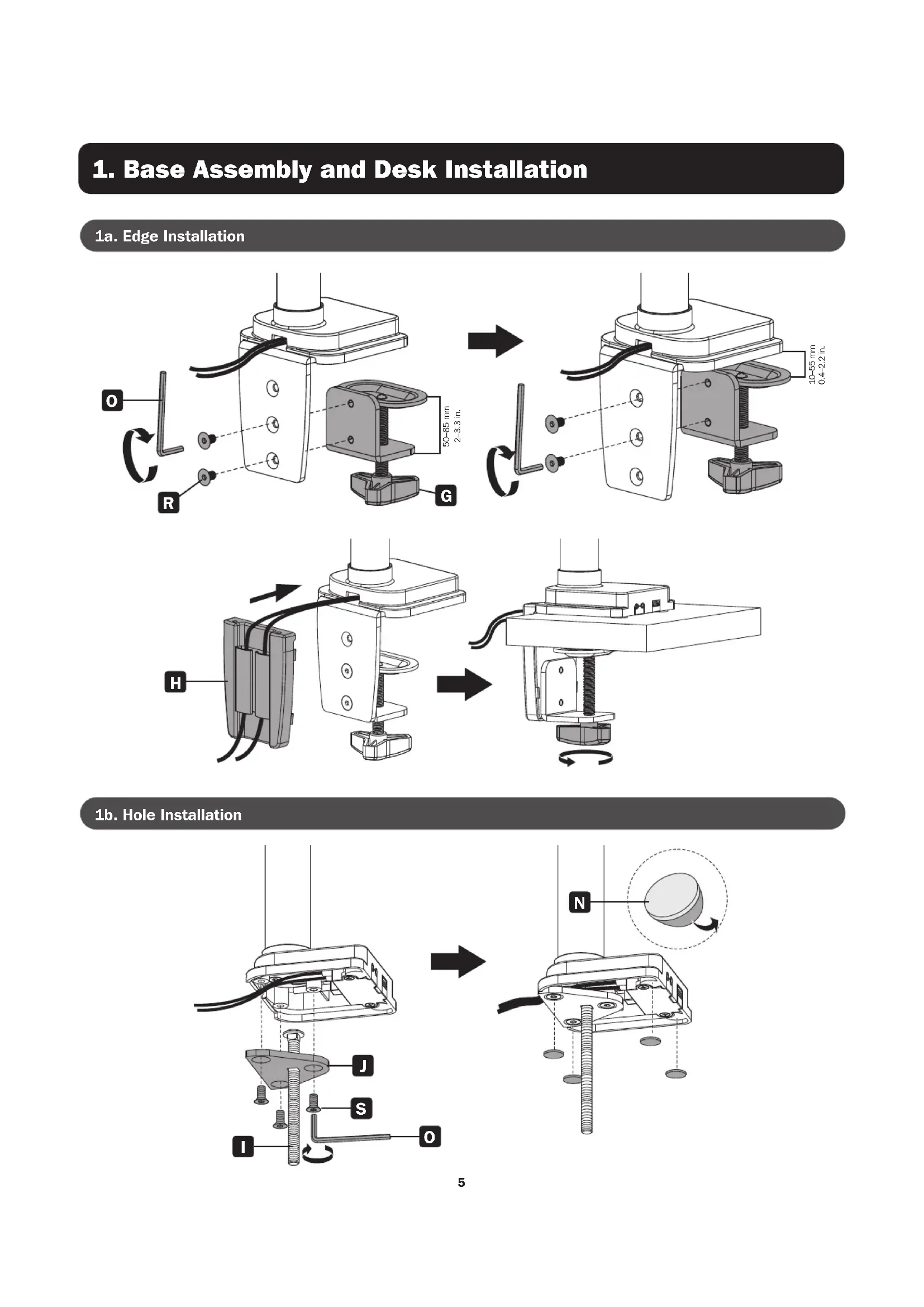
1. Base Assembly and Desk Installation
50–85 mm 2–3.3 in. 10–55 mm 0.4–2.2 in.
1. Base Assembly and Desk Installation6
10–80 mm 0.4–3.1 in.
1. Base Assembly and Desk Installation7
3. Attaching the Universal Plate to the Flex Arm
5. Connecting Peripherals
6. Adjusting the Monitors
- Check that the bracket is secure and safe to use at regular intervals (at least every three months).
50–85 mm 2"–3.3" 10–55 mm 0.4"–2.2"