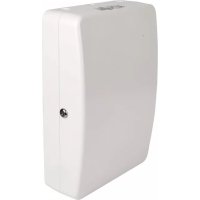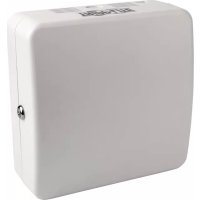
EN1111 - Access Point Tripp Lite - Free user manual and instructions
Find the device manual for free EN1111 Tripp Lite in PDF.


| Product Type | Wireless Access Point Enclosure |
| Brand | Tripp Lite |
| Model | EN1111 |
| Material | ABS |
| Dimensions | 30.48 cm (11 in) length |
| Weight | Approximately 0.5 kg |
| Color | White |
| Power | Not applicable (passive enclosure) |
| Main Features | Protection and wall mounting of an access point; compatible with Cisco, Aruba, and T-bar mounts |
| Care and Cleaning | Clean with a soft, dry cloth |
| Security | Integrated lock; secure mounting on wall studs |
| Spare Parts and Repairability | No detachable parts; 5-year warranty |
| Warranty | 5-year limited |
| Package Contents | Enclosure, universal Cisco bracket (AIR-AP-BRACKET-2), single-use tie, installation manual |
| Compatibility | Cisco, Aruba, and other T-bar mounted access points |
| Mounting Type | Wall mounting on wood studs or drywall (hardware not included) |
| Operating Temperature | 0 °C to 40 °C |
| Operating Humidity | 10% to 90% RH non-condensing |
Frequently Asked Questions - EN1111 Tripp Lite
User questions about EN1111 Tripp Lite
0 question about this device. Answer the ones you know or ask your own.
Ask a new question about this device
Download the instructions for your Access Point in PDF format for free! Find your manual EN1111 - Tripp Lite and take your electronic device back in hand. On this page are published all the documents necessary for the use of your device. EN1111 by Tripp Lite.
USER MANUAL EN1111 Tripp Lite
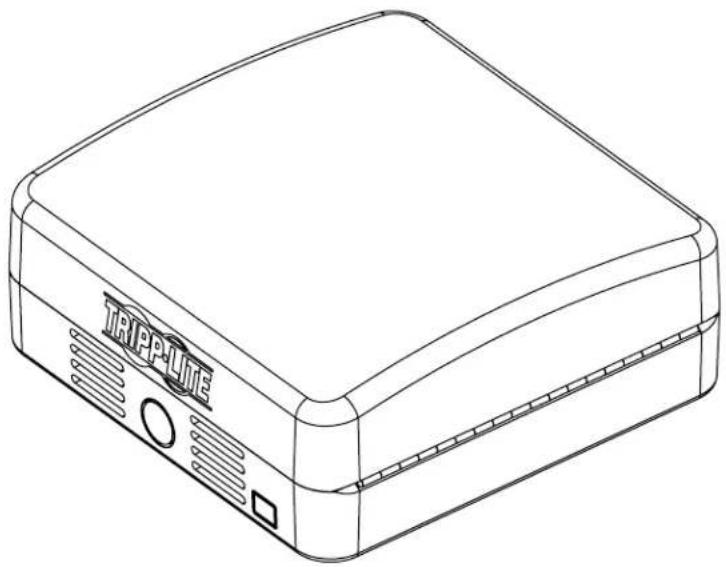
11" x 11" ABS Wireless Access Point Enclosure with Lock
Model: EN1111
natural_image
Line drawing of a TrippLite device casing with ventilation slots and buttons (no text or symbols on body)Español 5 • Français 9 • Русский 13
PROTECT YOUR INVESTMENT!
Register your product for quicker service and ultimate peace of mind.
You could also win an ISOBAR6ULTRA surge protector—a \$100 value!
www.tripplite.com/warranty



Manufacturing Excellence.
Components List
IMPORTANT:
Ensure that you have received all parts according to the component checklist prior to installing. If any parts are missing or faulty, visit www.tripplite.com/support for service.
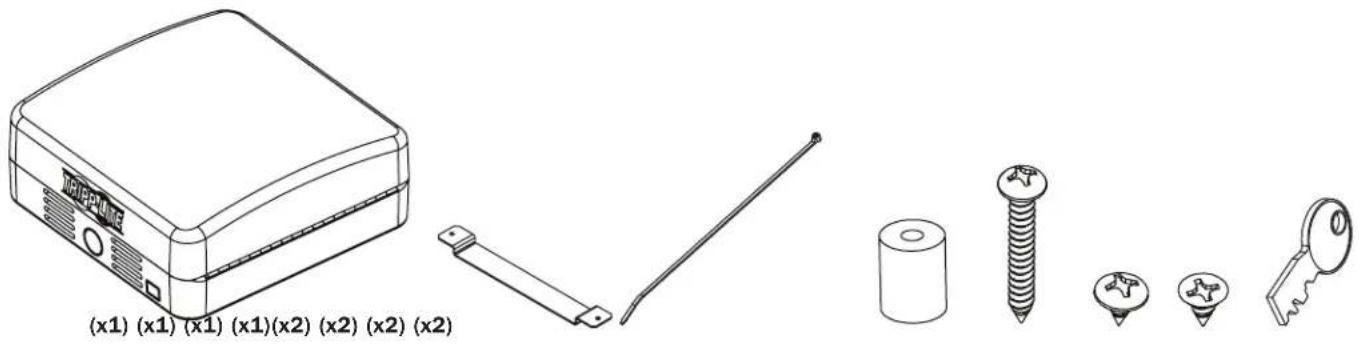
natural_image
Line drawings of various electronic components including a device, wires, and accessories (no text or symbols present)Installation
- Mount Enclosure Box to Wall
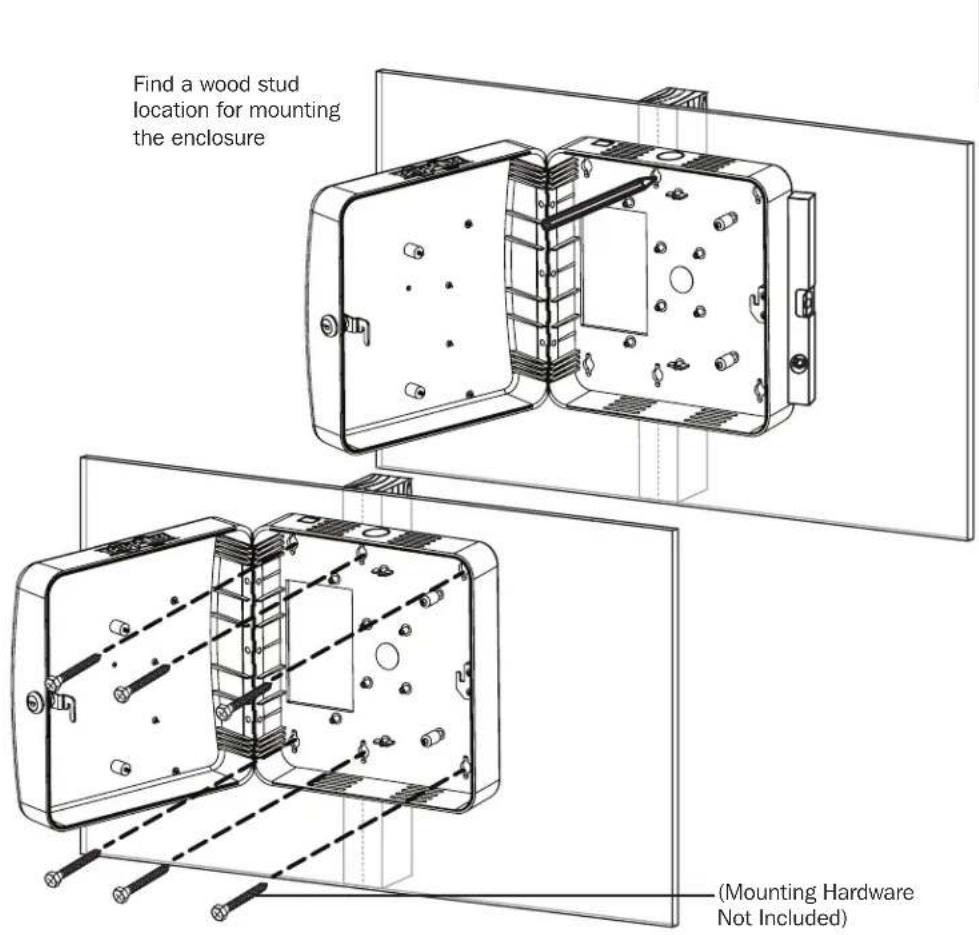
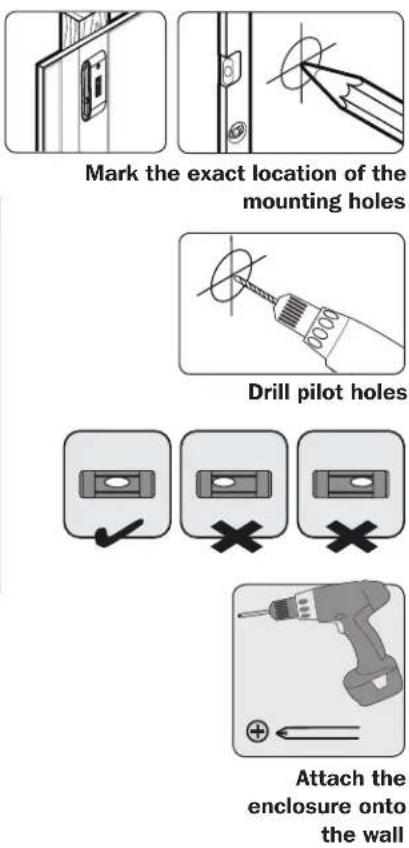
Installation
- Installers are responsible for providing wall-mounting hardware. Use a minimum of two #10 x 2" or larger screws (not included) to secure the enclosure in place.
- Make sure mounting screws are anchored into the center of the studs. Use of a stud finder is highly recommended.
- If there is no stud at the mounting location, it is recommended you use four anchors to secure the enclosure in place. Due to the weight of the enclosure, plastic expansion wall anchors are not recommended for drywall installations. Suitable anchors include: threaded drywall anchors, threaded drywall toggles, sleeve-type hollow wall anchors (a.k.a. molly bolts) or toggle bolts.
- If placing the enclosure over a telecommunications receptacle, remove the wall plate, then fasten the enclosure to the wall. Once secured, fasten the wall plate over the receptacle.
- If no telecommunications receptacle is available, a surface mount box (or biscuit jack) and equipment cord can be mounted inside the unit.
- Use an adhesive-backed surface mount box.
2. Run Data and Power Cable (If Required) Through the Rear Cutout or Side Conduit Cutout
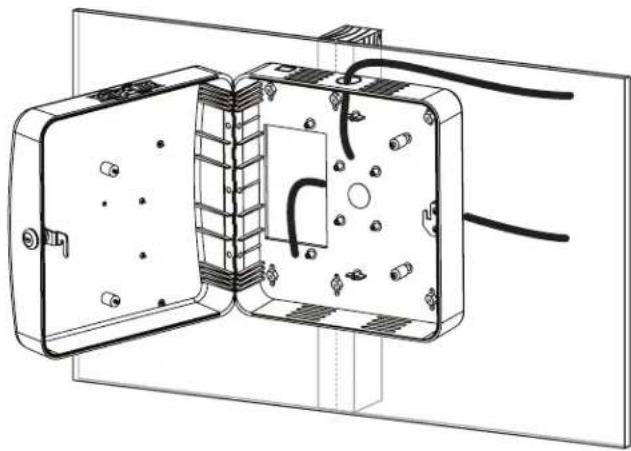
natural_image
Technical line drawing of an electrical enclosure with exposed wiring and internal components (no text or symbols)3. Using the Provided Screws, Attach the Access Point

IMPORTANT!
Attach all data and power cables to the access point prior to attaching to the enclosure.
3a. Cisco Universal Bracket (AIR-AP-BRACKET-2)\* Installation
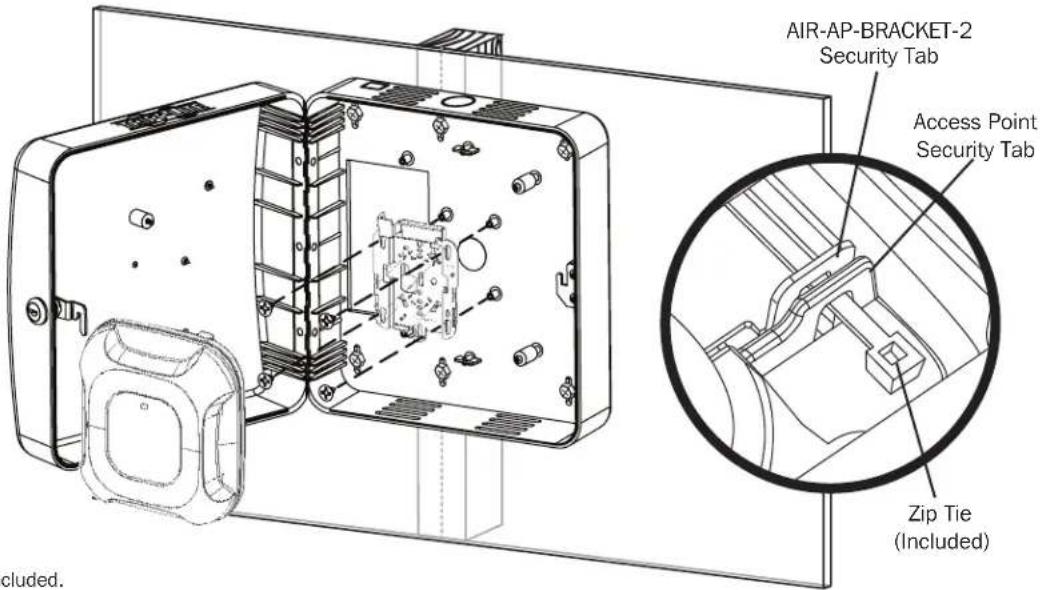
* Cisco brackets not included.
Installation
3b. Aruba or Other T-Bar Mounted Access Point Installation
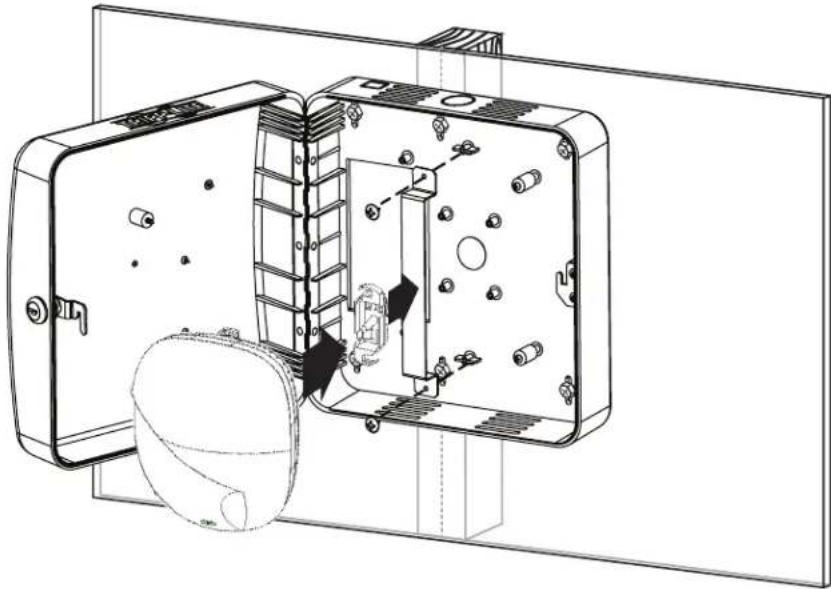
natural_image
Technical line drawing of a mechanical device with internal components and mounting holes (no text or symbols)Warranty and Product Registration
5-year Limited Warranty
Seller warrants this product, if used in accordance with all applicable instructions, to be free from original defects in material and workmanship for a period of 5 years from the date of initial purchase. If the product should prove defective in material or workmanship within that period, Seller will repair or replace the product, in its sole discretion.
THIS WARRANTY DOES NOT APPLY TO NORMAL WEAR OR TO DAMAGE RESULTING FROM ACCIDENT, MISUSE, ABUSE OR NEGLECT. SELLER MAKES NO EXPRESS WARRANTIES OTHER THAN THE WARRANTY EXPRESSLY SET FORTH HEREIN. EXCEPT TO THE EXTENT PROHIBITED BY APPLICABLE LAW, ALL IMPLIED WARRANTIES, INCLUDING ALL WARRANTIES OF MERCHANTABILITY OR FITNESS, ARE LIMITED IN DURATION TO THE WARRANTY PERIOD SET FORTH ABOVE; AND THIS WARRANTY EXPRESSLY EXCLUDES ALL INCIDENTAL AND CONSEQUENTIAL DAMAGES. (Some states do not allow limitations on how long an implied warranty lasts, and some states do not allow the exclusion or limitation of incidental or consequential damages, so the above limitations or exclusions may not apply to you. This warranty gives you specific legal rights, and you may have other rights which vary from jurisdiction to jurisdiction).
WARNING: The individual user should take care to determine prior to use whether this device is suitable, adequate or safe for the use intended. Since individual applications are subject to great variation, the manufacturer makes no representation or warranty as to the suitability or fitness of these devices for any specific application.
PRODUCT REGISTRATION
Visit www.triplite.com/warranty today to register your new Tripp Lite product. You'll be automatically entered into a drawing for a chance to win a FREE Tripp Lite product!*
* No purchase necessary. Void where prohibited. Some restrictions apply. See website for details.
Tripp Lite has a policy of continuous improvement. Specifications are subject to change without notice


1111 W. 35th Street, Chicago, IL 60609 USA • www.tripplite.com/support
Guía de Instalación
natural_image
Line drawing of a Trippuite electronic device (no text or symbols on body)English 1 • Français 9 • Русский 13


1111 W. 35th Street, Chicago, IL 60609 USA • www.tripplite.com/support
natural_image
Technical line drawings of electronic components including a device, screwdriver, and accessories (no text or symbols)Instalación
natural_image
Technical line drawing of an electrical enclosure with exposed wiring and internal components (no text or symbols)natural_image
Technical line drawing of an open electronic device with internal components and mounting holes (no text or symbols)Garantía
1111 W. 35th Street, Chicago, IL 60609 USA • www.tripplite.com/support
natural_image
Line drawing of a Trippu-lite electronic device (no text or symbols on body)English 1 • Español 5 • Русский 13


1111 W. 35th Street, Chicago, IL 60609 USA • www.tripplite.com/support
natural_image
Technical line drawings of electronic components including a device, screwdriver, and key (no text or symbols)Installation
natural_image
Technical illustration showing a door panel and a close-up of a hand holding a circular component (no text or symbols)natural_image
Technical line drawing of an electrical enclosure with exposed wiring and internal components (no text or symbols)natural_image
Technical line drawing of a mechanical device with internal components and mounting holes (no text or symbols)Garantie
1111 W. 35th Street, Chicago, IL 60609 USA • www.tripplite.com/support
natural_image
Line drawing of a TrippLite device with ventilation slots and buttons (no text or symbols on body)English 1 • Español 5 • Français 9


1111 W. 35th Street, Chicago, IL 60609 USA • www.tripplite.com/support
natural_image
Technical illustration showing a door panel and a close-up of a hand holding a circular component (no text or symbols)natural_image
Technical line drawing of an electrical enclosure with exposed wiring and internal components (no text or symbols)natural_image
Technical line drawing of an internal electrical enclosure with mounting holes and a spherical component (no text or symbols)1111 W. 35th Street, Chicago, IL 60609 USA • www.tripplite.com/support