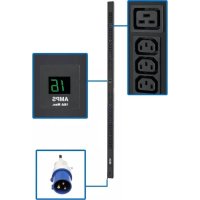
PDUMV16HV - Power Strip Tripp Lite - Free user manual and instructions
Find the device manual for free PDUMV16HV Tripp Lite in PDF.


| Product Type | Rack-mounted Power Distribution Unit (PDU) with meter |
| Brand | Tripp Lite |
| Model | PDUMV16HV |
| Power Input | Single-phase AC, IEC 309 16A plug, fixed cord |
| Nominal Voltage | 200-240 V |
| Nominal Current | 16 A |
| Overcurrent Protection | 20 A (per serial number AGPD6674) |
| Outputs | 16 IEC-60320-C19 outlets (depending on model) |
| Display | Digital ammeter showing total current |
| Mounting | Zero U rack (brackets or buttons), under-counter mount |
| Included Accessories | Mounting brackets, buttons, C14/C20 plug sleeves, PDUMVROTATEBRKT bracket |
| Usage | Indoor only, controlled environment |
| Maintenance and Cleaning | Unplug before cleaning; use dry cloth; do not open |
| Safety | Installation by qualified technician; grounding required; do not modify |
| Spare Parts and Repairability | No user-serviceable parts; contact Tripp Lite |
| Warranty | 2-year limited (defects in materials and workmanship) |
| Compliance | Certifications per serial number; WEEE (EU) |
| Approximate Dimensions | Approximately 180 x 4.4 x 4.4 cm (height x width x depth) for 16-outlet model |
| Approximate Weight | Approximately 2.5 kg |
Frequently Asked Questions - PDUMV16HV Tripp Lite
User questions about PDUMV16HV Tripp Lite
0 question about this device. Answer the ones you know or ask your own.
Ask a new question about this device
Download the instructions for your Power Strip in PDF format for free! Find your manual PDUMV16HV - Tripp Lite and take your electronic device back in hand. On this page are published all the documents necessary for the use of your device. PDUMV16HV by Tripp Lite.
USER MANUAL PDUMV16HV Tripp Lite
natural_image
Technical line drawing of a long rectangular electronic component with mounting feet and internal components (no text or symbols)Español 6 • Français 11 • Русский 16 • Deutsch 21
PROTECT YOUR INVESTMENT!
Register your product for quicker service and ultimate peace of mind.
You could also win an ISOBAR6ULTRA surge protector— a \$100 value!

www.tripplite.com/warranty


1111 W. 35th Street, Chicago, IL 60609 USA • www.tripplite.com/support
Copyright © 2019 Tripp Lite. All rights reserved.
Important Safety Instructions
SAVE THESE INSTRUCTIONS
This manual contains instructions and warnings that should be followed during the installation, operation and storage of this product. Failure to heed these instructions and warnings will void the product warranty.

Important Warnings
- The PDU provides the convenience of multiple outlets, but DOES NOT provide surge or line noise protection for connected equipment.
- The PDU is designed for indoor use only, in a controlled environment, away from excess moisture, temperature extremes, conductive contaminants, dust or direct sunlight.
- The PDU must be installed by a qualified technician only.
- Do not attempt to mount the PDU to an insecure or unstable surface.
- Install in accordance with National Electrical Codes. Be sure to use the proper over current protection for the installation, in accordance with the plug rating/equipment rating as follows:
| Model Series Number Overcurrent Protection | ||
| PDUV30HV AGIB6672 30A | ||
| PDUMV30 AGPD6673 30A | ||
| PDUMV16HV, PDUMV20HV AGPD6674 20A | ||
| PDUMV30HV AGPD6675 30A | ||
- Short-circuit backup protection and overcurrent protection is provided by the building installation.
- The electrical outlets supplying power to the equipment should be installed near the equipment and easily accessible.
- Do not connect the PDU to an ungrounded outlet or to extension cords or adapters that eliminate the connection to ground.
- The plug on the power supply cord is intended to serve as the disconnect device. Be sure that the socket-outlet is installed near the equipment and is made easily accessible.
- Never attempt to install electrical equipment during a thunderstorm.
- The power requirement for each piece of equipment connected to the PDU must not exceed the individual outlet's load rating.
- The total power requirement for equipment connected to the PDU must not exceed the maximum load rating for the PDU.
- Do not attempt to modify the PDU, input plugs or power cables.
- Do not drill into or attempt to open any part of the PDU housing. There are no user-serviceable parts inside.
- Do not attempt to use the PDU if any part of it becomes damaged.
Important Safety Instructions
- Use of this equipment in life support applications where failure of this equipment can reasonably be expected to cause the failure of the life support equipment or to significantly affect its safety or effectiveness is not recommended.
Installation
Note: The user must determine the fitness of hardware and procedures before mounting. The PDU and included hardware are designed for common rack and rack enclosure types and may not be appropriate for all applications.
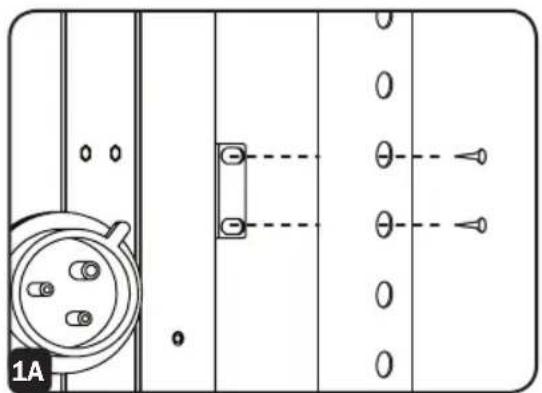
1A
OU Rack Configuration (Mounting
Brackets). Prior to installation, determine the rack location in which the PDU is to be installed. Attach the mounting brackets to the back of the PDU as shown, using the included screws. To assist with proper positioning, the brackets have four screw holes each; make sure that the same two holes are used to attach each bracket to the PDU. After attaching the brackets, position the PDU in the rack and mount it by installing four user-supplied screws through the brackets into the rack.
natural_image
Pure electrical circuit lines without any symbols1B
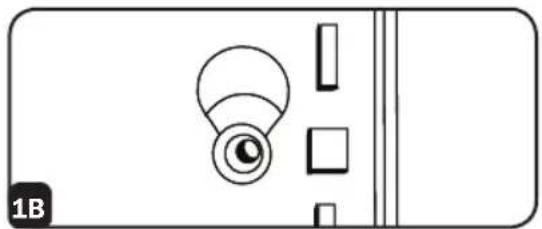
OU Rack Configuration (Mounting
Buttons). Attach the included mounting buttons to the PDU. Position the PDU as desired in the rack enclosure, align the buttons with the rack mounting slots, and slide the PDU into position.
natural_image
Simple line drawing of a device with a circular component and rectangular elements, no text or symbols present.1C
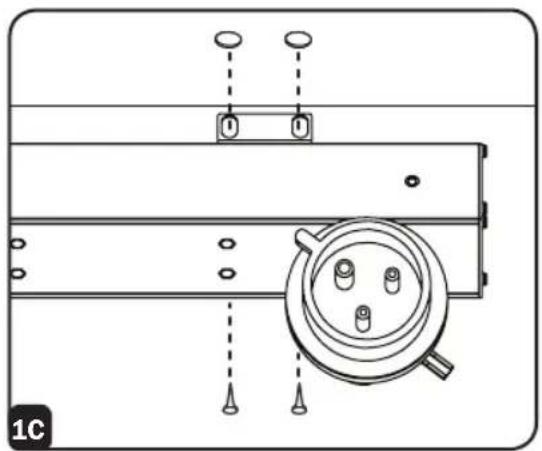
Under-Counter Configuration. The PDU
may be installed under a counter using the included mounting brackets. Attach the mounting brackets to the back of the PDU as shown in STEP 1A. Secure the PDU to the underside of the counter by installing two user-supplied screws through each bracket into the counter.
natural_image
Technical line drawing of a mechanical assembly with mounting holes and a circular component (no text or symbols)Features
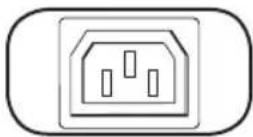
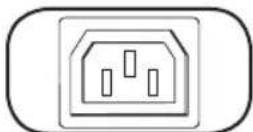
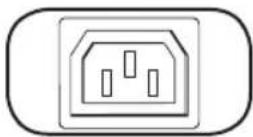
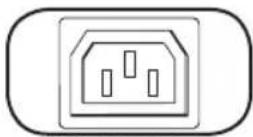
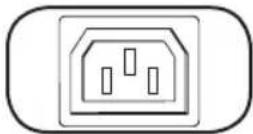
IEC-60320-C13
Outlets: During normal operation, the outlets distribute AC power to connected equipment.
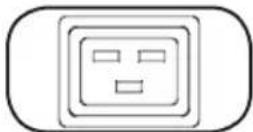
IEC-60320-C19
natural_image
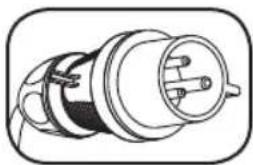
Technical line drawing of a cylindrical electrical connector (no text or symbols)Input Plug: The cord is permanently attached to the PDU and has an IEC 309 16A plug.
natural_image
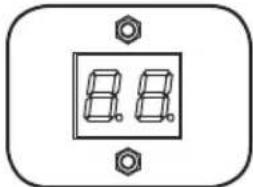
Pure electrical connector diagram without any text or symbolsAmmeter: The total electrical current used by the PDU will be displayed on the digital meter in amperes.
natural_image
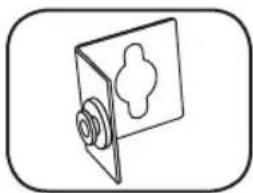
Simple line drawing of a door with a handle and screw base (no text or symbols)PDUMVROTATEBRKT Mounting Accessory: Use these V-shaped brackets to mount the PDU with its outlets facing the rear of the rack.
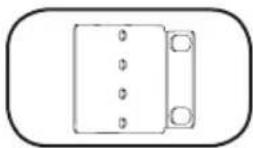
Mounting Brackets: Use these brackets as an alternate PDU mounting method.
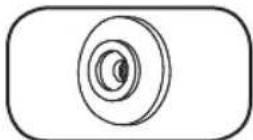
Mounting Buttons: Come pre-installed on the back side of the PDU and are used for toolless mounting. Note: Four additional mounting buttons are included for alternate rack styles.
natural_image
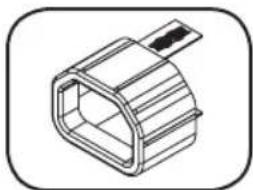
Technical line drawing of a mechanical component with no visible text or symbolsC14 Plug Sleeve: (Optional) Use the included C14 plastic sleeves to secure plugs to receptacles. Attach the sleeve to the plug making sure that the pull tabs remain outside the plug and that the fit is secure. To unplug equipment properly, use the pull tabs to remove the plug and sleeve from the receptacle.
natural_image
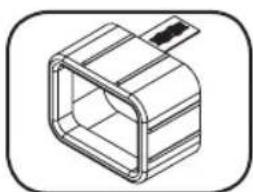
Isometric line drawing of a rectangular mechanical component with internal channels and a protruding rod (no text or symbols)C20 Plug Sleeve: (Optional) Use the included C20 plastic sleeves to secure plugs to receptacles. Attach the sleeve to the plug making sure that the pull tabs remain outside the plug and that the fit is secure. To unplug equipment properly, use the pull tabs to remove the plug and sleeve from the receptacle.
Warranty and Product Registration
2-YEAR LIMITED WARRANTY
Seller warrants this product, if used in accordance with all applicable instructions, to be free from original defects in material and workmanship for a period of 2 years from the date of initial purchase. If the product should prove defective in material or workmanship within that period, Seller will repair or replace the product, in its sole discretion. Service under this Warranty can only be obtained by your delivering or shipping the product (with all shipping or delivery charges prepaid) to: Tripp Lite, 1111 W. 35th Street, Chicago, IL 60609 USA. Seller will pay return shipping charges. Visit www.tripplite.com/support before sending any equipment back for repair.
THIS WARRANTY DOES NOT APPLY TO NORMAL WEAR OR TO DAMAGE RESULTING FROM ACCIDENT, MISUSE, ABUSE OR NEGLECT. SELLER MAKES NO EXPRESS WARRANTIES OTHER THAN THE WARRANTY EXPRESSLY SET FORTH HEREIN. EXCEPT TO THE EXTENT PROHIBITED BY APPLICABLE LAW, ALL IMPLIED WARRANTIES, INCLUDING ALL WARRANTIES OF MERCHANTABILITY OR FITNESS, ARE LIMITED IN DURATION TO THE WARRANTY PERIOD SET FORTH ABOVE; AND THIS WARRANTY EXPRESSLY EXCLUDES ALL INCIDENTAL AND CONSEQUENTIAL DAMAGES. (Some states do not allow limitations on how long an implied warranty lasts, and some states do not allow the exclusion or limitation of incidental or consequential damages, so the above limitations or exclusions may not apply to you. This Warranty gives you specific legal rights, and you may have other rights which vary from jurisdiction to jurisdiction).
WARNING: The individual user should take care to determine prior to use whether this device is suitable, adequate or safe for the use intended. Since individual applications are subject to great variation, the manufacturer makes no representation or warranty as to the suitability or fitness of these devices for any specific application.
PRODUCT REGISTRATION
Visit www.triplite.com/warranty today to register your new Tripp Lite product. You'll be automatically entered into a drawing for a chance to win a FREE Tripp Lite product!
** No purchase necessary. Void where prohibited. Some restrictions apply. See website for details.
Regulatory Compliance Identification Numbers
For the purpose of regulatory compliance certifications and identification, your Tripp Lite product has been assigned a unique series number. The series number can be found on the product nameplate label, along with all required approval markings and information. When requesting compliance information for this product, always refer to the series number. The series number should not be confused with the marking name or model number of the product.
WEEE Compliance Information for Tripp Lite Customers and Recyclers (European Union)

Under the Waste Electrical and Electronic Equipment (WEEE) Directive and implementing regulations, when customers buy new electrical and electronic equipment from Tripp Lite they are entitled to:
- Send old equipment for recycling on a one-for-one, like-for-like basis (this varies depending on the country)
- Send the new equipment back for recycling when this ultimately becomes waste
Tripp Lite has a policy of continuous improvement. Specifications are subject to change without notice.


Manufacturing Excellence.
1111 W. 35th Street, Chicago, IL 60609 USA • www.tripplite.com/support
natural_image
Technical line drawing of a long industrial conveyor belt with multiple ports and a valve (no text or symbols)English 1 • Français 11 • Русский 16 • Deutsch 21


1111 W. 35th Street, Chicago, IL 60609 USA • www.tripplite.com/support
natural_image
Pure electrical circuit lines without any symbols1B
natural_image
Simple line drawing of a device with a circular component and rectangular elements, no text or symbols present.1C
natural_image
Technical line drawing of a mechanical assembly with mounting holes and a circular component (no text or symbols)Características
IEC-60320-C13
natural_image
Technical line drawing of a cylindrical electrical connector (no text or symbols)natural_image
Pure electrical connector diagram without any text or symbols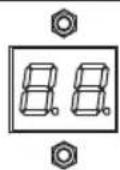
natural_image
Simple line drawing of a door with a handle and screw base (no text or symbols)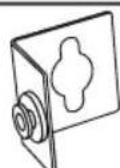
natural_image
Isometric line drawing of a mechanical connector or housing component (no text or symbols)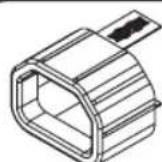
natural_image
Isometric line drawing of a rectangular mechanical component with internal cavity (no text or symbols)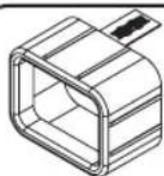
1111 W. 35th Street, Chicago, IL 60609 USA • www.tripplite.com/support
natural_image
Technical line drawing of a long industrial conveyor belt with multiple inlet/outlet ports (no text or symbols)English 1 • Español 6 • Русский 16 • Deutsch 21


1111 W. 35th Street, Chicago, IL 60609 USA • www.tripplite.com/support
natural_image
Pure electrical circuit lines without any symbols1B
natural_image
Simple line drawing of a device with a circular component and rectangular elements (no text or symbols)1C
natural_image
Technical line drawing of a mechanical assembly with mounting holes and a circular component (no text or symbols)Caractéristiques
IEC-60320-C13
natural_image
Simple diagram of a two-digit display with screw base (no text or symbols)natural_image
Simple line drawing of a door with a handle and screw, no text or symbols presentnatural_image
Technical line drawing of a mechanical component with no visible text or symbolsnatural_image
Isometric line drawing of a rectangular mechanical component with internal channels and a protruding rod (no text or symbols)1111 W. 35th Street, Chicago, IL 60609 USA • www.tripplite.com/support
natural_image
Technical line drawing of a long industrial conveyor belt with multiple slots and a valve (no text or symbols)English 1 • Español 6 • Français 11 • Deutsch 21
EAC


1111 W. 35th Street, Chicago, IL 60609 USA • www.tripplite.com/support
natural_image
Pure electrical circuit lines without any symbolsnatural_image
Simple line drawing of a device with a circular component and rectangular elements (no text or symbols)natural_image
Technical line drawing of a mechanical assembly with mounting holes and a central circular component (no text or symbols)Возможности
IEC-60320-C13
natural_image
Technical line drawing of a cylindrical electrical connector (no text or symbols)natural_image
Pure electrical connector diagram without any text or symbols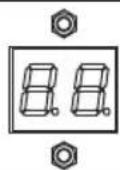
natural_image
Simple line drawing of a door with a handle and screw base (no text or symbols)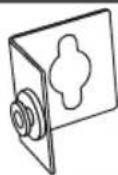
natural_image
Isometric line drawing of a mechanical component with no text or symbols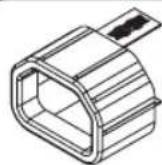
natural_image
Isometric line drawing of a rectangular mechanical component with a protruding rod (no text or symbols)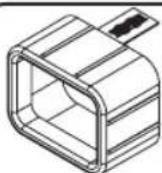
1111 W. 35th Street, Chicago, IL 60609 USA • www.tripplite.com/support
Benutzerhandbuch
natural_image
Technical line drawing of a long industrial conveyor belt with multiple inlet/outlet ports (no text or symbols)English 1 • Español 6 • Français 11 • Русский 16


1111 W. 35th Street, Chicago, IL 60609 USA • www.tripplite.com/support
natural_image
Pure electrical circuit lines without any symbols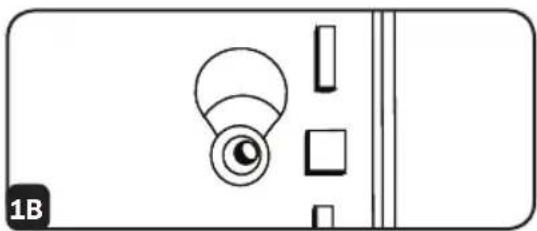
natural_image
Simple line drawing of a door handle with a circular knob and rectangular buttons (no text or symbols)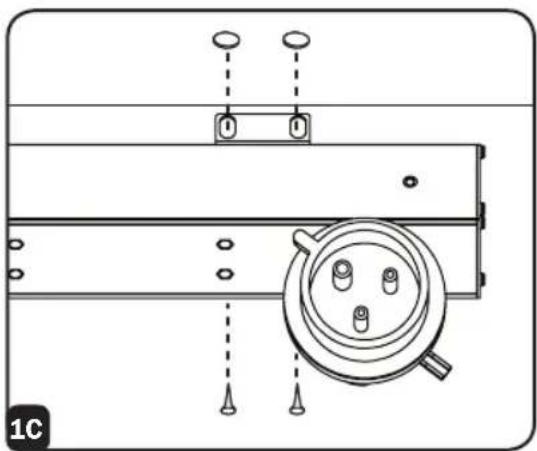
natural_image
Technical line drawing of a mechanical assembly with mounting holes and a circular component (no text or symbols)Ausstattung
IEC-60320-C13
natural_image
Technical line drawing of a cylindrical electrical connector (no text or symbols)natural_image
Simple line drawing of a two-pin electrical switch with mounting feet (no text or symbols)natural_image
Simple line drawing of a door with a handle and screw base (no text or symbols)natural_image
Isometric line drawing of a hexagonal mechanical component with a clip (no text or symbols)natural_image
Isometric line drawing of a rectangular mechanical component with internal channels and a protruding rod (no text or symbols)1111 W. 35th Street, Chicago, IL 60609 USA • www.tripplite.com/support


- PROTECT YOUR INVESTMENT!
- Important Safety Instructions
- SAVE THESE INSTRUCTIONS
- Important Warnings
- Installation
- 1A
- OU Rack Configuration (Mounting
- 1B
- 1C
- Under-Counter Configuration. The PDU
- Features
- Warranty and Product Registration
- 2-YEAR LIMITED WARRANTY
- PRODUCT REGISTRATION
- Regulatory Compliance Identification Numbers
- WEEE Compliance Information for Tripp Lite Customers and Recyclers (European Union)
- Características
- Caractéristiques
- Возможности
- Benutzerhandbuch
- Ausstattung
Brand : Tripp Lite
Model : PDUMV16HV
Category : Power Strip