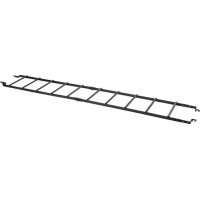
SmartRack SRCABLELADDER18 - Computer and peripheral cables Tripp Lite - Free user manual and instructions
Find the device manual for free SmartRack SRCABLELADDER18 Tripp Lite in PDF.


| Product Type | Cable Ladder for SmartRack Enclosure |
| Brand | Tripp Lite |
| Model | SmartRack SRCABLELADDER18 |
| Length | 3 m (10 ft) |
| Width | 0.45 m (18 in) |
| Material | Steel (estimated) |
| Primary Use | Routing cables between SmartRack enclosures, across an aisle or in a row |
| Required Accessory | SRCABLETRAY (sold separately) |
| Warranty | 5-year limited |
| Installation | Mounting on SRCABLETRAY plates with assembly brackets and shoulder pins |
| Grounding | Includes 3 grounding cables of 61 cm with bolts and washers |
| Environment | Indoor, controlled, away from moisture, extreme temperature, dust |
| Load Capacity | Not specified, but designed to support cable bundles |
| Number of Sections | 2 sections, modifiable (saw) if needed |
| Mounting Options | Across an aisle or in a row of enclosures |
| Approximate Weight | Approximately 5-10 kg (estimated) |
| Tools Required | 13 mm wrench, tape measure, hacksaw (optional), drill |
| Maintenance | Store in clean environment, temperature < 40°C, humidity < 90% |
| Package Contents | 2 ladder sections, brackets, pins, cotter pins, ground cables, straps, bolts |
| Safety | Do not climb, wear gloves, use safety glasses when cutting |
Frequently Asked Questions - SmartRack SRCABLELADDER18 Tripp Lite
User questions about SmartRack SRCABLELADDER18 Tripp Lite
0 question about this device. Answer the ones you know or ask your own.
Ask a new question about this device
Download the instructions for your Computer and peripheral cables in PDF format for free! Find your manual SmartRack SRCABLELADDER18 - Tripp Lite and take your electronic device back in hand. On this page are published all the documents necessary for the use of your device. SmartRack SRCABLELADDER18 by Tripp Lite.
USER MANUAL SmartRack SRCABLELADDER18 Tripp Lite
SmartRack® 10 ft. x 18 in. (3 m x 0.45 m) Cable Ladder
Model: SRCABLELADDER18
- Introduction 2
1.1 Parts List 2
1.2 Tools Required 2
-
Important Safety Instructions 2
-
Installation 3
3.1 Planning 3
3.2 Ladder Modification (Optional) 4
3.3 Ladder Assembly 4
3.4 Installation Across Aisle 5
3.5 Installation Within Row 6
3.6 Ground Connection 7
-
Storage and Service 8
-
Warranty and Product Registration 8
Español 9
Français 17
Русский 25
PROTECT YOUR INVESTMENT!
Register your product for quicker service and ultimate peace of mind.
You could also win an ISOBAR6ULTRA surge protector—a \$100 value!
www.tripplite.com/warranty


text_image
TRIPP·LITE
Manufacturing
Excellence.
1. Introduction
SRCABLELADDER18 provides roof-mounted cable routing for Tripp Lite's SmartRack Enclosures, allowing cable bundles to span aisles and/or spaces between enclosures in the same row.
Note: Standard installation of SRCABLELADDER18 requires Tripp Lite's SRCABLETRAY accessory, sold separately.
1.1 Parts List
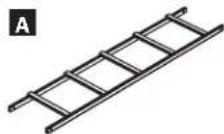
A Ladder Sections (2)
B Left Assembly Brackets (2)
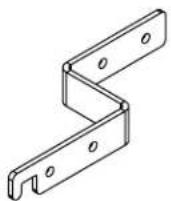
C Right Assembly Brackets (2)
D Clevis Pins (8)
E Cotter Pins (8)
F Ground Brackets (2)
G M6 Hex-Head Bolts (2)
H 24-inch Ground Cables (3)
M6 Lock Washers (4)
J M6 Hex Nuts (2)
K Ladder Clamp (4)
L M10x60 mm Carriage Bolts (2)
M M10 Lock Washers (2)
N M10 Hex Nuts (2)
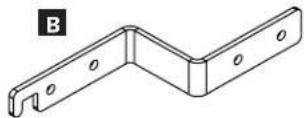
C
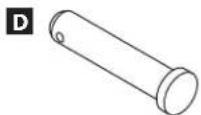
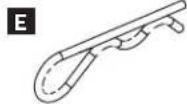
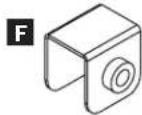
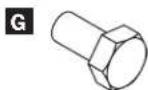
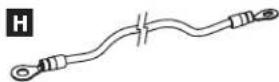
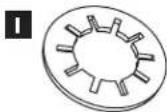

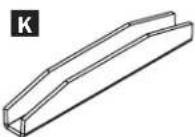
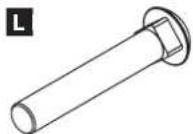
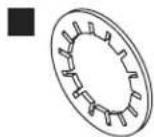
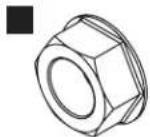
If any parts are missing, visit www.tripplite.com/support.
1.2 Tools Required
• 13 mm Wrench or Crescent Wrench
- Tape Measure
- Hacksaw (optional)
- Drill with 3/8-inch Bit (optional)
2. Important Safety Instructions
SAVE THESE INSTRUCTIONS
This manual contains instructions and warnings that must be followed during the installation and operation of the product described in this manual. Read all instructions and warnings thoroughly before attempting installation. Failure to comply may invalidate the warranty and cause property damage and/or personal injury.
• Install in a controlled indoor environment, away from moisture, temperature extremes, flammable liquids and gasses, conductive contaminants, dust and direct sunlight.
- Provide suitable grounding in accordance with all applicable electrical wiring regulations.
- Do not attempt to climb or walk across any part of the ladder.
- When using tools to cut or drill metal, use eye protection and follow all other safety precautions recommended by the tool manufacturer and required by applicable safety regulations.
- Use caution and wear safety gloves when handling metal parts that have been cut to length. Sharp edges can cause personal injury and property damage.
- Use of this equipment in life support applications where failure of this equipment can reasonably be expected to cause the failure of the life support equipment or to significantly affect its safety or effectiveness is not recommended.
3. Installation
Note: Prior to installation, you must install the SRCABLETRAY accessory (sold separately) on each enclosure that will be linked by the SRCABLELADDER18 accessory. For ordering information, visit www.triplite.com.
3.1 Planning
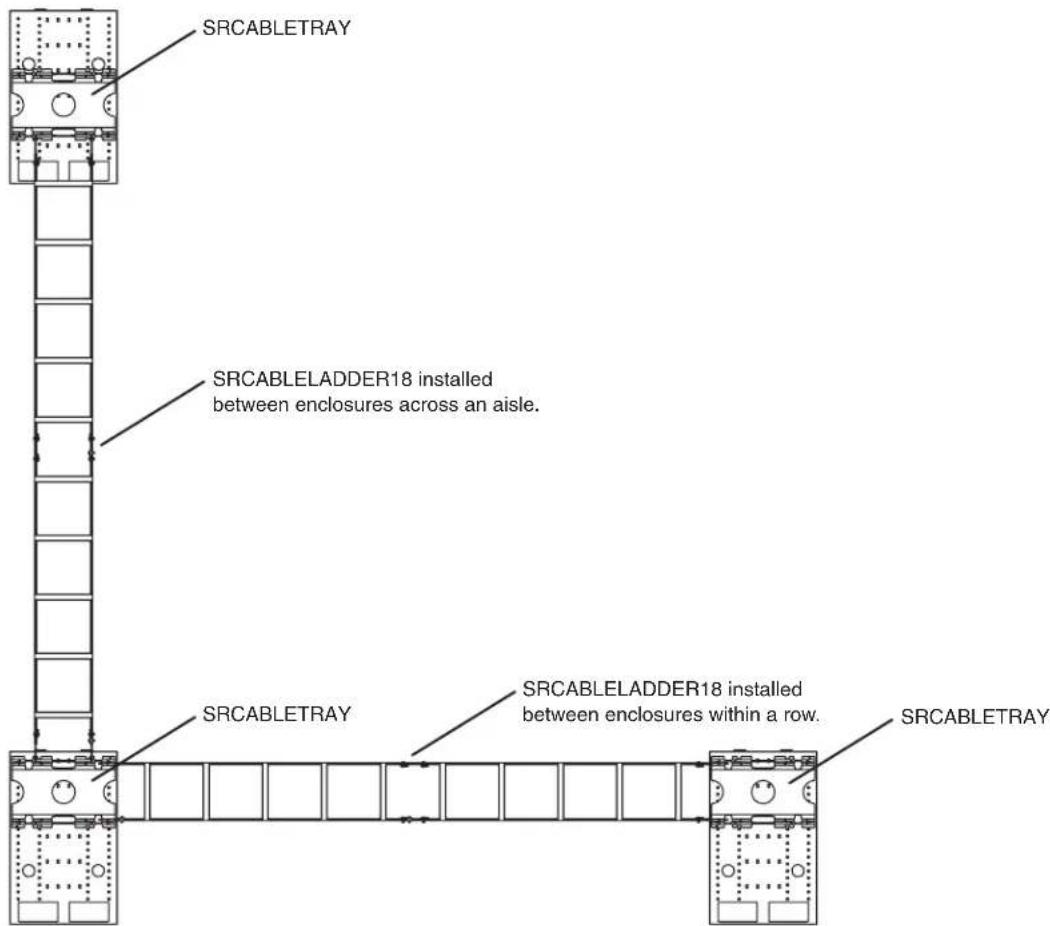
SRCABLELADDER18 can provide enclosure-to-enclosure cable routing across an aisle or within a single row. You can combine multiple SRCABLELADDER18 and SRCABLETRAY accessories to meet the cable routing needs of almost any configuration of SmartRack Enclosures, but planning and measurement are required to ensure a secure fit. Tripp Lite recommends that you read the entire manual in advance to gain a clear understanding of the installation process and accessory positioning.
Sample Cable Routing Configuration (Top View)
text_image
SRCABLETRAY SRCABLELADDER18 installed between enclosures across an aisle. SRCABLETRAY SRCABLELADDER18 installed between enclosures within a row. SRCABLETRAYUse a tape measure to determine the distance that SRCABLELADDER18 will bridge. (Preassembling the ladder sections will allow you to observe their attachment points in place for a more accurate measurement.)
The standard length of SRCABLELADDER18 is 10 feet. If the standard length and the distance between attachment points differ, adjusting the position of the SRCABLETRAY accessories will allow you to change the distance between attachment points. If necessary, you can use a single ladder section instead of two sections, reducing the overall ladder length to approximately 5 feet. In addition, the assembly brackets at the ends of the ladder sections will allow minor adjustments if you install them without pins, and you can add a few inches to the length of the ladder by using the alternate pin holes for assembly. If the available adjustments will not accommodate the SRCABLELADDER18 accessory, you must cut one of the ladder sections. See Section 3.2 Ladder Modification for instructions. If the SRCABLELADDER18 accessory will fit without modification, proceed to Section 3.3 Ladder Assembly.
3. Installation
3.2 Ladder Modification (Optional)
Warning: When using tools to cut or drill metal, use eye protection and follow all other safety precautions recommended by the tool manufacturer and required by applicable safety regulations. Use caution and wear safety gloves when handling metal parts that have been cut to length. Sharp edges can cause personal injury and property damage.
Note: Do not modify the SRCABLELADDER18 accessory unless you have followed the instructions in Section 3.1 Planning and determined that modification is required. If modification is not required, proceed to Section 3.3 Ladder Assembly.
1 Measure and mark the cable ladder section that will be cut.
2 Use a hacksaw or other metal-cutting tool to cut through the ladder section. Make sure your cut is perpendicular to the length of the ladder and use a metal-cutting tool that will not bend or crush the ladder section.
3 (Optional) After cutting, use a drill with a 3/8-inch bit to drill new pin holes in end of the ladder section. Compare the modified end of the ladder section with the unmodified end to determine where holes should be drilled. Make sure that the hole location matches your planning and measurements. You may omit this step, but drilling the pin holes and installing the pins will make the SRCABLELADDER18 accessory more stable.
3.3 Ladder Assembly
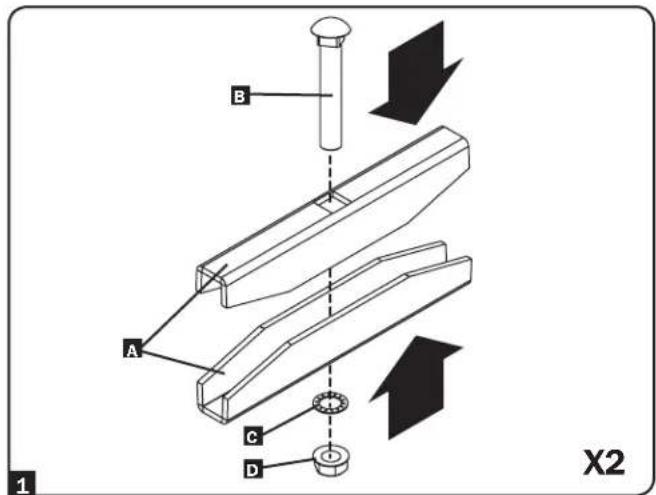
1 Assemble the two ladder clamps A with the M10 carriage bolts B, washers C and hex nuts D as seen in the diagram. For now, only tighten the nuts far enough to keep the clamps assembled together.
text_image
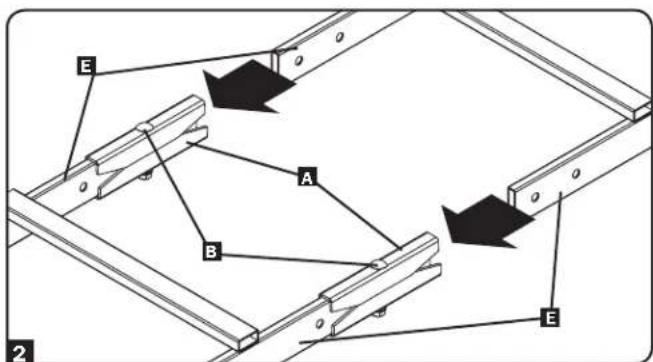
B A C D X22 Join the ladder sections E by inserting each side into the ladder clamps A until they are stopped by the bolts B. When the sections are joined, you can now secure the clamp by fully tightening the nuts.
text_image
E A B E 23. Installation
3.4 Installation Across Aisle
Note: Follow the instructions in this section only if the SRCABLELADDER18 accessory will be installed across an aisle. If the SRCABLELADDER18 accessory will be installed within a row of enclosures, follow the instructions in Section 3.5 Installation Within Row instead.
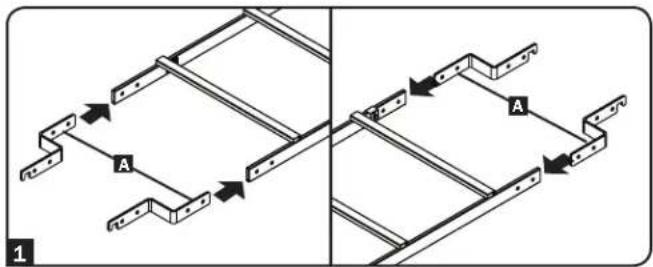
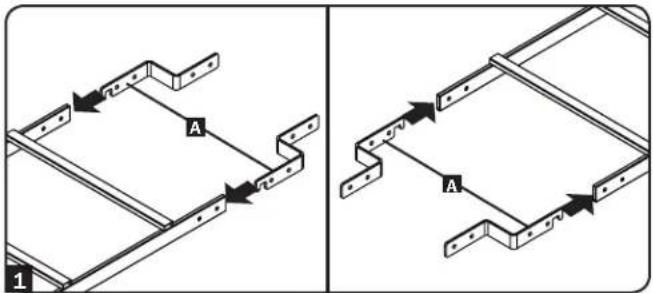
1 Insert four assembly brackets A into the ends of the ladder. The hooked ends of the brackets should be exposed. When the ladder is oriented so that the ladder's rungs are above the ladder's side rails, the hooked ends of the brackets should point down, as shown in the drawing.
2 Align the pin holes in the ladder sections with the pin holes in the assembly brackets and insert clevis pins B into the pin holes (4 total). This step may be omitted to provide additional installation flexibility, but installing the pins will make the SRCABLELADDER18 accessory more stable.
Warning: If you choose not to install the clevis pins, make sure at least 25% of the length of each assembly bracket is inside the ladder.
3 After inserting the clevis pins, insert a cotter pin C through the hole at the end of each clevis pin. (The straight section of the cotter pin goes through the hole.)
4 Using an assistant, lift the SRCABLELADDER18 accessory (rungs upward) and insert the exposed hook ends of the assembly brackets D into the corresponding slots E in the SRCABLETRAY accessories installed at the top of each enclosure. The hooks should fit the slots securely by sliding down to engage the edge of the slot.
Note: There are two levels of slots. Use the slots that match your application best.
text_image
A A 1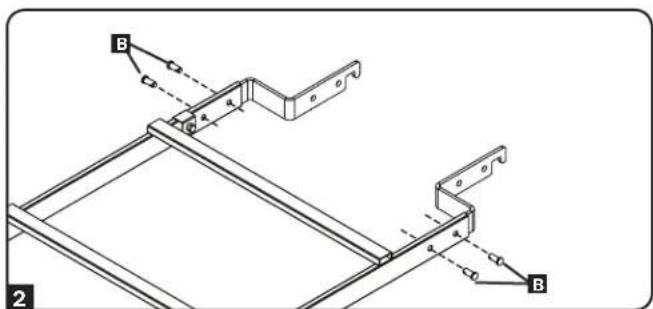
text_image
B A B 2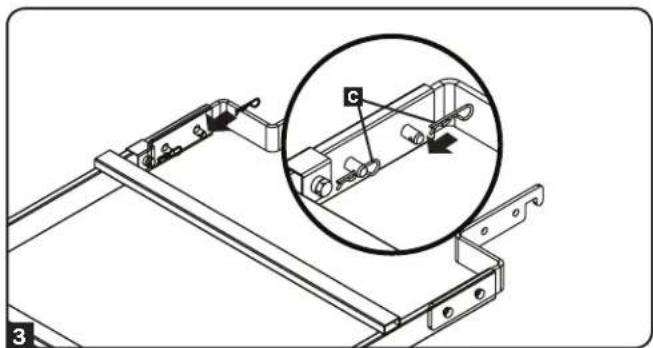
natural_image
Technical line drawing of a mechanical assembly with a magnified inset showing component detail (no text or symbols)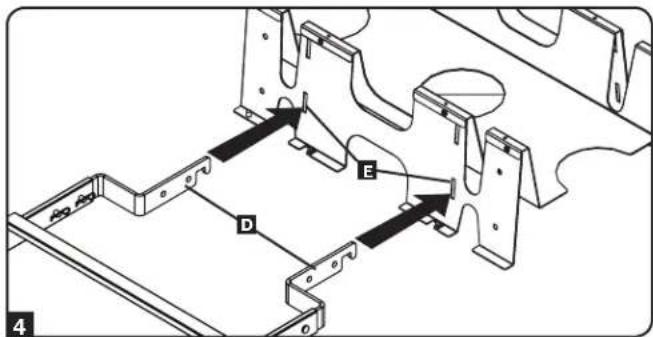
text_image
Technical diagram showing mechanical assembly with labeled components A, B, C, D and directional arrows indicating movement or force.3. Installation
3.5 Installation Within Row
Note: Follow the instructions in this section only if the SRCABLELADDER18 accessory will be installed within a row of enclosures. If the SRCABLELADDER18 accessory will be installed across an aisle, follow the instructions in Section 3.4 Installation Across Aisle instead.
1 Insert four assembly brackets A in the open ends of the ladder, hooked end first. When the ladder is oriented so that the ladder's rungs are above the ladder's side rails, the hooked ends of the brackets should point down, as shown in the drawing.
2 Align the pin holes in the ladder sections with the pin holes in the assembly brackets and insert clevis pins B into the pin holes (4 total). This step may be omitted to provide additional installation flexibility, but installing the pins will make the SRCABLELADDER18 accessory more stable.
Warning: If you choose not to install the clevis pins, make sure at least 25% of the length of each assembly bracket is inside the ladder.
3 After inserting the clevis pins, insert a cotter pin C through the hole at the end of each clevis pin. (The straight section of the cotter pin goes through the hole.)
4 Using an assistant, lift the SRCABLELADDER18 accessory (rungs upward) and align the holes at the ends of the assembly brackets D with the corresponding holes E in the SRCABLETRAY accessories installed at the top of each enclosure.
Note: There are two levels of holes. Use the holes that match your application best.
5 Align the pin holes and insert clevis pins F into each of the pin holes (4 total).
text_image
A 1 A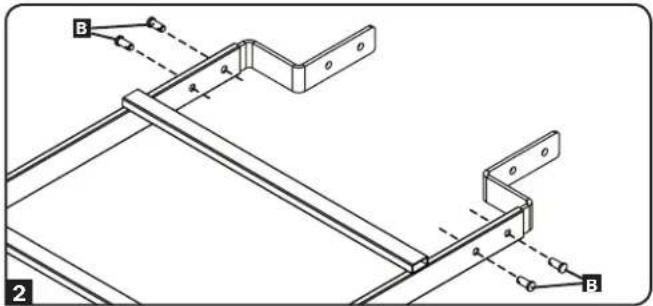
text_image
B 2 B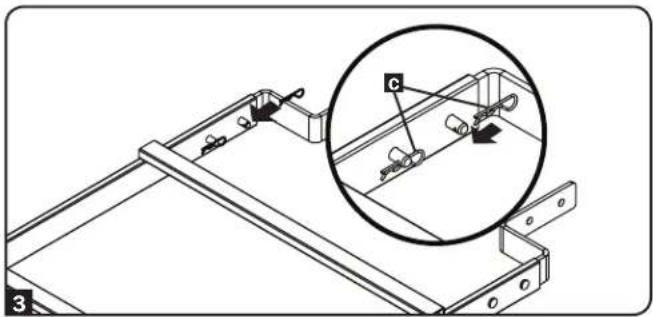
natural_image
Technical line drawing of a mechanical assembly with an inset magnified view showing a component labeled 'c' (no text or symbols present)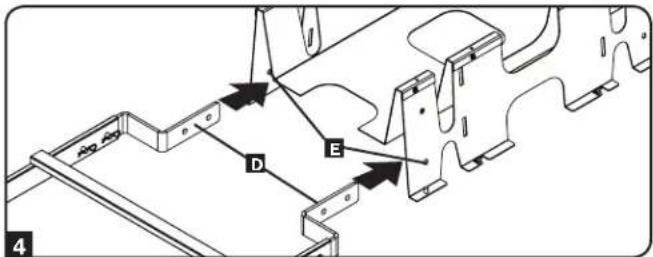
text_image
D E 4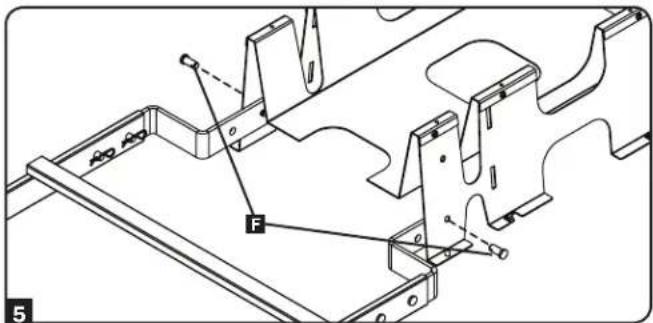
text_image
F 53. Installation
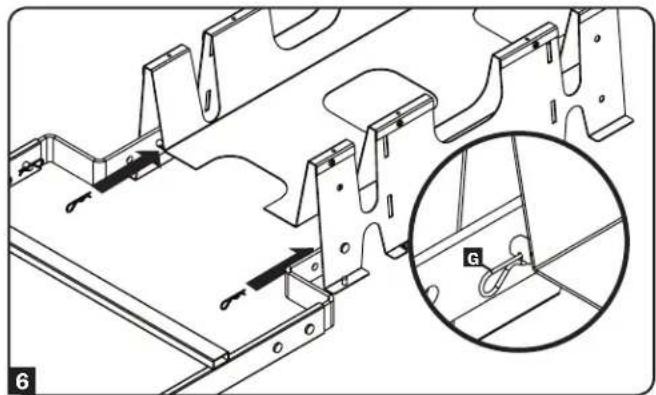
6 After inserting the clevis pins, insert a cotter pin G through the hole at the end of each clevis pin. (The straight section of the cotter pin goes through the hole.)
natural_image
Technical line drawing of a metal frame structure with an inset magnified view showing a detail labeled 'G' (no text or symbols present)3.6 Ground Connection
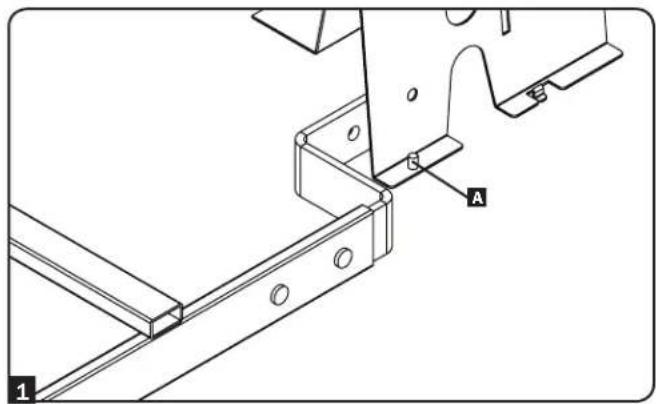
1 After installing the SRCABLELADDER18 accessory, determine where to place ground brackets by noting the distance between one end of the ladder and the grounding post A at the corner of the nearest SRCABLETRAY accessory.
text_image
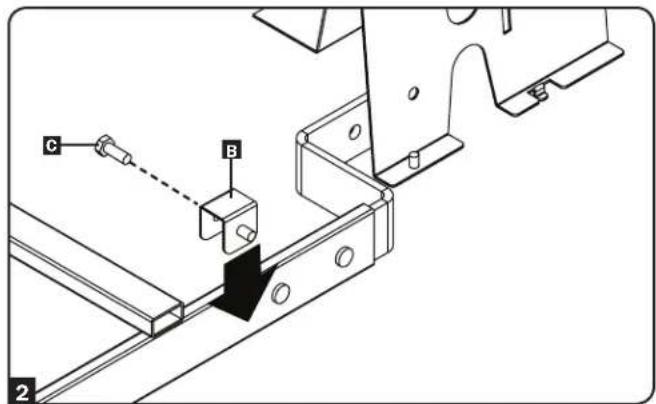
A 12 Place a ground bracket B near the end of the SRCABLELADDER18 accessory's leg and use a hex-head bolt C to secure it.
text_image
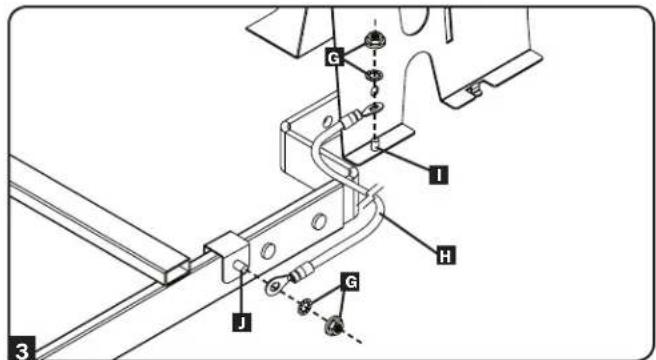
C B 23 Use the included hex nuts and lock washers G to connect one end of the included ground cable H to a grounding post I at the corner of the nearest SRCABLETRAY accessory and connect the other end to the grounding post J of the ground bracket attached to the SRCABLELADDER18 accessory. Repeat steps 1 to 3 for the other end of the SRCABLELADDER18 accessory.
text_image
G I H J A 34. Storage and Service
Storage
The unit must be stored in a clean, secure environment with a temperature less than 40^ (104°F) and a relative humidity less than 90% (non-condensing). Store the unit in its original shipping container if possible.
Service
Your Tripp Lite product is covered by the warranty described in this manual. A variety of Extended Warranty and On-Site Service Programs are also available from Tripp Lite. For more information on service, visit www.triplite.com/support. Before returning your product for service, follow these steps:
- Review the installation and operation procedures in this manual to ensure that the service problem does not originate from a misreading of the instructions.
- If the problem continues, do not contact or return the product to the dealer. Instead, visit www.tripplite.com/support.
- If the problem requires service, visit www.triplite.com/support and click the Product Returns link. From here you can request a Returned Material Authorization (RMA) number, which is required for service. This simple on-line form will ask for your unit's model and serial numbers, along with other general purchaser information. The RMA number, along with shipping instructions will be emailed to you. Any damages (direct, indirect, special or consequential) to the product incurred during shipment to Tripp Lite or an authorized Tripp Lite service center is not covered under warranty. Products shipped to Tripp Lite or an authorized Tripp Lite service center must have transportation charges prepaid. Mark the RMA number on the outside of the package. If the product is within its warranty period, enclose a copy of your sales receipt. Return the product for service using an insured carrier to the address given to you when you request the RMA.
5. Warranty and Product Registration
Limited Warranty
Seller warrants this product, if used in accordance with all applicable instructions, to be free from original defects in material and workmanship for a period of 5 years from the date of initial purchase. If the product should prove defective in material or workmanship within that period, Seller will repair or replace the product, in its sole discretion.
THIS WARRANTY DOES NOT APPLY TO NORMAL WEAR OR TO DAMAGE RESULTING FROM ACCIDENT, MISUSE, ABUSE OR NEGLECT. SELLER MAKES NO EXPRESS WARRANTIES OTHER THAN THE WARRANTY EXPRESSLY SET FORTH HEREIN. EXCEPT TO THE EXTENT PROHIBITED BY APPLICABLE LAW, ALL IMPLIED WARRANTIES, INCLUDING ALL WARRANTIES OF MERCHANTABILITY OR FITNESS, ARE LIMITED IN DURATION TO THE WARRANTY PERIOD SET FORTH ABOVE; AND THIS WARRANTY EXPRESSLY EXCLUDES ALL INCIDENTAL AND CONSEQUENTIAL DAMAGES. (Some states do not allow limitations on how long an implied warranty lasts, and some states do not allow the exclusion or limitation of incidental or consequential damages, so the above limitations or exclusions may not apply to you. This Warranty gives you specific legal rights, and you may have other rights which vary from jurisdiction to jurisdiction.)
Tripp Lite; 1111 W. 35th Street; Chicago IL 60609; USA
WARNING: The individual user should take care to determine prior to use whether this device is suitable, adequate or safe for the use intended. Since individual applications are subject to great variation, the manufacturer makes no representation or warranty as to the suitability or fitness of these devices for any specific application.
Product Registration
Visit www.triplite.com/warranty today to register your new Tripp Lite product. You'll be automatically entered into a drawing for a chance to win a FREE Tripp Lite product!*
* No purchase necessary. Void where prohibited. Some restrictions apply. See website for details.
Tripp Lite has a policy of continuous improvement. Specifications are subject to change without notice.

text_image
TRIPP·LITE
1111 W. 35th Street, Chicago, IL 60609 USA • www.tripplite.com/support
1111 W. 35th Street, Chicago, IL 60609 EE UU • www.tripplite.com/support
natural_image
Technical line drawing of a mechanical assembly with a magnified inset showing a component labeled 'C' (no text or symbols present)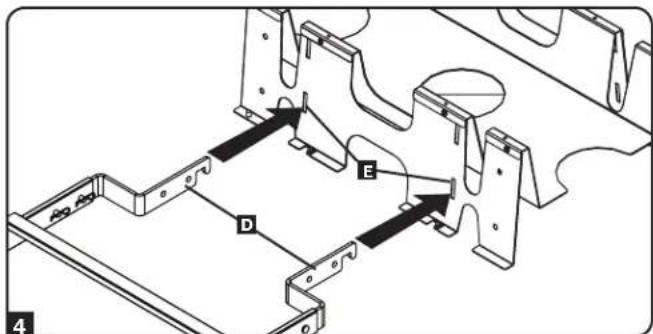
text_image
Technical diagram showing mechanical assembly with labeled components A, B, C, D and directional arrows indicating movement or force.3. Instalación
natural_image
Technical diagram of a mechanical assembly with a magnified inset showing a component labeled 'c' (no text or symbols present)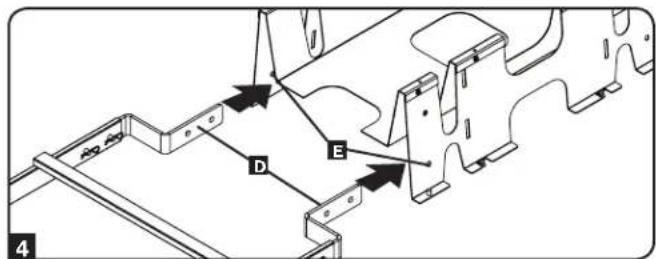
text_image
A B C D E 4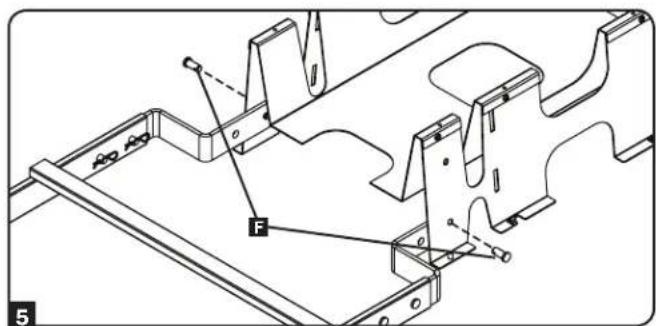
text_image
F 53. Instalación
natural_image
Technical line drawing of a metal frame structure with an inset magnified view showing a hanging hook (no text or symbols present)text_image
G I H J G A 31111 W. 35th Street, Chicago, IL 60609 EE UU • www.tripplite.com/support
1111 W. 35th Street, Chicago, IL 60609 USA • www.tripplite.com/support
natural_image
Technical line drawing of a mechanical assembly with a magnified inset showing a component labeled 'C' (no text or symbols present)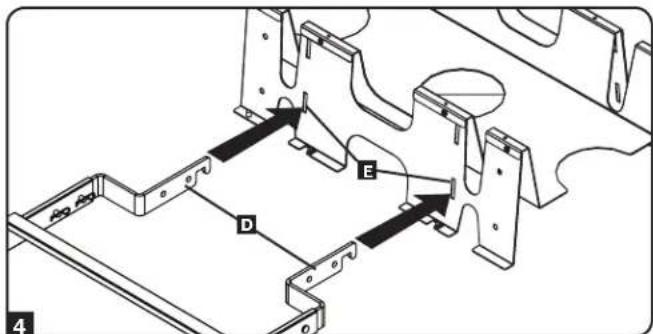
text_image
Technical diagram showing mechanical assembly with labeled components A, B, C, D and directional arrows indicating movement or force.3. Installation
natural_image
Technical diagram of a mechanical assembly with a magnified inset showing a component labeled 'c' (no text or symbols present)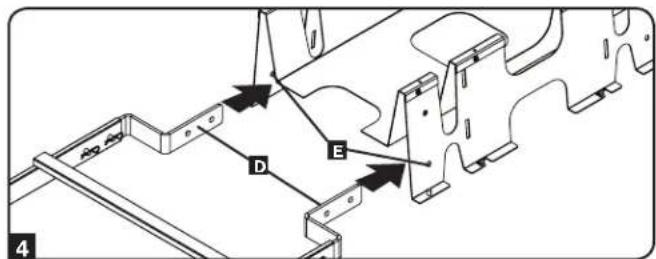
text_image
A B C D E 4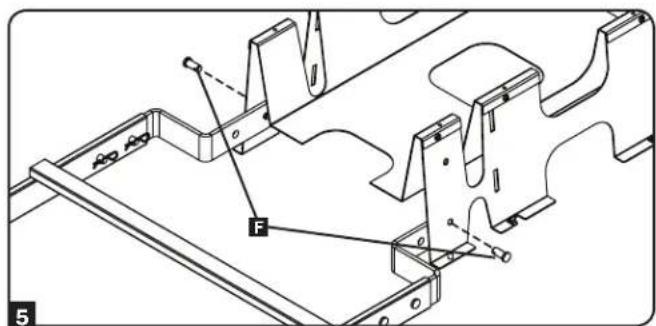
text_image
F 53. Installation
natural_image
Technical line drawing of a metal frame structure with an inset magnified view showing a hanging hook (no text or symbols present)text_image
G I H J G 31111 W. 35th Street, Chicago, IL 60609 USA • www.tripplite.com/support
1111 W. 35th Street, Chicago, IL 60609 USA • www.tripplite.com/support
natural_image
Technical line drawing of a mechanical assembly with a magnified inset showing component detail (no text or symbols)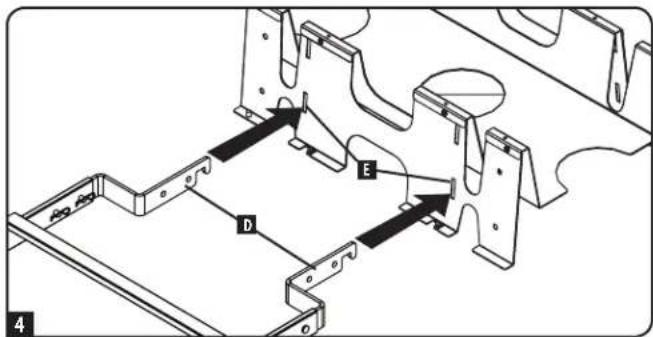
text_image
Technical diagram showing mechanical assembly with labeled components A, B, C, D and directional arrows indicating movement or force.3.Установка
natural_image
Technical line drawing of a mechanical assembly with a magnified inset showing a component labeled 'C' (no text or symbols present)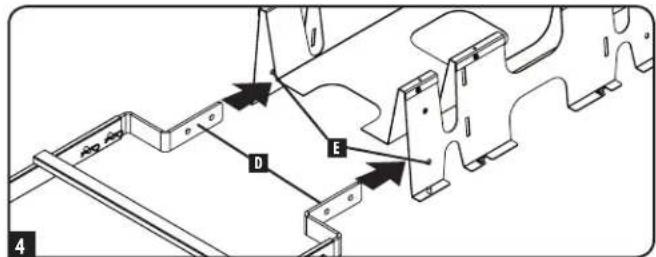
text_image
D E 4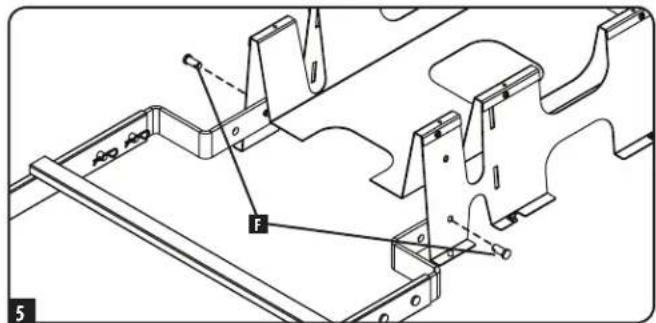
text_image
Technical diagram of a mechanical assembly with labeled components and force indicator F3.Установка
natural_image
Technical line drawing of a metal frame structure with an inset magnified detail showing a hook detail (no text or symbols)3.6 Заземление
text_image
G I H J 3
1111 W. 35th Street, Chicago, IL 60609 USA • www.tripplite.com/support