OneTouch V100 - Smartphone ALCATEL - Free user manual and instructions
Find the device manual for free OneTouch V100 ALCATEL in PDF.



| Product Type | Wi-Fi Key (Miracast wireless dongle) |
| Brand | Alcatel |
| Model | OneTouch V100 (Wolf type) |
| Use | Stream the screen of an Android mobile device to a TV via HDMI |
| Connectivity | HDMI (female port), Micro USB (power), Wi-Fi 2.4/5 GHz |
| Compatibility | Android devices with Miracast and Wi-Fi |
| Power | Micro USB port 5 V (via TV or power adapter) |
| Dimensions (estimated) | Approximately 5 × 2 × 1 cm |
| Weight (estimated) | Approximately 20 g |
| Operating Temperature | -15 °C to 55 °C |
| Indicator Light | LED: solid orange (on), blinking green (connection), blinking orange (transmission), alternating (upgrade) |
| Physical Button | WPS button for pairing |
| Firmware Upgrade | Via Web interface (192.168.16.1) after connecting to the dongle's SSID |
| Certifications | CE, RoHS, WEEE, compliant with EN 60950, EN 62311, EN 301 489, EN 300 328 |
| Maintenance and Cleaning | Clean with a soft, dry cloth; avoid moisture and dust |
| Safety | Minimum distance of 20 cm from the body; do not use near flammable gases or medical devices |
| Spare Parts and Repairability | Not user serviceable; contact manufacturer's after-sales service |
| General Information | Manufactured by TCT Mobile Europe; website www.alcatelonetouch.com; hotline and online FAQ |
Frequently Asked Questions - OneTouch V100 ALCATEL
Follow the same connection procedure.
User questions about OneTouch V100 ALCATEL
0 question about this device. Answer the ones you know or ask your own.
Ask a new question about this device
Download the instructions for your Smartphone in PDF format for free! Find your manual OneTouch V100 - ALCATEL and take your electronic device back in hand. On this page are published all the documents necessary for the use of your device. OneTouch V100 by ALCATEL.
USER MANUAL OneTouch V100 ALCATEL
Welcome! This manual brief is the profile of your Wi-Fi display dongle, please find Frequently Asked Question and help information on the website www. alcatelonetouch.com .
PROTECT YOUR HEARING

To prevent possible hearing damage, do not listen at high volume levels for long periods. Exercise caution when holding your device near your ear while the loud speaker is in use.
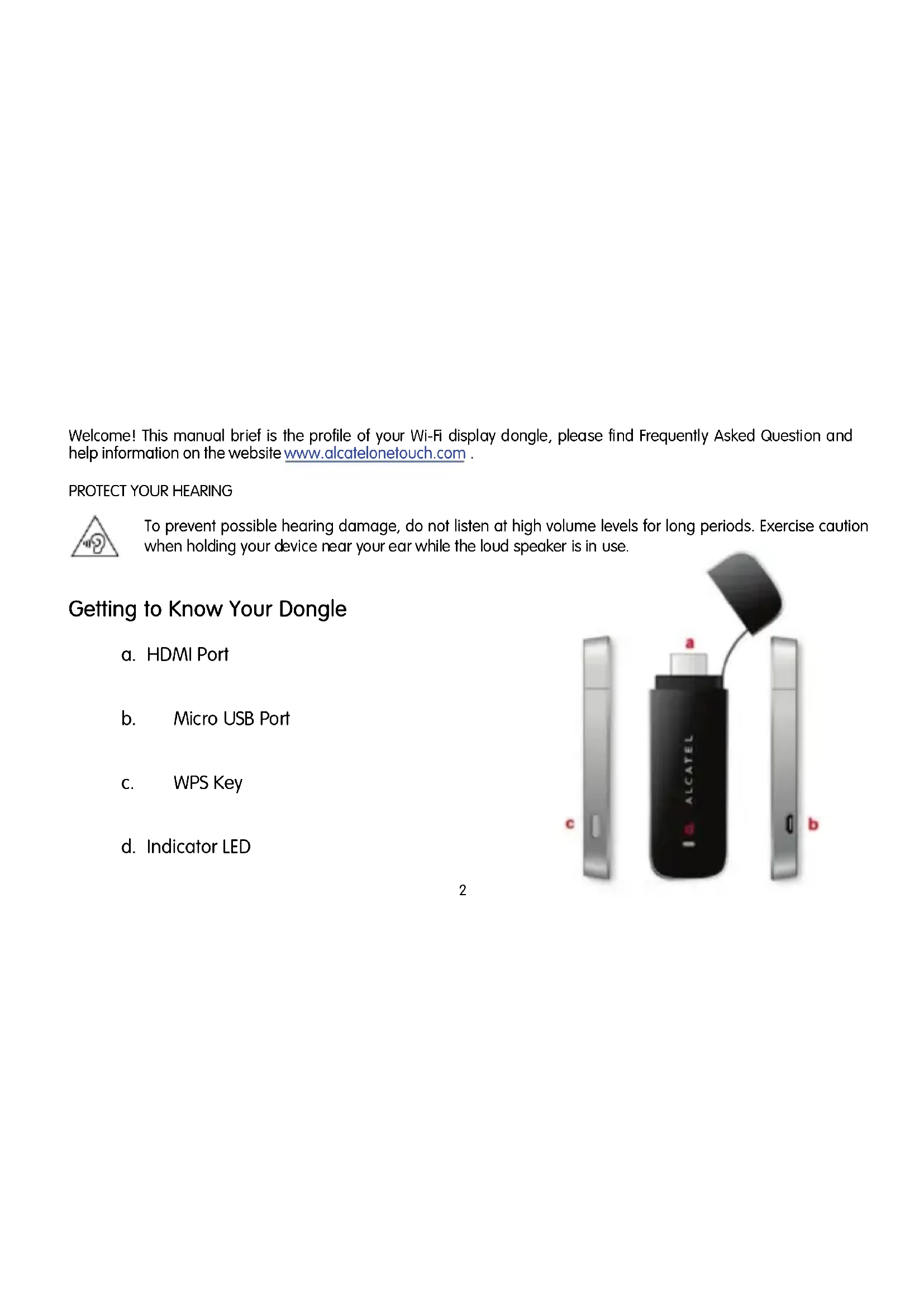
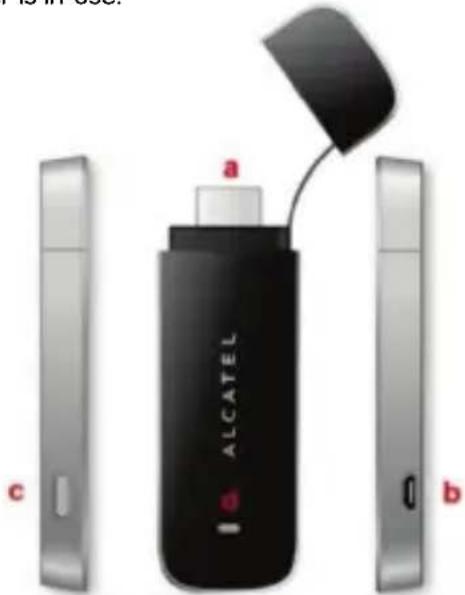
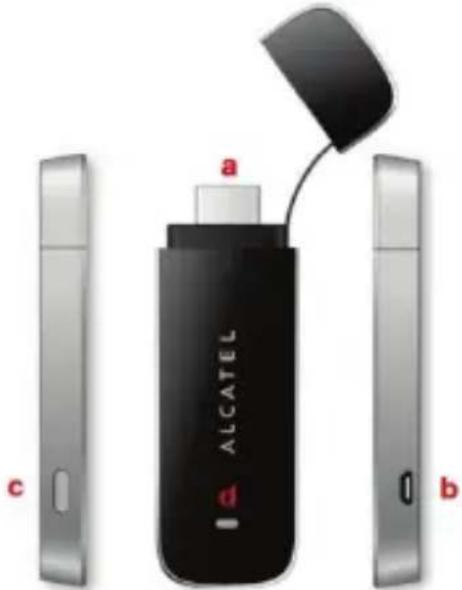
Getting to Know Your Dongle
a. HDMI Port
b. Micro USB Port
c. WPS Key
d. Indicator LED
How to start your Dongle
- Plug HDMI Port into TV's HDMI port; then plug micro USB port of USB cable into V100's USB port, plug the standard USB port of this USB cable into TV's USB port;
Tips:
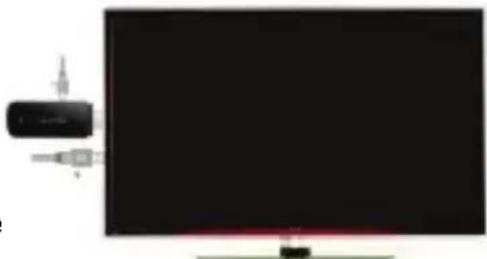
a) Please follow above step connection port strictly, otherwise may cause the UI can't be displayed;
b) If HDMI port can't plug into TV' HDMI port directly, please plug V100 into HDMI Adaptor then connect with HDMI Cable, at last plug HDMI Cable into TV's HDMI port.
- Waiting for TV display the main UI as below;
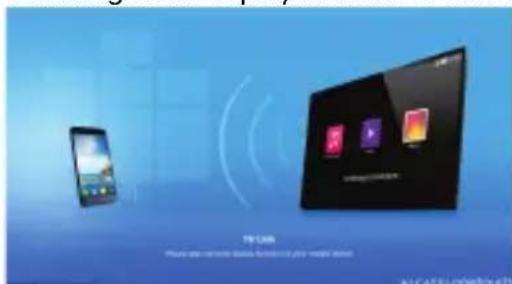
- Set your mobile device: click "Setting" -> "Display" -> "wireless display" -> "search";
-
Please click "V100-****" item, then you can see the connection status on the UI, press WPS key on the side of V100 or input pin code on the mobile device according to tips on the UI. Seconds later you can see the screen of mobile device display on the TV.
-
When you don't use it please disconnect on the mobile device follow below step: click "Setting" -> "Display" -> "wireless display" -> "V100-****", choose "yes", TV picture will return main UI after 20 seconds.
Tips:
a) The mobile devices connected with V100 should be support Android OS and Miracast function;
b) Please unplug the USB port connected with TV if you don't use V100 for a long time in order to avoid V100 too hot;
c) V100 can connect with mobile device one to one only, so please disconnect the current mobile device when you want to connect with another mobile device;
d) The mobile device should be connect with Wi-Fi network firstly then connect with V100, otherwise mobile device maybe can't access internet.
6. Upgrade:
a) Download new Firmware to PC (Notebook or Desktop with Wi-Fi card) from our website, record storage directory of new Firmware.
b) Plug V100's HDMI Port into TV's HDMI Port and plug micro USB port of USB cable into V100's USB port, follow the below steps:
- Hold the WPS key in the side of V100;
- Plug the standard USB port of USB cable into TV's USB port;
- Release the WPS key when TV screen shows the upgrade interface as the right-hand chart.
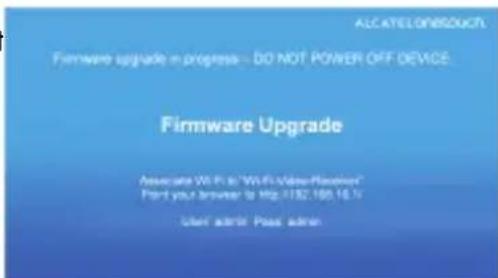
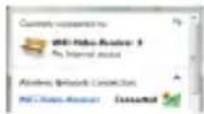
c) Search Wi-Fi SSID "Wi-Fi-Video-Receiver" in PC, click and connection it successfully as the left-hand chart.
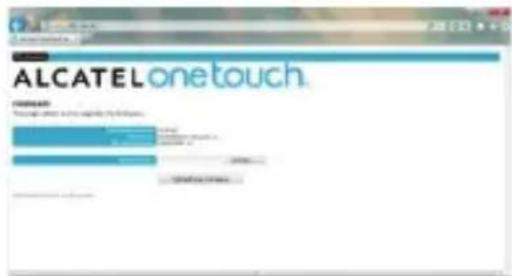
d) Open the PC browser into web http://192.168.16.1 (user: admin; password: admin), browse new Firmware storage directory, choose new Firmware and click "Upgrade" button.
e) Waiting for a moment, you can see upgrade result in this web page and TV picture.
f) Please restart V100 for the last upgrade step: pull out micro USB plug from V100 then plug it into V100 again, V100 will start to update SW in several minutes then restart automatically to finish whole upgrade process. Don't power off in the meanwhile otherwise V100 will be damaged!
LED Indicators
| LED Indicator | Description |
| Solid Orange Light | Power on and booting |
| Green Light Blinks 3 times in a row | Pair with mobile device in the first time |
| Orange Light Blinks 3 times interval of 0.5 seconds in a row | Connecting and data transmission |
| Orange and Green light Blink in turn | Upgrade SW |
Safety and Use
We recommend that you read this chapter carefully before using the Wi-Fi display Dongle. The manufacturer disclaims any liability for damage, which may result as a consequence of improper use of the Wi-Fi display Dongle or of use contrary to the instructions contained herein.
Traffic Safety
When driving, do not use the Wi-Fi display Dongle.
When switched on, the Wi-Fi display Dongle emits electromagnetic waves that can interfere with the vehicle's electronic systems such as ABS anti-lock brakes or airbags. To ensure that there is no problem:
- Do not place the Wi-Fi display Dongle on top of the dashboard or within an airbag deployment area.
- Check with your car dealer or the car manufacturer to make sure that the dashboard is adequately shielded from Dongle RF energy.
- Conditions of Use
- Switch the Wi-Fi display Dongle off before boarding an aircraft.
- Switch the Wi-Fi display Dongle off when you are in health care facilities, except in designated areas. As with many other types of equipment now in regular use, the Wi-Fi display Dongle can interfere with other electrical or electronic devices, or equipment-using radio frequencies.
- Switch the Wi-Fi display Dongle off when you are near gas or flammable liquids. Strictly obey all signs and instructions posted in a fuel depot, petrol station, chemical plant, or in any potentially explosive atmosphere.
- When the Wi-Fi display Dongle is switched on, it should be kept at least 15cm from any medical device such as a pacemaker, a hearing aid or insulin pump, etc.
-
Do not let children use the Wi-Fi display Dongle without supervision.
-
When replacing the cover, please note that the Wi-Fi display Dongle may contain substances that could create an allergic reaction.
- Always handle the Wi-Fi display Dongle with care and keep it in a clean and dust-free place.
- Do not allow the Wi-Fi display Dongle to be exposed to adverse weather or environmental conditions (moisture, humidity, rain, infiltration of liquids, dust, sea air, etc). The manufacturer's recommended operating temperature range is -15^ to +55^ .
- Do not open, dismantle or attempt to repair the Wi-Fi display Dongle yourself.
- Do not drop, throw or bend the USB Dongle.
- Do not paint it.
WEEE Approval
The Wi-Fi display Dongle is in compliance with the essential requirements and other relevant provisions of the Waste Electrical and Electronic Equipment Directive 2002/96/EC (WEEE Directive).
RoHs Approval
The Wi-Fi display Dongle is in compliance with the restriction of the use of certain hazardous substances in electrical and electronic equipment Directive 2011/65/EU (RoHs Directive).
Radio Waves
Proof of compliance with international standards (ICNIRP) or with European Directive 1999/5/EC (R&TTE) is required of all Dongle models before they can be put on the market. The protection of the health and safety for the user and any other person is an essential requirement of these standards or this directive.
THIS DEVICE MEETS INTERNATIONAL GUIDELINES FOR EXPOSURE TO RADIO WAVES.
Your device is a radio transmitter and receiver. It is designed not to exceed the limits for exposure to radio waves
(radio frequency electromagnetic fields) recommended by international guidelines. The guidelines were developed by an independent scientific organization (ICNIRP) and include a substantial safety margin designed to assure the safety of all persons, regardless of age and health.
The device is tested for typical body worn operation. The minimum distance between the user and/or any bystander and the radiating structure of the transmitter is 20cm .
The World Health Organization has stated that present scientific information does not indicate the need for any special precautions for the use of mobile devices. They recommend that if you are interested in further reducing your exposure then you can easily do so by limiting your usage or keep the device away from the head and body.
The Wi-Fi Logo is a certification mark of the Wi-Fi Alliance. Your device uses non-harmonized frequency and is intended for use in all European countries.
The WLAN can be operated in the EU without restriction indoors, but cannot be operated outdoors in France.
General Information
Internet address: www.alcatelonetouch.com
TCT Mobile Limited address: Room 1910-12A, Tower 3, China HK City, 33 Canton Road, Tsimshatsui, Kowloon, Hong Kong.
Hot Line Number: see "TCT Mobile Services" leaflet or go to our website.
On our website, you will find our FAQ (Frequently Asked Questions) section. You can also contact us by e-mail to ask any questions you may have.
An electronic version of this user guide is available in English and other languages according to availability on our server: www. alcatelonetouch.com
Your device is a transceiver that operates on Wi-Fi with 2.4GHz and 5GHz, but the band 4(5.725-5.825GHz) don't be used in Europe
Disclaimer
There may be certain differences between the user manual description and the device's operation, depending on the software release of your device or specific operator services.
TCT Mobile shall not be held legally responsible for such differences, if any, nor for their potential consequences, which responsibility shall be borne by the operator exclusively.
This handset may contain materials, including applications and software in executable or source code form, which is submitted by third parties for inclusion in this handset ("Third Party Materials").
All third party materials in this handset are provided "as is", without warranty of any kind, whether express or implied, including the implied warranties of merchantability, fitness for a particular purpose or use/third party application, interoperability with other materials or applications of the purchaser and non-infringement of copyright. The purchaser undertakes that TCT Mobile has complied with all quality obligations incumbent upon it as a manufacturer of mobile devices and handsets in complying with Intellectual Property rights. TCT Mobile will at no stage be responsible for the inability or failure of the Third Party Materials to operate on this handset or in interaction with any other devices of the purchaser. To the maximum extent permitted by law, TCT Mobile disclaims all liability for any claims, demands, suits or actions, and more specifically - but not limited to - tort law actions, under any theory of liability, arising out of the use, by whatever means, or attempts to use, such Third Party Materials. Moreover, the present Third Party Materials, which are provided free of charge by TCT Mobile, may be subject to paid updates and upgrades in the future; TCT Mobile waives any responsibility regarding such additional costs, which shall be borne
exclusively by the purchaser. The availability of the applications may vary depending on the countries and the operators where the handset is used; in no event shall the list of possible applications and software provided with the handsets be considered as an undertaking from TCT Mobile; it shall remain merely as information for the purchaser. Therefore, TCT Mobile shall not be held responsible for the lack of availability of one or more applications wished for by the purchaser, as its availability depends on the country and the operator of the purchaser. TCT mobile reserves the right at any time to add or remove Third Party Materials from its handsets without prior notice; in no event shall TCT Mobile be held responsible by the purchaser for any consequences that such removal may have on the purchaser regarding the use or attempt to use such applications and Third Party Materials.
EC declaration of conformity / Déclaration de conformité CE
Product / Product: Wi-Fi display Dongle
Declare under our sole responsibility that the product above mentioned is conform to the applicable essential requirements of the directive 1999/5/EC and that all essential radio test suites have been carried out. Conformity assessment procedure : annex IV of the directive. / déclarons sous notre
Council recommendation 1999/519/EC (July 99)
- directive 2011/65/EU (RoHS - restriction of the use of certain hazardous substances)
This product can connect with a Common Mobile Phone Charger which complies with below standards:
Conformity of this product has been reviewed by the following Notified body of directive 1999/5/EC
Suite C110, Whittier Avenue 6731, 22101 McLean, Virginia, United States
Identification number: 0700
Date:2013-08-01
Signature
Christophe Benoit
TCT Mobile Europe SAS / Deputy General Manager, EMEA
ALCATELonetouch.
onetouchv100
Adresse TCT Mobile Limited : Room 1910-12A, Tower 3, China HK City, 33 Canton Road, Tsimshatsui, Kowloon, Hong Kong.
Council recommendation 1999/519/EC (July 99)
- Item 3.1.b (protection requirements with respect to electromagnetic compatibility ) / Article
Item 3.2 (effective use of spectrum so as to avoid harmful interferences) / Article 3.2
This product also conforms to the applicable requirements of following directives, /Ce produit est en
- directive 2011/65/EU (RoHS - restriction of the use of certain hazardous substances)
This product can connect with a Common Mobile Phone Charger which complies with below standards:
American Certification Body, Inc.
American Certification Body, Inc.
Suite C110, Whittier Avenue 6731, 22101 McLean, Virginia, Estados Unidos
Christophe Benoit
TCT Mobile Europe SAS / Deputy General Manager, EMEA
ALCATELonetouch
onetouchv100
TCT Mobile Limited address: Room 1910-12A, Tower 3, China HK City, 33 Canton Road, Tsimshatsui, Kowloon, Hong Kong.
American Certification Body, Inc.
Suite C110, Whittier Avenue 6731, 22101 McLean, Virginia, United States
Identification number: 0700
Data:2013-08-01
Firma
Christophe Benoit
S/Deputy General Manager, EN
ALCATELonetouch.
onetouchv100
KpaTKoe pyKOBoCTBO NO NaCyI NcNoIb3OBaHnIa
CJA1710ALAAA
IpnBcTByem! B 3OM kpaKOM pyKOBDCTBe coepKHTcra IpoΦnJIb 3JIeKTPoHHoro KIOHoa JINCIJIe Wi-Fi. Cm. pa3deJ "Uacto 3aDaBaEMble BOIpocbl" H NHOFOpMaUHOB Cnpabke Ha Be6-caHre www.alcatelonetouch.com.
BEPETNTECJYX

Bo n36eKaHne BO3MOXHO rOBpeKJeHHr CnyxHa He BbIOJHrTe IPOClyuINBaHHe C BBICOKHM yPOBHE rPOMKOCTn B TeueHHe dIHTeJIbHO repHOa. Co6HOaIte OCTOPOXHOCTb, KOrJa yCTpOHTBO HAXoJNTcR 6JIH3KO y yxa, n pRn 3TOM hCIOJB3yETc rPOMKn DInHAMNK.
I3yueHHe 3JIeKtpoHHOrO KIIoua
a. Iopr HDMI
b. Iopr micro-USB
C. KHORIKA WPS
d. CBeToIOHOHbI HNdkaTOp
3anyck əJIeKTpOHHoro KJIIOUa
CbeToaHbIe HnAnKaTOpB1
- YcNoBna 3KcnIyatauN
-Bcerda BbiklouaTe 1eKtpoHHb KIOU DCnIe Wi-Fi nepeid nocaikoi B camoJeT.
-He BkIouaTe 3LeKtpoHbI KJIou dIscnpe Wi-Fi Ha TeppntOpnn MeDnUHNcknx UypeKeHn, KpOme cneuaNbHO OTBeDeHHbIX MecT. 3LeKtpoHHbI KJIou dIscnpe Wi-Fi, KaN MHOrne dpyrnE 6bITOBble npnbopbl, MoKET co3DaBaTb NOMex pa6ote 3LeKtpuuecknx I3LeKtpoHHbIX yCTpoJCTB, NcNoIb3yUOnx paIIOuAcTObl.
-OTKIIouaIte 3JIeKTOHbI KIOU dncnner Wi-Fi, ecIn pIOM c BamN HaxOITcra3 nll IerKo BocIIaMeHryUHneck HNDKOCtN. CToPO co6IIOdaIte npabINa NcNoIb3OBAHnY yCTpoiCTB, BbIEWeHHbIe Ha cKlaJax TCM, 6eH3O3aIpaBOuHbIX CTAHnX, XIMNUeCKNX 3aObAx INI B IIObOM IHOM MeCTe, Ie IMeETcPnCK B3PbIBa.
- CneiTe 3a Tem, TTo6bl BkHoueHHbI 3JeKToPOnHbI KJIIOH dncnner Wi-Fi HaxOuJcna Ha pacctoHaH MeHee Yem 15 cm ot MedunHcknx npnbopob (kapDnoCTmMyJatopa, clyxOBoro annapaTa, nHCylnHOBOrO uHXKeToppa nT.D.).
-He pa3peaIte MaIeHbKIM DeTAM Nolb3OBaTbCnN IrpaTb 3JIeKTpoHHbIM KInIOyOM DnCpIe Wi-Fi 6e3 npncmOTpa B3POcNbIX.
- Nocokbky 3neKtpoHbI KIOU dncnner Wi-Fi coepknt 3JeMeHTbl, KOtOpble Moryr BblBaTb anleprnueckyopeakun. Pnir 3aMeHe erO Kopnyca peKomeHdyetc npnrAe Heo6xOdMlbE MepbI npeOCTOPOKHOCTN.
-BepeXHo 6oPaaITeB c 3eKToHHbIM KJIIOHOM IINCIIeR Wi-Fi n XpaHInTe erO B UcTOM, HEnbIbHOM MeCTe.
-3aunuataTe 3eKtpnHbI KIOU ducnpe Wi-Fi OT Bo3deJCTBnE He6laonpnaTHbIX BHeWnX ycNOBn (BlaXHOCTN, DOxJa, POnaDaHn XnKDocTN BHyTpB, PbIN, MOpCKoro BO3dyxa n T.n.). IpnO3BOAnTeJIb peKOMeHnyet EKnLnyatnpoBaTb Telefoh npri TemnepaType ot -15°C do +55°C.
-3anpeaetcOtKpbBaTb,pa36npaTb nll peMOHTnpoBaTb 3JeKtpoHHbIKIOU dnCIIe Wi-Fi cBOIMn cnlaAM.
-BepeIe 3JIeKToHHbI KJIIOU USBOT naDeHn IIN DeΦOpMaun.
- He Hahocnte HnkaKnx KpaCOK Ha TeJefoH.
- CepTnΦnKAT WEEE
3JIeKtpoHHbI KJIIOU dncnleer Wi-Fi COOTBETCTByeT OCHOHbIM Tpe6OBaHnM n npOuHM COOTBETCTBYOUM m npEaNcAHnM dIpeKTtBBI 06 OTXoJax 3JIeKtpnueckoro n 3JIeKtpoHHoro o6OpydoBaHnR 2002/96/EC (dIpeKTHBbI WEEE).
- CepTHΦHKaT RoHs
3JIeKTPoHHbI KIIIOU DNcNlEe Wi-Fi COOTBeTCTByET DnpeKTHBe 6OrgaHnueHn NcNoIb3OBAHn HeKOToPbIX BpeDhbIX BeueCTB B 3JIeKTPuueckOM n 3JIeKTPoHHom 6OpyIDOBAHn 2011/65/EU (dInpeKTHbBi RoHS).
PaNoBOJIHbI
TapaHTnA COOTBeTCTBnA MeKdyHApOndHbIM CtHaDapTaM (ICNIRP) n ebPonecko DNpeKTnBe 1999/5/CE (R&TTE) RAJIaTeCRA3aTeJIbHbIM YcIIOBnEM dIy BblNyCa Ha pblHOK IIO6oM MoeI N 3JeKTPoHOrO KInOua. TlaBHOe Tpe6OBaHne 3THX cTAHdAPTOB IN DnpeKTNB COCTOIT B 3aUHTe 3DopOBBa N ObecneueHN 6e3OnacHocTN Notpe6HTeJ N OKpyKaHOuNX.
ДАНhoe YСТРОИСТВО COOTBETCTBYET MEXДУHAPOДнБIM HOPMAM BO3ДЕИCTBИР RAДЮBOЛH HA OPTAHIN3M YЕLOBEKA.
Данhoe устpoьстBO nepedaetиnpinHMaet paDIOBOLHbI. Ero KoHCTpyKcnei npedymoTeHo co6JIIOHeHne orpaHnueHn no Bo3deJCTBnIO paDIOBOLH (paDIOaCTOThbIX 3JIeKTPOMarHTbIX nolE) Ha opraHn3M cheLoBeKa B COOTBetCTBn C MeKdyHapOdHBIMn HopMaMn. DaHHbIe HOpMbI 6bln pa3pa6OtaHbI He3aBncmO hayHOJ opraHn3aUnei (ICNIRP) n npedyCMatpnbAot 3NaHTeJIbHbI KO3ΦfNcIeHT 3anaca dJa obecneueHn8 6e30nacHOCTN BCEX LIu, He3aBNCmO OT BO3pacta n COCTOHN 3doPOBbJ.
UcpoICTBO npoJIO nCnblTAHN EKcnlyataun npn HOweHn Ha TeJe. MHNImaJIbHOe pacctOHaHne MeKdy PONb3OBaTeJem H/nn OkpykaIoUzmm NIObMn H3NyuaOuum yCTpoIcTBOM nepeDaTuHka coCTabJare 20 cm. IIO 3aBHeHHIO eKcneptOB BcemnpHoi OprAHn3aun 3dpaBOoxpahEnH, B HactOJuee Bpem HET HNKaIX HayNbIX DaHHbIX, NOtBepXdaIOxH Heo6xoDmocb HcNoIb3OBaHHn CneUaNbHbIX MEP npedocToPOXHOCTn npn pa6ote c Mo6nblHbIMN yCTpoIcTBAMn. CornaCHO IN peKoMeHdaUzam, dny 6OJIbWero CHHXeHn BO3DeJcTBn PAIDNOBHn Ha CBOI opraHHMc CneDyET OrpaHHHTb NCnoIb3OBaHHne yCTpoIcTBa N He NCnoIb3OBaBT bero B6JIn3r rOlOBbl n TeLa.
Ilorotn Wi-Fi Logo yBlaetc 3HaKOM ceptnfkaun opran3aun Wi-Fi Alliance. DaHHOyCTBO nCnoIb3yeT HerapMOHN3NPOBaHHHyu YactOTy I npedHa3NaueHo dIry nCnoIb3OBAHn B cTpaHax Ebponbl.
Cetb WLAN MoJHo HcNoIb3OBaTb BE C6e3 orpaHnueHn IcNoJIb3OBaHne 3a npede lamn omeuEHH 3anpeuEHO BO PhaHcHn.
06uaHΦopMaun
Ampc B INHTepHeTe: www.alcatelonetouch.com
Ampocompanu TCT Mobile Limited: Room 1910-12A, Tower 3, China HK City, 33 Canton Road, Tsimshatsui, Kowloon, Hong Kong (TOnKoHr).
Homep ropeyem liHHm: cm. 6poohopy "TCT Mobile Services" nHn noceHTe HaW Be6-caHr.
Kpome Toro, Ha Hauem Be6-caite Bbl MoKeTe npocMoTpeb pa3eJ "AcTo 3aDaBaemble BonpoCb". MoKHo TaKHe 3aDaTb IHO6oB BonPoc, CBra3aBUnc b HAMn HApRMyIO NO 3JIeKTPOHHO N0HTe.
3NeKToHHbE Bercn 3TOrO pyKOBoCTBa NOJIb3OBaTeJHa aHrIiNCKOM I dpyrX RaBikax, no Mepe NIOBHeHn COOTBeTCTByUoHx NepeBODoB, MoKHO 6yJeT 3arpy3ntb c caTa no aDpecy: www.alcatelonetouch.com
DaHHe yCtpoIcTBO YBJIeTcnpHemonepeaTCHKOM,pa6OtaUoMn B cTeX Wi-Fi Ha acToTe 2,4 TgU n 5 TgU, oDHaKO dnaNa3OH 4 (5,725-5,825 TgU) 3anpeuEN K NcNoIb3OBaHNIO B EBpone
3aBHeHne 06ocB6OxKDeHNOTOTBeTCTBeHHoCTn
Mekny onicaHnem B pykoOdcTbe noIb3ObaTeJI N IeIcTBntelhBIMN yHKUmaN ycTroCTBa Moryt Na6IIOaTbcA HeKOToPbIe paXoxJdeHnB 3aBnCmOcTN OT BblNyCa IporpaMMHOro oecneueHn nn OT Oco6eHHocTe yCnyr BaWero onepaTopa CBA3n.
KomnaHn TCT Mobile He Hecet IOpnduuecko OTBeTCTBHeHOctn 3a noDo6hble paCXoxJeHn npn HnHaJIuHn, a TaKKe 3a IN BO3MOxHbIe NocLeDCTBn. OTBeTCTBHeHOctb BO3JaRaTeCnCKIoHuNTeJbHO Ha OpeaTopa.
American Certification Body, Inc.
Suite C110, Whittier Avenue 6731, 22101 McLean, Virginia, United States (CLJA)
IeHTnΦnKaUHbHbH HOpE:0700 DaTa:2013-08-01
PoiDnncb
Christophe Benoit (KpncToΦ BeHya) TCT Mobile Europe SAS / 3ameTntelrehepaBHoro pykoBoDntela,EMEA

- PROTECT YOUR HEARING
- Getting to Know Your Dongle
- How to start your Dongle
- Tips:
- Upgrade:
- Safety and Use
- Traffic Safety
- - Conditions of Use
- WEEE Approval
- RoHs Approval
- Radio Waves
- General Information
- Disclaimer
- EC declaration of conformity / Déclaration de conformité CE
- onetouchv100
- BEPETNTECJYX
- I3yueHHe 3JIeKtpoHHOrO KIIoua
- 3anyck əJIeKTpOHHoro KJIIOUa
- - YcNoBna 3KcnIyatauN
- - CepTnΦnKAT WEEE
- - CepTHΦHKaT RoHs
- PaNoBOJIHbI
- 06uaHΦopMaun
- 3aBHeHne 06ocB6OxKDeHNOTOTBeTCTBeHHoCTn
Brand : ALCATEL
Model : OneTouch V100
Category : Smartphone