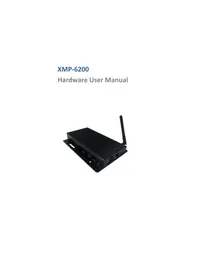
XMP6200 - Media player Iadea - Free user manual and instructions
Find the device manual for free XMP6200 Iadea in PDF.


| Product type | Media player |
| Brand | Iadea |
| Model | XMP6200 |
| Dimensions | 167 x 118.8 x 24.5 mm |
| Weight | 275 g |
| Power supply | 12V 1.5A DC, power adapter included |
| Power consumption | 6 W average |
| Supported video formats | H.264, VC-1, MPEG-4 ASP, MPEG-2 (up to 1080p, 10 Mbps) |
| Supported image formats | JPEG, PNG (up to 1920x1080) |
| Audio codecs | MP3 up to 320 Kbps |
| Internal storage | 8 GB flash memory |
| Expandable storage | Micro SD card reader |
| Connections | HDMI 1.4, USB 2.0 x2, Ethernet RJ45, Wi-Fi antenna connector, Micro USB (ADB), Micro SD card reader |
| Mounting | VESA MIS-D100 (100x100 mm) or included velcro |
| Package contents | Player, power adapter, Wi-Fi antenna, HDMI cable, velcro (2 pairs) |
| Required accessory not included | USB mouse for setup |
| Operating temperature | 0 to 45 °C |
| Operating humidity | 10 to 85% without condensation |
| Certifications | CE, FCC, VCCI, TELEC, CCC, IC |
| Warranty | One year limited parts and labor |
| Dynamic features | W3C HTML5, SMIL 3.0 (subset) |
| Cleaning and maintenance | Unplug the device. Clean with a soft dry cloth. Do not use liquids. |
| Safety | Use only the provided adapter. Do not expose to water or moisture. Do not open the device. |
| Spare parts and repairability | Contact Iadea customer service for any repairs or parts. |
Frequently Asked Questions - XMP6200 Iadea
User questions about XMP6200 Iadea
0 question about this device. Answer the ones you know or ask your own.
Ask a new question about this device
Download the instructions for your Media player in PDF format for free! Find your manual XMP6200 - Iadea and take your electronic device back in hand. On this page are published all the documents necessary for the use of your device. XMP6200 by Iadea.
USER MANUAL XMP6200 Iadea
This document describes the hardware of the XMP-6200.
1.1. Package contents

Media Player Unit
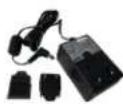
AC Adapter (with select power plug)

Wireless Antenna

HDMI Cable

Velcro (2 sets)
NOT INCLUDED: A USB mouse is required for system setup
1.2. Installation
Attach wireless antenna
Attach the wireless antenna as shown below, and then screw antenna clockwise onto the post.

Mounting Option 1: [VESA Mount] The player can be attached to mounting posts on the back of screens with the built in VESA MIS-D100 (100mmx100mm) compatible mounting flange(screw thread : M4)

Bottom view
Mounting Option 2: [Attach the player on the back of the monitor using Velcro]
- Separate the Velcro pads, and stick on the bottom of player as shown below.
![Iadea XMP6200 - Mounting Option 2: [Attach the player on the back of the monitor using Velcro] - 1](/content/2026/03/532153/images/029a79fc4332ae257ef657efe158975074d9d7ea7d3ade3f6ec50b5012cb6acd.jpg)
- Stick the other Velcro pad onto the back of monitor, and then attach the player to it. Use HDMI cable to connect player and the monitor.
![Iadea XMP6200 - Mounting Option 2: [Attach the player on the back of the monitor using Velcro] - 2](/content/2026/03/532153/images/36be5ea72eba3ce2e1eddc71cf27630db6abaf6c2e2d56a23f128101bc4872bb.jpg)
![Iadea XMP6200 - Mounting Option 2: [Attach the player on the back of the monitor using Velcro] - 3](/content/2026/03/532153/images/0e33ef74c701237fd5a906c96bd1888c04d0590f410df3adbe89d1ac4e3a9ebf.jpg)
1.3. Physical view


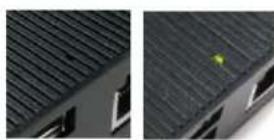
Physical features (left to right in above illustration)
- Reset button to perform factory reset
- USB ports for USB content update and configuration
- Power(green) and Status(orange) LED indicator
- Ethernet port for network content update
- Wireless antenna post
VESA mount
Kensington lock - Micro SD card slot
- HDMI port
DC input port - Micro USB for ADB, Android debug console port
2. Technical Data
2.1. Specifications
| XMP-6200 | |
| Video format support | H.264 (up to 1080p,10Mbps)VC-1 (up to 1080p,10Mbps)MPEG-4 ASP (up to 1080p,10Mbps)MPEG-2 (up to 1080p,10Mbps)POPAI Screen Media Standards : S6 to S12, E4,E7,E8 |
| Image format support | JPEG,PNG up to 1920x1080POPAI Screen Media Standards : S1 to S3, E1 to E3 |
| Audio codec support | MP3 up to 320KbpsPOPAI Screen Media Standards : S4, S5 |
| Dynamic content | W3C HTML5 (HTML, CSS, JavaScript)W3C SMIL 3.0 instructions (sub-set) |
| Physical I/O connectors | HDMI 1.4USB 2.0 x 2RJ45 Ethernet portWireless antenna portMicro USB for ADBMicro SD card slot |
| Local storage | 8 GB on-board flash memoryMicro SD card expansion slot |
| Accessories | AC adapter(UL/FCC/CE/CCC/C-Tick/VCCI certified power supplies)HDMI cableWireless antennaVelcro ( 2 sets ) |
| Power requirement | 12V 1.5A DC |
| Power consumption | Average 6 W |
| Environmental | Operating temperature: 0 - 45°C / 32 - 113° FHumidity: 10 - 85% @ 40°C / 32 - 104° F non-condensing |
| Dimensions | 167x118.8x24.5 mm ( 6.57x4.67x0.96 inches) |
| Weight | 275 g/0.61 lbs |
| Certifications | CE/FCC/VCCI/TELEC/CCC/IC |
| Warranty | One-year limited parts & labor |


Brand : Iadea
Model : XMP6200
Category : Media player