
XMP-7300 - Media player Iadea - Free user manual and instructions
Find the device manual for free XMP-7300 Iadea in PDF.


| Product Type | Media Player |
| Brand | Iadea |
| Model | XMP-7300 |
| Dimensions (approx.) | 150 x 100 x 30 mm |
| Weight (approx.) | 300 g |
| Power Supply | 5V DC via USB or AC adapter |
| Supported Video Formats | MP4, AVI, MKV, MOV, WMV |
| Supported Audio Formats | MP3, WMA, AAC, FLAC, WAV |
| Supported Image Formats | JPEG, PNG, BMP, GIF |
| Output Interface | HDMI, AV composite (RCA) |
| Input Interface | USB 2.0, SD card slot |
| Remote Control | Infrared remote included |
| On-Screen Display Language | English, French, Spanish, etc. |
| Subtitle Support | SRT, SUB, SSA |
| Playback Modes | Repeat, shuffle, A-B repeat |
| Maintenance & Cleaning | Wipe with a soft dry cloth; do not use liquids or solvents. |
| Safety Precautions | Keep away from water and heat sources; do not disassemble. |
| Spare Parts & Repairability | Not user-serviceable. Contact Iadea support for repairs. |
| General Information | Compatible with most USB drives and SD cards up to 32GB. |
Frequently Asked Questions - XMP-7300 Iadea
User questions about XMP-7300 Iadea
0 question about this device. Answer the ones you know or ask your own.
Ask a new question about this device
Download the instructions for your Media player in PDF format for free! Find your manual XMP-7300 - Iadea and take your electronic device back in hand. On this page are published all the documents necessary for the use of your device. XMP-7300 by Iadea.
USER MANUAL XMP-7300 Iadea
natural_image
Black HDMI router device with antenna and ports (no visible text or symbols on body)Contents
1. Introduction 1
1.1. Package contents 1
1.2. Installation 1
1.3. Physical view 3
2. Technical Data 4
2.1. Specifications 4
1. Introduction
This document describes the hardware of the XMP-7300.
1.1. Package contents

Media Player Unit

AC Adapter
(with select power plug)

Wireless Antenna

HDMI Cable

Velcro (2 sets)

Power & micro SD card brackets
NOT INCLUDED: A USB mouse is required for system setup
1.2. Installation
Attach wireless antenna
Attach the wireless antenna as shown below, and then screw antenna clockwise onto the post.

natural_image
Black HDMI router with antenna and ports (no visible text or symbols)Mounting Option: [Attach on the back of the monitor using Velcro] Separate the Velcro pads, and stick on the bottom of player as shown in right. Stick the other Velcro pads onto the back of monitor, and then attach the player to it. Use HDMI cable to connect player and the monitor

natural_image
Interior view of an electronic device with cooling unit, wiring, and control panel (no visible text or symbols)Mounting Option: [Built-in wall mount bracket] Mount the player with the built-in mount bracket, refer to below drawing for mounting hole and its dimension, mounting hole is highlighted in RED, screw thread: M4

1.3. Physical view
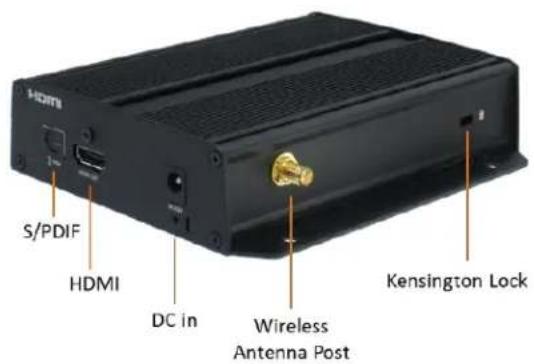
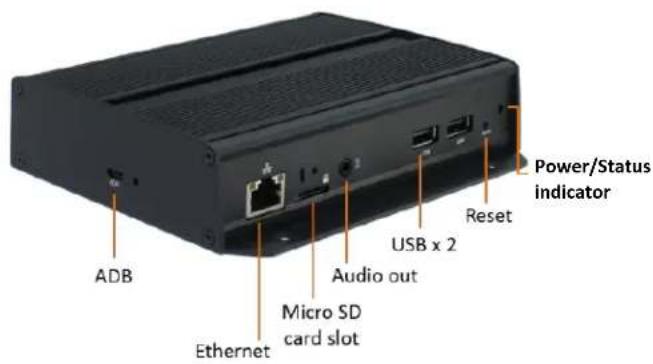
Physical features (left to right in above illustration)
• S/PDIF audio out
• HDMI 2.0 connector for digital video and audio combined output
- DC input port
- Wireless antenna post
- Kensington lock hole
- Micro USB for ADB, Android debug console port
- Ethernet port for network content update
- Micro SD card slot
• 3.5 mm jack audio out
• USB ports for USB content update and configuration
- Reset button to perform factory reset
• Power(green) and Status(orange) LED indicator
2. Technical Data
2.1. Specifications
| XMP-7300 | |
| Video format support | H.265(up to 4K@60p)H.264 (up to 1080p,10Mbps)VC-1 (up to 1080p,10Mbps)MPEG-4 ASP (up to 1080p,10Mbps)MPEG-2 (up to 1080p,10Mbps)POPAI Screen Media Standards : S6 to S12, E4,E7,E8 |
| Image format support | JPEG,PNG up to 4KPOPAI Screen Media Standards : S1 to S3, E1 to E3 |
| Audio codec support | MP3 up to 320KbpsPOPAI Screen Media Standards : S4, S5 |
| Dynamic content | W3C HTML5 (HTML, CSS, JavaScript)W3C SMIL 3.0 Instructions (sub-set) |
| Physical I/O connectors | HDMI 2.0USB 2.0 x 2RJ45 Ethernet port (Giga LAN)Wireless antenna portMicro USB for ADBMicro SD card slotAudio out (3.5mm Analog, S/PDIF)LED: Power(green)/Status(orange) |
| Local storage | 8 GB eMMCMicro SD card expansion slot |
| Accessories | AC adapter(UL/CB/PSE certified power supplies)HDMI cableWireless antennaVelcro ( 2 sets )Micro SD card slot bracket/screw x1Power jack bracket/screw x1 |
| Power requirement | 12V 1.5A DC |
| Power consumption | 7.5 W |
| Environmental | Operating temperature: 0 – 50°C / 32 – 122°FHumidity: 5 – 85% @ 45 °C / 32 – 113°F non-condensing |
| Dimensions | Top housing: 143.60x105.90x33.65mm (5.65x 4.16x1.32 inches)Base: 143.60x128.13x33.65mm (5.65x5.04x1.32 inches) |
| Weight | 478 g1.05 lbs |
| Certifications | CE/FCC/IC |
| Warranty | One-year limited parts & labor |

Brand : Iadea
Model : XMP-7300
Category : Media player