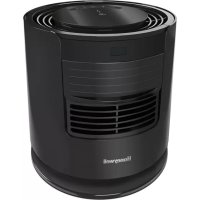
DreamWeaver HTF400 - Fan HONEYWELL - Free user manual and instructions
Find the device manual for free DreamWeaver HTF400 HONEYWELL in PDF.



User questions about DreamWeaver HTF400 HONEYWELL
0 question about this device. Answer the ones you know or ask your own.
Ask a new question about this device
Download the instructions for your Fan in PDF format for free! Find your manual DreamWeaver HTF400 - HONEYWELL and take your electronic device back in hand. On this page are published all the documents necessary for the use of your device. DreamWeaver HTF400 by HONEYWELL.
USER MANUAL DreamWeaver HTF400 HONEYWELL
DREAMWEAVERTM SLEEP FAN
With Year Round Pink Noise
Sound Blocking
Owner's Manual
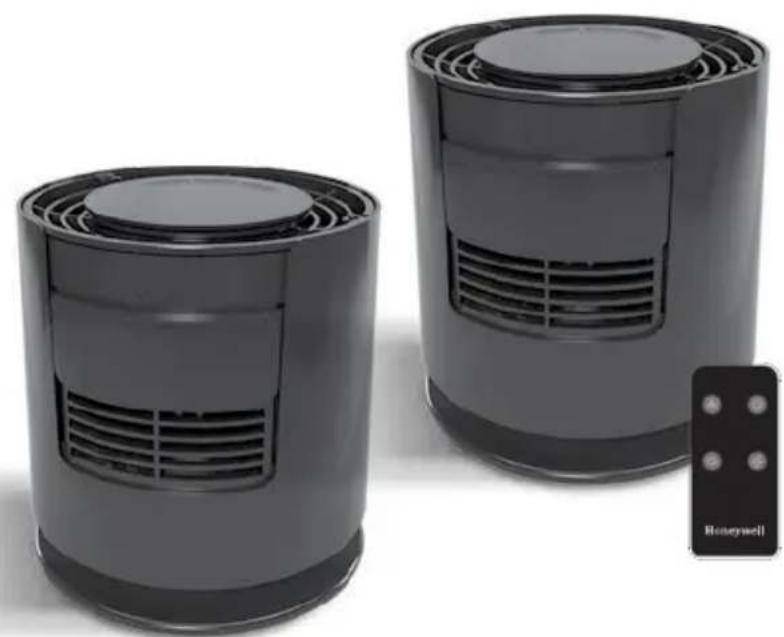
HTF400 SERIES HTF440 SERIES
IMPORTANT SAFETY INSTRUCTIONS
READ AND SAVE THESE SAFETY INSTRUCTIONS BEFORE USING THIS FAN
When using electrical appliances, basic precautions should always be followed to reduce the risk of fire, electric shock, and injury to persons, including the following:
- Use this fan only as described in this manual. Other use not recommended as it may cause fire, electric shock, or injury to persons.
- This product is intended for household use ONLY and not for commercial, industrial or outdoor use.
- To protect against electric shock, DO NOT place fan in window, DO NOT immerse unit, plug, or cord in water, and DO NOT spray unit with liquids.
- This appliance has a polarized plug (one blade is wider than the other). To reduce the risk of electric shock, this plug is intended to fit only one way in a polarized outlet. If the plug does not fit fully in the outlet, reverse the plug. If it still does not fit, contact a qualified electrician. DO NOT attempt to defeat this safety feature.
- Close supervision is necessary when any appliance is used by or near children.
- Turn the fan OFF and unplug the fan from the outlet when not in use, when moving the fan from one location to another, and before cleaning.
- To disconnect the fan, first turn the unit OFF, grip the plug and pull it from the wall outlet. NEVER pull the plug by the cord.
-
DO NOT operate the fan in the presence of explosive and/or flammable fumes.
-
DO NOT place the fan or any parts near an open flame, cooking, or other heating appliance.
- DO NOT use any product with a damaged cord or plug, any product that malfunctions, or any product that has been dropped or damaged in any manner (see warranty).
- Avoid contact with moving fan parts.
- The use of attachments not recommended by the manufacturer may be hazardous.
- Place the fan on a dry, level surface.
- DO NOT hang or mount fan on a wall or ceiling.
- DO NOT operate if the fan housing is damaged.
- A loose fit between the AC outlet (receptacle) and plug may cause overheating and a distortion of the plug. Contact a qualified electrician to replace loose or worn outlet.
- DO NOT run fan cord under carpeting. DO NOT cover cord with throw rugs, runners, or similar coverings. DO NOT route cord under furniture or appliances. Arrange cord away from traffic areas and where it will not be a tripping hazard.
- DO NOT use an extension cord or power strip with this fan.
For FCC compliance information, please see last page of this manual.
WARNING: To Reduce The Risk of Fire or Electric Shock, Do Not Use This Fan With Any Solid-State Speed Control Device.
HTF440 SERIES ONLY

WARNING: Chemical Burn Hazard.
Keep batteries away from children. This product contains a lithium button/coin cell battery. If a new or used lithium button/coin cell battery is swallowed or enters the body, it can cause severe internal burns and can lead to death in as little as 2 hours. ALWAYS completely secure the battery compartment. If the battery compartment does not close securely, stop using the product, remove the batteries, and keep it away from children. If you think batteries might have been swallowed or placed inside any part of the body, seek immediate medical attention. The cells shall be disposed of properly, including keeping them away from children; and even used cells may cause injury.
FUSED SAFETY PLUG - FOR US MODELS ONLY
This fan features a fused safety plug which is designed to cut off electric current to the fan if an electrical fault occurs. Please see below for more information on how to properly use your fan and replace the safety plug fuse, if needed.
USER SERVICING INSTRUCTIONS
- If your fan loses power and you suspect that the fuse on your fan has blown, grasp plug and remove from the receptacle or other outlet device. DO NOT unplug by pulling on cord.
- Slide fuse cover, located on the top of the plug, towards the prongs of the plug. (Fig. 1)
- Carefully remove the blown fuse and snap a new fuse into place. To reduce the risk of fire, replace fuse only with 2.5 Amp, 125 volt fuse. Fully close the fuse door by sliding back into place. (Fig. 2) Discard the blown fuse. The plug should now be ready for normal use.
- To Reduce the Risk of Fire, DO NOT replace attached plug. The plug contains a safety device (fuse) that should not be removed. Discard product if the attachment plug is damaged.
- If you need further information on how or when to replace the fuse in the safety plug, please contact our Consumer Relations department at 1-800-477-0457. You may also visit our website at: www.HoneywellPluggedIn.com.
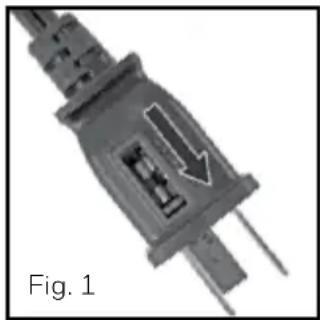
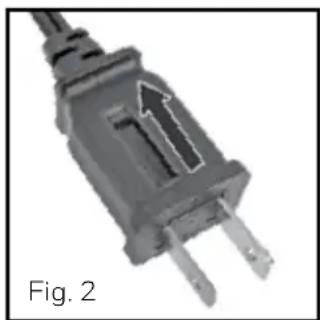
INTRODUCTION
Helping to create your optimal sleep environment year-round
The DreamWeaver™ Sleep Fan empowers you to design a relaxing, comfortable sleep environment to help promote a more restorative night's sleep. Quick tap controls make it easy to change the powerful fan speed settings even in the dark. Enjoy the pink noise sound blocking benefits year-round with or without a cooling airflow!
ON/OFF and SPEED CONTROL
This fan features Quick Tap controls that turn the fan on and cycle through the 3 powerful speed settings.
A light tap in the center of the control panel, located on the top surface will turn the power on at the lowest speed setting. (Fig 3)
Continue to tap the control panel to increase the speed setting; low, medium, high and off. (Fig 4)
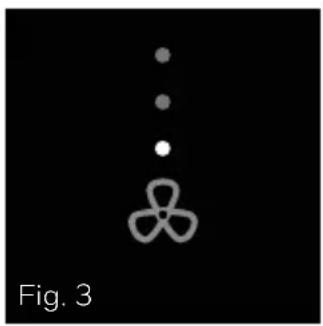
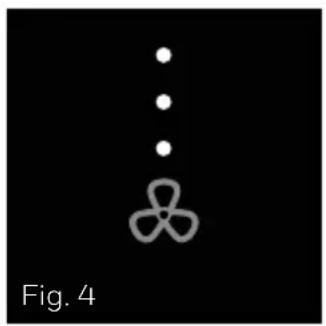
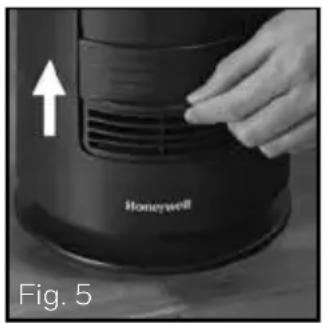
Air Shutter - Airflow that you control for year-round use.
The Science of Pink Noise - Pink Noise is a mix of high and low frequencies that sounds more balanced and natural than "white noise." The fan generates a soothing tone that remains constant even when you close the air shutter.
ON/OFF
To enjoy the powerful airflow, keep the air shutter open. (Fig 5)
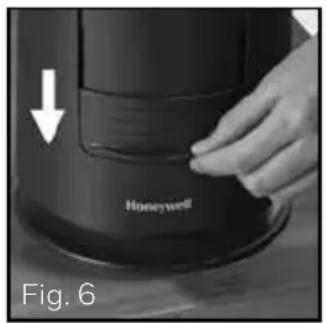
When cooling is not needed the air shutter can be closed all while maintaining the soothing Pink Noise Sound. (Fig 6)
Note: When the Air Shutter is closed there will be a minimal amount of air that escapes through the top grille of the fan.
OSCILLATION
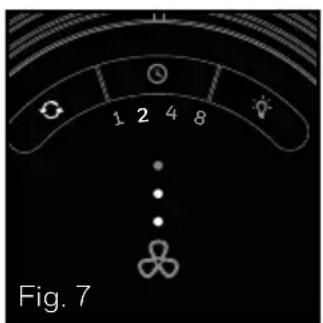
To activate the Oscillation feature, press the Oscillation button () on
Press the Oscillation button again to turn the Oscillation feature off. (Fig 7)
HTF400/440 SERIES OPERATION (continued)
PIVOTING BASE
Direct airflow where you need it, apply light pressure to the top of the unit towards the front edge to pivot the unit down. (Fig 8)
To direct the airflow up, apply light pressure to the top of the unit towards the back edge pivoting the unit up. (Fig 9)
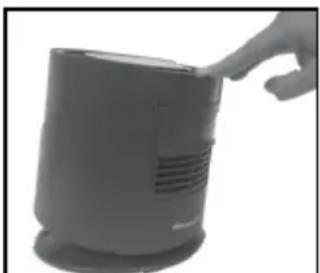
Fig. 8
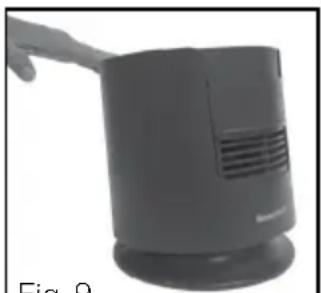
Fig. 9
AUTO-OFF TIMER OPTION
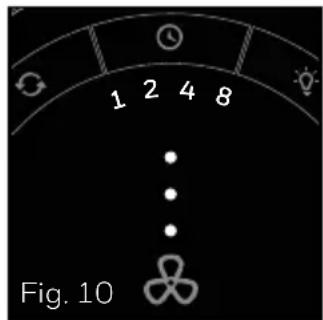
Choose from 1, 2, 4, or 8 hour settings by performing the following function:
- 1 hour: Press the Timer button (①) once.
- 2 hours: Press the Timer button ( ) twice.
- 4 hours: Press the Timer button (O) a third time.
- 8 hours: Press the Timer button (①) a fourth time.
Press the Timer button a fifth time to turn the Timer feature off. (Fig 10)
USB CHARGING PORT (your fan must be plugged in to provide power to the USB port)
Charge your electronic device while you sleep. Using your own charging cord, simply plug it into the USB outlet located in the base of the fan, and attach to your device to start charging. This outlet is rated 5V 2A.
LIGHT DIMMING FEATURE
Choose from 4 settings for your control panel lighting preference:
- Press the Light button ( ) once for 65% brightness
- Press the Light button ( · ) twice for 35% brightness
- Press the Light button (♀) a third time for no light
- Press the Light button ( ) a fourth time for 100% brightness. (Fig 11)
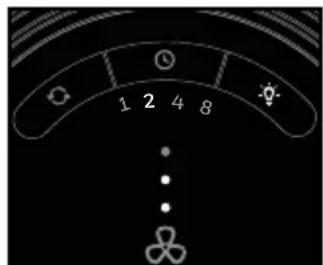
Fig. 11
REMOTE CONTROL OPERATION (Model HTF440 only)
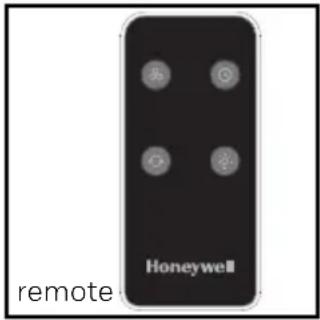
The Honeywell DreamWeaver™ Sleep Fan (Model series HTF440 only) can be controlled using the included remote control. To begin, activate the battery in the remote by removing the plastic pull tab.
ON/OFF AND SPEED CONTROL
Press the Fan button ( ) once to turn the fan on.
Continue to press the ( ) to adjust the speed setting, low, medium, high and off.
OSCILLATION
To activate the oscillation feature, press the Oscillation button (G) once.
Press the Oscillation button (O) again to turn the Oscillation feature off.
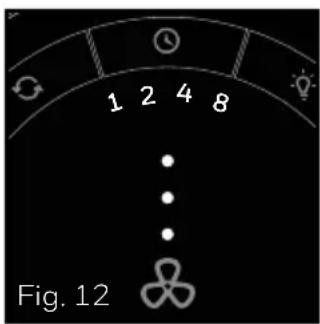
AUTO-OFF TIMER OPTION
Choose from 1, 2, 4, or 8 hour settings by performing the following function:
- 1 hour: Press the Timer button (①) once.
- 2 hours: Press the Timer button (①) twice.
- 4 hours: Press the Timer button (O) a third time.
- 8 hours: Press the Timer button (①) a fourth time.
Press the Timer button a fifth time to turn the Timer feature off. (Fig 12)
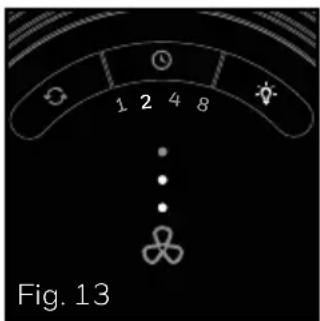
LIGHT DIMMING FEATURE
Choose from 4 settings for your control panel lighting preference:
- Press the Light button ( · ) once for 65 % brightness
- Press the Light button ( ) twice for 35% brightness
- Press the Light button (♀) a third time for no light
- Press the Light button ( Q ) a fourth time for 100% brightness. (Fig 13)
NOTE: for Model series HTF440 only
USERServICINGINSTRUCTIONS
CLEANING AND STORAGE
- Ensure the fan is turned OFF and unplugged.
- Use only a soft cloth to gently wipe the outer surfaces of the fan clean.
- DO NOT immerse the fan in water and NEVER allow water to drip into the motor housing.
- DO NOT use gasoline, paint thinner, or other chemicals to clean the fan.
- Store your fan in the original box or cover the fan to protect it from dust and debris.
Store the fan in a cool, dry place. - DO NOT wrap the power cord around the base of the fan. This could result in damage to the power cord.
CONSUMER RELATIONS
Questions or comments
Call us toll-free at: 1-800-477-0457
E-mail: ConsumerRelations@HelenofTroy.com
Or visit our website at: www.HoneywellPluggedIn.com
Please be sure to specify the model number.
NOTE: IF YOU EXPERIENCE A PROBLEM, PLEASE CONTACT CONSUMER RELATIONS FIRST OR SEE YOUR WARRANTY. DO NOT RETURN TO THE ORIGINAL PLACE OF PURCHASE. DO NOT ATTEMPT TO OPEN THE MOTOR HOUSING YOURSELF,DOING SO MAY Void YOUR WARRANTY AND CAUSE DAMAGE TO THE FAN OR PERSONAL INJURY
FCC COMPLIANCE
In the USA:
THIS DEVICE (HTF400/440 SERIES ONLY) COMPLIES WITH PART 15 OF THE FCC RULES
NOTE: This equipment has been tested and found to comply with the limits for a Class B digital device, pursuant to Part 15 of the FCC Rules. These limits are designed to provide reasonable protection against harmful interference in a residential installation. This equipment generates, uses, and can radiate radio frequency energy and, if not installed and used in accordance with the instructions, may cause harmful interference to radio communications. However, there is no guarantee that interference will not occur in a particular installation. If this equipment does cause harmful interference to radio or television reception, which can be determined by turning the equipment off and on, the user is encouraged to try to correct the interference by one or more of the following measures:
- Reorient or relocate the receiving antenna.
- Increase the separation between the equipment and receiver.
- Connect the equipment into an outlet on a circuit different from that to which the receiver is connected.
- Consult the dealer or an experienced radio/TV technician for help.
Please note that changes or modifications of this product not expressly approved by the party responsible for compliance could void the user's authority to operate the equipment.
In Canada (HTF440 Series Only):
This device contains licence-exempt transmitter(s) / receiver(s) that comply with Innovation, Science, and Economic Development Canada's licence-exempt RSS-210.
Operation is subject to the following 2 conditions:
- This device may not cause interference, and
- This device must accept interference, including interference that may cause undesired operation of the device.
1 YEAR LIMITED WARRANTY
You should first read all instructions before attempting to use this product.
A. This 1 year limited warranty applies to repair or replacement of product found to be defective in material or workmanship. This warranty does not apply to damage resulting from commercial, abusive, unreasonable use or supplemental damage. Defects that are the result of normal wear and tear will not be considered manufacturing defects under this warranty. KAZ USA, INC. IS NOT LIABLE FOR INCIDENTAL OR CONSEQUENTIAL DAMAGES OF ANY NATURE. ANY IMPLIED WARRANTY OF MERCHANTABILITY OR FITNESS FOR A PARTICULAR PURPOSE ON THIS PRODUCT IS LIMITED IN DURATION TO THE DURATION OF THIS WARRANTY. Some jurisdictions do not allow the exclusion or limitation of incidental or consequential damages or limitations on how long an implied warranty lasts, so the above limitations or exclusions may not apply to you. This warranty gives you specific legal rights, and you also may have other rights which vary from jurisdiction to jurisdiction. This warranty applies only to the original purchaser of this product from the original date of purchase.
B. At its option, Kaz will repair or replace this product if it is found to be defective in material or workmanship. Defective product should be returned to the place of purchase in accordance with store policy. Thereafter, while within the warranty period defective product may be returned to Kaz.
C. This warranty does not cover damage resulting from any unauthorized attempts to repair or from any use not in accordance with the instruction manual.
Questions or comments
Call us toll-free at: 1-800-477-0457
E-mail: ConsumerRelations@HelenofTroy.com
Or visit our website at:
www.HoneywellPluggedin.com
Please be sure to specify a model number.
Please go to
www.HoneywellPluggedIn.com/warranty- registration to register your product and receive product information updates and new promotional offers.
NOTE: IF YOU EXPERIENCE A PROBLEM, PLEASE CONTACT CONSUMER RELATIONS FIRST OR SEE YOUR WARRANTY. DO NOT RETURN THE PRODUCT TO THE ORIGINAL PLACE OF PURCHASE. DO NOT ATTEMPT TO OPEN THE MOTOR HOUSING YOURSELF, DOING SO MAY VOID YOUR WARRANTY AND CAUSE DAMAGE TO THE PRODUCT OR PERSONAL INJURY.
VENTILATEUR DREAMWEAVERMC
RELATIONS AVEC LES CONSOMMATEURS
© 2020 All rights reserved.
Kaz USA, Inc., a Helen of Troy Company
400 Donald Lynch Blvd., Suite 300, Marlborough, MA 01752
Distributed in Canada by: Kaz Canada, Inc., a Helen of Troy Company
6700 Century Avenue, Suite 210, Mississauga, Ontario L5N 6A46
Contact us at 1-800-477-0457 or www.HoneywellPluggedIn.com
Honeywell is a trademark of Honeywell International Inc., used under license by Helen of Troy Limited.
Honeywell International Inc. makes no representation or warranties with respect to this product.
For Responsible recycling, please visit:

www.RecycleNation.com
www.RecycleNation.com